Lead411 vs LeadGibbon: Which B2B Data Tool Wins in 2026?
Lead411 sells depth — intent data, direct dials, triggers. LeadGibbon sells speed — LinkedIn lists exported in minutes. Here is which one actually fits your motion, what each really costs, and when neither is the right buy.
TL;DR — Lead411 vs LeadGibbon at a glance
- Lead411 is a sales tool with data built in. You pay per seat. You get contacts, intent signals, hiring and funding alerts, direct dials, and CRM sync. It suits SDR teams.
- LeadGibbon is a list builder. It runs in Chrome, on top of LinkedIn. You search, you click, you export a list with emails attached. There is far less to learn.
- The pricing models do not compare. Lead411 bills per seat, per year, with export caps. LeadGibbon sells credits. A 3-rep team can pay 4-6x more and still hit a ceiling.
- Neither is a real API. Need 40,000 domains turned into verified emails inside your own system? A seat-based tool is the wrong shape.
Our pick in the Lead411 vs LeadGibbon race: take Lead411 if you need dials and intent, and can pay per rep. Take LeadGibbon if you work from LinkedIn and want cheap lists. Take a dedicated email finder if you need volume, verification, and an API.
Lead411 vs LeadGibbon: what each tool actually is#
Both sell B2B contact data. That is where the likeness ends.
Lead411 is a full sales intelligence suite. It pairs contact data with Bombora intent signals. It also flags funding rounds, hiring spikes, and new leaders. You get tech stack data and a built-in email tool. The pitch is simple: replace ZoomInfo for less. Your reps live in it all day, and CRM enrichment runs in the background.
LeadGibbon goes the other way. It is a Chrome extension first. You run a LinkedIn or Sales Navigator search. You click a button. You get a sheet with emails attached. There is a web app and a saved-list layer too. But the extension is the heart of it. No intent scores. No dialer. No sequencing.
That gap in shape drives every other gap: price, contract length, data volume, and who on your team will actually use it.
Lead411 vs LeadGibbon: the head-to-head table#
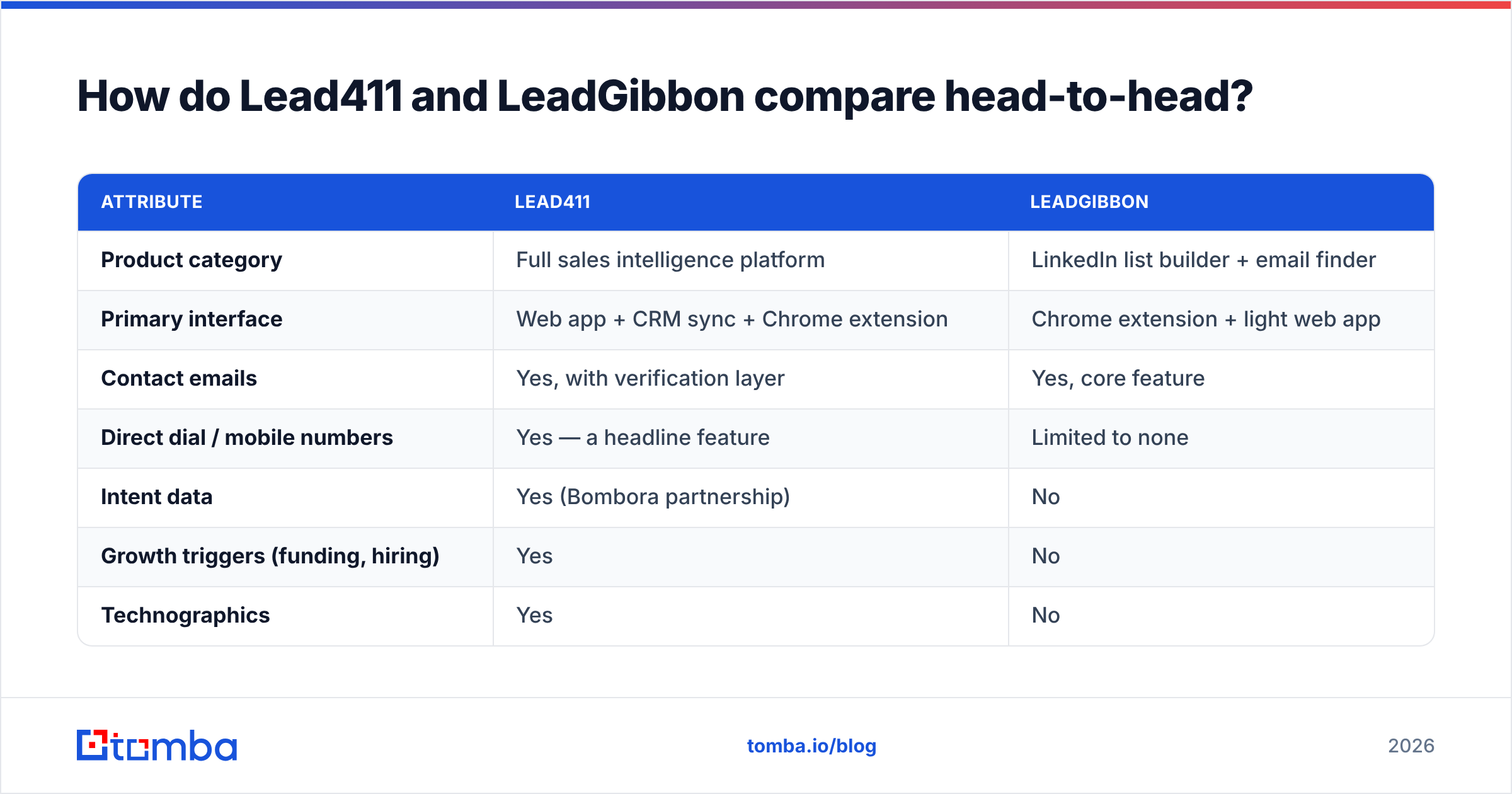
| Attribute | Lead411 | LeadGibbon |
|---|---|---|
| Product category | Full sales intelligence platform | LinkedIn list builder + email finder |
| Primary interface | Web app + CRM sync + Chrome extension | Chrome extension + light web app |
| Contact emails | Yes, with verification layer | Yes, core feature |
| Direct dial / mobile numbers | Yes — a headline feature | Limited to none |
| Intent data | Yes (Bombora partnership) | No |
| Growth triggers (funding, hiring) | Yes | No |
| Technographics | Yes | No |
| Built-in email sequencing | Yes (Reach add-on) | No |
| Pricing model | Per seat, annual commitment typical | Credit packs, month-to-month available |
| Entry cost (list price, check vendor) | ~$99/user/mo, cheaper on annual | ~$49/mo tier historically |
| Export limits | Capped per seat per month | Capped by credit balance |
| Best for | SDR teams needing dials + signals | Solo founders, agencies, LinkedIn-first outbound |
| Learning curve | Days | Under an hour |
Two honest notes on that table. First, both vendors change pricing often. Treat the numbers as a guide, then check their pricing pages before you sign. Second, export limits trip up most buyers. Lead411 markets unlimited viewing. The real cap sits on exports, per seat, per month. If you build lists in bulk, unlimited views are a slogan, not a feature.

Lead411 vs LeadGibbon: which one has better data accuracy?#
Lead411 wins on breadth. On email accuracy alone, the gap is smaller than the price gap suggests.
Lead411 runs its own checks and claims high deliverability. Teams report good results on mid-market and enterprise contacts in North America. Accuracy drops on small firms, on other regions, and on people who just changed jobs. Every provider has that same curve. Its real edge is phone numbers. Verified direct dials cost a lot to keep fresh, so most cheap tools skip them.
LeadGibbon guesses email patterns, then checks them against the domain. That works well for common formats at firms with a public footprint. Catch-all domains are the weak spot. The mail server accepts everything and tells you nothing. Almost every tool struggles there unless it runs a catch-all verifier.

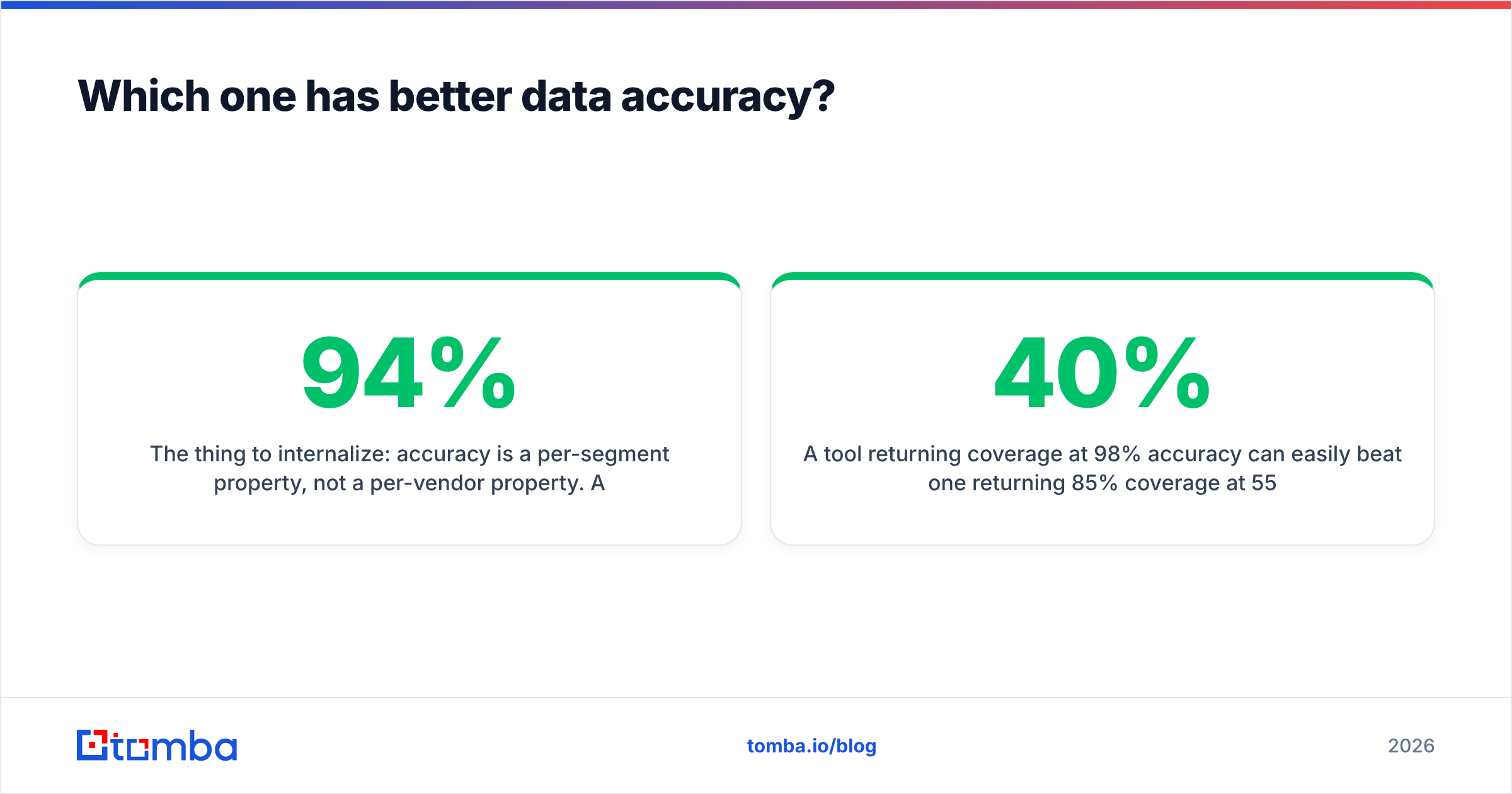
Here is the part to remember. Accuracy belongs to a segment, not to a vendor. A tool can be 94% right on US SaaS firms with 200+ staff. The same tool may be 61% right on small European manufacturers. Vendor numbers are averages across a whole database. They lean toward the segments each vendor is strongest in. Your own test is the only one that counts.
Run this before you commit to either tool:
- Pull 100 real contacts from your ICP. Use the exact company size, region, and job titles you sell to.
- Run those 100 through both tools during the trials. Add a third tool as a control.
- Check the output yourself with a standalone email verifier. Do not let a vendor grade its own homework.
- Count three numbers apart: coverage, accuracy, and cost per usable contact. That last one should drive the call.
- Repeat for phone numbers if you dial. Email accuracy tells you nothing about dial accuracy.
A tool with 40% coverage at 98% accuracy can beat one with 85% coverage at 55% accuracy. Price in the bounces. Price in the harm to your sender reputation. Price in the rep hours lost on dead records.
Lead411 vs LeadGibbon pricing: how it really works#
Here the two tools stop being alike. They are different purchases.
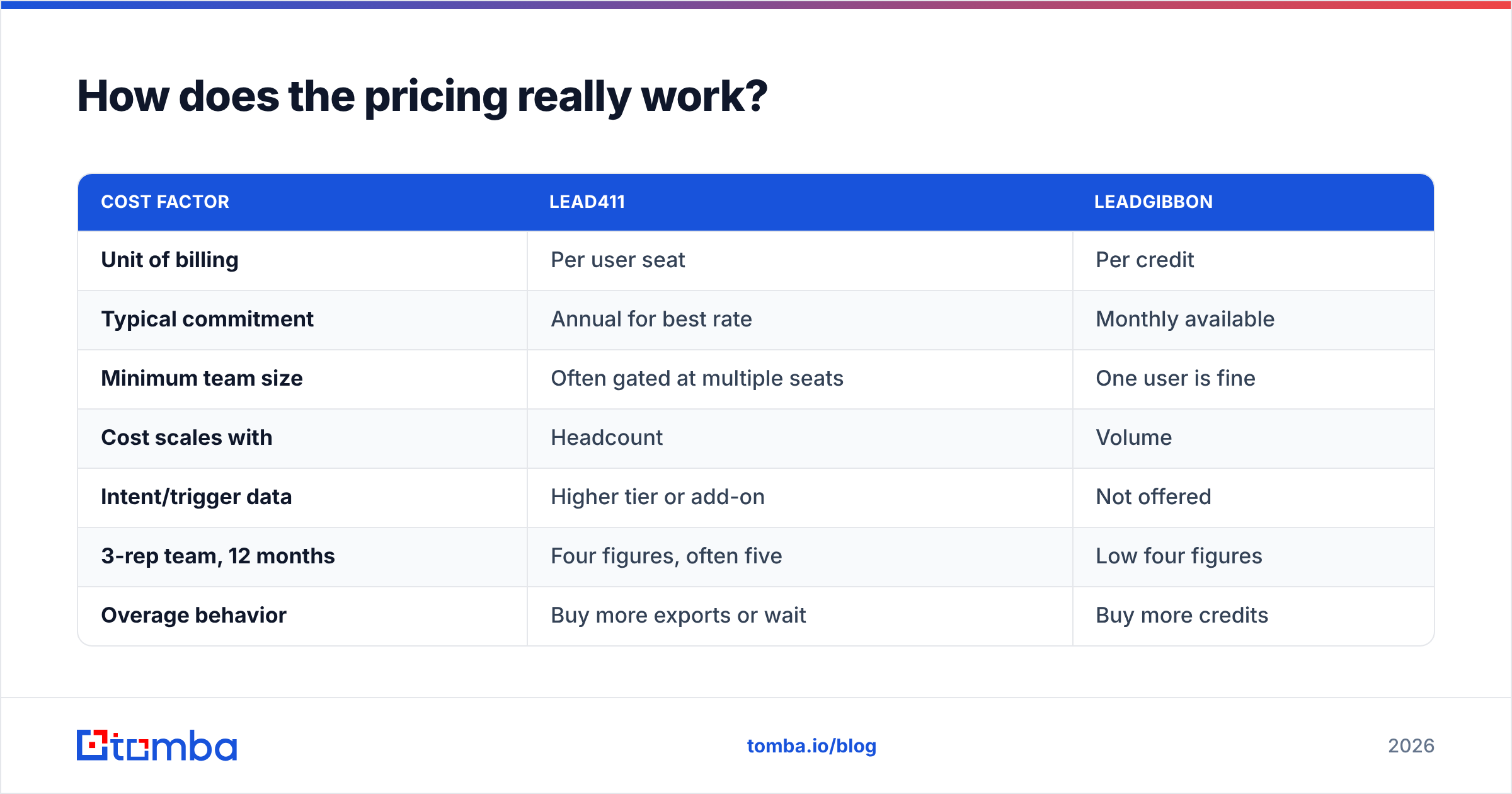
| Cost factor | Lead411 | LeadGibbon |
|---|---|---|
| Unit of billing | Per user seat | Per credit |
| Typical commitment | Annual for best rate | Monthly available |
| Minimum team size | Often gated at multiple seats | One user is fine |
| Cost scales with | Headcount | Volume |
| Intent/trigger data | Higher tier or add-on | Not offered |
| 3-rep team, 12 months | Four figures, often five | Low four figures |
| Overage behavior | Buy more exports or wait | Buy more credits |
| Cancel mid-term | Usually locked to contract | Generally simpler |
Seat pricing has one basic flaw. Your data need and your headcount are not linked. One RevOps person may enrich 50,000 rows. That is huge volume on a single seat. Six SDRs may work 40 accounts a week each. That is tiny volume on six seats. Seat pricing charges the second team more, even though it costs less to serve. That is backwards.
Credits fix that gap and open a new one. You are always guessing, topping up, and rationing. Reps start avoiding lookups near month-end. That is a real tax on output, just a hidden one.
Check both vendors' current pages first. For a third data point on flat-rate volume pricing, Tomba pricing runs Free (25 searches a month), Starter $49, Growth $99, and Pro $249. There is no per-seat multiplier.
Who should choose Lead411?#
Buy Lead411 if three things are true at once:
- You need direct dials. Cold calling is the strongest case for Lead411. LeadGibbon does not compete here.
- Intent signals change what reps do. Not "nice to have." They must change the sequence, the order, or the message. If nobody acts on a surge score, you are buying a dashboard.
- You have a team and a budget per rep. Lead411 assumes a funded SDR org. At five or more seats with real quota, the cost per rep holds up.
Lead411 also works as a cheaper stand-in for ZoomInfo, with a similar feature set. Buyers who shop the enterprise tier often land on it as the mid-market option. The G2 category pages show that same pattern.
What annoys people: rigid contracts, export caps that clash with the "unlimited" pitch, and a busy UI. If your reps use 15% of the product, you fund the other 85%.
Who should choose LeadGibbon?#
Buy LeadGibbon if your prospecting starts and ends on LinkedIn.
The workflow it optimizes is genuinely good. Filter Sales Navigator down to a tight ICP. Select, export, and get emails appended. For a solo founder, a small agency, or a recruiter, that is the whole job. Paying platform prices for intent data you never open is waste.
It is also the easier tool to quit. Credits are month to month. A failed test costs you one month, not one year. If you are still testing whether outbound works at all, that freedom is worth real money.
What annoys people: no phone numbers, thin coverage outside LinkedIn, and no API worth building on. Once your process outgrows "a human clicks a button in Chrome," LeadGibbon stops growing with you.
Is there a better option if you only need verified emails?#
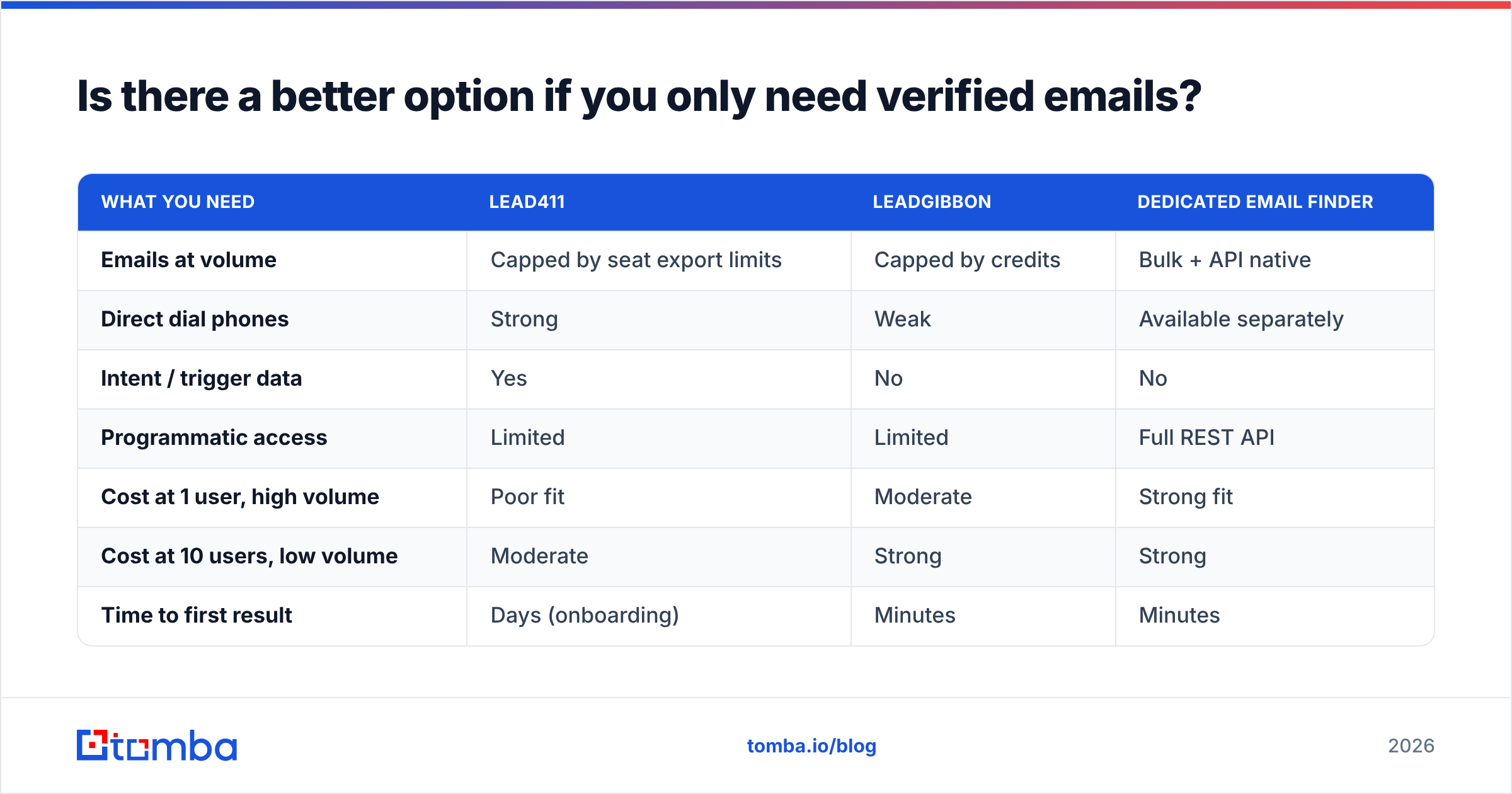
Yes, and it is worth saying plainly. Many people who search "Lead411 vs LeadGibbon" need neither tool.
Run this test. Strip out intent data, direct dials, triggers, tech stack data, and the sequencer. Would the rest still solve your problem? If yes, you are shopping for an email finder. You are just paying platform prices for one.
| What you need | Lead411 | LeadGibbon | Dedicated email finder |
|---|---|---|---|
| Emails at volume | Capped by seat export limits | Capped by credits | Bulk + API native |
| Direct dial phones | Strong | Weak | Available separately |
| Intent / trigger data | Yes | No | No |
| Programmatic access | Limited | Limited | Full REST API |
| Cost at 1 user, high volume | Poor fit | Moderate | Strong fit |
| Cost at 10 users, low volume | Moderate | Strong | Strong |
| Time to first result | Days (onboarding) | Minutes | Minutes |
| Spreadsheet / no-code workflow | CRM-first | CSV export | Sheets, Excel, Airtable, Zapier |

For most teams the practical version is simple. Use a domain search to map every contact at a target account. Verify before you send. Push the result into your CRM with the Tomba API or a no-code connector. You skip the seat math entirely. The tool that finds the email stays separate from the tool that picks who to contact. Those are two different jobs, with different vendors who are best at them.
It also protects your sending setup. Unverified lists are the top cause of domain reputation damage. No amount of intent data saves a burned domain. Verify everything before it reaches a sequencer, whatever tool sourced it.
What do most buyers get wrong in this comparison?#
Four common mistakes, from most to least costly:
- Buying for the demo, not the daily workflow. Intent data demos well. Six months later, most teams have not changed a single sequence because of it. Ask your reps what they would open every morning.
- Reading "unlimited" as unlimited. Read the export terms, not the headline. Every plan has a ceiling. It usually sits on the action you care about most.
- Ignoring the annual lock. A 12-month deal on a tool you outgrow in four is worse than paying 30% more by the month.
- Comparing list price, not cost per usable contact. A $49 tool at 50% accuracy costs more per meeting than a $99 tool at 90%. Run the numbers on your own test set.
So which one wins?#
Lead411 wins on power. LeadGibbon wins on fit for small teams. Neither wins on volume email work.
Do you run a funded SDR team that dials and acts on buying signals? Then Lead411 is the stronger tool, and it is cheaper than the enterprise names. Accept the seat model and the annual term as the price.
Are you one to three people working from LinkedIn? LeadGibbon does that job for a fraction of the cost, with no lock-in. Do not let a feature chart sell you a platform you will barely use.
Do you just need verified email addresses at scale? For enrichment, a CRM backfill, or an outbound engine you build yourself? Then stop shopping in the sales intelligence aisle. Start with the Tomba Email Finder. Find emails by name, company, or domain. Verify them before they hit your sequencer. Run it through the UI, a spreadsheet add-on, or the API. The free tier gives you 25 searches a month. Benchmark it against Lead411 and LeadGibbon on your own ICP. That is the only comparison that counts.
Related guides#
// get started
Find, verify and enrich your first contacts today
Start on the free plan with 25 searches a month, then scale when your team is ready.
Free plan · No credit card required · GDPR & CCPA
// about the author