Lead411 vs LeadLeaper (2026): Which B2B Email Tool Wins?
Lead411 sells full sales intelligence with intent data. LeadLeaper is a lightweight LinkedIn email extractor. They solve different problems — and only one of them fits a lean outbound team's budget.
Lead411 vs LeadLeaper is not a close fight. One is a full sales intelligence platform. The other is a cheap LinkedIn email extractor. The real question is which one fits your budget and your outbound motion.
TL;DR
- Lead411 is a full B2B sales intelligence platform: verified emails, direct dials, Bombora intent data, growth triggers, and CRM sync. It is priced per seat and sold annually, which makes it a team purchase, not a solo one.
- LeadLeaper is a Chrome extension that pulls email addresses off LinkedIn and Sales Navigator search results. It is cheap, fast, and narrow — no intent data, no direct dials, no real enrichment layer.
- If you need intent signals and phone numbers, Lead411 wins on capability. If you need cheap LinkedIn email extraction, LeadLeaper wins on price. Neither is the best answer for API-first email finding at volume.
On price and limits:
- Lead411's annual commitment and per-seat pricing mean a 3-rep team can cross $3,500/year before anyone sends an email. LeadLeaper's low tiers run out of credits fast.
- A third path: run a flat-rate email finder with an API and a built-in verifier. Buy intent data separately, and only if you can prove it moves pipeline.
What is Lead411 and what is LeadLeaper?#
People compare them constantly. Both promise "verified B2B emails," yet they sit at opposite ends of the market.
Lead411 has been around since 2001. It is a database-first platform. You search a contact universe by title, company size, tech stack, location, and funding events, then export contacts with emails and direct dials. Its differentiator is intent. Bombora-powered topic surges and its own "growth intent" triggers — hiring spikes, funding rounds, IPO activity — tell you when an account is in market, not just who works there.
LeadLeaper is a different animal. It is a browser extension that works on top of LinkedIn. You run a LinkedIn or Sales Navigator search, click the extension, and it captures the profiles on screen. Then it appends best-guess email addresses. A basic sequencing feature lets you email the list without leaving the tool.
Here is the practical split:
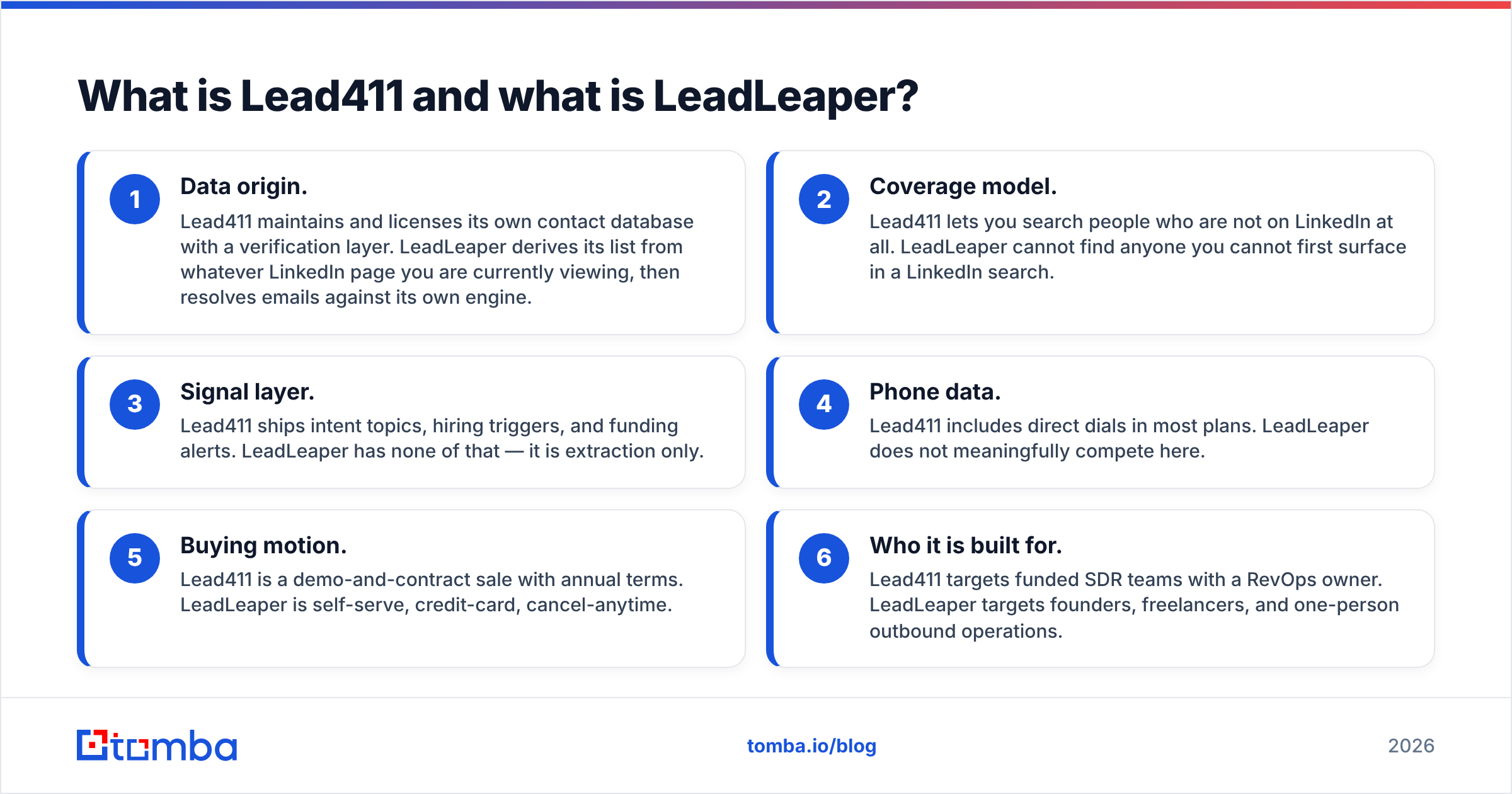
- Data origin. Lead411 maintains and licenses its own contact database with a verification layer. LeadLeaper derives its list from whatever LinkedIn page you are currently viewing, then resolves emails against its own engine.
- Coverage model. Lead411 lets you search people who are not on LinkedIn at all. LeadLeaper cannot find anyone you cannot first surface in a LinkedIn search.
- Signal layer. Lead411 ships intent topics, hiring triggers, and funding alerts. LeadLeaper has none of that — it is extraction only.
- Phone data. Lead411 includes direct dials in most plans. LeadLeaper does not meaningfully compete here.
- Buying motion. Lead411 is a demo-and-contract sale with annual terms. LeadLeaper is self-serve, credit-card, cancel-anytime.
- Who it is built for. Lead411 targets funded SDR teams with a RevOps owner. LeadLeaper targets founders, freelancers, and one-person outbound operations.
If you already know which of those two profiles you are, you can nearly stop reading. If you are in between — a 2 to 5 person team that wants real coverage without an annual contract — the rest of this post is for you.
How much do Lead411 and LeadLeaper actually cost?#
Pricing is where the comparison stops being close. Always confirm current numbers on each vendor's page. The structural difference has been stable for years.
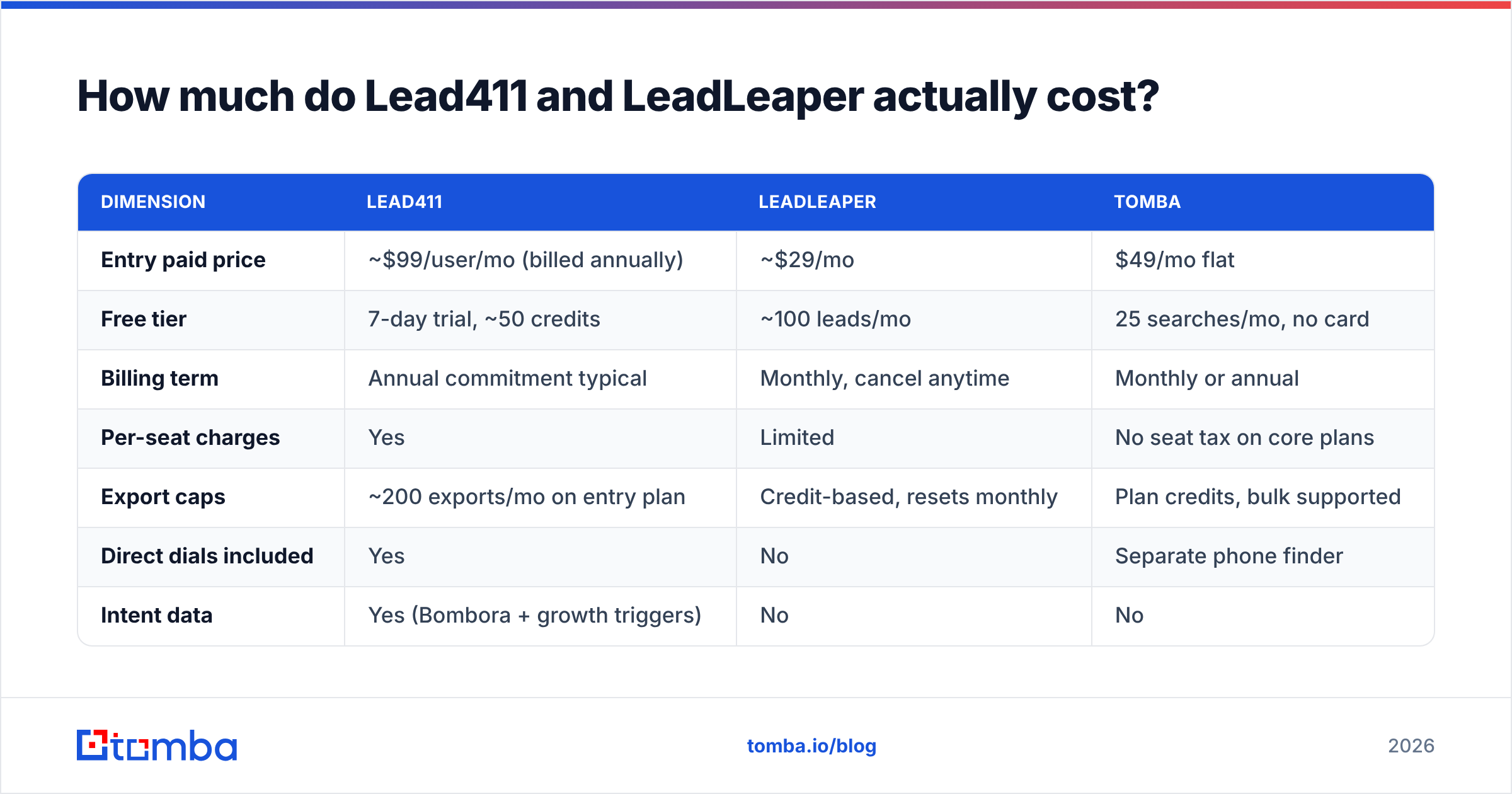
| Dimension | Lead411 | LeadLeaper | Tomba |
|---|---|---|---|
| Entry paid price | ~$99/user/mo (billed annually) | ~$29/mo | $49/mo flat |
| Free tier | 7-day trial, ~50 credits | ~100 leads/mo | 25 searches/mo, no card |
| Billing term | Annual commitment typical | Monthly, cancel anytime | Monthly or annual |
| Per-seat charges | Yes | Limited | No seat tax on core plans |
| Export caps | ~200 exports/mo on entry plan | Credit-based, resets monthly | Plan credits, bulk supported |
| Direct dials included | Yes | No | Separate phone finder |
| Intent data | Yes (Bombora + growth triggers) | No | No |
| Public API | Yes, higher tiers | Limited | Yes, all paid plans |
Two things jump out.
First, Lead411's headline price is per user. A three-rep team on the entry plan is looking at roughly $3,500 a year before you count the contract minimum. That is defensible if intent data is closing deals. It is expensive if your reps mostly need an email address.
Second, LeadLeaper's cheapness is real but capped. The low tiers burn out quickly once you extract hundreds of profiles a week. Every lookup is tied to a LinkedIn page view, so your throughput is bounded by how fast you can page through Sales Navigator. That is a hard ceiling no amount of credits fixes.

Want a fuller picture? Our breakdown of Tomba pricing shows what the same monthly spend buys in raw lookups.
Which tool has better email accuracy?#
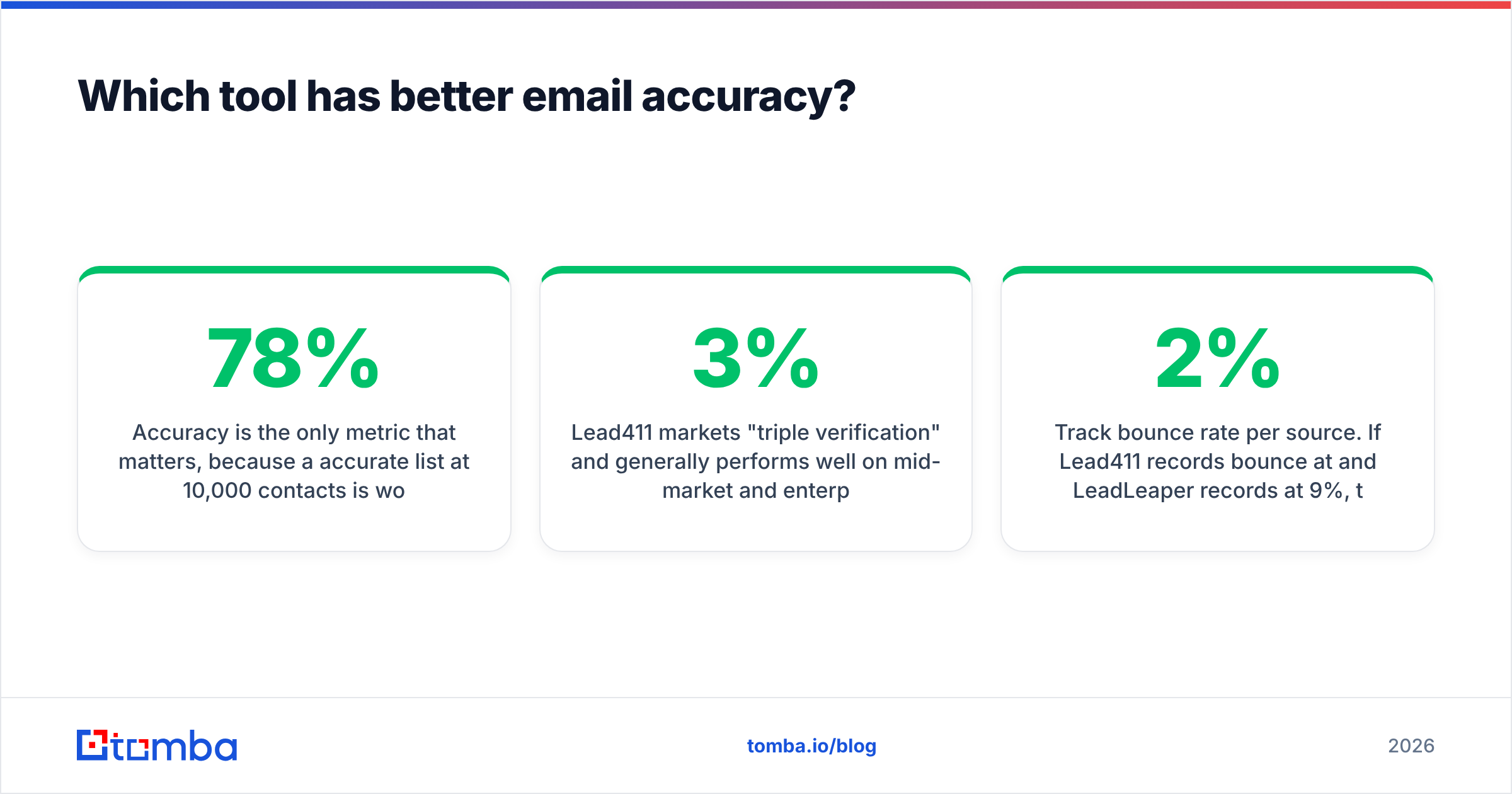
Accuracy is the metric that matters most. A 78% accurate list of 10,000 contacts is worse than a 95% accurate list of 3,000. Bounces damage your sending domain. Repairing a damaged domain costs far more than the data cost to buy.

Lead411 markets "triple verification" and performs well on mid-market and enterprise North American contacts. It slips on small companies, non-US domains, and recently changed roles. User reports on G2 and outbound communities point the same way. That is a database problem, not a Lead411 problem. Every static database decays roughly 2 to 3% per month.
LeadLeaper's accuracy is more variable. It resolves emails at capture time from a LinkedIn profile. So the hit rate depends on whether the company has a clear email pattern. Large employers with predictable formats resolve well. Small firms on Google Workspace with catch-all domains do not. In those cases LeadLeaper often returns a pattern-guessed address with no strong verification signal behind it.
That is the real trap in this comparison. A guessed address that looks right will pass a basic syntax check and still bounce. Three habits protect you regardless of which tool you pick:
- Verify every list before sending, even a "verified" one. Run exports through an independent email verifier rather than trusting the vendor's own status flag.
- Handle catch-all domains separately. Catch-all servers accept everything at SMTP time, so standard verification returns "valid" for addresses that do not exist. A dedicated catch-all verifier is the only honest way to grade those.
- Re-verify anything older than 90 days. Quarterly re-verification on your active list is the cheapest deliverability insurance you can buy.
- Track bounce rate per source. If Lead411 records bounce at 2% and LeadLeaper records at 9%, that gap is your true cost difference, not the invoice.
Both vendors will quote you a headline accuracy number. Neither number is auditable. Your own bounce log is.
Is Lead411 better than LeadLeaper for outbound teams?#
For a funded team with an SDR manager, yes — with caveats.
Lead411 gives you three things LeadLeaper structurally cannot:
Account-level timing. Intent topics and growth triggers let you prioritize the 40 accounts showing research activity this week, instead of working an alphabetical list. Teams that use intent well report better connect rates. Forrester's research on intent data documents the same pattern across B2B buying groups.
Direct dials. If your motion includes calling — and for deals over roughly $20k ACV it should — phone coverage is not optional. LeadLeaper leaves you emailing only.
CRM hygiene. Lead411 pushes to Salesforce, HubSpot, Outreach, and Salesloft with field mapping. LeadLeaper's export path is far more manual, and manual export paths are where clean data goes to die.
The caveats are real though. Lead411's UI feels dated next to newer platforms. Export limits on the entry plan frustrate teams who expected "unlimited." The annual contract also locks you in for twelve months. If the data does not cover your niche — say, European SMBs or non-tech verticals — you are stuck. Trial it against your actual ICP before signing, not against a demo account the rep pre-loaded.
When is LeadLeaper the smarter pick?#
LeadLeaper earns its place in exactly one scenario: you already live inside LinkedIn Sales Navigator, your target list is built through LinkedIn filters, and your volume is modest.
If you are a founder doing 50 to 200 touches a month off LinkedIn searches, paying $99 per seat annually for intent data you will never open is waste. LeadLeaper's extension gets you from a Sales Navigator list to a CSV in under a minute, and the price is close to a rounding error.
Its limits show up fast though. There is no meaningful bulk API, and support is thin next to an enterprise vendor. This part matters too: any tool that scrapes LinkedIn pages operates against LinkedIn's user agreement. Account restrictions do happen. Use a secondary LinkedIn account if extraction is central to your process. Do not build your only pipeline motion on a platform that can revoke it.
Is LinkedIn your primary sourcing channel, but you want a real API behind it? A dedicated LinkedIn finder resolves profile URLs to verified addresses. There is no page-scraping extension to keep alive.
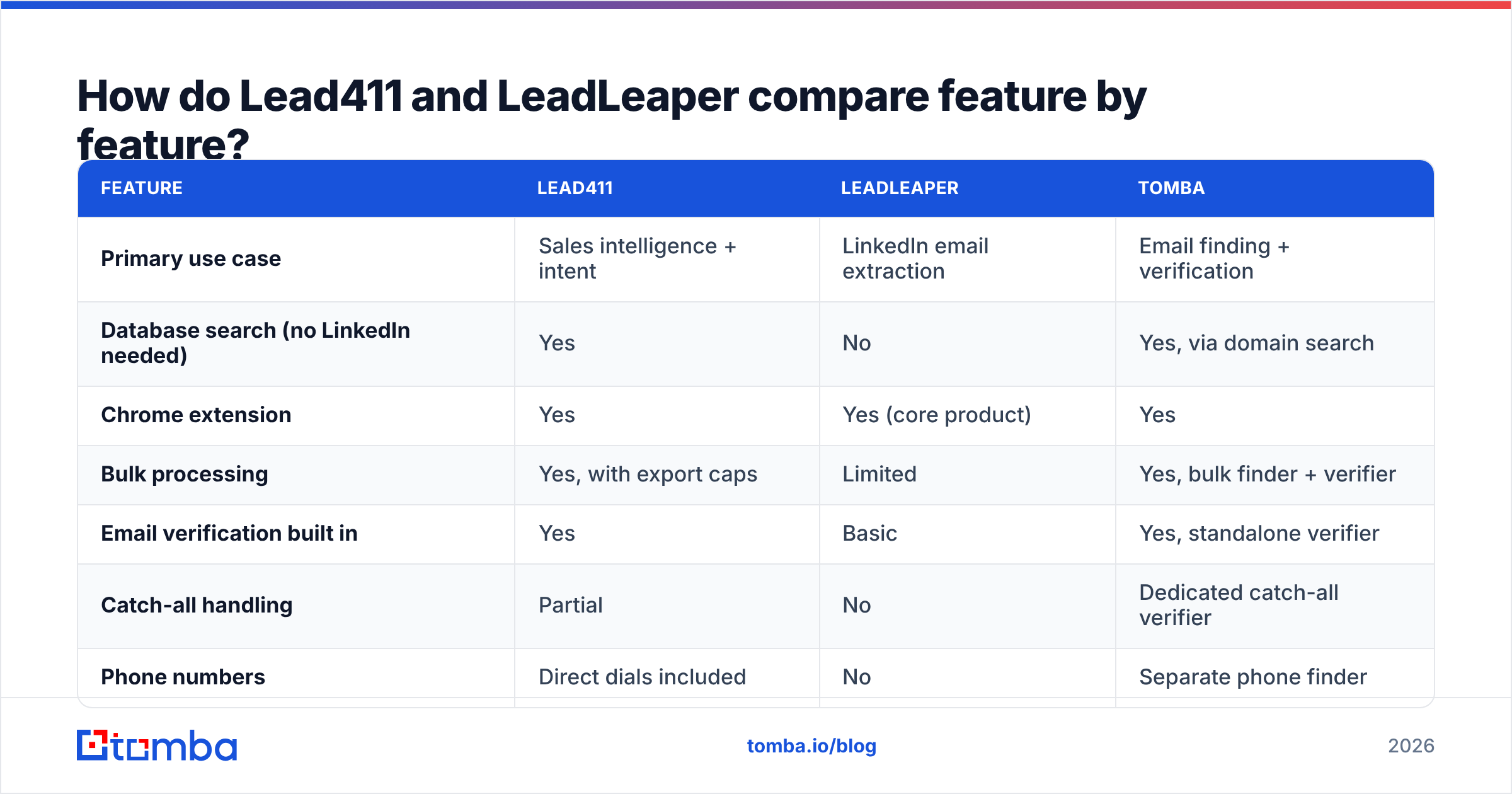
Lead411 vs LeadLeaper: how do they compare feature by feature?#

| Feature | Lead411 | LeadLeaper | Tomba |
|---|---|---|---|
| Primary use case | Sales intelligence + intent | LinkedIn email extraction | Email finding + verification |
| Database search (no LinkedIn needed) | Yes | No | Yes, via domain search |
| Chrome extension | Yes | Yes (core product) | Yes |
| Bulk processing | Yes, with export caps | Limited | Yes, bulk finder + verifier |
| Email verification built in | Yes | Basic | Yes, standalone verifier |
| Catch-all handling | Partial | No | Dedicated catch-all verifier |
| Phone numbers | Direct dials included | No | Separate phone finder |
| Intent data | Yes | No | No |
| API access | Higher tiers | Limited | All paid plans |
| Spreadsheet add-ons | Limited | No | Sheets + Excel add-ins |
| Free plan | Trial only | Yes, small | Yes, 25/mo |
| Contract | Annual typical | Monthly | Monthly or annual |
The pattern is clear. Lead411 wins on breadth of signal. LeadLeaper wins on cost of entry. Neither wins on cost-per-verified-email at volume. One charges per seat. The other caps throughput at human browsing speed.

What should you actually buy?#
Most Lead411 vs LeadLeaper decisions come down to a single constraint. Match the tool to that constraint, not to the feature list you find impressive.
Buy Lead411 if: you have 3+ reps, a CRM someone owns, budget above $300/month, and a genuine plan to act on intent signals within 48 hours of them firing. Intent data is worthless if nobody works the alerts.
Buy LeadLeaper if: you are one or two people, LinkedIn is your entire sourcing motion, your monthly volume is under a few hundred contacts, and you want to cancel whenever you like.
Buy neither if: your bottleneck is cost-per-verified-email at scale, or you want to wire lead lookups into a product, workflow, or automation. That is an API problem. Per-seat platforms and browser extensions both get expensive or brittle the moment you need programmatic lookups. You end up paying for a UI your scripts never open.
That third case is more common than vendors admit. A RevOps team enriching inbound signups, an agency building lists for ten clients, an engineering team appending contacts inside their own app — none of them need intent dashboards or a LinkedIn sidebar. They need a clean email finder API with predictable pricing and a verification endpoint on the same key.
How do you run a fair Lead411 vs LeadLeaper trial?#
Do not judge on the demo. Run this instead:
- Build one 100-row ICP sample — real companies, real titles, drawn from accounts you genuinely want.
- Run the same 100 rows through every tool, including a free tier as a control.
- Record hit rate: how many rows returned an address at all.
- Record verified rate: how many survived an independent verification pass.
- Send to the survivors and record actual bounce rate after 72 hours.
- Divide total monthly cost by delivered, non-bouncing contacts. That single number is your answer.
Most teams discover their "expensive" option is cheaper per usable contact, and their "cheap" option was charging them in bounces and rep time. The test takes an afternoon and saves an annual contract's worth of regret.
Ready to test a flat-rate alternative?#
If your real problem is finding and verifying business emails — not buying a dashboard — start with the Tomba Email Finder. Search by domain, name, or company, and verify in the same workflow. Hit it from the API, a spreadsheet add-on, or the browser extension on the same credits. The free tier gives you 25 searches a month with no card. Starter is $49/mo flat with no per-seat tax. Growth at $99/mo covers most 3-to-5 person outbound teams for less than a single Lead411 seat.
Run your 100-row ICP sample through it alongside Lead411 and LeadLeaper, compare bounce rates, and let the cost-per-delivered-contact decide. Try the Tomba Email Finder free.
Related guides#
// get started
Find, verify and enrich your first contacts today
Start on the free plan with 25 searches a month, then scale when your team is ready.
Free plan · No credit card required · GDPR & CCPA
// about the author