Lead411 vs Mailshunt 2026: Data Depth vs Cheap Volume
Lead411 sells intent-backed sales intelligence at seat pricing. Mailshunt sells cheap email finding by the credit. We compare data quality, export limits, and real cost per usable contact.
TL;DR
- Lead411 is a full sales-intelligence platform: a contact database with company records, growth intent signals, and direct-dial phone numbers, sold per seat with a hard monthly export cap.
- Mailshunt is a lightweight email finder and verifier sold by credit, aimed at people who already know who they want to reach and just need the address.
- They are not really competitors on features — they compete on budget. Lead411 is a research tool; Mailshunt is a lookup tool.
- Pick Lead411 if your SDRs build lists from scratch and need firmographics plus intent. Pick Mailshunt if you have a list of names and domains and need addresses cheaply.
- If what you actually want is accurate email discovery plus verification at an API-first price point, a dedicated email finder like Tomba sits between the two — from a free tier up to $49/mo.
What are Lead411 and Mailshunt, exactly?#
They solve different halves of the same problem, and that difference explains almost every disagreement buyers have about them.
Lead411 has been in the B2B data business since 2001. It is a database-first product: you log in, build a filter (industry, headcount, tech stack, funding, location, title), and pull a list of companies and people. Its pitch since about 2019 has centred on Bombora-style intent data and "growth intent" triggers — hiring spikes, funding rounds, tech installs — layered on top of verified emails and direct-dial mobile numbers. You can read the vendor's own framing at lead411.com.
Mailshunt comes at it from the opposite direction. It is an email-finding and verification utility — you feed it a name and a domain, or a domain on its own, and it returns addresses with a confidence score, plus SMTP-level verification and some bulk/CSV workflow. There is an outreach layer bolted on for sending sequences. See mailshunt.com for the current feature set. It does not try to be a searchable universe of companies with firmographic filters, and it does not sell intent.
So the honest framing of Lead411 vs Mailshunt is: do you need to discover who to contact, or do you already know and just need contact details? Buying the wrong side of that question is how teams end up paying seat prices for a glorified email lookup, or paying credit prices and then spending 15 hours a week in LinkedIn Sales Navigator building the list by hand.
How do Lead411 and Mailshunt compare feature by feature?#
Here is the side-by-side, with Tomba included as a third reference point since it overlaps both. Prices and limits are what the vendors published at the time of writing — always confirm on the vendor's own pricing page before you buy, because B2B data pricing changes quietly and often.
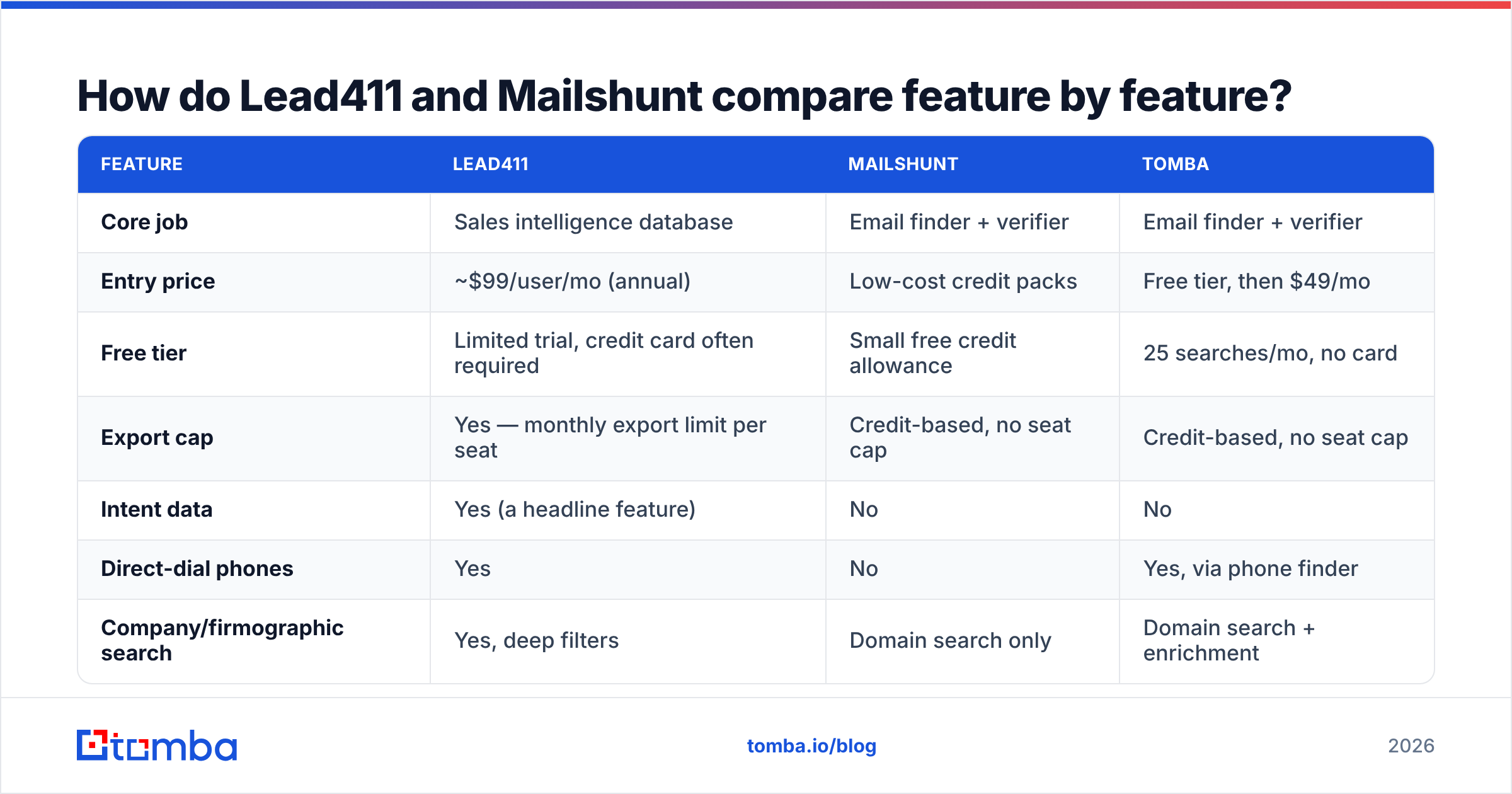
| Feature | Lead411 | Mailshunt | Tomba |
|---|---|---|---|
| Core job | Sales intelligence database | Email finder + verifier | Email finder + verifier |
| Entry price | ~$99/user/mo (annual) | Low-cost credit packs | Free tier, then $49/mo |
| Free tier | Limited trial, credit card often required | Small free credit allowance | 25 searches/mo, no card |
| Export cap | Yes — monthly export limit per seat | Credit-based, no seat cap | Credit-based, no seat cap |
| Intent data | Yes (a headline feature) | No | No |
| Direct-dial phones | Yes | No | Yes, via phone finder |
| Company/firmographic search | Yes, deep filters | Domain search only | Domain search + enrichment |
| Catch-all handling | Flagged | Basic | Dedicated catch-all verifier |
| Public API | Yes, higher tiers | Yes | Yes, on every paid plan |
| Best for | SDR teams building lists cold | Solo founders, agencies, list top-ups | Developers + lean GTM teams |

Two rows in that table deserve more attention than the rest.
The export cap. This is the single most-cited complaint about Lead411 in public reviews on G2 and Capterra. Seat pricing plus a monthly export ceiling means your cost per exported contact is fixed by the plan, not by usage. If a rep burns the allocation in week two, they are done for the month — or you buy more. Credit-based tools do not have that failure mode; you simply consume what you consume.
Intent data. This is the feature Mailshunt has no answer to, and it is the reason Lead411's price is defensible for some teams. Intent signals — a company researching your category, a sudden hiring spree for roles adjacent to your product — genuinely change reply rates when the SDR uses them in the first line. But intent is only useful if your motion is outbound to cold accounts at volume. If you are an agency emailing 200 hand-picked prospects a month, you are paying for a jet engine to power a bicycle.
Which tool has better data accuracy?#
Neither vendor's marketing number should be taken at face value, and that is not a jab at either of them — it is how the whole category works.
Every email-data vendor publishes an accuracy figure somewhere in the 95–99% range. Those numbers are calculated on different denominators. One vendor counts "emails we returned that did not hard bounce". Another counts "emails we returned with a high confidence score, excluding catch-alls and risky domains". A third counts verification accuracy on a clean test list that looks nothing like your ICP. The headline figure is not comparable across vendors.

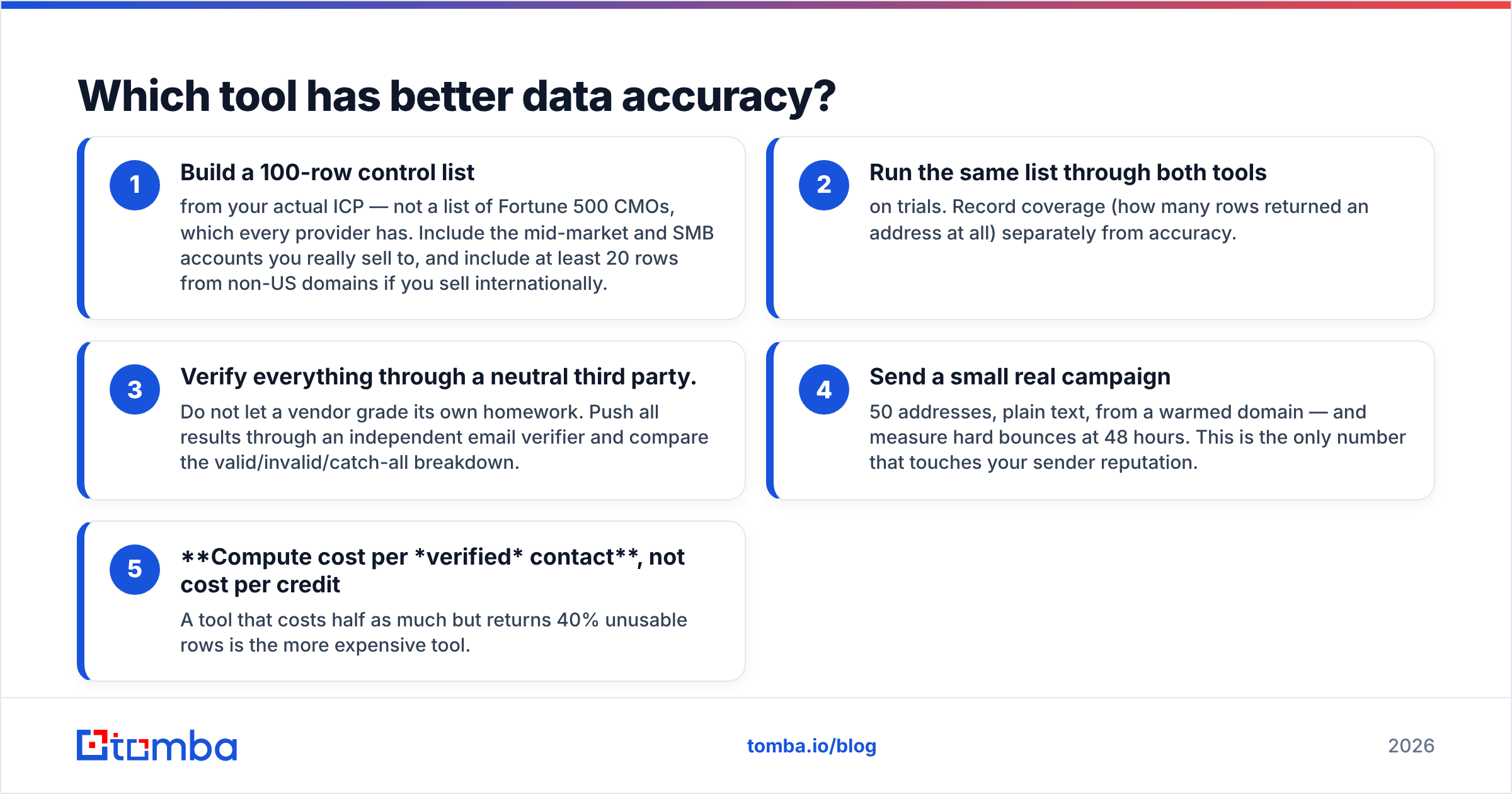
What is comparable is a test you run yourself. Here is the protocol that takes an afternoon and settles the argument:
- Build a 100-row control list from your actual ICP — not a list of Fortune 500 CMOs, which every provider has. Include the mid-market and SMB accounts you really sell to, and include at least 20 rows from non-US domains if you sell internationally.
- Run the same list through both tools on trials. Record coverage (how many rows returned an address at all) separately from accuracy.
- Verify everything through a neutral third party. Do not let a vendor grade its own homework. Push all results through an independent email verifier and compare the valid/invalid/catch-all breakdown.
- Send a small real campaign — 50 addresses, plain text, from a warmed domain — and measure hard bounces at 48 hours. This is the only number that touches your sender reputation.
- Compute cost per verified contact, not cost per credit. A tool that costs half as much but returns 40% unusable rows is the more expensive tool.
In practice, the pattern we see repeatedly in this category: database-first tools like Lead411 win on coverage for enterprise and mid-market US accounts, because that is where their data partnerships concentrate. Finder-first tools win on freshness for smaller and international domains, because they resolve the address at query time rather than serving a record that was true nine months ago. Neither is universally better. Your ICP decides.
How does the pricing really compare?#
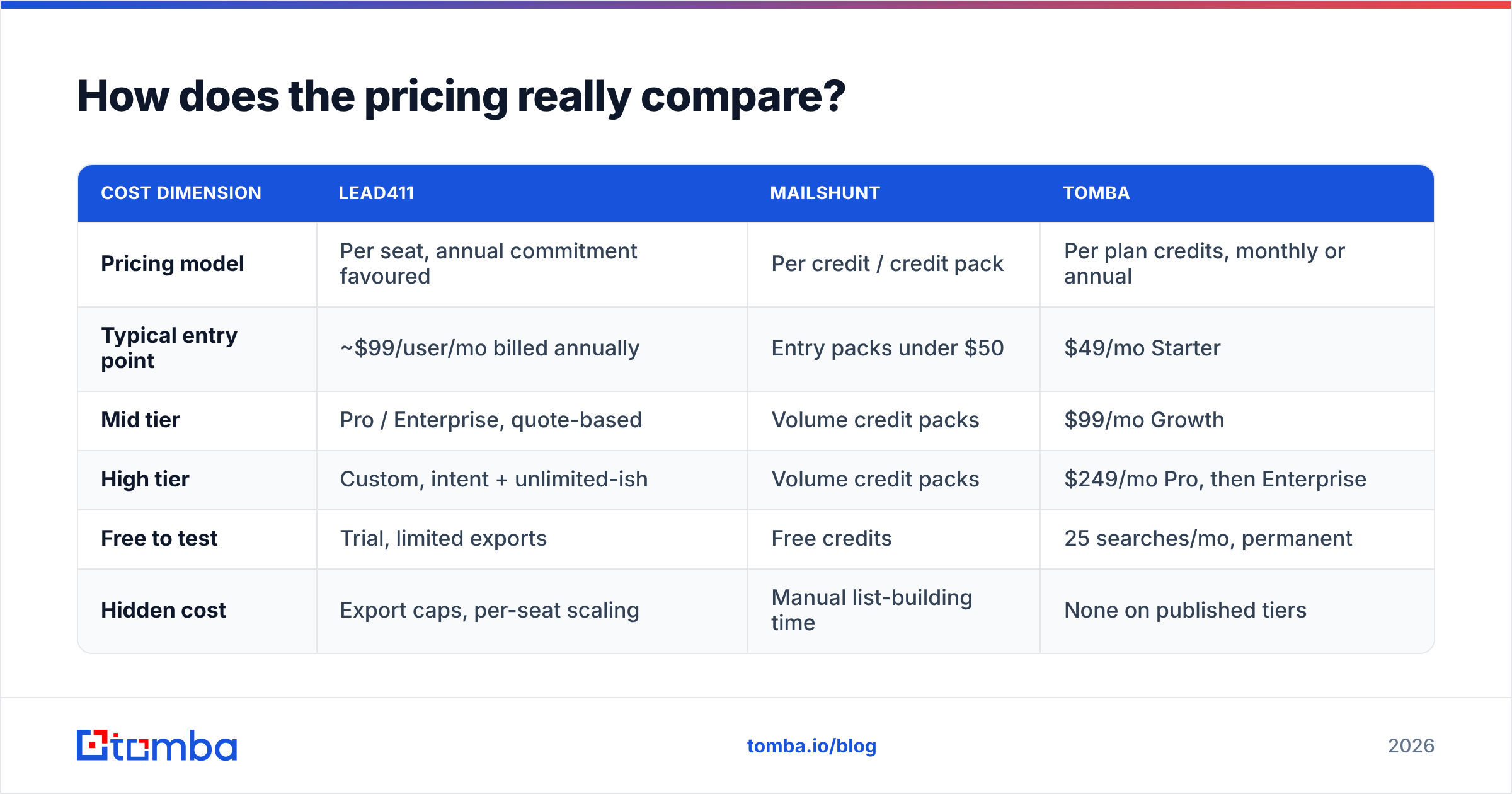
| Cost dimension | Lead411 | Mailshunt | Tomba |
|---|---|---|---|
| Pricing model | Per seat, annual commitment favoured | Per credit / credit pack | Per plan credits, monthly or annual |
| Typical entry point | ~$99/user/mo billed annually | Entry packs under $50 | $49/mo Starter |
| Mid tier | Pro / Enterprise, quote-based | Volume credit packs | $99/mo Growth |
| High tier | Custom, intent + unlimited-ish | Volume credit packs | $249/mo Pro, then Enterprise |
| Free to test | Trial, limited exports | Free credits | 25 searches/mo, permanent |
| Hidden cost | Export caps, per-seat scaling | Manual list-building time | None on published tiers |
The trap in this table is the hidden cost row, and it cuts both ways.
Lead411's hidden cost is structural: seats and caps. Add three SDRs and your bill triples whether or not those SDRs pull three times the data. That is fine at a company with predictable headcount and a real outbound budget. It is punishing for a five-person startup where two people occasionally need a list.
Mailshunt's hidden cost is your team's time. A $29 credit pack looks unbeatable until you count the hours someone spends in Sales Navigator assembling the names and domains that the finder needs as input. At a loaded cost of $40/hour, ten hours of manual list-building costs $400 — more than a year of the credit pack. Cheap tools are only cheap when the input list already exists.
Tomba's published Tomba pricing sits deliberately in between: credit-based like Mailshunt (no seat tax, no export cap), but with domain search, enrichment, catch-all verification, and an API on every paid tier so the list-building step can be automated instead of done by hand.
Who should pick Lead411?#
Choose Lead411 when all of these are true:
- You run a real outbound team. Three or more full-time SDRs whose job is list-building, not just sending. The seat cost only amortises if the seat is used daily.
- You sell to US mid-market or enterprise. That is where Lead411's coverage is strongest and where intent data has enough signal density to be actionable.
- Intent genuinely changes your play. If your reps will actually rewrite an opener because an account showed research activity, you get paid back. If intent data becomes a column nobody looks at, you do not.
- You need direct dials. Phone coverage is a real differentiator against pure email finders, and if your motion is multi-channel, that matters.
- Predictable annual budget. Seat pricing is a feature for finance teams that want a flat line item.
Skip it if your export needs are spiky, if you sell mostly outside North America, or if the intent module is the reason you are considering it but nobody has defined what the team will do with a signal.
Who should pick Mailshunt?#
Choose Mailshunt when:
- You already have the list. Names and companies exist in a spreadsheet, a CRM, or a scrape, and you need addresses appended.
- Volume is modest and bursty. A few thousand lookups a quarter, unevenly distributed. Credits do not punish irregular usage the way seats do.
- You are a one- or two-person GTM function. Agencies, solo founders, freelance lead-gen contractors. Seat pricing is dead weight at that size.
- You want send and find in one login. The built-in outreach layer is a real convenience if you are not already committed to a sequencer.
Skip it if you need firmographic discovery, intent, phones, or if compliance requires documented data sources for every record you process — smaller vendors vary widely in how much provenance they expose.
What do most buyers get wrong in this comparison?#
Four mistakes come up in nearly every evaluation:
- Comparing headline accuracy instead of cost per usable contact. A 97% claim on a denominator you cannot inspect is marketing. Cost per verified, non-bouncing, in-ICP contact is procurement.
- Ignoring catch-all domains. A large share of B2B domains accept everything at the SMTP layer, so "verified" means almost nothing there. Ask specifically how each tool handles catch-alls before you trust its valid count — a dedicated catch-all verifier exists precisely because generic verification can't resolve them.
- Buying for the demo ICP, not their own. Vendors demo on accounts where their coverage is excellent. Always test on your own 100-row control list.
- Forgetting the API. If your RevOps stack does anything automated — enrichment on form fill, CRM hygiene jobs, lead routing — a tool without a usable API becomes a manual bottleneck within two quarters. Check API availability and rate limits per tier, not just "yes, we have an API."
- Treating deliverability as the tool's problem. No data vendor can save a cold domain with no SPF/DKIM alignment and no warmup. Even a 99%-valid list bounces when the sending infrastructure is broken.
Where does Tomba fit between them?#
Tomba is not a replacement for Lead411's intent module, and it is honest to say so. If intent signals are the reason you are shopping, Lead411 has a product Tomba does not.
What Tomba does replace is the find-and-verify core that both tools charge for. The free tier gives 25 searches a month with no card, so the control-list test above costs nothing to run. Starter is $49/mo, Growth $99/mo, Pro $249/mo — all credit-based, no per-seat multiplier, no monthly export ceiling. Domain search, catch-all verification, phone finding, and data enrichment are part of the same account rather than separate line items, and the API is available on every paid plan for teams that want lookups running inside their own workflows instead of inside someone's browser tab.
For a lean team, the practical stack is often: Tomba for discovery and verification at the data layer, a sequencer you already own for sending, and a seat-based intelligence platform only when the outbound team is large enough that intent data pays for itself.
Ready to benchmark it yourself? Run your own 100-row control list through the Tomba Email Finder on the free tier, verify the output, and compare bounce rates against whatever you are using now. If the numbers do not beat your current tool on cost per verified contact, you have lost nothing but an afternoon — and you will finally have a real answer instead of three vendors' accuracy claims.
Related guides#
// get started
Find, verify and enrich your first contacts today
Start on the free plan with 25 searches a month, then scale when your team is ready.
Free plan · No credit card required · GDPR & CCPA
// about the author