Lead411 vs Nymeria: Which B2B Contact Data Tool Wins in 2026?
Lead411 sells intent-driven sales intelligence at enterprise prices. Nymeria sells cheap bulk contact enrichment. We compare coverage, pricing, accuracy and fit so you pick the right one.
Lead411 vs Nymeria is not really a feature fight. The two tools do different jobs. Lead411 tells you which accounts to call this quarter. Nymeria tells you how to reach a person you have already picked. This guide compares price, coverage, accuracy, and fit — then names the cheaper third option most teams actually need.
TL;DR
- Lead411 is a full sales-intelligence platform: a curated B2B database, Bombora intent signals, growth triggers, and a CRM-friendly workflow. It is priced like enterprise software, sold per seat, on annual contracts.
- Nymeria is a lean enrichment engine: a huge people index, a LinkedIn Chrome extension, bulk lookups, and an API. It is priced like a utility — cheap per record, no sales call.
- They are not the same product. Lead411 answers "who should I call this quarter?" Nymeria answers "what is this person's email?"
- Neither is the cheapest way to get verified work emails at volume. A dedicated finder like Tomba or Findymail usually costs less per usable contact.
- Best fit: Lead411 if intent data drives territory planning. Nymeria if you have the names and need contact details fast. A specialist finder if deliverability is your metric.
What are Lead411 and Nymeria, exactly?#
Lead411 is a B2B sales-intelligence platform. It has been around since 2001. Its pitch is not "we have the most records." It is "we tell you which companies are in-market right now." The product bundles a company and contact database with Bombora intent topics, hiring and funding triggers, tech-stack data, and a light cadence tool. You work inside its UI, build saved searches, get daily alerts, and push contacts to your CRM.
Nymeria is a different animal. It is an enrichment layer over a very large people index — hundreds of millions of profiles pulled from public web sources. You reach it through a browser extension, a bulk uploader, and an API. There is no intent data, no triggers, no sequencing. You give it an identifier — a LinkedIn URL, a name plus company, an email — and it returns emails, phone numbers, and social profiles.
That distinction matters more than any feature-by-feature scoreboard. Comparing them on "number of contacts" is like comparing a restaurant to a grocery store by counting calories. One sells you a decision. The other sells you an ingredient.

Lead411 vs Nymeria: how do they compare head-to-head?#
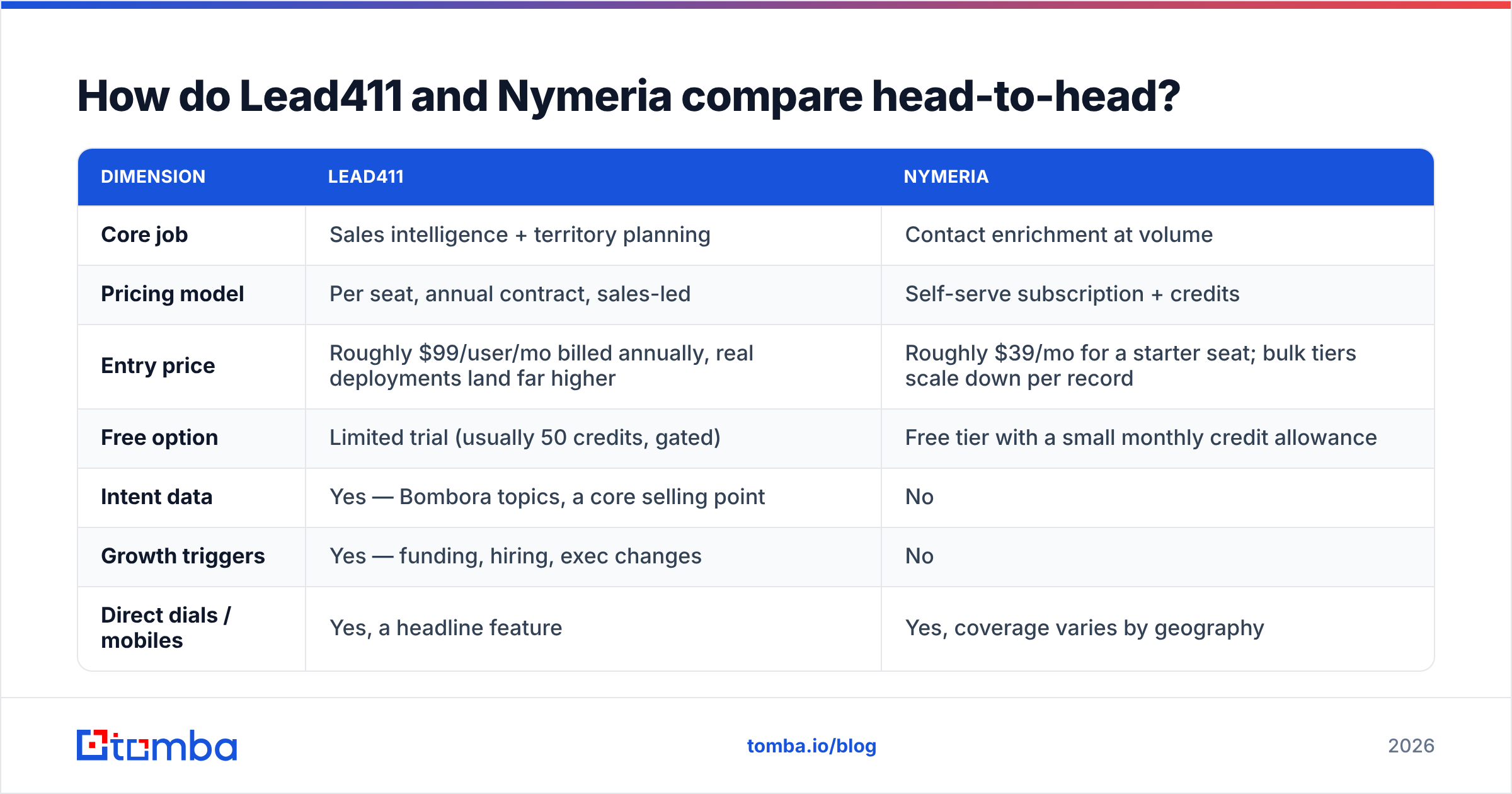
Here is the practical breakdown. Prices are public list prices as of early 2026. Both vendors negotiate, so treat them as starting points rather than gospel.
| Dimension | Lead411 | Nymeria |
|---|---|---|
| Core job | Sales intelligence + territory planning | Contact enrichment at volume |
| Pricing model | Per seat, annual contract, sales-led | Self-serve subscription + credits |
| Entry price | Roughly $99/user/mo billed annually, real deployments land far higher | Roughly $39/mo for a starter seat; bulk tiers scale down per record |
| Free option | Limited trial (usually 50 credits, gated) | Free tier with a small monthly credit allowance |
| Intent data | Yes — Bombora topics, a core selling point | No |
| Growth triggers | Yes — funding, hiring, exec changes | No |
| Direct dials / mobiles | Yes, a headline feature | Yes, coverage varies by geography |
| Chrome extension | Yes | Yes — LinkedIn-first, its strongest surface |
| Bulk CSV enrichment | Yes, with export limits per plan | Yes, a primary workflow |
| API | Yes, on higher tiers | Yes, on most tiers, well documented |
| Email verification | Bundled, "triple verified" claim | Basic validity status, lighter |
| Export limits | Capped per seat; unlimited-ish only on top tiers | Generous relative to price |
| Typical buyer | SDR team of 5-50 with a RevOps function | Founder, growth marketer, recruiter, dev |
| Contract friction | Demo → quote → annual term | Sign up with a card |
The pattern is consistent. Lead411 charges for judgment. Nymeria charges for throughput.
Which one has better data quality?#
Honest answer: they are good at different halves of the problem. Both also fail in the same places.
Lead411's edge is the company layer. Its company profiles, employee-count bands, tech-stack tags, and trigger events are tighter than a pure enrichment index. When Lead411 says a company raised a Series B in the last 90 days, that is usually right. That signal is what you are paying for. Contact-level email accuracy is solid on US mid-market and enterprise accounts. It gets weaker on SMB, and weaker still outside North America.
Nymeria's edge is the person layer, and it comes down to breadth. Its index is built from broad public sources, so it returns something for profiles curated databases have never touched: niche European SaaS, agencies under 20 people, engineers who never show up in a sales database. The tradeoff is staleness. An index built from old crawls will hand you the email someone used at a job they left in 2023.
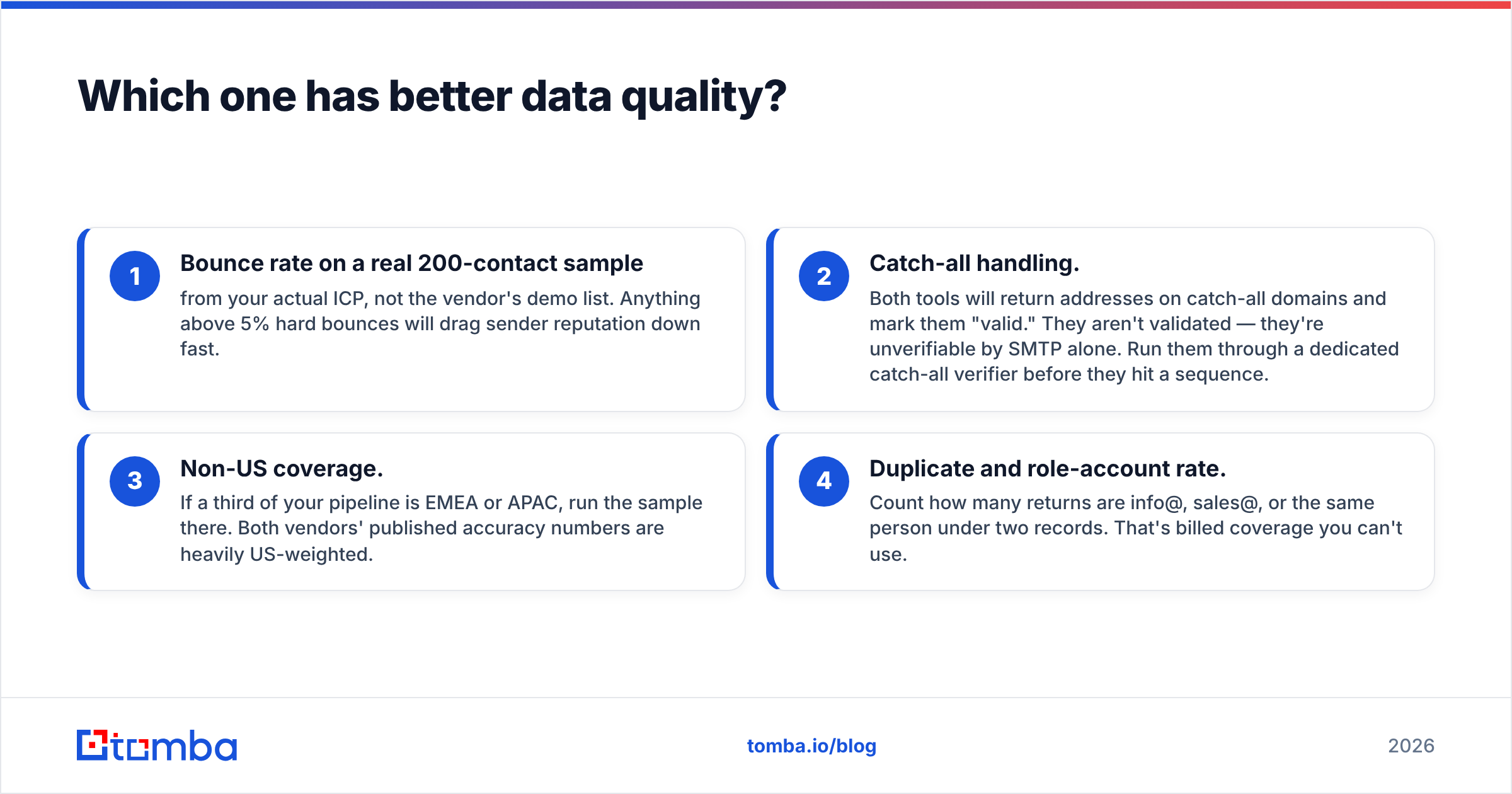
Four things to test before you commit to either:
- Bounce rate on a real 200-contact sample from your own target list, not the vendor's demo data. Anything above 5% hard bounces will drag sender reputation down fast.
- Catch-all handling. Both tools return addresses on catch-all domains and mark them "valid." They are not verified — SMTP alone cannot check them. Run them through a dedicated catch-all verifier before they hit a sequence.
- Non-US coverage. If a third of your pipeline is EMEA or APAC, run the sample there. Both vendors' published accuracy numbers lean heavily on US data.
- Duplicate and role-account rate. Count how many returns are info@, sales@, or the same person under two records. That is billed coverage you cannot use.
Neither vendor publishes an audited accuracy figure. The only number that matters is the one your own test produces. Cross-check vendor claims against real reviewer volume on G2 rather than the marketing page.
Is Lead411 worth the price premium?#
It depends on whether your team will actually use the intent data.
Lead411's premium over a commodity enrichment tool is roughly 3-10x per seat. That premium buys Bombora intent topics, growth triggers, and a search UI built around them. Say your SDR team runs a tight motion: daily trigger alerts, territory rebuilds by intent surge, a fast feedback loop between marketing and sales. Then the premium pays for itself in prioritization alone. Calling 100 in-market accounts beats calling 1,000 cold ones.
If nobody opens the intent tab after week three, you are paying enterprise prices for a mediocre contact database. That is the most common way intent-led platforms fail. It is a process problem, not a product problem. Forrester has written often about intent data sitting unused because no one owns the workflow around it.
Ask yourself three questions before you sign:
- Is our target profile tight enough for intent surges to mean anything? Intent on "CRM software" across 4,000 accounts is noise.
- Who acts on a trigger, and within how many hours? If the answer is "the SDRs, eventually," the signal decays to nothing.
- Are we replacing a tool or adding one? Lead411 overlaps heavily with ZoomInfo, Apollo, and Cognism. Stacking them is common and wasteful.
Is Nymeria good enough for cold outbound?#
Nymeria is good enough for list building. On its own it is not good enough for cold outbound at scale. Breadth without verification is how you get blocked.
Here is the workflow that works. Use Nymeria or its extension to turn LinkedIn profiles into candidate contact rows. Then pass every row through an independent verification step before it touches a sending domain. Nymeria's own validity flags help, but they are lighter than a dedicated check. A separate email verifier catches syntax errors, disposable domains, role accounts, dead MX records, and full mailboxes that a bundled check waves through.
Where Nymeria genuinely shines:
- Recruiting. Finding personal emails and mobiles for candidates is its home turf. The depth of the index pays off here in a way it does not in enterprise sales.
- API-first workflows. If you enrich signups or inbound form fills programmatically, Nymeria's per-record cost is hard to beat.
- Long-tail prospecting. Small companies and non-US markets where curated databases return nothing.
- Budget-constrained teams. A founder sending their first 500 outbound emails does not need Bombora intent topics.
Where it falls short: no intent, no triggers, no account-level views, thin company data, and deliverability risk if you skip verification. It is a component, not a system.
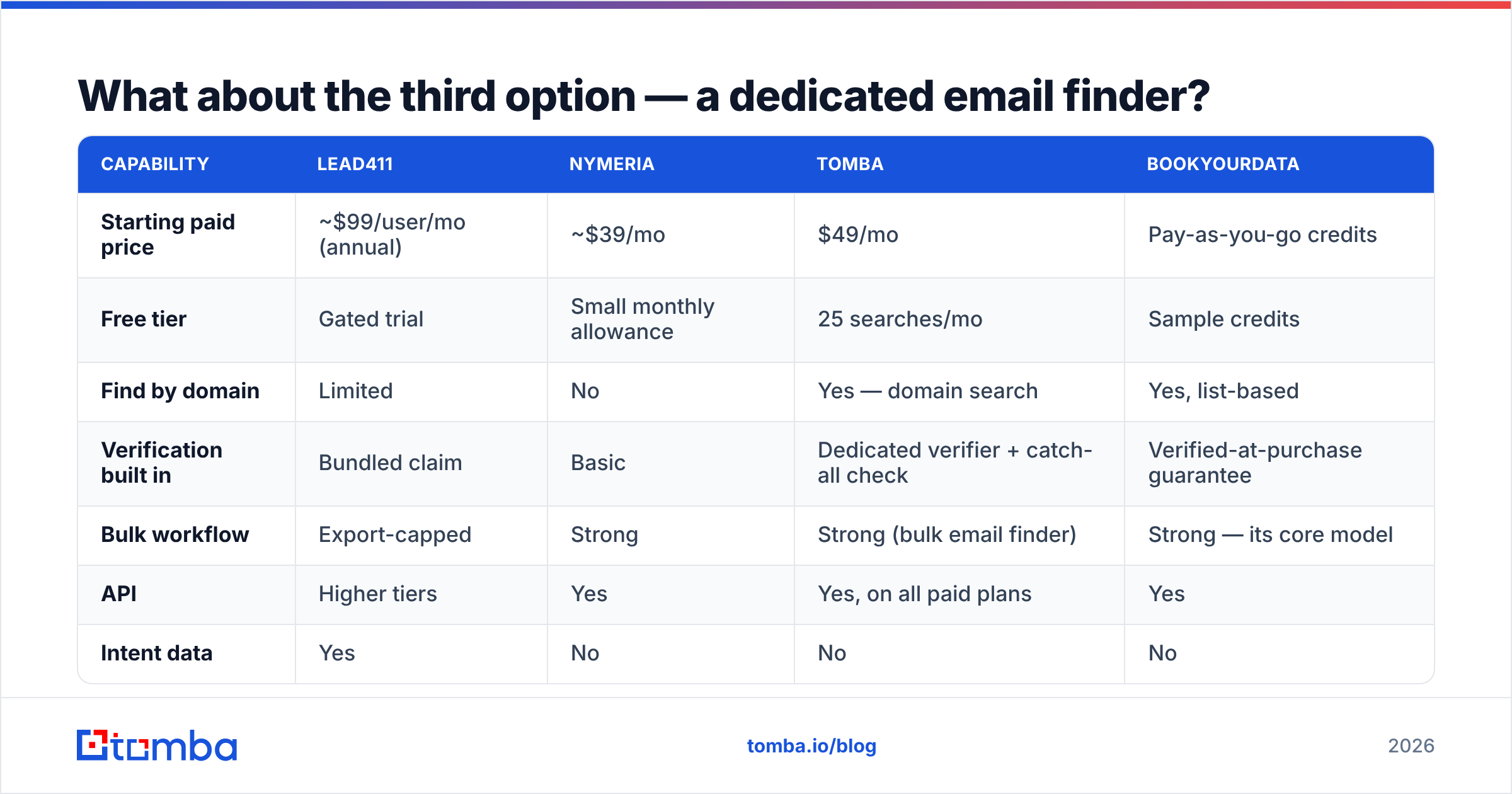
What about the third option — a dedicated email finder?#
Most teams comparing these two are really asking a narrower question: what is the cheapest reliable way to get verified work emails for a list of people I already know?
That question has a different answer. A finder-plus-verifier stack is usually cheaper per usable contact than a sales-intelligence seat. It is also more accurate than a broad enrichment index, because finding and verifying happen in the same pipeline instead of being bolted together.
| Capability | Lead411 | Nymeria | Tomba | BookYourData |
|---|---|---|---|---|
| Starting paid price | ~$99/user/mo (annual) | ~$39/mo | $49/mo | Pay-as-you-go credits |
| Free tier | Gated trial | Small monthly allowance | 25 searches/mo | Sample credits |
| Find by domain | Limited | No | Yes — domain search | Yes, list-based |
| Verification built in | Bundled claim | Basic | Dedicated verifier + catch-all check | Verified-at-purchase guarantee |
| Bulk workflow | Export-capped | Strong | Strong (bulk email finder) | Strong — its core model |
| API | Higher tiers | Yes | Yes, on all paid plans | Yes |
| Intent data | Yes | No | No | No |
| Best for | Territory planning | Cheap enrichment at volume | Verified email discovery | Buying pre-built targeted lists |
BookYourData deserves a mention because it solves a third version of the problem. Sometimes you do not want a search tool at all — you want to buy a filtered, verified list and get on with it. For teams without a dedicated prospecting motion, that is a fair shortcut, and often faster than learning another UI.
Tomba's angle is narrower and cheaper: find the email, verify the email, enrich around it. Tomba pricing starts free at 25 searches per month. Paid plans run $49/mo Starter, $99/mo Growth, and $249/mo Pro. There is no per-seat contract and no annual commitment. You will not get intent topics. You do get a Tomba API, a Chrome extension, and Sheets/Excel add-ins that drop into a workflow you already have.
How should you actually choose between them?#
Run this decision in order. Stop at the first line that matches.
- You need to know which accounts are in-market, and someone owns acting on that. → Lead411. Nothing in Nymeria does this. Bolting Bombora onto a cheap enrichment tool costs more than Lead411 does.
- You have a list of names and need contact details, cheaply, at volume. → Nymeria, plus an independent verification pass.
- You need verified work emails from company domains and job titles, and deliverability is the metric you are judged on. → A dedicated finder plus verifier. Lead411 is overkill. Nymeria is under-verified.
- You need a pre-built targeted list today with no tooling learning curve. → A list vendor like BookYourData.
- You are enriching inbound signups programmatically. → Whichever has the better API economics at your volume. That is usually Nymeria or a finder API, not a seat-based platform.
- You already own ZoomInfo, Apollo, or Cognism. → Do not add Lead411. Fix the motion on what you have first.
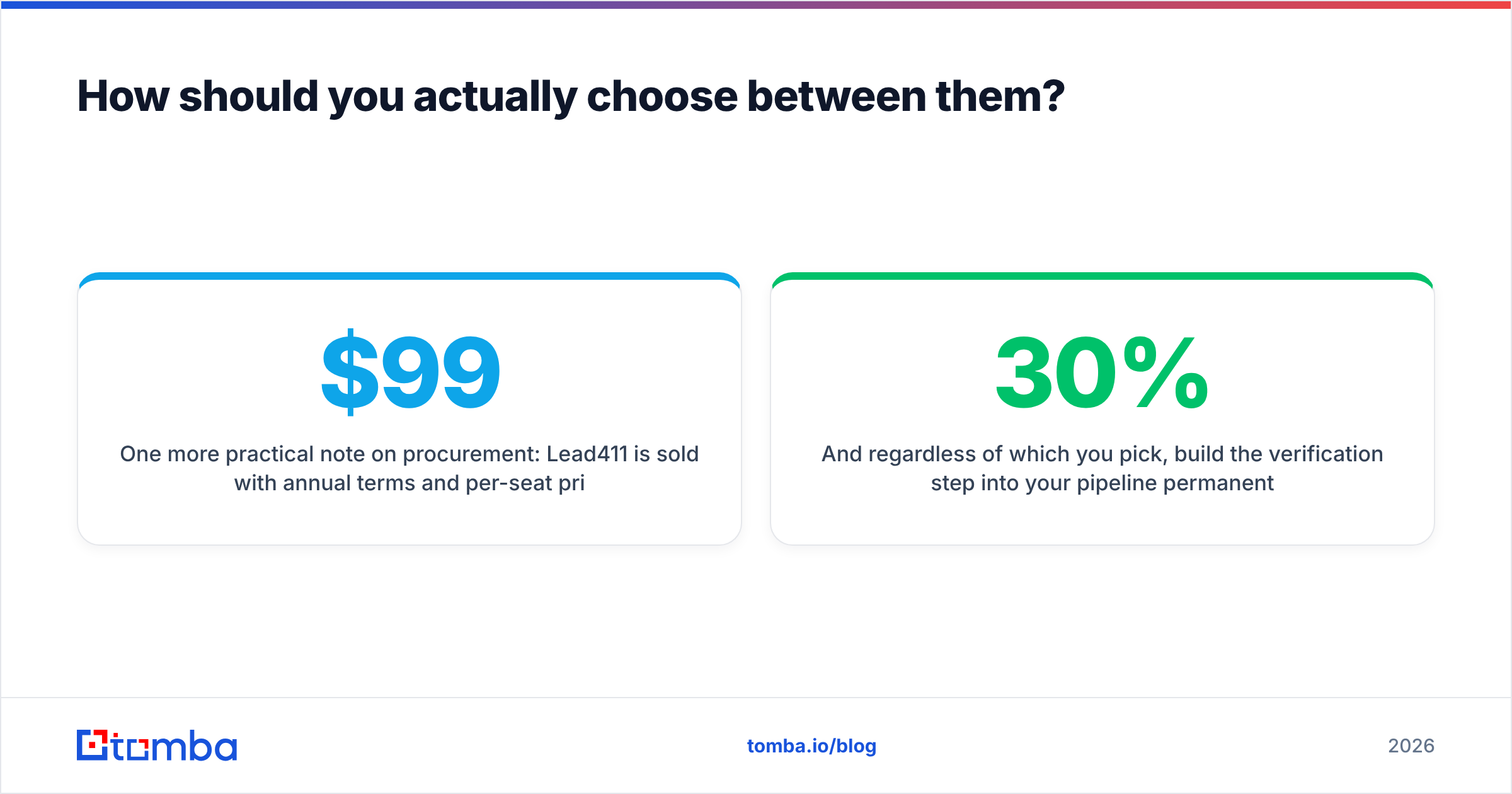
One more note on procurement. The Lead411 vs Nymeria price gap is not really "$99 vs $39." Lead411 is sold per seat on annual terms. The real comparison is five seats × twelve months at a negotiated rate, with export caps, against one subscription anyone on the team can query. Model the total, not the sticker.
Whichever you pick, build the verification step into your pipeline for good, not as a one-time cleanup. Contact data decays around 25-30% a year as people change jobs. A list that was clean in January is clearly dirty by autumn. Re-verify before every major campaign. Watch your email deliverability metrics weekly, and treat a rising bounce rate as an early warning.
Lead411 vs Nymeria: what's the verdict?#
Lead411 wins if intent data is the reason you are buying. It is a real sales-intelligence platform with a genuine signal advantage. Teams that act on triggers every day get returns that dwarf the seat cost. Buy it for the workflow, not the record count.
Nymeria wins if you are cost-sensitive, technically comfortable, and already know who you want to reach. It is an honest utility at an honest price. Just do not mistake a big index for an accurate one. Verify everything before you send.
And if the real job is neither territory planning nor bulk lookups — if you just need correct, deliverable work emails for people you have already identified — both tools are the wrong shape.
That is where the Tomba Email Finder fits. Search by domain, by name and company, or by LinkedIn profile. Every result runs through verification and catch-all detection before it reaches you. Start free with 25 searches a month, then scale to $49/mo when you are ready. No demo call. Run your own 200-contact bounce test against whatever you use now — that is the only comparison that settles this.
Related guides#
// get started
Find, verify and enrich your first contacts today
Start on the free plan with 25 searches a month, then scale when your team is ready.
Free plan · No credit card required · GDPR & CCPA
// about the author