Lead411 vs Skrapp: Which B2B Data Tool Wins in 2026?
Lead411 sells intent data and direct dials. Skrapp sells cheap LinkedIn email scraping. They are not the same product, and picking the wrong one wastes a year of budget. Here is the honest breakdown.
Lead411 vs Skrapp is not a fair fight, because the two tools do different jobs. One is a sales database with phone numbers and intent data. The other is a cheap email finder that lives in your browser. The right pick depends on what your reps do all day.
TL;DR
- Lead411 is a full sales-intelligence database: company records, direct dials, Bombora intent data, and hiring/funding triggers, priced per seat and sold annually.
- Skrapp is a lightweight email finder built around a LinkedIn Chrome extension and domain search, priced per email credit with a small free tier.
- They are not competitors in the strict sense. Lead411 competes with ZoomInfo and Apollo; Skrapp competes with Hunter, Snov.io, and Tomba.
- Pick Lead411 if you need phone numbers plus buying signals and you have budget for per-seat licensing. Pick Skrapp if you already know your target accounts and just need addresses.
- If you want finder-level pricing with database-level verification, run a third option in the bake-off before you sign an annual contract.
Lead411 vs Skrapp: what does each tool actually do?#
The fastest way to waste $5,000 is to buy the wrong class of tool. You pay for an intent-data platform when a $49/mo email lookup would have done the job. Or you buy an email scraper when your reps needed direct dials. So start with what each product is at its core.
- Lead411 is a contact database with a signal layer on top. You search its index by title, industry, revenue, technology, or location, then export contacts with emails and direct-dial phone numbers. Its differentiator is intent: it resells Bombora topic surges and layers on "growth intent" triggers like recent funding, hiring spikes, and IPO activity.
- Skrapp is an extraction tool with a small index behind it. Its primary interface is a browser extension that pulls email addresses while you browse LinkedIn profiles, LinkedIn Sales Navigator lists, or company websites. It also offers a domain search and a bulk finder for uploaded CSVs.
The pricing models split along the same line.
- Lead411 charges by seat, annually. Pricing is published from roughly $99 per user per month on an annual commitment, with export caps that vary by plan and custom quotes above that. Check lead411.com for current numbers, because tiers move.
- Skrapp charges by credit, monthly or annually. Public tiers have historically run from a free allowance of around 100 emails per month up to plans in the $49-$299 range, scaling with email volume rather than with headcount. Confirm on skrapp.io.
One more difference outweighs price.
- Only one of them is a system of record. Lead411 is designed to be a prospecting database your whole team searches. Skrapp is designed to sit next to a list you already built somewhere else.
That distinction drives almost every downstream decision: accuracy expectations, verification workload, CRM hygiene, and total cost.
Which tool finds more valid emails?#
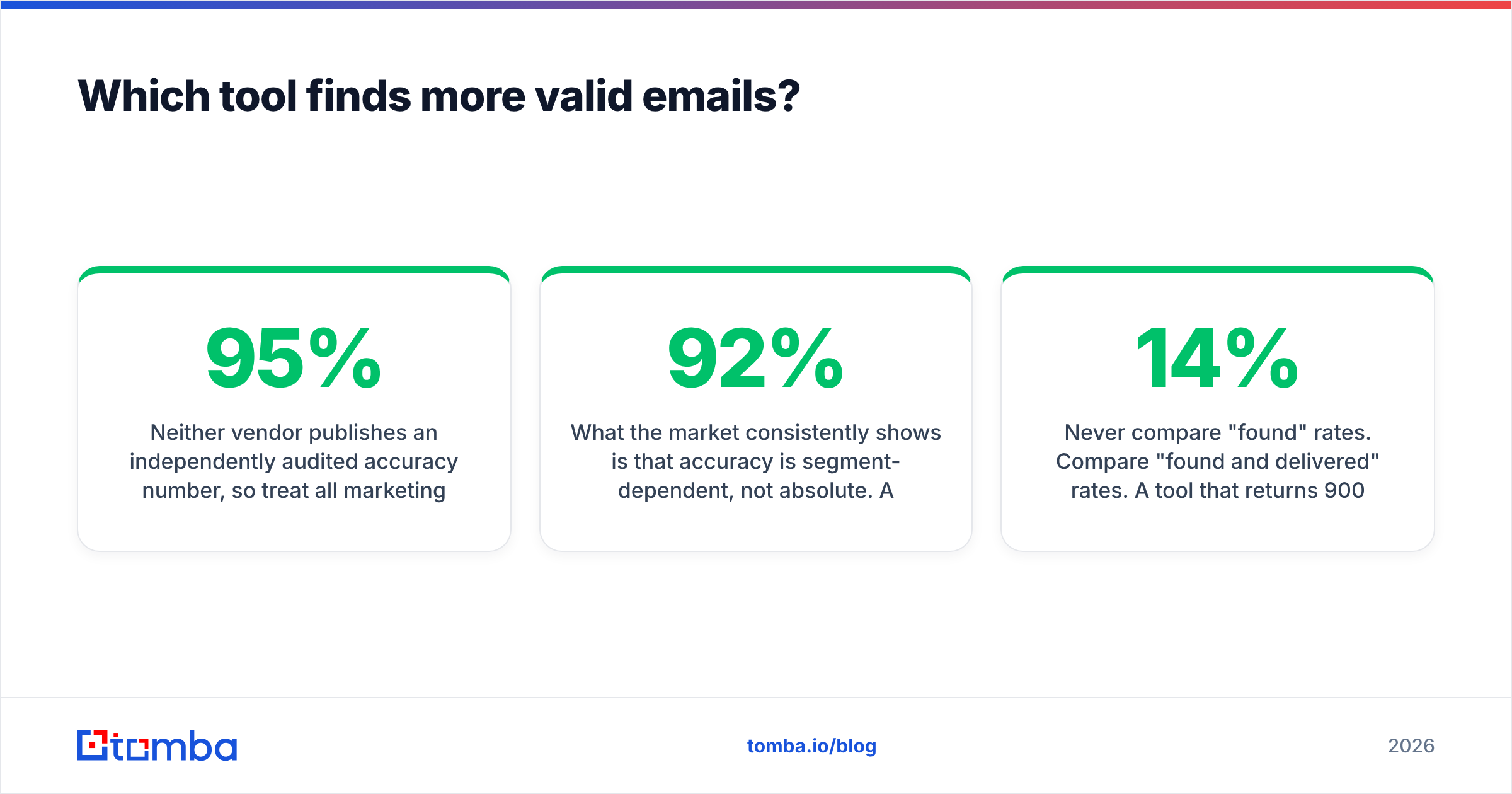
Neither vendor publishes an independently audited accuracy number. So treat every marketing claim as unproven until you test it on your own list. That includes "95% accuracy" and "verified in real time."
What the market shows is that accuracy is segment-dependent, not absolute. A tool that hits 92% on US SaaS mid-market can drop below 60% on European manufacturing or on catch-all mail servers. Lead411's index skews toward North American companies, with strong coverage of mid-market and enterprise firmographics. Skrapp's coverage follows LinkedIn. If the person has a profile and the company has a clear email pattern, Skrapp usually resolves it. If not, it guesses the pattern and flags how confident it is.

Two practical rules from running these tests:
- Never compare "found" rates. Compare "found and delivered" rates. A tool that returns 900 addresses out of 1,000 but bounces 14% is worse than one that returns 700 with a 2% bounce rate. The second one protects your email deliverability and your sending domain.
- Test the same 200 contacts in both tools on the same day. Pull them from a real ICP segment, not a random sample. Then push both outputs through an independent email verifier. That way a neutral referee grades the results, instead of each vendor grading its own homework.
Skrapp includes a verification step, and Lead411 markets real-time verification on export. Both still return catch-all domains where SMTP gives no clear answer. That is where a dedicated catch-all verifier earns its keep.
Lead411 vs Skrapp: how do the features compare?#
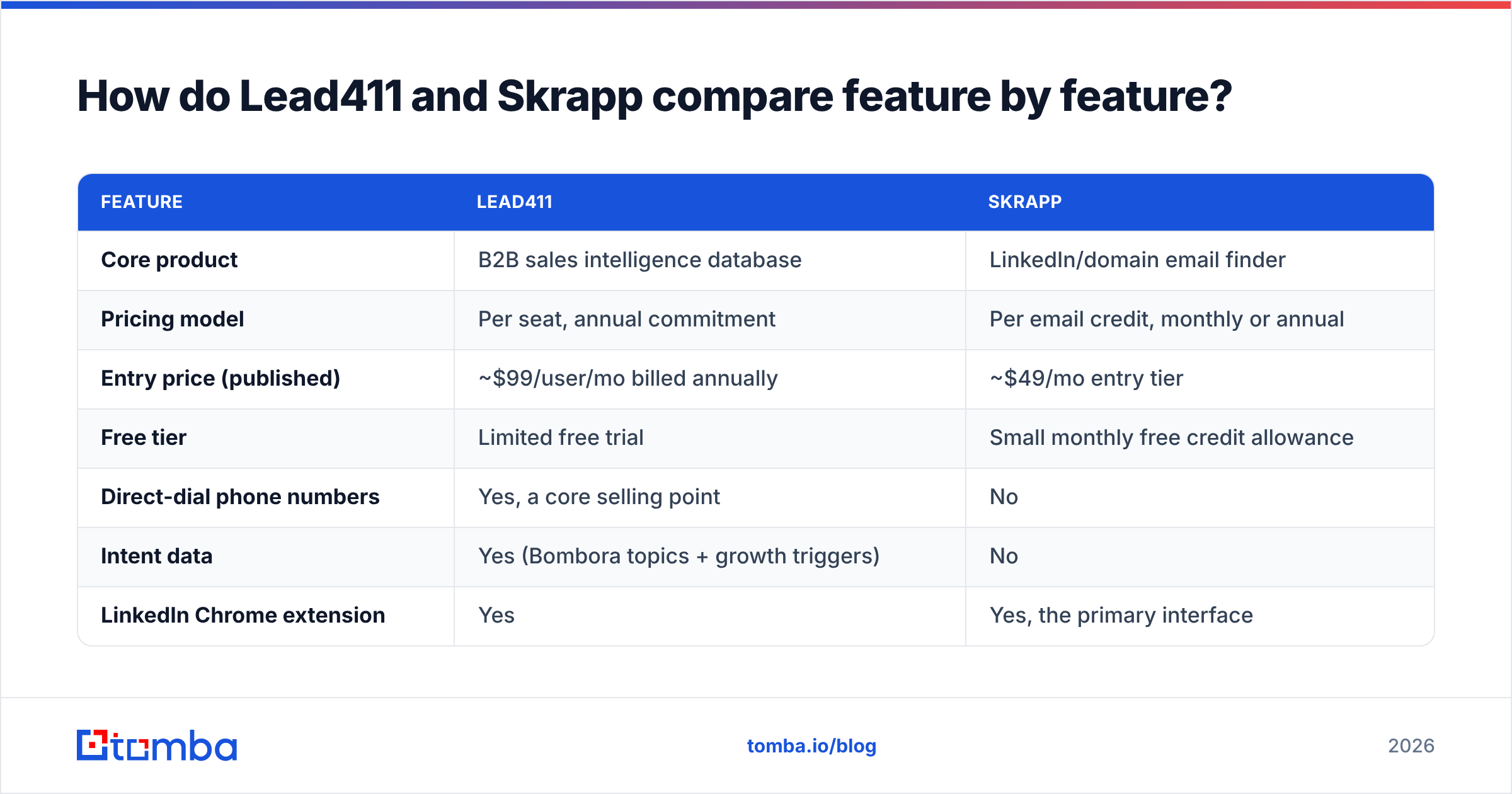
| Feature | Lead411 | Skrapp |
|---|---|---|
| Core product | B2B sales intelligence database | LinkedIn/domain email finder |
| Pricing model | Per seat, annual commitment | Per email credit, monthly or annual |
| Entry price (published) | ~$99/user/mo billed annually | ~$49/mo entry tier |
| Free tier | Limited free trial | Small monthly free credit allowance |
| Direct-dial phone numbers | Yes, a core selling point | No |
| Intent data | Yes (Bombora topics + growth triggers) | No |
| LinkedIn Chrome extension | Yes | Yes, the primary interface |
| Bulk CSV enrichment | Yes | Yes |
| Company/firmographic search | Deep (revenue, tech stack, headcount) | Basic (domain and company name) |
| API access | Available on higher tiers | Available on paid tiers |
| CRM integrations | Salesforce, HubSpot, Pipedrive, Outreach, Salesloft | Lighter set, plus Zapier-style connectors |
| Best fit | SDR teams needing calls + signals | Founders and small teams needing addresses |

Read that table as two different jobs, not one scoreboard. If phone numbers and buying signals matter to your motion, Skrapp does not make the shortlist at all. If your motion is pure email outbound to accounts you already identified, most of Lead411's value is dead weight you pay for every month.
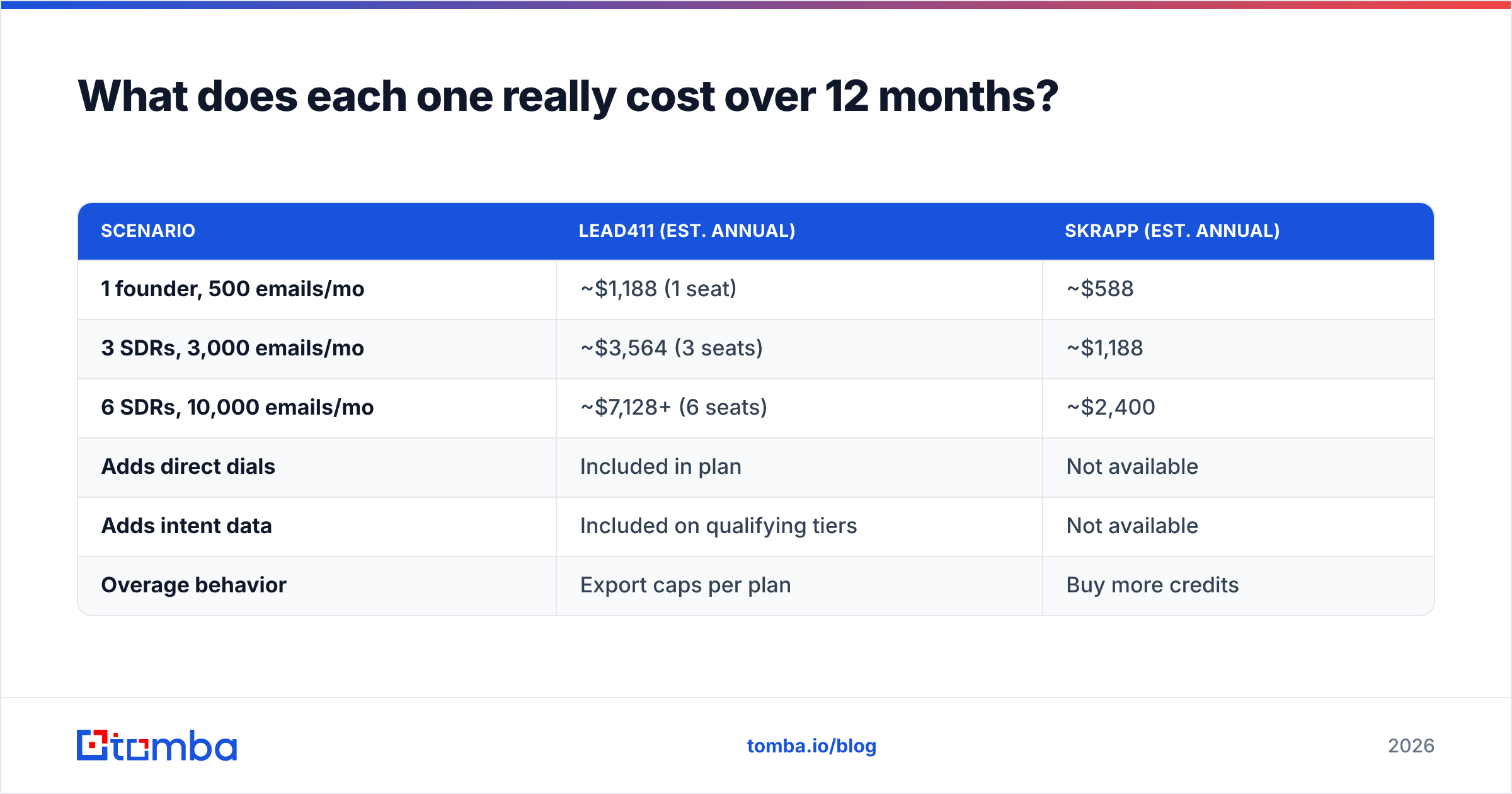
What does each one really cost over 12 months?#
Per-seat pricing and per-credit pricing behave very differently as you grow. That is where the sticker price misleads people.
| Scenario | Lead411 (est. annual) | Skrapp (est. annual) |
|---|---|---|
| 1 founder, 500 emails/mo | ~$1,188 (1 seat) | ~$588 |
| 3 SDRs, 3,000 emails/mo | ~$3,564 (3 seats) | ~$1,188 |
| 6 SDRs, 10,000 emails/mo | ~$7,128+ (6 seats) | ~$2,400 |
| Adds direct dials | Included in plan | Not available |
| Adds intent data | Included on qualifying tiers | Not available |
| Overage behavior | Export caps per plan | Buy more credits |
Figures are illustrative estimates based on published list prices and will differ from your quote. Lead411 sells annually and negotiates; Skrapp's published tiers are closer to what you actually pay.
The pattern is clear. Lead411's cost scales with headcount. Skrapp's cost scales with volume. A four-person team that each needs 500 lookups a month pays four seats at Lead411 and one modest credit plan at Skrapp. A one-person growth team burning 20,000 lookups a month flips that math the other way.
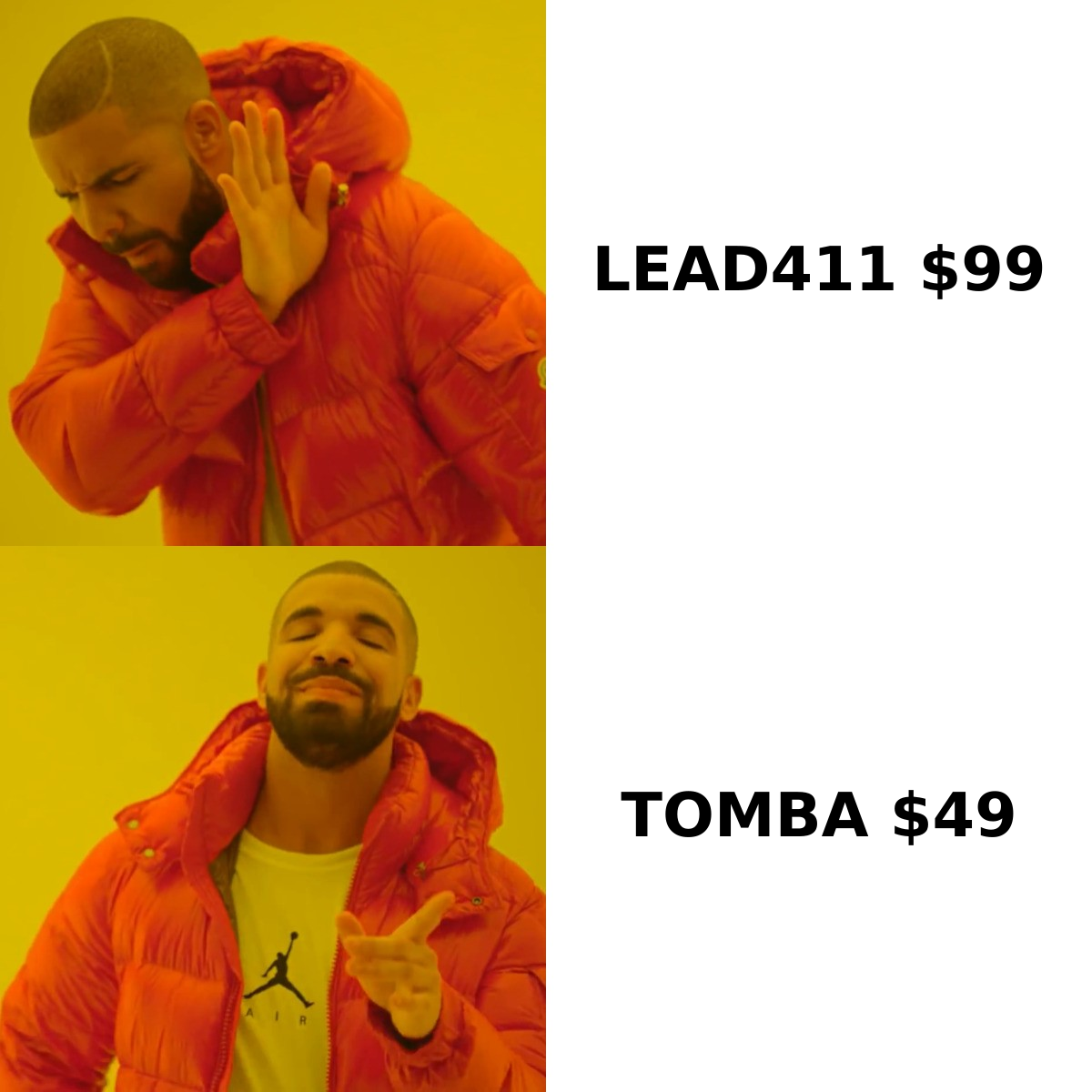
Per-seat licensing is also where annual contracts hurt. If two of your six reps churn in month four, you keep paying for six seats. Credit-based tools let you dial spend down the month your pipeline needs shrink. Compare that against Tomba pricing, which runs Free (25 searches/mo), Starter $49/mo, Growth $99/mo, and Pro $249/mo without charging per user.
Is Lead411's intent data worth the premium?#
Sometimes. Intent data is the single strongest argument for Lead411 over any pure email finder. It is also the most oversold category in sales tech.
Intent works when three things are true:
- You have a repeatable play attached to the signal. A Bombora surge on "warehouse management software" is useless unless a rep knows exactly what to send within 48 hours.
- Your ICP is large enough that prioritization matters. If your total addressable market is 400 accounts, you should be contacting all 400, not ranking them.
- Someone owns the workflow. Intent feeds that land in a dashboard nobody opens produce zero pipeline. Forrester and other analysts have documented this repeatedly: signal data fails on operational adoption far more often than on data quality.
Growth triggers — funding rounds, leadership hires, office expansions — are usually the more reliable half of Lead411's signal stack. They are events rather than probabilistic topic scores. A Series B announcement is a fact. A "surging" topic score is an inference from third-party content consumption.
If your team is not yet running disciplined sequences off a clean list, buying intent data first is putting a turbocharger on a car with no wheels. Fix targeting and deliverability, then buy signals.
Where does Skrapp fall short?#
Skrapp is honest about what it is, which is refreshing. Still, you should know the ceilings before you standardize on it.
- No phone numbers. If your sequence includes calls — and for most mid-market motions it should — you need a separate phone finder or a different platform entirely.
- Coverage is tied to LinkedIn presence. Prospects who do not keep profiles, or who work at companies with thin LinkedIn footprints, are hard to reach. This hits blue-collar, government, and non-US SMB segments hardest.
- Catch-all domains return ambiguous results. Like nearly every finder, Skrapp will hand you an address on a catch-all server marked as accepted. Some of those are real. Some are black holes that quietly destroy your sender reputation.
Two more limits show up as you scale.
- Thin firmographic filtering. You cannot easily build a list of "US manufacturers, $50M-$200M revenue, using NetSuite" from inside Skrapp. You build that list elsewhere and bring it to Skrapp for enrichment.
- Lighter integration surface. It connects to common tools, but it is not designed to be the backbone of a RevOps stack.

None of these are dealbreakers for the job Skrapp is designed for. They become dealbreakers the moment your team grows past pure email outbound.
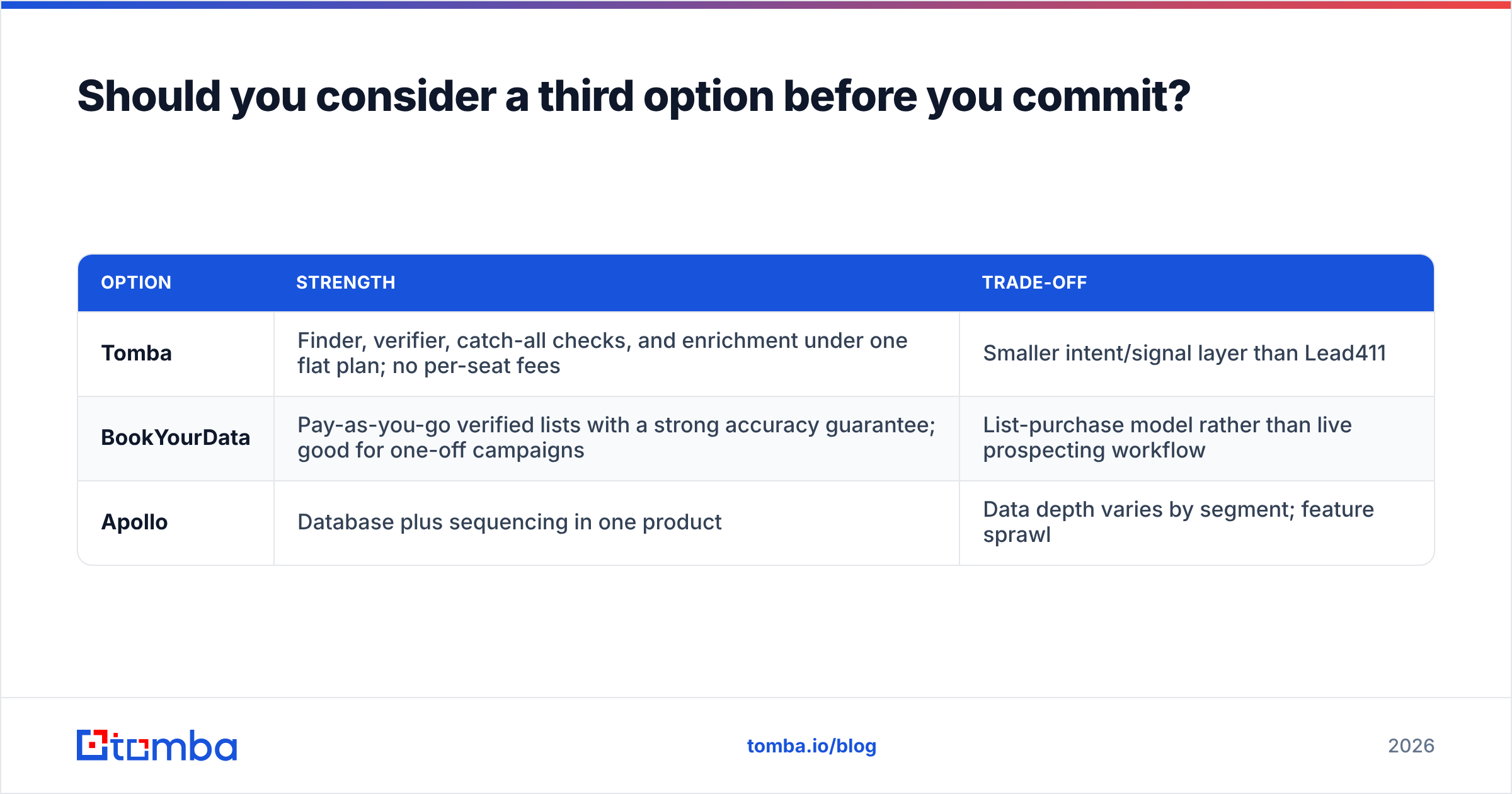
Should you consider a third option before you commit?#
Yes, and not because either tool is bad. The Lead411 vs Skrapp framing forces a false choice between "expensive platform I mostly won't use" and "cheap finder that can't grow with me."
Three alternatives worth putting in the same bake-off:
| Option | Strength | Trade-off |
|---|---|---|
| Tomba | Finder, verifier, catch-all checks, and enrichment under one flat plan; no per-seat fees | Smaller intent/signal layer than Lead411 |
| BookYourData | Pay-as-you-go verified lists with a strong accuracy guarantee; good for one-off campaigns | List-purchase model rather than live prospecting workflow |
| Apollo | Database plus sequencing in one product | Data depth varies by segment; feature sprawl |
Tomba's angle is the gap between the two products in this comparison. The email finder covers name-and-domain lookups, domain search handles whole-company sweeps, and the LinkedIn finder covers the extension workflow Skrapp users rely on. Verification is built into the same credit pool instead of being sold as a separate subscription. For engineering-led teams, the Tomba API handles enrichment inside your own pipeline instead of forcing reps into another UI.
BookYourData is a genuinely different model worth understanding: you buy verified contact lists outright, which suits campaign-based teams that do not need a year-round seat. Check pricing structures on G2 where all three categories sit side by side with user reviews.
Which one should you choose?#
Answer these five questions and the decision makes itself.
- Do your reps make calls? Yes, and you have no dialer data source, then Lead411. No, then skip it.
- Is your list already built? If you know your 500 target accounts, you need enrichment, not a database. Skrapp or a finder wins.
- How many people need access? Three or more seats makes per-seat pricing expensive fast. Weigh credit-based tools.
- What is your bounce tolerance? If you are rebuilding domain reputation, prioritize verification depth over raw coverage. Run every list through a verifier regardless of vendor.
- Will you actually operationalize intent? If nobody owns the play, you are paying for a dashboard.
For most early-stage and SMB teams, Skrapp or an equivalent finder plus a rigorous verification step covers 90% of the job at a fraction of the cost. For established SDR teams calling into mid-market accounts with a defined intent workflow, Lead411 is a legitimate ZoomInfo alternative at a materially lower price point.
Frequently asked questions#
Is Lead411 cheaper than ZoomInfo? Generally yes. Lead411 publishes entry pricing around $99 per user per month annually, while ZoomInfo quotes are typically multiples of that. The trade-off is index breadth and enterprise tooling.
Does Skrapp violate LinkedIn's terms? Browser extensions that read profile data operate in a gray area of LinkedIn's user agreement. Use a secondary account for extraction work, keep volumes reasonable, and read LinkedIn's current terms yourself before scaling.
Can I use both? Yes, and some teams do: Lead411 for account discovery and phone numbers, a cheaper finder for high-volume email enrichment. Just watch for duplicate spend on overlapping capabilities.
How do I stop buying bad data twice? Verify everything at the point of import, deduplicate before it hits the CRM, and re-verify anything older than 90 days. B2B contact data decays at roughly 2-3% per month as people change roles.
Start with the data, not the dashboard#
Before you sign an annual per-seat contract, run the boring test: take 200 real ICP contacts, find them in both tools, verify the output independently, and send to both lists. The bounce rate and reply rate will tell you more than any feature matrix.
If that test shows you need coverage and verification rather than intent dashboards, start with the Tomba Email Finder. The free tier gives you 25 searches a month to run the comparison yourself. Starter is $49/mo with no per-seat charge, and finding, verifying, and catch-all checking all draw from the same plan. Build the list, prove the deliverability, then decide whether a signal layer is worth adding on top.
Related guides#
// get started
Find, verify and enrich your first contacts today
Start on the free plan with 25 searches a month, then scale when your team is ready.
Free plan · No credit card required · GDPR & CCPA
// about the author