Leadbrowser Pricing, Reviews, Pros and Cons (2026 Guide)
A neutral breakdown of Leadbrowser pricing, reviews, pros and cons — what credits really cost per usable contact, where the data holds up, and when a cheaper stack wins.
TL;DR
- Leadbrowser is a browser-first B2B prospecting tool: search companies and people, pull contact data, push it to your CRM or a CSV. It sells on speed of workflow, not on having the biggest database.
- Pricing is credit-based and tiered. The headline monthly number is rarely what you pay per usable contact — credits burn on searches and reveals that return unverified or catch-all addresses.
- Reviews cluster around the same two themes: the interface is genuinely fast, and data coverage is uneven outside US/UK mid-market tech.
- The honest math: divide plan cost by verified, deliverable contacts, not by credits. That single calculation changes most buying decisions.
- If you mainly need accurate email discovery and verification rather than a full prospecting workspace, a dedicated email finder at $49/mo will usually beat a bundled seat-priced platform.
What is Leadbrowser and who is it for?#
Leadbrowser (leadbrowser.co) is a B2B lead discovery tool built around a search-and-reveal loop. You filter a company or contact list, reveal the contact details you want, and export or sync them. The pitch is workflow speed: fewer tabs, fewer copy-pastes, one place to go from "these 200 accounts" to "these 200 emails in my sequencer."
That positions it against two very different categories at once:
- Full GTM platforms (Apollo, ZoomInfo-class tools) that bundle database, sequencing, dialer, and intent signals into one seat price.
- Focused data utilities (email finders, verifiers, enrichment APIs) that do one job precisely and charge per lookup.
Leadbrowser sits in the middle. For a two-person SDR team that wants a single screen, that's appealing. For a RevOps lead wiring enrichment into HubSpot via API, it can feel like paying for a UI you'll never open.
Who it fits best:
- Founders doing their own outbound who value a fast interface over API depth.
- Small SDR teams (1–5 seats) selling into US and Western European mid-market.
- Agencies building one-off lists where a monthly credit bucket is easier to expense than metered API usage.
Who it fits badly:
- Anyone enriching at volume programmatically — you want an email finder API, not a browser session.
- Teams selling into APAC, LATAM, or non-tech verticals, where coverage on browser-first tools thins out fast.
- Deliverability-sensitive senders who need verification built into the same pass, not bolted on after export.
How does Leadbrowser pricing actually work?#
Conclusion first: the plan price is the least interesting number on the page. Credit mechanics decide your real cost.
Like most tools in this category, Leadbrowser uses a credit system layered on a monthly subscription, typically structured as a free or trial tier, a low entry plan for solo users, a mid plan where most teams land, and a custom tier for volume. Because vendors in this space adjust list pricing several times a year, treat any figure you read — here or elsewhere — as a starting point and confirm the current numbers on the vendor's own pricing page before you buy.
What matters more than the sticker price:
- What consumes a credit. Some tools charge for the search, some for the reveal, some for both. If a failed reveal still debits you, your effective cost per contact rises quietly.
- Whether credits roll over. Non-rolling monthly credits mean you pay for capacity you didn't use. Annual buckets are far more forgiving for lumpy list-building.
- Seat multiplication. Per-seat pricing means a three-person team pays three times for the same database. Credit-pooled pricing usually wins for small teams.
- Export limits. A generous credit count paired with a low monthly export cap is a soft throttle. Read both numbers together.
- Verification status of what you get. An unverified or catch-all address costs the same credit as a confirmed one but is worth a fraction as much.
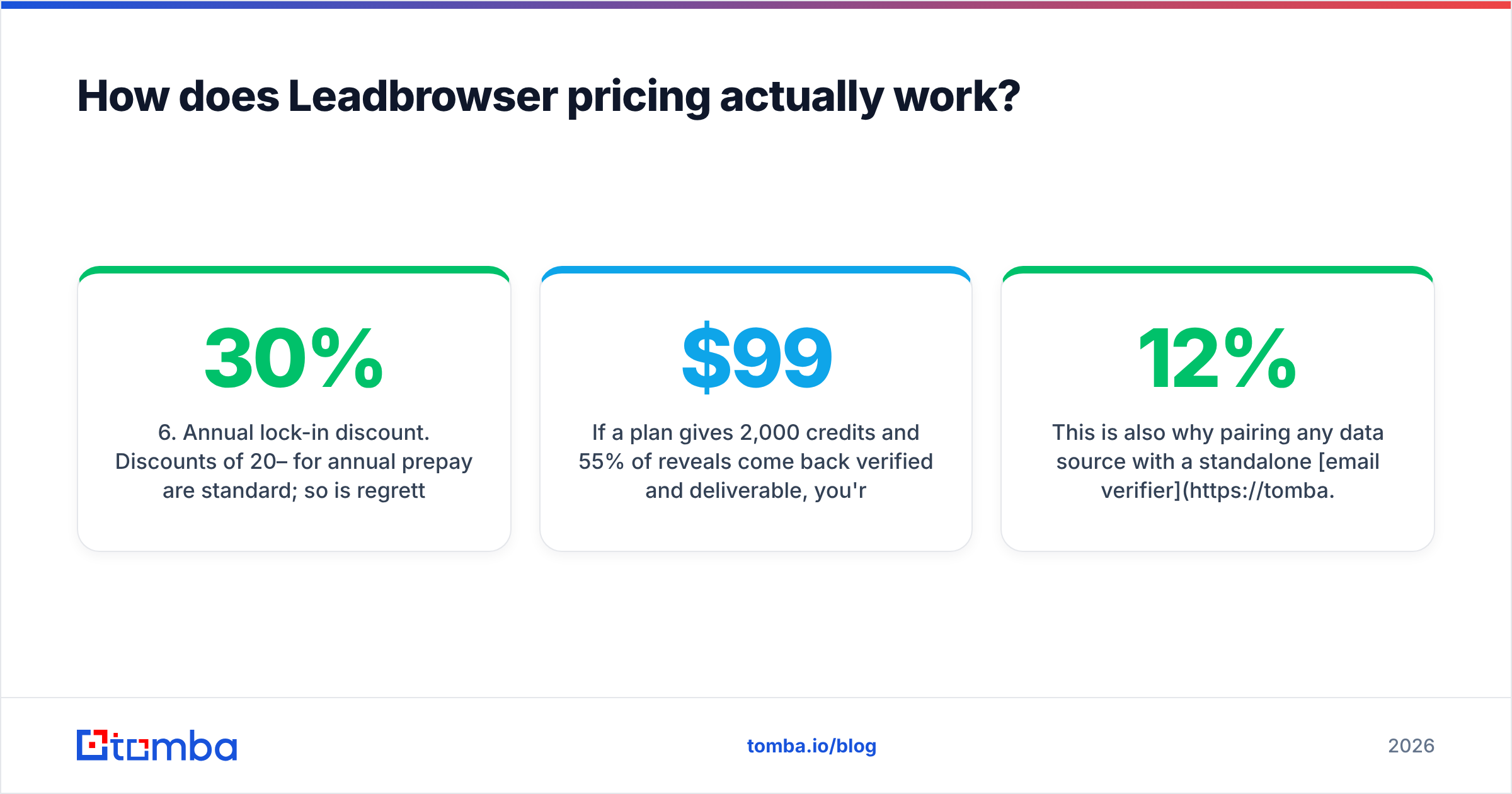
- Annual lock-in discount. Discounts of 20–30% for annual prepay are standard; so is regretting them in month four.

The only pricing math that matters#
Take your plan cost, divide by the number of contacts you can actually mail:
Real cost per lead = monthly price ÷ (credits × usable-rate)If a $99 plan gives 2,000 credits and 55% of reveals come back verified and deliverable, you're paying roughly $0.09 per usable lead — not $0.05. If a cheaper plan returns 85% deliverable, it can beat a "bigger" plan outright. Run that number before comparing logos.
This is also why pairing any data source with a standalone email verifier tends to pay for itself. Bouncing 12% of a list does not just waste credits; it damages sender reputation, which costs you replies on every campaign afterward.
What do Leadbrowser reviews say?#
Public review volume for Leadbrowser is modest compared with the category giants, so read the sample size before you read the stars. Check the live listings on G2 and Capterra rather than trusting any roundup — including this one — as a snapshot in time.
Across the tool's category, reviewer sentiment tends to fall into consistent buckets:
What reviewers praise
- Speed of the search-to-export loop; fewer steps than legacy databases.
- Clean filtering UI that non-technical users pick up in an afternoon.
- Responsive support at smaller vendors, which is a real advantage over enterprise incumbents.
What reviewers complain about
- Coverage gaps outside core geographies and industries.
- Credits spent on reveals that return a generic role address (info@, sales@) or a catch-all domain.
- CRM sync that handles the happy path but needs manual cleanup on duplicates.
- Pricing changes between the time a review was written and the time you read it.
The pattern is normal for a mid-size vendor. It is not a reason to disqualify the tool — it is a reason to run a paid trial against your ICP list rather than a demo list the vendor picked.
Is Leadbrowser accurate enough for cold outreach?#
Accuracy is the pivot point of this whole decision, and it is measured wrong almost everywhere. "95% accuracy" claims usually mean syntax and MX validity, not a human reads this inbox.
Three numbers to demand from any vendor, Leadbrowser included:
- Hit rate — of 100 prospects you search, how many return any address?
- Verified rate — of those, how many pass SMTP-level verification rather than being marked "accept-all" or "unknown"?
- Bounce rate in production — what actually happened when you sent.

Catch-all domains are where most tools quietly lose. A domain configured to accept all mail returns "valid" to naive checks, so the address lands in your sequencer and then bounces or black-holes. If a meaningful slice of your ICP runs catch-all — common in enterprise and in European mid-market — you need a dedicated catch-all verifier in the pipeline regardless of which database you buy from.
A practical test protocol, 30 minutes, before you sign anything:
- Pull 100 real prospects from your ICP — names and domains you already know.
- Run them through the trial. Record hit rate.
- Export and run the same list through an independent verifier.
- Compare the vendor's "valid" count to the independent "deliverable" count.
- Send a 50-contact test campaign and measure the real bounce rate.
Whatever survives step 5 is your true cost per lead. Everything before that is marketing.
What are the pros and cons of Leadbrowser?#
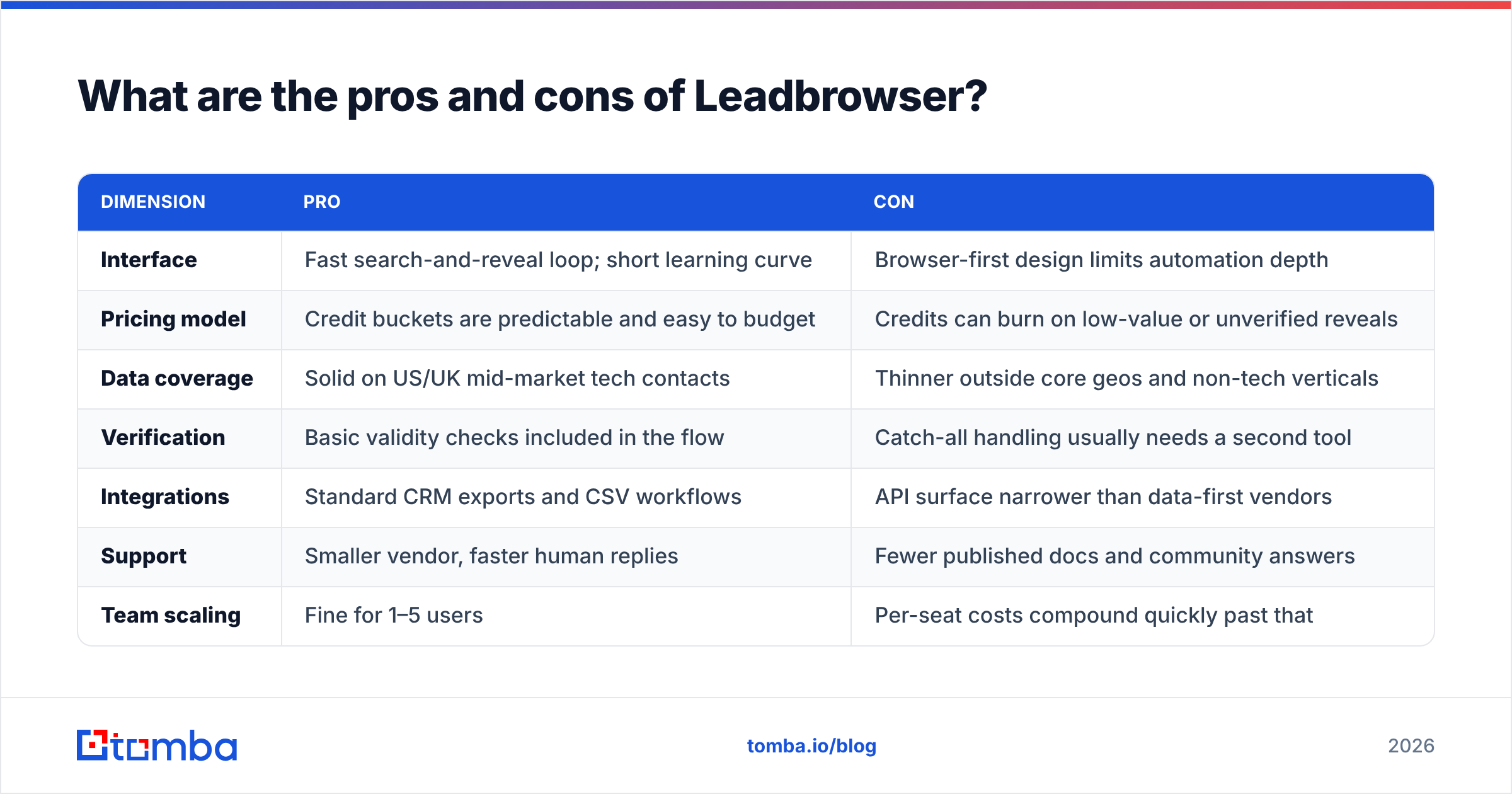
| Dimension | Pro | Con |
|---|---|---|
| Interface | Fast search-and-reveal loop; short learning curve | Browser-first design limits automation depth |
| Pricing model | Credit buckets are predictable and easy to budget | Credits can burn on low-value or unverified reveals |
| Data coverage | Solid on US/UK mid-market tech contacts | Thinner outside core geos and non-tech verticals |
| Verification | Basic validity checks included in the flow | Catch-all handling usually needs a second tool |
| Integrations | Standard CRM exports and CSV workflows | API surface narrower than data-first vendors |
| Support | Smaller vendor, faster human replies | Fewer published docs and community answers |
| Team scaling | Fine for 1–5 users | Per-seat costs compound quickly past that |
The summary: Leadbrowser is a workflow product with a database attached, not a database product with a workflow attached. If your bottleneck is finding time, that's a fit. If your bottleneck is finding correct contacts at scale, you're buying the wrong layer.
How does Leadbrowser compare to other lead data tools?#
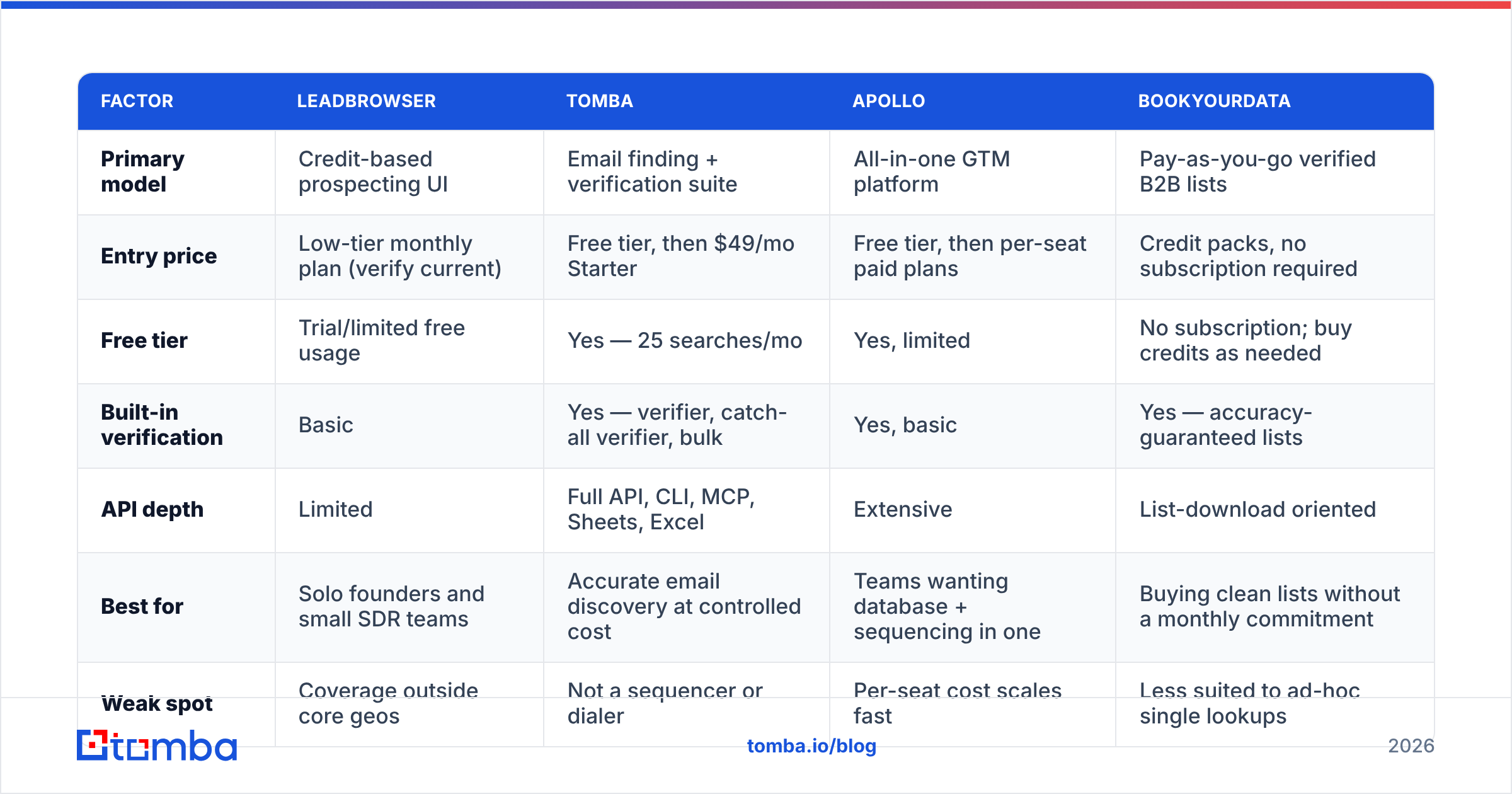
Compare on model, not on feature checklists — every vendor's checklist says yes to everything.

| Factor | Leadbrowser | Tomba | Apollo | BookYourData |
|---|---|---|---|---|
| Primary model | Credit-based prospecting UI | Email finding + verification suite | All-in-one GTM platform | Pay-as-you-go verified B2B lists |
| Entry price | Low-tier monthly plan (verify current) | Free tier, then $49/mo Starter | Free tier, then per-seat paid plans | Credit packs, no subscription required |
| Free tier | Trial/limited free usage | Yes — 25 searches/mo | Yes, limited | No subscription; buy credits as needed |
| Built-in verification | Basic | Yes — verifier, catch-all verifier, bulk | Yes, basic | Yes — accuracy-guaranteed lists |
| API depth | Limited | Full API, CLI, MCP, Sheets, Excel | Extensive | List-download oriented |
| Best for | Solo founders and small SDR teams | Accurate email discovery at controlled cost | Teams wanting database + sequencing in one | Buying clean lists without a monthly commitment |
| Weak spot | Coverage outside core geos | Not a sequencer or dialer | Per-seat cost scales fast | Less suited to ad-hoc single lookups |
BookYourData deserves a specific note: if your need is "give me a clean, verified list for this segment, no subscription," a pay-as-you-go list vendor is a legitimately better shape of purchase than a monthly seat. Different problem, different tool.
Tomba pricing is the simplest comparison anchor because the tiers are public and flat: Free (25 searches/mo), Starter $49/mo, Growth $99/mo, Pro $249/mo, Enterprise custom — no per-seat multiplier on the core data. Run the cost-per-usable-lead formula across all four columns above and the ranking usually reorders itself.

Who should buy Leadbrowser — and who should not?#
Buy it if:
- You're a founder or small team selling into US/UK mid-market tech and your main constraint is hours, not data volume.
- You want a single screen from filter to export and will actually use the UI daily.
- Your monthly contact need sits comfortably inside one credit tier — no overage roulette.
Skip it if:
- You need programmatic enrichment. Wire a data enrichment endpoint into your stack and skip the seat entirely.
- You already own a sequencer. Paying for overlapping workflow features is the most common wasted line item in outbound stacks.
- Your ICP is catch-all-heavy or geographically diverse. Test coverage first; assume nothing.
- You build lists in bursts. A bulk email finder run three times a quarter is cheaper than twelve months of unused credits.
The hybrid most teams land on: one source for discovery, one dedicated layer for verification, one sequencer. Three tools, each doing a job it's actually good at, usually costs less than one bundle that does all three at 70%.
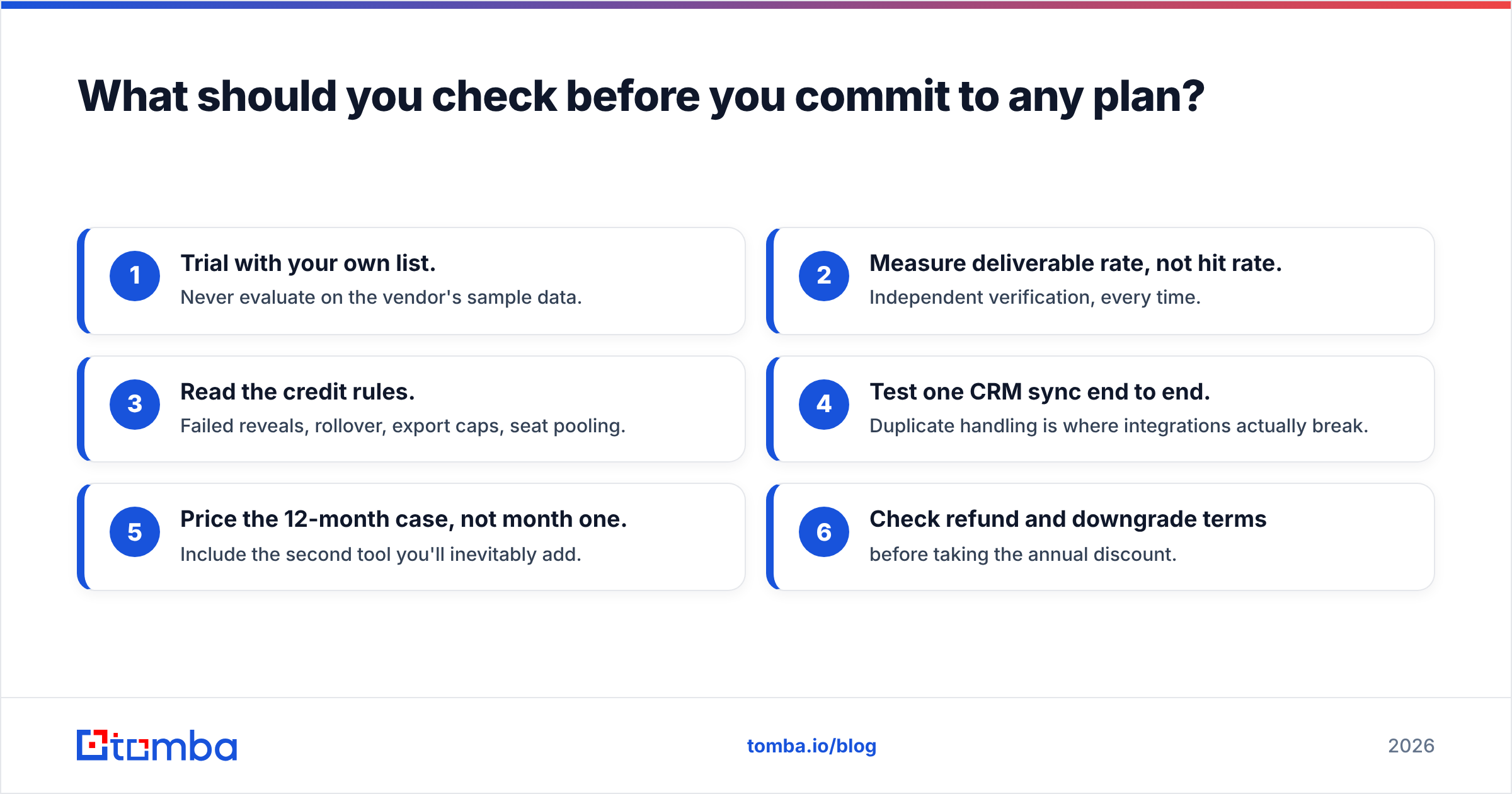
What should you check before you commit to any plan?#
Run this list against Leadbrowser or any competitor. It takes an hour and saves a year of contract regret.
- Trial with your own list. Never evaluate on the vendor's sample data.
- Measure deliverable rate, not hit rate. Independent verification, every time.
- Read the credit rules. Failed reveals, rollover, export caps, seat pooling.
- Test one CRM sync end to end. Duplicate handling is where integrations actually break.
- Price the 12-month case, not month one. Include the second tool you'll inevitably add.
- Check refund and downgrade terms before taking the annual discount.
If steps 1–2 show a weak deliverable rate, the rest of the checklist is moot. Data quality is upstream of everything — no sequencer copy rescues a list that bounces.
The bottom line#
Leadbrowser is a reasonable fit for solo operators and small teams who want a fast prospecting UI and whose ICP sits inside its strongest coverage. It is a poor fit for volume enrichment, API-driven workflows, or catch-all-heavy markets — and in those cases the bundled price is money spent on an interface you won't use.
If what you actually need is accurate contact discovery with verification in the same pass, start narrow. Tomba Email Finder gives you 25 free searches a month to test against your own ICP, $49/mo Starter when you're ready, and a built-in verifier plus domain search so you're not paying two vendors to do one job. Run your 100-prospect test on both and let the deliverable rate pick the winner.
Related guides#
// get started
Find, verify and enrich your first contacts today
Start on the free plan with 25 searches a month, then scale when your team is ready.
Free plan · No credit card required · GDPR & CCPA
// about the author