LeadEngineAI Pricing in 2026: Plans, Real Costs, and Alternatives
LeadEngineAI quotes a monthly number, but the real cost lives in credits, seats, and unusable records. Here's how to model the true cost per booked meeting — and when a cheaper stack wins.
TL;DR
- LeadEngineAI sells an AI-assisted lead engine, not raw contact data — so the sticker price is only the entry fee. Credits, seats, and enrichment overages decide the real bill.
- Public pricing is thin. Most buyers get a quote, which means the number you pay depends on how well you negotiate, not on a published rate card.
- The only metric that matters is cost per usable, verified contact — not cost per credit. A $0.02 record that bounces costs more than a $0.10 record that lands.
- If you mainly need accurate B2B emails and phones, a focused finder like Tomba at $49/mo, or pay-as-you-go credits from BookYourData, usually beats a full AI platform on cost per meeting.
- Buy the platform only if you'll actually use the workflow layer — scoring, sequencing, routing. Paying platform rates for a glorified email lookup is the most common budget leak in outbound.
What is LeadEngineAI, and what are you paying for?#
LeadEngineAI positions itself in the AI lead-generation category: software that finds accounts, identifies buying signals, enriches contacts, and hands sales a prioritized list. Think of it less like a phone book and more like a hiring agency — you're not paying for names, you're paying for someone to pre-screen and rank them.
That distinction matters the second you look at the invoice. A pure data vendor charges you for records. A platform charges you for records plus the software wrapped around them: the UI, the scoring model, the integrations, the seats your reps log into. When you compare LeadEngineAI pricing to a $49/mo email finder and conclude the finder is "10x cheaper," you're comparing two different products. The honest question is whether you need the wrapper.
Here's what a platform bill typically decomposes into:
- Platform fee — the base subscription that unlocks the app, regardless of usage. This is the line item most vendors quote first because it's the smallest.
- Seats — per-user charges for every rep who logs in. On team plans this frequently overtakes the platform fee by month three.
- Credits — consumption units burned on searches, enrichments, verifications, and exports. Different actions cost different amounts, which is where budgets go sideways.
- Overages or top-ups — what you pay when you exhaust credits mid-month. Top-up rates are almost always worse than the bundled rate.
- Onboarding and integration fees — one-time charges for implementation, CRM mapping, or custom fields on annual contracts.
- The invisible one: waste — credits spent on records that bounce, duplicate, or belong to someone who left the company in 2023.
Most pricing comparisons stop at line 1. Every finance team that has renewed an outbound tool knows lines 3 and 6 are the ones that hurt.

How does LeadEngineAI pricing work in 2026?#
Be skeptical of any article — including this one — that gives you exact LeadEngineAI plan prices to the dollar. At the time of writing, the vendor does not publish a complete, self-serve rate card the way Tomba or HubSpot do; entry tiers surface through trials and sales conversations, and quoted figures vary by region, contract length, and volume commitment. Treat any number you read online as a starting point for your own quote, not a fact.
What you can nail down before a sales call is the shape of the pricing, because AI lead platforms in this segment converge on the same model:
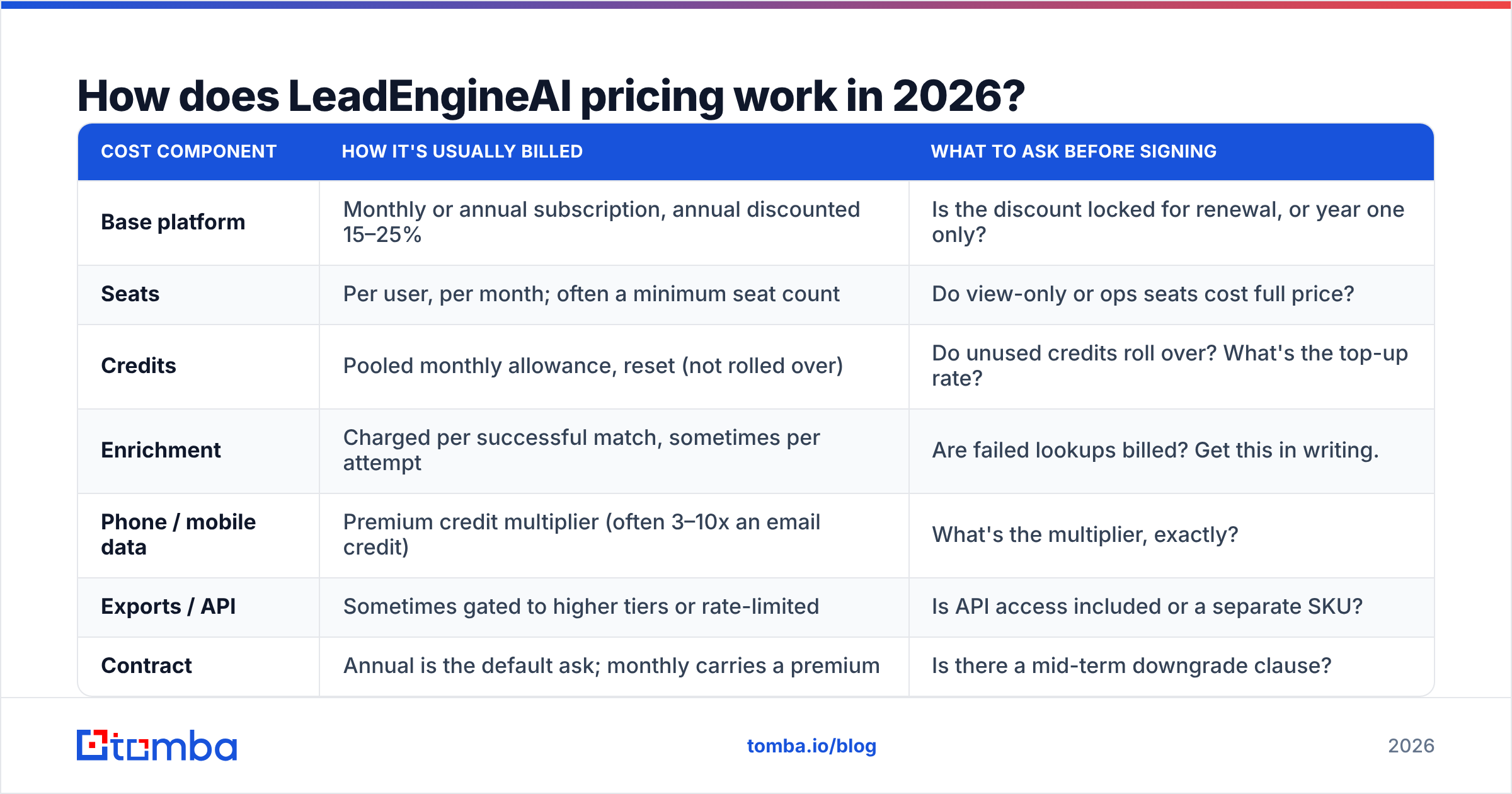
| Cost component | How it's usually billed | What to ask before signing |
|---|---|---|
| Base platform | Monthly or annual subscription, annual discounted 15–25% | Is the discount locked for renewal, or year one only? |
| Seats | Per user, per month; often a minimum seat count | Do view-only or ops seats cost full price? |
| Credits | Pooled monthly allowance, reset (not rolled over) | Do unused credits roll over? What's the top-up rate? |
| Enrichment | Charged per successful match, sometimes per attempt | Are failed lookups billed? Get this in writing. |
| Phone / mobile data | Premium credit multiplier (often 3–10x an email credit) | What's the multiplier, exactly? |
| Exports / API | Sometimes gated to higher tiers or rate-limited | Is API access included or a separate SKU? |
| Contract | Annual is the default ask; monthly carries a premium | Is there a mid-term downgrade clause? |
The single highest-leverage question on that list is "do failed lookups burn credits?" A vendor with a 55% match rate that charges per attempt is functionally twice as expensive as its rate card suggests. A vendor that charges only on success is telling you it's confident in coverage.
The second highest-leverage question is credit rollover. Outbound volume is lumpy — you run a 5,000-contact campaign in March and almost nothing in April. Non-rolling credits quietly convert that lumpiness into pure waste.
What does LeadEngineAI actually cost per usable lead?#
Conclusion first: divide your total monthly spend by the number of contacts that are verified, deliverable, and in-ICP, not by the number of credits you were sold.
Run the math like this:
- Start with the all-in monthly cost. Platform + seats + expected top-ups. Not the headline tier price.
- Multiply credits by the match rate. If 10,000 credits return 6,200 contacts, your effective unit cost is 1.6x the advertised rate.
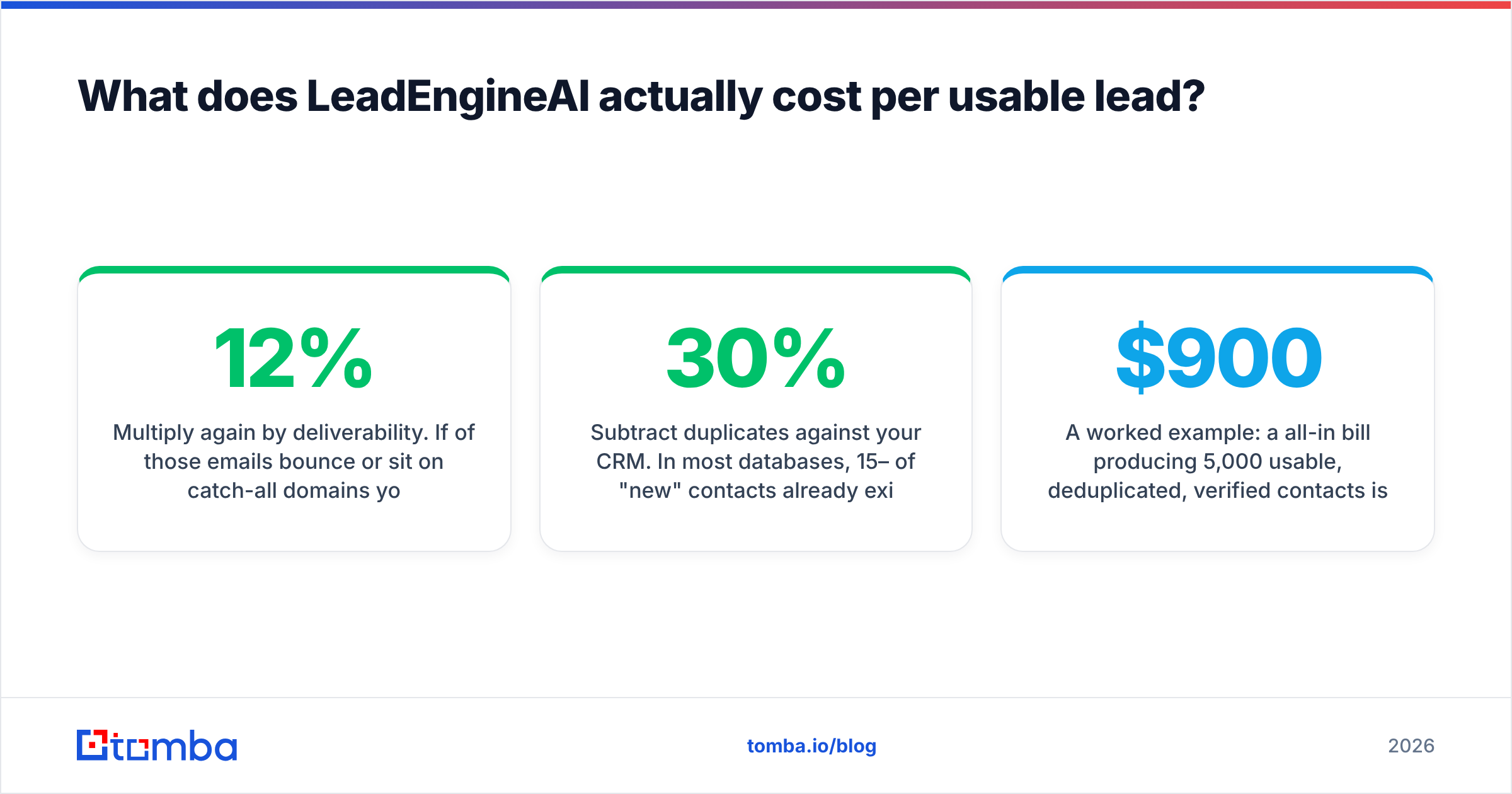
- Multiply again by deliverability. If 12% of those emails bounce or sit on catch-all domains you never validated, you're down to ~5,450 usable records.
- Subtract duplicates against your CRM. In most databases, 15–30% of "new" contacts already exist. Deduplicate before you count.
- Now divide. That's your true cost per usable contact — and it's routinely 2–3x the number in the vendor's deck.
A worked example: a $900/month all-in bill producing 5,000 usable, deduplicated, verified contacts is $0.18 per contact. The same $900 producing 1,800 usable contacts is $0.50 — nearly 3x worse, from the identical invoice. Nobody notices, because the invoice looks the same either way.
This is also why verification is not an optional add-on. Running new data through an email verifier before it hits a sequence is the cheapest insurance in the stack: you pay cents to avoid burning sender reputation that costs weeks to rebuild. G2's lead intelligence category reviews are full of teams who discovered that distinction after a domain got throttled.
What are the hidden costs nobody puts in the quote?#
Seat creep. You buy three seats. Marketing wants one. RevOps wants one for list building. A contractor needs one for a quarter. Per-seat pricing punishes exactly the behavior you want — more people using the data.
The annual lock-in. The 20% annual discount is real, and so is the risk. Outbound tooling churns fast; a 12-month commitment made in Q1 is frequently regretted by Q3. Price the discount against the option value of leaving.
Data decay. Roughly 2–3% of B2B contact data goes stale every month through job changes alone. A list you bought in January is materially worse in June. If the platform doesn't re-enrich automatically, you're paying twice for the same contact.
Deliverability damage. This one doesn't appear on any invoice. Sending to unverified or catch-all addresses raises bounce rates, which degrades sender reputation, which suppresses every campaign you run afterward — including the ones with good data. The cost shows up as a declining reply rate you can't explain.
Integration labor. Getting a platform to write cleanly into your CRM is rarely a checkbox. Budget engineering or ops hours for field mapping, dedupe rules, and routing logic. Capterra's lead generation software listings make implementation time look trivial; practitioners consistently report otherwise.

How does LeadEngineAI pricing compare to the alternatives?#
Different tools solve different problems, and pricing follows the problem. Here's the honest landscape:
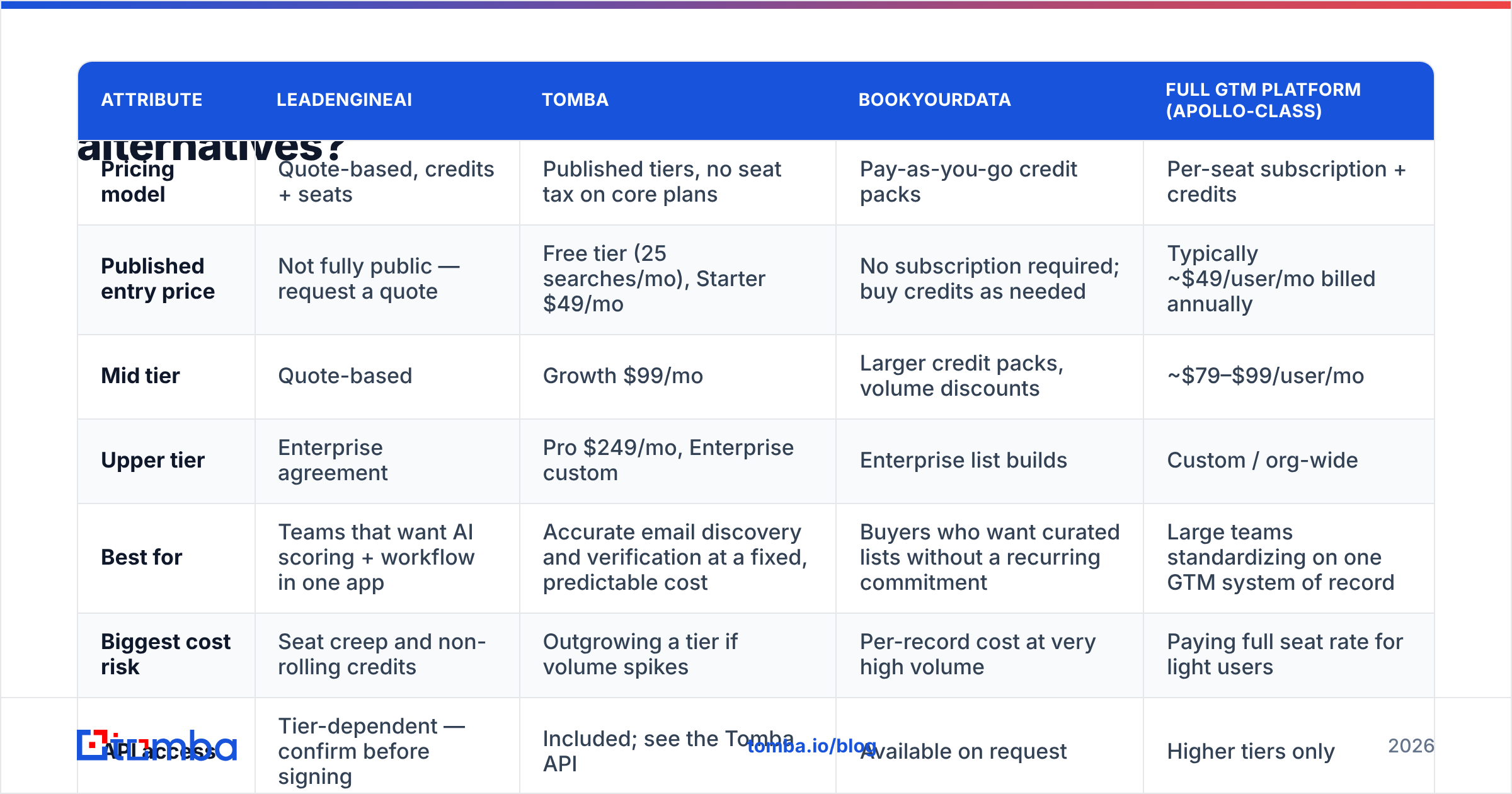
| Attribute | LeadEngineAI | Tomba | BookYourData | Full GTM platform (Apollo-class) |
|---|---|---|---|---|
| Pricing model | Quote-based, credits + seats | Published tiers, no seat tax on core plans | Pay-as-you-go credit packs | Per-seat subscription + credits |
| Published entry price | Not fully public — request a quote | Free tier (25 searches/mo), Starter $49/mo | No subscription required; buy credits as needed | Typically ~$49/user/mo billed annually |
| Mid tier | Quote-based | Growth $99/mo | Larger credit packs, volume discounts | ~$79–$99/user/mo |
| Upper tier | Enterprise agreement | Pro $249/mo, Enterprise custom | Enterprise list builds | Custom / org-wide |
| Best for | Teams that want AI scoring + workflow in one app | Accurate email discovery and verification at a fixed, predictable cost | Buyers who want curated lists without a recurring commitment | Large teams standardizing on one GTM system of record |
| Biggest cost risk | Seat creep and non-rolling credits | Outgrowing a tier if volume spikes | Per-record cost at very high volume | Paying full seat rate for light users |
| API access | Tier-dependent — confirm before signing | Included; see the Tomba API | Available on request | Higher tiers only |
Figures reflect publicly listed pricing at the time of writing and change frequently. Verify directly with each vendor before budgeting — especially for LeadEngineAI, where pricing is quote-driven.
Two things worth calling out from that table.
First, BookYourData's pay-as-you-go structure solves a real problem that subscription pricing doesn't: intermittent demand. If you build lists in bursts — a conference push, a new vertical test, an ABM pilot — buying credits when you need them beats paying twelve monthly invoices for four months of usage. It's a genuinely different buying model, not a cheaper version of the same one.
Second, the per-seat platforms aren't overpriced — they're mispriced for small teams. A 40-rep organization that lives inside one system of record gets real value from seat-based pricing. A four-person startup running outbound out of a spreadsheet and a sequencer does not, and should stop pretending otherwise.
Is LeadEngineAI worth it for your team?#
Yes, if three things are true: you'll use the AI scoring and workflow layer daily, you have enough seats to justify the platform overhead, and your buying committee values one vendor over best-of-breed. Platforms earn their premium through consolidation — one contract, one support relationship, one place your reps log in.
No, if you're buying it primarily to find email addresses. That's the mismatch we see most often. The AI layer is the expensive part; if your actual job-to-be-done is "get me verified contacts for these 2,000 companies," you're paying a workflow premium for a data task.
A practical test: list the five features you'd lose by switching to a focused finder plus your existing sequencer. If you can't name five you'd genuinely miss, the platform isn't earning its price.
For the data-task case, the cheaper stack looks like this:
- Discovery: a domain search to pull every public contact pattern at a target company, then an email finder for named prospects.
- Validation: bulk verification before anything enters a sequence, with catch-all domains flagged rather than blindly mailed.
- Enrichment: fill gaps on records you already own instead of re-buying them.
- Sequencing: whatever you already pay for — Instantly, Smartlead, Salesloft, or your CRM's native tooling.
That stack runs at a predictable monthly number with no seat tax, and it fails gracefully: if one component underperforms, you swap it without renegotiating a master agreement.
How do you negotiate a better LeadEngineAI price?#
Quote-based pricing is negotiable pricing. That's the whole point of not publishing a rate card.
- Ask for the match-rate guarantee in writing. "We only charge for successful matches" in an email from an AE is worth more than any discount.
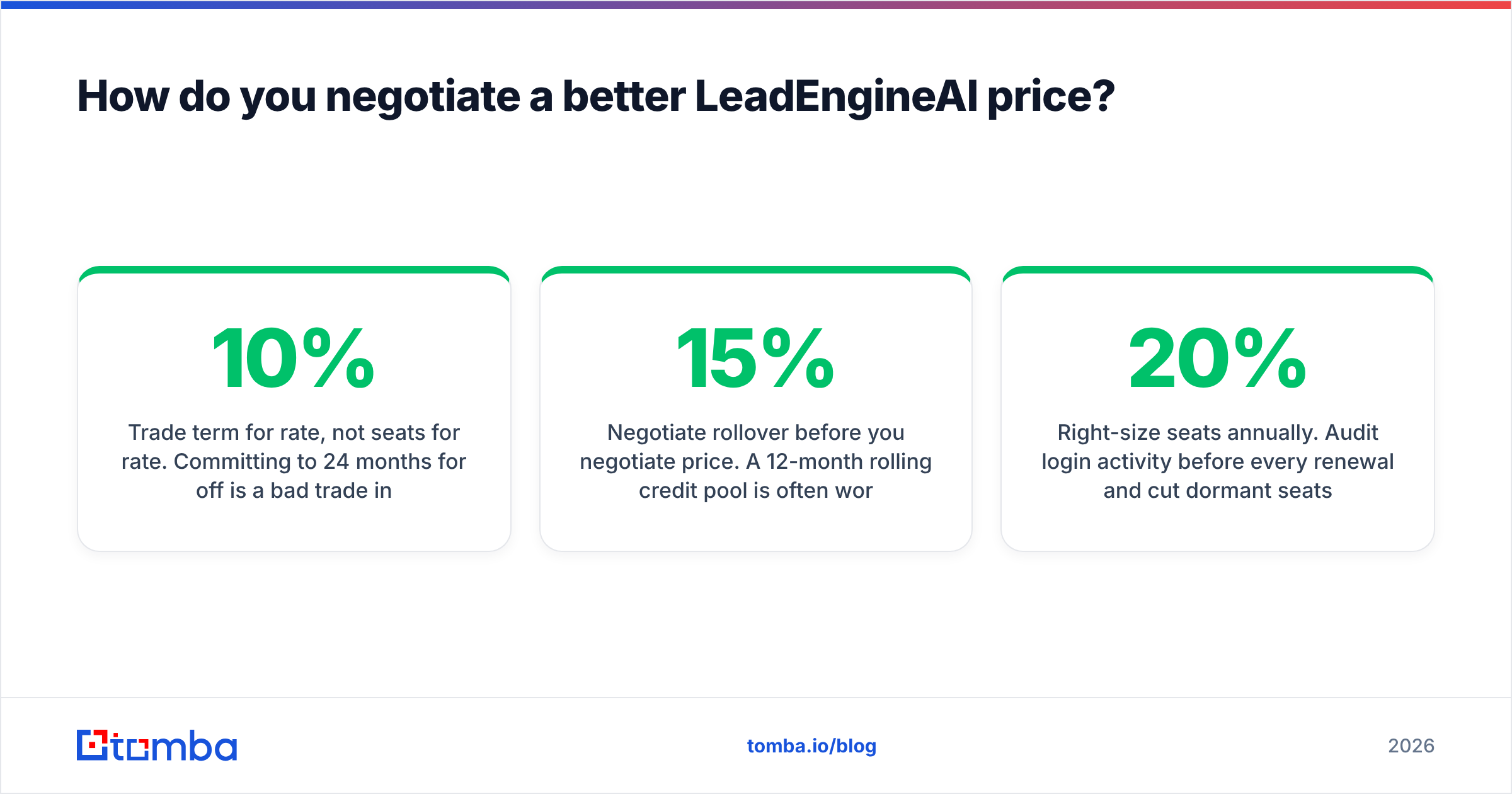
- Trade term for rate, not seats for rate. Committing to 24 months for 10% off is a bad trade in a category this volatile. Committing to a higher credit volume at a lower unit rate is usually a good one.
- Negotiate rollover before you negotiate price. A 12-month rolling credit pool is often worth more than a 15% discount on a non-rolling one.
- Run a paid pilot on your real ICP. Not the vendor's sample list. Export 500 records, verify them independently, and measure the actual deliverable rate. Bring that number to the negotiation.
- Time it. End of quarter is a real lever, and HubSpot's sales research has documented the pattern for years: discount authority loosens as quotas close.
- Right-size seats annually. Audit login activity before every renewal and cut dormant seats. This alone frequently recovers 20% of spend.
What should you do next?#
Price the job, not the tool. Write down how many verified contacts you need per month, what you currently pay per usable record, and which workflow features you'd actually miss. If the answer is "I need accurate emails and phones, reliably, at a price I can forecast," you don't need a quote — you need a rate card.
Start with the Tomba Email Finder. The free tier gives you 25 searches a month to benchmark match quality against your own target list before you spend anything, Starter is $49/mo, and every plan includes verification so you're not paying twice to find out whether an address is real. Run your ICP through it alongside whatever quote LeadEngineAI puts in front of you, compare cost per usable contact, and let the numbers pick the winner.
Related guides#
// get started
Find, verify and enrich your first contacts today
Start on the free plan with 25 searches a month, then scale when your team is ready.
Free plan · No credit card required · GDPR & CCPA
// about the author