LeadEngine AI vs FindEmails.com (Toofr): 2026 Comparison
LeadEngine AI promises AI-sourced leads. FindEmails.com (formerly Toofr) sells cheap bulk lookups. We compare coverage, verification, pricing and cost per valid email — plus where each one quietly fails.
LeadEngine AI vs FindEmails.com (Toofr) is a choice between two different jobs. One builds your list. The other looks up addresses for names you already have. Here is how they compare, and what each one really costs per valid email.
TL;DR
- LeadEngine AI sells an AI-assisted sourcing workflow: describe an ICP, get a built list with enriched contacts. Good for teams who want the list built for them.
- FindEmails.com (the product formerly known as Toofr) is the opposite philosophy: a cheap, no-frills email lookup engine with bulk CSV processing and a low price per credit.
- Neither tool is primarily a verification platform. Both hand you results that still need an independent validity check before you load them into a sequencer.
- On cost-per-valid email — the only metric that matters — a low sticker price can be the more expensive option once you subtract unverifiable and catch-all results.
- If your bottleneck is data quality and API access rather than list ideation, a dedicated finder + verifier stack (Tomba's Free tier is 25 searches/mo, Starter $49/mo) usually lands cheaper per usable contact.
What are LeadEngine AI and FindEmails.com?#
They solve different halves of the same problem, which is exactly why people compare them.
FindEmails.com started life as Toofr, one of the older email-finding tools on the market. It was built around a simple idea: given a name and a company domain, guess the most probable email pattern, test it, and return a confidence score. Toofr rebranded to FindEmails.com and kept that DNA — cheap credits, bulk CSV upload, an API, minimal UI. You come with a list of names and companies. It comes back with addresses.
LeadEngine AI sits one step earlier in the funnel. Instead of "here are my 400 prospects, find their emails," the pitch is "here is my ideal customer profile, build me the list." AI-first lead platforms in this category combine three parts. A contact database, intent or firmographic filters, and an LLM layer. The LLM turns a plain-English ICP description into a query, and the output is a ready-to-run list with emails attached.
So the honest framing is not "which is better" but "which gap are you filling?" If you already know who you want to reach, list-building AI is overhead you're paying for. If you're staring at a blank CRM, a pure lookup engine gives you nothing to look up.
What happened to Toofr, and does the rebrand matter?#
Toofr became FindEmails.com — same core lookup engine, new brand and packaging. It matters for two practical reasons.
First, most reviews you'll find are about Toofr, not FindEmails.com. When you read a three-year-old G2 or Capterra thread praising or panning "Toofr's accuracy," you're reading about an earlier iteration of the pattern-matching engine. Treat old reviews as directional, not current.
Second, the rebrand coincided with a repositioning toward volume buyers. The pricing model rewards people who process thousands of rows at once, not people who need fifty perfect contacts for an ABM play. That's a legitimate strategy — it just determines who should buy it.
LeadEngine AI vs FindEmails.com: how do they compare head-to-head?#
Pricing on AI-first lead tools changes often, and both vendors run promotional tiers. Check current numbers on each vendor's site before you commit. The structural differences below are the durable part.
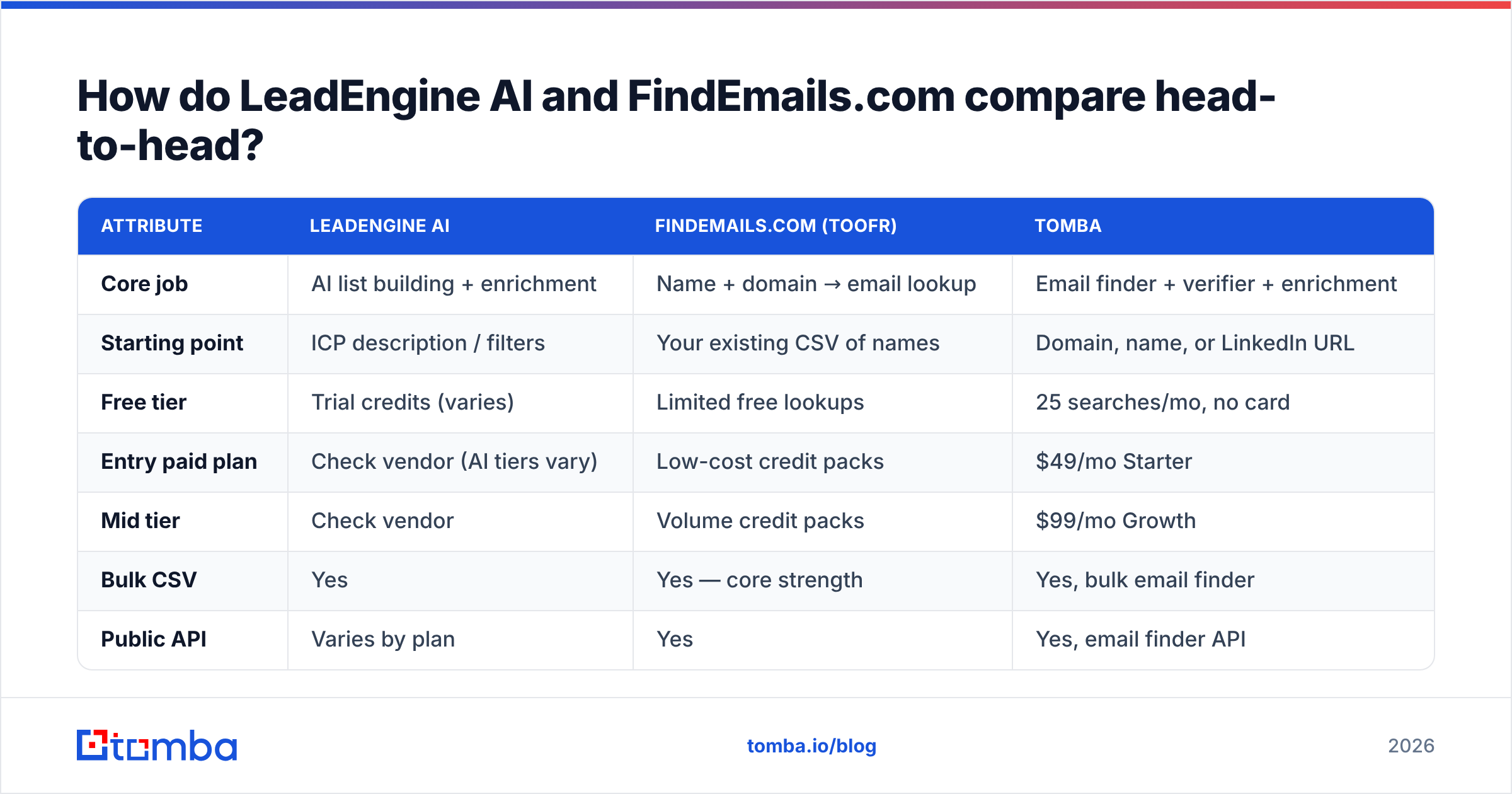
| Attribute | LeadEngine AI | FindEmails.com (Toofr) | Tomba |
|---|---|---|---|
| Core job | AI list building + enrichment | Name + domain → email lookup | Email finder + verifier + enrichment |
| Starting point | ICP description / filters | Your existing CSV of names | Domain, name, or LinkedIn URL |
| Free tier | Trial credits (varies) | Limited free lookups | 25 searches/mo, no card |
| Entry paid plan | Check vendor (AI tiers vary) | Low-cost credit packs | $49/mo Starter |
| Mid tier | Check vendor | Volume credit packs | $99/mo Growth |
| Bulk CSV | Yes | Yes — core strength | Yes, bulk email finder |
| Public API | Varies by plan | Yes | Yes, email finder API |
| Built-in verification | Basic / bundled | Confidence score, limited SMTP depth | Dedicated email verifier + catch-all handling |
| Phone numbers | Sometimes bundled | No | Yes, phone finder |
| Best for | Teams with no list yet | High-volume, price-sensitive lookups | Teams who need verified data in a workflow |

The pattern that falls out of the table: LeadEngine AI competes on sourcing, FindEmails.com competes on price per lookup, and neither competes primarily on verification depth. That third column is where most cold email programs actually break.
Which one finds more valid email addresses?#
Nobody should trust a vendor's own accuracy claim, including ours. Public benchmarks vary wildly because they use different test sets. What you can reason about is methodology, because methodology predicts where a tool fails.

Three mechanisms drive accuracy, and every finder uses some mix:
- Pattern inference. Determine that Acme uses
first.last@acme.com, then apply it to your target. Cheap, fast, and the backbone of the Toofr lineage. It fails silently when a company runs mixed patterns after an acquisition, or when two employees share a name. - Crawled and sourced records. Real addresses observed in public sources — bylines, filings, repos, company pages. Slower to build, far more defensible. This is what separates a B2B database from a permutation engine.
- SMTP and MX validation. Actually ask the receiving server whether the mailbox exists. This is where catch-all domains wreck naive tools: a catch-all accepts everything, so a shallow checker marks garbage as "valid."
A tool that leans hard on mechanism 1 and light on mechanism 3 will show you a high "found" rate and a low deliverable rate. That's the most common disappointment with budget lookup tools, and it's not dishonesty — it's just what pattern guessing does. Want to see the difference yourself? Run twenty known-good contacts through any tool and compare its confidence score to an independent check with a free email checker.
AI list builders have a different failure mode. The LLM layer reads your ICP loosely, so you can get a clean list of 500 contacts where 80 sit at companies that don't match your criteria at all. The emails may be fine. The targeting quietly drifted. Always spot-check 25 rows against your real ICP before you launch.
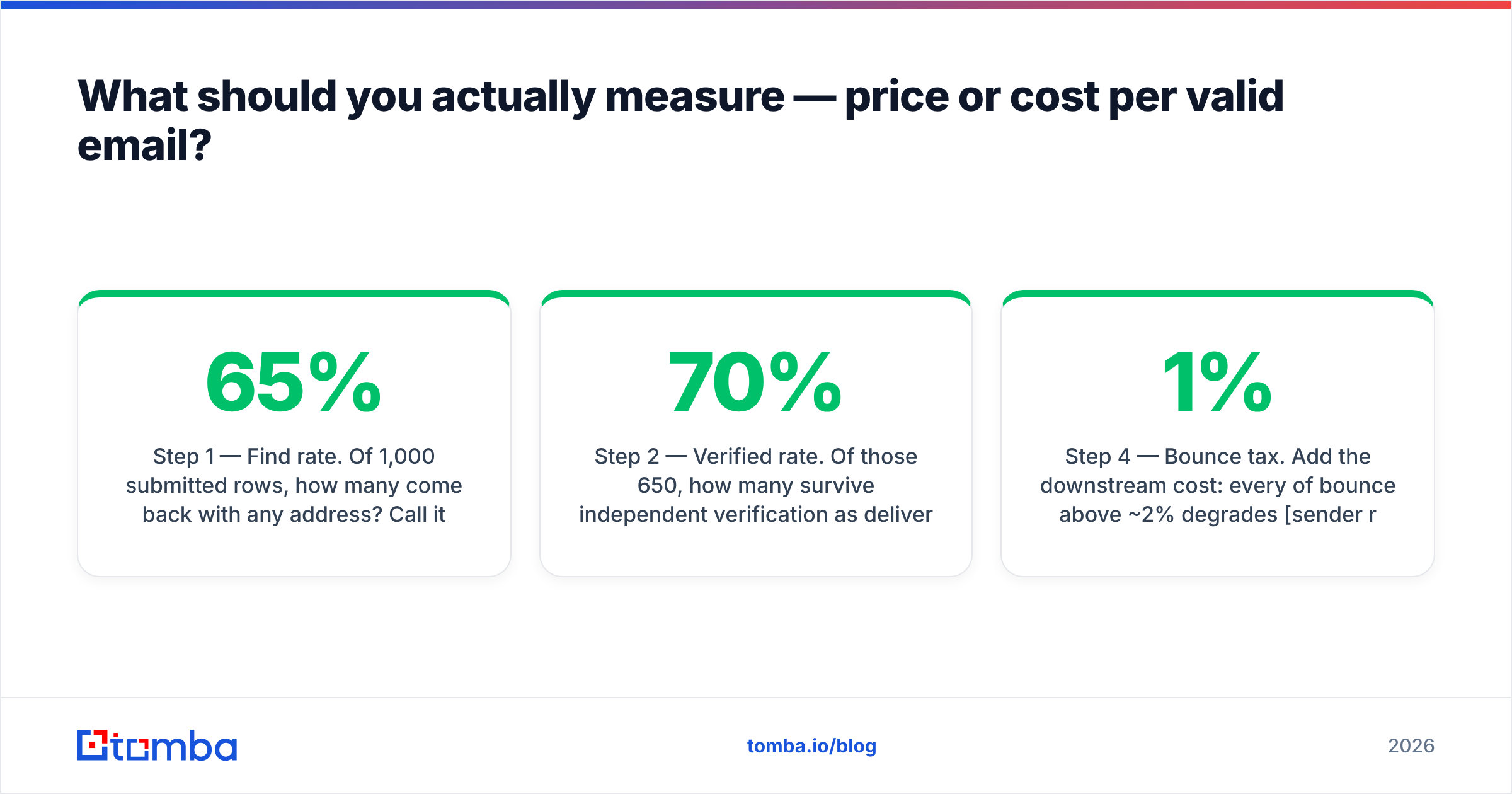
What should you actually measure — price or cost per valid email?#
Price per credit is the wrong number. Here's the one to use.
- Step 1 — Find rate. Of 1,000 submitted rows, how many come back with any address? Call it 65%.
- Step 2 — Verified rate. Of those 650, how many survive independent verification as deliverable (not catch-all, not risky)? Say 70% → 455.
- Step 3 — Effective cost. Divide your total spend (credits + verification + the hours spent cleaning) by 455, not by 1,000.
- Step 4 — Bounce tax. Add the downstream cost: every 1% of bounce above ~2% degrades sender reputation, which suppresses the inbox placement of your good contacts too.
- Step 5 — Compare. A tool at half the price with two-thirds the verified rate is not cheaper. It's more expensive and slower.
That step-4 bounce tax is the part teams forget. Mailbox providers judge you on the aggregate. As HubSpot's sales research and most deliverability guidance repeat, list hygiene sits upstream of every other cold email metric. Subject lines can't rescue a domain that's already been throttled.
Who should choose LeadEngine AI?#
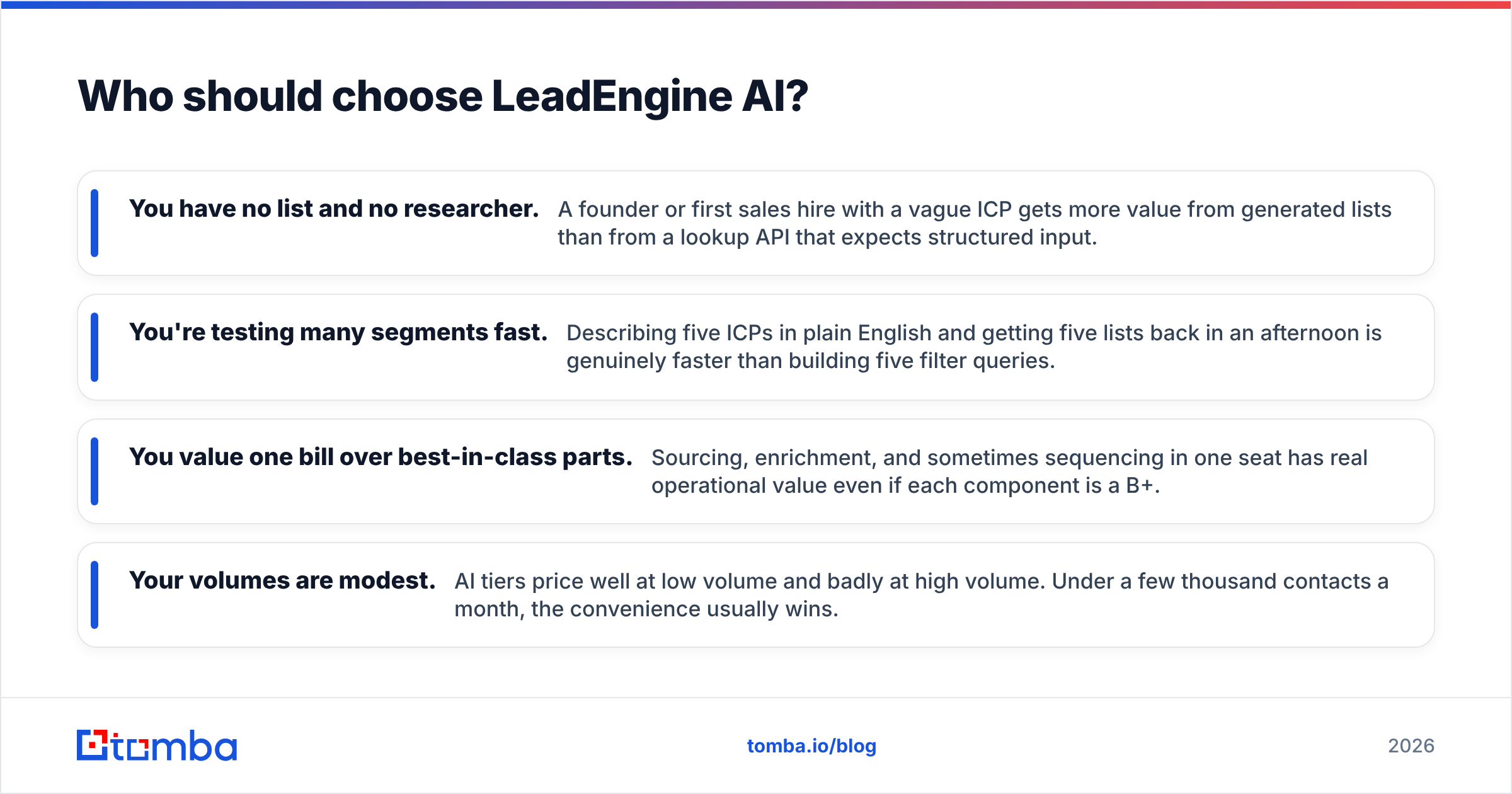
Pick the AI list-builder route if you recognise yourself here:
- You have no list and no researcher. A founder or first sales hire with a vague ICP gets more value from generated lists than from a lookup API that expects structured input.
- You're testing many segments fast. Describing five ICPs in plain English and getting five lists back in an afternoon is genuinely faster than building five filter queries.
- You value one bill over best-in-class parts. Sourcing, enrichment, and sometimes sequencing in one seat has real operational value even if each component is a B+.
- Your volumes are modest. AI tiers price well at low volume and badly at high volume. Under a few thousand contacts a month, the convenience usually wins.
Where it hurts: you inherit the vendor's database coverage. If their records are thin in your vertical — European mid-market manufacturers, say, or anything outside SaaS — no amount of LLM phrasing conjures contacts that aren't there. Ask for a sample export in your niche before signing.
Who should choose FindEmails.com?#
Pick the cheap-lookup route if:
- You already own the names. Conference attendee lists, scraped LinkedIn exports, webinar registrants, trade association directories — you have rows, you need addresses.
- Volume is high and tolerance for noise is real. If you're sending broad campaigns and can absorb some waste, per-credit cost dominates.
- You want a simple API. The Toofr-era API is straightforward and easy to wire into a script.
- You'll verify separately anyway. Smart operators treat cheap finders as candidate generators and pipe everything through a real verifier afterward. That combination is perfectly rational.
Where it hurts: catch-all domains and thin coverage on smaller companies. And because verification is shallow, "found" and "safe to send" are not the same set. Budget for a second tool, or accept the bounce rate.
Where does a dedicated finder-plus-verifier stack fit?#
This is the third option most comparison posts skip, and it's the one that usually wins on cost per valid email.
The argument is simple: the expensive part of outbound isn't finding an address, it's being wrong about one. A stack that does finding, verification, catch-all handling, and enrichment in one API removes the seam where data quality leaks.
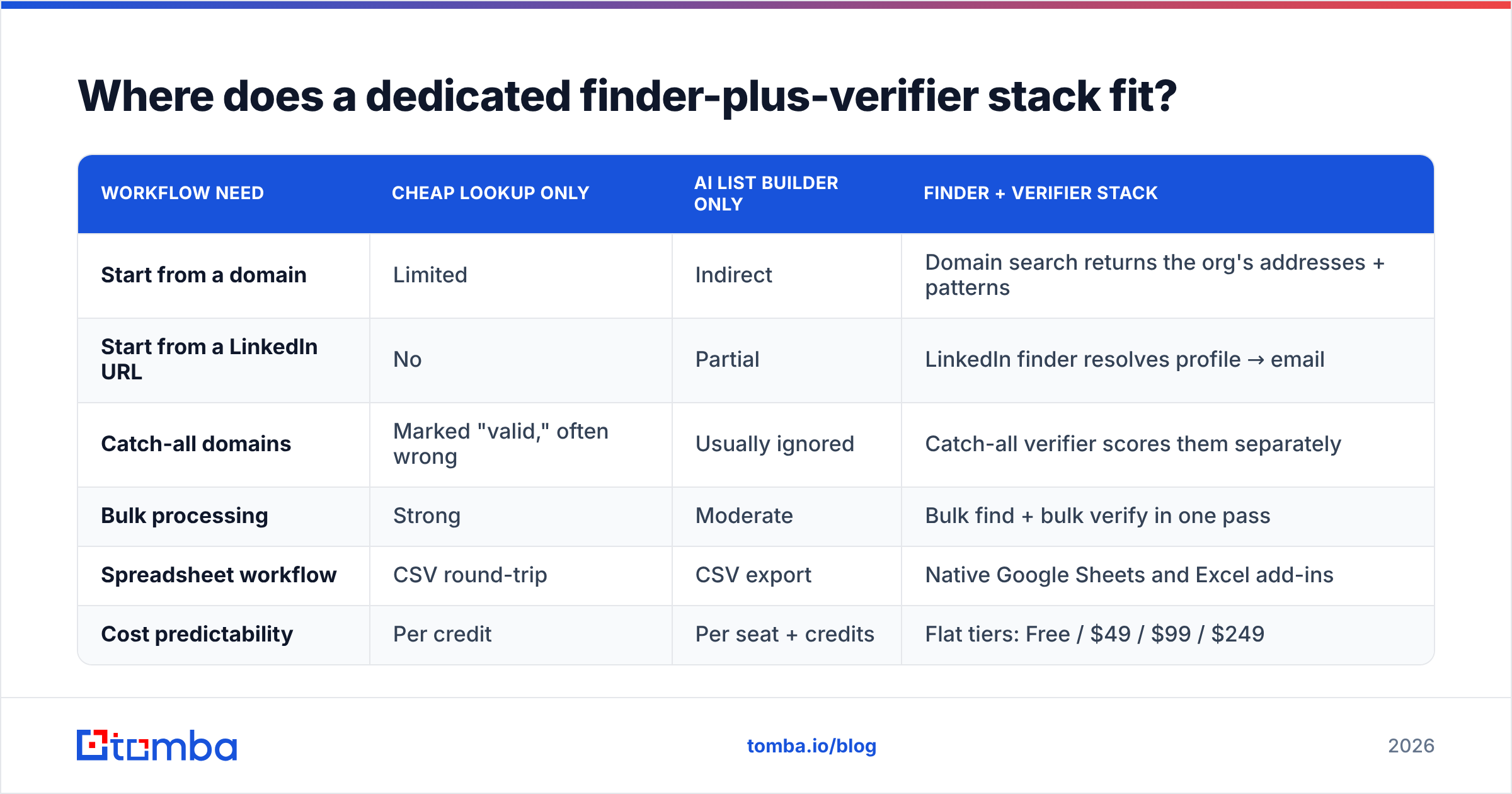
| Workflow need | Cheap lookup only | AI list builder only | Finder + verifier stack |
|---|---|---|---|
| Start from a domain | Limited | Indirect | Domain search returns the org's addresses + patterns |
| Start from a LinkedIn URL | No | Partial | LinkedIn finder resolves profile → email |
| Catch-all domains | Marked "valid," often wrong | Usually ignored | Catch-all verifier scores them separately |
| Bulk processing | Strong | Moderate | Bulk find + bulk verify in one pass |
| Spreadsheet workflow | CSV round-trip | CSV export | Native Google Sheets and Excel add-ins |
| Cost predictability | Per credit | Per seat + credits | Flat tiers: Free / $49 / $99 / $249 |
Tomba's pricing runs Free (25 searches/mo), Starter $49/mo, Growth $99/mo, Pro $249/mo, and Enterprise custom — full details on the Tomba pricing page. The relevant point isn't the sticker. It's that finding and verifying live in the same credit pool, so you're not paying two vendors to disagree with each other.
If you want to sanity-check any provider's sourcing before you buy, the data sources question is the one to ask every vendor on your shortlist. Tools that can't answer it clearly are usually reselling someone else's scrape.
What about compliance and data provenance?#
Worth thirty seconds of your attention regardless of which tool wins.
In the EU and UK, B2B contact data falls under GDPR's legitimate-interest rules. Three things matter. The contact has to be relevant to their professional role, you have to identify yourself, and opting out has to be trivial. In the US, CAN-SPAM sets a lower bar, but it still demands a working unsubscribe and accurate headers. AI list builders can muddy this. When the tool assembles a list from an ICP prompt, you may not know which source each record came from. Ask for per-record provenance if you sell into regulated markets or the EU. Vendors listed in a public directory like G2's sales intelligence category usually document this. Ones that dodge the question are a risk you're absorbing.
Which should you buy in 2026?#
The LeadEngine AI vs FindEmails.com decision comes down to three clean rules:
Buy LeadEngine AI if list creation is your bottleneck and your volumes are moderate. You're paying for research hours you don't have. Validate coverage in your specific vertical during the trial, and spot-check ICP drift.
Buy FindEmails.com (Toofr) if you already have names and domains, your volume is high, and you're willing to run a separate verification step. It's an honest cheap tool that does one job.
Buy a finder + verifier stack if what you care about is cost per valid email, you need an API your engineers won't fight, and bounce rate is a real KPI rather than an afterthought. This is the majority case for teams past their first ten customers.
And whichever you choose: verify before you send. Not "the tool says 92% confidence" — an independent check, every time, on every list, including the ones you bought last quarter. B2B data decays at roughly 2-3% per month as people change jobs. A list is a perishable good.
Ready to test the data quality argument yourself? Run your next 25 prospects through the Tomba Email Finder on the free tier — no card, no trial countdown — and compare the verified results side by side with whatever you're using now. If the verified-deliverable rate is higher, the math on cost per valid email makes the decision for you. If it isn't, you've lost nothing but ten minutes.
Related guides#
// get started
Find, verify and enrich your first contacts today
Start on the free plan with 25 searches a month, then scale when your team is ready.
Free plan · No credit card required · GDPR & CCPA
// about the author