LeadEngineAI vs Lead Kahuna: Which Lead Tool Wins in 2026?
Two very different lead tools: one AI-first platform, one desktop scraper built for agencies. Here is how LeadEngineAI and Lead Kahuna compare on data accuracy, pricing and workflow fit — and when neither is the right call.
TL;DR
- LeadEngineAI and Lead Kahuna solve different problems. LeadEngineAI sits in the AI-assisted prospecting category — you describe an ICP, it assembles and enriches a list. Lead Kahuna is a desktop scraper built for agencies harvesting local-business and site-owner contacts at volume.
- Lead Kahuna wins on raw volume and one-time cost. If you need 5,000 dentist listings in Ohio with whatever email is on the site, a scraper is cheap and fast.
- LeadEngineAI wins on workflow. Cloud-based, team-shareable, CRM-friendly, and it does more of the ICP thinking for you — which matters more than scrape speed once you have a real pipeline.
- Neither is a verification layer. Both hand you addresses that still need checking. Scraped and AI-inferred emails bounce at rates that will hurt your domain if you send blind.
- The honest recommendation: pick one for sourcing, then run every address through a dedicated email verifier before it touches your sequencer. That single step protects deliverability more than switching tools ever will.
What are LeadEngineAI and Lead Kahuna?#
They get grouped together in search results because both promise "leads," but they come from opposite ends of the market.
LeadEngineAI belongs to the newer wave of AI-native prospecting platforms. The pitch is that you stop building Boolean filter stacks and instead describe who you want to reach — "Series A fintech companies in the UK with a head of growth" — and the system interprets that, pulls matching companies, identifies the people, and enriches them with contact data. Everything lives in the browser, results sync out to a CRM or CSV, and credits are consumed per enriched contact.
Lead Kahuna comes from the SEO and local-agency world. It is a Windows desktop application that crawls search engines, directories and websites, then extracts contact details — emails, phone numbers, social profiles, site metadata — into exportable lists. It has historically been popular with link builders, local SEO shops and agencies selling website or marketing services to small businesses, because those workflows need thousands of low-value contacts rather than fifty high-value ones.
That difference in origin explains almost every practical difference between them. One is designed around the account; the other is designed around the listing.

How do LeadEngineAI and Lead Kahuna differ under the hood?#
Before you look at features, understand the four structural differences. They decide which tool fits your team far more than any checkbox list.
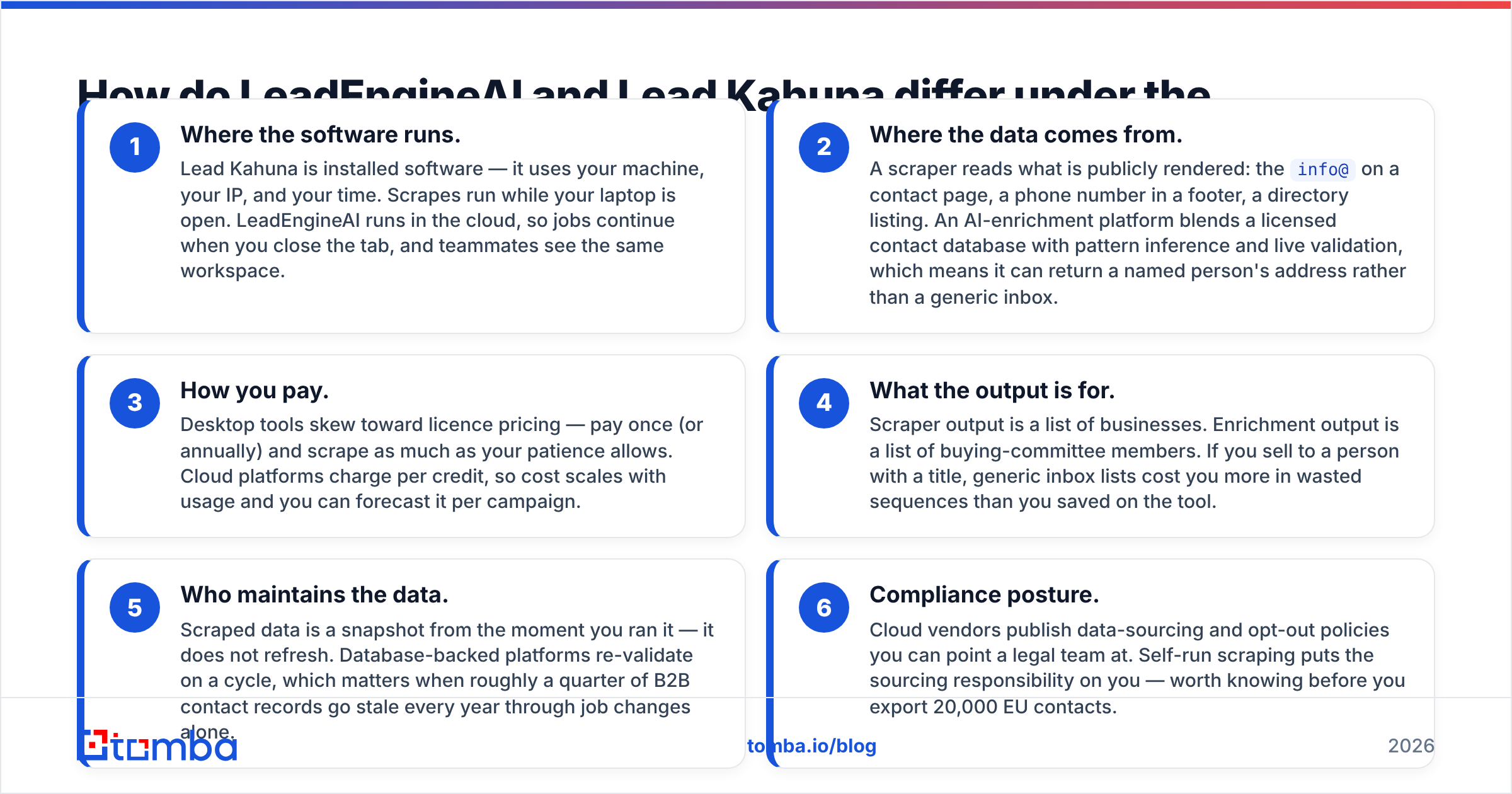
- Where the software runs. Lead Kahuna is installed software — it uses your machine, your IP, and your time. Scrapes run while your laptop is open. LeadEngineAI runs in the cloud, so jobs continue when you close the tab, and teammates see the same workspace.
- Where the data comes from. A scraper reads what is publicly rendered: the
info@on a contact page, a phone number in a footer, a directory listing. An AI-enrichment platform blends a licensed contact database with pattern inference and live validation, which means it can return a named person's address rather than a generic inbox. - How you pay. Desktop tools skew toward licence pricing — pay once (or annually) and scrape as much as your patience allows. Cloud platforms charge per credit, so cost scales with usage and you can forecast it per campaign.
- What the output is for. Scraper output is a list of businesses. Enrichment output is a list of buying-committee members. If you sell to a person with a title, generic inbox lists cost you more in wasted sequences than you saved on the tool.
- Who maintains the data. Scraped data is a snapshot from the moment you ran it — it does not refresh. Database-backed platforms re-validate on a cycle, which matters when roughly a quarter of B2B contact records go stale every year through job changes alone.
- Compliance posture. Cloud vendors publish data-sourcing and opt-out policies you can point a legal team at. Self-run scraping puts the sourcing responsibility on you — worth knowing before you export 20,000 EU contacts.
LeadEngineAI vs Lead Kahuna: how do they compare feature by feature?#
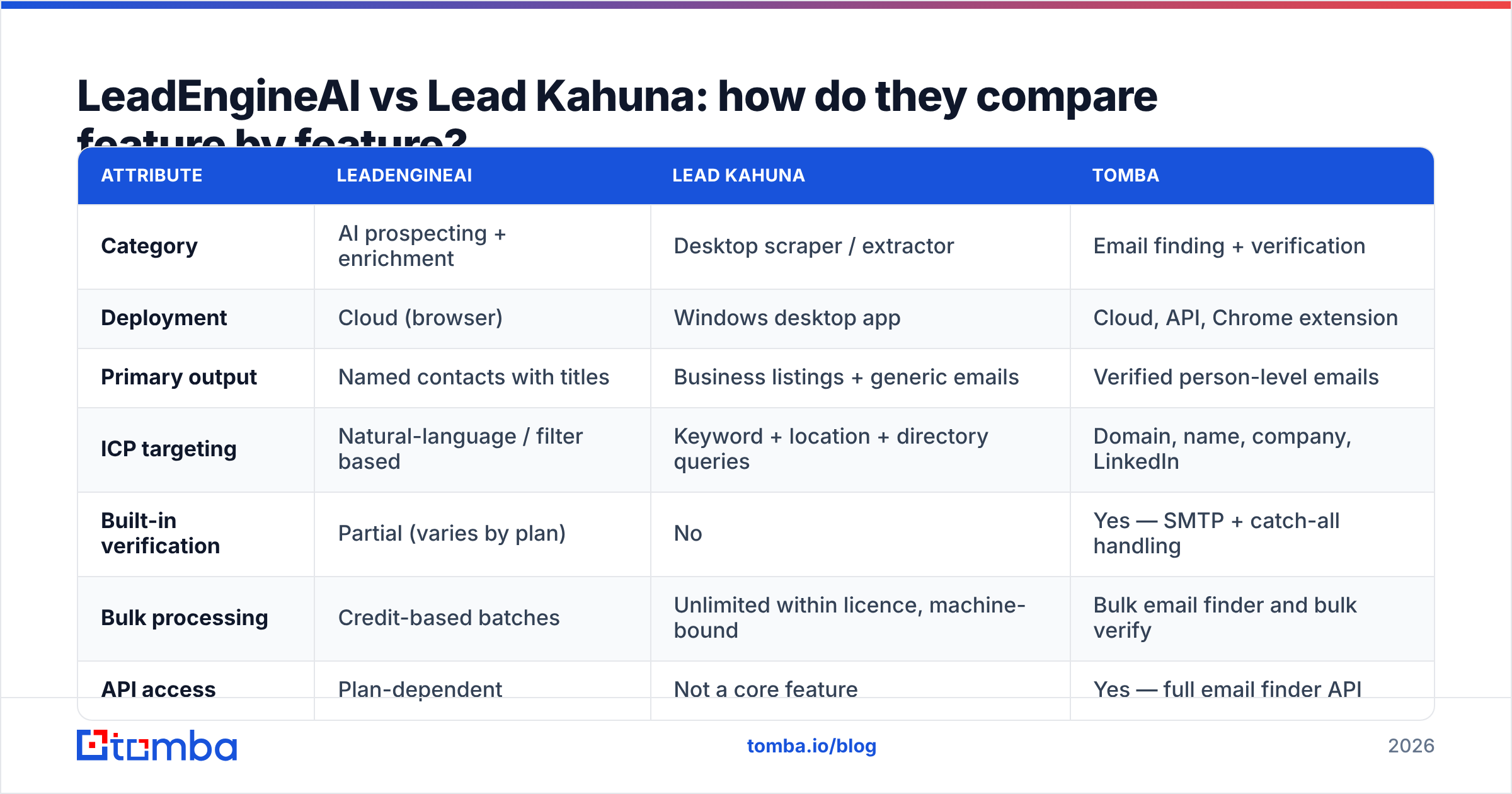
Here is the head-to-head. Treat pricing as directional — both vendors change plans, and you should confirm current numbers on their own sites before you buy. Tomba is included as the reference point for the data layer, since it is the piece both categories leave to you.
| Attribute | LeadEngineAI | Lead Kahuna | Tomba |
|---|---|---|---|
| Category | AI prospecting + enrichment | Desktop scraper / extractor | Email finding + verification |
| Deployment | Cloud (browser) | Windows desktop app | Cloud, API, Chrome extension |
| Primary output | Named contacts with titles | Business listings + generic emails | Verified person-level emails |
| ICP targeting | Natural-language / filter based | Keyword + location + directory queries | Domain, name, company, LinkedIn |
| Built-in verification | Partial (varies by plan) | No | Yes — SMTP + catch-all handling |
| Bulk processing | Credit-based batches | Unlimited within licence, machine-bound | Bulk email finder and bulk verify |
| API access | Plan-dependent | Not a core feature | Yes — full email finder API |
| Team collaboration | Shared workspace | Single-machine licence | Shared workspace + seats |
| Entry price | Subscription, credit-metered | Licence-style, one-time or annual | Free 25 searches/mo, then $49/mo |
| Best for | SaaS and B2B SDR teams | Local SEO and agency prospecting | Any team that needs clean addresses |

The table makes the pattern obvious: these tools barely overlap except in the column that matters most — the quality of the email address at the end of the process.
Which one actually finds more valid emails?#
Volume and validity are not the same metric, and this is where most buyers get burned.
A scraper like Lead Kahuna will return more rows. That is what scrapers do — they sweep directories and site footers, and a big sweep produces a big CSV. But the majority of those addresses are role accounts: info@, contact@, sales@, admin@. Role accounts are technically deliverable and strategically weak. They land in shared inboxes, get filtered aggressively, and almost never reach the person with budget. Several major ESPs treat heavy role-account sending as a spam signal in itself.
An AI enrichment platform like LeadEngineAI returns fewer rows but aims at named humans. The trade-off is inference risk: when a platform guesses first.last@company.com from a known pattern and does not verify it, you get a plausible-looking address that hard-bounces. Pattern inference is genuinely useful — Tomba's own company email pattern tool exists for exactly this reason — but inference without an SMTP check is a guess wearing a suit.

Three practical rules, whichever tool you pick:
- Never send to an unverified list. A hard-bounce rate above roughly 2% starts damaging sender reputation, and reputation damage takes weeks to undo.
- Segment role accounts out. Send them a different message — or don't send at all — but never mix them into a personalised sequence.
- Handle catch-all domains separately. Catch-all servers accept everything, so a naive check marks them "valid." Use a catch-all verifier so you know which of those are real risk.
What does each one actually cost you?#
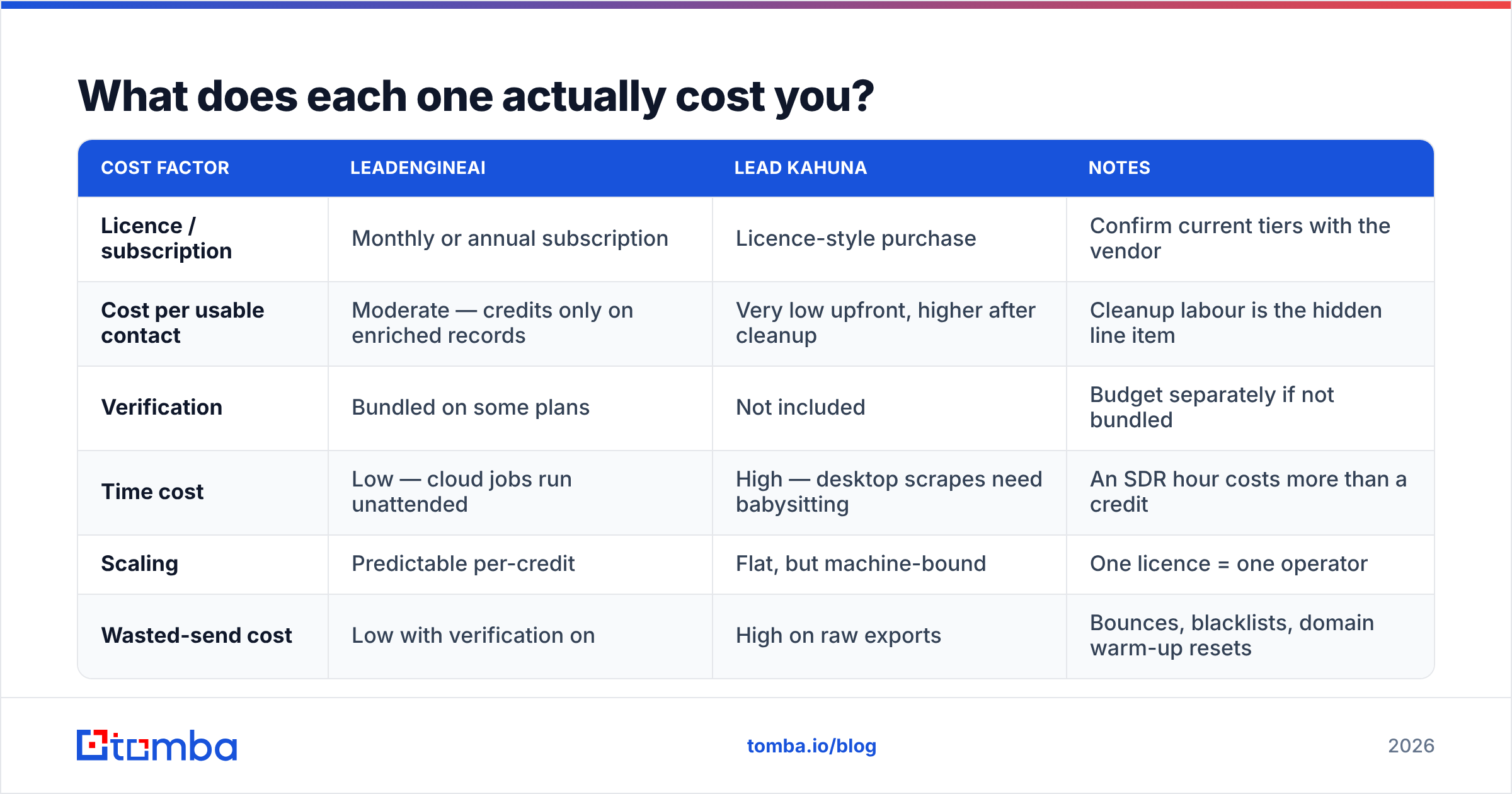
Sticker price is the smallest part of the bill. The real cost is credits burned on bad records plus deliverability damage.
| Cost factor | LeadEngineAI | Lead Kahuna | Notes |
|---|---|---|---|
| Licence / subscription | Monthly or annual subscription | Licence-style purchase | Confirm current tiers with the vendor |
| Cost per usable contact | Moderate — credits only on enriched records | Very low upfront, higher after cleanup | Cleanup labour is the hidden line item |
| Verification | Bundled on some plans | Not included | Budget separately if not bundled |
| Time cost | Low — cloud jobs run unattended | High — desktop scrapes need babysitting | An SDR hour costs more than a credit |
| Scaling | Predictable per-credit | Flat, but machine-bound | One licence = one operator |
| Wasted-send cost | Low with verification on | High on raw exports | Bounces, blacklists, domain warm-up resets |
For comparison, Tomba's published pricing details run Free (25 searches/month), Starter at $49/mo, Growth at $99/mo, Pro at $249/mo, and custom Enterprise — with verification included rather than sold as a separate line. That structure matters because it removes the temptation to skip the verification step to save money.

Who should choose LeadEngineAI, and who should choose Lead Kahuna?#
Choose Lead Kahuna if you run a local SEO or web-services agency, your targets are small businesses without published org charts, and generic inboxes are genuinely the right destination because the owner reads them. Scrapers also make sense for research tasks — mapping every competitor in a metro area, auditing directory presence, building a link-prospecting universe. In those jobs the listing is the deliverable.
Choose LeadEngineAI if you sell B2B software or services with a multi-person buying committee, you need titles and seniority to route your messaging, and multiple SDRs need to work the same list without stepping on each other. The moment "who is the VP of Engineering here" becomes a question you ask daily, a desktop extractor stops being the right shape of tool.
Choose neither as your only tool if deliverability is already a problem. If your open rates are falling, your reply rates are under 2%, or you have been placed on a blocklist, your bottleneck is data hygiene and sending infrastructure — not sourcing. Adding a faster list builder to a leaky funnel just makes the leak louder. Start with an email checker on a sample of your existing list; if more than a tenth comes back risky, fix that first.
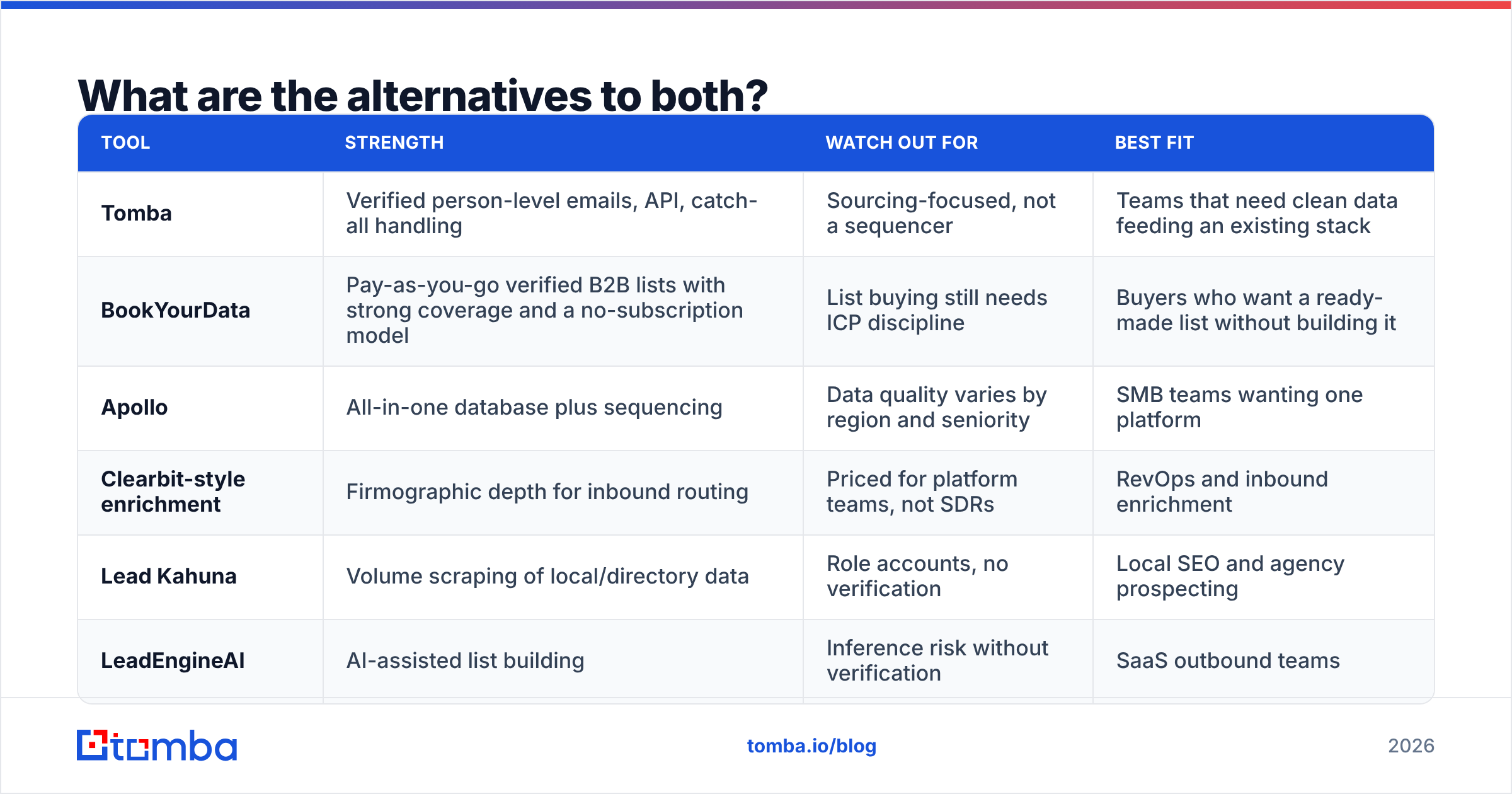
What are the alternatives to both?#
The lead-data market is wide, and the "vs" framing hides better-fitting options. A quick honest map:
| Tool | Strength | Watch out for | Best fit |
|---|---|---|---|
| Tomba | Verified person-level emails, API, catch-all handling | Sourcing-focused, not a sequencer | Teams that need clean data feeding an existing stack |
| BookYourData | Pay-as-you-go verified B2B lists with strong coverage and a no-subscription model | List buying still needs ICP discipline | Buyers who want a ready-made list without building it |
| Apollo | All-in-one database plus sequencing | Data quality varies by region and seniority | SMB teams wanting one platform |
| Clearbit-style enrichment | Firmographic depth for inbound routing | Priced for platform teams, not SDRs | RevOps and inbound enrichment |
| Lead Kahuna | Volume scraping of local/directory data | Role accounts, no verification | Local SEO and agency prospecting |
| LeadEngineAI | AI-assisted list building | Inference risk without verification | SaaS outbound teams |
If you want independent buyer sentiment rather than vendor claims, the G2 lead intelligence category and Capterra's lead generation software directory both carry volume reviews with dates attached — filter for reviews from the last twelve months, since data vendors change materially year to year.
How should you build a stack that actually converts?#
The tool argument matters less than the sequence. This is the pipeline that consistently outperforms "buy one tool and hope":
- Define the ICP before the tool. Industry, headcount band, geography, trigger event, and the two or three titles that own the problem. If you cannot write it in one sentence, no software will rescue the list.
- Source with whichever tool matches the shape of your market — scraper for listing-based markets, AI platform or database for org-chart-based markets.
- Enrich to person level. Company row plus a name is not a prospect. Use a domain search to pull the actual people at each target account with their roles and email patterns.
- Verify every address, every time. Run the full list through verification, drop hard fails, segment catch-alls and role accounts, and keep your bounce rate under 2%.
- Warm up and pace your sending. Even a perfect list will underperform from a cold domain. Authenticate with SPF, DKIM and DMARC, and ramp volume gradually — HubSpot's sales blog has solid primers if you are setting this up for the first time.
- Measure per-source, not per-campaign. Tag where every contact came from and compare bounce rate, reply rate and meetings booked by source. After 60 days the data tells you which tool to renew — and it is frequently not the one with the best demo.
Is the "vs" question even the right one?#
Mostly, no. LeadEngineAI and Lead Kahuna are not substitutes; they are tools for different markets that happen to share a keyword. The genuine decision is whether your buyers live in directories or in org charts.
What is shared is the failure mode. Both hand you a spreadsheet of addresses of unknown quality, and both leave the consequences of sending to bad addresses entirely with you. Bounces are not a rounding error — they are the single fastest way to burn a sending domain you spent months warming. The teams that win at outbound in 2026 are not the ones with the cleverest sourcing tool. They are the ones who treat verification as non-negotiable and who send fewer, better-targeted emails to addresses they know are real.
So run the comparison, pick the sourcing tool that matches your market, and then spend the ten minutes it takes to bolt a verification step onto the end. That step costs less than one blown domain reputation and pays for itself in the first campaign.
Ready to fix the data layer?#
Whichever sourcing tool you land on, the addresses still have to be real. Tomba Email Finder finds professional email addresses by domain, name or company, verifies them with real SMTP checks, flags catch-all domains instead of pretending they are safe, and ships with an API, Chrome extension and bulk processing so it slots into the stack you already run. Start on the free tier with 25 searches a month, then scale to Starter at $49/mo when the pipeline justifies it — no bounced-list cleanup required.
Related guides#
// get started
Find, verify and enrich your first contacts today
Start on the free plan with 25 searches a month, then scale when your team is ready.
Free plan · No credit card required · GDPR & CCPA
// about the author