LeadEngineAI vs LeadGenius: Which B2B Lead Engine Wins in 2026
One sells AI-generated pipeline, the other sells human-verified custom research. We compare LeadEngineAI and LeadGenius on data sourcing, pricing, accuracy and fit, then name the cheaper setup that covers most outbound teams.
LeadEngineAI vs LeadGenius is a choice between speed and research. One tool guesses fast and cheap, while the other pays people to check each record by hand. This guide shows which one fits your team, and when a cheaper tool beats both.
TL;DR
LeadGenius is a managed B2B data firm with humans in the loop. You set the segment and the custom fields. Their research team builds the list. Pricing is quote only, contracts run a year, and setup takes weeks.
LeadEngineAI is an AI first lead engine. Describe your ICP in plain words. You get scored contacts back in minutes. It is cheap and quick, but there are few public docs on where the data comes from, so test it before you spend.
The split is simple. LeadGenius sells custom data you cannot buy elsewhere. LeadEngineAI sells speed and self serve volume.
Most outbound teams need neither. They need correct work emails, a way to check them, and an API. That runs about $49 to $99 a month, not a five figure deal.
Our LeadEngineAI vs LeadGenius pick: choose LeadGenius if your ICP needs fields no vendor sells. Choose LeadEngineAI if you want fast self serve lists. Choose a finder plus a checker if you just need contacts who reply.
LeadEngineAI vs LeadGenius: what are these two tools?#
These two tools get compared for one reason. They sit at opposite ends of the same problem. How do you turn your ideal customer into a list of humans you can email?
LeadGenius (leadgenius.com) has sold custom B2B data for over ten years. The model is unusual: instead of selling access to a static list, it mixes software with a spread out team of human researchers. They build and check data to your spec. Say you need online stores on Shopify Plus with three to eight warehouses and a named head of fulfillment. LeadGenius is the kind of vendor that will go and find it. That is very hard to buy off the shelf.
LeadEngineAI is part of the new wave of AI first tools. These showed up once large models made prompt parsing cheap. The pitch is speed. Type a prompt that describes your ICP. The system finds matching firms and contacts, scores them, and hands you a list. It often writes the first email too. Public docs on where the records come from are thin right now. So treat any vendor claim as the start of your own test.
That gap matters more than any feature grid. One vendor sells research work. The other sells speed.
Where does the data come from?#
This one question drives everything else. It sets price, quality, refresh rate, and legal risk. Here is how the main sourcing models work.
Managed human research (LeadGenius). People check each record against the source. They use company sites, filings, job posts, and directories. You get the widest range of custom fields. You also pay the most per record and wait the longest.
AI guesswork and aggregation (LeadEngineAI and similar). The tool pulls from web crawls, licensed data, and pattern matching. A model then maps records to your prompt. It is fast and cheap, but quality swings a lot by region and company size.
Shared databases (Apollo, Cognism, ZoomInfo). Users hand over contacts through plugins and email sync. In return they get credits. Volume is huge, but freshness is uneven, and consent is a grey area in some regions.
Pattern based email finding plus checks (Tomba, Hunter). Start with a domain and a name. Work out the likely address from known company patterns. Then test if it is live. The scope is narrow, but the hit rate per dollar is the best on the one field most teams need.
Bought list files (BookYourData and similar). Pre built, filterable data sold per record. Useful for a clean bulk pull with no annual deal.
Most teams think they need option 1 or 2. Often option 4 solves the whole problem. Your sequencing tool may already know which accounts to hit. If you only lack good addresses, an email finder plus an email verifier closes the gap for far less.

LeadEngineAI vs LeadGenius: feature by feature#
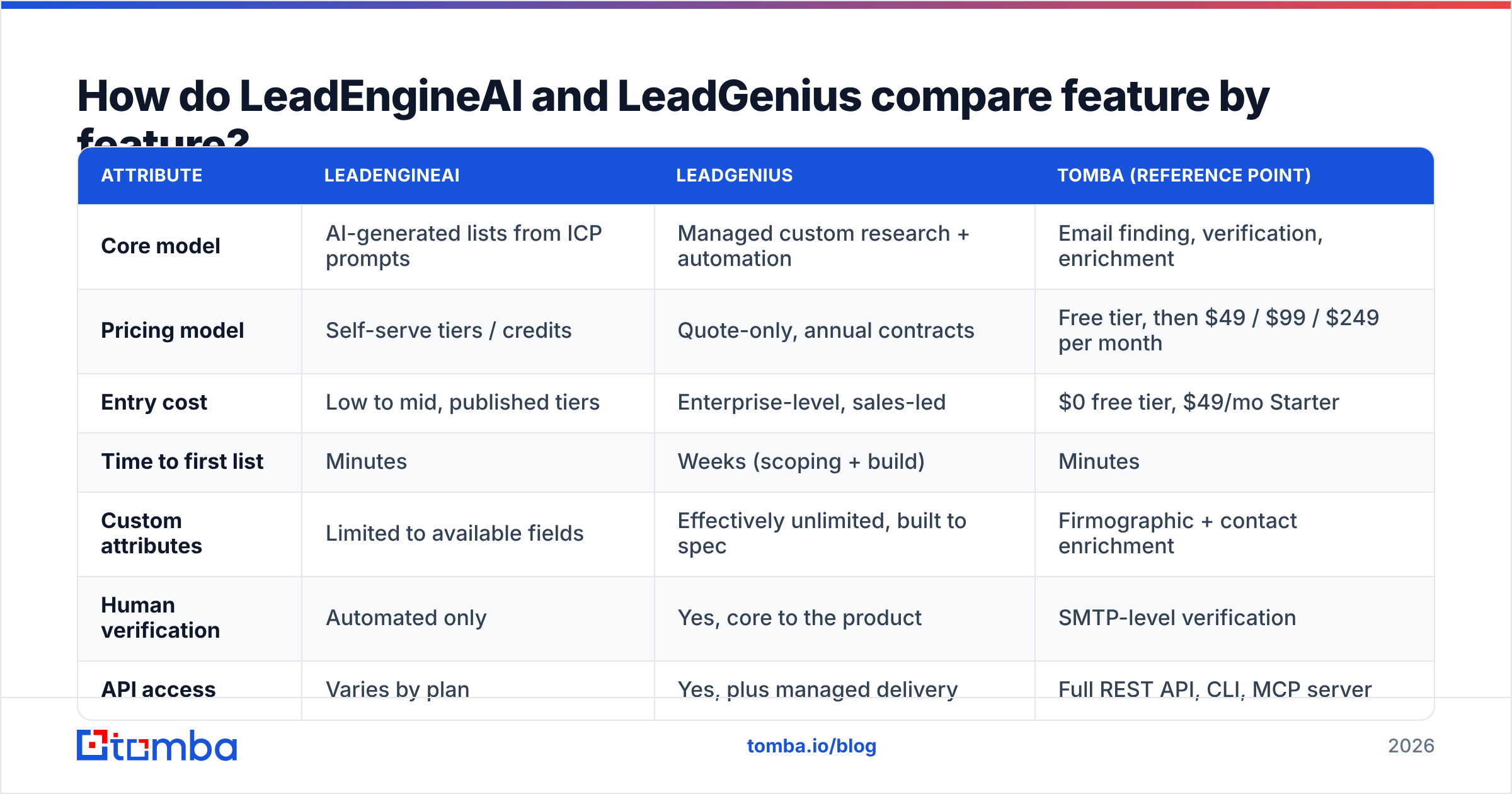
| Feature | LeadEngineAI | LeadGenius | Tomba |
|---|---|---|---|
| Core model | AI built lists from ICP prompts | Managed custom research | Email finding, checks, enrichment |
| Pricing | Self serve tiers and credits | Quote only, annual deals | Free tier, then $49, $99, $249 a month |
| Entry cost | Low to mid, published | High, sales led | $0 free tier, $49 Starter |
| Time to first list | Minutes | Weeks | Minutes |
| Custom fields | Limited to what exists | Built to spec | Firm and contact data |
| Human checks | None | Yes, core to the product | Live mailbox checks |
| API | Varies by plan | Yes | Full REST API, CLI, MCP |
| Best for | Fast self serve lists | Hard to source niches | Work emails that land |
| Weak spot | Unproven claims | Cost and wait time | Not a sequencer |
Read the table as three buys, not three rivals. LeadGenius is a data service. LeadEngineAI is a lead tool you pay for by the month. A finder plus a checker is plumbing.
Which one gets the data right?#
Claims about data quality mean little until you test them on your own segment. Every vendor picks the segment where it looks best.
What holds up in practice:
LeadGenius wins on odd fields. A human can check if a firm runs three warehouses. The answer is right most of the time. No model matches that on fields that live in no database.
AI tools win on volume and lose on edge cases. Prompt driven tools do well on large US tech firms with a big web presence. They fade on small firms, non English markets, and trades with a thin web trail. Those are the exact segments where founders hope AI will save them.
Email quality is a separate problem. A record can be right about the person and still hold a dead mailbox. Contact data at both vendors ages by about 2 to 3% a month as people switch jobs.
Here is the practical test. Pull 200 records from each vendor for the same segment. Run every address through a checker. Then count three things. How many come back valid? How many bounce on a live send? How many job titles still match LinkedIn? That test takes an afternoon, and it beats any vendor benchmark. G2's lead intelligence category is a fair place to sanity check claims first. But reviews lean toward whoever runs the loudest review push.
Bounces may be the symptom you care about. If so, the fix sits upstream of vendor choice. Check every address you import, whatever the source. Then check again on anything older than 90 days.
LeadEngineAI vs LeadGenius: what does each one cost?#
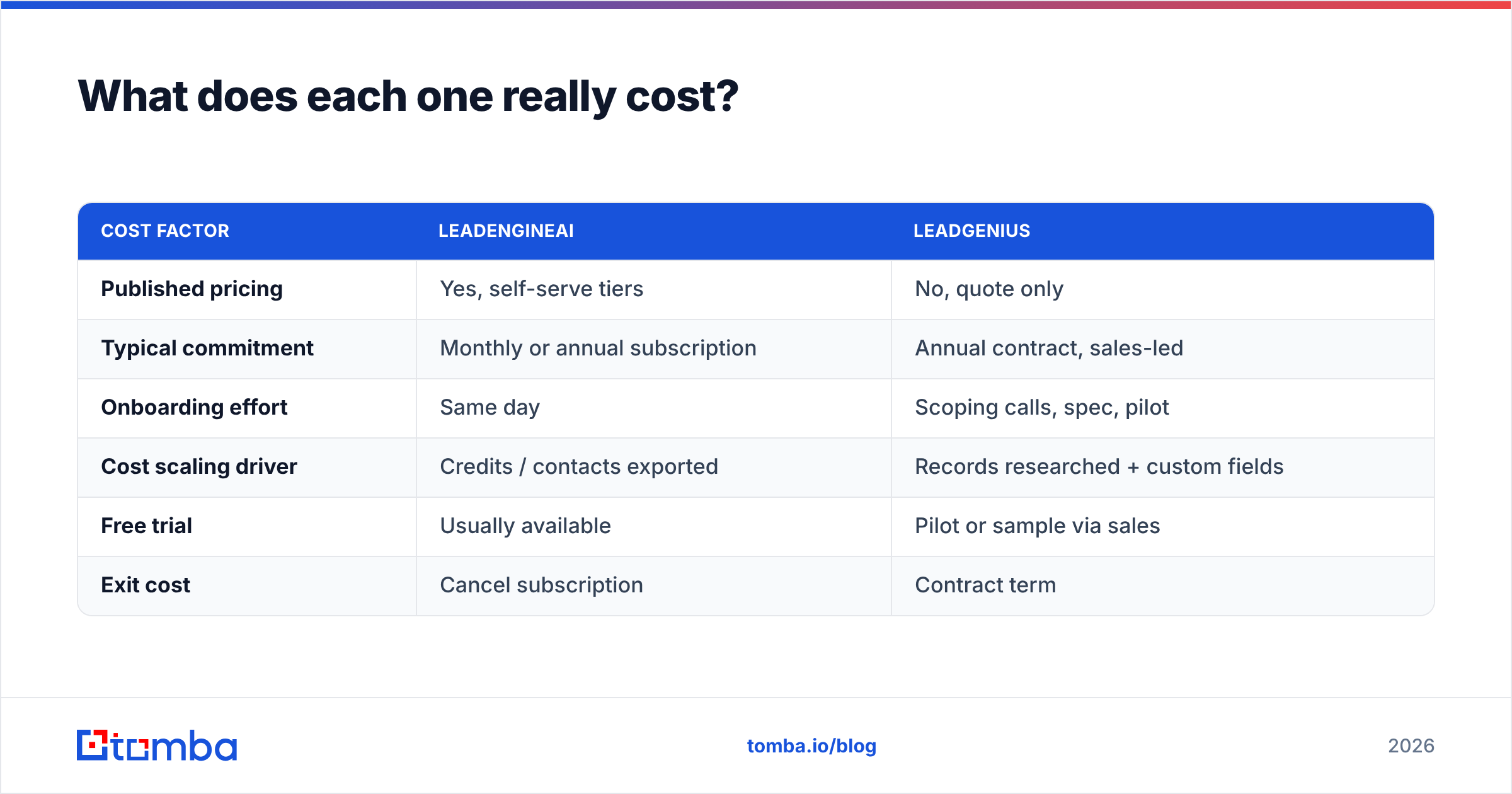
| Cost factor | LeadEngineAI | LeadGenius |
|---|---|---|
| Published pricing | Yes, self serve tiers | No, quote only |
| Typical commitment | Monthly or annual plan | Annual deal, sales led |
| Setup effort | Same day | Calls, spec, pilot |
| What drives cost | Credits and contacts used | Records and custom fields |
| Free trial | Usually | Sample via sales |
| Exit cost | Cancel the plan | Contract term |
The line item nobody budgets for is rework. Say 18% of your list bounces: you pay for that twice, once in credits and once in sender reputation damage that drags down every other campaign on that domain. A $2,000 list that burns a domain costs far more than $2,000.
The second hidden cost is time. A six week research job is fine when you plan a 2026 territory map. It is no use when a rep needs 40 contacts by Thursday.
Who should choose LeadGenius?#
Pick LeadGenius when all three of these are true.
Your ICP rests on fields no vendor sells. Think kit counts, franchise sites, safety badges, tech setups, or license status. Your filter may not fit a standard search form. Human research is then the only honest answer.
The deal size covers the contract. Managed data works when your ACV runs to five or six figures. On a $200 a month product the math breaks.
Someone owns the spec. Custom data jobs live or die on the brief. If nobody can define the segment, you will pay for research on the wrong thing.
RevOps teams at large firms are the natural buyer, building account lists for a named account push. So are research and data teams who need a sourcing trail they can defend. That matters if you work in a regulated market or sell into the EU.
Who should choose LeadEngineAI?#
Pick an AI first engine like LeadEngineAI when:
- Speed beats precision. You are testing five ICPs this quarter. You need to learn which one replies.
- Your segment is well covered online. SaaS, agencies, online stores, US and UK mid market. Crawl based data is dense there.
- You want self serve. No buying cycle, no sales call. Card on file, export today.
- You will run your own checks. Treat any AI built list as raw material. Clean it before it hits your sequencer.
The failure mode is easy to predict. A team takes an AI list at face value. They blast 3,000 emails, hit a 14% bounce rate, and then spend two months on repair work. The list was not the problem. Skipping the check was.

Is there a cheaper third option?#
Yes. And it is worth being blunt. The LeadEngineAI vs LeadGenius framing assumes you need a list tool at all.
Many outbound teams know their target accounts. The list comes from a CRM, an event, a partner page, a funding tracker, or a scrape. Targeting is not the gap. The gap is contact data that reaches an inbox.
For that job, the stack looks like this:
- Domain search pulls every known address pattern at a target firm.
- Email finder turns a first name, last name, and domain into a live address.
- Checks handle catch all domains before anything enters a sequence.
- Enrichment fills in titles, seniority, firm size, and phone numbers on records you own.
- API and bulk runs keep all of this inside your workflow.
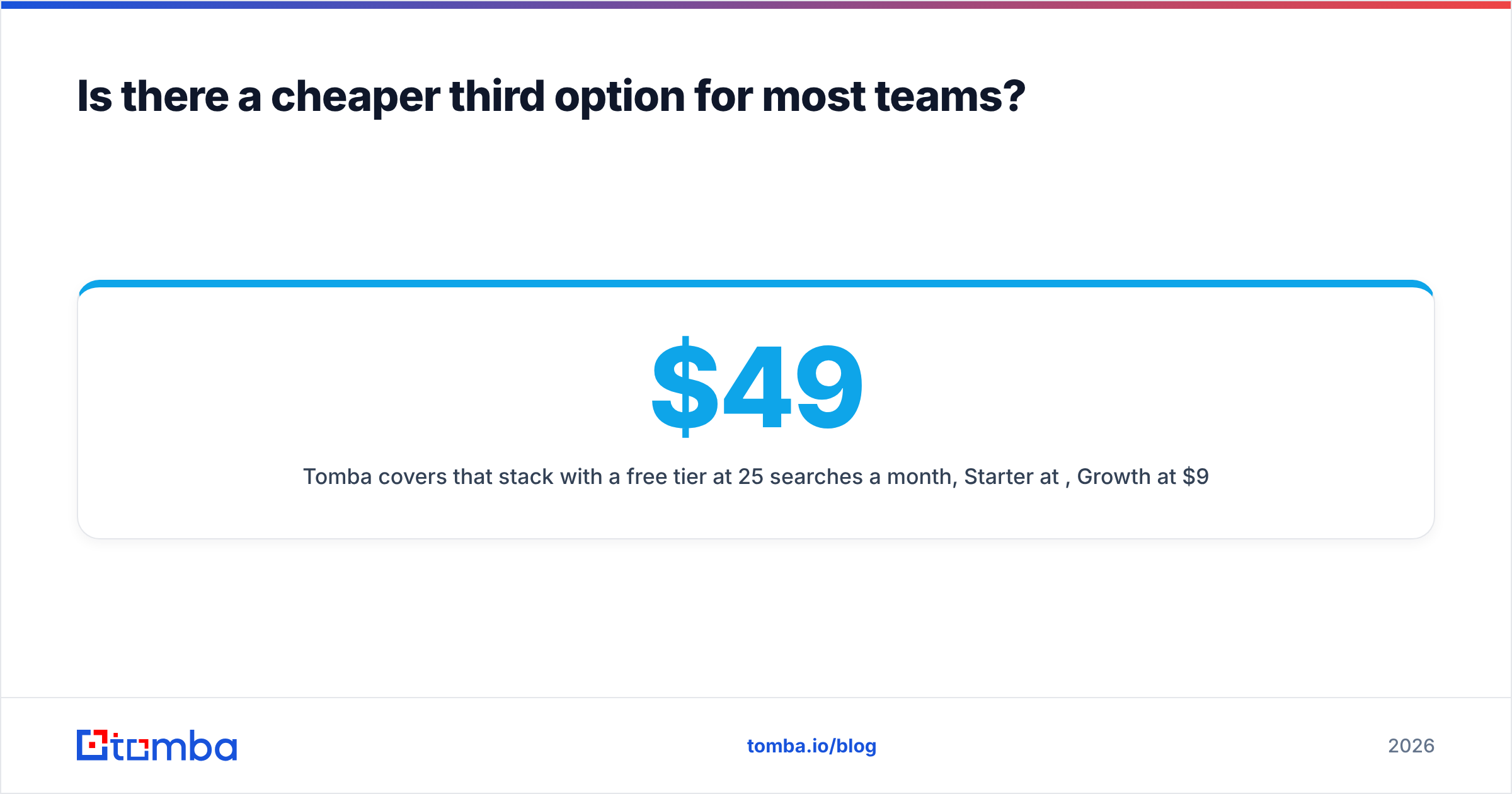
Tomba covers that stack. The free tier gives 25 searches a month. Starter is $49 a month, Growth is $99, and Pro is $249. See current Tomba pricing for exact credit limits. There is a full Tomba API for engineering led workflows. There is also data enrichment for records you hold in your CRM.
One honest limit. This does not replace LeadGenius when you need custom research fields. It is not a sequencer either. It is the layer that makes your list land. For a wider view of how teams build outbound, HubSpot's sales blog covers the process side well.
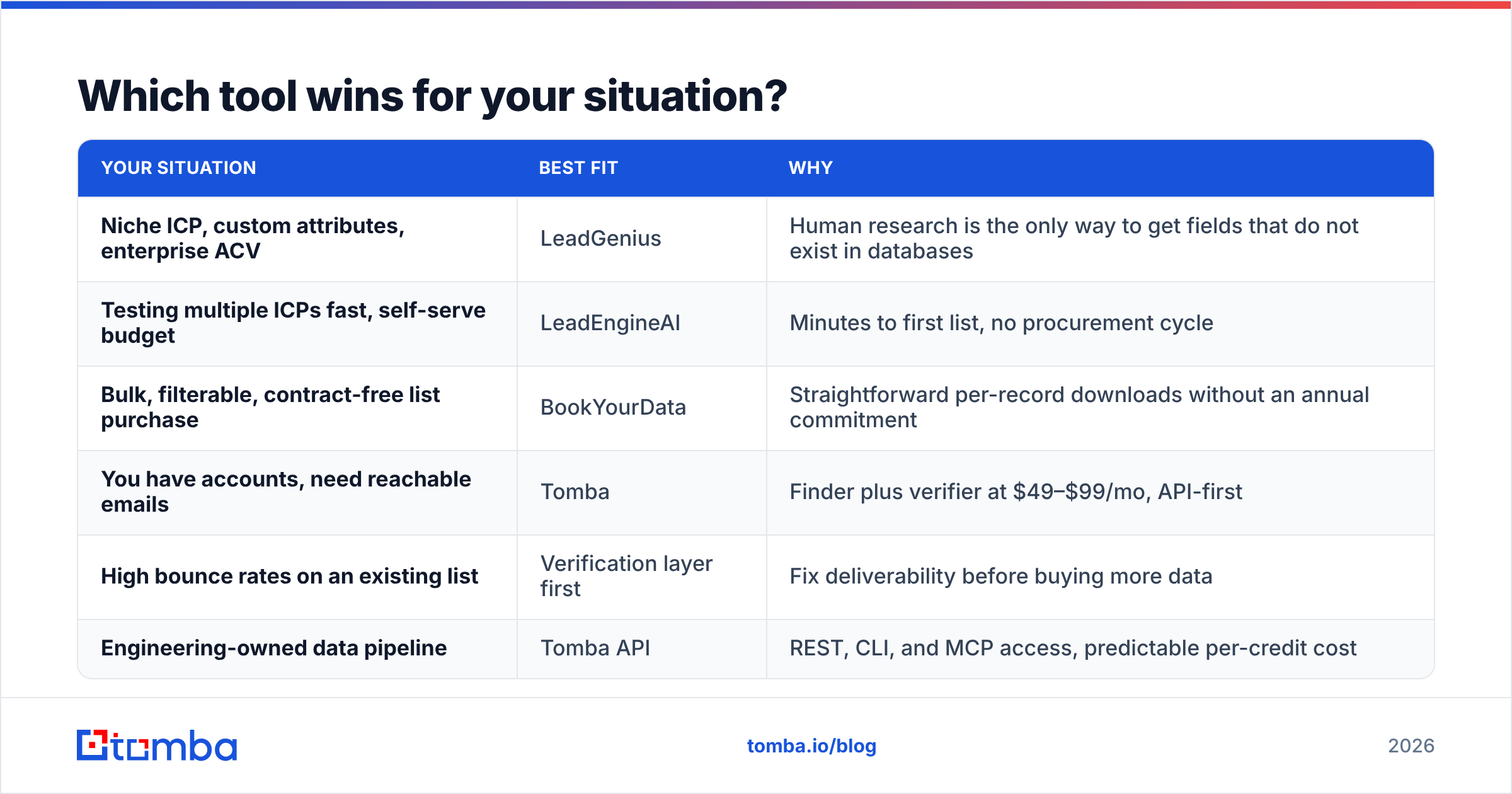
Which tool wins for your situation?#
| Your situation | Best fit | Why |
|---|---|---|
| Niche ICP, custom fields, big deals | LeadGenius | Only humans can build fields no database holds. |
| Testing many ICPs fast | LeadEngineAI | Minutes to a first list, and no sales cycle. |
| Bulk, filterable, no contract | BookYourData | Simple per record downloads. |
| You have accounts, need emails | Tomba | Finder plus checks at $49 to $99 a month. |
| High bounce rates today | Check the list first | Fix reach before you buy more data. |
| Engineering led data pipeline | Tomba API | REST, CLI, and MCP with a clear cost per credit. |
One more framing helps here. Ask what breaks if the vendor shuts down tomorrow. Losing LeadGenius may mean you cannot define your market at all. That is a real dependency, and it is worth paying for. Losing an AI list tool may just send you back to a CRM export. In that case you were buying ease. Price it that way.
The verdict#
The LeadEngineAI vs LeadGenius verdict splits cleanly. LeadGenius wins on quality and custom fields. It loses on cost and speed. LeadEngineAI wins on speed and access. It asks you to accept less proof about where the data came from. Neither is wrong. They answer different questions.
Run the cheap test before you sign either deal. Take 100 target accounts you already want. Find the contacts, check them, and send. Are reply rates fine? Then your problem was never list building. It was reach, and you just fixed it for the price of a monthly plan.
Start with the contacts you know you need. Run your target accounts through the Tomba Email Finder. You get 25 free searches a month, then $49 a month as you scale. Every address comes with a confidence score and public sources. Build the list where you like. Just make sure it lands.
Related guides#
// get started
Find, verify and enrich your first contacts today
Start on the free plan with 25 searches a month, then scale when your team is ready.
Free plan · No credit card required · GDPR & CCPA
// about the author