LeadEngineAI vs LeadGibbon: Which Lead Tool Wins in 2026?
LeadEngineAI leans on AI sourcing, LeadGibbon leans on LinkedIn list building. We compare data accuracy, pricing bands, export limits and API depth to find which one actually earns a seat in your outbound stack.
TL;DR
- LeadEngineAI sells an AI-first sourcing workflow: describe an ICP, let the system assemble a list. It is fast to start and weakest where you need auditable, per-record proof of an email.
- LeadGibbon is the older, narrower tool: pull a LinkedIn or company list, get emails appended, export a CSV. Predictable, but list-shaped rather than API-shaped.
- Neither publishes an independent, third-party accuracy benchmark. Treat every advertised "95%+ accuracy" claim — from either vendor — as marketing until you test it on your own domains.
- Pricing on both moves. Budget for the effective cost per verified email, not the sticker price per credit, because unverified credits are where these tools quietly get expensive.
- If you need finder + verifier + catch-all handling + a real API in one place, a dedicated email-data platform like Tomba ($49/mo Starter, free tier at 25 searches) usually beats bolting a verifier onto either tool.
Most "LeadEngineAI vs LeadGibbon" searches come from the same moment: you have a list-building job, a limited budget, and two tools that look superficially identical on a pricing page. They are not identical. They solve different halves of the prospecting problem, and the half you actually have determines which one is a waste of money.
Here is the honest breakdown, including where both fall short.
What is LeadEngineAI?#
LeadEngineAI positions itself in the AI-sourcing category: you describe the kind of company and role you want, and the platform assembles a prospect list rather than making you build filters by hand. The pitch is speed — from blank screen to a few hundred contacts without learning a query language.
That category has a real advantage and a real, structural weakness.
The advantage: intent-style and natural-language targeting genuinely shortens the gap between "we want ops leaders at Series B logistics startups" and a usable list. If your team is small and nobody owns list-building as a job, that matters.
The weakness: AI-assembled lists blur provenance. When a record arrives without a clear answer to where did this email come from and when was it last confirmed, you inherit the risk. Guessed, permutated, or stale addresses look exactly like sourced ones in a CSV. They only differentiate themselves later, in your bounce rate.
Be skeptical of any vendor — LeadEngineAI included — that describes accuracy as a single headline percentage without saying whether it is measured pre-verification or post-verification, and on which segment of data. Those two numbers can differ by 30 points.
What is LeadGibbon?#
LeadGibbon is the more traditional product: a B2B lead database plus a browser-based workflow for pulling contacts off LinkedIn search results and company pages, appending business emails, and exporting to CSV or a CRM.
It is deliberately narrow. You get list extraction, email append, and export. That narrowness is a feature if your process is "build a list on Monday, load it into a sequencer on Tuesday." It's a constraint if you need programmatic lookups inside a product, a CRM enrichment job, or a data pipeline that runs nightly.
LeadGibbon's other honest strength is predictability. Extraction tools that operate on a list you already curated tend to produce fewer wildly off-target records than generative sourcing, simply because you did the targeting. The tool isn't guessing your ICP.
Its limits show up in three places: coverage outside its core geographies, catch-all domains (where a simple SMTP check can't return a definitive answer), and depth of integration beyond CSV.
How accurate is the email data from each tool?#
This is the only question that matters, and both vendors make it hard to answer.
Run this test before you pay either one. It takes 40 minutes:
- Build a 100-contact control set from domains you already have confirmed contacts at — customers, partners, past deals. You know the ground truth.
- Run the same 100 through each tool's trial. Record: hit rate (how many returned an address at all), and match rate (how many matched your known-good address).
- Push every returned address through a neutral verifier — not the vendor's own. Self-graded accuracy is not accuracy.
- Segment the results by domain type. Separate catch-all domains from standard MX setups. Tools that look equal overall often diverge badly on catch-alls.
- Compute cost per verified email, not cost per credit. A $0.02 credit with a 55% verified-hit rate costs more than a $0.05 credit at 92%.

In practice, the accuracy gap between mid-market finders is smaller than vendors claim and larger than buyers expect. Most tools cluster on easy targets — US tech companies with obvious first.last@ patterns. The spread appears on hard targets: European mid-market, agencies with catch-all DNS, companies that switched domains after an acquisition.
If your ICP lives in the easy bucket, either tool will do and you should optimize for workflow and price. If it lives in the hard bucket, you need a platform with an explicit catch-all verifier rather than a finder that shrugs and returns "accept-all."

How do LeadEngineAI, LeadGibbon and Tomba compare?#
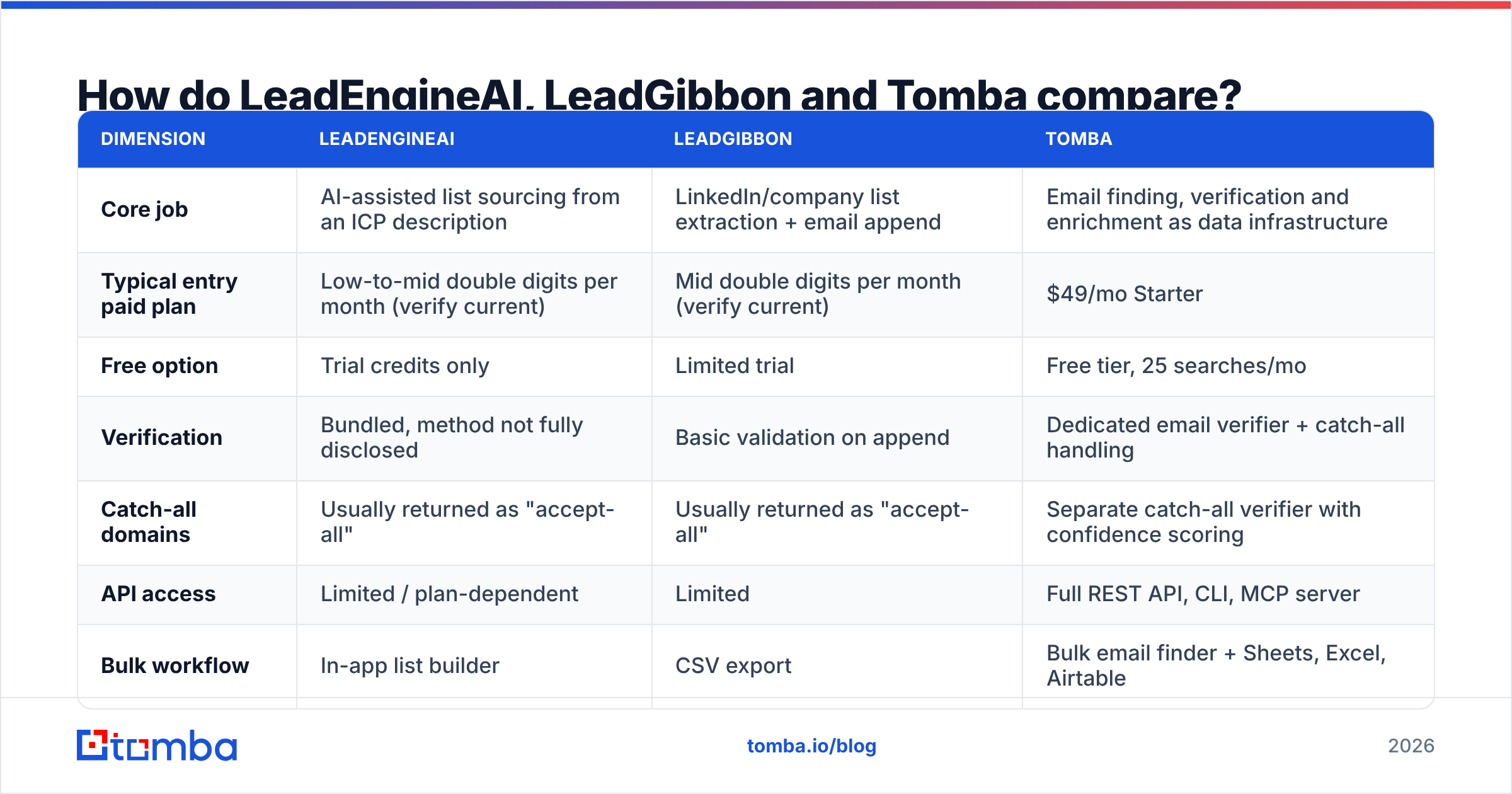
Prices and limits change frequently in this category. Check each vendor's own pricing page before you commit — the shape of the offer matters more than the exact number in this table.
| Dimension | LeadEngineAI | LeadGibbon | Tomba |
|---|---|---|---|
| Core job | AI-assisted list sourcing from an ICP description | LinkedIn/company list extraction + email append | Email finding, verification and enrichment as data infrastructure |
| Typical entry paid plan | Low-to-mid double digits per month (verify current) | Mid double digits per month (verify current) | $49/mo Starter |
| Free option | Trial credits only | Limited trial | Free tier, 25 searches/mo |
| Verification | Bundled, method not fully disclosed | Basic validation on append | Dedicated email verifier + catch-all handling |
| Catch-all domains | Usually returned as "accept-all" | Usually returned as "accept-all" | Separate catch-all verifier with confidence scoring |
| API access | Limited / plan-dependent | Limited | Full REST API, CLI, MCP server |
| Bulk workflow | In-app list builder | CSV export | Bulk email finder + Sheets, Excel, Airtable |
| Phone data | Varies by plan | Limited | Phone finder + validator |
| Best fit | Solo founders who hate building filters | Recruiters and SDRs living in LinkedIn | Teams that need verified data inside systems, not spreadsheets |

Two things stand out.
First, both LeadEngineAI and LeadGibbon are workflow products. They assume a human sits in a UI, builds a list, and exports it. That's fine until enrichment becomes a recurring job — refreshing 40,000 CRM records quarterly, enriching inbound signups in real time, or appending contacts inside your own app. At that point you need an email finder API, and a CSV-shaped tool becomes an operations tax.
Second, neither treats verification as a first-class product. Bundled verification is convenient and structurally conflicted: the same vendor that charges you for a found email grades whether it was good. That's not fraud, it's just a weak incentive. Independent verification is cheap insurance.
Which tool fits which team?#
Skip the feature matrix for a second and match the tool to the job:
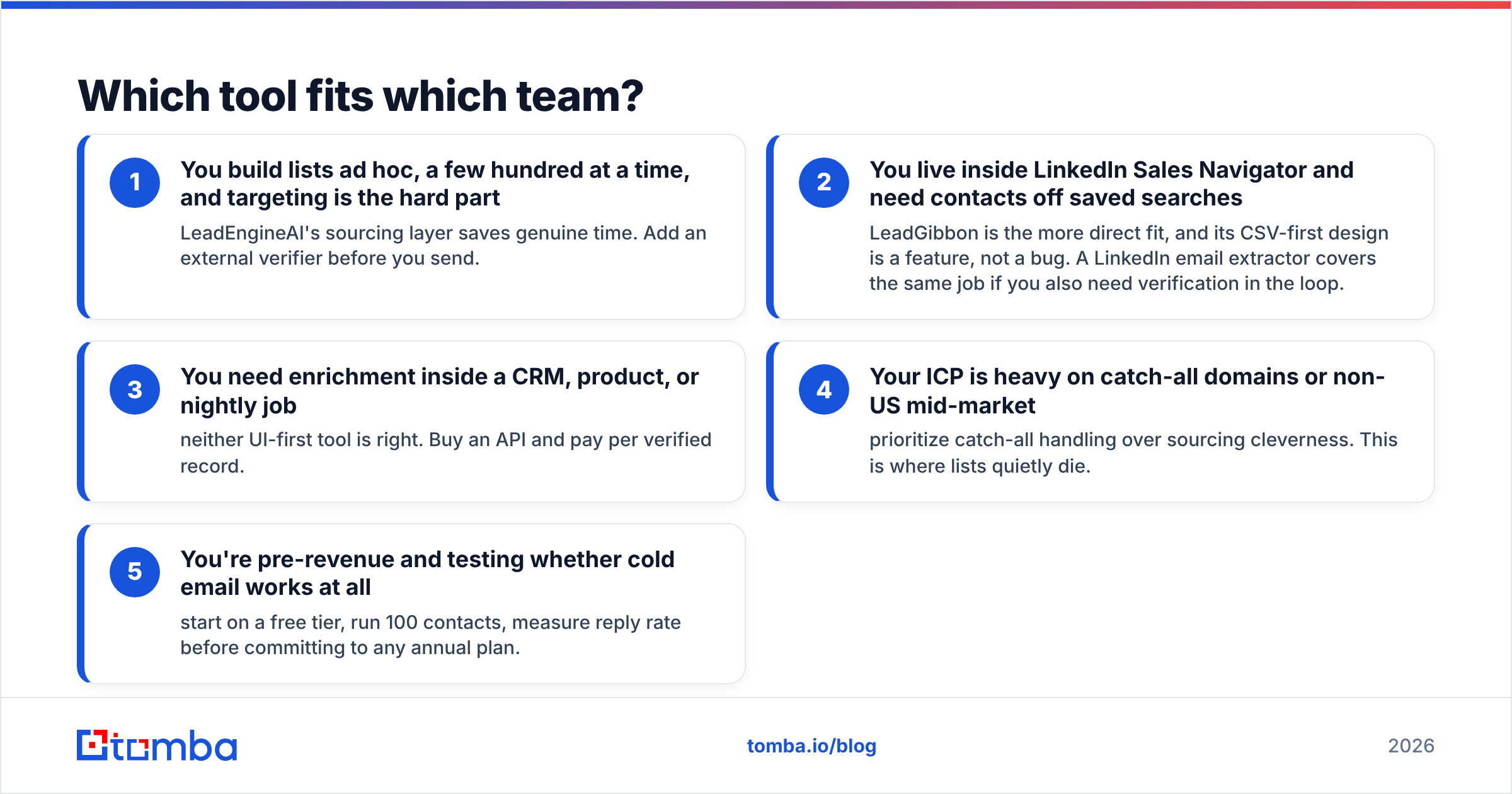
- You build lists ad hoc, a few hundred at a time, and targeting is the hard part — LeadEngineAI's sourcing layer saves genuine time. Add an external verifier before you send.
- You live inside LinkedIn Sales Navigator and need contacts off saved searches — LeadGibbon is the more direct fit, and its CSV-first design is a feature, not a bug. A LinkedIn email extractor covers the same job if you also need verification in the loop.
- You need enrichment inside a CRM, product, or nightly job — neither UI-first tool is right. Buy an API and pay per verified record.
- Your ICP is heavy on catch-all domains or non-US mid-market — prioritize catch-all handling over sourcing cleverness. This is where lists quietly die.
- You're pre-revenue and testing whether cold email works at all — start on a free tier, run 100 contacts, measure reply rate before committing to any annual plan.
Does either tool protect your deliverability?#
Not really, and you shouldn't expect them to. Finding an address and getting a message delivered are separate disciplines.
A finder's only deliverability contribution is not handing you invalid addresses. Everything after that — SPF, DKIM, DMARC, domain warmup, sending volume, content — is on you and your sending platform. Email deliverability degrades fastest from hard bounces, and hard bounces come from unverified lists. That's the whole causal chain, and it's why the verification step is worth more than the sourcing step.
The practical rule: keep bounce rate under 2%. Above roughly 5%, mailbox providers start treating your domain as a list-quality problem, and recovery takes weeks. A list you exported but never verified is a coin flip against your sender reputation.

What about compliance and data sourcing?#
Ask both vendors, in writing, where the data comes from and how a person opts out. Under GDPR, processing B2B contact data is possible under legitimate interest, but it isn't automatic — you need a lawful basis, a real opt-out path, and a supplier who can tell you the provenance of a record.
Red flags in either direction:
- The vendor won't describe its sources beyond "public data and partners."
- There's no documented deletion/suppression process.
- Records include personal (non-business) addresses mixed into B2B exports.
Transparency about data sources isn't a nice-to-have if you sell into the EU or UK. It's the thing your legal team will ask about the week before a security review.
Is there a better third option?#
For most outbound teams, yes — and it isn't a slight against either tool. It's a category mismatch.
LeadEngineAI optimizes for sourcing. LeadGibbon optimizes for extraction. Neither optimizes for data quality as infrastructure, which is what you actually need once cold email stops being an experiment and becomes a channel with a number attached to it.
That's the gap Tomba sits in. The email finder is the core, but the surrounding pieces are what change the economics: a standalone verifier, a catch-all verifier that returns a confidence signal instead of a shrug, domain search for mapping an entire company, bulk processing, and an API that turns all of it into a job your systems run without a human exporting anything.
Pricing is legible rather than credit-gamed: a free tier at 25 searches/mo to test, $49/mo Starter, $99/mo Growth, $249/mo Pro, with Enterprise custom. Full Tomba pricing is public, so you can model cost per verified email before you buy instead of after.
Honest caveat: if your entire workflow is "browse LinkedIn, grab 50 people, paste into a sequencer," a browser-extension-first tool like LeadGibbon may simply feel faster day to day, and that's a legitimate reason to choose it. Tools that win on workflow ergonomics often beat tools that win on spec sheets. Check independent reviews on G2 for both, filtered to companies your size — the aggregate score matters far less than what people with your use case wrote.
What do buyers usually ask next?#
Is LeadEngineAI or LeadGibbon cheaper? Sticker price is close enough that it shouldn't decide the purchase. Compute cost per verified email on a 100-contact trial and the gap often inverts.
Can I use both? You can, and some teams do — sourcing in one, extraction in the other. It's rarely worth two subscriptions. Pick the one matching your dominant workflow and spend the difference on verification.
Do I still need a separate verifier? Yes, if bounce rate matters to you. Bundled verification from the tool that sold you the email is a conflicted grade. A neutral email verification API run before send is the cheapest insurance in the stack.
Which handles catch-all domains better? Neither resolves them definitively — most finders return "accept-all" and pass the risk to you. If catch-alls are a meaningful share of your ICP, that capability should outrank every other criterion on your list.
How many contacts do I need to test properly? One hundred known-good records is enough to see a real difference. Anything under 50 is noise.
The verdict#
Choose LeadGibbon if your prospecting happens inside LinkedIn and you want a predictable extract-and-export loop. Choose LeadEngineAI if targeting is your bottleneck and you'd rather describe an ICP than build filters. In both cases, add an independent verification step before anything hits your sending domain — that single change will do more for reply rates than switching between these two ever will.
And if the real problem is that you need verified contact data flowing into a CRM, a sequencer, and your own product without a human exporting CSVs, neither tool is built for that shape of work.
Start with Tomba Email Finder — 25 free searches a month, no card, enough to run the 100-contact benchmark described above against whichever tool you're currently paying for. Test it on your own domains, compare cost per verified email, and let the bounce rate decide.
Related guides#
// get started
Find, verify and enrich your first contacts today
Start on the free plan with 25 searches a month, then scale when your team is ready.
Free plan · No credit card required · GDPR & CCPA
// about the author