LeadEngineAI vs LetsExtract: Which Lead Tool Wins in 2026?
One is a cloud AI lead engine, the other a desktop email extractor built in a different era. We compare data sourcing, accuracy, pricing models, and compliance risk so you can pick without burning a domain.
LeadEngineAI vs LetsExtract is a choice between two very different tools. One is a cloud AI lead engine. The other is a desktop email extractor. Here is how they compare on data, accuracy, price, and legal risk.
TL;DR
- LeadEngineAI vs LetsExtract in one line: one sells curated data, the other sells collection power.
- LeadEngineAI is a cloud, credit-based lead engine. You describe an ICP, and it returns enriched contact records.
- LetsExtract is a Windows desktop app. It harvests email addresses from web pages, search results, and mailboxes you point it at.
- Desktop scraping still gives the cheapest raw volume per dollar. It also gives the highest bounce rates, the most role accounts, and the most GDPR exposure.
- Neither tool replaces a verification layer. Scraped and AI-guessed addresses both need SMTP checks before they touch your sending domain.
- Best setup for most B2B teams in 2026: a finder, a verifier, and a short, well-targeted list. Not a 500,000-row harvest.
LeadEngineAI vs LetsExtract: what is each tool?#
The two products solve the same problem — "I need contacts to email" — from opposite ends of the stack.
- LeadEngineAI — a browser platform from the AI-prospecting wave. You set an ideal customer profile. It then builds a list from its own database plus enrichment partners, billed in credits.
- LetsExtract — a Windows desktop suite that predates the AI wave. It crawls URLs, search results, local files, and mailboxes, then grabs every string that looks like an email.
- The data differs. LeadEngineAI ships records it believes are real people. LetsExtract ships strings it found on pages. A string is not a contact.
- The risk differs. A cloud vendor documents its sourcing. With a desktop harvester, you are the data controller, and the legal basis is yours to defend.
- The cost differs most. Subscription plus credits, versus a one-time licence. That gap drives most buying decisions.
Plain-English version: LeadEngineAI is a grocery delivery service. LetsExtract is a metal detector. One hands you ingredients someone already checked. The other lets you sweep a field and keep whatever beeps.
LeadEngineAI vs LetsExtract: how do they source contacts?#
LeadEngineAI works from a pre-built index. Say you search for "VP of Engineering at Series B fintechs in Germany." It queries records it already holds, drawn from public profiles, company sites, data partners, and user uploads. It checks the match before it charges you a credit.
LetsExtract works at runtime. You give it seeds: a list of domains, a search query, a directory URL, a folder of documents. It fetches those pages and pulls out anything shaped like an email. There is no index. There is no check that the person is real, and no company-level cleanup. You get every something@somewhere.tld on the crawled surface.
That runtime model has three costs worth stating plainly:
- Recall is high, precision is low. A crawl of 2,000 company pages returns thousands of addresses. Most are
info@,support@,privacy@,noreply@, or dead aliases sitting in old PDFs. - You cannot target seniority. A regex has no idea who the VP of Engineering is. You extract a bucket, then sort it by hand.
- You inherit stale pages. A contact page that lists a sales lead who left in 2023 will still hand you their address in 2026.

Cloud platforms have their own failure mode. They guess patterns, then show a confident score next to the guess. firstname.lastname@company.com is a decent bet, not a fact. That is why testing accuracy beats reading feature lists.
Which one gives you more accurate email addresses?#
Accuracy is the only metric that survives contact with a sending domain. It has two parts: deliverable rate (does the mailbox accept mail) and relevance rate (is this the person you wanted).
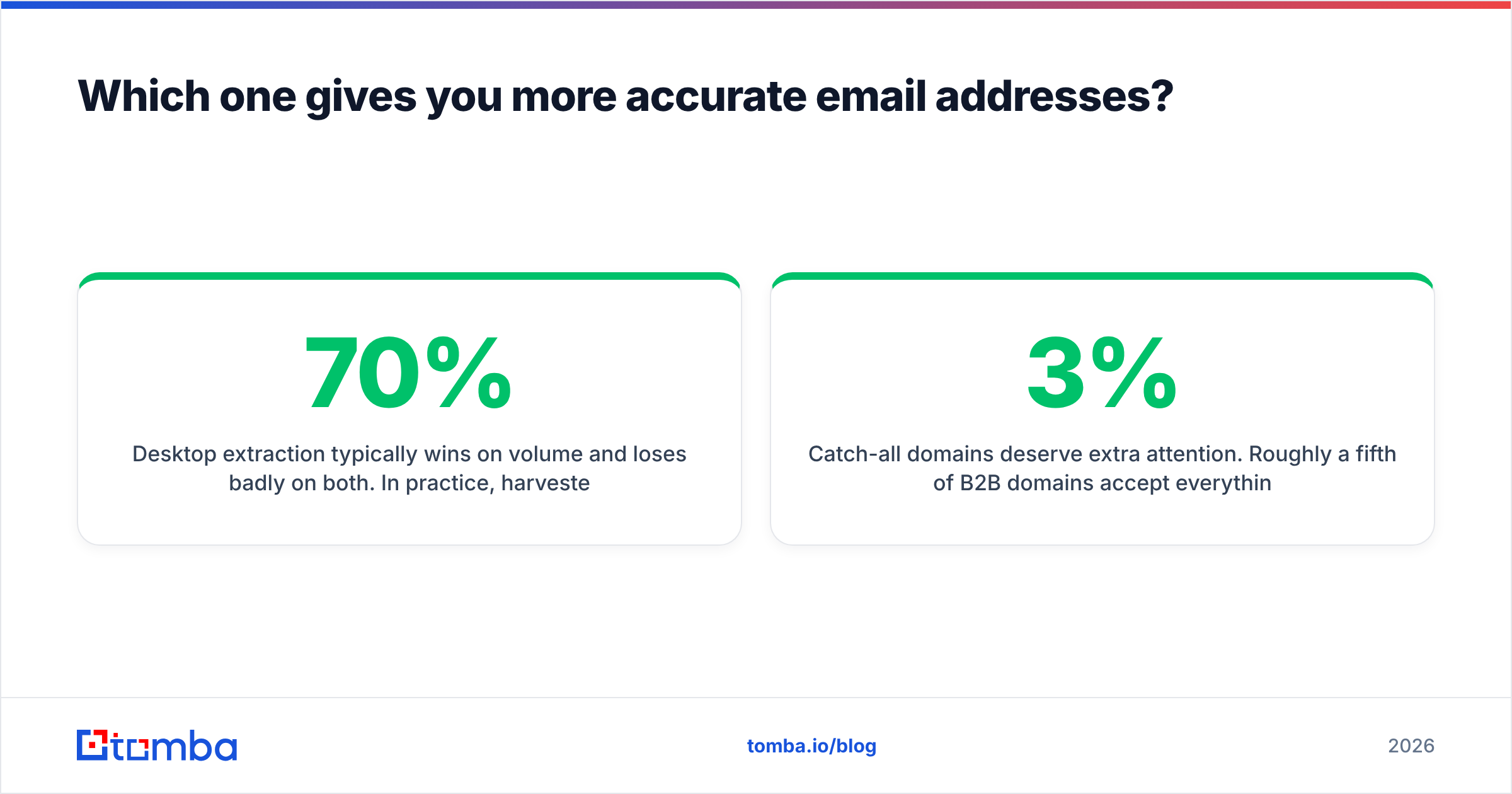
Desktop extraction wins on volume and loses on both. Harvested B2B lists from public crawls usually land in the 40–70% deliverable range before cleaning. A large share of what survives is generic aliases nobody reads. Cloud finders with real validation pipelines score much higher, but they vary a lot. Vendor-published accuracy numbers are marketing, not measurement.

The honest way to compare is simple. Run the same seed list through each tool, then verify the output with a neutral third-party checker. Take 200 known contacts — people whose addresses you can confirm — and score:
- Hit rate: how many of the 200 returned any address at all
- Exact-match rate: how many matched the address you already knew
- Bounce rate: what an independent email verifier says about the rest
- Waste rate: how many credits or rows went to role accounts, duplicates, or catch-all domains you cannot confirm
Catch-all domains deserve extra attention. About a fifth of B2B domains accept everything at the SMTP layer. Neither a scraper nor a finder can tell you whether j.smith@ exists there without deeper checks. A dedicated catch-all verifier is the difference between a 3% bounce rate and a 15% one. At 15%, mailbox providers start throttling you.

LeadEngineAI vs LetsExtract: features and price compared#
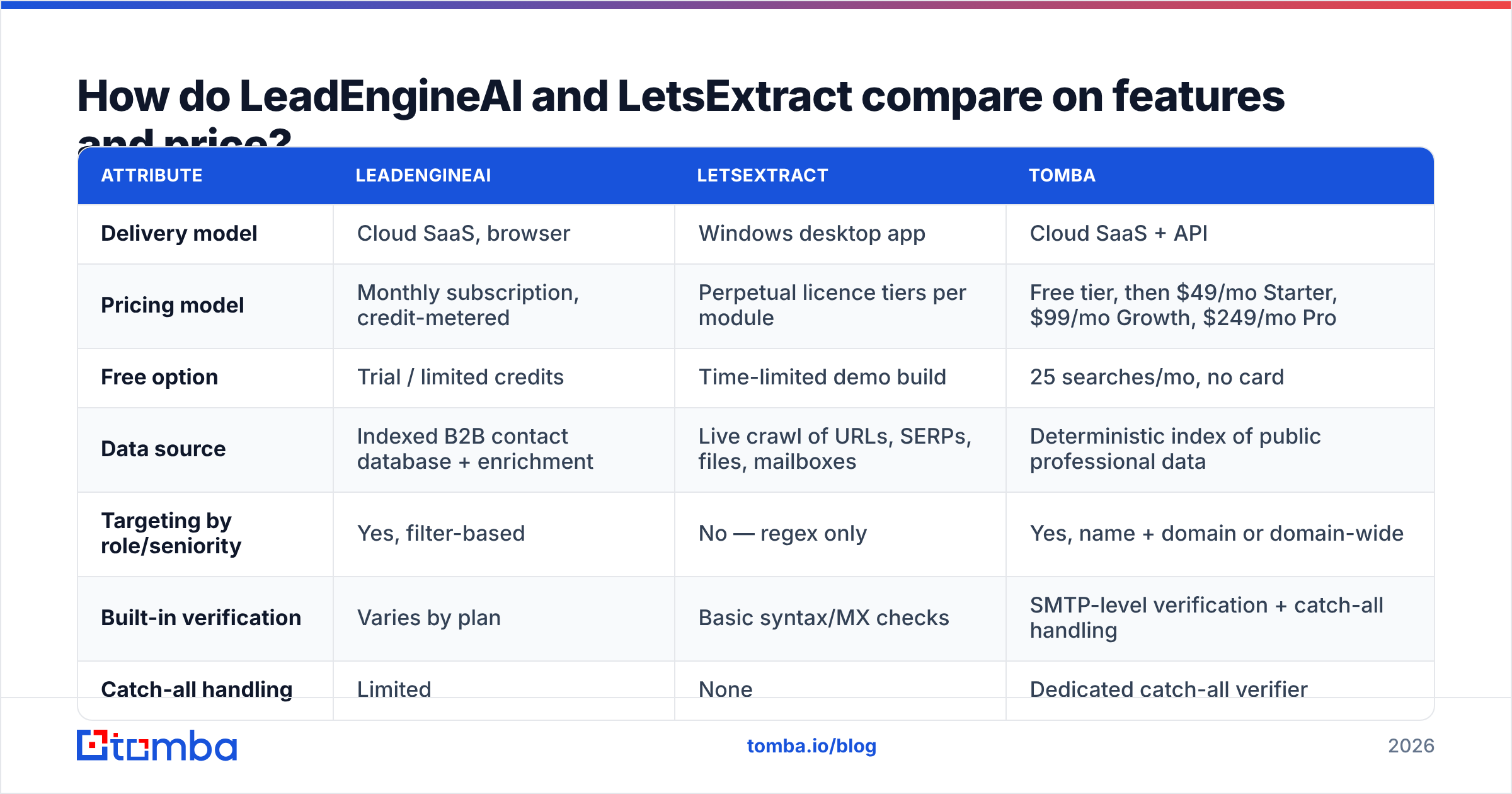
Here is the head-to-head. Pricing changes often on both sides. Treat the model as the stable part, and confirm the figures on each vendor's current price list before you buy.
| Attribute | LeadEngineAI | LetsExtract | Tomba |
|---|---|---|---|
| Delivery model | Cloud SaaS, browser | Windows desktop app | Cloud SaaS + API |
| Pricing model | Monthly subscription, credit-metered | Perpetual licence tiers per module | Free tier, then $49/mo Starter, $99/mo Growth, $249/mo Pro |
| Free option | Trial / limited credits | Time-limited demo build | 25 searches/mo, no card |
| Data source | Indexed B2B contact database + enrichment | Live crawl of URLs, SERPs, files, mailboxes | Deterministic index of public professional data |
| Targeting by role/seniority | Yes, filter-based | No — regex only | Yes, name + domain or domain-wide |
| Built-in verification | Varies by plan | Basic syntax/MX checks | SMTP-level verification + catch-all handling |
| Catch-all handling | Limited | None | Dedicated catch-all verifier |
| Bulk workflows | Yes, in-app lists | Yes, local exports | Bulk email finder + CSV |
| API access | Plan-dependent | No meaningful public API | Full REST email finder API, CLI, MCP |
| Runs unattended | Yes, cloud jobs | Only while the PC is on | Yes |
| Compliance posture | Vendor-documented sourcing | You are the controller | Documented data sources |
| Best for | ICP-driven outbound lists | One-off scraping of specific sites | Precision finding + verification at scale |

Two points the table understates.
First, the one-time licence is genuinely attractive when the job is narrow and repeatable. Say you pull exhibitor contacts from three trade show directories a year. You pay once. There are no credits to ration. A subscription would be overkill.
Second, the desktop model carries a hidden tax. It only runs when your machine runs. You cannot schedule it from a workflow tool, call it from a CRM step, or drop it into a data pipeline. If your revenue stack expects contact lookup to be an API call, a Windows GUI is a dead end. That is why growing teams move to something with an endpoint, whether a competitor platform or Tomba's API.
Is scraped email data still safe to use in 2026?#
Short answer: less safe than it was, and the gap keeps widening.
Three things changed. Mailbox providers tightened their rules for bulk senders. Authentication, low complaint rates, and one-click unsubscribe are now enforced, not suggested.
Spam traps also multiplied, and recycled traps sit on exactly the kind of stale pages a crawler loves. Regulators in the EU and UK have been clear too: harvesting addresses from public pages does not by itself give you a lawful basis to market to them. The practice is old enough to have its own entry under email harvesting.
What this means in practice:
- A scraped list is not a cleaned list. Extraction plus a syntax check is not verification. Run everything through SMTP-level validation first.
- Role accounts poison your metrics.
info@addresses often route to shared inboxes that mark mail as spam. Strip them. - Spam traps do not bounce. They accept your mail and quietly downgrade your sender reputation. That is why bounce rate alone is a false all-clear.
- You need a record of where each contact came from. "Our desktop tool found it online" is a weak answer in a data subject request.
None of this makes extraction software illegitimate. Pulling contacts from your own CRM exports, your own mailbox, or a directory you licensed is ordinary business. The problem is the untargeted mass crawl — and that is what most buyers reach for.
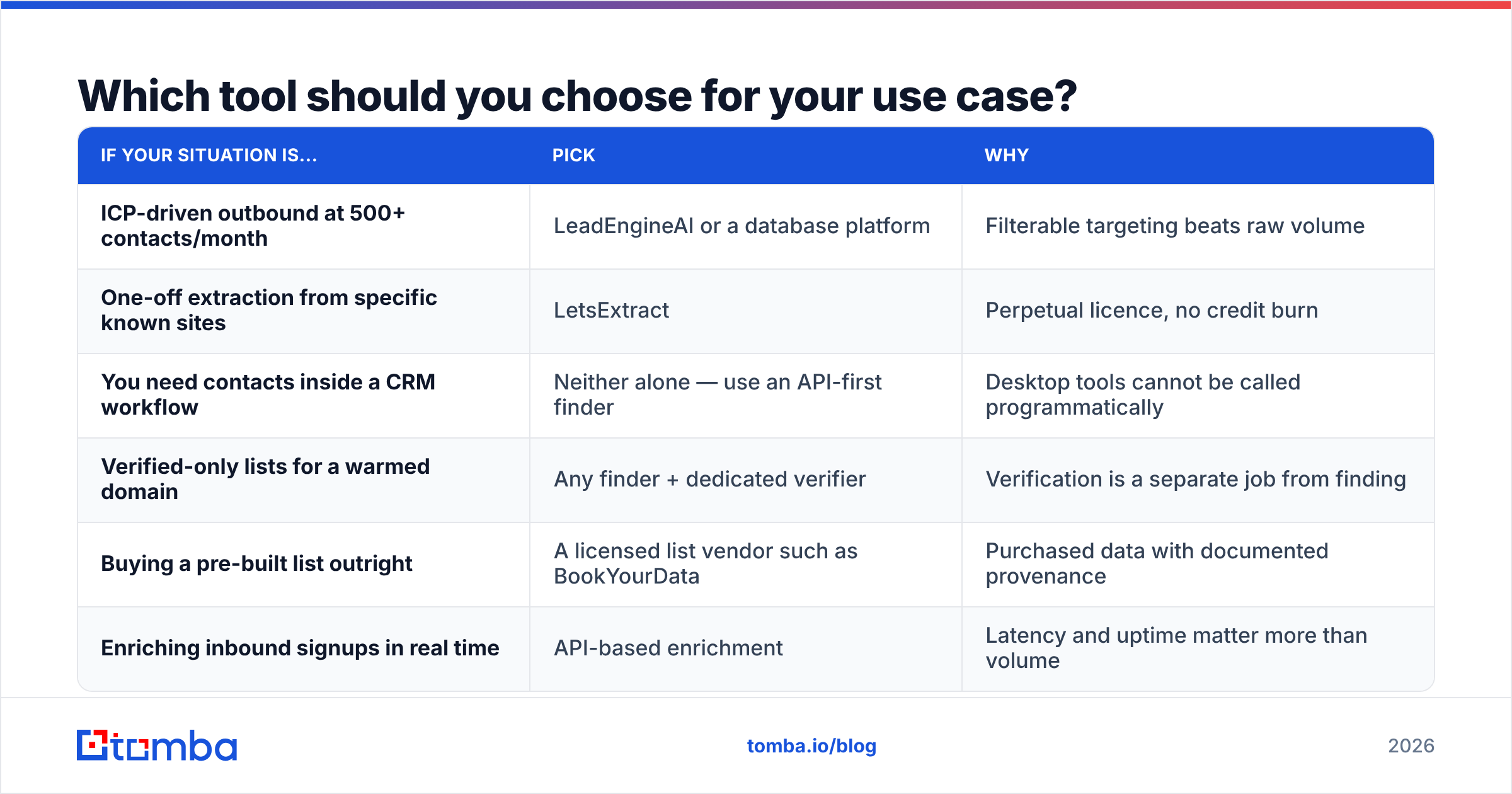
Which tool should you choose for your use case?#
| If your situation is... | Pick | Why |
|---|---|---|
| ICP-driven outbound at 500+ contacts/month | LeadEngineAI or a database platform | Filterable targeting beats raw volume |
| One-off extraction from specific known sites | LetsExtract | Perpetual licence, no credit burn |
| You need contacts inside a CRM workflow | Neither alone — use an API-first finder | Desktop tools cannot be called programmatically |
| Verified-only lists for a warmed domain | Any finder + dedicated verifier | Verification is a separate job from finding |
| Buying a pre-built list outright | A licensed list vendor such as BookYourData | Purchased data with documented provenance |
| Enriching inbound signups in real time | API-based enrichment | Latency and uptime matter more than volume |
Most teams overbuy. If you send 300 cold emails a week, you do not need a half-million-row harvest. You need about 1,200 accurate addresses a month, each attached to a person who plausibly cares. That reframing usually settles the LeadEngineAI vs LetsExtract question on its own.
Many teams land on a hybrid. Build the account list first, by hand or with a database platform. Then resolve contacts one domain at a time with a domain search. Then verify everything before import. It is slower to set up and far cheaper per reply. If you are weighing nearby options, check peer reviews on G2 rather than any single vendor's landing page — ours included. You can also confirm current desktop module pricing at LetsExtract.
What do the pros and cons look like side by side?#
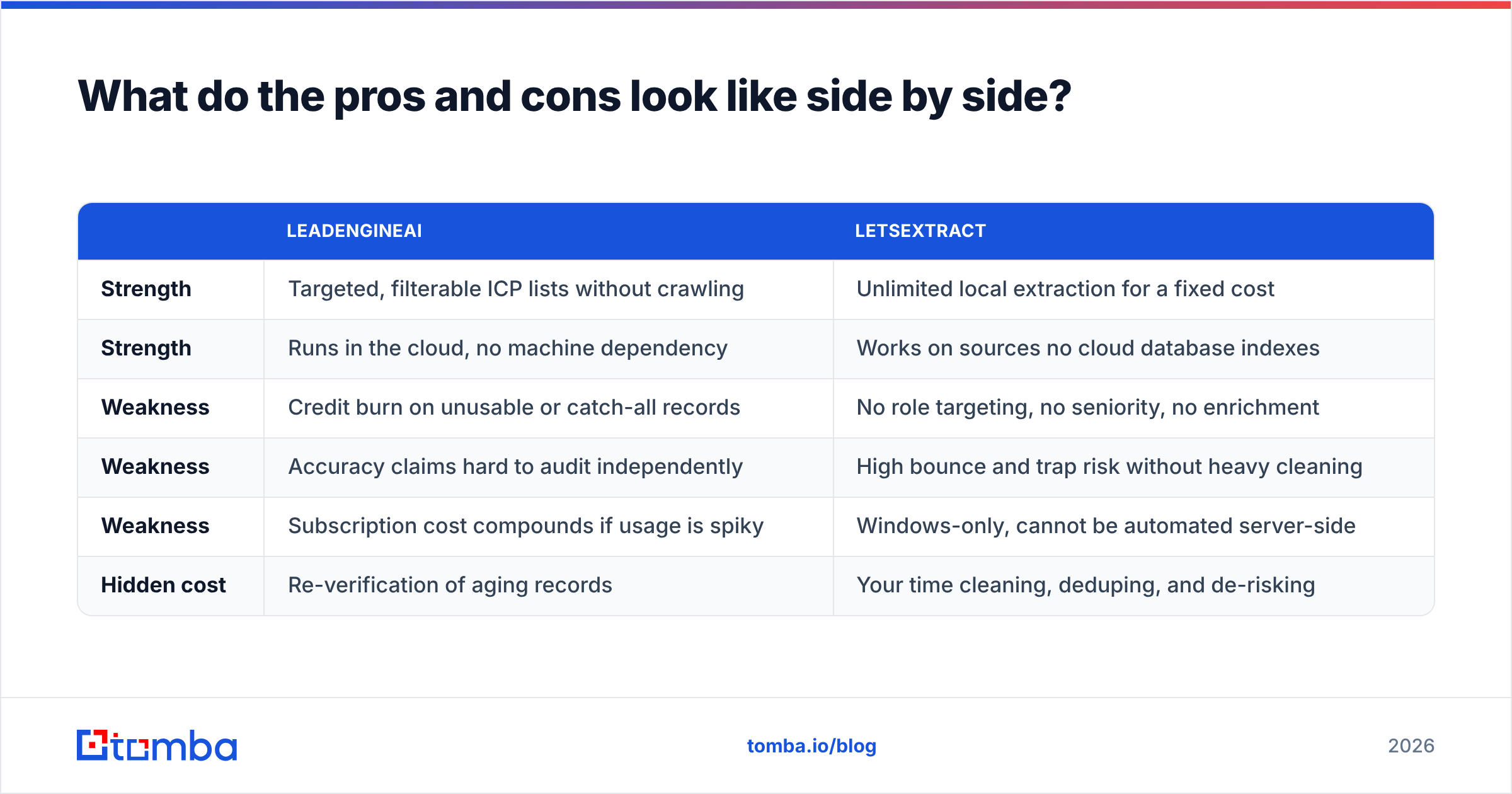
Here is the LeadEngineAI vs LetsExtract scorecard in one view.
| LeadEngineAI | LetsExtract | |
|---|---|---|
| Strength | Targeted, filterable ICP lists without crawling | Unlimited local extraction for a fixed cost |
| Strength | Runs in the cloud, no machine dependency | Works on sources no cloud database indexes |
| Weakness | Credit burn on unusable or catch-all records | No role targeting, no seniority, no enrichment |
| Weakness | Accuracy claims hard to audit independently | High bounce and trap risk without heavy cleaning |
| Weakness | Subscription cost compounds if usage is spiky | Windows-only, cannot be automated server-side |
| Hidden cost | Re-verification of aging records | Your time cleaning, deduping, and de-risking |
Neither column is disqualifying on its own. The real disqualifier is using either tool without a verification step. That is where most burned domains come from.
How should you test both before committing?#
Run a 60-minute bake-off instead of reading more comparison posts.
- Build a 100-contact truth set. Real people at real companies whose addresses you already know: past customers, partners, your own network.
- Blank out the addresses. Feed only the names and domains into each tool.
- Score exact matches, not "found something." Partial credit hides the real gap.
- Verify everything both tools returned with a neutral third-party checker, including addresses that were not in your truth set.
- Compute cost per verified, role-free, non-catch-all contact. This is the only number that maps to pipeline.
- Time the workflow. If one tool needs 40 minutes of cleanup per 1,000 rows, price that at your SDR's hourly rate and add it in.
Teams that run this test often find the cheap tool is the expensive one. A licence that costs nothing per record, then creates four hours of cleanup and a 12% bounce rate, is not free.
Where does Tomba fit in this comparison?#
Tomba is not a crawler, and it is not a database you rent by the seat. It is a deterministic contact resolution layer. Give it a name and a domain, or just a domain. It returns addresses with confidence scores and sources, then verifies them at the SMTP layer — including the catch-all cases most tools quietly skip.
If you are weighing LeadEngineAI vs LetsExtract because you want accurate contacts without inheriting someone else's scraping risk, start with the Tomba Email Finder. The free tier gives you 25 searches a month with no card. That is enough to run the bake-off above on a real sample. Paid plans start at $49/mo, and every plan includes the same verification engine — see Tomba pricing for the tier breakdown. Test it against your current tool, score the exact-match rate yourself, and let the numbers decide.
Related guides#
// get started
Find, verify and enrich your first contacts today
Start on the free plan with 25 searches a month, then scale when your team is ready.
Free plan · No credit card required · GDPR & CCPA
// about the author