LeadEngineAI vs Mailstand: Which Outbound Tool Wins in 2026?
LeadEngineAI and Mailstand get lumped together as "cold email tools," but they solve opposite halves of the problem. Here is where each one actually wins, where both leave a gap, and how to decide without wasting a quarter.
TL;DR — the short LeadEngineAI vs Mailstand answer:
- They are not real rivals. LeadEngineAI owns the front half of outbound: finding leads, enriching them, drafting sequences. Mailstand owns the back half: sending from many mailboxes, rotating them, pooling replies in one inbox.
- No list yet? LeadEngineAI removes more work on day one.
- List in hand, but replies are scattered across 15 inboxes? Mailstand removes more work.
- Neither one fixes data accuracy, and that is what really sets your reply rate. Both sit downstream of the list you feed them.
- The pricing shapes differ. One bills by credits and seats. The other bills by mailboxes and seats. Compare cost per verified contact reached, not cost per seat.
- Most teams add a data layer — an email finder plus a verifier — in front of whichever tool they pick.
What are LeadEngineAI and Mailstand?#
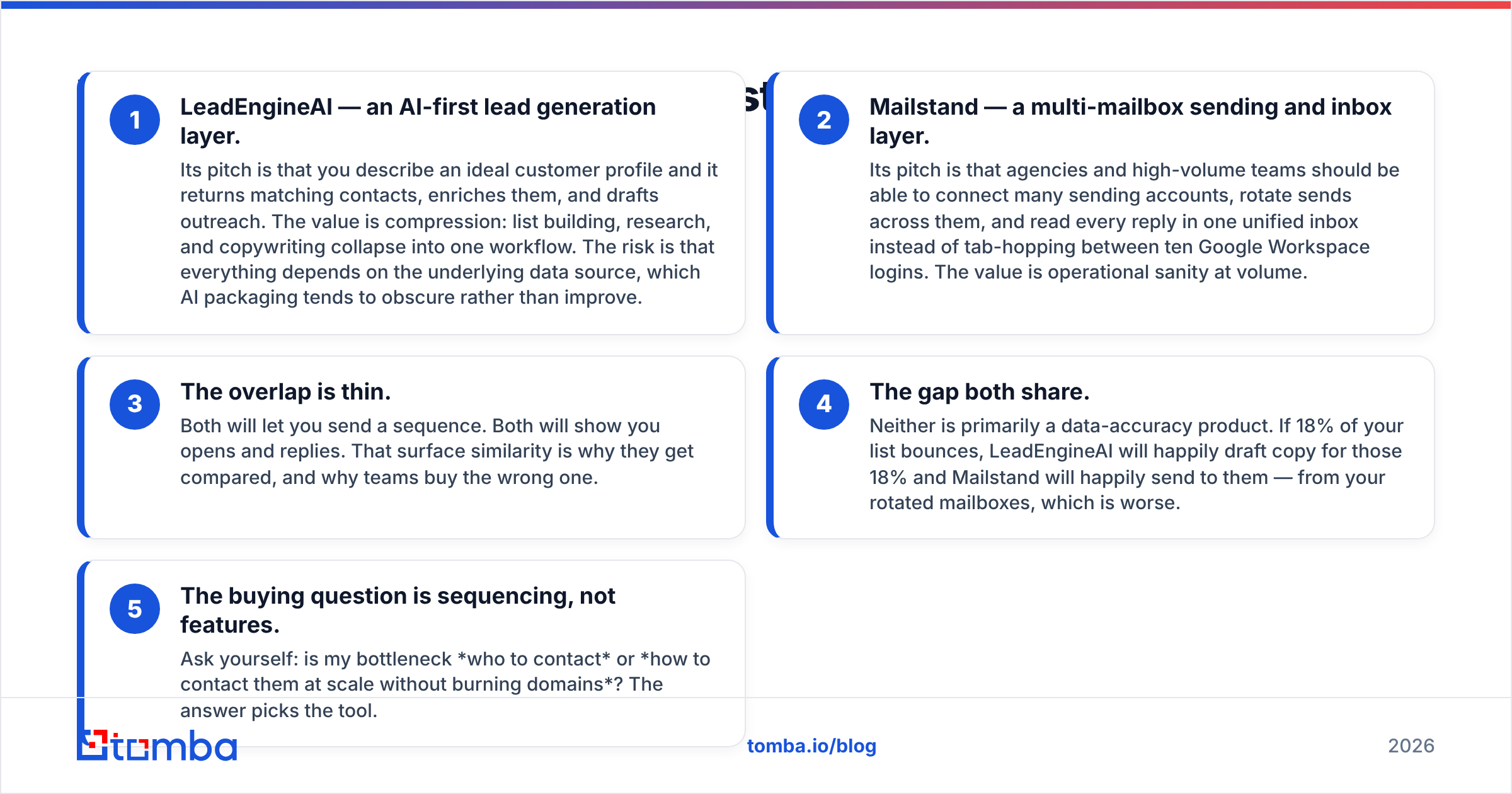
Start with honest framing. Most LeadEngineAI vs Mailstand posts treat these as one product category. They are not.
LeadEngineAI is an AI-first lead generation layer. You describe your ideal customer. It returns matching contacts, enriches them, and drafts the outreach. The value is speed: list building, research, and copy fold into one flow. The risk sits underneath. Everything rests on the data source, and AI packaging tends to hide that source rather than improve it.
Mailstand is a multi-mailbox sending and inbox layer. Agencies and high-volume teams connect many sending accounts. Mailstand rotates sends across them. Every reply lands in one place, so nobody tab-hops between ten Google Workspace logins. The value is calm at volume.
Two more points decide most purchases:
- The overlap is thin. Both send a sequence. Both show opens and replies. That surface match is why teams compare them, and why some buy the wrong one.
- Both share one gap. Neither is built for data accuracy. Say 18% of your list bounces. LeadEngineAI will still draft copy for those people. Mailstand will still mail them, from your rotated mailboxes. That is the worse outcome.
So the buying question is about order, not features. Is your block who to contact? Or how to reach them at scale without burning domains? The answer picks the tool.
A note on method. Both vendors ship fast, and public pricing pages change often. Check exact numbers on the vendor page and on review sites like G2 and Capterra before you sign a yearly deal. The design gap between the two moves far more slowly, and that gap is what this comparison rests on.
LeadEngineAI vs Mailstand: how do the features compare?#
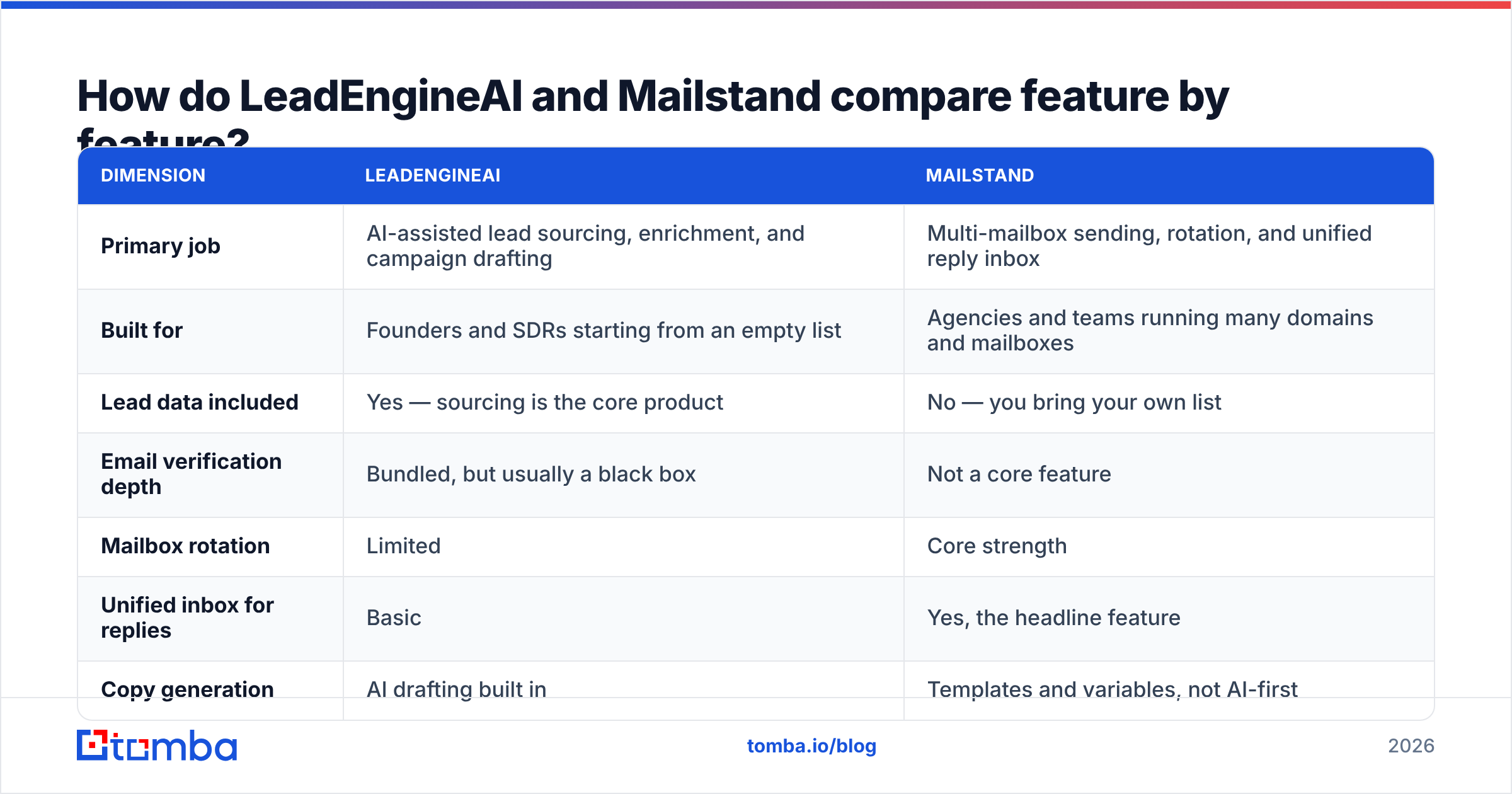
| Dimension | LeadEngineAI | Mailstand |
|---|---|---|
| Primary job | AI-assisted lead sourcing, enrichment, and campaign drafting | Multi-mailbox sending, rotation, and one shared reply inbox |
| Built for | Founders and SDRs starting from an empty list | Agencies and teams running many domains and mailboxes |
| Lead data included | Yes — sourcing is the core product | No — you bring your own list |
| Email verification depth | Bundled, but usually a black box | Not a core feature |
| Mailbox rotation | Limited | Core strength |
| Unified inbox for replies | Basic | Yes, the headline feature |
| Copy generation | AI drafting built in | Templates and variables, not AI-first |
| Pricing model | Credit and seat tiers | Mailbox and seat tiers |
| Scales badly when | Your target market is narrow and the database is thin | Your list is poor and bounces pile up |
| Scales well when | You need lots of prospects fast | You need lots of sends without domain damage |
Read the last two rows twice. That row pair is the real LeadEngineAI vs Mailstand answer.
LeadEngineAI fails when your target market is narrow and the database is thin. It will return contacts. The ones you want most are often missing or stale.
Mailstand fails in another way. It is an amplifier. Give it a clean list and it earns its price. Give it a scraped one and it spreads the damage across every domain you own.
Is LeadEngineAI better than Mailstand for cold email?#
For starting cold email, LeadEngineAI is the shorter path. You get a list and a sequence in one afternoon.
For sustaining cold email at agency volume, Mailstand is the better engine. Mailbox rotation and a shared reply inbox solve the two problems that break teams past roughly 5,000 sends a month.
But "better for cold email" hides a third factor that beats both: email deliverability. Mailbox providers now police bulk senders hard. The strongest signal against you is a high bounce rate. Cross the usual 2–3% line and rotation will not save you. You are just spreading a bad name across more domains.
So the LeadEngineAI vs Mailstand choice comes with homework either way:
- LeadEngineAI users: treat the bundled data as a candidate list, not a final one. Export it and check it again before it reaches a sequence.
- Mailstand users: make verification a hard gate. Nothing enters a campaign unverified. The tool holds no view on list hygiene and will not protect you from yourself.
Either path ends at a standalone email verifier between "list" and "send." That is not a Tomba-only argument. HubSpot's own deliverability guidance makes the same point: clean the list before you raise volume.
LeadEngineAI vs Mailstand pricing: how do the models compare?#
Compare the shape of the pricing, not the sticker.
LeadEngineAI-style tools bill on credits and seats. Every lead you reveal, enrich, or verify draws down a balance. Your cost tracks prospecting volume. A sloppy customer profile gets expensive fast, because you burn credits on people you will never email.
Mailstand-style tools bill on mailboxes and seats. Your cost tracks sending setup, not list size. Twenty more mailboxes cost real money. Twenty thousand more contacts in a live campaign often cost nothing.
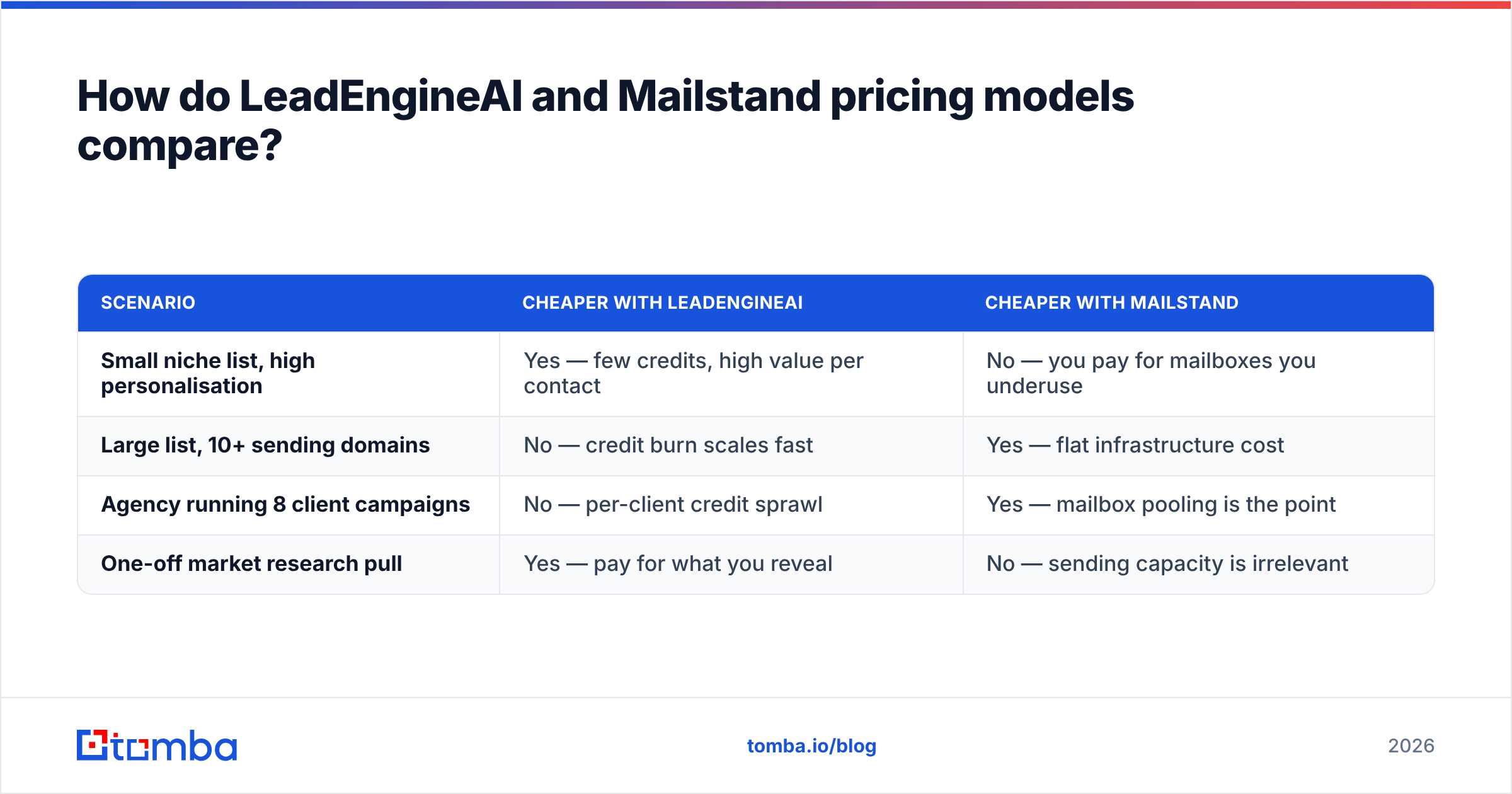
That gap creates two very different invoice problems:
| Scenario | Cheaper with LeadEngineAI | Cheaper with Mailstand |
|---|---|---|
| Small niche list, high personal touch | Yes — few credits, high value per contact | No — you pay for mailboxes you underuse |
| Large list, 10+ sending domains | No — credit burn scales fast | Yes — flat cost for the setup |
| Agency running 8 client campaigns | No — per-client credit sprawl | Yes — mailbox pooling is the point |
| One-off market research pull | Yes — pay for what you reveal | No — sending capacity is beside the point |
Want a reference point for the data layer? Tomba pricing runs a free tier at 25 searches per month, Starter at $49/mo, Growth at $99/mo, and Pro at $249/mo. Enterprise is quoted on request.
Why that matters here: buying data on its own is usually cheaper than paying a sending tool's top tier just to unlock its bundled contacts. You also keep your contacts if you switch platforms later.
Which one actually improves your reply rate?#
Neither, on its own. This is the awkward part of any LeadEngineAI vs Mailstand review.
Reply rate rests on three inputs, in order of impact:
- Is the address real, and does it belong to the right person? A perfect email to a VP who left is a zero.
- Does the message fit that person's job today? AI drafting helps here, but only when the data behind it is right.
- Does the message reach the main inbox? This is where sending setup earns its keep.
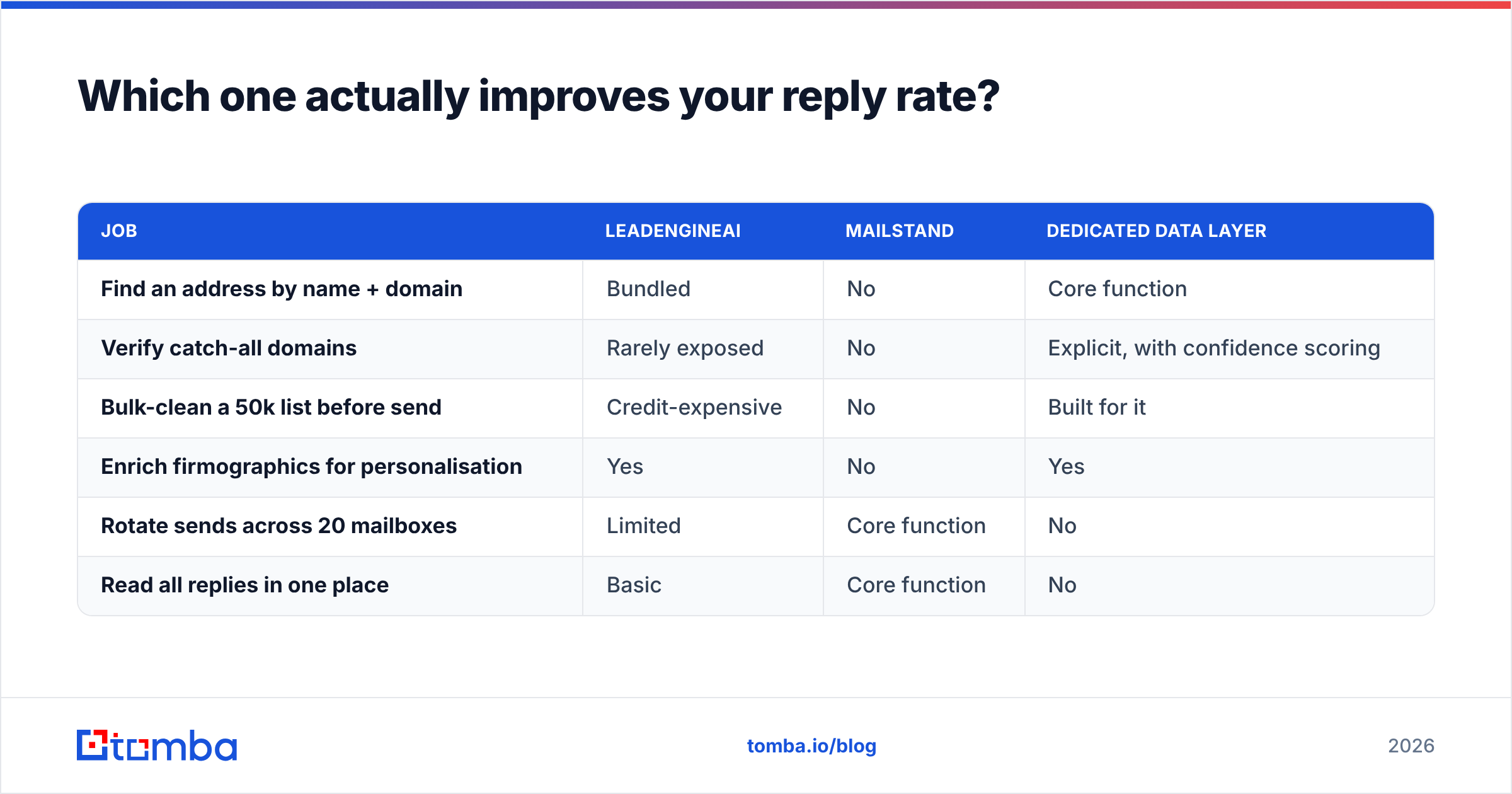
LeadEngineAI touches inputs 1 and 2. Mailstand touches input 3. Neither owns input 1 the way a dedicated provider does. That is why serious outbound teams split the layers:
| Job | LeadEngineAI | Mailstand | Dedicated data layer |
|---|---|---|---|
| Find an address by name + domain | Bundled | No | Core function |
| Verify catch-all domains | Rarely exposed | No | Yes, with confidence scores |
| Bulk-clean a 50k list before send | Credit-expensive | No | Built for it |
| Enrich company data for relevance | Yes | No | Yes |
| Rotate sends across 20 mailboxes | Limited | Core function | No |
| Read all replies in one place | Basic | Core function | No |
The clean setup is boring and it works. Source and verify in a data tool. Send and handle replies in a sending tool. Do not let one vendor own both jobs badly.
Most teams skip one step: a bulk email finder run before campaign import. That step decides how the next 30 days go.

Which should you choose for your team?#
Here is the LeadEngineAI vs Mailstand call, split by team type.
Choose LeadEngineAI if:
- You start from zero and need a list this week more than you need sending depth.
- Your target market is broad, so a general database will cover it.
- You are a founder or small team, and one person sources, writes, and sends.
- You want a first campaign fast, and data portability can wait.
Choose Mailstand if:
- You already have a good source of contacts, and your problem is throughput.
- You run many domains and mailboxes, and replies get lost between them.
- You are an agency, and client campaign isolation plus one reply inbox is daily pain.
- Domain damage has burned you, and you want rotation as a defence.
Choose neither yet — fix the input first — if:
- Your bounce rate has been above 3% in the last 90 days. Tooling changes nothing until the data is clean.
- You sell into a narrow niche where general databases are thin. Pattern-based finding plus verification beats a database lookup.
- You need contacts in a CRM, not in a sending tool. Then a HubSpot integration or direct API access matters more than either platform's UI.
What does a sane 2026 outbound stack look like?#
Four layers, each owned by a tool that is good at it:
- Targeting. Build the account list before you open any tool. This is human work, and no AI shortcut has replaced it yet.
- Data. Find and verify contacts at those accounts. Use a domain search to map who works there. Then check every address before it enters a campaign.
- Messaging. Write to something real: a new role, a funding round, a tool in their stack. LeadEngineAI's drafting helps here, as long as the data underneath is right.
- Sending. Rotate mailboxes, respect volume ramps, keep replies in one place. Mailstand fits this layer well.
The common mistake is folding layers 2 and 4 into one vendor for convenience. Data is the layer you will want to swap on its own. Lock it inside a sending platform and you will buy the same contacts twice. That is the LeadEngineAI vs Mailstand trap worth dodging.
Frequently asked questions#
Can I use LeadEngineAI and Mailstand together? Yes. For many teams that is the right answer: source in one, send in the other. Just add a verification step between them. Never pipe raw output straight into a sequence.
Which has better deliverability? Mailstand is more deliverability-aware by design, because rotation and gentle ramping are its job. But design cannot fix a bad list. Run an email reputation check on your sending domain before you blame either tool.
Is AI-sourced lead data accurate enough to send to directly? Treat it as a guess, not a fact. AI contacts are often pattern-guessed addresses shown with unearned confidence. Verification is cheap. A burned domain is not.
What about catch-all domains? Both tools hand you catch-all addresses with little warning. Those need their own step. A catch-all verifier tells you whether the mailbox is likely real, not just whether the server accepts everything.
The verdict#
The LeadEngineAI vs Mailstand verdict splits by bottleneck. If your block is who to email, LeadEngineAI is the better first buy. If your block is emailing at scale without wrecking your domains, Mailstand is. They work together more often than they compete, and any review that names a flat winner is measuring the wrong axis.
Neither one fixes the data layer under both. That is where most outbound programmes quietly fail.
So fix the input first. Use the Tomba Email Finder to source verified, confidence-scored business addresses by name, domain, or company. Then push only clean contacts into whichever sending engine you pick. Start on the free tier at 25 searches a month. Test it on a segment you already know, and compare the bounce rate to your current list. If the data holds up, the tooling choice gets much easier.
Related guides#
// get started
Find, verify and enrich your first contacts today
Start on the free plan with 25 searches a month, then scale when your team is ready.
Free plan · No credit card required · GDPR & CCPA
// about the author