LeadEngineAI vs MailTag: Which Tool Wins for Outbound in 2026?
One tool tries to build your list with AI. The other tells you when someone opened your email. Here is an honest breakdown of what each actually does, what it costs, and which gap you still need to fill.
TL;DR
- LeadEngineAI and MailTag are not really competitors. LeadEngineAI sits at the top of the funnel (finding and scoring prospects with AI); MailTag sits at the bottom (tracking whether the email you already sent got opened or clicked).
- If you are choosing between them because you only have budget for one, ask which problem is actually costing you revenue: an empty list, or blind follow-up timing. An empty list costs more.
- MailTag is cheap, narrow, and Chrome/Gmail-bound. It does open tracking, link tracking, and simple ping-style follow-up sequences well, and it does nothing else.
- AI lead-engine platforms promise sourcing, enrichment, and scoring in one place. The recurring complaint across that whole category is data freshness — AI-assembled contact records still bounce if nobody verifies them at send time.
- The stack most teams end up with: a verified data source for contacts, a sending tool for sequencing, and a tracking layer for signals. Tomba covers the first piece at $49/mo on Starter with a free tier to test accuracy first.
What are LeadEngineAI and MailTag, exactly?#
They solve opposite ends of the same sentence: "send the right person the right email at the right time."
LeadEngineAI belongs to the AI lead-generation category — platforms that ingest an ideal-customer-profile description, then generate, enrich, and score a list of matching companies and contacts. The pitch is compression: replace a list-building VA, a data vendor subscription, and a scoring spreadsheet with one prompt. In practice these tools are a thin AI layer sitting on top of licensed or scraped B2B data, plus an LLM that writes the reason-to-reach-out.
MailTag is an email tracking extension for Gmail. Install it, and every email you send gets a tracking pixel and rewritten links. You get desktop notifications when someone opens, a timeline of opens and clicks per thread, and a lightweight "Ping" sequencer that fires scheduled follow-ups. It is the same product family as HubSpot's free email tracking or Mailtrack — see MailTag's own product site for the current feature list, and Wikipedia's overview of email tracking for how the pixel mechanism actually works and where it now fails.
So the honest framing of leadengineai vs mailtag is not "which is better." It is "which stage of my outbound is currently broken."

How do LeadEngineAI and MailTag compare head-to-head?#
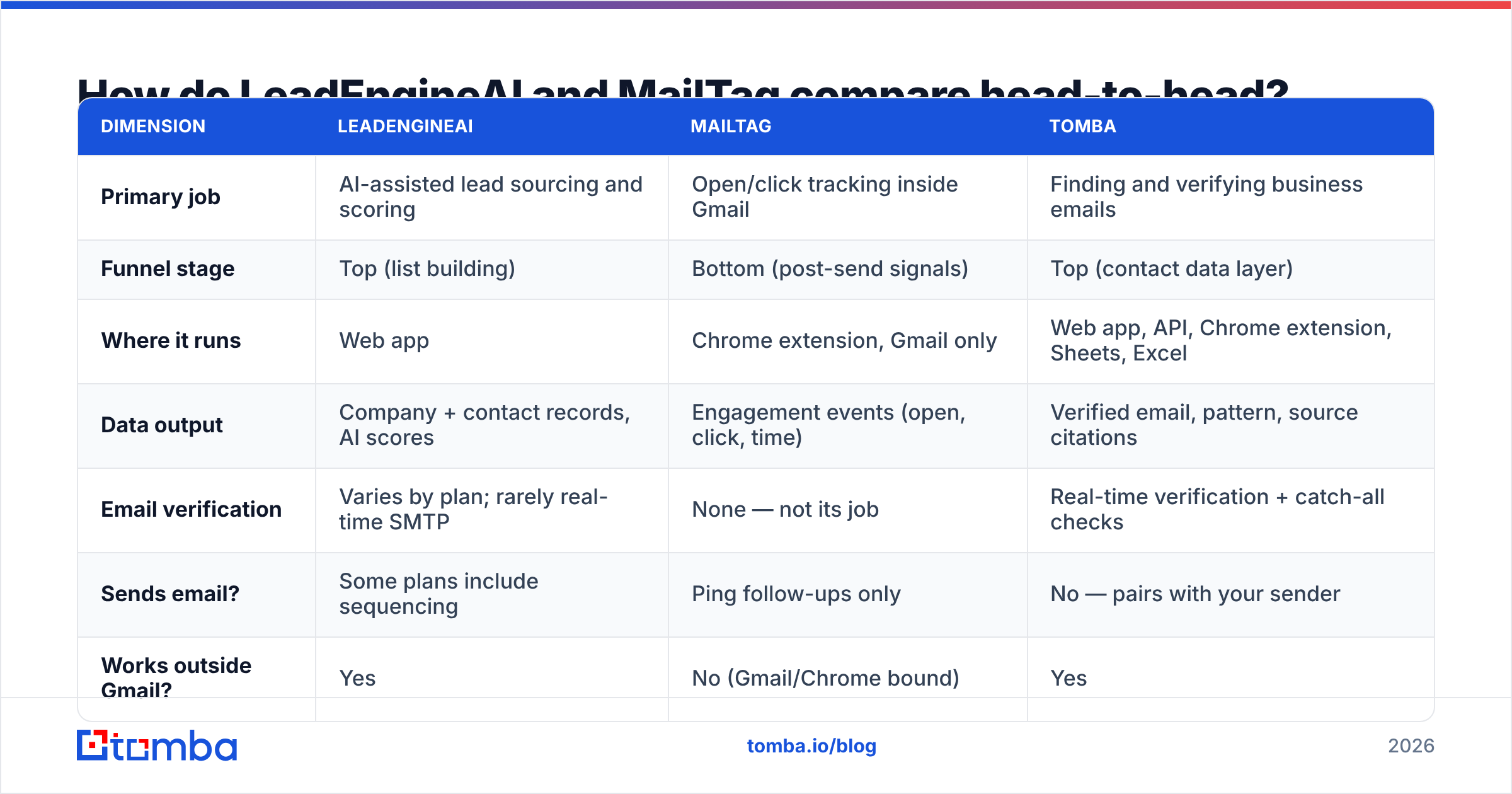
| Dimension | LeadEngineAI | MailTag | Tomba |
|---|---|---|---|
| Primary job | AI-assisted lead sourcing and scoring | Open/click tracking inside Gmail | Finding and verifying business emails |
| Funnel stage | Top (list building) | Bottom (post-send signals) | Top (contact data layer) |
| Where it runs | Web app | Chrome extension, Gmail only | Web app, API, Chrome extension, Sheets, Excel |
| Data output | Company + contact records, AI scores | Engagement events (open, click, time) | Verified email, pattern, source citations |
| Email verification | Varies by plan; rarely real-time SMTP | None — not its job | Real-time verification + catch-all checks |
| Sends email? | Some plans include sequencing | Ping follow-ups only | No — pairs with your sender |
| Works outside Gmail? | Yes | No (Gmail/Chrome bound) | Yes |
| Typical buyer | Founder or SDR building a list from scratch | Solo seller or AE tracking active threads | Any team that needs contact data at volume |
| Entry price | Quote/tier-based — check the vendor page | Roughly $10/user/mo at list price | Free tier (25 searches/mo), then $49/mo |
Two things fall out of that table immediately.
First, you can run MailTag and an AI lead engine simultaneously without overlap, and many small teams do. The decision is only forced when budget is genuinely one-line-item tight.
Second, neither tool's core promise includes the thing that most often breaks cold outbound: whether the address is deliverable at the moment you press send. AI sourcing tools output records. Tracking tools measure what happens after. The verification step in the middle is a separate job, which is why an email verifier usually ends up in the stack regardless of which of these two you pick.
Is MailTag worth it in 2026?#
Yes, with a caveat that has gotten heavier every year: open tracking is less trustworthy than it used to be.
Apple Mail Privacy Protection pre-fetches images, which fires your pixel whether or not a human looked at the message. Gmail's image proxy has cached images since 2013. Corporate security gateways click every link in an inbound email to scan it, which means your "click" event may be a scanner in Virginia, not your prospect. The result: open rate is now a directional vanity metric, and click data needs a skeptical eye.
What still works well in MailTag:
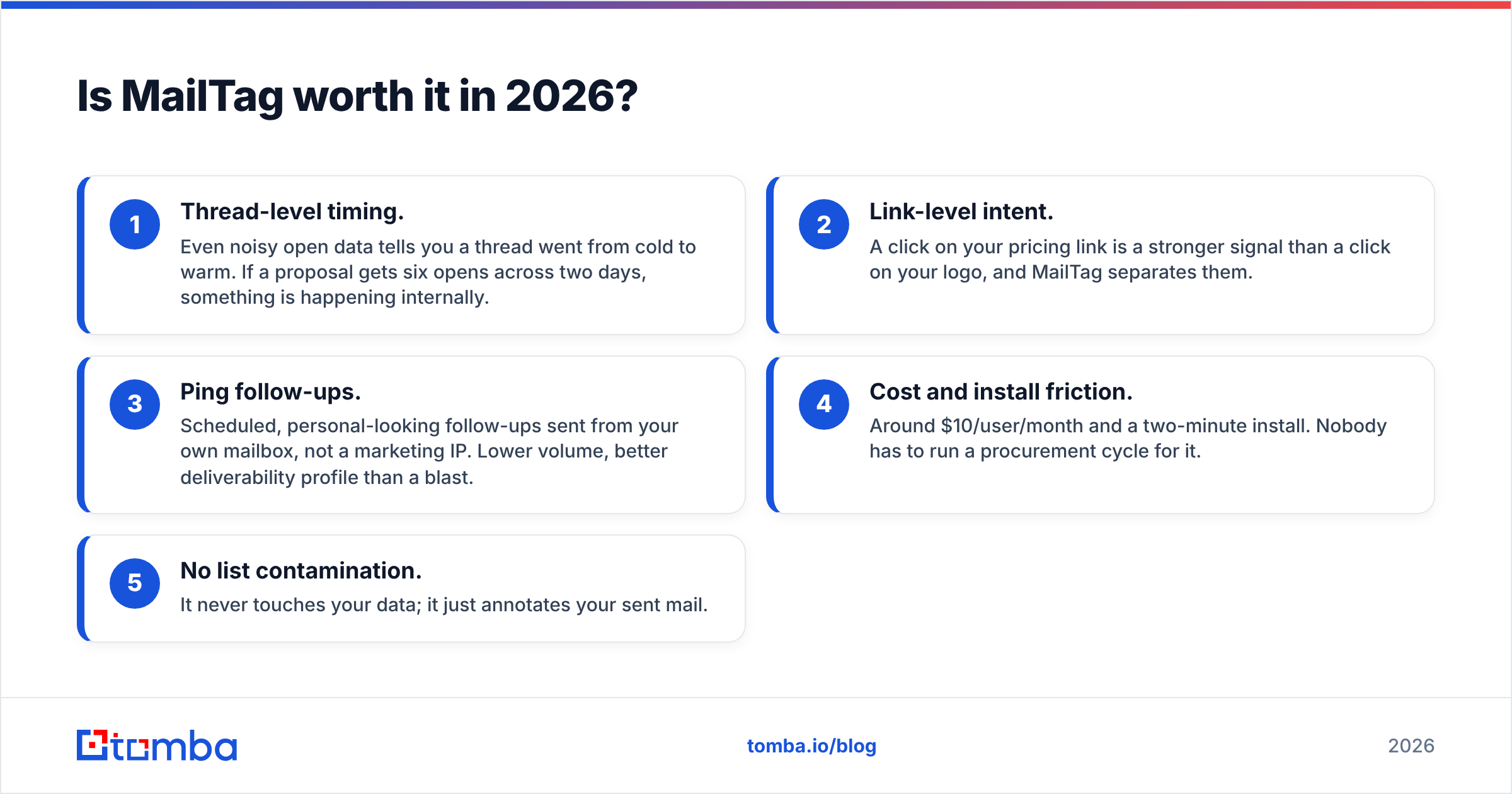
- Thread-level timing. Even noisy open data tells you a thread went from cold to warm. If a proposal gets six opens across two days, something is happening internally.
- Link-level intent. A click on your pricing link is a stronger signal than a click on your logo, and MailTag separates them.
- Ping follow-ups. Scheduled, personal-looking follow-ups sent from your own mailbox, not a marketing IP. Lower volume, better deliverability profile than a blast.
- Cost and install friction. Around $10/user/month and a two-minute install. Nobody has to run a procurement cycle for it.
- No list contamination. It never touches your data; it just annotates your sent mail.
Where MailTag runs out of road: it is Gmail-and-Chrome only, it has no CRM-grade reporting, and it will not tell you who to email. If your problem is "I have 40 live conversations and I am losing track," it is a good $10. If your problem is "I have nine prospects total," it solves nothing.
Is an AI lead engine better than buying verified data?#
This is the real question hiding inside leadengineai vs mailtag, and the answer depends on how much you trust generated records.
AI lead engines are excellent at the research half of prospecting: reading a website, inferring a tech stack, summarizing why a company might care, drafting a first line. That work used to take an SDR ten minutes per account and now takes seconds. That is genuine leverage.
They are weaker at the identity half: this specific human, at this specific company, has this specific working mailbox, today. An LLM can confidently produce firstname.lastname@company.com because that is the modal pattern in its training data — not because anyone confirmed the mailbox exists. When a generated address is wrong, it does not fail loudly; it bounces, and bounces quietly erode your sender reputation.
A practical test before you commit to any AI sourcing tool: pull 100 contacts, run them through independent verification, and count. Under 90% deliverable and you are paying for research, not data. Compare that to sourcing the same 100 through a dedicated email finder that cites where each address came from and verifies it at query time.
The category-level pattern you can confirm yourself in the review data on G2 and Capterra: AI prospecting tools score high on "ease of use" and noticeably lower on "data accuracy." Tracking tools like MailTag score the opposite way — narrow, but they do the narrow thing reliably.

What does each tool cost, realistically?#
Sticker price is rarely the real number. Credits, seats, and rollover rules matter more.
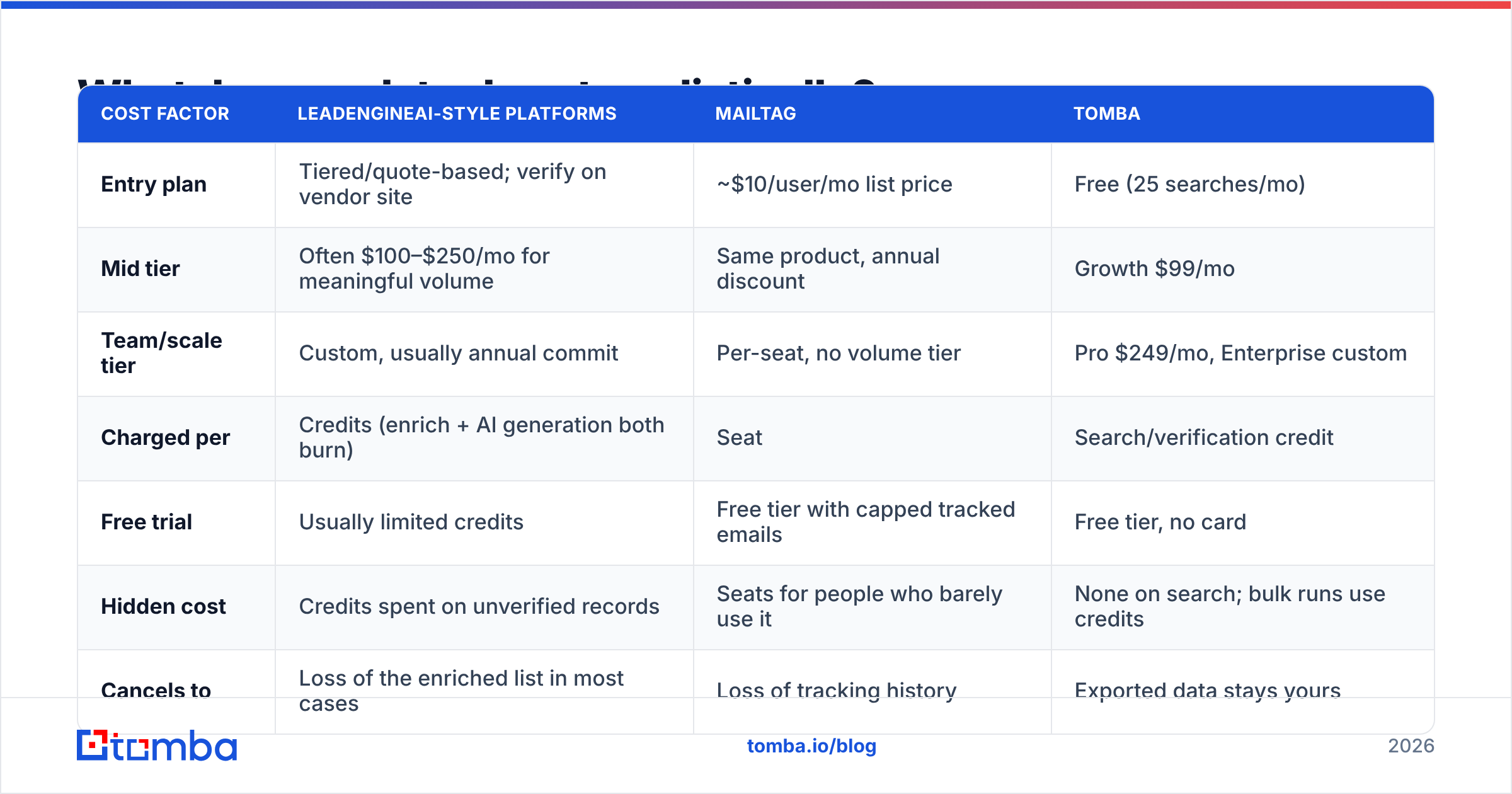
| Cost factor | LeadEngineAI-style platforms | MailTag | Tomba |
|---|---|---|---|
| Entry plan | Tiered/quote-based; verify on vendor site | ~$10/user/mo list price | Free (25 searches/mo) |
| Mid tier | Often $100–$250/mo for meaningful volume | Same product, annual discount | Growth $99/mo |
| Team/scale tier | Custom, usually annual commit | Per-seat, no volume tier | Pro $249/mo, Enterprise custom |
| Charged per | Credits (enrich + AI generation both burn) | Seat | Search/verification credit |
| Free trial | Usually limited credits | Free tier with capped tracked emails | Free tier, no card |
| Hidden cost | Credits spent on unverified records | Seats for people who barely use it | None on search; bulk runs use credits |
| Cancels to | Loss of the enriched list in most cases | Loss of tracking history | Exported data stays yours |
The line that catches people out is the one marked credits spent on unverified records. On credit-metered AI platforms, a lookup that returns a wrong address costs the same as one that returns a right address. At 80% accuracy, your effective cost per usable contact is 25% higher than the rate card implies. Run that math against Tomba pricing before you compare headline numbers — per-usable-contact is the only figure worth comparing.
Which one should you pick for your situation?#
Match the tool to the bottleneck, not to the demo.
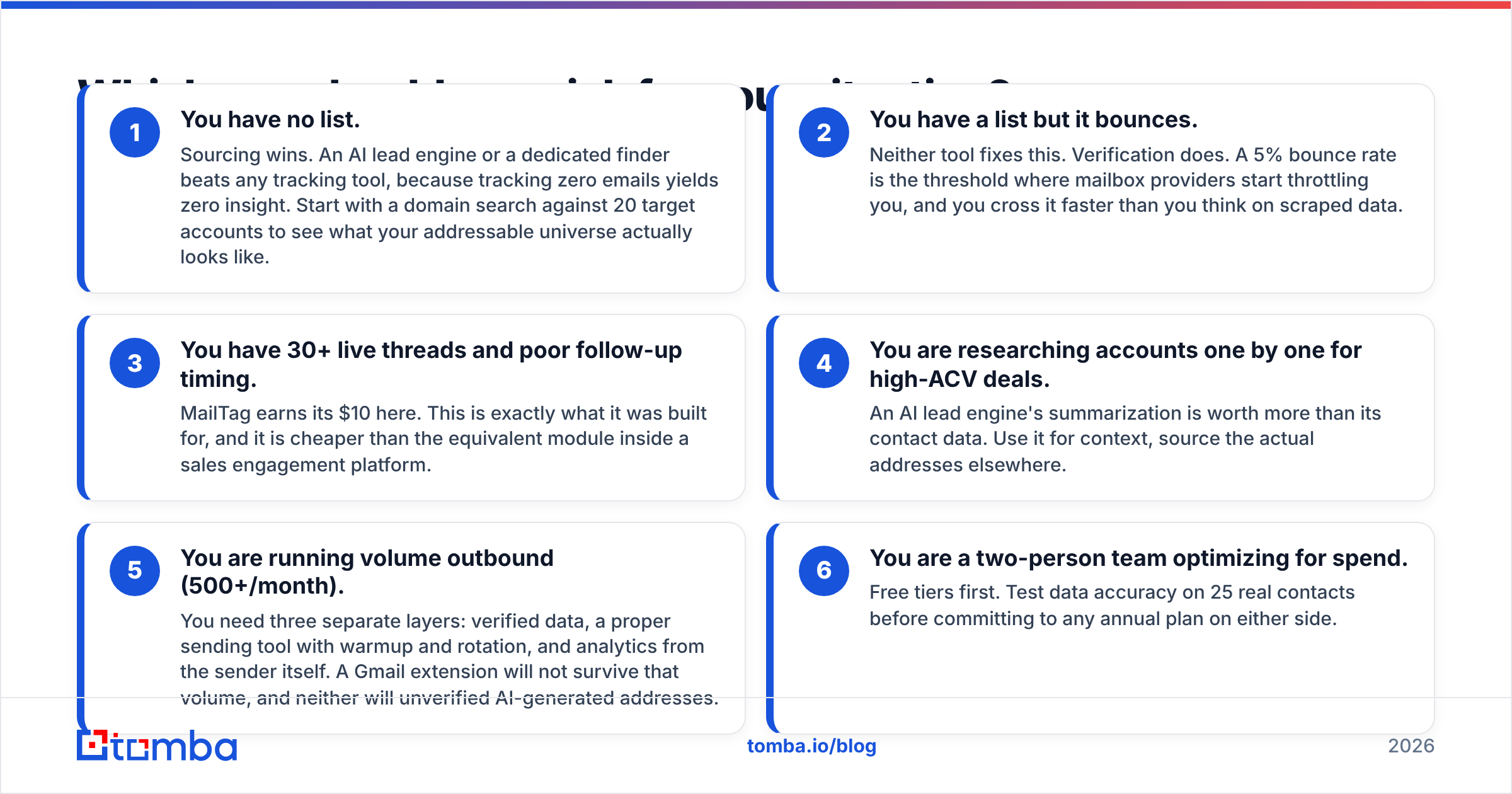
- You have no list. Sourcing wins. An AI lead engine or a dedicated finder beats any tracking tool, because tracking zero emails yields zero insight. Start with a domain search against 20 target accounts to see what your addressable universe actually looks like.
- You have a list but it bounces. Neither tool fixes this. Verification does. A 5% bounce rate is the threshold where mailbox providers start throttling you, and you cross it faster than you think on scraped data.
- You have 30+ live threads and poor follow-up timing. MailTag earns its $10 here. This is exactly what it was built for, and it is cheaper than the equivalent module inside a sales engagement platform.
- You are researching accounts one by one for high-ACV deals. An AI lead engine's summarization is worth more than its contact data. Use it for context, source the actual addresses elsewhere.
- You are running volume outbound (500+/month). You need three separate layers: verified data, a proper sending tool with warmup and rotation, and analytics from the sender itself. A Gmail extension will not survive that volume, and neither will unverified AI-generated addresses.
- You are a two-person team optimizing for spend. Free tiers first. Test data accuracy on 25 real contacts before committing to any annual plan on either side.
Can you just use both?#
Yes, and for most sub-20-person teams that is the correct answer — the combined cost is under $120/month.
A workable stack looks like this: use the AI engine to build the target-account list and draft context, run every address through verification before it enters your sequencer, send from your own domain, and let MailTag annotate the threads that go manual. The AI handles breadth, verification handles accuracy, MailTag handles the last-mile signal on deals that are actually moving.
The part people skip is the middle. It is tempting, because sourcing tools display addresses with the same visual confidence whether they are confirmed or inferred. If you only add one habit from this comparison, make it a verification pass between sourcing and sending — including a catch-all verifier run for the domains that accept everything and tell you nothing.
For reference on how the mature end of this stack is assembled, HubSpot's sales documentation lays out the same three-layer split: data, engagement, signal. The tooling changes; the layers do not.
What is the verdict on LeadEngineAI vs MailTag?#
If you must pick one, pick the sourcing tool. Tracking amplifies an existing pipeline; it cannot create one. A team with 500 verified contacts and no open tracking will out-book a team with perfect open tracking and 40 stale contacts, every quarter.
But treat AI-generated contact data as a hypothesis, not a fact. Verify before you send. The 20 minutes that costs is cheaper than the three weeks it takes to repair a domain reputation after a bounce spike.
And if your threads are the bottleneck rather than your list, MailTag is a legitimately good ten dollars. It is honest about its scope, it installs in two minutes, and it does not pretend to be a CRM.
Start with data you can trust#
If the honest diagnosis is that your list is the weak link, fix that layer first. Tomba's Email Finder returns business email addresses by name, domain, or company, with real-time verification and source attribution on every result — so you know whether an address was confirmed or inferred before it costs you a bounce. The free tier gives you 25 searches a month with no card, which is enough to benchmark accuracy against whatever tool you are considering. Starter runs $49/mo when you are ready for volume, and the same data is available through the API, Chrome extension, Google Sheets, and bulk uploads. Test it against your current source on 25 real contacts and let the bounce rate decide.
Related guides#
// get started
Find, verify and enrich your first contacts today
Start on the free plan with 25 searches a month, then scale when your team is ready.
Free plan · No credit card required · GDPR & CCPA
// about the author