LeadEngineAI vs ManyReach: Full 2026 Comparison and Verdict
One tool wants to be your AI SDR. The other wants to be the cheapest way to send cold email at scale. Here is how LeadEngineAI and ManyReach actually differ on data, deliverability, pricing model, and who each one fits.
TL;DR
- They are not the same category. LeadEngineAI sells an AI-SDR workflow — find leads, write the sequence, send it. ManyReach sells sending infrastructure with a pay-per-email meter and no per-seat tax.
- Pick ManyReach if you already have a data source and a copywriter, and your pain is cost-per-send, mailbox sprawl, or agency-style multi-client sending.
- Pick LeadEngineAI if you have no list, no sequence, and one person doing outbound who needs the whole thing assembled for them.
- Both inherit the same failure mode: whatever contact data you feed them. A 12% bounce rate kills a domain regardless of which platform sent the message.
- Verify before you send. Run any list — scraped, AI-sourced, or purchased — through an email verifier first. It is the cheapest insurance in the stack.
What are LeadEngineAI and ManyReach?#
Two products that both show up when you search "cold email tool," built on opposite bets.
- LeadEngineAI — the bundled AI SDR. It aims to compress prospecting, enrichment, copywriting, and sending into one flow. You describe an ICP, it proposes contacts, drafts sequences, and runs them. The pitch is fewer tabs and fewer subscriptions.
- ManyReach — the metered sending layer. It is an outreach platform built around pay-per-email pricing with unlimited seats and unlimited connected mailboxes. You bring the list; it handles rotation, throttling, and reply detection. See the official ManyReach site for current plan mechanics, which change more often than most vendors'.
- Different unit of value. LeadEngineAI charges for work done on your behalf (credits, contacts, AI generations). ManyReach charges for volume moved (emails sent). That single difference drives almost every other trade-off below.
- Different failure surface. LeadEngineAI's weak point is data provenance — you often cannot see where a contact came from. ManyReach's weak point is that it assumes competence you may not have: it will faithfully send a bad list to a bad audience at high speed.
- Different ceiling. Bundled AI tools plateau when you outgrow their database. Metered senders scale indefinitely but never improve your targeting.
If you only remember one line: LeadEngineAI replaces people, ManyReach replaces infrastructure. Teams that confuse the two end up paying for one and needing the other.

How do LeadEngineAI and ManyReach compare head-to-head?#
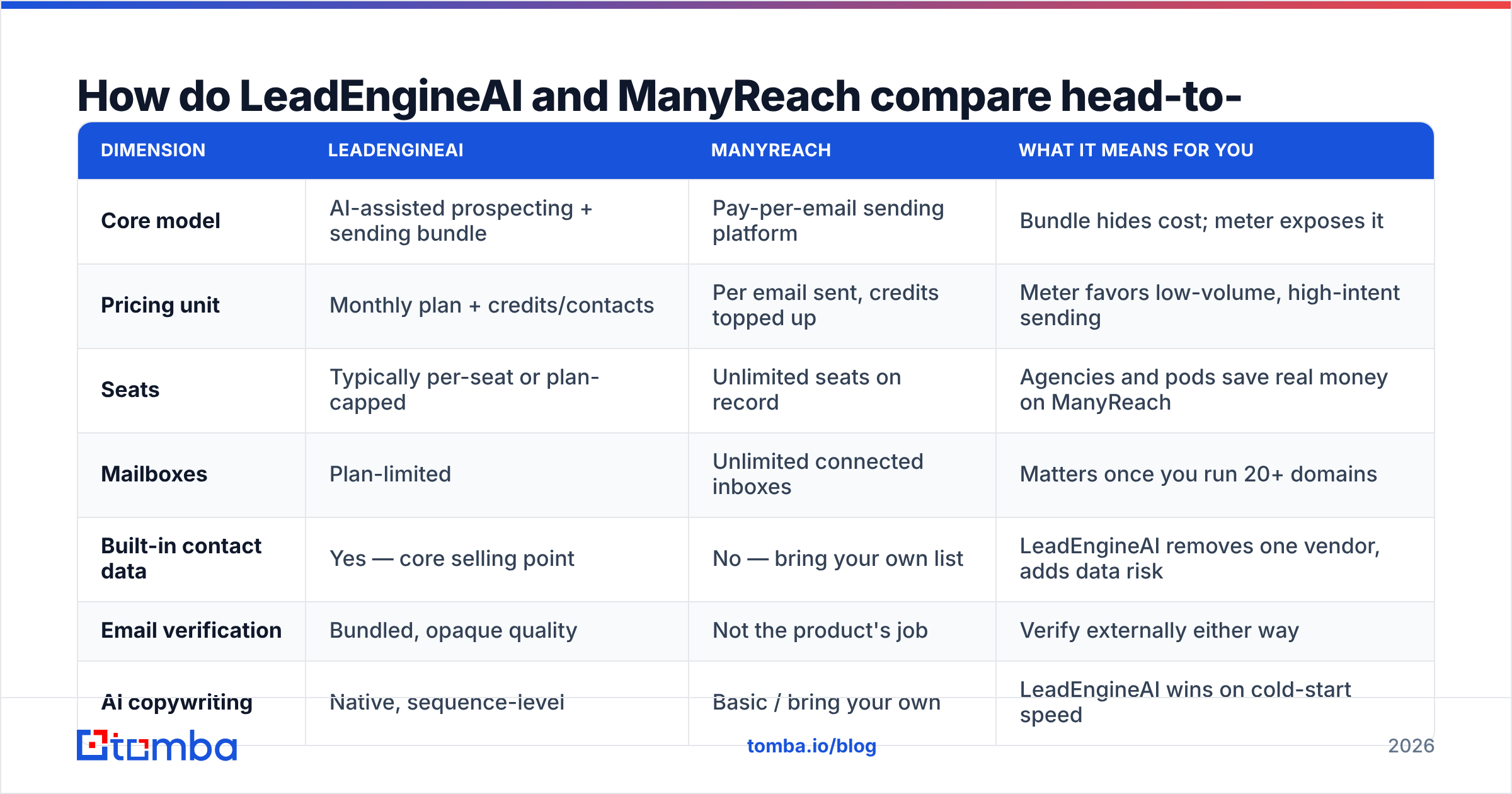
Pricing pages for both products move, so treat exact dollar figures as something to confirm at checkout. The shape of the pricing is the part that stays stable and the part that should drive your decision.
| Dimension | LeadEngineAI | ManyReach | What it means for you |
|---|---|---|---|
| Core model | AI-assisted prospecting + sending bundle | Pay-per-email sending platform | Bundle hides cost; meter exposes it |
| Pricing unit | Monthly plan + credits/contacts | Per email sent, credits topped up | Meter favors low-volume, high-intent sending |
| Seats | Typically per-seat or plan-capped | Unlimited seats on record | Agencies and pods save real money on ManyReach |
| Mailboxes | Plan-limited | Unlimited connected inboxes | Matters once you run 20+ domains |
| Built-in contact data | Yes — core selling point | No — bring your own list | LeadEngineAI removes one vendor, adds data risk |
| Email verification | Bundled, opaque quality | Not the product's job | Verify externally either way |
| AI copywriting | Native, sequence-level | Basic / bring your own | LeadEngineAI wins on cold-start speed |
| API access | Limited on lower tiers | Available, send-focused | Check before you build automation |
| Best fit | Solo founder, first outbound motion | Agency, RevOps, high-volume sender | Team shape decides more than features |
| Biggest risk | Unverifiable data provenance | You supply the quality control | Both land on your sender reputation |
Two honest caveats. First, LeadEngineAI is the younger and less independently reviewed of the pair — check current listings on G2 before committing to an annual contract, and weight recent reviews heavily. Second, ManyReach's "unlimited seats" framing is genuinely unusual in this category and worth modeling against your current per-seat spend; for a five-person team on a $99/seat sequencer, the math often flips on its own.
Is LeadEngineAI's built-in data good enough?#
Usually good enough to start, rarely good enough to scale. That is the honest answer for every bundled-data outreach tool, not a knock specific to LeadEngineAI.
Bundled databases optimize for coverage, because coverage is what demos well. A tool that returns 400 contacts for your ICP query looks better than one that returns 180 — even when 90 of the 400 are stale, role-based, or catch-all addresses that will silently vanish. You find out six weeks later, when your reply rate has halved and your primary domain is landing in Promotions.
What to actually test during a trial:
- Pull 100 contacts and verify them elsewhere. If more than 5-8% come back invalid or risky, the database is coasting on volume.
- Check the catch-all share. Domains with catch-all MX accept everything and confirm nothing. A catch-all verifier tells you which ones are actually safe to mail rather than guessing.
- Ask where the data comes from. Vendors that publish their data sources are making a claim you can hold them to. Vendors that say "proprietary AI" are not.
- Spot-check seniority accuracy. AI-inferred job titles drift fast. Mailing a "VP Marketing" who left 14 months ago is worse than not mailing at all.
ManyReach sidesteps this entirely by not selling data — which is a feature if you already have a reliable source, and a gap if you do not. The gap is easy to fill: a dedicated email finder or domain search feeds ManyReach a clean CSV for a fraction of what a bundled seat costs.
What does ManyReach's pay-per-email pricing actually change?#
It changes your behavior, not just your invoice — and that is the interesting part.
When sending is a flat monthly fee, the rational move is to send more. Volume is free at the margin, so blast lists grow, personalization thins out, and the 3% reply rate gets treated as a law of physics. When every send costs something, even a small amount, someone on the team starts asking whether the bottom 4,000 contacts on the list are worth the spend. They almost never are.
Where metered pricing wins:
- Agencies running many clients. Unlimited seats and mailboxes plus per-send billing maps cleanly onto client billing.
- Spiky campaigns. Event follow-ups, product launches, and quarterly pushes where a subscription sits idle for two months.
- High-value, low-volume ABM. 300 accounts, deeply researched. A per-seat sequencer is terrible value here.
Where it loses:
- Sustained six-figure monthly volume. Past a certain line, flat-rate platforms get cheaper. Model it on your real numbers rather than the vendor's example.
- Teams that want coaching wheels. ManyReach assumes you know what good outbound looks like. It will not stop you from doing something dumb quickly.

Which tool wins on deliverability?#
Neither, meaningfully — and any vendor claiming otherwise is selling you something. Platform choice is maybe the fourth most important input to email deliverability. The first three are list hygiene, sending domain reputation, and message relevance, in that order.
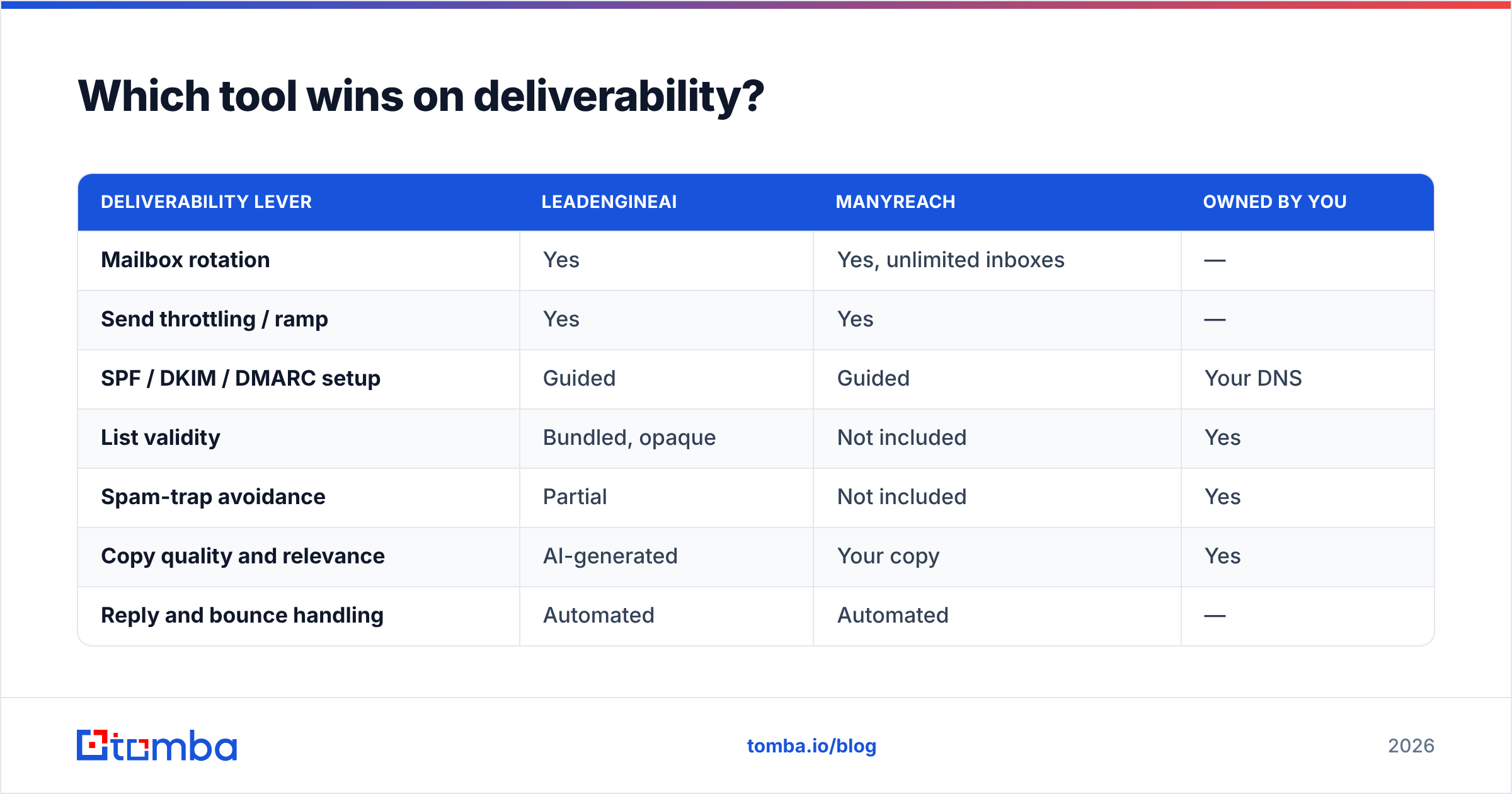
What the platform can control:
| Deliverability lever | LeadEngineAI | ManyReach | Owned by you |
|---|---|---|---|
| Mailbox rotation | Yes | Yes, unlimited inboxes | — |
| Send throttling / ramp | Yes | Yes | — |
| SPF / DKIM / DMARC setup | Guided | Guided | Your DNS |
| List validity | Bundled, opaque | Not included | Yes |
| Spam-trap avoidance | Partial | Not included | Yes |
| Copy quality and relevance | AI-generated | Your copy | Yes |
| Reply and bounce handling | Automated | Automated | — |
Look at the right-hand column. Three of the seven rows are yours regardless of which product you buy, and they happen to be the three that actually move inbox placement. Google and Microsoft both weight complaint rate and invalid-recipient rate heavily; a bounce rate above roughly 2-3% starts doing measurable damage, and HubSpot's own sales and outreach research has been consistent on this point for years.
Practical sequence that works with either tool:
- Build the list from a source you can audit.
- Verify every address — no exceptions, including ones the AI tool "already verified."
- Warm the domain for two to three weeks before real volume.
- Cap daily sends per mailbox conservatively; add mailboxes instead of pushing volume.
- Watch bounce rate weekly and pause the moment it crosses 3%.
- Re-verify lists older than 60 days — B2B contact data decays at roughly 2-3% per month.
Step 2 and step 6 are where most teams quietly skip. A bulk email verifier run takes minutes and costs less than a single day of a blown domain.
Which one should you pick for your situation?#
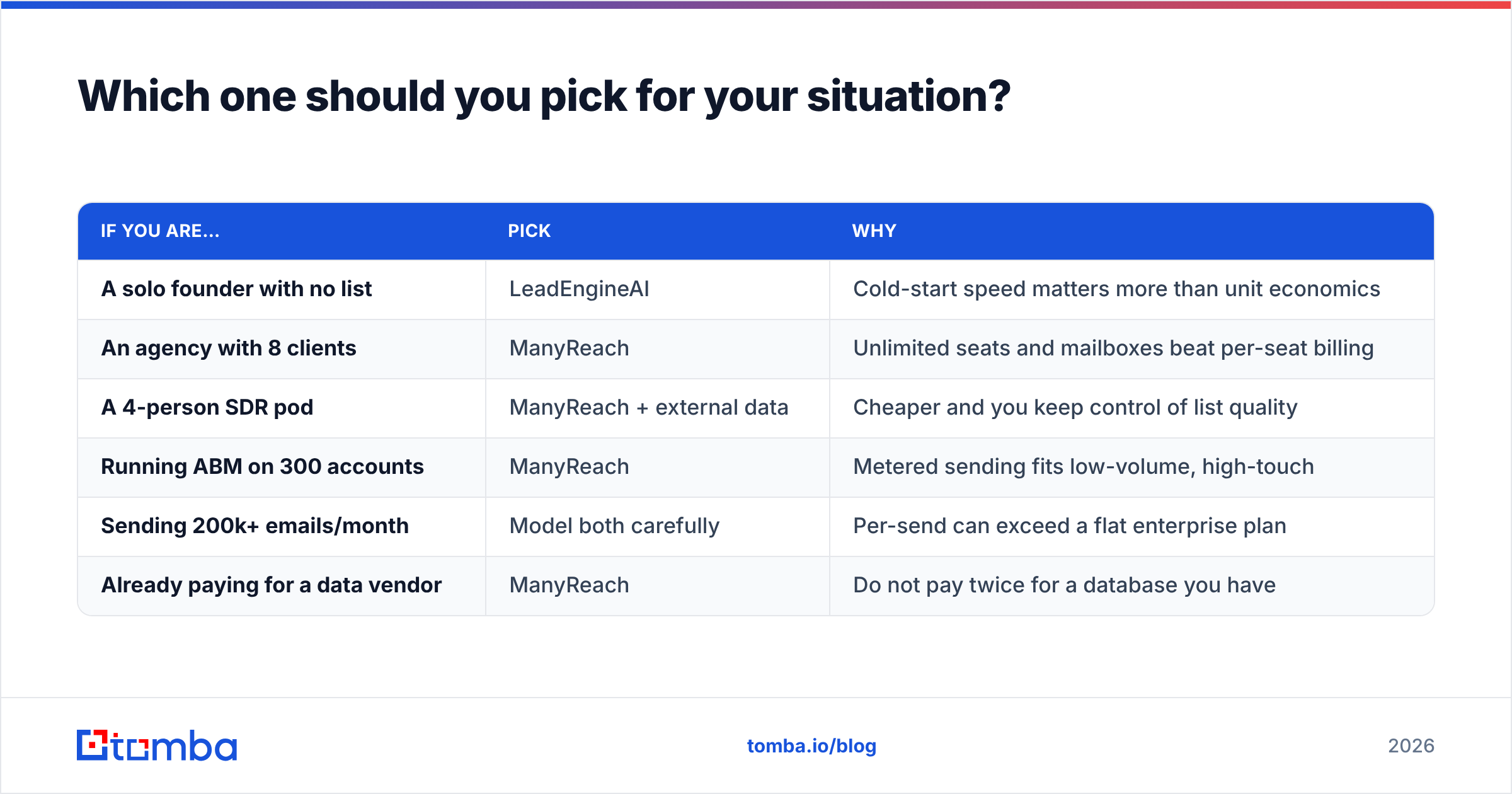
| If you are… | Pick | Why |
|---|---|---|
| A solo founder with no list | LeadEngineAI | Cold-start speed matters more than unit economics |
| An agency with 8 clients | ManyReach | Unlimited seats and mailboxes beat per-seat billing |
| A 4-person SDR pod | ManyReach + external data | Cheaper and you keep control of list quality |
| Running ABM on 300 accounts | ManyReach | Metered sending fits low-volume, high-touch |
| Sending 200k+ emails/month | Model both carefully | Per-send can exceed a flat enterprise plan |
| Already paying for a data vendor | ManyReach | Do not pay twice for a database you have |
The pattern: LeadEngineAI is a good first outbound tool and an expensive fifth one. ManyReach is a mediocre first tool and an excellent fourth one, once you know what you are doing and have a data pipeline you trust.
What layer do both tools assume you already have?#
Clean, verified, current contact data — and neither one guarantees it.
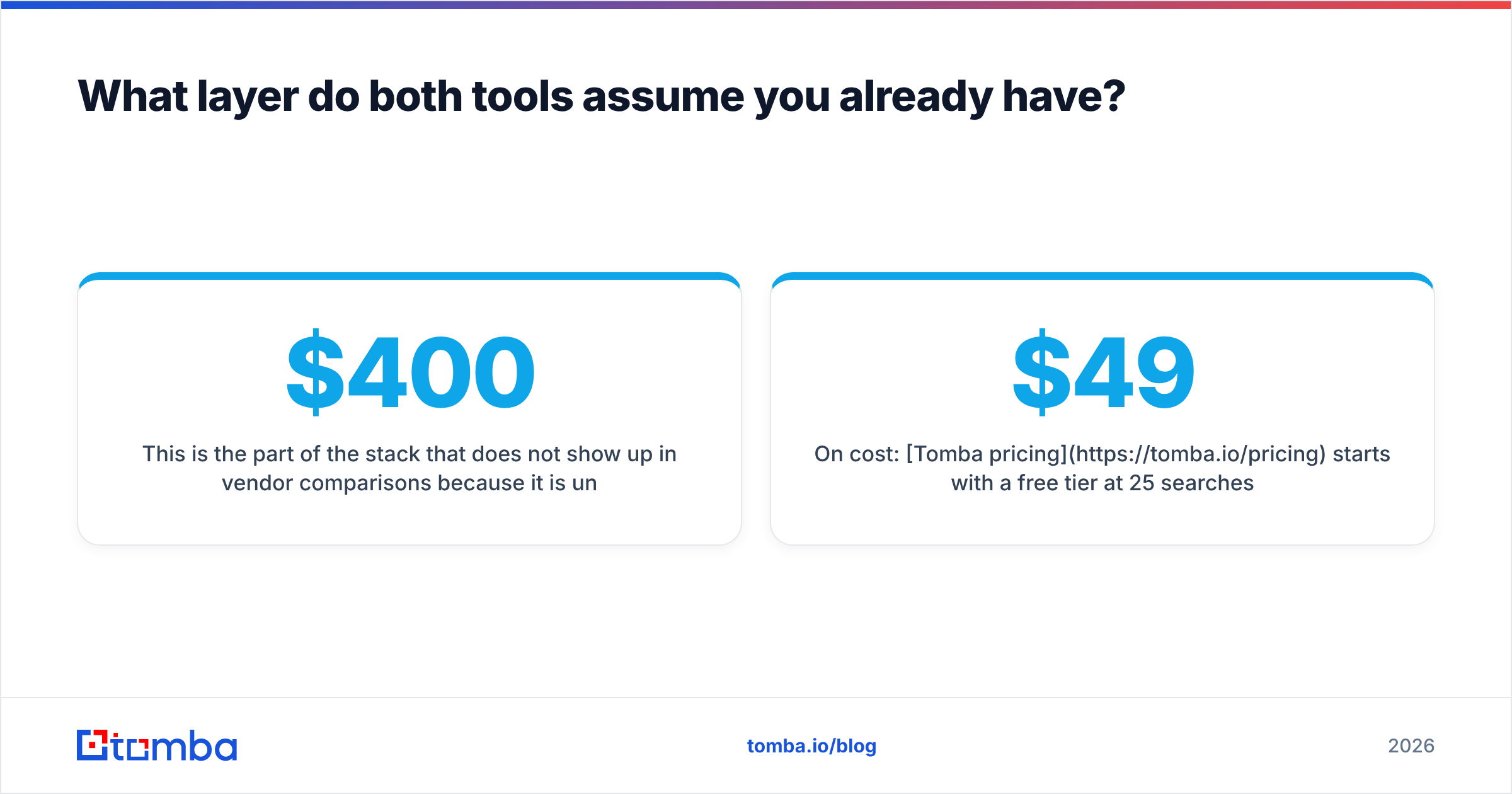
This is the part of the stack that does not show up in vendor comparisons because it is unglamorous. It is also the part that determines whether the other $400/month of tooling produces meetings or bounces. A sending platform with perfect infrastructure and a 15%-invalid list performs worse than a mediocre platform with a clean one.
Tomba sits in that layer deliberately. It does not try to be your sequencer or your AI SDR — it finds and verifies the addresses those tools consume:
- Find contacts by domain, name, or company with the email finder and domain search.
- Verify in bulk before every campaign, including catch-all domains most tools mark "risky" and move on from.
- Enrich existing CRM records with data enrichment so your sequences personalize on something real.
- Automate the whole thing through the Tomba API so verification runs as a pipeline step rather than a monthly chore someone forgets.
On cost: Tomba pricing starts with a free tier at 25 searches/month, then Starter at $49/mo, Growth at $99/mo, and Pro at $249/mo, with Enterprise custom. For most teams, adding a dedicated data layer costs less than the difference between two sending-platform tiers — and it is the single change most likely to lift reply rates on either LeadEngineAI or ManyReach.
What is the verdict on LeadEngineAI vs ManyReach?#
ManyReach for most teams that have already run outbound; LeadEngineAI for teams that have not.
ManyReach's pricing model is the more defensible design. It scales with usage instead of headcount, removes the per-seat penalty that makes sequencers painful for agencies, and does not pretend to solve problems outside its lane. The trade-off is real: you are responsible for the list, the copy, and the judgment.
LeadEngineAI earns its place when the alternative is not sending at all. Bundling removes decisions, and for a founder doing outbound for the first time, removing decisions is worth paying for. Just plan the exit: the moment your volume or your ICP outgrows the built-in database, you will want to separate data from sending anyway.
Whichever you choose, do not let the platform own your data quality. Run every list — AI-sourced, scraped, or bought — through verification before the first send, and re-run it every 60 days.
Start with the data layer. Use the Tomba Email Finder to build a verified, source-traceable list before you commit to either platform. The free tier is enough to test 25 contacts against whatever your current tool claims is accurate — and that single comparison usually answers the buying question faster than a two-week trial does.
Related guides#
// get started
Find, verify and enrich your first contacts today
Start on the free plan with 25 searches a month, then scale when your team is ready.
Free plan · No credit card required · GDPR & CCPA
// about the author