LeadEngineAI vs MergeMail: Which One Fits Your Outbound?
LeadEngineAI finds and scores leads. MergeMail sends to them. Most teams compare the two as if they are interchangeable — they are not. Here is where each one actually earns its seat, and what breaks when you pick wrong.
TL;DR
- LeadEngineAI and MergeMail solve different halves of the same problem. One builds and scores the list; the other merges it into personalized sends. Comparing them head-to-head only makes sense once you know which half is currently broken for you.
- If your reply rate is low because you are emailing the wrong people or stale addresses, a sending tool will not save you. Fix the data layer first.
- If your list is clean but you are still copy-pasting into Gmail drafts, a merge-and-send layer is the cheaper, faster win.
- Neither category is a full replacement for a dedicated finder-plus-verifier. Most teams that run both end up paying twice for partial data coverage.
- Budget check: a dedicated data layer like Tomba starts at $49/mo with a free tier of 25 searches, which is usually less than the "AI enrichment" surcharge bundled into all-in-one platforms.
What are LeadEngineAI and MergeMail?#
Short version: LeadEngineAI is a list-building and scoring layer. MergeMail is a send layer. They sit on opposite ends of the same pipeline, and the reason people compare them is that both market themselves as "cold outreach software."
Here is the honest breakdown of what each category does:
- LeadEngineAI (data and intent side) — Pulls company and contact records, applies AI scoring or fit models, and hands you a prioritized list. The pitch is that you spend less time deciding who to contact.
- MergeMail (delivery side) — Takes a spreadsheet or CRM segment and merges it into templated emails sent from your own mailbox, usually with tracking, follow-up steps, and unsubscribe handling. The pitch is that you spend less time sending.
- Overlap zone — Both will claim some contact enrichment. LeadEngineAI does it as a core function; a merge tool typically does it as a thin add-on or via a third-party connector.
- What neither owns well — SMTP-level verification, catch-all resolution, and domain-level pattern discovery. These are specialist jobs, and platforms that bolt them on tend to return "accept-all" as if it were a clean verdict.
- What your stack actually needs — A finder, a verifier, a sender, and a CRM. Whether that is two tools or four depends on how much duplication you are willing to pay for.
If you take one thing from this section: the real question is not LeadEngineAI vs MergeMail. It is which layer of my pipeline is leaking?

Is LeadEngineAI better than MergeMail for cold outreach?#
Only if your bottleneck is targeting. Run this diagnostic before you spend anything.
Pull your last 500 sent cold emails and calculate three numbers: hard bounce rate, open rate, and reply rate.
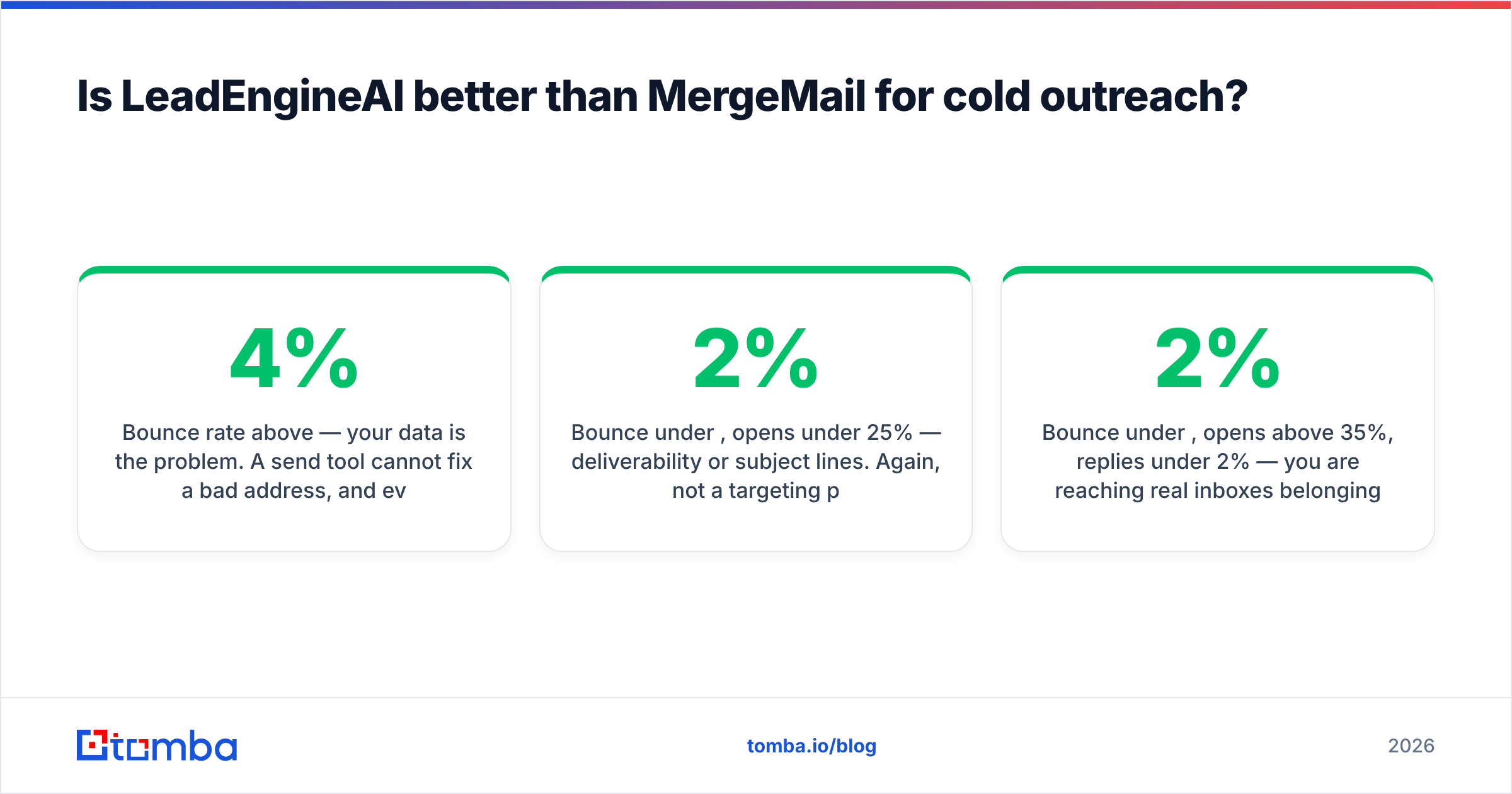
- Bounce rate above 4% — your data is the problem. A send tool cannot fix a bad address, and every bounce chips away at sender reputation. Fix the list layer.
- Bounce under 2%, opens under 25% — deliverability or subject lines. Again, not a targeting problem. A scoring engine will not help.
- Bounce under 2%, opens above 35%, replies under 2% — you are reaching real inboxes belonging to the wrong people, or your message is wrong. This is where a fit-scoring layer genuinely earns money.
- Everything healthy but volume is capped by manual work — you need merge-and-send automation, not more data.
Most teams that arrive at the LeadEngineAI vs MergeMail question are in bucket one and misdiagnose it as bucket three. They buy an AI scoring product, load the same unverified contacts into it, and get the same bounces with nicer dashboards attached.
How do LeadEngineAI, MergeMail, and a dedicated data layer compare?#
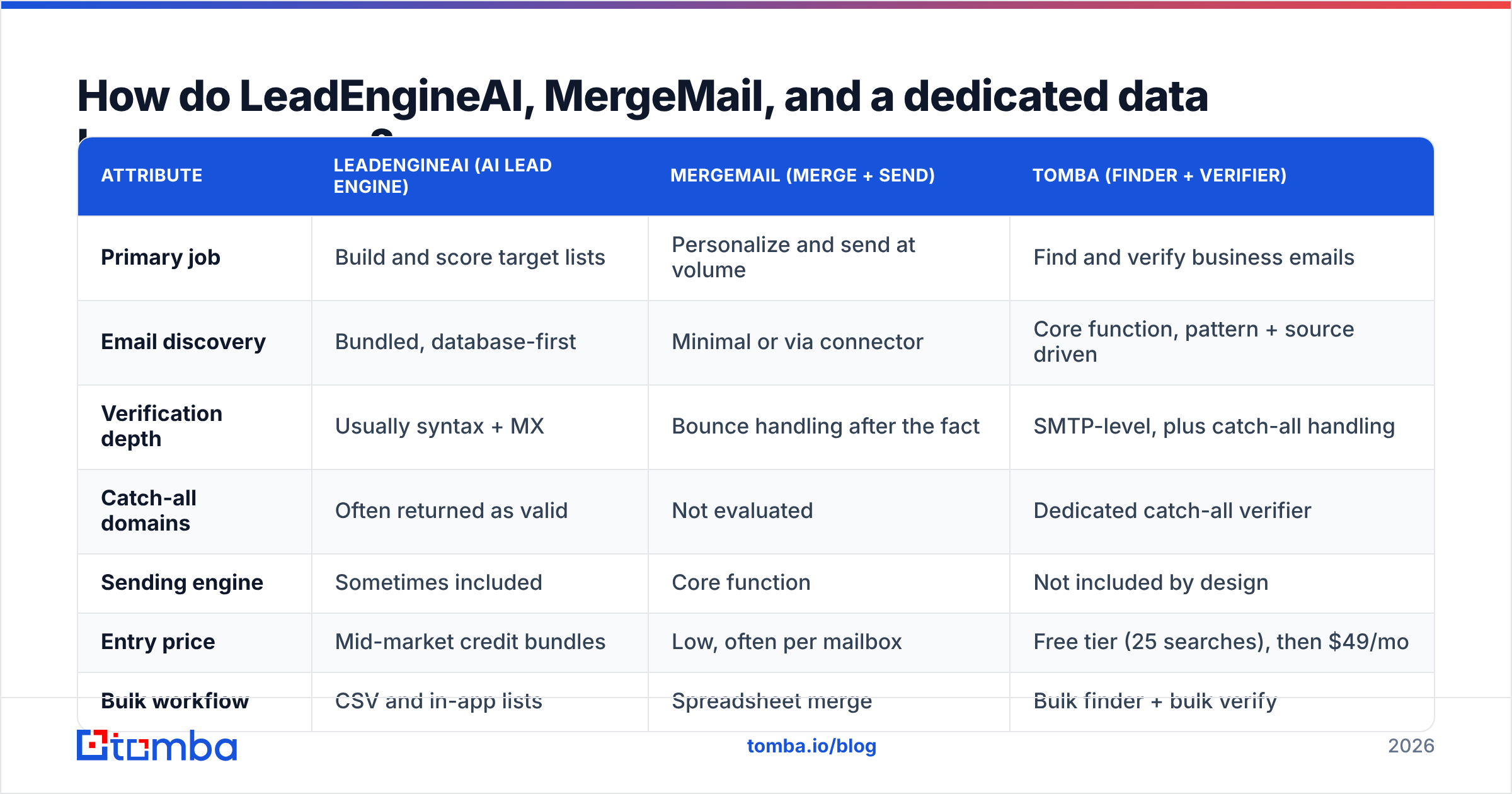
The table below compares the three approaches on the attributes that change outcomes. Verify current numbers on each vendor's own pricing page before you buy — pricing in this category moves every few quarters. Tomba's figures are current as of 2026.
| Attribute | LeadEngineAI (AI lead engine) | MergeMail (merge + send) | Tomba (finder + verifier) |
|---|---|---|---|
| Primary job | Build and score target lists | Personalize and send at volume | Find and verify business emails |
| Email discovery | Bundled, database-first | Minimal or via connector | Core function, pattern + source driven |
| Verification depth | Usually syntax + MX | Bounce handling after the fact | SMTP-level, plus catch-all handling |
| Catch-all domains | Often returned as valid | Not evaluated | Dedicated catch-all verifier |
| Sending engine | Sometimes included | Core function | Not included by design |
| Entry price | Mid-market credit bundles | Low, often per mailbox | Free tier (25 searches), then $49/mo |
| Bulk workflow | CSV and in-app lists | Spreadsheet merge | Bulk finder + bulk verify |
| API access | Tiered, usually paid-up | Limited | Full REST API on paid plans |
| Best for | Deciding who to contact | Contacting them at scale | Making sure the address is real |
Two things stand out. First, there is almost no feature overlap between columns one and two — which is why "versus" framing misleads buyers. Second, the verification row is where all-in-one platforms are weakest and where bounces come from.
What does each tool actually cost per usable contact?#
Sticker price is the wrong unit. The number that matters is cost per usable contact — one that is real, reaches an inbox, and belongs to someone in your ICP.
Work it out like this:
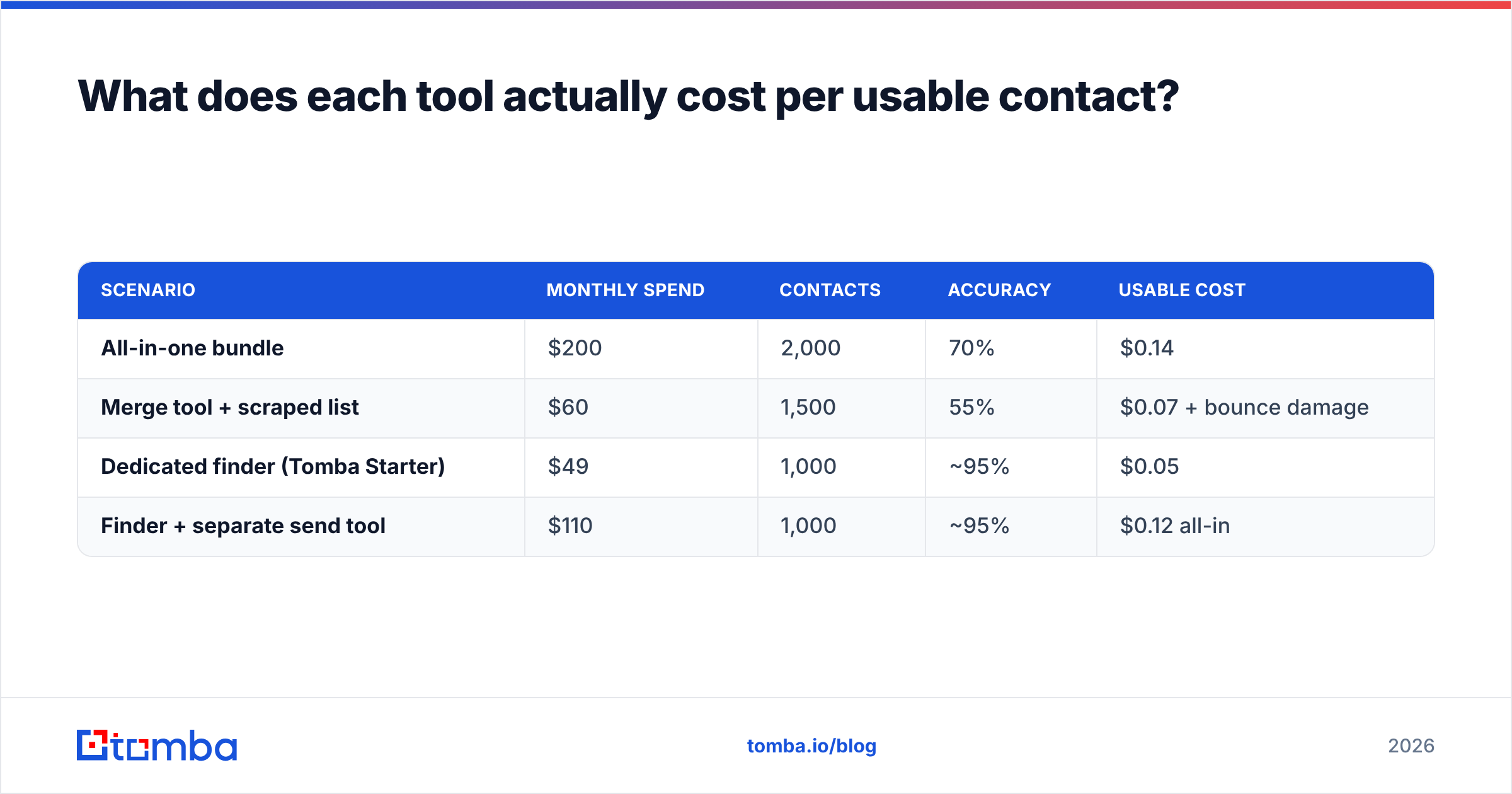
Cost per usable contact = monthly spend ÷ (contacts pulled × accuracy rate × ICP fit rate)A platform charging $200/mo for 2,000 contacts looks like $0.10 each. At 70% accuracy and 60% ICP fit, you are actually paying $0.24 per usable contact. A $49/mo tool returning 1,000 contacts at 95% accuracy and the same fit rate costs $0.086 — roughly a third.
| Scenario | Monthly spend | Contacts | Accuracy | Usable cost |
|---|---|---|---|---|
| All-in-one bundle | $200 | 2,000 | 70% | $0.14 |
| Merge tool + scraped list | $60 | 1,500 | 55% | $0.07 + bounce damage |
| Dedicated finder (Tomba Starter) | $49 | 1,000 | ~95% | $0.05 |
| Finder + separate send tool | $110 | 1,000 | ~95% | $0.12 all-in |
The scraped-list row is the trap. It looks cheapest on the spreadsheet and is the most expensive in practice, because a 10% bounce rate on a new domain can cost you weeks of warmup and a chunk of email deliverability you do not get back quickly. Google and Microsoft both tightened bulk-sender enforcement, and the industry guidance consolidated around keeping complaints under 0.3% and bounces well under 2%. You cannot hit that with guessed addresses.
Check current Tomba pricing before modeling this for your own volume — the free tier is enough to run a 25-contact sample against your existing list and measure the accuracy delta yourself.
Where does data accuracy actually break?#
Four failure points, in the order they bite:
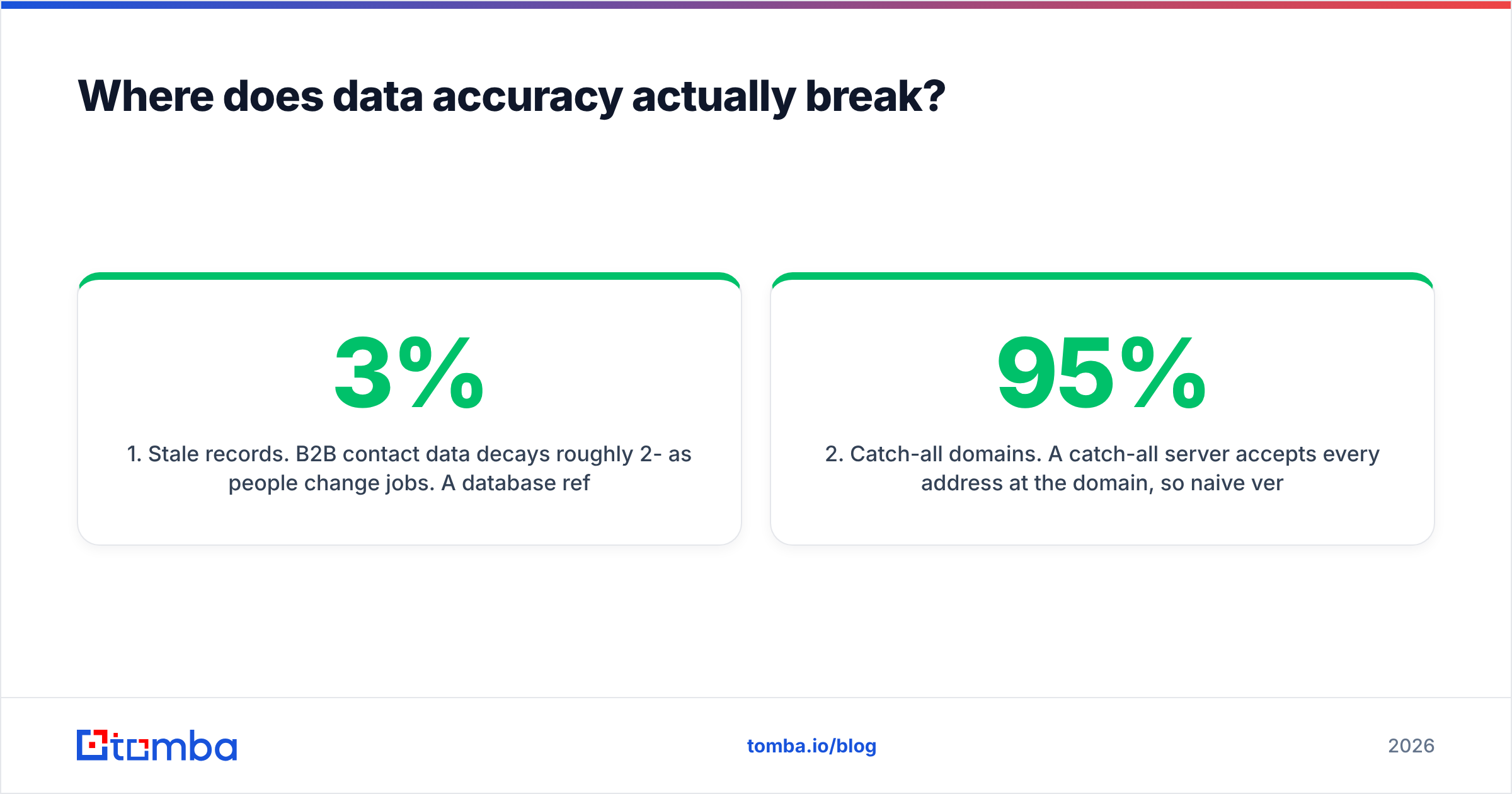
1. Stale records. B2B contact data decays roughly 2-3% per month as people change jobs. A database refreshed annually is materially wrong by the time you export it. Ask any vendor when a record was last re-verified, not when it was added.
2. Catch-all domains. A catch-all server accepts every address at the domain, so naive verification marks anything@company.com as valid. Plenty of tools return "accept-all" and let you treat it as a green light. That is how a 95%-verified list bounces at 8%. A dedicated catch-all verifier applies additional signals instead of shrugging.
3. Pattern guessing without confirmation. Generating first.last@domain.com from a naming pattern is fine as a hypothesis. Shipping it unconfirmed is not. Good tooling separates derived from confirmed and tells you which you are looking at.
4. Role accounts. info@, sales@, and support@ inflate contact counts and tank reply rates. They should be flagged, not counted toward your quota.
If you run a list through an email verifier before it hits any send tool, most of these disappear. That step costs cents and protects the asset — your domain — that everything else depends on.

Should you run both tools, or replace them?#
Three realistic stack shapes, with the tradeoffs stated plainly.
Stack A — All-in-one (LeadEngineAI-style, sending included). One vendor, one invoice, one login. You accept whatever accuracy the bundled database gives you, and you are locked in when a better data source appears. Reasonable for small teams under 500 sends/month who value simplicity over precision.
Stack B — Merge tool plus your own list (MergeMail-style). Cheapest on paper. Works well if your list comes from inbound, events, or an existing CRM where records are already validated. Falls apart the moment you need net-new contacts, because you will fill the gap with scraped data.
Stack C — Specialist data layer plus a send tool. A finder and verifier feed a clean list into whatever sending tool you prefer. Two invoices, better numbers, and no lock-in on either side. This is what most teams converge on past ~2,000 sends/month.
For Stack C, the data layer needs to cover more than single lookups. Look for domain search to map every contact at a target account, a bulk email finder for list-scale work, and an API so your RevOps team can enrich records on write instead of in monthly batches. If you want to compare the broader category before committing, the sales intelligence listings on G2 and Capterra's lead generation directory are the least biased public snapshots of what each vendor claims.
What should you look for in a merge and send tool?#
If you land on the MergeMail side of the decision — your data is fine, your sending is manual — evaluate on these, not on template libraries:
- Mailbox rotation and per-mailbox caps. Sending 400/day from one Google Workspace mailbox is a reputation problem regardless of content quality.
- Native unsubscribe and suppression. Global suppression lists that apply across every campaign and every sender, not per-sequence opt-outs.
- Reply detection that actually stops the sequence. Out-of-office handling included, or you will email someone four times while they are on leave.
- Real merge-field fallbacks. "Hi {{first_name|there}}" is the difference between a warm email and an obviously automated one.
- Bounce webhooks back to your data source. Closing the loop matters; a bounce should mark the record dead everywhere, not just in one campaign report.
The concept itself is old — mail merge predates email — and the modern value is entirely in deliverability hygiene and sequencing, not in the merge.
Which one should you pick in 2026?#
Pick the AI lead engine if you genuinely do not know who to target, you are entering a new market segment, or account prioritization is the thing your reps argue about. Pay for the scoring; verify the emails elsewhere.
Pick the merge and send tool if your targeting is settled and your constraint is human hours. It is the cheapest lever available and you will feel it in week one.
Pick neither, first, if your bounce rate is above 3%. Spend $49 on a data layer, re-verify the list you already have, and re-measure. A large share of "our outbound does not work" cases are a data problem wearing a strategy costume, and fixing it costs less than either platform.
Run all three once you are past roughly 3,000 sends per month, when the cost of a bad list exceeds the cost of a second subscription. That is the point where specialization pays.
One more note on fairness: neither category is a scam, and both have real users getting real results. The failure mode is buying the layer you already have and leaving the broken one untouched. Audit before you subscribe.
FAQ#
Can a merge tool replace an email finder? No. Merging personalizes and sends; it does not discover or validate addresses. If it offers enrichment, it is usually reselling a third-party API — and you can buy that directly for less.
Is AI lead scoring worth paying extra for? It is worth it when you have enough closed-won data for the model to learn from. Under about 50 closed deals, a manual ICP filter usually performs as well.
How do I test data quality without committing? Take 25 contacts you already know are correct, run them through the tool's finder, and measure the match rate and false positives. Free tiers exist specifically so you can do this — use Tomba's 25 free monthly searches, or the equivalent on any vendor you are evaluating.
Does verification really prevent blacklisting? It removes the largest single cause of hard bounces, which is the main input to bulk-sender enforcement. It does not fix bad content or missing authentication — check your SPF record as well.
Fix the layer that is actually leaking. If your bounce rate says the problem is data, start with the Tomba Email Finder — find verified professional emails by name, domain, or company, confirm them with SMTP-level checks including catch-all domains, and push clean records into whatever send tool you already use. The free tier gives you 25 searches a month to benchmark against your current list before you change anything; paid plans start at $49/mo. Run the test, compare the numbers, and let the accuracy delta make the decision for you.
Related guides#
// get started
Find, verify and enrich your first contacts today
Start on the free plan with 25 searches a month, then scale when your team is ready.
Free plan · No credit card required · GDPR & CCPA
// about the author