LeadEngineAI vs OneMoreLead: Honest 2026 Comparison
OneMoreLead sells a large static B2B list. LeadEngineAI sells AI-assisted lead generation. Neither is a straight swap for the other — here's how they differ on data freshness, verification, pricing and API access.
LeadEngineAI vs OneMoreLead is a fair question with an unfair answer. The two tools do not do the same job. One sells you a big list. The other builds a small one for you.
TL;DR
LeadEngineAI vs OneMoreLead is not a like-for-like fight. OneMoreLead is a prepaid B2B contact database. You search it and export. LeadEngineAI is an AI layer that builds and scores a short list for you.
Neither one is a real verifier. Both hand you records. Neither runs the live check you need before you send. Budget for a verifier either way.
The prices do not line up. Databases charge by record. AI tools charge by seat plus credits. Compare cost per usable contact, not cost per month.
Your ICP decides it. Broad US lists favor a database. Narrow, signal-led targeting favors a live finder and an API.
There is a third path. Pair a live email finder with real-time checks. Skip the yearly list contract. Tomba is free for 25 searches a month, then $49/mo.
What are LeadEngineAI and OneMoreLead?#
Both tools sit in the same sales intelligence aisle. But they were built on different bets.
OneMoreLead is a contact database. You buy access to a pool of B2B records. Each record has a company, a title, an email, and sometimes a phone. You filter with search facets. Then you export a CSV or push it to your CRM. The pitch is volume and a low price per record. The typical buyer is a founder or an SDR lead. They want 5,000 US emails today, with no seat contract to sign.
LeadEngineAI sits on the newer AI side of the market. It does not sell you a static index. You give it an ICP or a seed list. It runs enrichment and scoring passes. Then it hands back a short list it thinks is worth a touch. The pitch is fewer records and less manual filtering.
That gap matters more than any feature box. Five things really separate lead sources. Here is where each model lands.
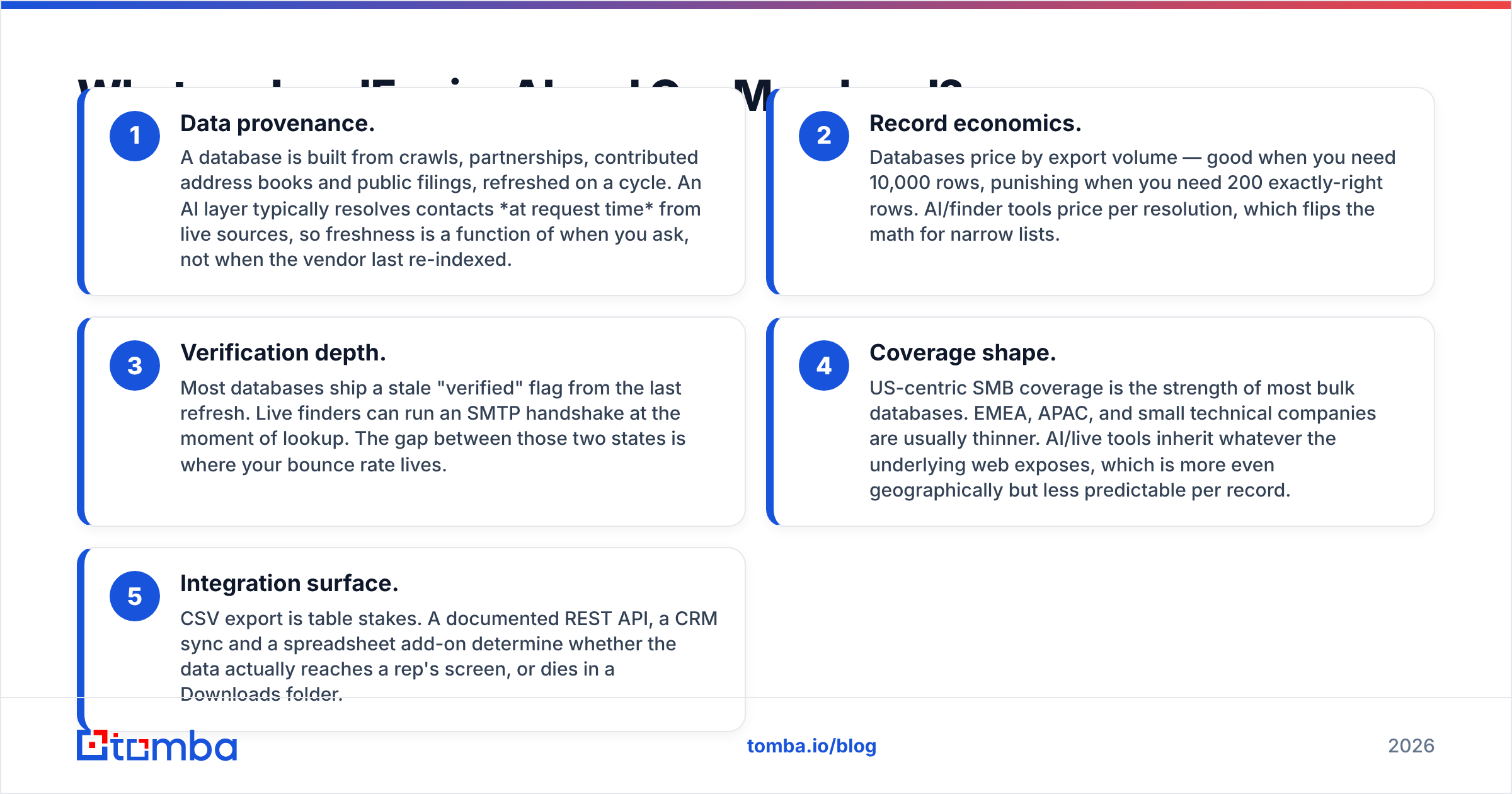
Where the data comes from. A database is built from crawls, deals, shared address books and public filings. It is refreshed on a cycle. An AI layer looks contacts up when you ask. So freshness depends on your timing, not on the vendor's.
How you pay. Databases charge by export volume. That is good for 10,000 rows. It hurts when you need 200 right ones. Finders charge per lookup, which flips the math on small lists.
How deep the checks go. Most databases ship a stale "verified" flag. A live finder can run an SMTP check at lookup time. Your bounce rate lives in that gap.
Where the coverage is. Bulk databases are strong in the US, mostly SMB. EMEA, APAC and small tech firms are thinner. Live tools mirror the open web. That is more even by region but less sure per record.
How the data reaches a rep. CSV export is table stakes. A REST API, a CRM sync and a sheet add-on decide the rest. Without them, good data dies in a Downloads folder.
Remember one thing. You are not picking between two brands. You are picking between stock and flow.
Which has better data accuracy in 2026?#
In practice, LeadEngineAI vs OneMoreLead gets decided on accuracy. It is the only number that survives a real campaign. It is also the hardest one to pin down. Every vendor quotes a test it designed itself.
Know two things before you read any accuracy claim.
First, "verified" means "was verified once." Say a record was marked valid in a Q1 refresh. You export it in Q3. It has had two quarters to rot. B2B email decay runs about 2–2.5% a month, and it spikes in layoff season. On a six-month-old slice, that is a double-digit bounce rate before you write a subject line. Every database carries this risk, OneMoreLead included. It says nothing about how good their sourcing is.
Second, accuracy is really three things. Does the email bounce? Is the person still in that role? Do they read that inbox? A record can be live and still useless if the person left in March. AI lists tend to win on the role question. Bulk databases tend to win on volume per dollar.

So test it. Treat any accuracy claim as a guess and check it on 200 records first. Run the export through an email verifier. Measure the real invalid rate. Then divide what you paid by the count that lived. That number is cost per usable contact. It is the only fair way to compare a database with a finder.
Check how each tool treats catch-all domains too. Many mid-market domains accept all mail at the SMTP layer. A naive verifier calls them "unknown." A careless vendor calls them "valid." Neither helps. A catch-all verifier scores the risk instead, using patterns and other signals.
LeadEngineAI vs OneMoreLead: the head-to-head table#
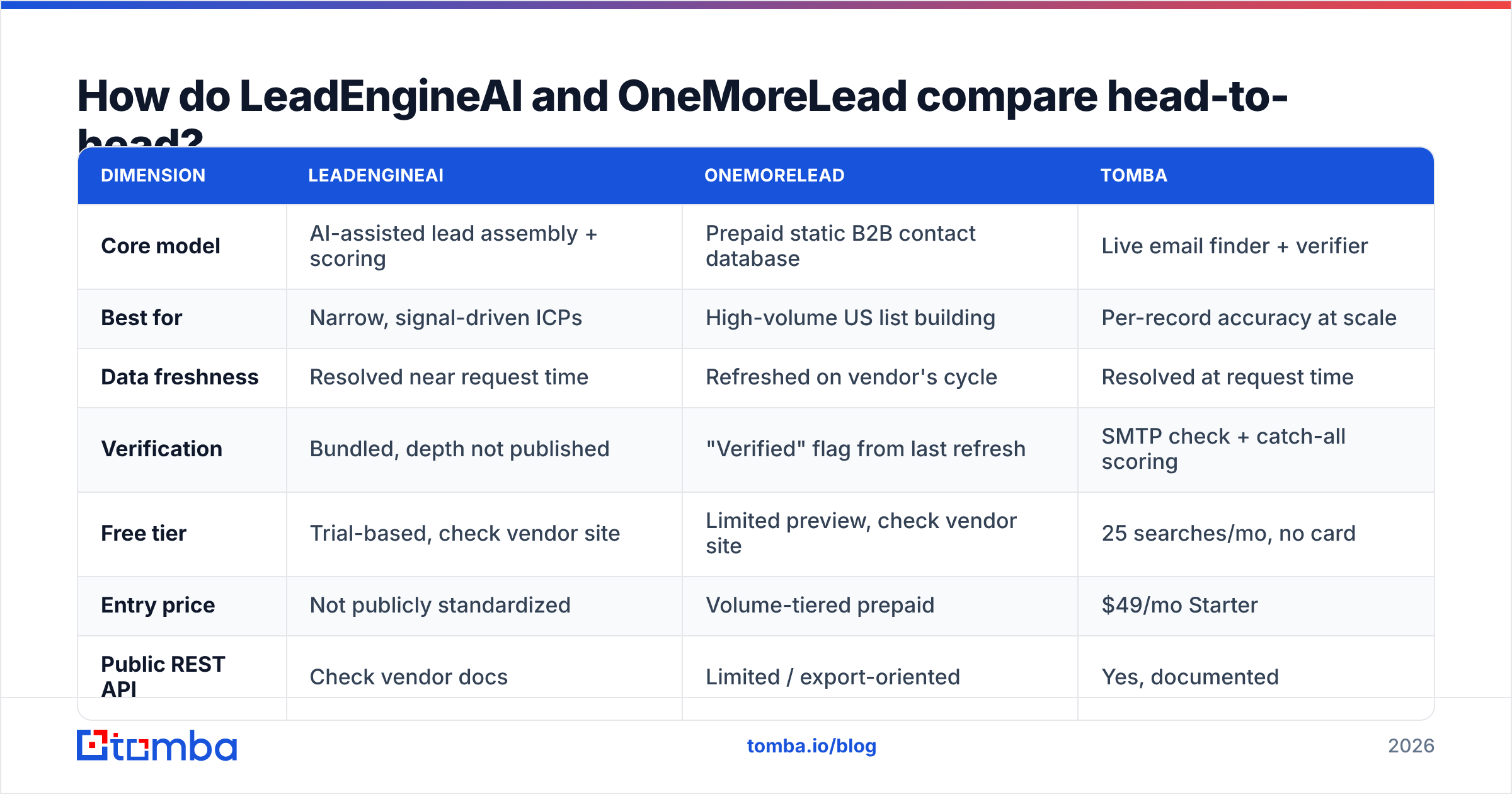
Here is the structural view, with Tomba as the live-lookup yardstick. Where a vendor does not publish a number, it says so. Confirm the terms on each vendor's pricing page before you buy.
| Dimension | LeadEngineAI | OneMoreLead | Tomba |
|---|---|---|---|
| Core model | AI-assisted lead assembly + scoring | Prepaid static B2B contact database | Live email finder + verifier |
| Best for | Narrow, signal-driven ICPs | High-volume US list building | Per-record accuracy at scale |
| Data freshness | Resolved near request time | Refreshed on vendor's cycle | Resolved at request time |
| Verification | Bundled, depth not published | "Verified" flag from last refresh | SMTP check + catch-all scoring |
| Free tier | Trial-based, check vendor site | Limited preview, check vendor site | 25 searches/mo, no card |
| Entry price | Not publicly standardized | Volume-tiered prepaid | $49/mo Starter |
| Public REST API | Check vendor docs | Limited / export-oriented | Yes, documented |
| Spreadsheet add-ons | Not published | CSV export | Sheets, Excel, Airtable |
| Bulk processing | Workflow-based | Native (it's a list product) | Bulk finder + bulk verify |
| Geographic strength | Web-signal dependent | US / North America heavy | Global, domain-driven |

Two rows deserve a second look.
The API row matters more than it looks. Does an SDR search, export, and upload to a sequencer? Then a CSV button is fine. Do you enrich signups, refresh a CRM nightly, or feed an agent? Then you need code access. A tool with no email finder API caps you, however good the data is.
The free-tier row predicts your test quality. Vendors who let you try 25–50 real records are sure of their hit rate. Vendors who gate it behind a demo are selling the demo. That is not a moral point. It tells you how much you can test before you pay.
What does each actually cost per usable contact?#
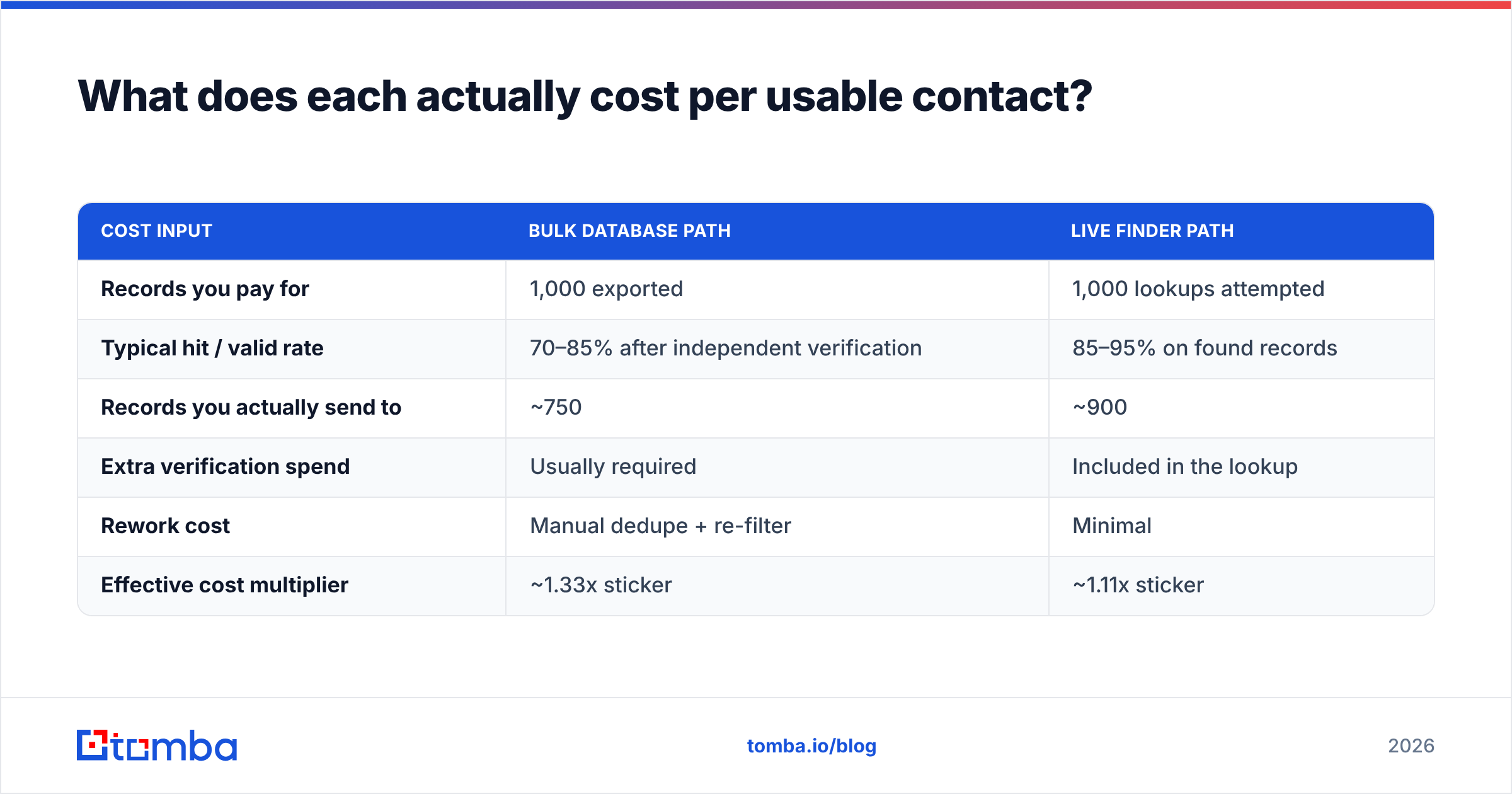
Sticker price is the wrong unit. Do the math on a 1,000-record list.
| Cost input | Bulk database path | Live finder path |
|---|---|---|
| Records you pay for | 1,000 exported | 1,000 lookups attempted |
| Typical hit / valid rate | 70–85% after independent verification | 85–95% on found records |
| Records you actually send to | ~750 | ~900 |
| Extra verification spend | Usually required | Included in the lookup |
| Rework cost | Manual dedupe + re-filter | Minimal |
| Effective cost multiplier | ~1.33x sticker | ~1.11x sticker |
Those ranges are directional. Plug in your own test results. But the shape holds. A list that looks 40% cheaper per record often ends up close to a live finder. Bounces, dupes and the extra verify pass eat the gap.
For the record, Tomba pricing is Free for 25 searches a month, then Starter at $49, Growth at $99, Pro at $249, plus Enterprise. Checks are bundled, not a separate line. Compare that with your quote, per usable contact.

Who should choose OneMoreLead?#
Pick a bulk database like OneMoreLead when all three are true.
Your ICP is broad and US-based. If "any firm with 20–200 staff in these six states" fits your target, a facet search fills a quarter of pipeline fast.
You need volume now, not aim. High-volume outbound with a simple offer is a numbers game. Databases win those on price.
You verify before you send. This one is not optional. Send raw and you will burn your sender reputation in two weeks. Bounces are the signal inbox providers watch.
It gets rough in niche markets, outside the US, and with odd job titles. A database can only give back what it indexed.
Who should choose LeadEngineAI?#
Pick the AI model when your problem is picking, not supply.
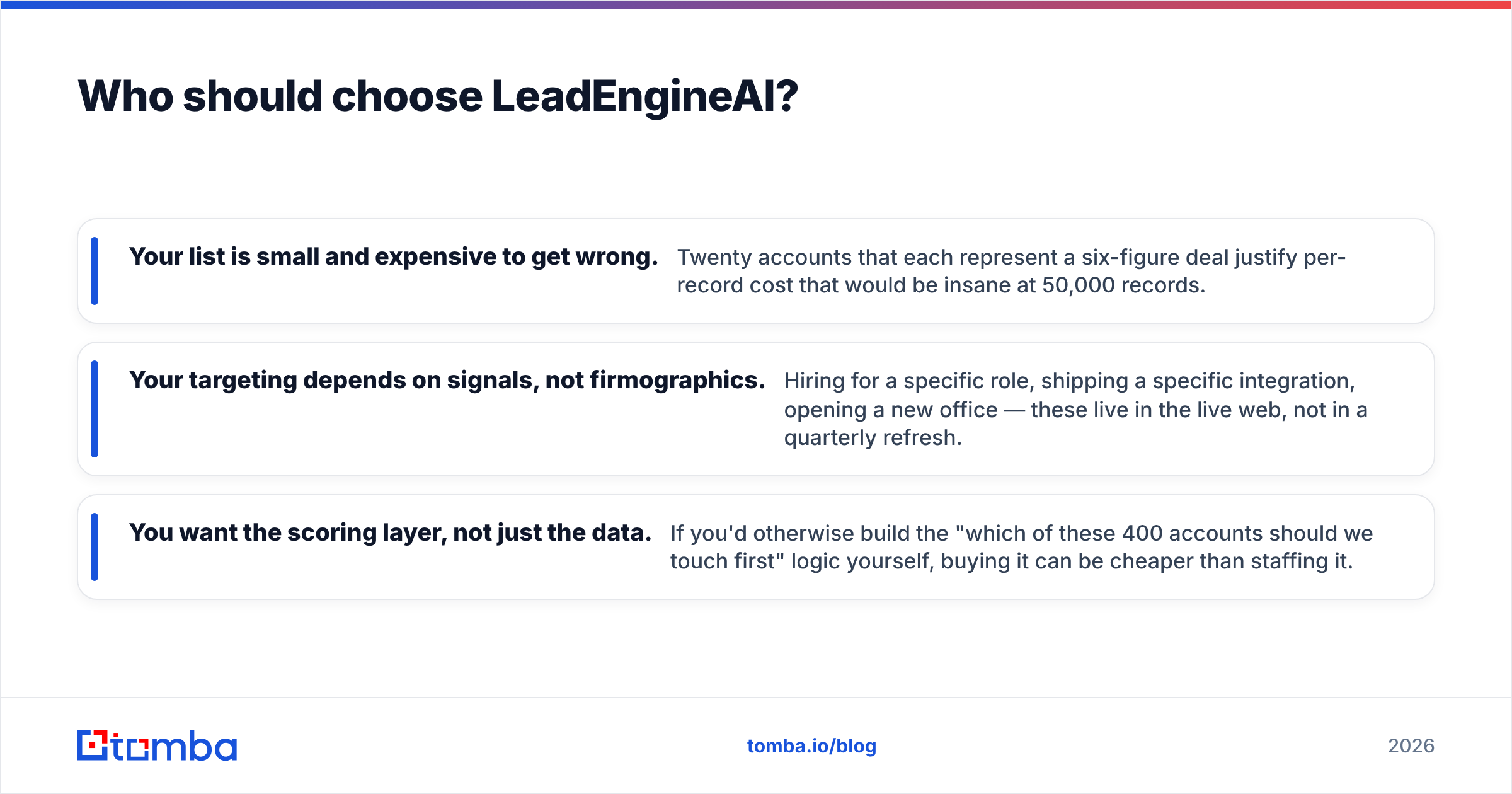
Your list is small and costly to get wrong. Twenty accounts worth six figures each justify a high cost per record. At 50,000 records it would be mad.
You target on signals, not company size. Hiring for a role, shipping an integration, opening an office — these live on the open web, not in a quarterly refresh.
You want the scoring, not just the data. If you would build "which 400 accounts do we touch first" yourself, buying it can beat staffing it.
One honest caveat. AI lists are harder to audit. When a record is wrong, the cause sits in a pipeline you cannot open. With a database you at least know it was stale. Ask any vendor how they show confidence scores and sources per field. The answer sorts real products from wrappers.
Where do both tools leave a gap?#
Three gaps run through this whole category. Neither model closes them for you.
Catch-all domains. A quarter to a third of your list will sit on domains that accept all mail. Databases mark them valid. Naive verifiers mark them unknown. You want a tool that scores them.
Re-checking. Buying data is an event. Keeping it true is a habit. A 10,000-record CRM decays past use in about a year. Run a bulk verify each quarter instead of one big yearly cleanup.
One channel only. Email-only outbound is fragile in 2026. Check whether your source also gives you B2B phone numbers and LinkedIn handles. One bad sending week should not cost you the quarter. A CRM with one way to reach each contact is a single point of failure.
If a vendor answers "our data is very accurate," keep asking. Truth lives in the detail. Do they run a live SMTP check? How do they treat a soft bounce message? Does the "valid" flag carry a date?
The verdict on LeadEngineAI vs OneMoreLead#
There is no universal winner. Anyone who names one is selling it.
Want 10,000 cheap US SMB contacts and you own a verifier? A bulk database like OneMoreLead is the efficient pick. BookYourData is worth a second quote.
Want 200 hand-picked accounts with scoring? The AI model that LeadEngineAI stands for earns its premium.
Want accurate emails on demand at any volume, with checks and an API? A live finder is the safer default. It is the only one that works as infrastructure, not as a purchase.
Most teams who run this test end up with two tools. A cheap broad source and a precise finder. And they verify every record before it hits a sequencer.
Ready to test the third option?#
Run a control test before you sign anything. Take 100 target firms. Find their decision-makers with the Tomba Email Finder. Compare hit rate, bounce rate and cost per usable contact with the quote in your inbox. Checks are included. The API and the Sheets add-on wait for you. The free tier gives 25 searches a month with no card — enough to settle this with data, not a demo.
Related guides#
// get started
Find, verify and enrich your first contacts today
Start on the free plan with 25 searches a month, then scale when your team is ready.
Free plan · No credit card required · GDPR & CCPA
// about the author