LeadEngineAI vs PipiLeads: Which Lead Gen Tool Wins in 2026?
Two AI lead-generation tools, almost no public benchmarks, and a lot of marketing copy. Here is how LeadEngineAI and PipiLeads actually compare on data accuracy, pricing transparency, and outbound fit — plus what to test before you pay.
TL;DR — LeadEngineAI vs PipiLeads in one screen
- Neither tool publishes real pricing, accuracy tests, or data sources. That gap shapes the whole LeadEngineAI vs PipiLeads call.
- Do not pick on feature lists. Pick on a 500-contact blind test against your own ICP. Track bounce rate and reply rate.
- "AI scoring" is cheap to claim. Contact accuracy is the line that moves your reply rate.
- Want open pricing, a public API, and a clear verify step? Both tools trail Tomba, Apollo, and BookYourData.
- Our 2026 pick: use neither as your main list source until you have your own bounce data. Start free, prove the list is clean, then add AI on top.
What are LeadEngineAI and PipiLeads?#
Both names sit on the same crowded shelf. Both are AI-branded B2B lead tools. Both promise to find firms, name the buyer, and hand you an email.
LeadEngineAI leans on the engine idea. You feed it an ideal customer profile. It pushes matching leads back, often with a score or intent tag on top.
PipiLeads sells itself as lighter and faster. Think list builder, with some enrichment bolted on.
Here is the honest part. It is also why this post exists. Neither vendor has the public footprint of Apollo, ZoomInfo, or Clearbit. No cited third-party accuracy test exists for either one. No SOC 2 page is easy to check. No price list holds still for a year. Review counts are thin in G2's lead intelligence category and in Capterra's lead generation directory.
That does not make either tool bad. Plenty of good software starts small. But it means one thing. Anyone who posts a tidy "94.3% vs 91.7%" table is making the numbers up. So test both tools the way a careful buyer would.
LeadEngineAI vs PipiLeads: how do you compare tools with no benchmarks?#
Stop reading the home page. Run a controlled test instead. Five checks, in this order.
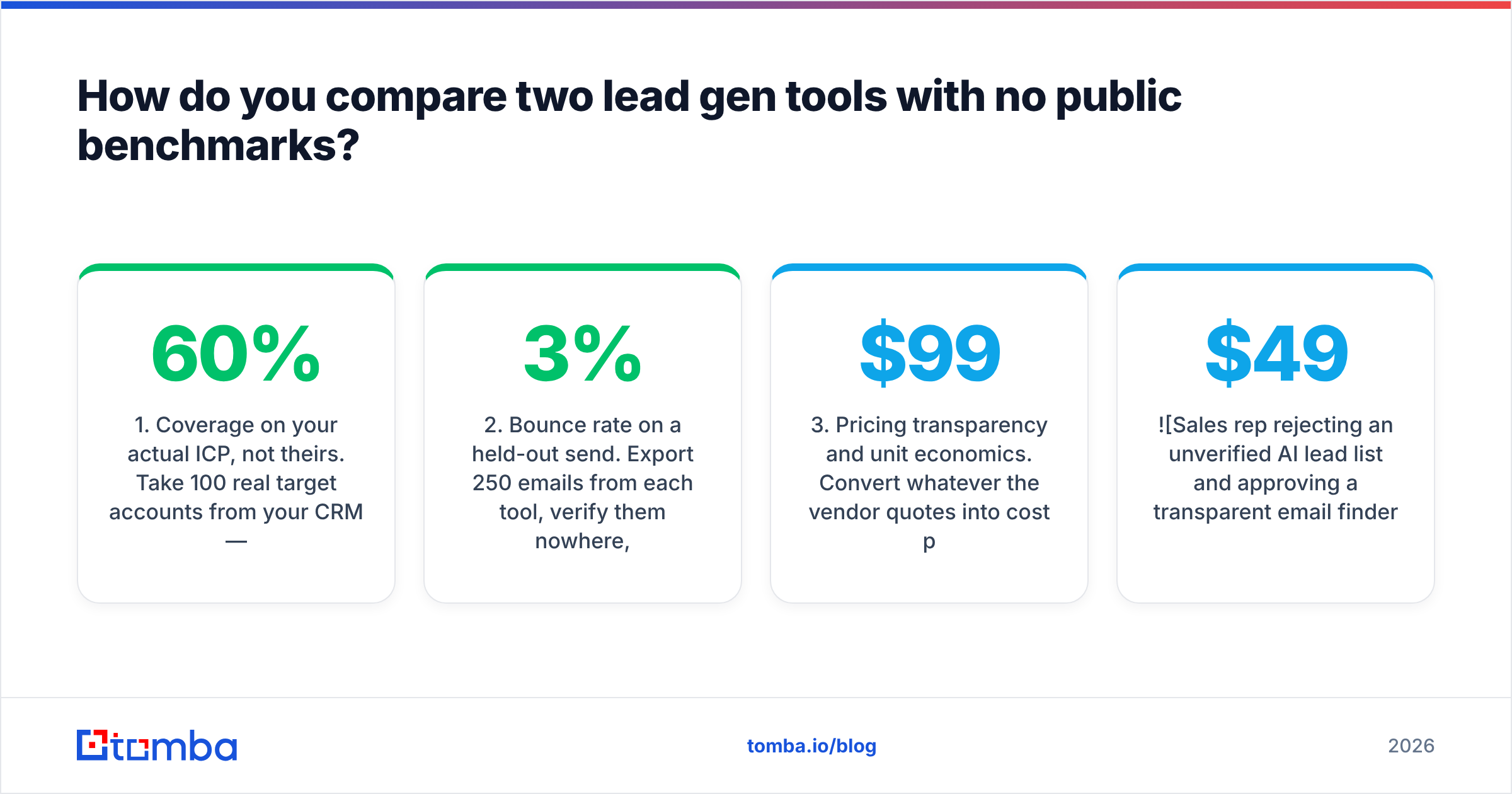
1. Coverage on your ICP, not theirs. Pull 100 real target accounts from your CRM. Include the awkward ones: tiny firms, non-US domains, agencies, holding groups. Ask each tool for a named contact at each. Coverage is the share where you get a real person plus a way to reach them. Under 60% on your own list? Then the accuracy debate is moot.
2. Bounce rate on a held-out send. Export 250 emails from each tool. Do not clean them. Send a real, low-volume sequence from a warmed domain. Hard bounces above 3% mean the vendor guesses patterns instead of testing them. This number drives every other one.
3. Price per valid contact. Turn any quote into cost per good contact, not cost per credit. A $99 plan with 5,000 credits at a 70% hit rate costs more per usable lead than a $249 plan with 3,000 credits at 95%.
4. What a miss costs. Does a "not found" burn a credit? Does a catch-all domain? Does the same contact charge you twice next month? Vagueness here is rarely an accident.
5. Exit cost. Can you export it all as CSV, on any plan, with no support ticket? Is there an API you can read the docs for? If either answer is no, you rent your pipeline data. You do not own it.
Run those five checks. The marketing gap in LeadEngineAI vs PipiLeads then shrinks to two or three numbers you can defend in a budget meeting.
LeadEngineAI vs PipiLeads: which tool has better data accuracy?#
Neither one shares a test you can repeat. So the honest answer is simple: unknown until you run it. But how a tool gets its data tells you a lot.
There are three ways to build a list. Each one fails in its own way.
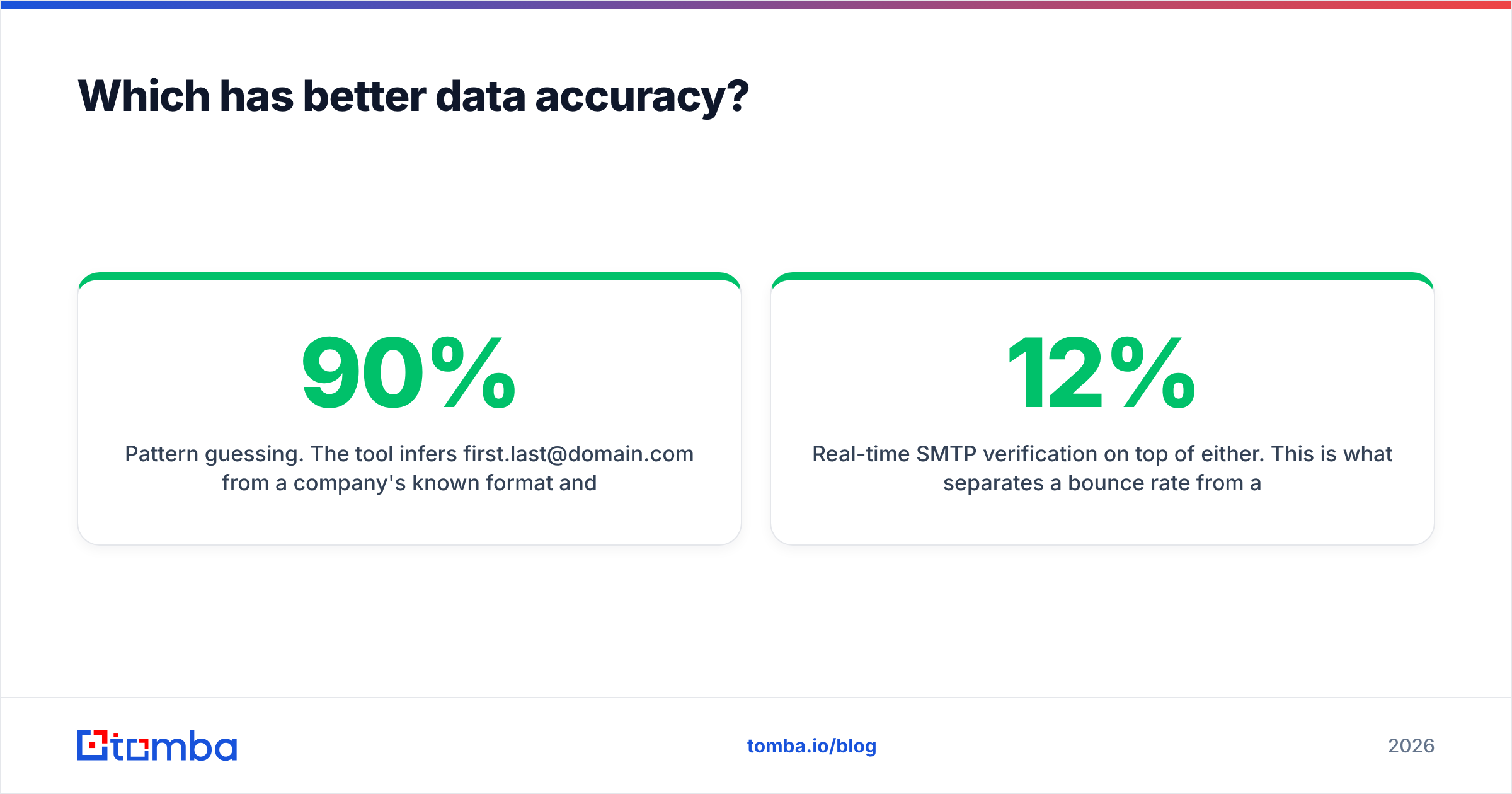
- Pattern guessing. The tool sees
first.last@domain.comonce and ships that shape for the whole firm. Cheap, fast, and the root of most weak accuracy claims. It breaks on firms with mixed formats. - Crawled and cross-checked sources. The tool gathers addresses that are already public, matches repeat sightings, and scores each one. Slower to build, and far more accurate. It is why where a vendor gets its data is a fair question on a sales call.
- Live SMTP checks on top. This is the gap between a 12% bounce rate and a 2% one. Ask both vendors one thing. Do you test the address at export, or serve a cached result? Cached results rot by 2-3% a month as people switch jobs.

If neither vendor can say which of the three they do, assume the first.
Whichever tool you pick, run the output through a separate email verifier first. Do not let one vendor grade its own homework. That is how sender reputation slips away over a quarter.
LeadEngineAI vs PipiLeads: features and pricing side by side#
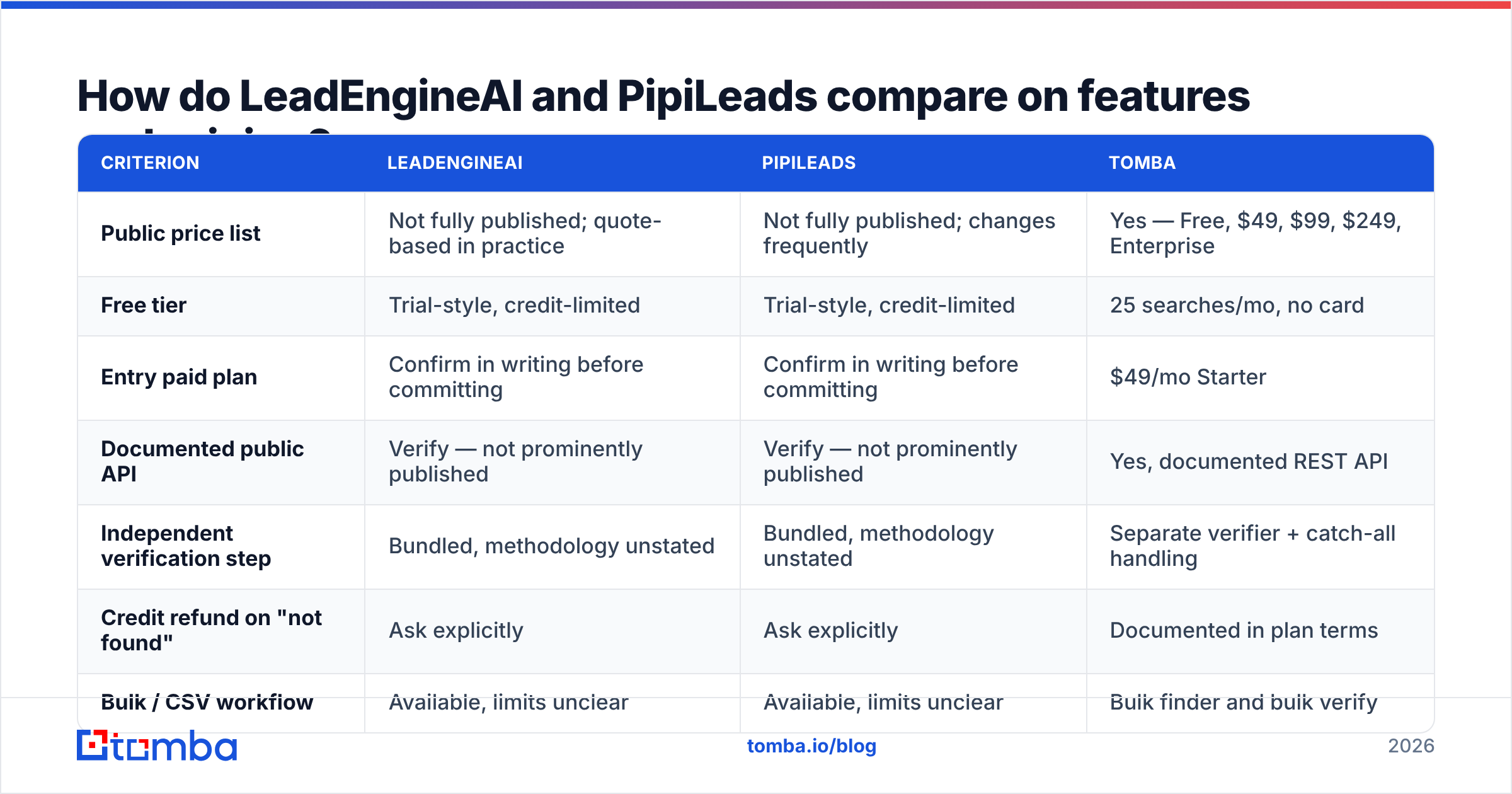
The table sticks to what you can check. Where a vendor hides a number, that gap is the finding. We do not fill it with a guess.
| Criterion | LeadEngineAI | PipiLeads | Tomba |
|---|---|---|---|
| Public price list | Not fully published; quote-based in practice | Not fully published; changes frequently | Yes — Free, $49, $99, $249, Enterprise |
| Free tier | Trial-style, credit-limited | Trial-style, credit-limited | 25 searches/mo, no card |
| Entry paid plan | Confirm in writing before committing | Confirm in writing before committing | $49/mo Starter |
| Documented public API | Verify — not prominently published | Verify — not prominently published | Yes, documented REST API |
| Independent verification step | Bundled, methodology unstated | Bundled, methodology unstated | Separate verifier + catch-all handling |
| Credit refund on "not found" | Ask explicitly | Ask explicitly | Documented in plan terms |
| Bulk / CSV workflow | Available, limits unclear | Available, limits unclear | Bulk finder and bulk verify |
| Native CRM integrations | Limited published list | Limited published list | HubSpot, Salesforce, Pipedrive, Zapier |
| Review-site track record | Thin | Thin | Established across G2 and Capterra |

Two things fall out of the table.
First, the price rows matter more than the feature rows. A vendor that hides its price list prices each buyer by hand. Your renewal is then a haggle, not a line item. A big firm with a buying team can live with that. A five-person sales team cannot.
Published Tomba pricing — $49 Starter, $99 Growth, $249 Pro — lets you model cost per lead before you talk to anyone.
Second, "AI" shows up in one product name and in both pitches. It does not show up anywhere useful in the table. AI scoring on weak contact data just ranks bad leads with more confidence. Fix the data layer first.
Is either one better for cold outbound at scale?#
At high volume, the LeadEngineAI vs PipiLeads choice narrows to three things. Both tools are hard to back on all three today.
Volume without credit cliffs. Outbound at 3,000-5,000 contacts a month needs a stable unit cost. Quote-based pricing with murky credit rules is the worst fit. You learn you overspent after the fact.
Inbox hygiene. Cold sending in 2026 runs under Google and Yahoo bulk sender rules. Your spam complaint rate has to stay under 0.3%. Your bounce rate has to stay low, for good. HubSpot's own outbound work and the State of Marketing data point the same way. List quality now swings reply rate more than copy does. A list you cannot audit is a risk you cannot price.
Catch-all domains. Roughly 15% to 25% of B2B domains are catch-all. The server accepts every address, so a test comes back "unknown". How a vendor treats those is a real tell. Passing them off as "valid" pumps up the vendor's accuracy claim and your bounce rate. A catch-all verifier exists because this case needs its own rules.
If either tool gives you a straight answer on catch-all handling, that is a good sign. Most tools at this tier dodge the question.
What about compliance and data sourcing?#
Most comparison posts skip this part. In regulated fields, it is the part that kills deals.
Ask both vendors, in writing:
- What is the lawful basis for EU contact data? Legitimate interest can work under GDPR for B2B data. But the vendor must have it written down, not made up on a call.
- Is there a public opt-out page? If you cannot find it, your buyers cannot either. Part of the fallout lands on you as the sender.
- Where does the data come from? "Proprietary AI" is not an answer. Crawled pages, partner feeds, and user uploads each carry their own risk.
- How often is it refreshed? B2B data decays 25-30% a year through job changes alone. A list refreshed once a year is wrong on a big share of rows most days.
Neither side of the LeadEngineAI vs PipiLeads pair makes this easy to find. That is not proof of a problem. Small vendors skip paperwork all the time. But it moves the homework onto you.
What are the best alternatives to both?#
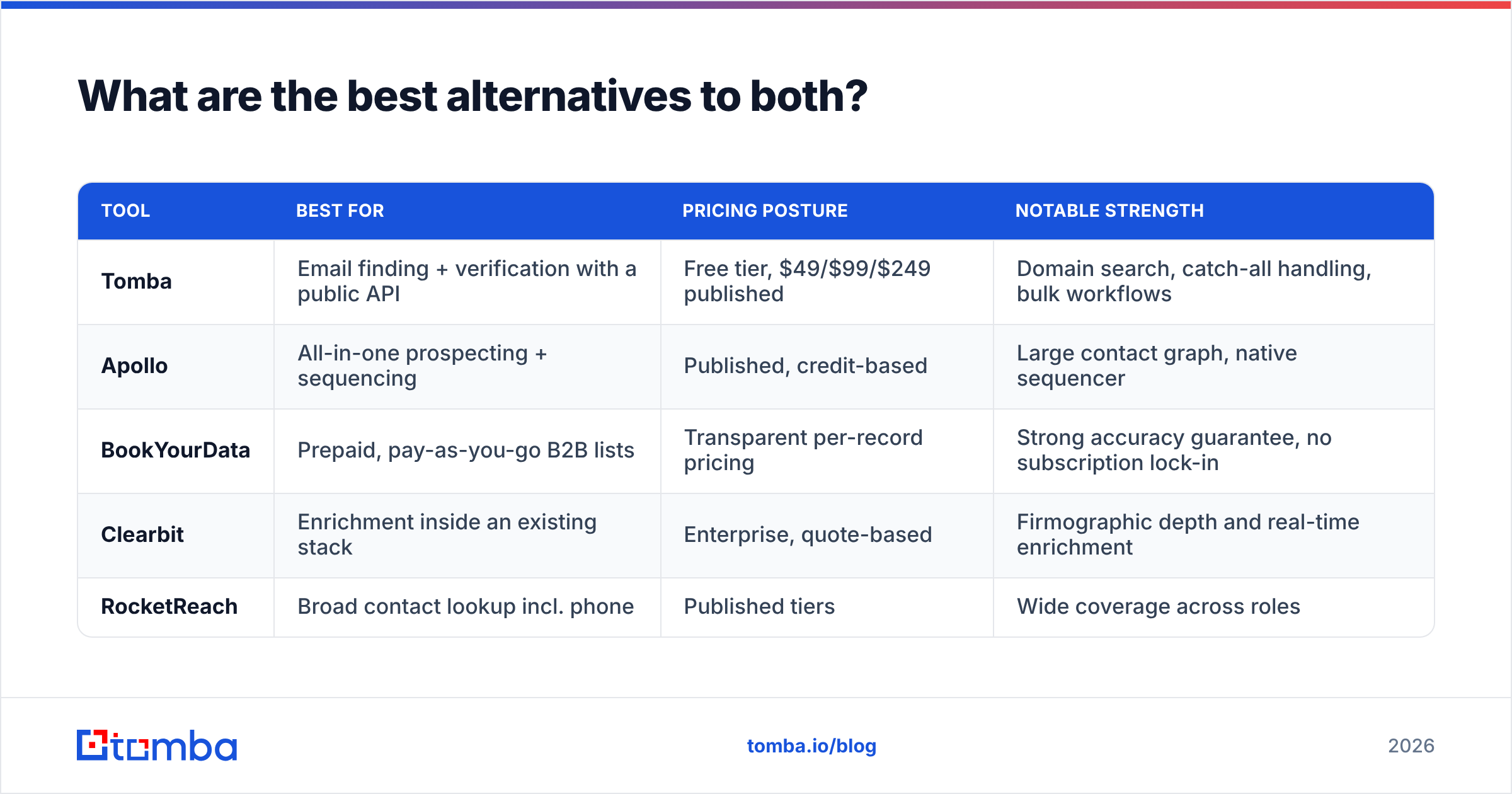
If the answers come back thin, the market has older options at the same price points.
| Tool | Best for | Pricing posture | Notable strength |
|---|---|---|---|
| Tomba | Email finding + verification with a public API | Free tier, $49/$99/$249 published | Domain search, catch-all handling, bulk workflows |
| Apollo | All-in-one prospecting + sequencing | Published, credit-based | Large contact graph, native sequencer |
| BookYourData | Prepaid, pay-as-you-go B2B lists | Transparent per-record pricing | Strong accuracy guarantee, no subscription lock-in |
| Clearbit | Enrichment inside an existing stack | Enterprise, quote-based | Firmographic depth and real-time enrichment |
| RocketReach | Broad contact lookup incl. phone | Published tiers | Wide coverage across roles |
BookYourData is worth a look if the subscription itself is your issue. You prepay per record, buy only what you need, and hold the vendor to a guarantee. Apollo fits if you want prospecting and sending in one seat.
Many teams end up splitting the two jobs. A focused email finder plus your current sending tool is cheaper, and it holds up longer.
Which should you pick: LeadEngineAI vs PipiLeads?#
Our verdict: neither, as your main data source, until you have your own bounce data.
That is not a dodge. Both vendors share less than their rivals do. No third-party test exists for either one. This is the only call you can defend.
Here is a 30-day plan:
- Week 1. Build a 100-account test list from your real ICP. Run it through the free tier of an open tool. Now you have a baseline that cost you nothing.
- Week 2. Get trial access to both tools. Run the same 100 accounts. Record coverage, not claims.
- Week 3. Send to 250 contacts from each source from a warmed domain. Log hard bounces, spam complaints, and replies apart from each other.
- Week 4. Turn it all into cost per replied lead. The winning number wins. And you hold a buying case, not a hunch.
If a vendor will not hand you enough trial credits to run that test, you have your answer. Tools that trust their data give you a free tier and step aside.
Start with data you can verify#
Get a control group before you sign anything. Tomba's Email Finder gives you 25 searches a month for free, with no card. Pricing is public at $49/mo Starter when you scale up. You also get a separate verifier, catch-all handling, domain search, and an open API. Your contact data never gets stuck inside one vendor's dashboard.
Run your 100-account ICP list through it this week. Whatever you decide about LeadEngineAI vs PipiLeads later, you will decide with numbers instead of home page copy.
Related guides#
// get started
Find, verify and enrich your first contacts today
Start on the free plan with 25 searches a month, then scale when your team is ready.
Free plan · No credit card required · GDPR & CCPA
// about the author