LeadEngineAI vs Power Almanac (2026): Which Data Wins?
One is an AI prospecting engine that builds lists on demand. The other is a hand-verified database of US local government officials. They solve different problems — here's which one actually fits your pipeline.
LeadEngineAI vs Power Almanac is an odd matchup. One tool builds B2B lists with AI. The other sells a hand-checked file of US local government contacts. This guide shows which one fits your outbound, and what to check before you buy.
TL;DR
- They are not real rivals. LeadEngineAI is an AI prospecting engine. It builds lists from broad B2B sources. Power Almanac is a narrow, hand-checked file of US local government officials.
- Sell to cities and counties? Power Almanac wins on depth. No general tool matches its municipal title coverage. You buy the records outright instead of renting a seat.
- Sell to private companies? An AI lead engine fits better. You get fresh, filtered lists every week. You also inherit the accuracy risk of machine-built data.
The rest comes down to hygiene and budget.
- Verify before you send. Government rosters change with every election. AI-built contacts carry guesswork. An email verifier step is not optional in 2026.
- Watch the billing shape. Pay per record is cheaper for one-off campaigns. Subscriptions win when you prospect all year.
What is LeadEngineAI?#
LeadEngineAI is part of the new wave of AI-native prospecting tools. You do not get a search screen with 40 filters. You describe your ideal customer in plain words — "Series A logistics SaaS in the US with a VP of Operations." The tool then runs the research, builds a matching list, enriches it, and pushes it to your sequencer or CRM.
The upside is speed. The downside is transparency. When an AI agent hands you a contact, one question gets hard to answer: where did this email address come from? Some records come from licensed data partners. Some are scraped from public web pages. Some are guessed from a pattern (first.last@domain) and then probed over SMTP.
This category moves fast and pricing pages change often. Treat any number you read — here or anywhere else — as a starting point. Confirm it on the vendor's own site before you buy. That warning applies to every young AI data tool, not just this one.

What is Power Almanac?#
Power Almanac does one job very well. It helps you reach elected and appointed officials in US local government. The database covers roughly 19,000+ municipalities plus counties and townships. It holds around 200,000+ named officials: mayors, city managers, council members, clerks, police and fire chiefs, public works directors, finance directors, and IT directors.
Three things set it apart from a general B2B database:
- Human checks. Researchers review and refresh records on a rolling cycle. Nothing is inferred by an algorithm. Local turnover follows election dates, so that matters more here than in the private sector.
- Pay per record. You pick a segment by state, population band, or job title. You see the count, then buy that list as a download. No seat license gates your access.
- Government job titles. Titles in local government do not map onto corporate filters. A "City Manager" or "Township Supervisor" is the real buyer. General databases tag them badly or miss them.
If you sell to public agencies, that focus is the whole point. If you do not, Power Almanac is not for you. That, in the end, is the real decision.
LeadEngineAI vs Power Almanac: how do they compare?#
| Dimension | LeadEngineAI | Power Almanac |
|---|---|---|
| Core market | General B2B, private sector | US local government only |
| Data assembly | AI research agents + partner data + pattern inference | Human researchers, rolling re-verification |
| Coverage claim | Broad, cross-industry | ~19,000+ municipalities, 200,000+ officials |
| Pricing model | Subscription / credits | Pay per record, volume discounts |
| Contract commitment | Monthly or annual plan | None — buy a list, keep it |
| Filters | ICP description, firmographics, intent-style signals | State, population, county, job title, entity type |
| Output | CRM/sequencer sync, CSV | CSV download |
| Phone numbers | Varies by plan | Office lines included on most records |
| Best for | Continuous outbound to companies | GovTech, public-sector, civic suppliers |
| Weak spot | Accuracy transparency, source provenance | Useless outside US public sector |
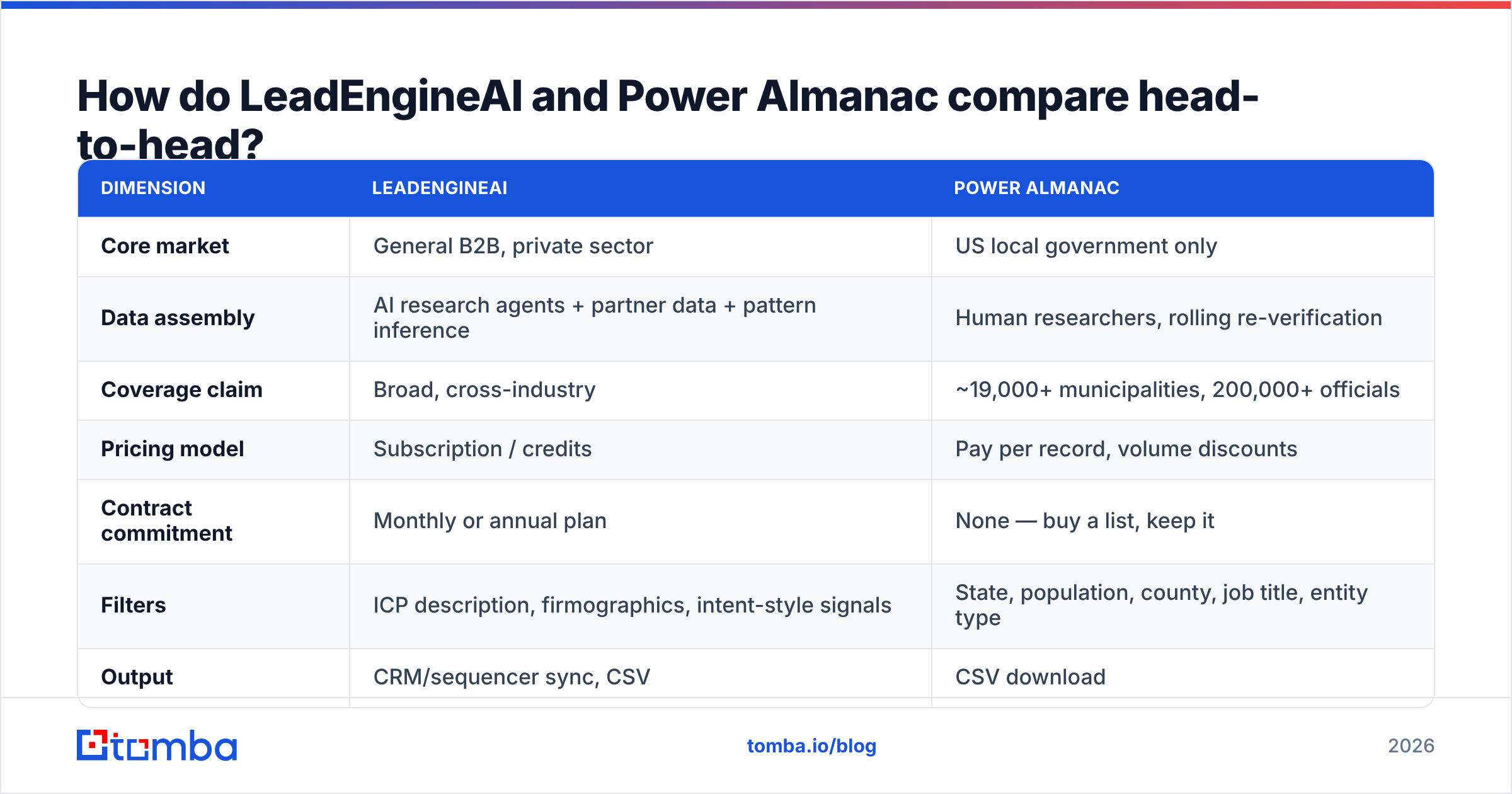
The table settles it faster than analysis does. These tools overlap on almost nothing. Both sell you contact data, and that is where the likeness ends. A bake-off only makes sense if you truly sell to both markets. In that case you need both, not one.
Which one has better data coverage?#
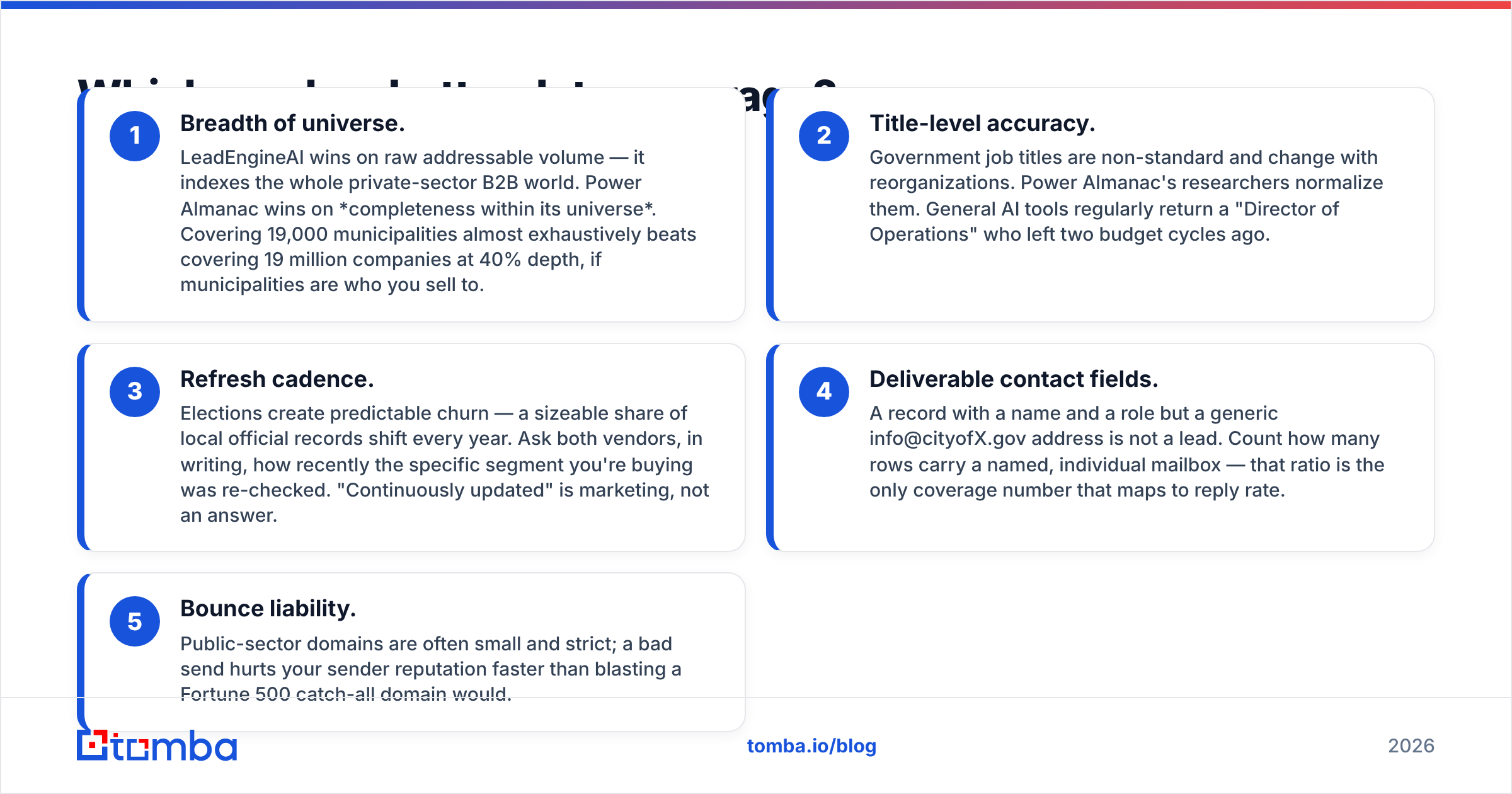
Coverage is the sharpest split in the LeadEngineAI vs Power Almanac question. It is also a trick question. Break it into the things that decide campaign results.
- Size of the universe. LeadEngineAI wins on raw volume. It indexes the whole private-sector B2B world. Power Almanac wins inside its own lane. Near-full coverage of 19,000 towns beats 40% depth across 19 million firms, if towns are your buyers.
- Title accuracy. Government titles are odd and shift with each reorg. Power Almanac's researchers clean them up. General AI tools often return a "Director of Operations" who left two budget cycles ago.
- Refresh pace. Elections create churn you can predict. Ask both vendors, in writing, when your exact segment was last checked. "Continuously updated" is marketing, not an answer.
Two more checks decide whether the rows are worth sending to.
- Usable contact fields. A name and a role with a generic info@cityofX.gov address is not a lead. Count the rows that carry a named mailbox. That ratio is the only coverage number tied to reply rate.
- Bounce risk. Public-sector domains are small and strict. A bad send hurts your sender reputation faster than a blast at a Fortune 500 catch-all would.
Run that five-point test on a sample from each vendor first. A 500-row sample costs almost nothing. It tells you more than any review, this one included.
What does each one actually cost?#
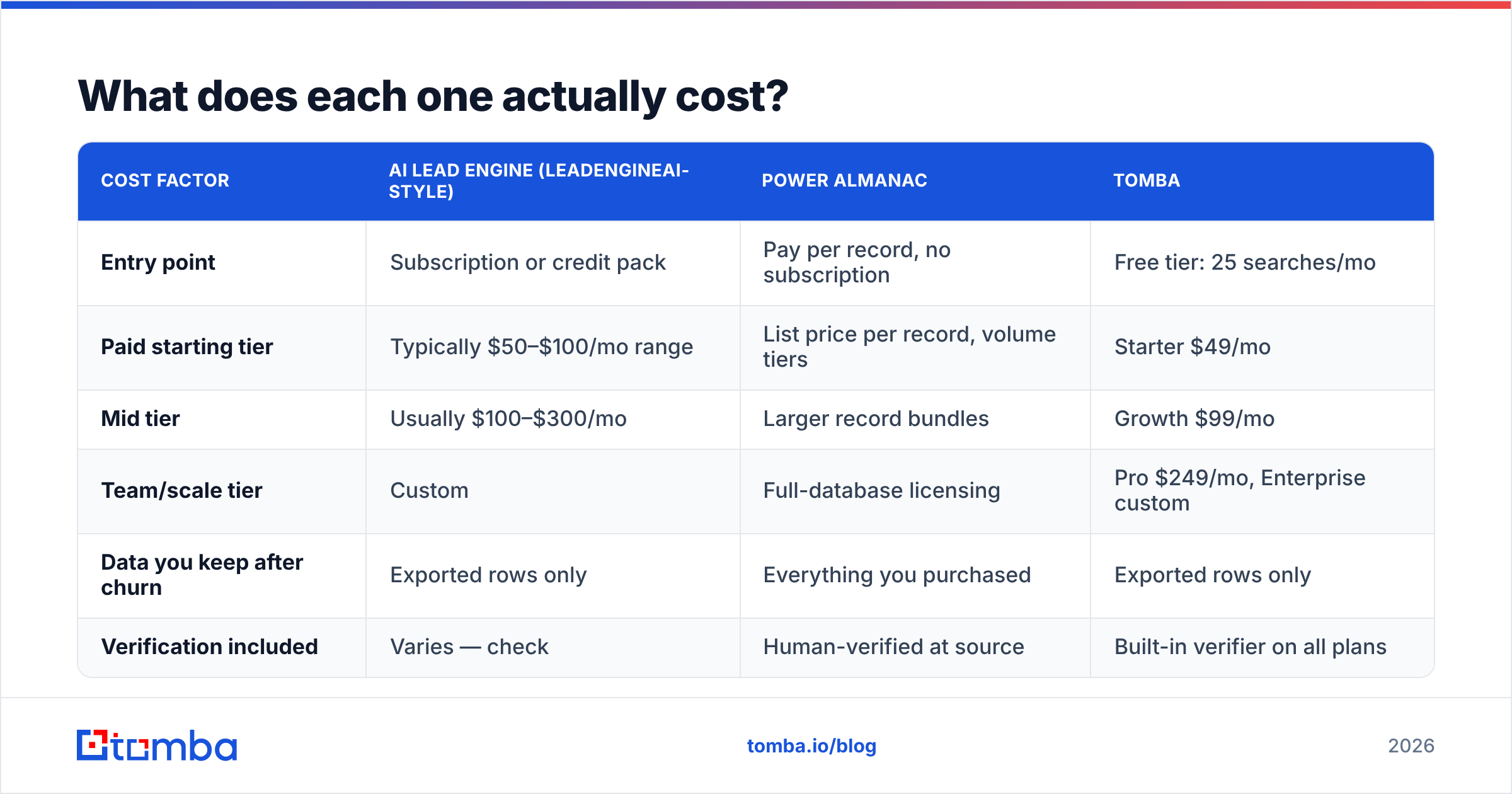
The pricing models differ, so a per-month comparison misleads. Compare cost per usable contact instead. "Usable" means verified, addressed to a person, and inside your ICP.
| Cost factor | AI lead engine (LeadEngineAI-style) | Power Almanac | Tomba |
|---|---|---|---|
| Entry point | Subscription or credit pack | Pay per record, no subscription | Free tier: 25 searches/mo |
| Paid starting tier | Typically $50–$100/mo range | List price per record, volume tiers | Starter $49/mo |
| Mid tier | Usually $100–$300/mo | Larger record bundles | Growth $99/mo |
| Team/scale tier | Custom | Full-database licensing | Pro $249/mo, Enterprise custom |
| Data you keep after churn | Exported rows only | Everything you purchased | Exported rows only |
| Verification included | Varies — check | Human-verified at source | Built-in verifier on all plans |
Two lessons are worth keeping.
Pay per record is underrated for finite markets. There are only so many US municipalities. Once you buy the segment, you own it. Paying every month to re-query a market that does not grow is a bad trade.
Subscriptions are underrated for churny markets. Private-sector contacts decay fast. Common estimates put B2B data decay at 25–30% a year. A feed that refreshes beats a one-time file that starts rotting the day you download it.
For current Tomba numbers, see the pricing details page. Do not lean on a third-party table, including this one.
Is LeadEngineAI better than Power Almanac for cold outreach?#
For private-sector outreach, yes. Power Almanac is not playing that game at all. For public-sector outreach, no, and it is not close.
One issue hits both tools. Neither is a deliverability product. Buying a list and pushing it straight into a sequencer is how teams burn domains. Here is the sequence that works:
- Source the list from the vendor that owns your market.
- Deduplicate against your CRM and suppression lists. Remove duplicates before you pay to verify the same row twice.
- Verify every address, even the ones the vendor calls clean. Vendor checks and your ESP's tolerance are not the same bar.
- Split out catch-all domains. Many
.govand small-business domains accept everything at the SMTP layer. A "valid" result proves nothing there. Run them through a catch-all verifier and treat them as low-confidence. - Warm the send. Start at low volume on any new domain, whatever the list quality.

Skip the verify step and the vendor choice stops mattering. A 12% bounce rate on a hand-checked government list does the same inbox damage as 12% on an AI-built one.
Where does each tool break down?#
LeadEngineAI-style platforms break down on sourcing. When an AI agent returns a contact, you often cannot trace where it came from. In regulated industries that is a compliance problem. Everywhere else it is a quality problem. It also blocks debugging. If a segment bounces at 20%, you cannot tell which step failed.
Power Almanac breaks down outside its lane. It has no answer for private-sector prospecting. There is no sequencer, no CRM workflow, and no enrichment past the government record itself. It is a data file, delivered well, for one market.
Both break down as a full GTM stack. Neither replaces a CRM, a sequencer, or a verification layer. Teams that expect an all-in-one pay for three tools anyway. If you are weighing nearby categories, check recent user reviews on G2. Review volume and recency say a lot about how mature a vendor is.
Neither handles "found the company, now find the person" well. That is a different job. A domain search against one company domain beats a list buy for it.
Which should you pick in 2026?#
Treat this as a decision rule, not a scorecard.
- You sell to cities, counties, school districts, or public agencies → Power Almanac. Buy the segment, verify it, own it. Nothing general-purpose matches its municipal title depth.
- You sell to private companies and prospect all year → an AI lead engine like LeadEngineAI. Make the vendor explain its data sources before you sign.
- You sell to both → buy both. Standardize verification on one layer so your CRM does not fill with three different data shapes.
Two cases point away from both tools.
- You prospect account by account → skip both. An email finder plus data enrichment costs far less than a database license, and the contacts carry higher intent.
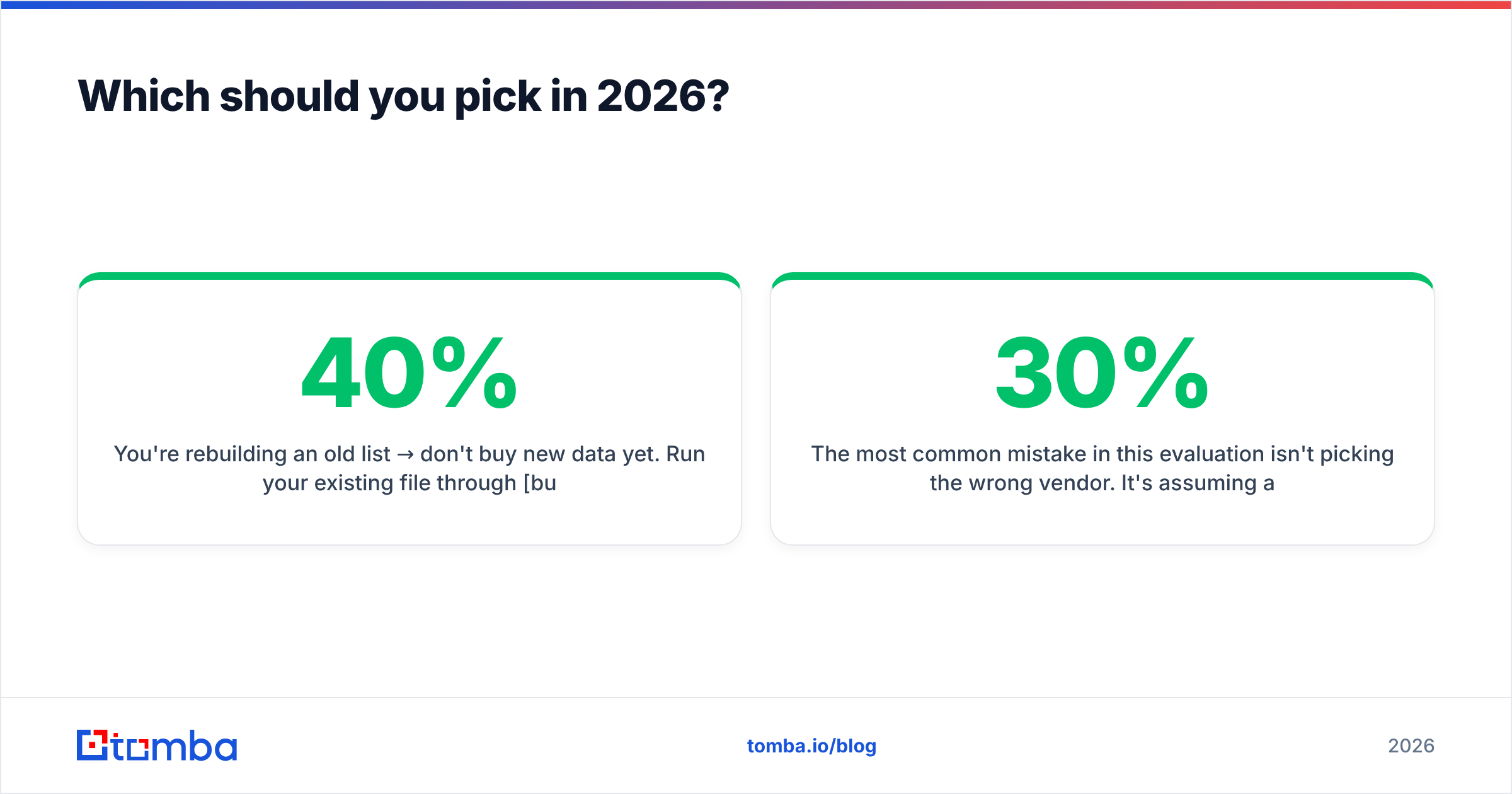
- You are rebuilding an old list → hold off on new data. Run your file through bulk verify first. Teams often find 30–40% of the "dead" list was never dead, just unverified.
The common mistake in the LeadEngineAI vs Power Almanac debate is not picking the wrong vendor. It is treating the list purchase as the hard part. Sourcing is maybe 30% of the work. Verification, segmentation, and send discipline are the other 70%. That is where campaigns are won or lost.
Where does Tomba fit alongside either one?#
Tomba is not a government database and does not pretend to be. If Power Almanac's market is your market, buy Power Almanac. Tomba covers the layer both tools leave open. It finds and confirms the address behind a company or a name, at the moment you need it, with no list-buying commitment.
That helps in three cases. First, you found a target account and need the right contact today, not at the next data refresh. Second, you bought a list and need every row verified before it touches your sequencer. Third, you want the same lookup inside your current workflow — through the Tomba API, a spreadsheet, or a browser extension — instead of another dashboard to log into.
Start with the free tier: 25 searches a month, no card. Run it against a sample of any list you are about to buy. Cross-check 50 rows from each vendor with the Tomba Email Finder before you spend a dollar. The match rate between your sample and the vendor's file is the most honest quality signal you will get, and it takes about ten minutes.
Related guides#
// get started
Find, verify and enrich your first contacts today
Start on the free plan with 25 searches a month, then scale when your team is ready.
Free plan · No credit card required · GDPR & CCPA
// about the author