LeadEngineAI vs RampedUp: Which B2B Lead Data Tool Wins?
LeadEngineAI and RampedUp both promise clean B2B contact data, but they solve different problems. Here is an honest breakdown of coverage, accuracy, pricing models and CRM fit — plus when a dedicated email finder beats both.
TL;DR — LeadEngineAI vs RampedUp in one minute
LeadEngineAI builds lists with AI. You type a prompt. It finds accounts, scores fit, and drafts your first email.
RampedUp cleans the data you already own. It fills gaps in CRM records, scores accounts, and refreshes stale fields.
Pick RampedUp if your CRM is full of stale, half-empty records. Pick LeadEngineAI if you need new lists fast and have no RevOps team.
Neither shows a simple price you can compare line by line. Both lean on quotes or seat-plus-credit deals. That makes cost per verified contact hard to forecast before a sales call.
Bounce risk is the weak spot in both. Enrichment tools rarely re-check an address at send time. AI list builders inherit whatever the source had.
Most teams add a cheap finder and verifier under the platform they pick. That is the job Tomba does at $49/mo.
LeadEngineAI vs RampedUp: what are they?#
They are not the same kind of product. That is the first thing to get straight.
RampedUp is a B2B contact and company data provider. It grew up around sales intelligence and CRM enrichment. Its focus is the record you already have. Think of a lead in Salesforce with no title. Or an account with no employee count. Or a list of 40,000 rows where half the phone fields are blank. RampedUp fills, scores, and refreshes those rows. You can read their own framing on the RampedUp website.
LeadEngineAI sits in the newer AI prospecting wave. You describe your ideal customer in plain words. For example: "Series B fintech firms in the UK with 50–200 staff hiring compliance people." The tool then builds the list, fills in the details, and often writes the first email. Less spreadsheet, more prompt.
So the honest version of "LeadEngineAI vs RampedUp" is not which tool is better. It is which half of your funnel is broken right now.
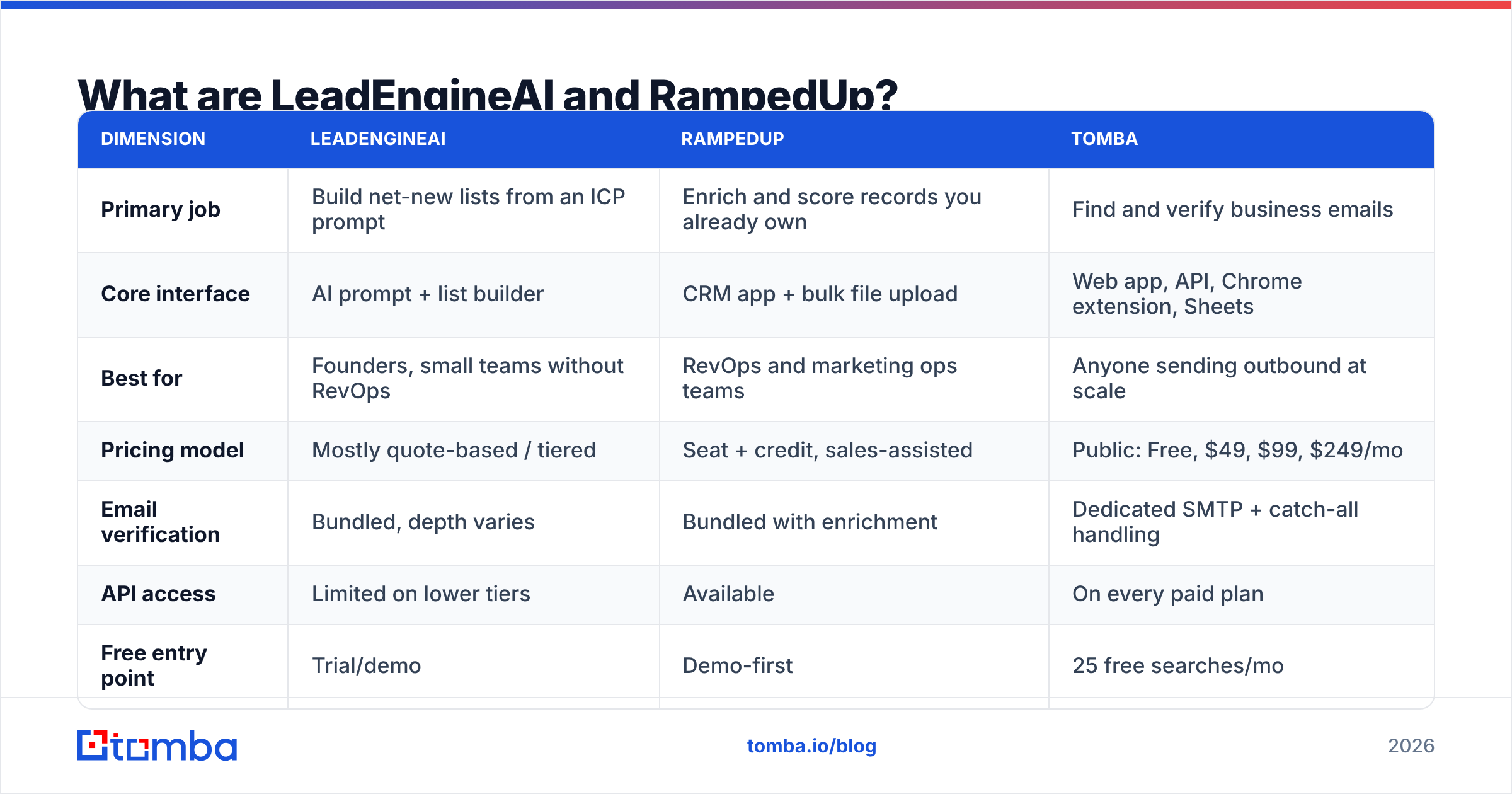
| Dimension | LeadEngineAI | RampedUp | Tomba |
|---|---|---|---|
| Primary job | Build net-new lists from an ICP prompt | Enrich and score records you already own | Find and verify business emails |
| Core interface | AI prompt + list builder | CRM app + bulk file upload | Web app, API, Chrome extension, Sheets |
| Best for | Founders, small teams without RevOps | RevOps and marketing ops teams | Anyone sending outbound at scale |
| Pricing model | Mostly quote-based / tiered | Seat + credit, sales-assisted | Public: Free, $49, $99, $249/mo |
| Email verification | Bundled, depth varies | Bundled with enrichment | Dedicated SMTP + catch-all handling |
| API access | Limited on lower tiers | Available | On every paid plan |
| Free entry point | Trial/demo | Demo-first | 25 free searches/mo |
One warning before you treat that table as gospel. Both vendors ship fast. Neither posts a full, self-serve price sheet today. Read the pricing row as a model comparison, not a quote. Ask each one for the cost per usable, verified contact. Not the cost per credit.
LeadEngineAI vs RampedUp: how do you choose?#
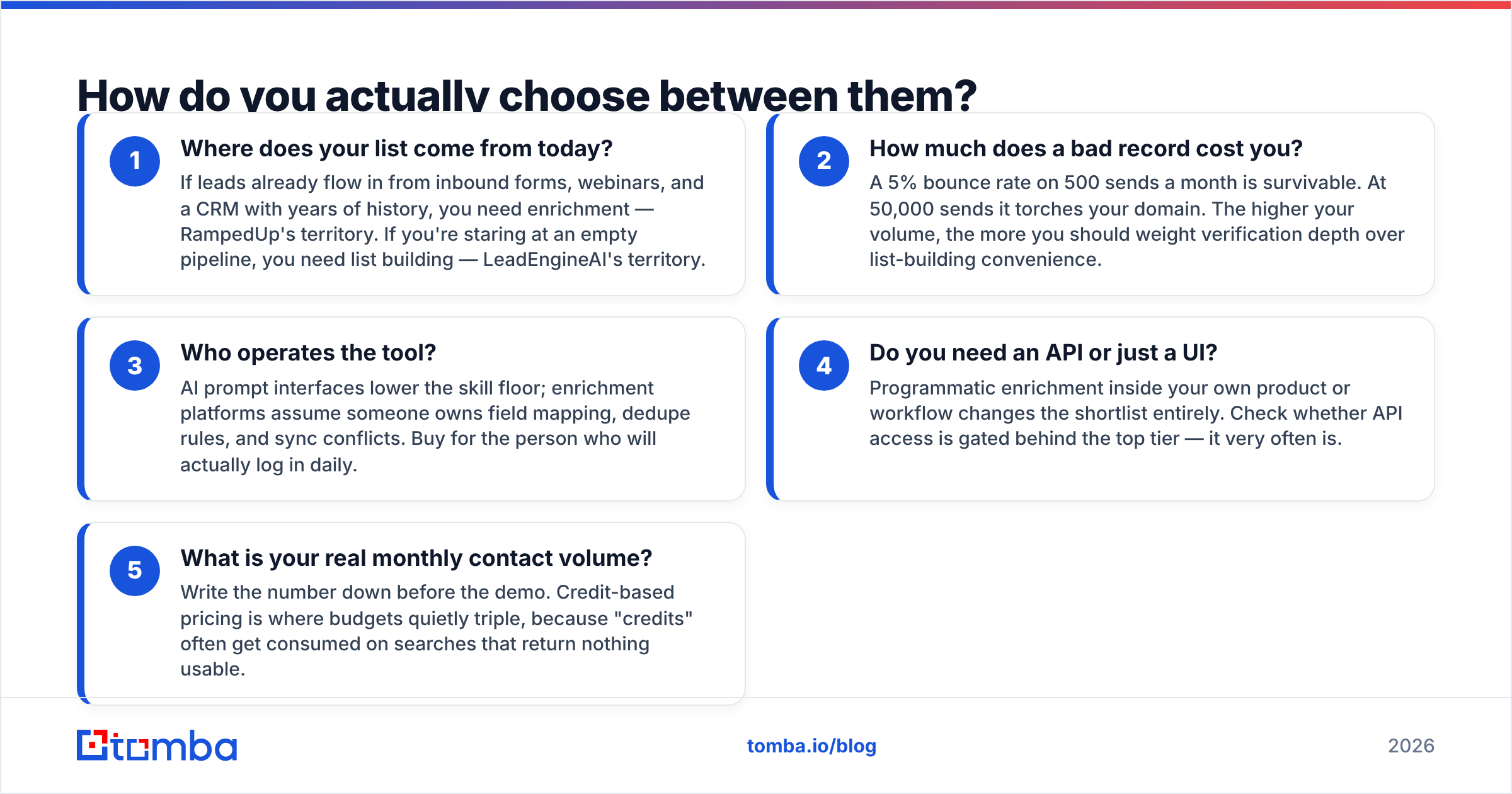
Work through these five questions in order. They settle the choice faster than any feature grid.
Where do your leads come from today? Do they flow in from forms, webinars, and years of CRM history? Then you need enrichment. That is RampedUp's turf. Staring at an empty pipeline instead? You need list building. That is LeadEngineAI's turf.
What does a bad record cost you? A 5% bounce rate on 500 sends a month is survivable. At 50,000 sends it burns your domain. The higher your volume, the more verification depth matters.
Who will run the tool? AI prompts lower the skill floor. Enrichment platforms assume someone owns field mapping, dedupe rules, and sync conflicts. Buy for the person who logs in daily.
Do you need an API or just a screen? Enrichment inside your own product changes the shortlist. Check whether API access sits behind the top tier. It often does.
What is your real monthly contact volume? Write the number down before the demo. Credit pricing is where budgets quietly triple. Credits often get spent on searches that return nothing usable.
That last point deserves weight. Ask every vendor the same thing. Do I pay for a lookup that returns no email? Or only for a result you deliver? Answers vary a lot. The gap between those two models can be 2–3x on your real cost.
LeadEngineAI vs RampedUp: which has better data accuracy?#
Marketing copy helps least here. Almost every vendor in this space claims a number in the nineties. Those numbers come from different samples, different tests, and different refresh cycles.

Four things drive accuracy in LeadEngineAI vs RampedUp:
Source freshness. Enrichment databases are snapshots. B2B contact data goes stale at roughly 22–30% a year as people change jobs. That range is widely cited in the data industry and echoed in HubSpot's own research on database decay. A tool that refreshes each quarter is worse than one that checks at query time. The headline percentage does not change that.
Verification method. There is a real gap between two things. One is guessing an email format (first.last@domain.com). The other is opening an SMTP conversation with the mail server. Guessing scales well and bounces badly. If a vendor will not say which method they use, assume the cheap one.
Catch-all handling. Many company domains accept every address at the gate. Naive checks mark them all "valid." Good tools flag them on their own and add more signals. Tomba splits them out with a catch-all verifier. So a Tomba "valid" and a generic platform "valid" are not the same claim.
AI guesswork. Probe this one with LeadEngineAI-style tools. When a model builds a contact record, is every field sourced? Or are some fields guessed? A guessed job title is a small annoyance. A guessed email address is a deliverability problem.
Here is a free test. Take 200 contacts you know are right. Use current customers, partners, or people you emailed this quarter. Run them through each trial. Measure match rate and error rate. Tools that look the same on a feature grid often split by 15–20 points here.
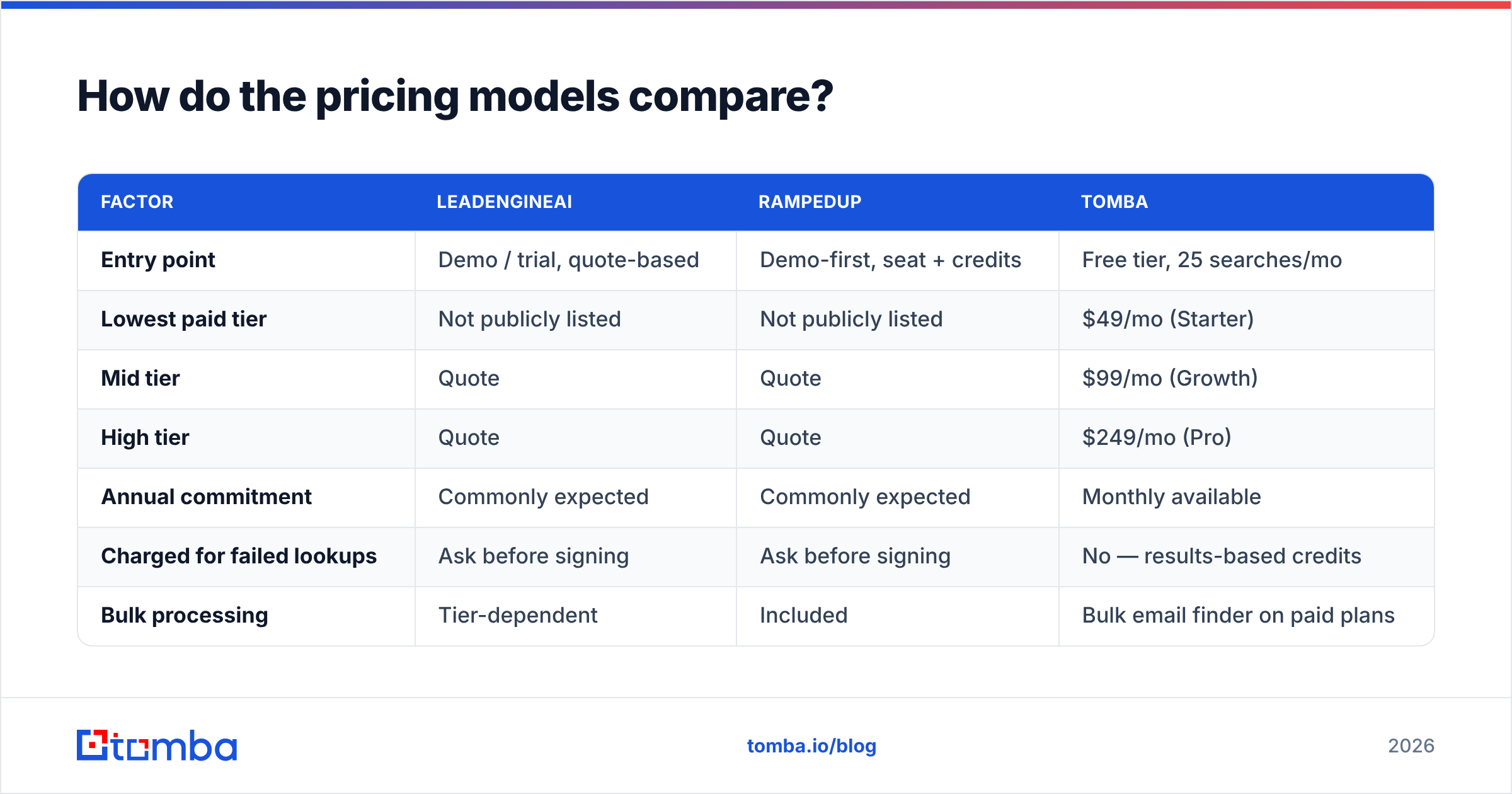
LeadEngineAI vs RampedUp: how do the pricing models compare?#
| Factor | LeadEngineAI | RampedUp | Tomba |
|---|---|---|---|
| Entry point | Demo / trial, quote-based | Demo-first, seat + credits | Free tier, 25 searches/mo |
| Lowest paid tier | Not publicly listed | Not publicly listed | $49/mo (Starter) |
| Mid tier | Quote | Quote | $99/mo (Growth) |
| High tier | Quote | Quote | $249/mo (Pro) |
| Annual commitment | Commonly expected | Commonly expected | Monthly available |
| Charged for failed lookups | Ask before signing | Ask before signing | No — results-based credits |
| Bulk processing | Tier-dependent | Included | Bulk email finder on paid plans |
| Contract flexibility | Sales-negotiated | Sales-negotiated | Self-serve, cancel anytime |
The pattern is the real finding. Both LeadEngineAI and RampedUp are sold, not bought. That is not a knock. Big data deals need scoping, and a good rep will right-size your plan. But a five-person startup will spend two weeks in demos before it sees a number. And that number is usually annual.
If that friction bothers you, use Tomba pricing as a baseline. A finder does not replace an enrichment suite. It does give you a public, per-contact cost to negotiate against. Walking into a demo knowing verified email discovery starts at $49/mo changes the conversation.
Check real buyer reviews too, on G2 and Capterra. Filter to reviewers at companies your size. A 4.6 average built on big enterprise rollouts says little about a three-person sales team.
What do these platforms not do well?#
Every honest comparison needs this part.
Neither is a deliverability tool. They hand you addresses. They do not warm your domain, sign your mail, or keep you out of spam. If your SPF, DKIM, and DMARC setup is shaky, a better list makes things worse. You simply burn a bigger audience. Fix email deliverability first.
Neither solves data decay. A quarterly refresh means part of your list is wrong on any given day. The fix is to re-check right before a send with a dedicated email verifier. Do not trust the enrichment date.
AI list building is only as good as its filters. "Find me companies that just raised funding" sounds precise. It often returns a mix of good hits, old funding news, and noise. Spot-check 20 rows by hand before every campaign. Every time.
Coverage is regional. North American coverage is strong across the board. EMEA is decent. APAC and LATAM thin out fast. If your buyers sit outside the US, test coverage by region during the trial.


Can you use a finder layer alongside either one?#
Yes. Most teams running real volume already do.
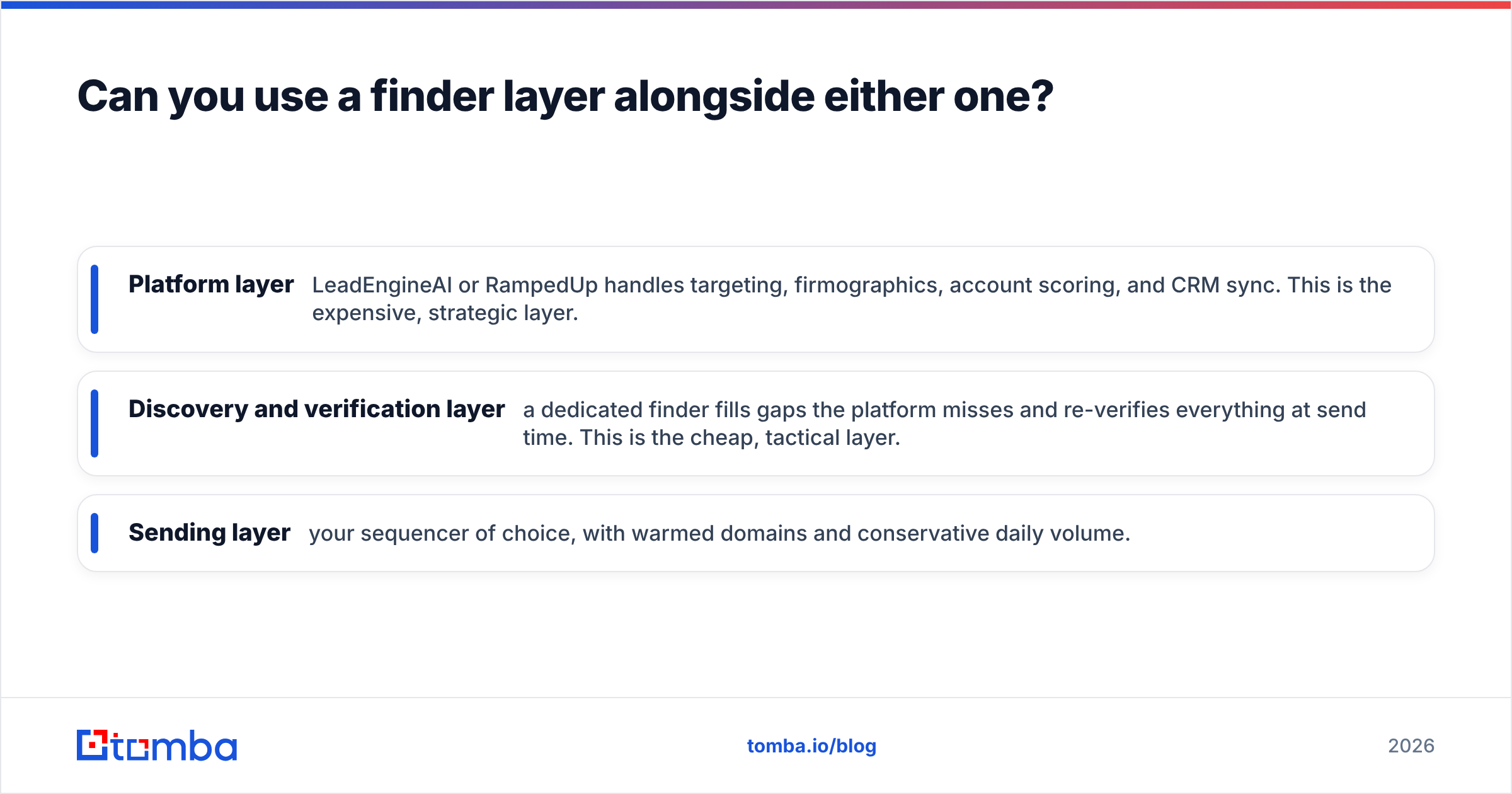
The stack looks like this:
Platform layer — LeadEngineAI or RampedUp handles targeting, firm data, account scoring, and CRM sync. This is the pricey, strategic layer.
Discovery and verification layer — a finder fills gaps the platform misses. It also re-checks every address at send time. This is the cheap, tactical layer.
Sending layer — your sequencer, with warmed domains and modest daily volume.
Gap-filling matters more than people expect. No single database covers every domain. Say your enrichment run comes back with a 62% email fill rate. The missing 38% are not junk leads. They are often your best-fit accounts, and they sit outside that vendor's strongest coverage. Run them through a domain search or a bulk finder. You will recover a good slice for a fraction of the platform cost.
The same logic covers more than email. Need job titles, company size, or social profiles on a recovered list? Data enrichment endpoints let you add them in code, with no CSV round trip. Wiring this into a workflow? The Tomba API does find-then-verify in one pass. That is the pattern you want. Never store an address you have not checked.
LeadEngineAI vs RampedUp: which should you pick in 2026?#
Pick RampedUp if you have a real CRM with history. You also need an ops owner who will maintain field mappings. Your bottleneck is record quality, not record count. RampedUp is the more mature, more ops-minded of the two.
Pick LeadEngineAI if you are early, list-poor, and short on ops help. The prompt interface really does cut the time from "we should target X" to "here are 500 firms matching X." Budget time for manual QA on every list. And treat any AI-written email address as unverified until you prove it.
Pick neither, yet, if your market is under a few thousand accounts. At that size, a finder plus a spreadsheet plus steady research beats any platform. It also costs about 5% as much.
Whichever way you go, keep verification separate from sourcing. The vendor that sold you the list has every reason to grade its own homework kindly. An independent verifier does not.
Ready to stop guessing on email accuracy?#
Your answer to LeadEngineAI vs RampedUp matters less than one thing. The addresses have to be real on the day you press send. The Tomba Email Finder finds work emails by domain, name, or company. It then checks them with SMTP-level tests and flags catch-all domains. So "valid" means valid. Start free with 25 searches a month. Run your own 200-contact test against whatever the platforms hand you. Let the results decide. Paid plans start at $49/mo, with no annual contract and no sales call.
Related guides#
// get started
Find, verify and enrich your first contacts today
Start on the free plan with 25 searches a month, then scale when your team is ready.
Free plan · No credit card required · GDPR & CCPA
// about the author