LeadEngineAI vs Rebump: Which Follow-Up Tool Wins in 2026?
One is an AI outbound engine that builds lists and writes sequences. The other is a $5 Gmail add-on that bumps unanswered threads. Here is where each one actually earns its place in a 2026 stack.
TL;DR
- These two tools are not really competitors. Rebump is a single-purpose Gmail follow-up bumper. LeadEngineAI positions itself as an AI outbound engine that sources leads, drafts copy, and runs multi-step sequences.
- Pick Rebump if you already send from Gmail one-to-one, hate sequence builders, and just want unanswered threads nudged automatically for a few dollars a month.
- Pick LeadEngineAI (or a mature sequencer) if you need list building, multi-channel steps, reply detection across mailboxes, and team-level reporting.
- Neither tool fixes the failure that kills most campaigns: bad email data. A perfect 5-step cadence sent to a 22% invalid list still lands in spam.
- Verify contacts before either tool touches them. That is the cheapest performance lever in the entire stack.
What is Rebump, and what does it actually do?#
Rebump is a Gmail and Google Workspace extension with one job: it watches threads you send and, if nobody replies, it sends your follow-up messages on a schedule you set. When a reply arrives, it stops. That is the whole product.
You install it, enable it on a per-email basis (a small icon in the compose window), and set the number of bumps plus the days between them. The follow-ups go out from your normal Gmail thread, so the recipient sees one continuous conversation rather than a sequencer-generated blast. You can review the official feature list on rebump.cc.
The design philosophy is worth naming, because it explains everything else: Rebump assumes you already have the conversation started. It does not find contacts, it does not verify them, it does not score replies, and it does not manage a pipeline. It removes one specific chore — remembering to bump.
For solo consultants, recruiters, agency owners, and anyone whose outbound is measured in dozens of threads per week rather than thousands, that narrowness is a feature. There is no onboarding, no CSV mapping, no deliverability dashboard to misread.
What is LeadEngineAI, and how is it different?#
LeadEngineAI sits in a different category: AI-assisted outbound. Tools in this class typically bundle four things — a contact database or enrichment layer, an AI copy generator, a multi-step sequencer, and analytics. Instead of "bump this thread," the promise is "describe your ICP and we will build and run the campaign."
That bundling is the whole value proposition, and also the whole risk. When one vendor owns sourcing, copy, and sending, a weakness in any layer contaminates the rest. An AI that writes a sharp opening line still fails if the underlying contact record is two jobs stale.
One honest caveat before we go further: the AI-outbound category churns fast. Plan names, credit allowances, and feature gates change quarterly, and LeadEngineAI is a younger product than Rebump. Treat any pricing figure below as a starting point and confirm it on the vendor's live pricing page before you buy. Third-party review sites like G2's sales engagement category are a useful sanity check on how a tool is actually landing with buyers versus how it markets itself.
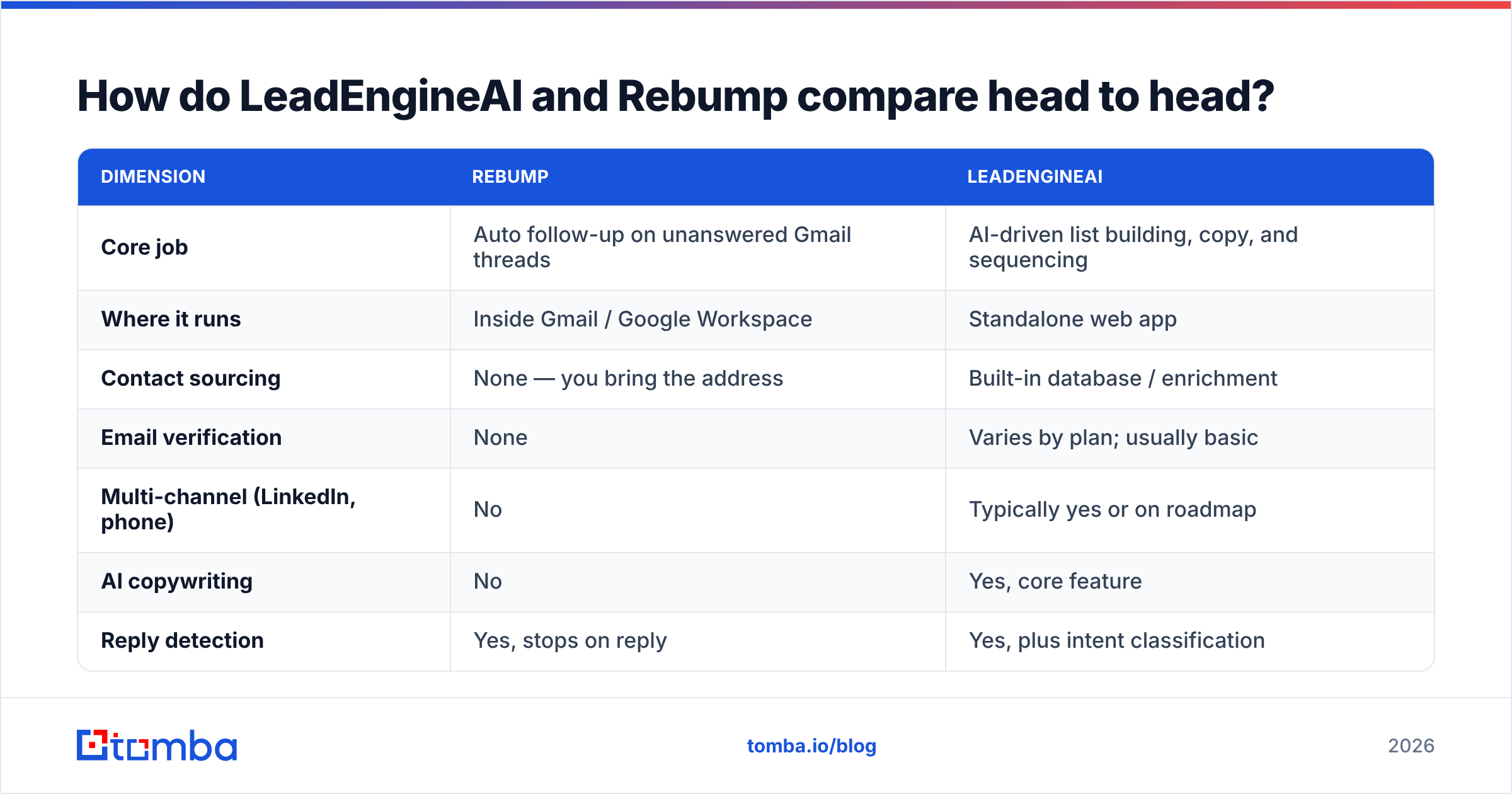
How do LeadEngineAI and Rebump compare head to head?#
| Dimension | Rebump | LeadEngineAI |
|---|---|---|
| Core job | Auto follow-up on unanswered Gmail threads | AI-driven list building, copy, and sequencing |
| Where it runs | Inside Gmail / Google Workspace | Standalone web app |
| Contact sourcing | None — you bring the address | Built-in database / enrichment |
| Email verification | None | Varies by plan; usually basic |
| Multi-channel (LinkedIn, phone) | No | Typically yes or on roadmap |
| AI copywriting | No | Yes, core feature |
| Reply detection | Yes, stops on reply | Yes, plus intent classification |
| Team reporting | Minimal | Dashboards, per-rep stats |
| Typical price point | Low single digits per user/mo | Mid two to three figures per user/mo |
| Setup time | Under 5 minutes | Half a day to a week |
| Best for | Solo senders, 10-100 threads/week | Teams running structured outbound at volume |
The table makes the real decision obvious. You are not choosing between two follow-up tools. You are choosing between adding one missing behaviour to a workflow you already like and replacing your workflow with a platform.

Which one should you pick for your situation?#
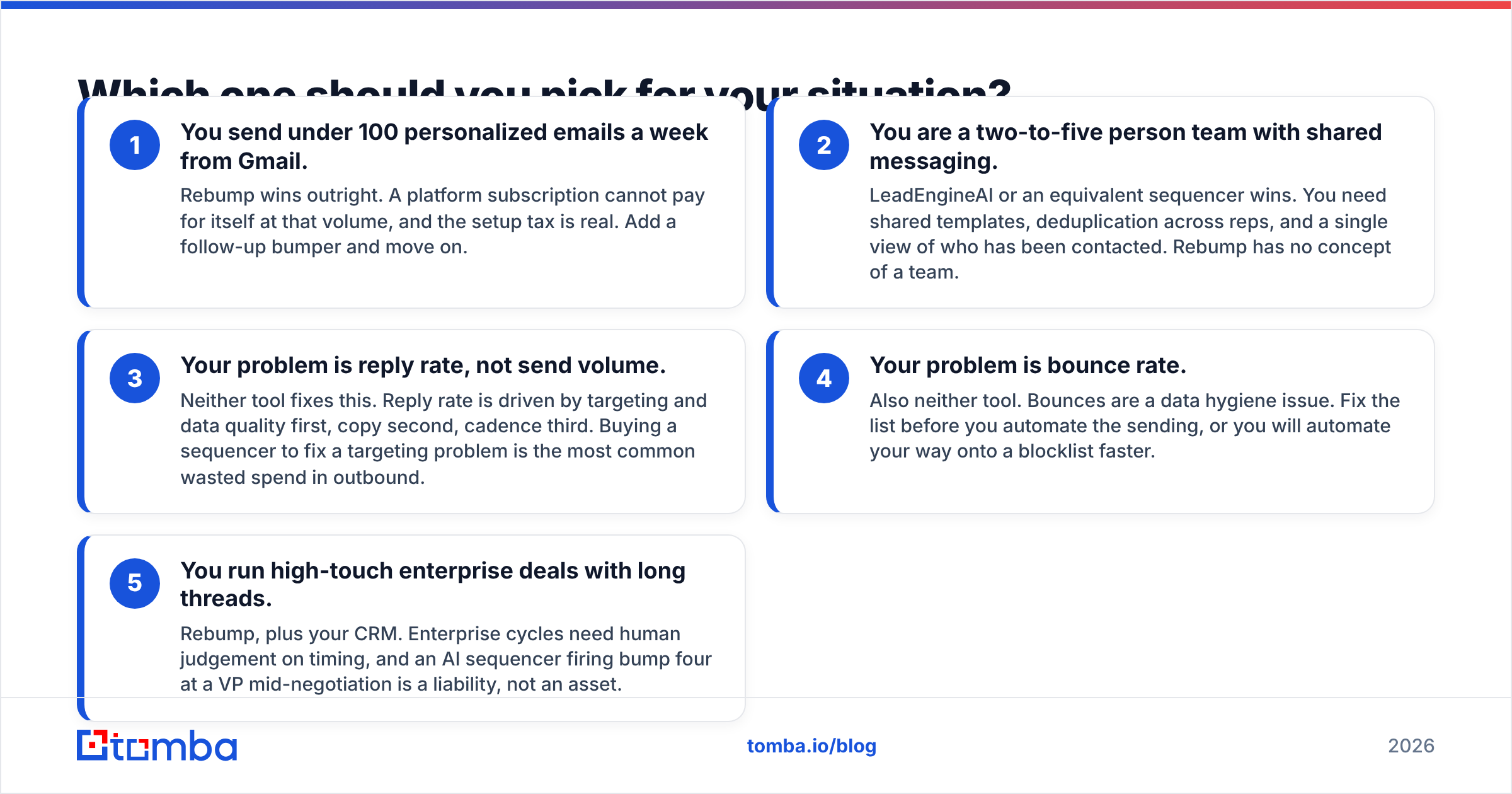
Run through these five scenarios and stop at the first one that describes you.
- You send under 100 personalized emails a week from Gmail. Rebump wins outright. A platform subscription cannot pay for itself at that volume, and the setup tax is real. Add a follow-up bumper and move on.
- You are a two-to-five person team with shared messaging. LeadEngineAI or an equivalent sequencer wins. You need shared templates, deduplication across reps, and a single view of who has been contacted. Rebump has no concept of a team.
- Your problem is reply rate, not send volume. Neither tool fixes this. Reply rate is driven by targeting and data quality first, copy second, cadence third. Buying a sequencer to fix a targeting problem is the most common wasted spend in outbound.
- Your problem is bounce rate. Also neither tool. Bounces are a data hygiene issue. Fix the list before you automate the sending, or you will automate your way onto a blocklist faster.
- You run high-touch enterprise deals with long threads. Rebump, plus your CRM. Enterprise cycles need human judgement on timing, and an AI sequencer firing bump four at a VP mid-negotiation is a liability, not an asset.
Most buyers land in bucket 1 or bucket 4, which is why so many sequencer trials quietly lapse after month two.
Is Rebump good enough on its own in 2026?#
For its stated job, yes. The tool has been around long enough to be stable, it is cheap, and it does not try to be a platform. Its limitations are honest rather than hidden:
- No list building. You need a separate source for addresses.
- No verification. If the address is dead, Rebump will cheerfully bump a bounce.
- Gmail only. Outlook-first teams are out.
- Thread-level, not campaign-level. You cannot answer "how did the Q3 CFO campaign perform?" from inside Rebump.
- Sending reputation is entirely on you. Rebump increases send volume per contact without giving you any deliverability instrumentation.
That last point matters more in 2026 than it did three years ago. Google and Yahoo's bulk sender requirements pushed spam complaint thresholds into the foreground, and a tool that multiplies your touches without showing you complaint or bounce signals shifts all the monitoring burden onto you. If you use Rebump, pair it with something that reports on your sender reputation and authentication setup.
Where does LeadEngineAI fall short?#
Three recurring weaknesses show up across the AI-outbound category, and buyers should test for all of them during a trial rather than taking the demo at face value.
Data freshness is the weak link. Bundled databases are only as good as their refresh cycle. Ask the vendor directly: how often is the contact record re-verified, and what is the documented bounce rate on exported lists? If the answer is vague, assume the worst and verify externally.
AI copy converges. When thousands of users prompt the same model with similar ICP descriptions, the output starts to rhyme. Prospects have learned the tells — the fake-specific compliment about a LinkedIn post, the "I noticed you're scaling" opener. Generated copy is a starting draft, not a finished email.
Credit systems obscure real cost. Advertised seat price rarely reflects what you actually pay once enrichment credits, verification credits, and extra mailboxes are added. Build a spreadsheet of your real monthly volume before signing anything annual.
None of that makes the category worthless. It means the platform's sequencer and reporting are usually the durable value, and the bundled data is the part worth benchmarking against a dedicated provider.
What does each one cost, and what does the total stack cost?#
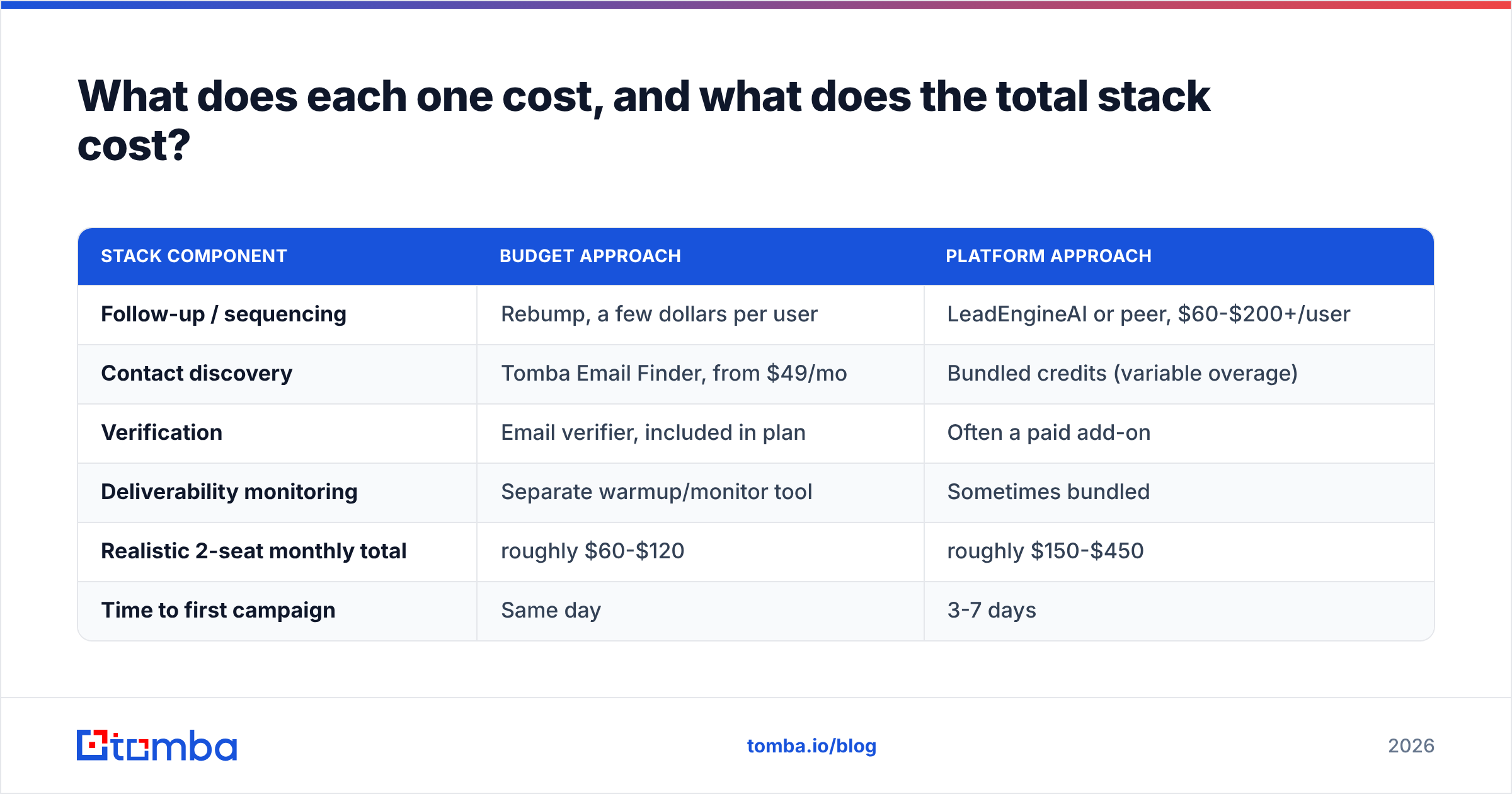
Here is a realistic monthly picture for a two-person outbound team sending roughly 1,500 emails a month, with data quality handled properly.
| Stack component | Budget approach | Platform approach |
|---|---|---|
| Follow-up / sequencing | Rebump, a few dollars per user | LeadEngineAI or peer, $60-$200+/user |
| Contact discovery | Tomba Email Finder, from $49/mo | Bundled credits (variable overage) |
| Verification | Email verifier, included in plan | Often a paid add-on |
| Deliverability monitoring | Separate warmup/monitor tool | Sometimes bundled |
| Realistic 2-seat monthly total | roughly $60-$120 | roughly $150-$450 |
| Time to first campaign | Same day | 3-7 days |
The budget stack is not a compromise for small teams. It is frequently the better-performing stack, because you are buying each layer from a specialist instead of accepting the weakest component in a bundle. Full Tomba pricing runs Free (25 searches/mo), Starter $49/mo, Growth $99/mo, Pro $249/mo, and Enterprise custom — so the data layer is predictable rather than credit-metered into surprise invoices.
The platform stack earns its premium once you have four or more reps, need shared attribution, or your RevOps lead is spending real hours reconciling tools.
Why does neither tool fix your actual problem?#
Because both of them operate downstream of the thing that determines outcomes: whether the address is real and whether the person is the right target.
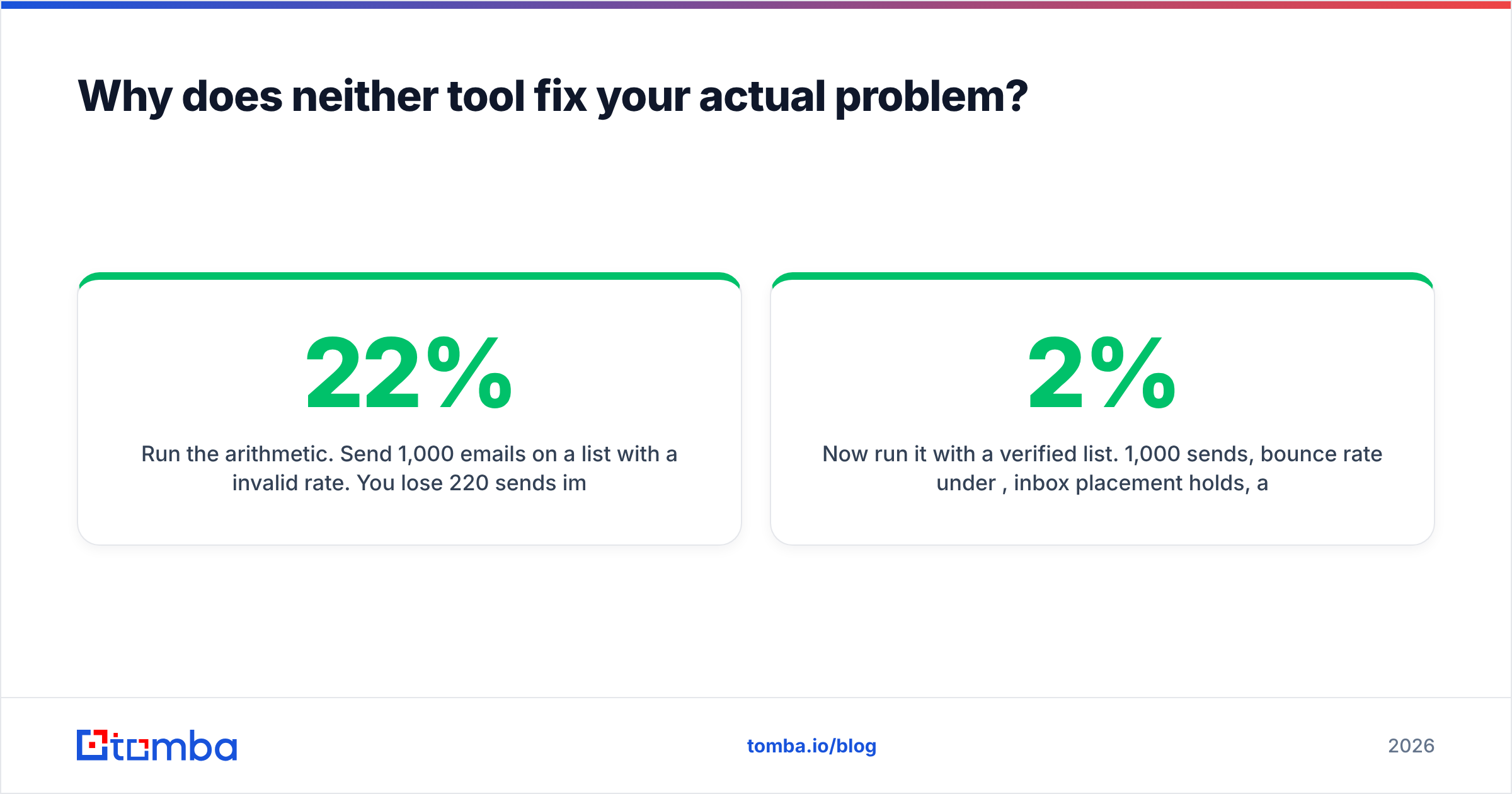
Run the arithmetic. Send 1,000 emails on a list with a 22% invalid rate. You lose 220 sends immediately, your bounce rate lands well above the 2% threshold that mailbox providers treat as a red flag, and your domain reputation drops. Every subsequent campaign from that domain — including the ones with a clean list — underperforms. The sequencer did nothing wrong. The data did.
Now run it with a verified list. 1,000 sends, bounce rate under 2%, inbox placement holds, and your 5% reply rate is measured against 980 delivered rather than 780. Same copy, same cadence, roughly 25% more conversations.

This is why the sequencing debate is usually the wrong first argument. Before you compare cadence builders, do three things:
- Verify every address before import, and re-verify anything older than 90 days.
- Handle catch-all domains explicitly instead of pretending they are valid. A catch-all verifier tells you which accept-all domains are safe to send to and which will silently swallow your mail.
- Deduplicate across reps so two people are not bumping the same VP in the same week, which is a real risk when one rep uses Gmail and another uses a platform.
For a broader primer on the mechanics, email deliverability covers the authentication and reputation basics that sit underneath all of this. If you want an outside reference on how inbound and outbound motions fit together, HubSpot publishes solid free material on sequencing and cadence design.
What is the verdict on LeadEngineAI vs Rebump?#
Rebump wins on simplicity and price. If your outbound is genuinely one-to-one and Gmail-native, nothing in the AI category will beat a five-dollar extension that just works. Do not over-buy.
LeadEngineAI wins on scope. If you need list building, multi-channel steps, shared visibility, and reporting your manager will actually read, a single-purpose bumper cannot get you there no matter how many extensions you bolt together.
Neither wins on data. Both assume you have arrived with good contacts. Whichever you choose, the contact layer is a separate decision, and it is the decision with the largest effect on results.
A practical pattern that works for teams of one to five: keep Gmail plus Rebump for high-value, genuinely personal threads. Use a dedicated data provider for discovery and verification. Add a full sequencer only when the volume and headcount make the reporting worth the overhead — not before.
One more honest note: trial both. Rebump's commitment is trivially small, and any AI outbound platform worth considering will let you test export quality before you pay. Export 100 contacts from the platform, run them through an independent verifier, and look at the invalid percentage. That single test tells you more than any demo.
Start with contacts that actually exist#
Whichever side of the LeadEngineAI vs Rebump decision you land on, the cadence only pays off if the addresses are real. Tomba Email Finder finds professional email addresses by domain, name, or company, with verification built into the same workflow — so the list you hand to your sequencer is clean before the first send, not after the first bounce report. Start on the free tier with 25 searches a month, test it against your current list, and compare the bounce rates yourself.
Related guides#
// get started
Find, verify and enrich your first contacts today
Start on the free plan with 25 searches a month, then scale when your team is ready.
Free plan · No credit card required · GDPR & CCPA
// about the author