LeadEngineAI vs Right Inbox: Which Outbound Stack Wins in 2026
One tool builds and scores your lead list with AI. The other lives inside Gmail and makes sure nobody gets forgotten. Here is how LeadEngineAI and Right Inbox actually compare — and the gap both of them leave wide open.
TL;DR
- They are not the same category. LeadEngineAI is an AI lead-generation and outbound platform. Right Inbox is a Gmail extension for scheduling, tracking, and follow-up reminders. Buying one does not remove the need for the other.
- Right Inbox wins on price and simplicity. It is a low-double-digit monthly add-on that lives inside the inbox your reps already use, with published pricing on rightinbox.com.
- LeadEngineAI wins on list-building and automation scope — if its data quality holds up for your ICP. Its pricing is credit-based and not always published, so get a quote before you commit.
- Both leave the same gap: verified contact data. Neither is a dedicated email-finding and verification layer, and bounce rates are what actually kill outbound.
- Best-value stack for most teams under 20 reps: a verified data source for the list, Right Inbox for one-to-one follow-up discipline, and a sequencer only when volume justifies it.
What is LeadEngineAI, and what is Right Inbox?#
Think of outbound like running a restaurant. LeadEngineAI is the supplier plus the prep kitchen — it sources the ingredients (leads), sorts them, and sets up the service line. Right Inbox is the timer on the pass: it makes sure nothing sits there getting cold and nobody forgets table six.
LeadEngineAI positions itself as an AI-driven lead engine: pull a target list, enrich it, score it, and push automated multichannel outreach with AI-written copy. The pitch is consolidation — one subscription instead of a database tool, an enrichment tool, and a sequencer. It sits in the same broad bucket as Apollo, Instantly, and Amplemarket, and reviews across G2 for tools in this class consistently show the same tension: breadth of features versus depth of data accuracy.
Right Inbox is narrower on purpose. It is a Gmail extension, launched years before the AI wave, that adds the things Gmail still does badly: send later, recurring emails, follow-up reminders if nobody replies, open and click tracking, private notes, email templates, signatures, and a basic mail merge. It does not build your list. It does not tell you who to email. It makes the email you already decided to send go out at the right time and come back to you when it is ignored.
That distinction matters more than any feature grid, so hold onto it before you read the table.
Is LeadEngineAI vs Right Inbox even a fair comparison?#
Partly. They overlap in exactly one place — sequences and follow-ups — and diverge everywhere else.
Here is where each tool sits in a normal outbound workflow:
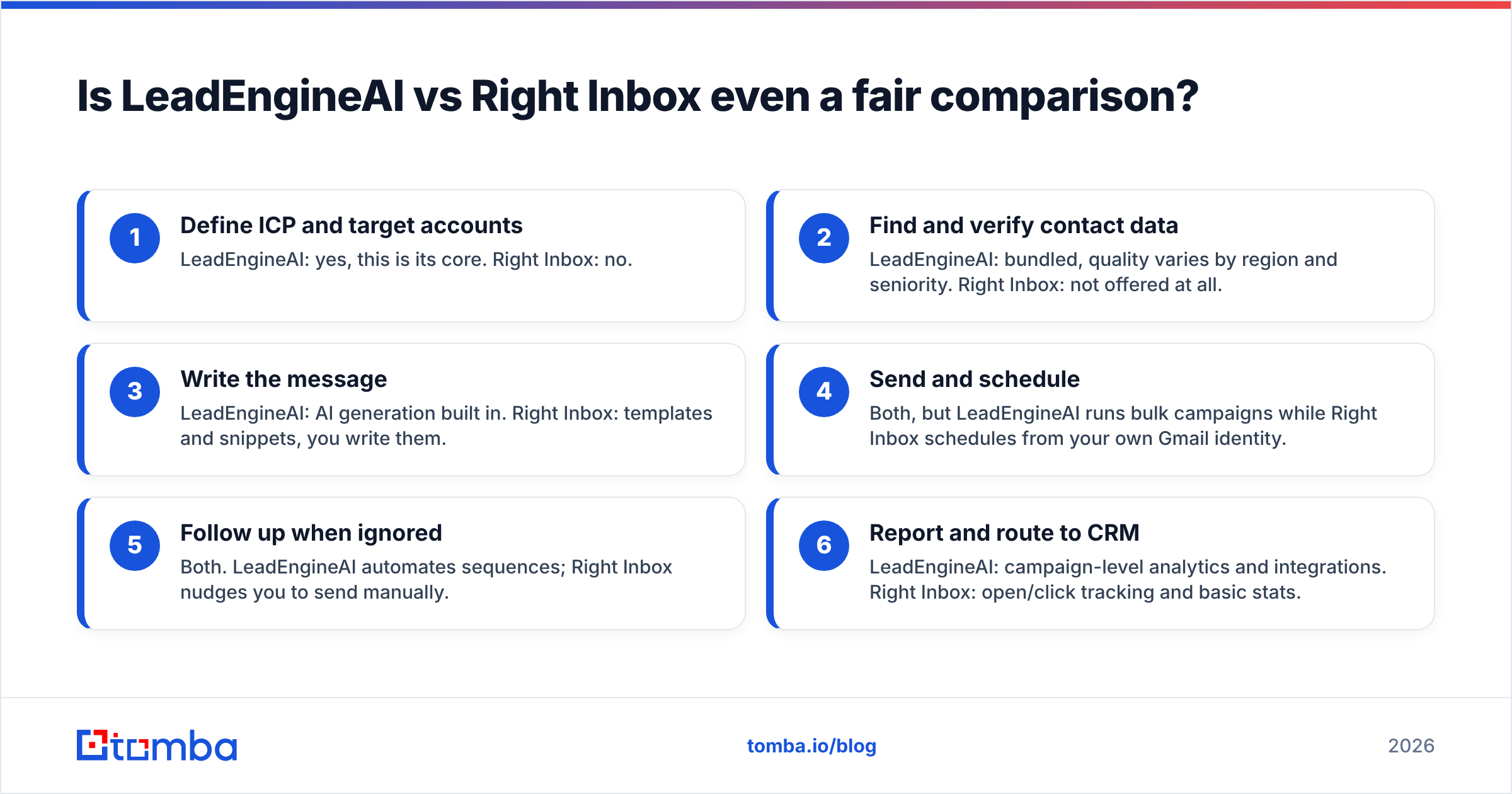
- Define ICP and target accounts — LeadEngineAI: yes, this is its core. Right Inbox: no.
- Find and verify contact data — LeadEngineAI: bundled, quality varies by region and seniority. Right Inbox: not offered at all.
- Write the message — LeadEngineAI: AI generation built in. Right Inbox: templates and snippets, you write them.
- Send and schedule — Both, but LeadEngineAI runs bulk campaigns while Right Inbox schedules from your own Gmail identity.
- Follow up when ignored — Both. LeadEngineAI automates sequences; Right Inbox nudges you to send manually.
- Report and route to CRM — LeadEngineAI: campaign-level analytics and integrations. Right Inbox: open/click tracking and basic stats.
If you only need steps 4 and 5, you do not need a platform. If you need 1 through 3, a Gmail extension will never get you there.

How do LeadEngineAI and Right Inbox compare feature by feature?#
| Feature | LeadEngineAI | Right Inbox |
|---|---|---|
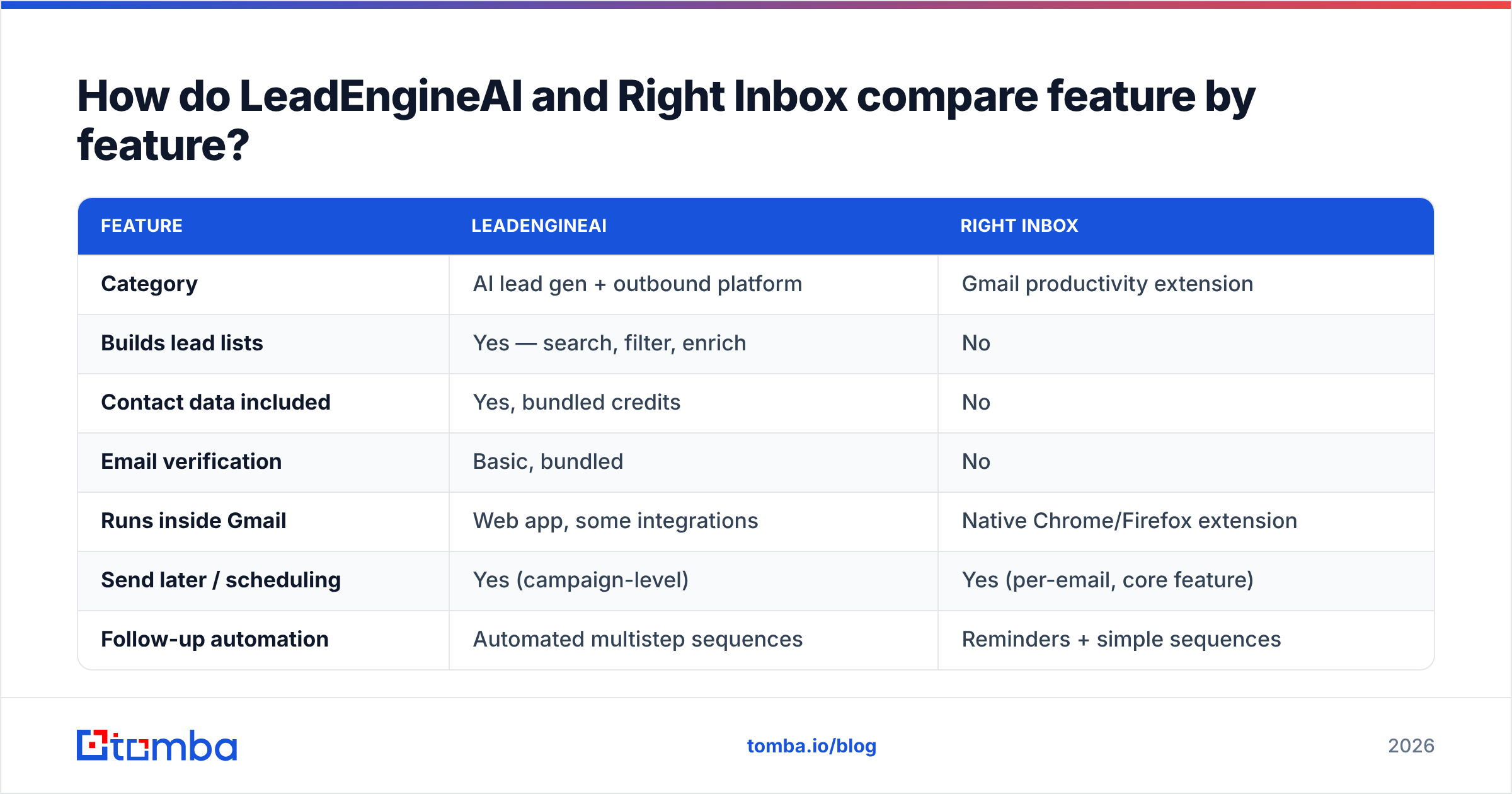
| Category | AI lead gen + outbound platform | Gmail productivity extension |
| Builds lead lists | Yes — search, filter, enrich | No |
| Contact data included | Yes, bundled credits | No |
| Email verification | Basic, bundled | No |
| Runs inside Gmail | Web app, some integrations | Native Chrome/Firefox extension |
| Send later / scheduling | Yes (campaign-level) | Yes (per-email, core feature) |
| Follow-up automation | Automated multistep sequences | Reminders + simple sequences |
| Open & click tracking | Yes | Yes |
| Mail merge | Yes, bulk campaigns | Yes, capped per day |
| AI copywriting | Yes, built in | Limited / template-based |
| CRM sync | Native + Zapier | Zapier-style and native Gmail workflow |
| Sending identity | Platform mailboxes or connected inboxes | Your own Gmail/Workspace account |
| Typical buyer | SDR team, agency, founder-led sales | AE, consultant, recruiter, solo founder |
| Learning curve | Days | Under an hour |
Read that table as two different jobs, not two competitors. The only rows where they genuinely collide are scheduling, follow-ups, and tracking — and Right Inbox does those from your real Gmail identity, which matters for reply rates on high-value, low-volume outreach.
What does each one actually cost?#
Right Inbox publishes its pricing openly, which is the easier half of this question. Its plans run from a free tier with a small monthly tracked-email allowance up to personal and professional tiers in the roughly $8–$30 per user per month range depending on annual versus monthly billing. Check the current numbers on their site before budgeting — extension pricing changes quietly.
LeadEngineAI is harder to pin down. Like most AI lead platforms, it sells credits, and credits are consumed by search, enrichment, verification, and sending. Two things to insist on before signing:
- Ask what a credit buys. One "lead" may cost one credit to reveal and another to enrich, which doubles your effective per-contact cost.
- Ask about rollover and overage. Credit platforms make their margin on unused credits and on overage rates you did not model.
| Cost factor | LeadEngineAI | Right Inbox | What to watch |
|---|---|---|---|
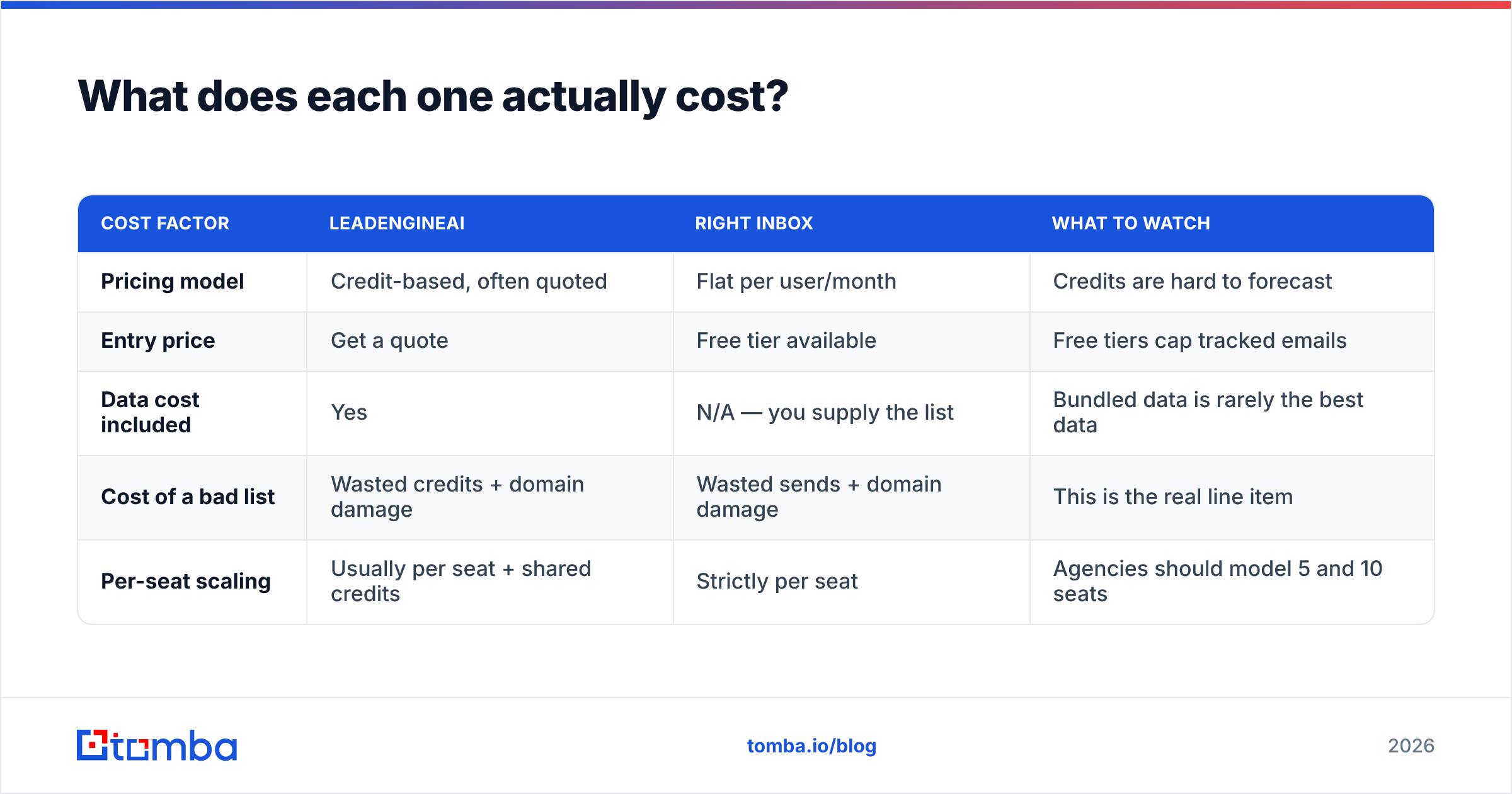
| Pricing model | Credit-based, often quoted | Flat per user/month | Credits are hard to forecast |
| Entry price | Get a quote | Free tier available | Free tiers cap tracked emails |
| Data cost included | Yes | N/A — you supply the list | Bundled data is rarely the best data |
| Cost of a bad list | Wasted credits + domain damage | Wasted sends + domain damage | This is the real line item |
| Per-seat scaling | Usually per seat + shared credits | Strictly per seat | Agencies should model 5 and 10 seats |
That fourth row is the one finance never sees. A 30% bounce rate does not just waste credits — it drags email deliverability down for every mailbox on the domain, including the ones your closers use. Google's own sender guidelines tie inbox placement directly to spam complaints and invalid recipients, and neither of these tools protects you from a dirty list.
Which one is better for cold outbound specifically?#
LeadEngineAI, but with conditions. Cold outbound at any real volume needs list-building, sequencing, and deliverability controls in one place. Right Inbox was built for warm, one-to-one, relationship-driven email — sending 400 cold emails a day through your primary Google Workspace mailbox with a Gmail extension is a fast route to a damaged domain, since Workspace caps external recipients per day regardless of which extension you use.
The conditions on LeadEngineAI:
- Verify the bundled data independently. Run a sample of 200 contacts through a separate email verifier before you trust the platform's own "valid" flag. Self-graded data is not data quality.
- Never send on the platform's shared infrastructure without warmup. Whatever the vendor's warmup feature promises, a cold domain is a cold domain.
- Check catch-all handling. A large share of B2B domains are catch-all, and platforms often mark them "valid" to pad accuracy claims. A dedicated catch-all verifier is more honest about what it cannot confirm.
Which one is better for follow-ups and account management?#
Right Inbox, comfortably. For an AE working 40 open opportunities, the job is not volume — it is never dropping a thread. Right Inbox's reminder model ("bring this back to my inbox in 3 days if they don't reply") is a better fit for that than a campaign sequencer, because it keeps every message personal and keeps the reply thread intact in the recipient's inbox.
It also avoids something teams underrate: your replies stay in Gmail, so your CRM sync, your shared mailbox rules, and your legal archive all keep working. Sequencers that send through their own infrastructure often break that chain. HubSpot's sales email research has consistently found that reply rates improve when follow-ups look like a continuation of a real conversation rather than step 4 of a cadence.

What gap do both tools leave in your stack?#
Verified contact data that you own and control.
LeadEngineAI bundles data, which is convenient until you switch vendors and discover your list quality was never portable. Right Inbox does not touch data at all — it assumes you already have addresses. In both cases, the accuracy of the email address is the single variable that determines whether your campaign works, and in both cases it is the variable you have the least visibility into.
A practical fix is to decouple the layers:
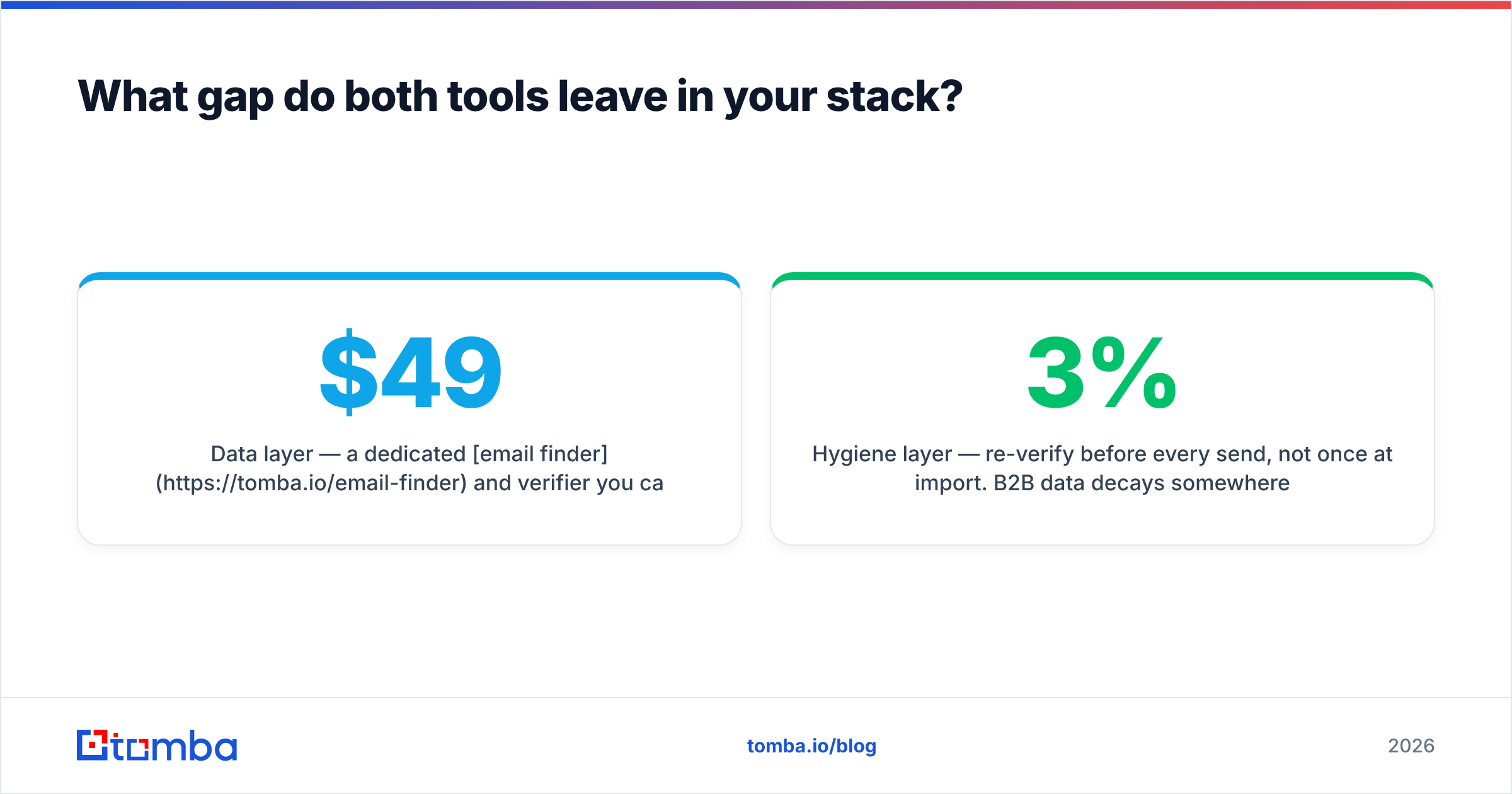
- Data layer — a dedicated email finder and verifier you can point at any list, any CRM, any platform. Tomba's plans run Free (25 searches/month), Starter $49/mo, Growth $99/mo, and Pro $249/mo, with Enterprise quoted; full Tomba pricing is public so you can model it against credit-based platforms.
- Execution layer — Right Inbox for one-to-one, a sequencer or LeadEngineAI for volume.
- Hygiene layer — re-verify before every send, not once at import. B2B data decays somewhere around 2-3% per month as people change jobs.
Teams that build lists at scale usually also want a bulk email finder so verification is a batch job, not a per-rep chore. Peers like BookYourData take a different but respectable route — selling pre-verified list data outright — which suits teams that would rather buy a finished list than run their own enrichment pipeline. Both models work; the failure mode is having neither.
Which should you buy first?#
- Solo founder, under 50 emails a week — Right Inbox plus a free-tier data tool. Total cost under $60/month. Do not buy a platform yet.
- Two to five reps, warm and referral-heavy pipeline — Right Inbox for everyone, verified data centrally. Skip the AI engine until your list-building actually becomes the bottleneck.
- SDR team running true cold outbound — LeadEngineAI or a comparable platform, but pair it with an independent verification step and your own domain strategy.
- Agency running client campaigns — Platform for execution, separate data vendor for portability. You cannot hand a client back a list that lives inside a tool they do not pay for.
- Recruiters and one-to-one relationship sellers — Right Inbox, every time. Sequencers make recruiting outreach feel like recruiting spam.
Is LeadEngineAI or Right Inbox better value in 2026?#
Value depends on which bottleneck is actually costing you money.
If your reps have a good list and still miss follow-ups, the fix is $10 per seat, not $500 a month. If your reps are spending three hours a day building lists in spreadsheets, a Gmail extension is irrelevant to your problem.
The honest verdict on LeadEngineAI vs Right Inbox: Right Inbox is the safer purchase — cheap, narrow, and genuinely good at one job. LeadEngineAI is the higher-ceiling purchase — broader, more expensive, and only worth it if the data underneath holds up for your specific market. Test the data before you buy the platform, because every other feature is replaceable and the data is not.
Start with the layer that decides everything#
Whichever execution tool you pick, the addresses come first. Run your next 100 target accounts through the Tomba Email Finder — find verified professional addresses by name, company, or domain, confirm them before a single send, and keep that list portable no matter which platform you end up in next quarter. The free tier is 25 searches a month, which is enough to sanity-check any vendor's data claims before you sign anything.
Related guides#
// get started
Find, verify and enrich your first contacts today
Start on the free plan with 25 searches a month, then scale when your team is ready.
Free plan · No credit card required · GDPR & CCPA
// about the author