LeadEngineAI vs SecureMailMerge: Which Tool Fits 2026?
One tool finds and scores leads with AI. The other sends privacy-safe mail merges from inside Outlook. They solve different halves of the same outbound problem — here is how to pick, and when you need both.
LeadEngineAI vs SecureMailMerge is the wrong fight to pick. One tool finds leads. The other sends mail. Here is how to tell which half of the job you need to fix first.
TL;DR
- They are not rivals. LeadEngineAI finds and ranks accounts. SecureMailMerge sends merged mail from Outlook. Each owns one half of one job.
- Pick a lead engine if you do not know who to contact.
- Pick a merge add-in if legal or IT will not let your list leave the tenant.
- Neither one cleans your data. A bad address bounces either way.
- The 2026 stack has three parts: a scoring layer, a verified data layer, and a sending layer your security team allows.
What problem does each tool actually solve?#
Start with the honest framing. You are comparing a lead-generation engine to a sending tool. Most "X vs Y" pages skip that part.
LeadEngineAI is an AI lead-intelligence tool. It sits on the same shelf as Apollo, Clay and 6sense. Tools in this class pull in company data, web activity and intent signals. Then they rank which accounts deserve a rep's time. The promise is focus: fewer, better targets instead of a 10,000-row blast.
SecureMailMerge is a privacy-first sender. It is a mail merge add-in that lives inside Outlook. Your list, your merge fields and your message text stay in your own Microsoft 365 tenant. Nothing is uploaded to a third-party sending cloud. That matters a lot to hospitals, law firms, public-sector teams and EU firms with strict data rules. It matters almost none to a 12-person startup sending cold email from a burner domain.
Pick the wrong tool for your bottleneck and you know how it ends. You buy a scoring engine when you needed good addresses. Or you buy a safe sender when you needed someone to tell you which 200 accounts to call.

LeadEngineAI vs SecureMailMerge: how do they compare feature by feature?#
Here is the short version. Treat pricing as a rough guide. Both vendors change plans often, so check their own pages before you budget.
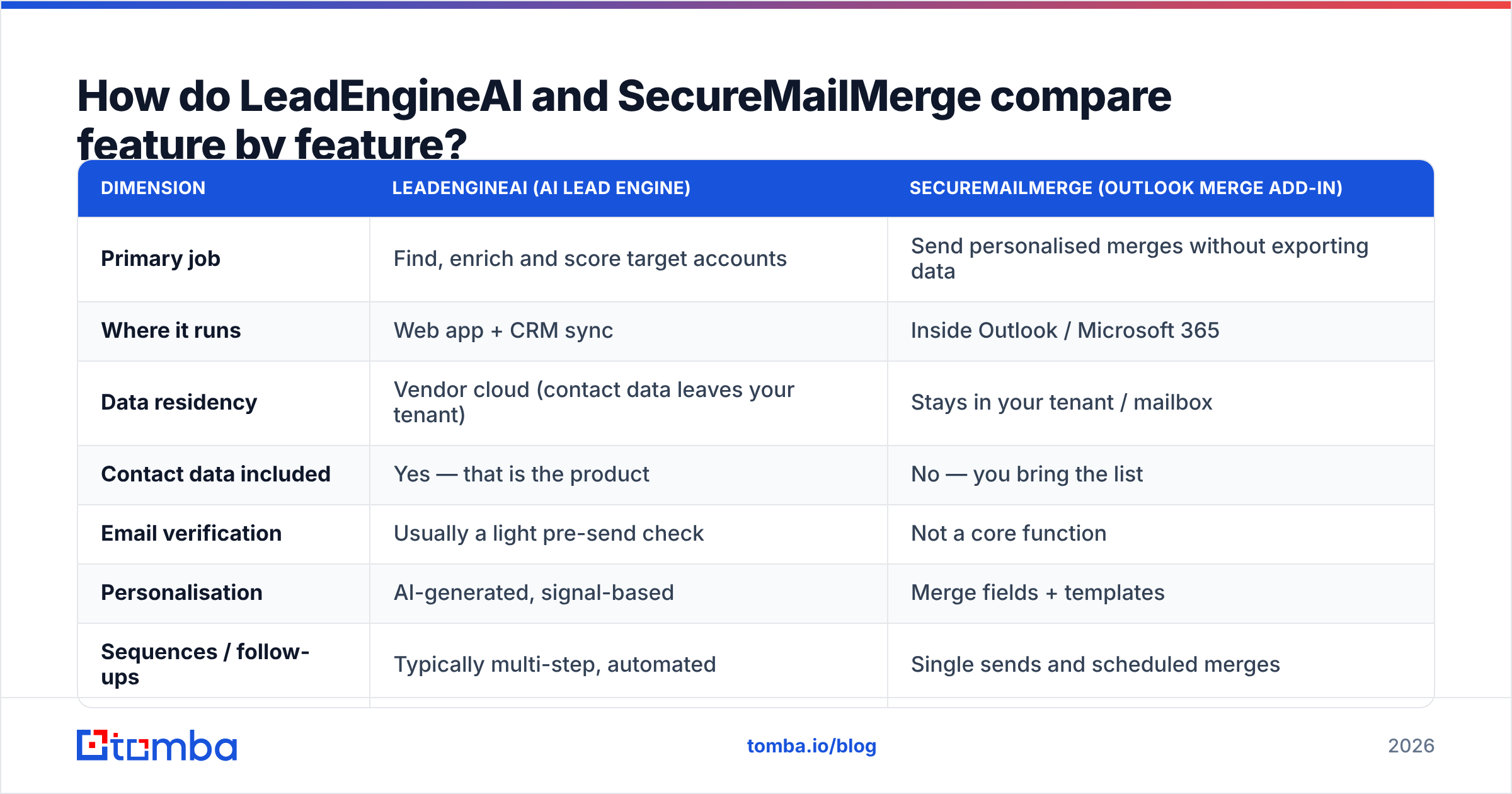
| Dimension | LeadEngineAI (AI lead engine) | SecureMailMerge (Outlook merge add-in) |
|---|---|---|
| Primary job | Find, enrich and score target accounts | Send personalised merges without exporting data |
| Where it runs | Web app + CRM sync | Inside Outlook / Microsoft 365 |
| Data residency | Vendor cloud (contact data leaves your tenant) | Stays in your tenant / mailbox |
| Contact data included | Yes — that is the product | No — you bring the list |
| Email verification | Usually a light pre-send check | Not a core function |
| Personalisation | AI-generated, signal-based | Merge fields + templates |
| Sequences / follow-ups | Typically multi-step, automated | Single sends and scheduled merges |
| Compliance posture | Depends on vendor DPA | Strong selling point (GDPR, no third-party upload) |
| Typical buyer | SDR team, growth lead | IT-governed org, ops/admin owner |
| Pricing model | Per-seat + credit pool, mid-market tiers | Low per-user licence or one-off add-in fee |
Two rows matter more than the rest.
Data residency is the cleanest split here. Say your security review bans uploading a recipient list to a US-hosted app. Then an AI lead engine is a long procurement talk, and a merge add-in is a short one. That is a governance fact, not a taste in features.
Contact data included is the second. An AI engine sells you the list. A merge tool assumes you have one. Either way, someone still has to find the addresses. That is where a dedicated email finder does more work than either tool.
Which one is better for cold outbound in 2026?#
Short answer: the AI lead engine wins cold outbound. The merge add-in wins warm or governed outbound.
Cold outbound rests on three things, in order. Targeting, deliverability, then a message worth reading. A merge add-in helps with neither of the first two. It sends from your main mailbox. That is the last thing you want when you email 500 strangers a week. One wave of spam complaints, and your domain problem becomes everyone's problem.
Warm outbound flips it. Think renewal notices, event invites, client updates, win-back mail. These go to people who know you, on lists you already own. The risk you manage is compliance, not reputation. Here the merge add-in is the better tool, and an AI scoring engine is costly overkill.
A quick test: would the reader be surprised to hear from you? Surprised means cold. You need targeting and a separate sending domain. Not surprised means warm. You need reliability and an audit trail.
Want a second opinion on where each product sits? G2's lead intelligence category shows where the reviews cluster. Five minutes there beats any vendor's own comparison page.
What does each tool miss, and why does data quality decide the winner?#
Both share one blind spot. Neither promises the address is real.
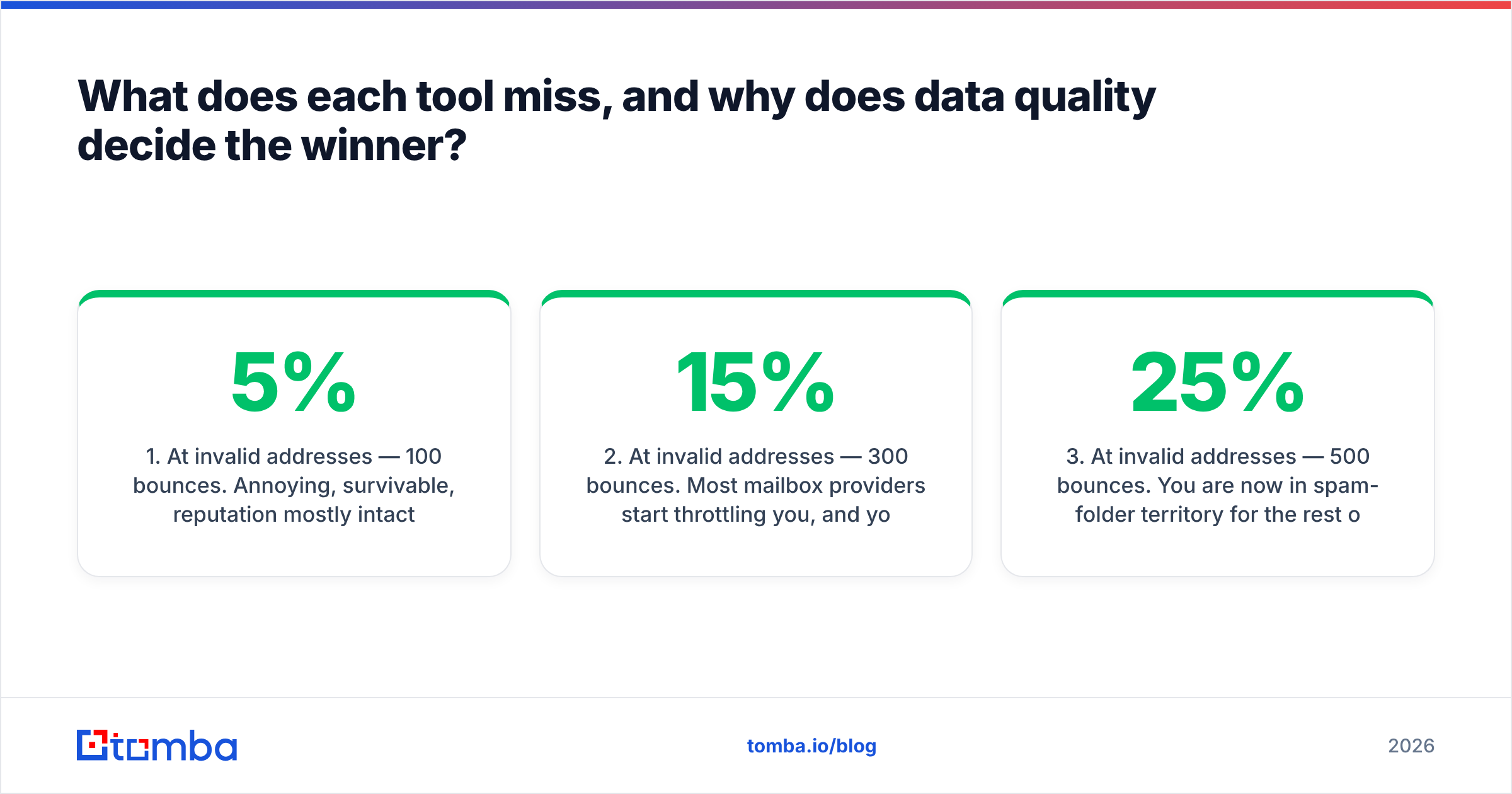
That sounds minor. It is not. Run the math on a 2,000-contact campaign:
- 5% bad addresses — 100 bounces. Annoying, but you survive.
- 15% bad addresses — 300 bounces. Mailbox providers start to throttle you. Inbox placement on the other 1,700 drops too.
- 25% bad addresses — 500 bounces. Now you sit in the spam folder for the rest of the quarter. Your AI score will not save you, and neither will your encryption.
- Catch-all domains skew all of it — they accept every address at the gate, then drop it later. Your "delivered" number is a lie.
An AI lead engine with an old database hands you case 2 or 3 and says nothing. A secure merge add-in runs case 3 with perfect encryption. Neither one is broken. Clean data is simply not their job.
So treat the check as its own layer. Run the list through an email verifier before it reaches either tool. That turns a reputation problem into a smaller list, which is the trade you want. A campaign to 1,700 good addresses beats one to 2,000 mystery addresses, every time.

How should you combine them into one workflow?#
The teams that win in 2026 do not pick a side. They build three layers and let each one do a single job.
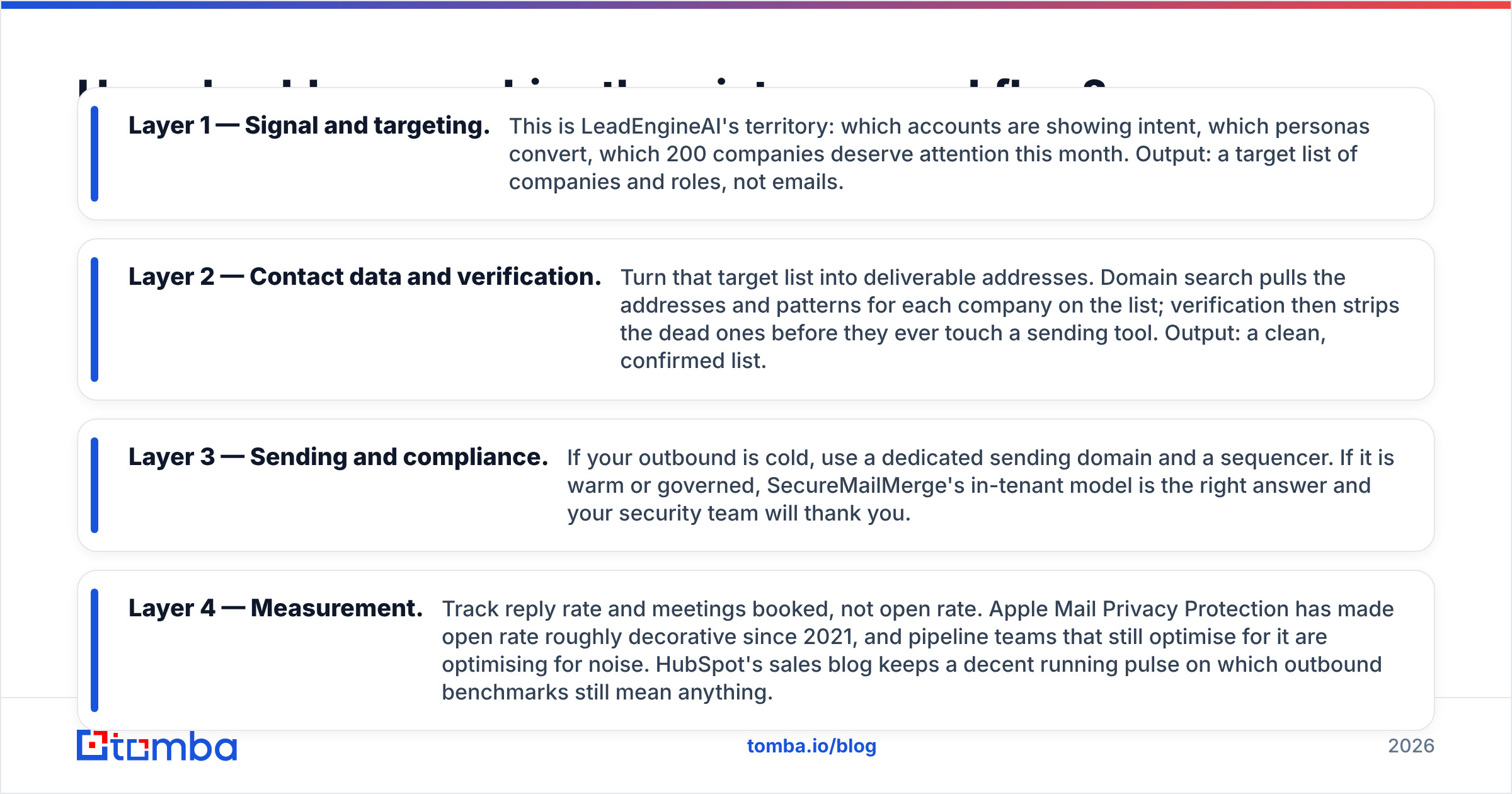
- Layer 1 — Targeting. This is the AI engine's turf: which accounts show intent, which roles buy, which 200 firms deserve your month. Output: a list of companies and job titles, not emails.
- Layer 2 — Contact data. Turn that list into real addresses. Domain search pulls the addresses and email patterns for each company. A verifier then strips the dead ones. Output: a clean list.
- Layer 3 — Sending. Cold? Use a separate sending domain and a sequencer. Warm or regulated? The in-tenant merge model is the right call.
- Layer 4 — Measurement. Track replies and meetings, not opens. Apple Mail Privacy Protection made open rate mostly noise back in 2021. HubSpot's sales blog tracks which benchmarks still mean something.
Fix Layer 2 first. It costs less than an AI engine. It moves faster than a security review. And it lifts the results of every tool you already own.
What about Microsoft-native teams?#
If your company lives in Microsoft 365, the answer tilts toward the merge add-in. It helps to know why.
Outlook add-ins run inside the mailbox on Microsoft's own framework. The model is spelled out in Microsoft's Outlook add-ins overview. The add-in works inside your tenant's security border. So the data questions that stall most reviews never come up. No new sub-processor. No new contract. No cross-border transfer.
Now compare that to adding an AI lead engine. New vendor. New data agreement. New home for personal data. New access review. In a regulated shop, that runs six to twelve weeks. It is the real reason many large teams still merge from Outlook, even when they would rather use a modern sequencer.
One tactic works well there. Keep the sending inside the tenant, and pull contact data through an API instead of a bulk export. A bulk email finder or an API call that drops verified addresses into your CRM is a much smaller thing to approve than a platform that will hold your whole prospect database.
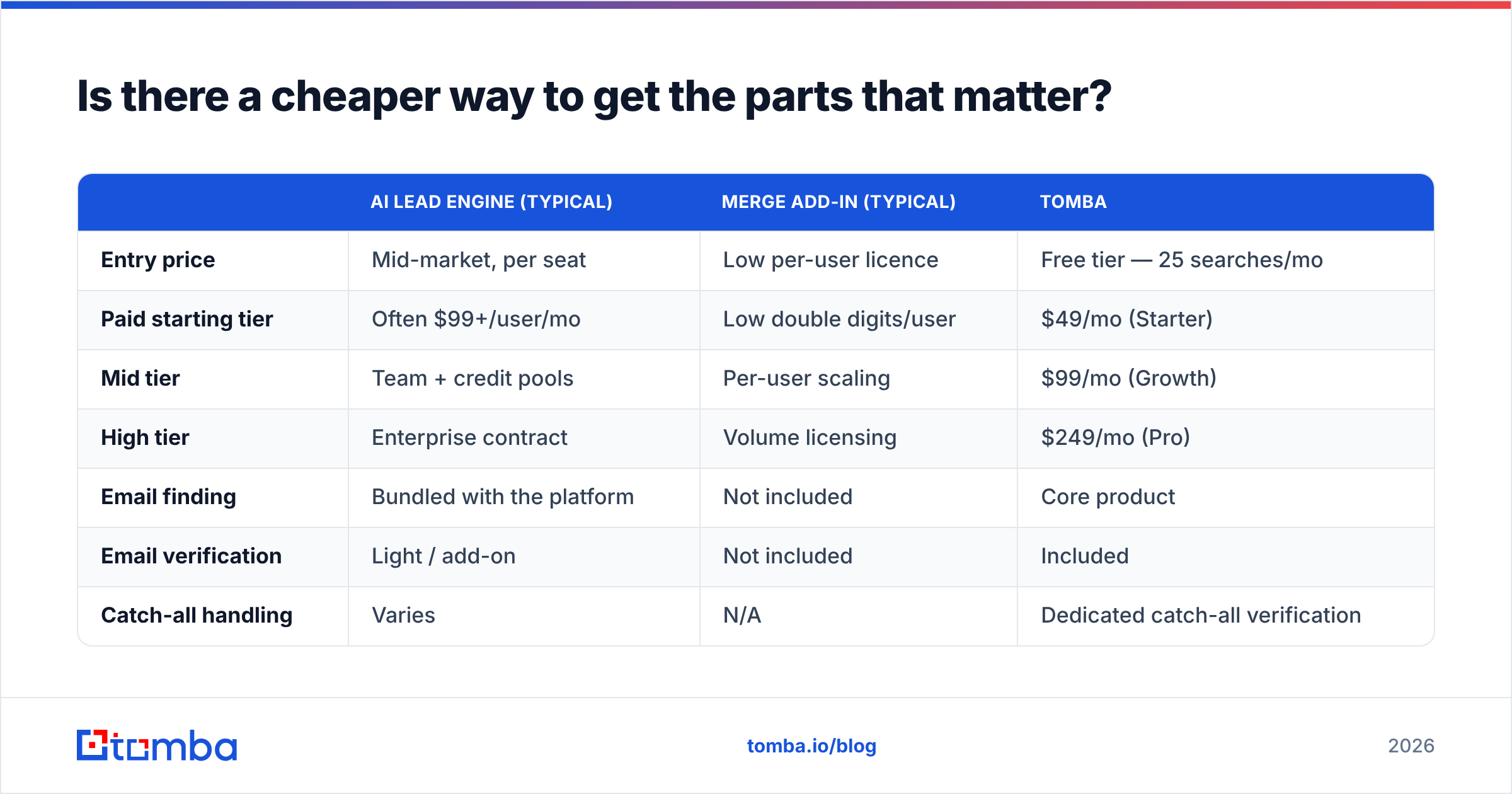
Is there a cheaper way to get the parts that matter?#
For most teams, yes. The costly part of an AI lead engine is the database you rent. The costly part of an enterprise sender is the seats.
Strip both down to what drives pipeline and you need three things. Good contact data, a check that it is valid, and a way to send. Bought apart, that stack usually costs less than one mid-market licence.
| AI lead engine (typical) | Merge add-in (typical) | Tomba | |
|---|---|---|---|
| Entry price | Mid-market, per seat | Low per-user licence | Free tier — 25 searches/mo |
| Paid starting tier | Often $99+/user/mo | Low double digits/user | $49/mo (Starter) |
| Mid tier | Team + credit pools | Per-user scaling | $99/mo (Growth) |
| High tier | Enterprise contract | Volume licensing | $249/mo (Pro) |
| Email finding | Bundled with the platform | Not included | Core product |
| Email verification | Light / add-on | Not included | Included |
| Catch-all handling | Varies | N/A | Dedicated catch-all verification |
| API access | Usually higher tiers | Limited | Available across plans |
The full list sits on the Tomba pricing page. The free tier is enough to test address accuracy on your own target accounts. That is the only benchmark that counts, since every vendor measures accuracy on a sample it picked itself.
Which should you choose?#
The LeadEngineAI vs SecureMailMerge call comes down to your bottleneck, not a feature list:
- You don't know who to contact → AI lead engine. Clean sending cannot fix a bad target list.
- You know who to contact, but legal blocks the export → merge add-in. Compliance is your limit.
- You know who to contact and your mail keeps bouncing → neither. You have a data problem. A finder plus a verifier fixes it for a fraction of either licence.
- You send cold at volume → AI engine for targeting, a separate domain and sequencer for delivery. Never your main mailbox.
- You send warm, regulated mail → merge add-in, plus a re-check of the list each quarter. Known contacts still decay 25–30% a year.
Run that test honestly and most teams land on layer two. It is the boring middle that neither vendor sells.
That gap is what the Tomba Email Finder closes. Give it a domain or a name. Get back a verified work address, a confidence score, and the sources it was confirmed against. Then hand that clean list to whichever sender your compliance team already signed off on. The free tier gives you 25 searches a month, so you can test it on accounts you know well — and see whether your current list is as good as your platform claims.
Related guides#
// get started
Find, verify and enrich your first contacts today
Start on the free plan with 25 searches a month, then scale when your team is ready.
Free plan · No credit card required · GDPR & CCPA
// about the author