Leadfeeder Pricing, Reviews, Pros and Cons: 2026 Analysis
Leadfeeder's price scales with how many companies it identifies, and the free plan hides most of your traffic. Here's what the paid tiers really cost, what reviewers complain about, and when a cheaper stack wins.
TL;DR
- Leadfeeder (now sold inside Dealfront) prices on how many companies it identifies per month, not per seat — so your bill grows with your traffic, not your team.
- The free tier is a demo, not a plan: 7 days of data retention and a hard cap around 100 identified companies.
- Paid entry pricing starts around $99/month (billed annually) and climbs quickly past 1,000 identified companies/month. Anything enterprise-shaped is quote-only.
- Reviewers consistently praise the CRM integrations and the "who visited" feed, and consistently complain about ISP noise, missing contact-level data, and renewal price jumps.
- Visitor identification tells you which company looked at you. It does not give you who to email. Most teams end up paying for a second tool to close that gap.
What is Leadfeeder, and what is it in 2026?#
Leadfeeder is a website visitor identification tool. It reads the IP addresses hitting your site, matches them against a company database, and turns anonymous traffic into a feed of named accounts: "Acme Corp viewed your pricing page three times this week."
Think of it as caller ID for your website. You do not get the person's name, but you learn which building the call came from — and for B2B, the building is often enough to start.
The important structural change: Leadfeeder merged with Echobot and now sells under the Dealfront umbrella. The Leadfeeder product still exists and still has its own product page, but commercially it's a module in a larger platform that also includes company data, targeting, and ads. That matters for pricing, because the upsell path is no longer "more visitors" — it's "more modules."
How much does Leadfeeder pricing actually cost?#
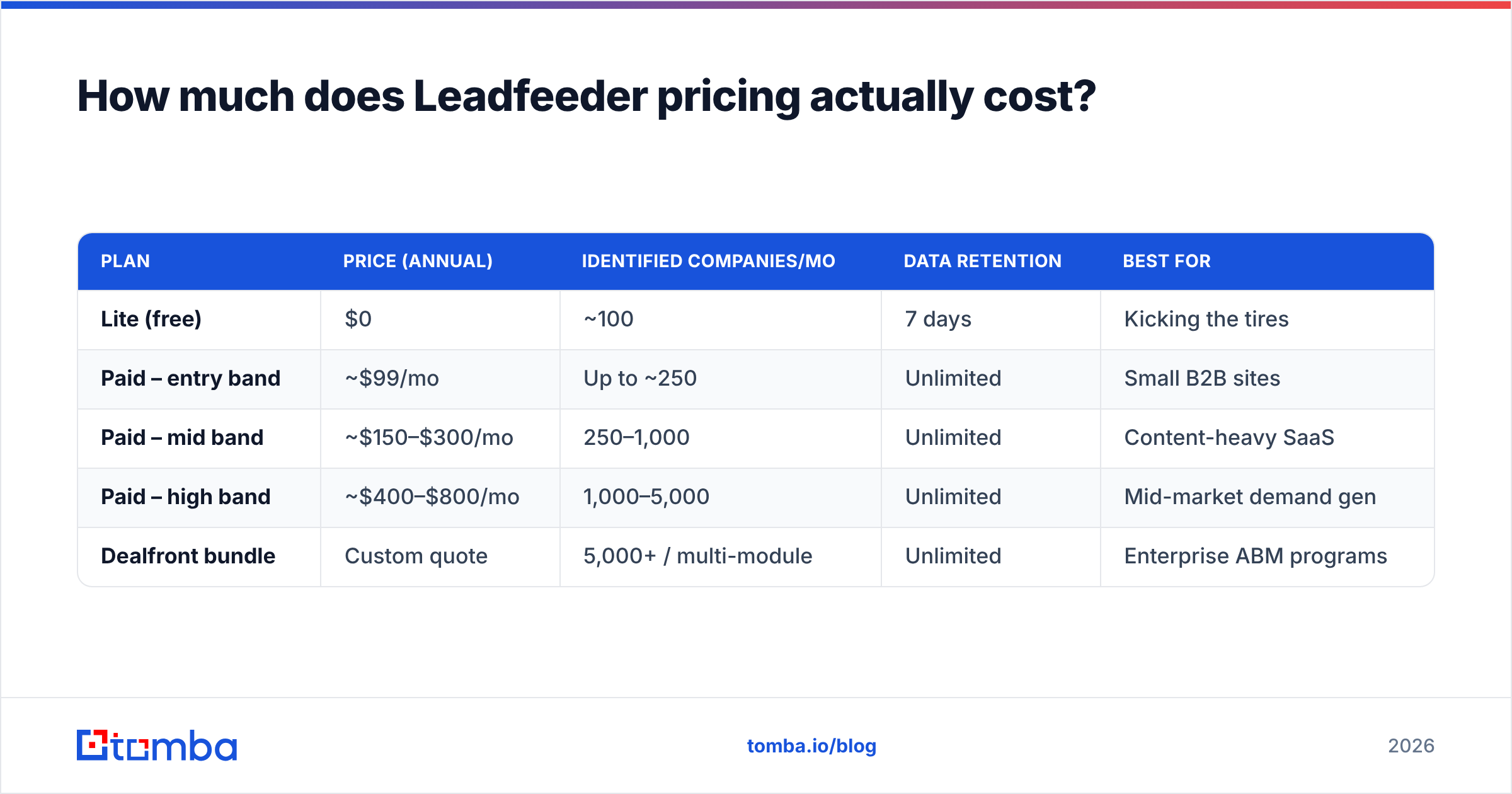
Leadfeeder's pricing is usage-based on identified companies per month. You pick a band, and if you exceed it, you move up a band. Seats are unlimited on paid plans, which is genuinely generous compared to per-seat sales tools.
Here's the shape of it as published in 2026. Treat the upper bands as directional — Dealfront quotes them individually and regional/currency pricing varies:
| Plan | Price (annual) | Identified companies/mo | Data retention | Best for |
|---|---|---|---|---|
| Lite (free) | $0 | ~100 | 7 days | Kicking the tires |
| Paid – entry band | ~$99/mo | Up to ~250 | Unlimited | Small B2B sites |
| Paid – mid band | ~$150–$300/mo | 250–1,000 | Unlimited | Content-heavy SaaS |
| Paid – high band | ~$400–$800/mo | 1,000–5,000 | Unlimited | Mid-market demand gen |
| Dealfront bundle | Custom quote | 5,000+ / multi-module | Unlimited | Enterprise ABM programs |
Three things to internalize before you budget:
- You do not control the meter. A successful content campaign, a Product Hunt launch, or a competitor's team browsing your docs all consume identification credits. Your cost is downstream of your marketing success.
- The free plan is not a working tier. Seven-day retention means you cannot run a weekly review cadence, let alone a monthly one. It exists to show you the product works.
- Annual billing is the real price. Monthly billing carries the usual premium, typically 15–25% depending on band.

What are the hidden costs in Leadfeeder pricing?#
The sticker price is only part of the spend. These are the line items teams report after the first renewal cycle:
- Identification waste. A meaningful chunk of identified "companies" are ISPs, mobile carriers, hosting providers, and your own agency. Some plans count these against your quota even when you filter them out of the UI. Ask directly how your band is metered before signing.
- The contact-data gap. Leadfeeder tells you Acme visited. It rarely tells you that Priya in procurement visited. Closing that gap means buying a contact database or an email finder on top — a second line item most buyers forget when comparing to all-in-one platforms.
- Renewal escalation. This is the single most common complaint in review sites: traffic grows, band moves up, and the renewal quote lands 40–80% higher than year one.
- Module creep. Under Dealfront, the natural upgrade is a bundle. The bundle is a different budget conversation entirely.
- Implementation time. The tracker install is trivial. Building useful custom feeds, scoring rules, and CRM field mapping is a real week of RevOps work.
What do Leadfeeder reviews actually say?#
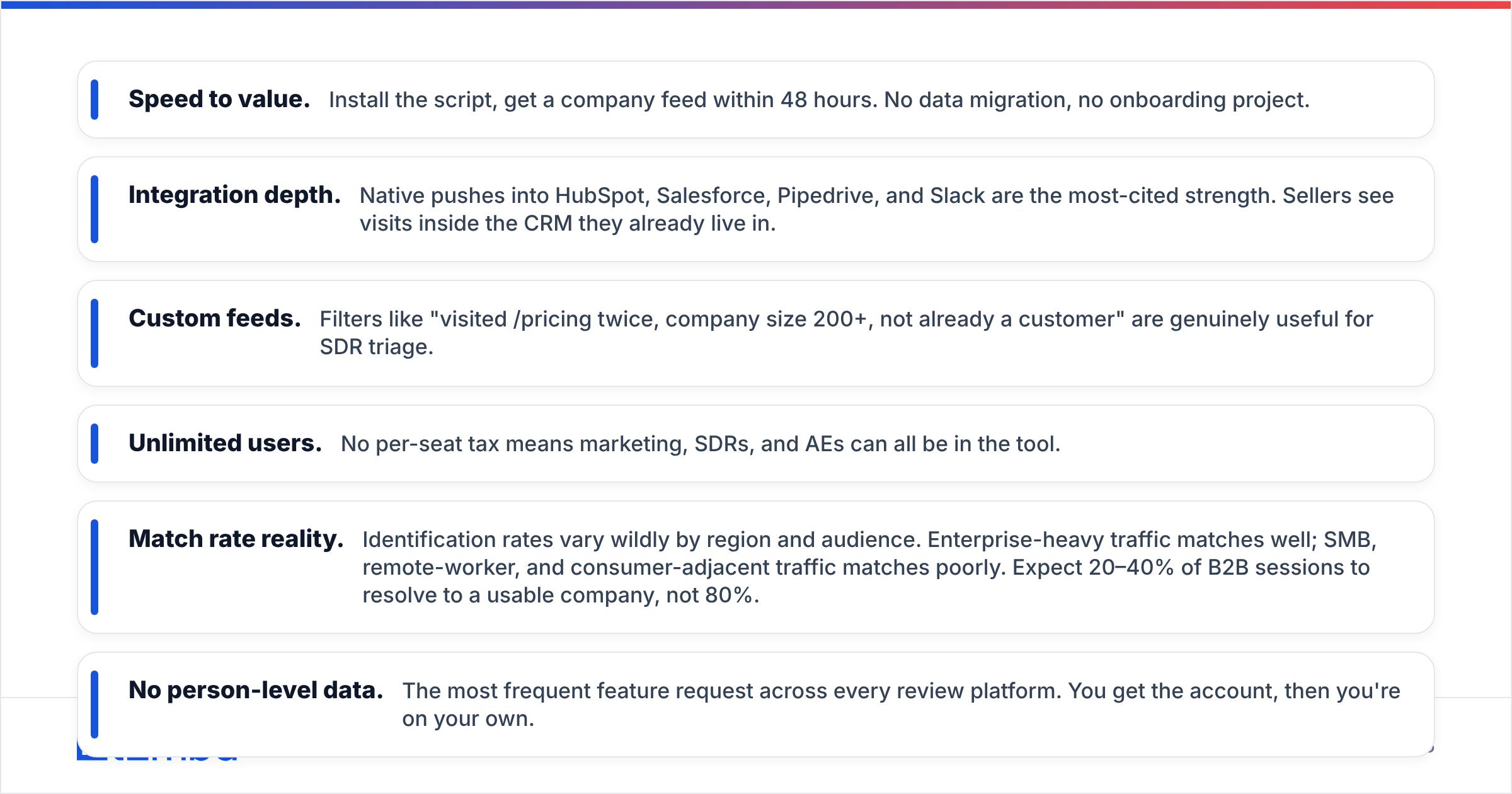
Aggregate sentiment on G2 and Capterra is solidly positive — typically in the 4.3–4.6 range — with a consistent and predictable split between what users love and what they grind their teeth over.
What reviewers praise:
- Speed to value. Install the script, get a company feed within 48 hours. No data migration, no onboarding project.
- Integration depth. Native pushes into HubSpot, Salesforce, Pipedrive, and Slack are the most-cited strength. Sellers see visits inside the CRM they already live in.
- Custom feeds. Filters like "visited /pricing twice, company size 200+, not already a customer" are genuinely useful for SDR triage.
- Unlimited users. No per-seat tax means marketing, SDRs, and AEs can all be in the tool.
What reviewers criticize:
- Match rate reality. Identification rates vary wildly by region and audience. Enterprise-heavy traffic matches well; SMB, remote-worker, and consumer-adjacent traffic matches poorly. Expect 20–40% of B2B sessions to resolve to a usable company, not 80%.
- No person-level data. The most frequent feature request across every review platform. You get the account, then you're on your own.
- Support responsiveness at lower tiers, especially post-merger.
- Pricing opacity above the entry band — you have to talk to sales to get a number.
Is Leadfeeder worth it compared to the alternatives?#
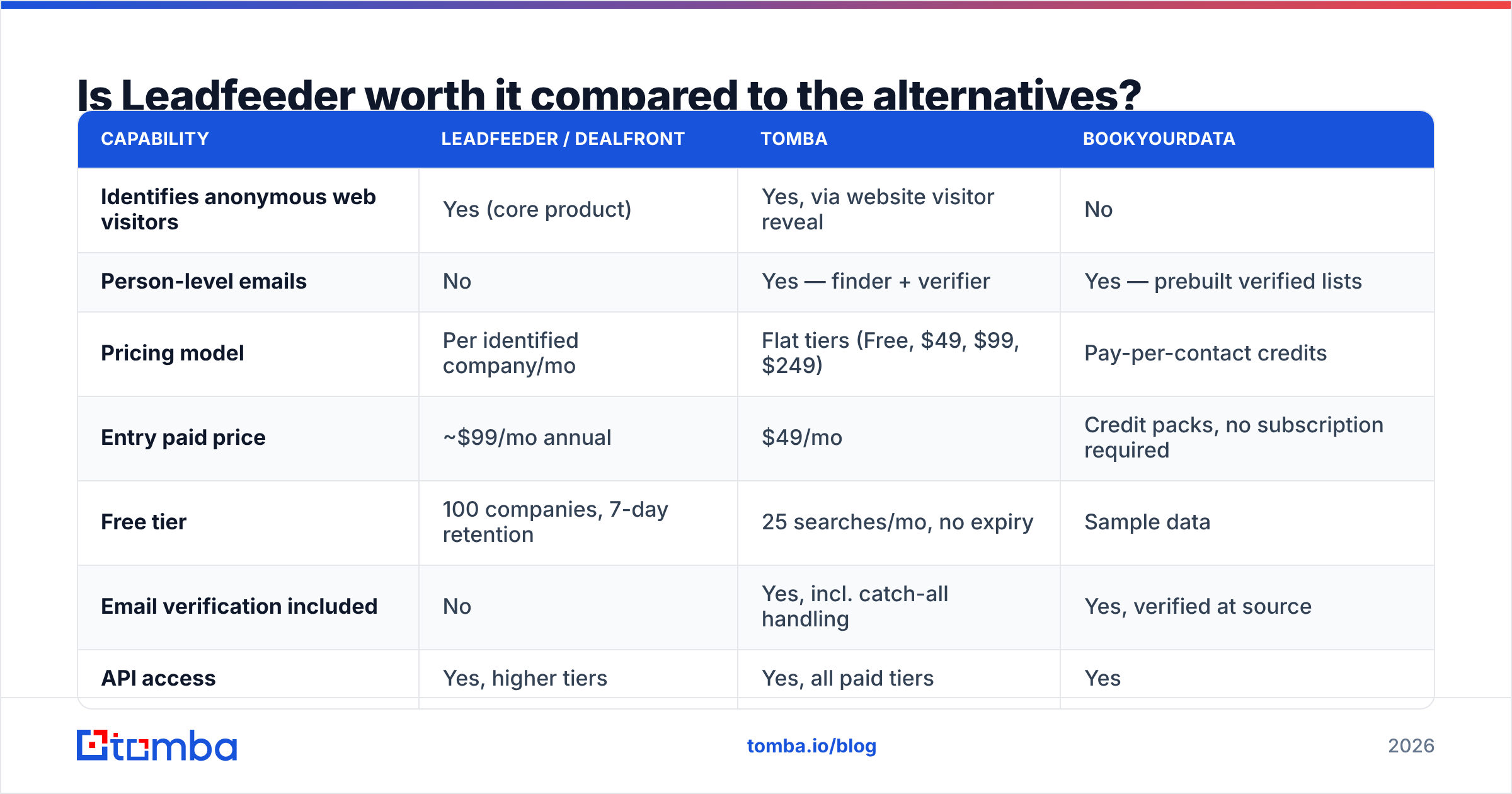
Depends on the job. If the job is "surface accounts already showing intent," it's strong. If the job is "build a pipeline of contactable leads," it's one-third of a stack.
| Capability | Leadfeeder / Dealfront | Tomba | BookYourData |
|---|---|---|---|
| Identifies anonymous web visitors | Yes (core product) | Yes, via website visitor reveal | No |
| Person-level emails | No | Yes — finder + verifier | Yes — prebuilt verified lists |
| Pricing model | Per identified company/mo | Flat tiers (Free, $49, $99, $249) | Pay-per-contact credits |
| Entry paid price | ~$99/mo annual | $49/mo | Credit packs, no subscription required |
| Free tier | 100 companies, 7-day retention | 25 searches/mo, no expiry | Sample data |
| Email verification included | No | Yes, incl. catch-all handling | Yes, verified at source |
| API access | Yes, higher tiers | Yes, all paid tiers | Yes |
| Best fit | Intent signals on existing traffic | Turning accounts into contactable people | Buying targeted lists outright |
BookYourData is worth a serious look if your bottleneck is list supply rather than traffic intelligence — its pay-as-you-go credit model avoids the subscription commitment entirely, which suits campaign-driven teams. Leadfeeder and a contact-data source are not really competitors; they solve adjacent halves of the same problem.

What are Leadfeeder's pros and cons in plain terms?#
Pros
- Zero-friction setup. A script tag and a CRM connection. You'll have data before your next standup.
- Unlimited seats. Rare in this category and materially valuable for teams over five people.
- Genuinely good CRM workflows. Visits land as timeline events and trigger tasks — not just another dashboard nobody opens.
- Behavioral filtering. Page-level and frequency-based rules let you build an actual intent score, not a raw visitor dump.
- Trusted brand with real infrastructure. The Dealfront merger added EU-focused company data and GDPR posture, which matters if you sell into Europe.
Cons
- Cost scales with traffic you cannot control. Budget risk sits on the wrong side of the equation.
- No contact-level output. The tool ends exactly where outbound begins.
- Match rates disappoint on SMB and remote-heavy audiences. Remote employees on residential IPs are largely invisible.
- Opaque pricing above the entry tier. You cannot self-serve a real quote.
- Low-traffic sites won't clear the bar. Under roughly 3,000 monthly B2B sessions, you'll identify too few accounts to justify $99/month.
Who should buy Leadfeeder — and who should skip it?#
Buy it if: you get 5,000+ monthly visits from business networks, you sell a considered B2B purchase with a 30+ day cycle, you already run content or paid campaigns that drive research traffic, and you have SDR capacity to act on account signals within 48 hours. Intent data decays fast; if nobody works the feed within two days, you're paying for a log file.
Skip it if: your traffic is under a few thousand sessions a month, your buyers are solo operators or very small businesses, or your team has no defined follow-up motion. In those cases the same budget produces more pipeline spent on outbound contact data and verified sending — which is a cheaper, more predictable meter.
A useful gut check: take your monthly identified-company estimate, multiply by your realistic contact-and-book rate (2–5% is honest for cold account outreach), and compare the resulting meetings against the annual spend. If the number of meetings is in single digits per quarter, the math doesn't work at the higher bands.
How do you turn identified companies into actual pipeline?#
Visitor identification gives you the account. Outreach needs the person. The gap between those two is where most Leadfeeder deployments quietly stall.
The workflow that actually converts looks like this:
- Filter the feed hard. Ignore anything that didn't hit a bottom-funnel page twice. One homepage bounce is not intent.
- Map the buying committee. For each qualified account, identify 2–4 role-relevant titles rather than one "best" contact.
- Find the addresses. Run the domain through a domain search to pull the company's verified email patterns and known contacts in one pass.
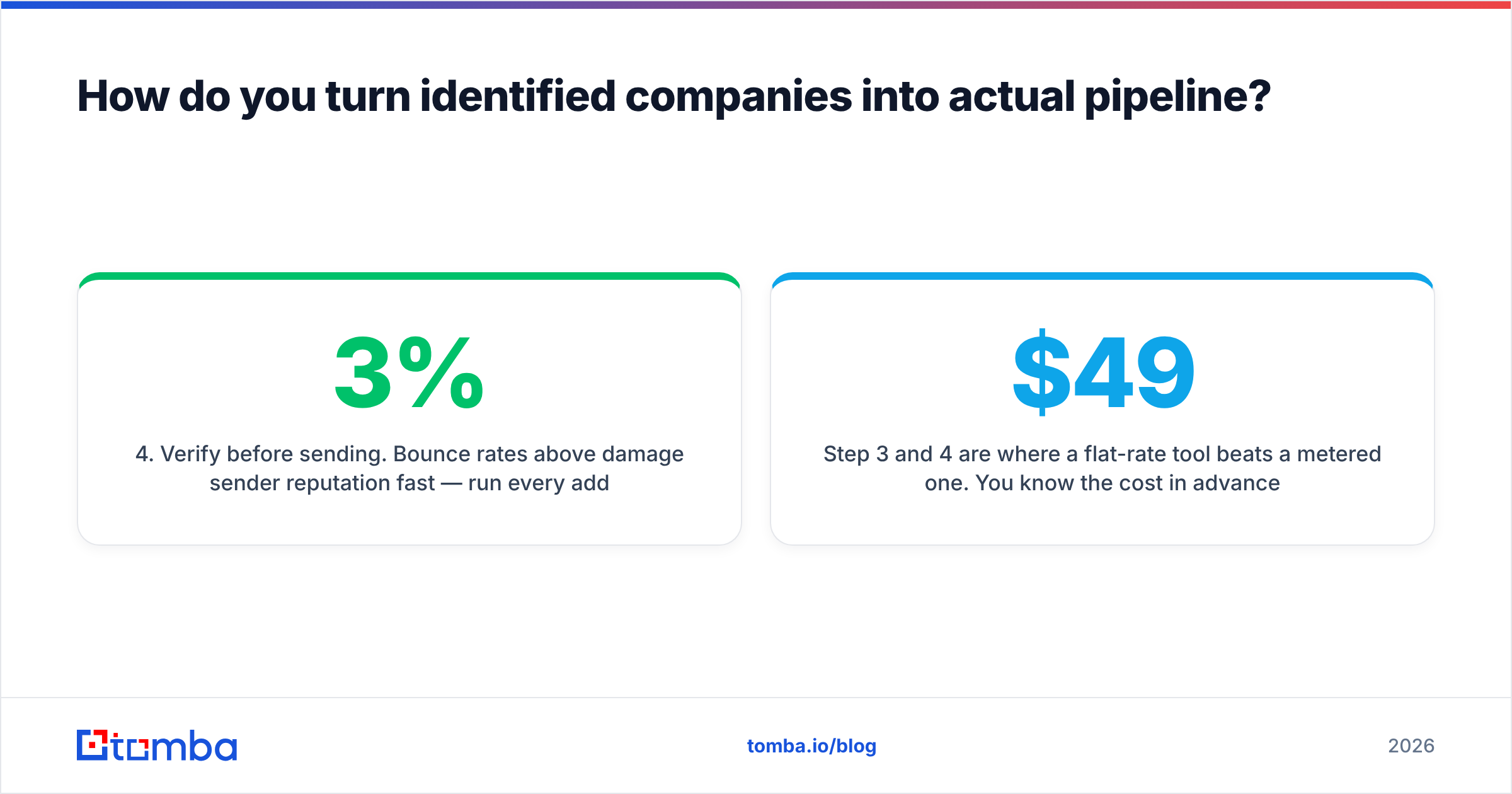
- Verify before sending. Bounce rates above 3% damage sender reputation fast — run every address through an email verifier, including catch-all domains, before it enters a sequence.
- Reference the behavior, carefully. "I noticed your team was comparing integration options" works. "I saw you visited our pricing page at 2:14pm" is creepy and kills replies.
- Enrich and route. Push firmographics and contact records back into the CRM so the account has a complete record, not a floating signal.
Step 3 and 4 are where a flat-rate tool beats a metered one. You know the cost in advance regardless of how much traffic you identified that month. Tomba's plans run Free (25 searches/mo), Starter $49/mo, Growth $99/mo, and Pro $249/mo — see the full Tomba pricing breakdown for credit allocations.
What's the verdict on Leadfeeder pricing in 2026?#
Leadfeeder is a good product with a pricing model that punishes growth. At the entry band it's reasonable value for a site with meaningful B2B traffic and a team that works the feed daily. Above 1,000 identified companies per month, you should be actively negotiating and benchmarking against alternatives at renewal, because the escalation is real and well documented in user reviews.
The bigger strategic point: identification is a signal layer, not a lead source. Budget for the whole chain — signal, contact data, verification, sequencing — before you commit annual dollars to any one link in it. Teams that buy the signal layer first and discover the contact gap in month two end up over budget and under pipeline.
Ready to close the gap between "Acme visited" and "here's Priya's verified email"? Tomba Email Finder turns the companies in your visitor feed into contactable, verified decision-makers — at a flat monthly price that doesn't move when your traffic spikes. Start free with 25 searches a month, no card required, and test it against your last 20 identified accounts before you renew anything.
Related guides#
// get started
Find, verify and enrich your first contacts today
Start on the free plan with 25 searches a month, then scale when your team is ready.
Free plan · No credit card required · GDPR & CCPA
// about the author