Leadfeeder vs Lead Forensics 2026: Honest Feature Comparison
Both tools turn anonymous website traffic into company names. One is self-serve and transparent, the other is enterprise-priced and demo-gated. Here is how Leadfeeder and Lead Forensics actually differ in 2026 — and when neither is the right buy.
Leadfeeder vs Lead Forensics comes down to one call. Do you want a self-serve tool with public pricing, or an enterprise deal that bundles contact data? Both name the companies on your site. Neither names the person. Here is how the two differ in 2026.
TL;DR
- Leadfeeder (now part of Dealfront) is the self-serve pick. Public pricing, a free tier, monthly billing, and Google Analytics-style filters. Best for SMB and mid-market teams that want to start this week.
- Lead Forensics is the enterprise pick. No public price, demo-gated sales, annual contracts, and a large IP-to-company database with contacts attached. Best for teams with budget and a clear ABM plan.
- Both name companies, not people. Neither tool tells you who visited. That gap is where most buyers get let down.
- Match rates land near 20–40% of B2B traffic for both. Your traffic mix drives the number. Remote work and home ISPs have squeezed it every year since 2020.
- The real cost comes after the match. Turning "Acme Corp read your pricing page" into a verified email is a separate job, and a separate tool.
What do Leadfeeder and Lead Forensics actually do?#
Both tools solve one problem. Roughly 97% of the people who land on your site never fill in a form. Visitor ID software tries to win some of that back.
The trick is simpler than the marketing suggests. Think of a doorman who cannot see faces but can read the plate on every car in the lot. The software grabs the IP address of each visit. It looks that IP up in a database of registered companies. Then it reports the company name and the pages they read.
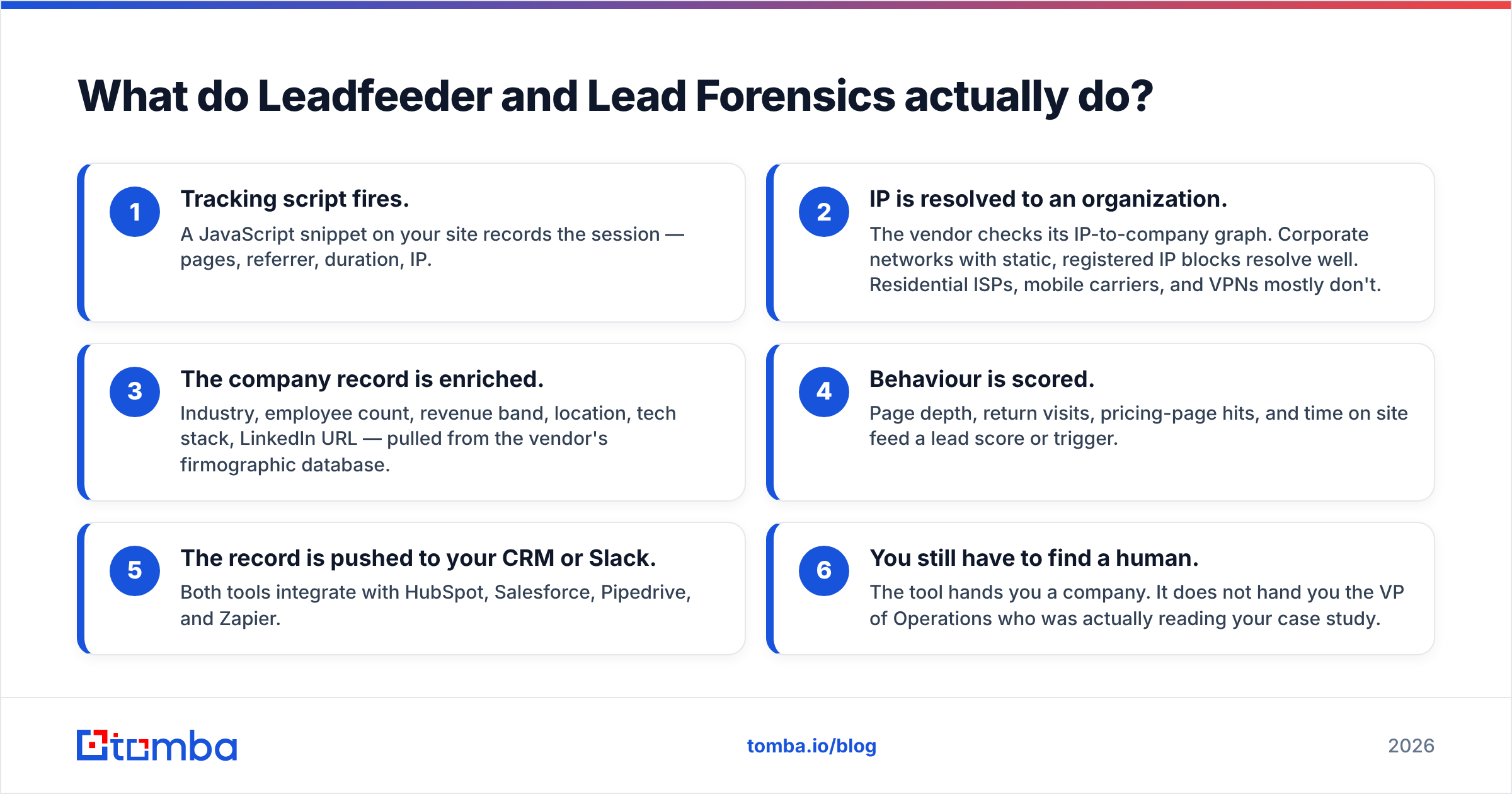
Here is the pipeline in practice:
- Tracking script fires. A snippet on your site logs the session — pages, referrer, time, IP.
- IP is matched to a company. Office networks with fixed IPs match well. Home ISPs, mobile carriers, and VPNs mostly do not.
- The record is enriched. Industry, headcount, revenue band, location, tech stack, and LinkedIn URL get added.
- Behaviour is scored. Page depth, repeat visits, pricing-page hits, and time on site feed a score or an alert.
- The record lands in your CRM or Slack. Both tools link to HubSpot, Salesforce, Pipedrive, and Zapier.
- You still have to find a human. The tool hands you a company. It does not hand you the VP who read your case study.
Buyers underrate that last step. It is the honest reason a visitor ID tool on its own rarely moves pipeline.

Leadfeeder vs Lead Forensics: how does pricing compare?#
This is the cleanest split between them. For most buyers it settles the choice before features matter.
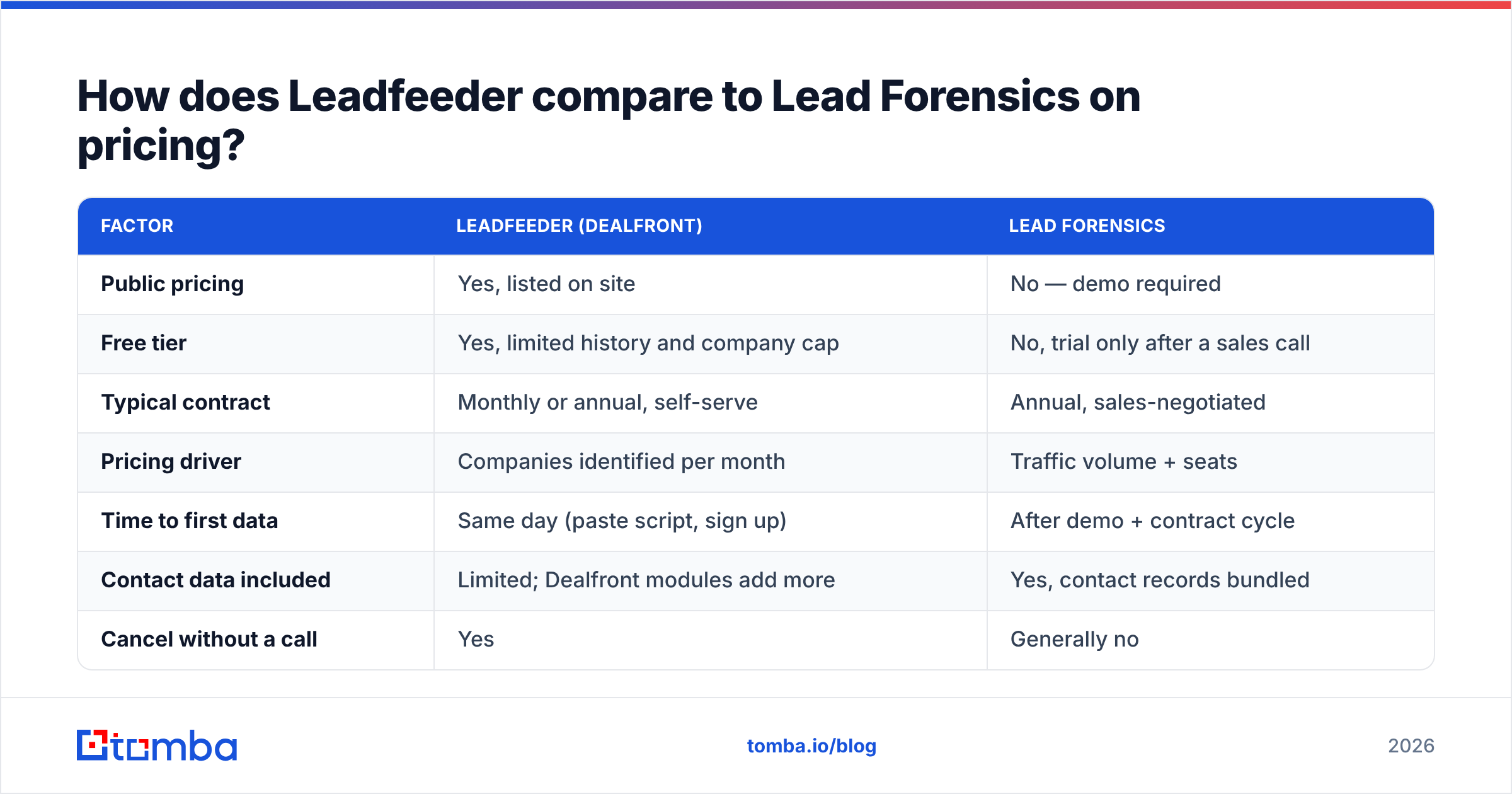
Leadfeeder publishes its prices. It merged with German data firm Echobot in 2022 to form Dealfront. The Leadfeeder product now sits inside that platform, but the self-serve motion survived. There is a free tier, capped on history and company count. Paid plans scale with how many companies you identify each month, billed monthly or yearly.
Lead Forensics does not publish prices. Every route on leadforensics.com ends at a demo request. Buyer reports on G2 and Capterra point to annual deals in the low-to-mid five figures. Price tracks your traffic volume and seat count. Treat any number you read online as unverified. It is negotiated per account, and it moves.
| Factor | Leadfeeder (Dealfront) | Lead Forensics |
|---|---|---|
| Public pricing | Yes, listed on site | No — demo required |
| Free tier | Yes, limited history and company cap | No, trial only after a sales call |
| Typical contract | Monthly or annual, self-serve | Annual, sales-negotiated |
| Pricing driver | Companies identified per month | Traffic volume + seats |
| Time to first data | Same day (paste script, sign up) | After demo + contract cycle |
| Contact data included | Limited; Dealfront modules add more | Yes, contact records bundled |
| Cancel without a call | Yes | Generally no |
If speed matters, Leadfeeder wins by default. If you want a named CSM, onboarding sessions, and someone on the hook for adoption, that is what the Lead Forensics price buys. For some teams the trade is fair rather than a rip-off.
Which tool identifies more companies?#
Match rate is where Leadfeeder vs Lead Forensics gets murky. Neither vendor will give you a number you can audit. Read any published figure as a marketing claim.
The trend is easier to verify. Match rates have fallen across the whole category since 2020:
- Remote work moved much of B2B browsing onto home IPs that resolve to Comcast, not to Acme Corp.
- Mobile traffic resolves to carriers.
- VPNs and zero-trust networks hide company IP ranges.
- Privacy rules — GDPR in the EU, plus a patchwork of US state laws — push vendors toward safer, consent-gated matching.
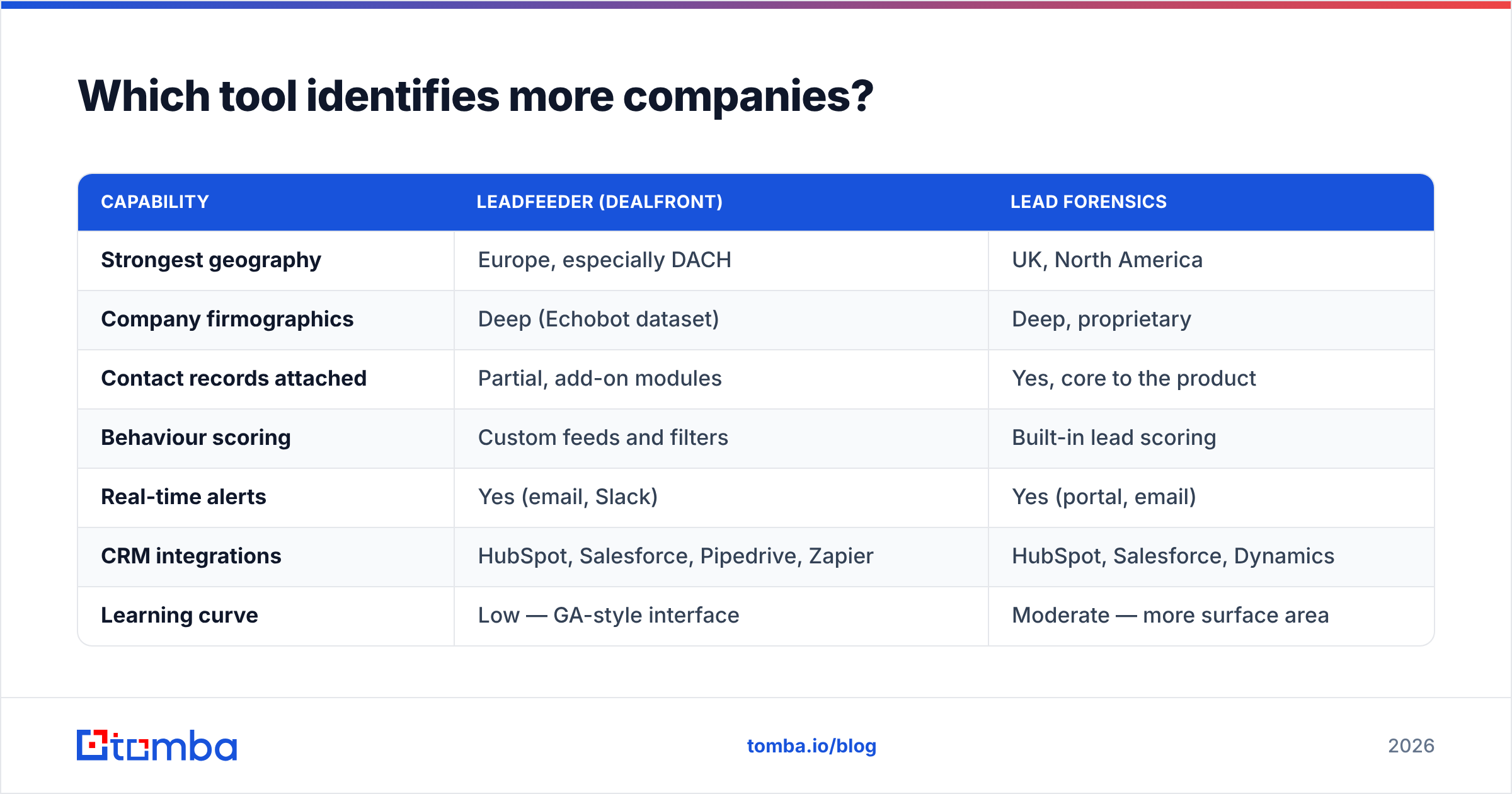
Teams that run both tools at once tend to report matches on 20–40% of B2B sessions. The winner shifts by region. Lead Forensics has long been strong on UK and US company IP data. Dealfront's Echobot roots give it real depth in the DACH region and wider Europe. If your pipeline is German-speaking, that edge is easy to check.
The only fair test is a 30-day parallel trial on your own traffic. Ask both vendors for raw matched-company counts over the same window, with the same script placement. Anything else is anecdote.
| Capability | Leadfeeder (Dealfront) | Lead Forensics |
|---|---|---|
| Strongest geography | Europe, especially DACH | UK, North America |
| Company firmographics | Deep (Echobot dataset) | Deep, proprietary |
| Contact records attached | Partial, add-on modules | Yes, core to the product |
| Behaviour scoring | Custom feeds and filters | Built-in lead scoring |
| Real-time alerts | Yes (email, Slack) | Yes (portal, email) |
| CRM integrations | HubSpot, Salesforce, Pipedrive, Zapier | HubSpot, Salesforce, Dynamics |
| Learning curve | Low — GA-style interface | Moderate — more surface area |
| Support model | Self-serve + docs | Dedicated account management |
Is Lead Forensics worth the premium over Leadfeeder?#
It depends on one thing: will you use the contact layer?
Lead Forensics bundles contacts with the companies it finds. You get names, roles, and often direct details. That is the core of its pitch, and it is why the price differs in kind rather than degree.
But the contact data is inferred, not observed. The tool does not know that Sarah in Procurement read your pricing page. It knows someone at her company did, and that Sarah is a plausible person to call. That is useful. It is not proof of intent. Any rep who treats it as proof will send some very strange emails.
Leadfeeder takes the narrower line. Name the company well, integrate cleanly, keep pricing public, and let you pick who to contact. Dealfront sells contact and trigger data as add-on modules, so you can buy up later instead of on day one.
Choose Lead Forensics if: you run an ABM motion with a set target account list. You need approved budget for a five-figure annual tool, and an SDR team that works alerts daily. Low-volume, high-ACV deals repay the spend fastest.
Choose Leadfeeder if: you want proof that visitor ID works before you commit budget. It also fits if your traffic skews European, or if you already have a data stack that handles contact discovery and you just need the company signal.
Choose neither if: your monthly B2B traffic is under a few thousand sessions. At that volume you will match a handful of companies a week. A targeted outbound list, built from scratch, would give you more pipeline.
What do both tools leave you to solve?#
The gap between "company found" and "email sent" is the whole game. It is also where visitor ID projects quietly die.
An alert lands. A 200-person logistics firm in Rotterdam read your integrations page three times this week. Now what? You need a name, a role, a verified email, and ideally a phone number. Lead Forensics hands you candidate contacts of mixed freshness. Leadfeeder hands you a LinkedIn company URL and a domain.
Either way, you need a path from domain → decision-maker → verified inbox. That is a domain search job, followed by an email verification job. Skip the check and you burn your sender reputation on stale guesses. That costs far more than the software did.
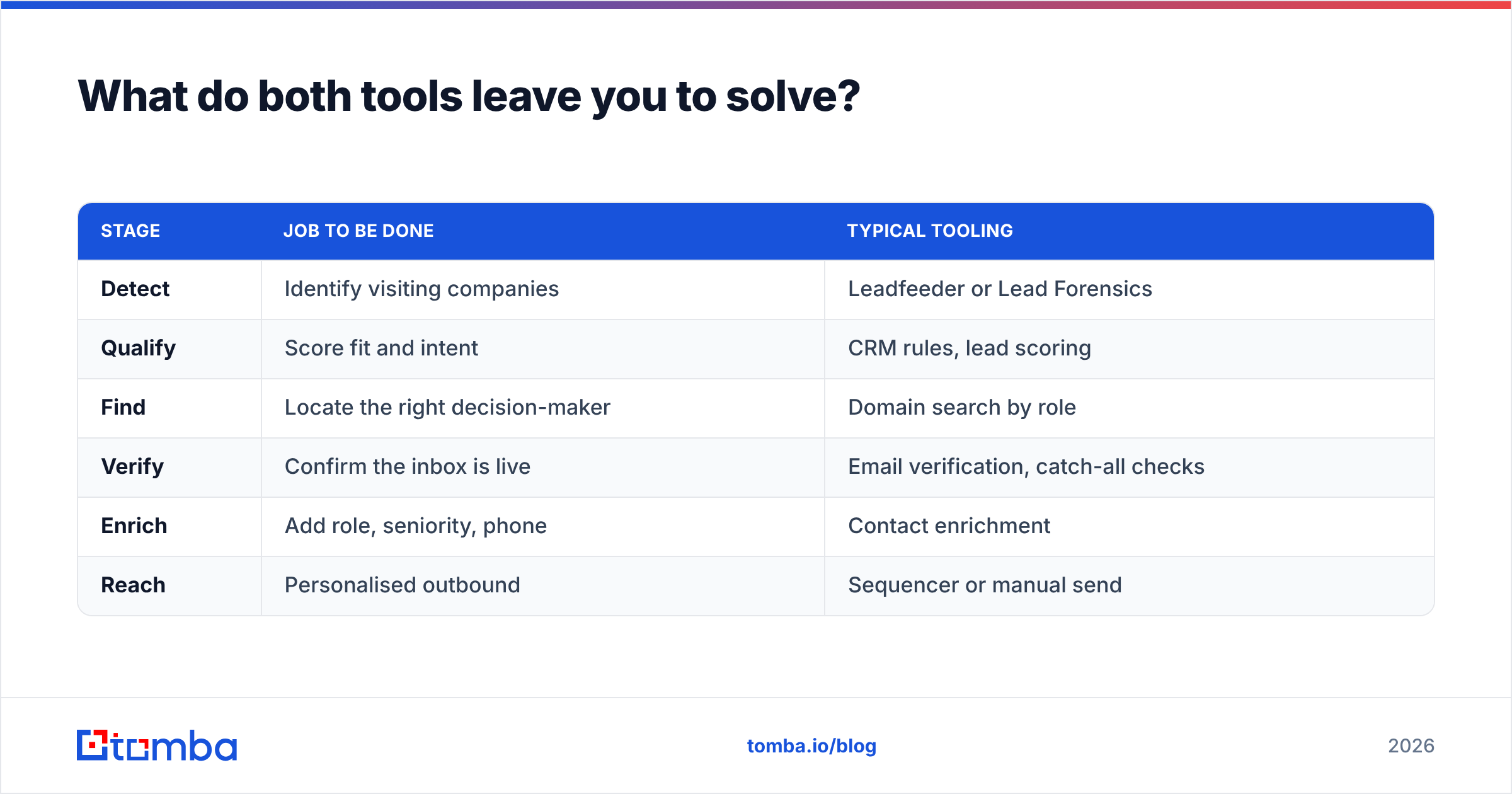
A workable stack looks like this:
| Stage | Job to be done | Typical tooling |
|---|---|---|
| Detect | Identify visiting companies | Leadfeeder or Lead Forensics |
| Qualify | Score fit and intent | CRM rules, lead scoring |
| Find | Locate the right decision-maker | Domain search by role |
| Verify | Confirm the inbox is live | Email verification, catch-all checks |
| Enrich | Add role, seniority, phone | Contact enrichment |
| Reach | Personalised outbound | Sequencer or manual send |
You may already pay five figures a year to spot the traffic. Skimping on the find-and-verify steps is then the priciest mistake in the chain.
How do you run a fair 30-day trial?#
Do not judge on feature lists. Run the Leadfeeder vs Lead Forensics test on your own traffic, under the same terms for both vendors.
Set the test up like this:
- Run both scripts at once on the same pages for the same 30 days. Back-to-back trials are worthless, because seasonality swamps the gap.
- Pick one metric up front: unique matched companies that fit your ICP, not total matches. A tool that surfaces 400 irrelevant firms loses to one that surfaces 90 good ones.
- Test the contact layer honestly. Take 50 contacts from Lead Forensics, run them through an email verifier, and log the valid rate. That number is your real data quality, not the vendor's claim.
Then check the parts that bite after you sign:
- Trace the CRM sync end to end. Push 20 records in. Look at field mapping, duplicate handling, and whether reps can see the page-view history.
- Ask about exit. Check the export format, the notice period, and whether old data stays reachable after you cancel. Annual contracts make that question expensive to skip.
What's the verdict for 2026?#
For most teams under 200 staff, Leadfeeder is the sensible first move. The pricing logic is public, the free tier proves the concept, and there is no procurement cycle. Within a month you will know whether visitor ID deserves a permanent line in your budget. If it does, upgrade into Dealfront's wider dataset. Or move to Lead Forensics with real numbers in hand, instead of a vendor deck.
For enterprise ABM teams with budget and an SDR bench, Lead Forensics earns its price. The contact layer and the account management carry it. That holds as long as you verify the contacts before you send.
So the short answer on Leadfeeder vs Lead Forensics: both are legitimate tools for a real problem. Neither one tells you who to email.
Close the loop on every identified company. Once visitor ID names the firms on your site, use the Tomba Email Finder to turn each domain into named, verified decision-maker emails. Catch-all detection and deliverability checks are built in. The free tier covers 25 searches a month, Starter is $49/mo, and Growth is $99/mo at volume. Detection without contact data is a report. Detection plus verified contacts is pipeline.
Related guides#
// get started
Find, verify and enrich your first contacts today
Start on the free plan with 25 searches a month, then scale when your team is ready.
Free plan · No credit card required · GDPR & CCPA
// about the author