LeadGenius vs LeadRocks: Which B2B Data Tool Wins in 2026?
One sells managed, human-verified custom data on enterprise contracts. The other sells a cheap LinkedIn-sourced contact database. Here is the honest breakdown of which one earns its price in 2026.
LeadGenius vs LeadRocks is an odd matchup. One is a managed research team on an annual contract. The other is a cheap LinkedIn-sourced database you can buy this afternoon. Here is how they differ, and when neither one is what you need.
TL;DR
- LeadGenius is a managed B2B data service. Human researchers plus machine learning build custom datasets and hard-to-find fields for enterprise GTM teams. It is sold on annual contracts, not self-serve credits.
- LeadRocks is a self-serve contact database sourced largely from LinkedIn profiles. It is popular for its low monthly price and its history of lifetime deals.
- They are not really competitors. They compete for the same budget line, which is why you are comparing them. But one is a research team and the other is a lookup table.
Pick by the job, not by the price tag:
- Need 50 custom attributes on 3,000 accounts? LeadGenius. Need emails and phones on a LinkedIn list? LeadRocks. Need verified, per-contact email discovery with an API you can wire into your stack? A dedicated email finder is the cheaper third path.
- Always run any purchased list through an email verifier before sending. No vendor, at any price, ships a list that is clean on arrival.
What are LeadGenius and LeadRocks?#
They solve two different problems that both get filed under "we need better data."
LeadGenius is a managed data provider. You tell them the accounts and the attributes you care about, and their mix of automated collection and human researchers builds that dataset for you. Those attributes can be headcount by department, hiring signals, tech stack, store count, or whether a company runs Shopify Plus. Delivery happens through CRM sync, flat files, an API, or their browser extension. The pitch is custom coverage: fields that no standard database sells, on accounts that standard databases index poorly.
LeadRocks is a B2B contact database with a Chrome extension. You search by job title, company, location, industry, or headcount, or you paste in LinkedIn profile and search URLs. It returns emails, phone numbers, and profile data from a pre-built index of several hundred million records. The pitch is price. It costs less per month than most teams spend on coffee, credits roll forward, and a long run of AppSumo lifetime deals put a permanent seat in a lot of small-team stacks.
The distinction matters more than any feature table. LeadGenius is bought by RevOps leaders at companies with a data engineer. LeadRocks is bought by founders and solo SDRs with a card and a Tuesday afternoon.
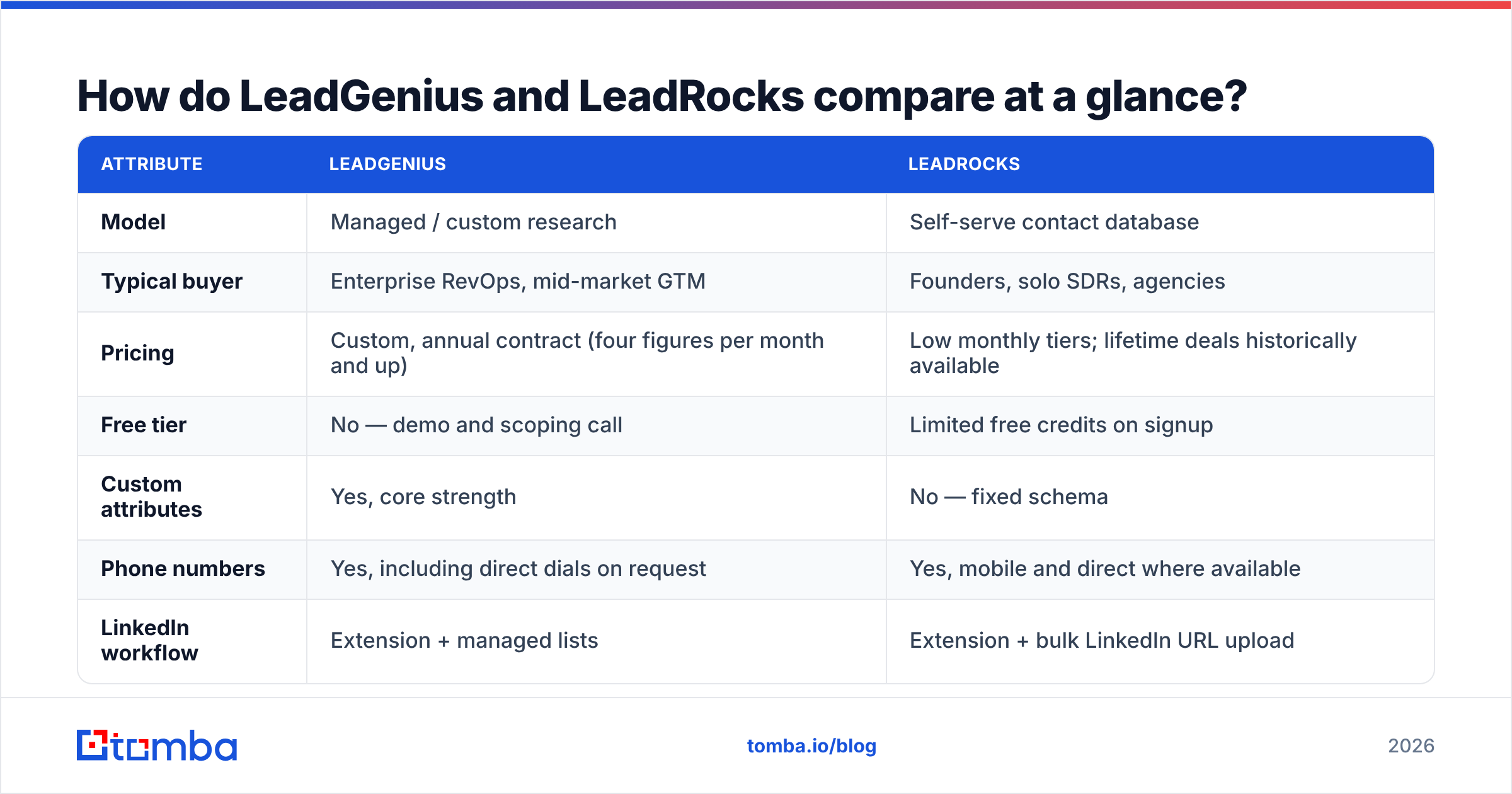
LeadGenius vs LeadRocks: how do they compare at a glance?#
| Attribute | LeadGenius | LeadRocks |
|---|---|---|
| Model | Managed / custom research | Self-serve contact database |
| Typical buyer | Enterprise RevOps, mid-market GTM | Founders, solo SDRs, agencies |
| Pricing | Custom, annual contract (four figures per month and up) | Low monthly tiers; lifetime deals historically available |
| Free tier | No — demo and scoping call | Limited free credits on signup |
| Custom attributes | Yes, core strength | No — fixed schema |
| Phone numbers | Yes, including direct dials on request | Yes, mobile and direct where available |
| LinkedIn workflow | Extension + managed lists | Extension + bulk LinkedIn URL upload |
| API | Yes | Limited / not the primary interface |
| Time to first record | Weeks (scoping, build, QA) | Minutes |
| Built-in verification | Part of the managed QA process | Basic; third-party verification recommended |
| Best at | Data nobody else sells | Cheap volume on known profiles |
Read that table as a fork, not a scoreboard. Almost nobody is truly torn between a $30k annual data contract and a $39 monthly tool. But plenty of teams get halfway through a LeadGenius scoping call and realise a lookup tool was the answer. And plenty of LeadRocks users find out on month four that a static index cannot answer their ICP question at all.

What does LeadGenius actually do well?#
Custom fields. That is the whole answer, and it is a bigger answer than it sounds.
Every general-purpose database sells you roughly the same schema: name, title, company, size, industry, location, email, phone. If your ICP is defined by those fields, you have a hundred vendors to pick from and price is the only variable. But real ICPs often hinge on things no schema contains. How many physical locations does this franchise operate? Does this manufacturer run a specific ERP version? How many nurses does this clinic employ, as opposed to total staff?
LeadGenius exists because those questions get answered by a person reading a website, a filing, or a job posting. Then someone checks that answer. Human-in-the-loop research is slow and expensive. It is also the only thing that works when the attribute you need is not machine-readable at scale.
The second strength is coverage in awkward geographies and segments. Global mid-market, non-English markets, and industries with little public digital footprint are where off-the-shelf databases thin out fastest. A managed provider can go build that coverage instead of telling you it does not exist.
The trade-offs are the obvious ones. You cannot try it this afternoon. You will sit through scoping, agree to a spec, and wait for a first delivery. Pricing is quoted against volume and complexity, which in practice means an annual commitment. That puts it out of reach for anyone without a real data budget. And once the dataset is built, refreshing it is its own line item, because custom data decays exactly as fast as standard data does.
What does LeadRocks actually do well?#
Speed and price per contact. You install the extension, run a LinkedIn Sales Navigator search, push the results, and have emails and phones in a CSV before the page finishes paginating.
The database skews heavily toward LinkedIn-derived profiles, and that has one big consequence: coverage is best exactly where LinkedIn use is highest. North American and Western European tech, SaaS, marketing, recruiting, and professional services are dense. Regional manufacturing, trades, healthcare back-office, and low-LinkedIn markets get sparse fast. If your ICP lives on LinkedIn, LeadRocks punches far above its price. If it does not, the low price is not a bargain. It is a small amount of money for very little usable data.
Credit rollover and the lifetime-deal history also matter more than they should. A lot of small teams still hold a LeadRocks tier they paid for once in 2022. That makes it free at the margin and very hard to displace on price alone.
Where it struggles: verification depth, catch-all handling, and any workflow that needs data pushed into a system rather than pulled into a spreadsheet. It is a tool for a human sitting at a browser. That is a design choice, not a defect, but it caps how far it scales inside an automated GTM motion.
How accurate is the data on each one?#
Accuracy claims in this category are close to meaningless without definitions, so start by insisting on three of them.
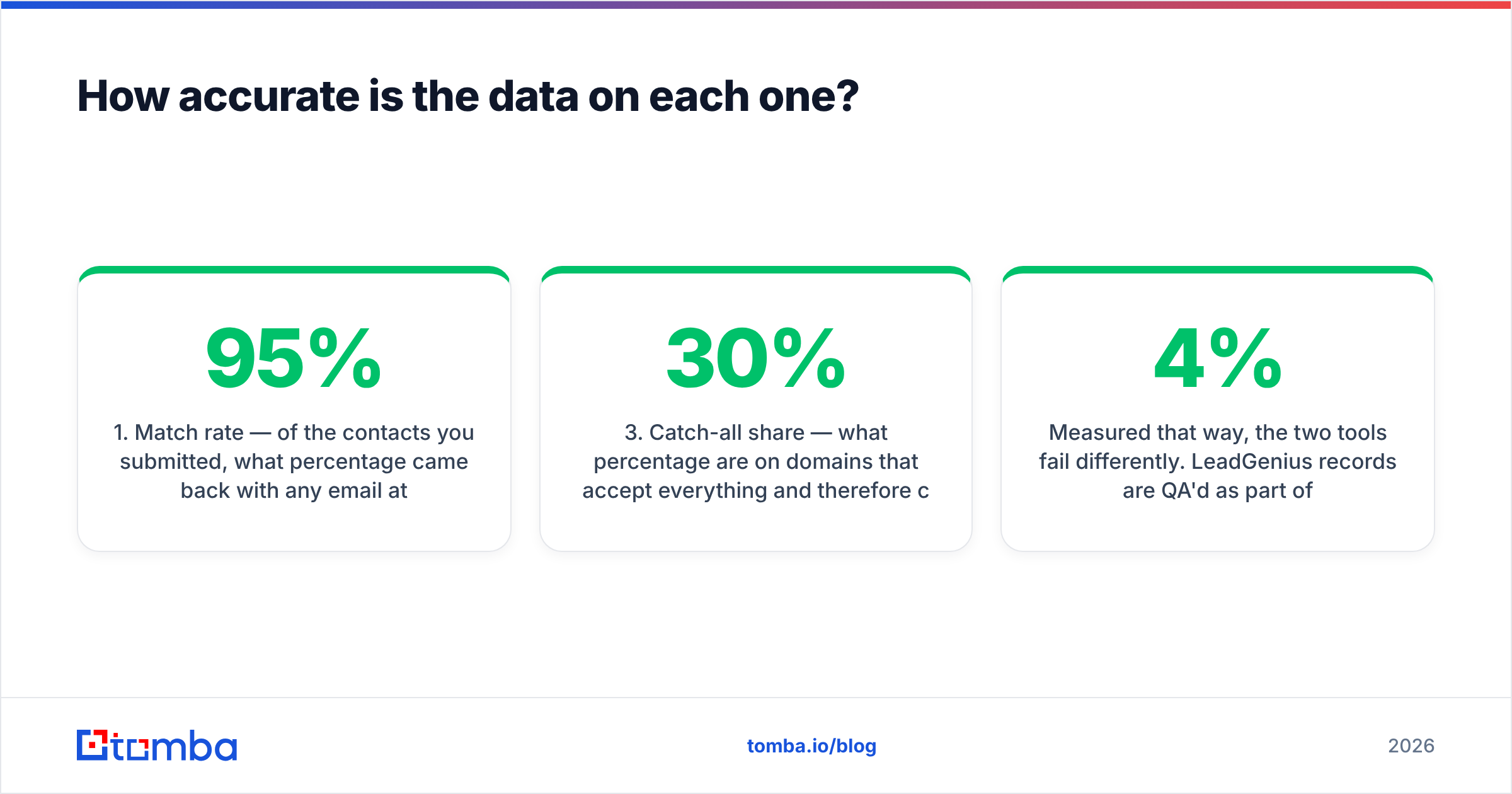
- Match rate — of the contacts you submitted, what percentage came back with any email at all? A vendor quoting 95% "accuracy" on a 40% match rate is telling you about the wrong number.
- Deliverable rate — of the emails returned, what percentage actually accept mail? This is the only figure that survives contact with a real send.
- Catch-all share — what percentage sit on domains that accept everything and cannot be verified by SMTP alone? On enterprise-heavy lists this is routinely 20–30%, and it quietly inflates every other number.
- Freshness — when was the record last confirmed? A correct email from 2023 for someone who changed jobs in 2024 is a bounce wearing a disguise.
- Role-account share — how much of the list is info@, sales@, contact@? These deliver fine and convert terribly, so they flatter deliverability stats.

Measured that way, the two tools fail differently. LeadGenius records are QA'd as part of delivery, so the accepted dataset tends to be clean at handover. But it is a snapshot, and a custom build delivered in March is a March dataset. LeadRocks returns results instantly from a standing index, so you get whatever state that index is in. That includes records nobody has re-confirmed in a while.
Neither case is a reason to skip your own verification pass. Run the output through a catch-all verifier and a standard verification step before anything touches your sending domain. A 4% bounce rate on a 5,000-contact send will do more damage to your sender reputation than the data cost you in the first place.
How does pricing compare, and where does Tomba sit?#
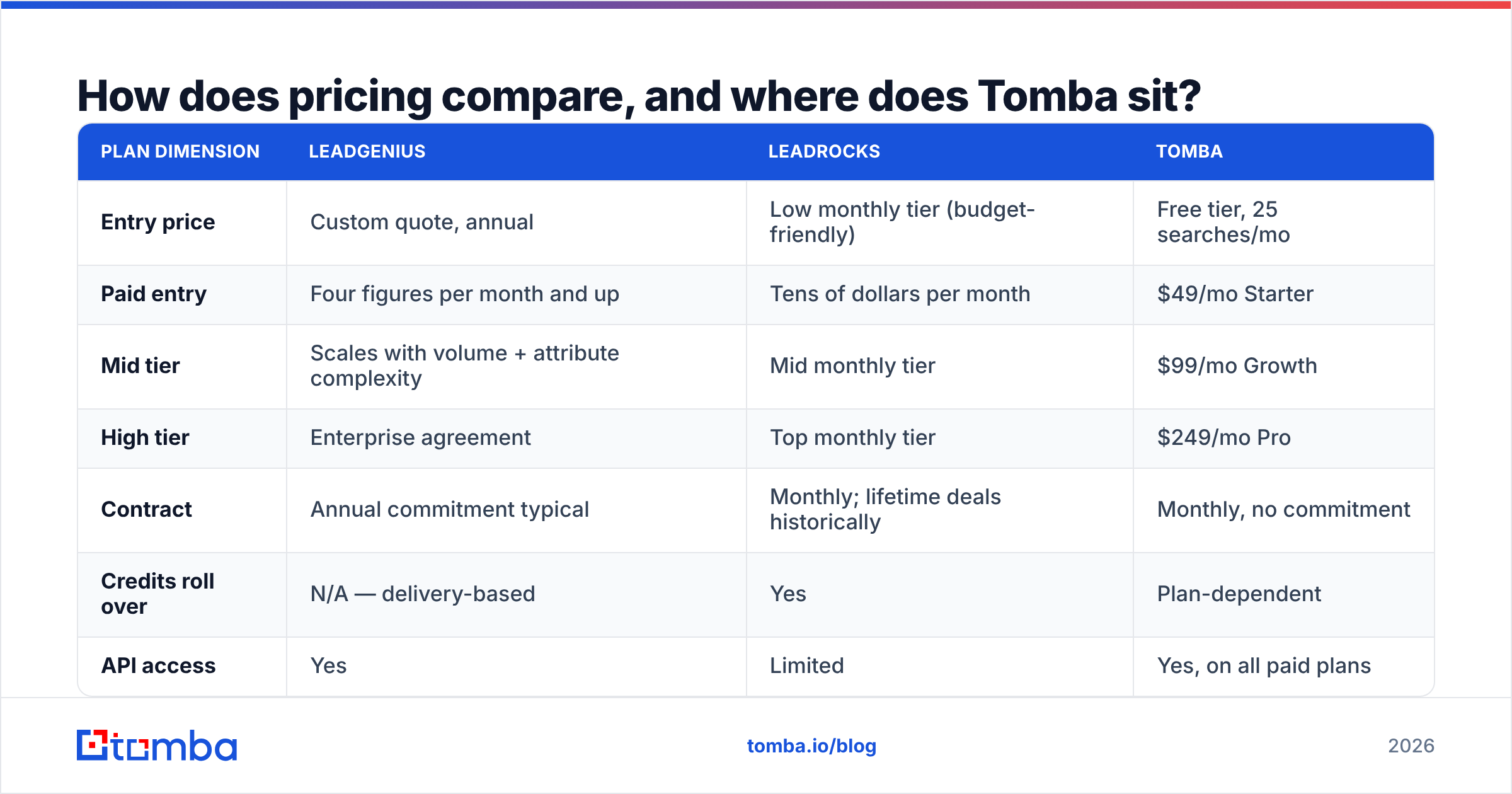
Pricing is where LeadGenius vs LeadRocks stops being a close contest. One is a project budget. The other is a subscription you barely notice.

| Plan dimension | LeadGenius | LeadRocks | Tomba |
|---|---|---|---|
| Entry price | Custom quote, annual | Low monthly tier (budget-friendly) | Free tier, 25 searches/mo |
| Paid entry | Four figures per month and up | Tens of dollars per month | $49/mo Starter |
| Mid tier | Scales with volume + attribute complexity | Mid monthly tier | $99/mo Growth |
| High tier | Enterprise agreement | Top monthly tier | $249/mo Pro |
| Contract | Annual commitment typical | Monthly; lifetime deals historically | Monthly, no commitment |
| Credits roll over | N/A — delivery-based | Yes | Plan-dependent |
| API access | Yes | Limited | Yes, on all paid plans |
| Verification included | Managed QA | Basic | Email verifier included |
Vendor pricing moves. Treat the LeadGenius and LeadRocks columns as directional, and confirm on their own sites and on G2 before you buy. Tomba's figures are exact: a free tier at 25 searches per month, then $49, $99, and $249, with Enterprise quoted. Full breakdown on the Tomba pricing page.
Tomba belongs in this table because most "we need a data vendor" projects are really "we need verified email addresses for people we can already name." You have the account list from your CRM, your CSM team, an event export, or a scrape. You do not need a research firm to build a custom attribute. You do not need a standing index of 300 million strangers either. You need pattern detection and verification on 4,000 specific people, delivered through an API your ops team can call. That is a different, cheaper product.

Which one should you choose?#
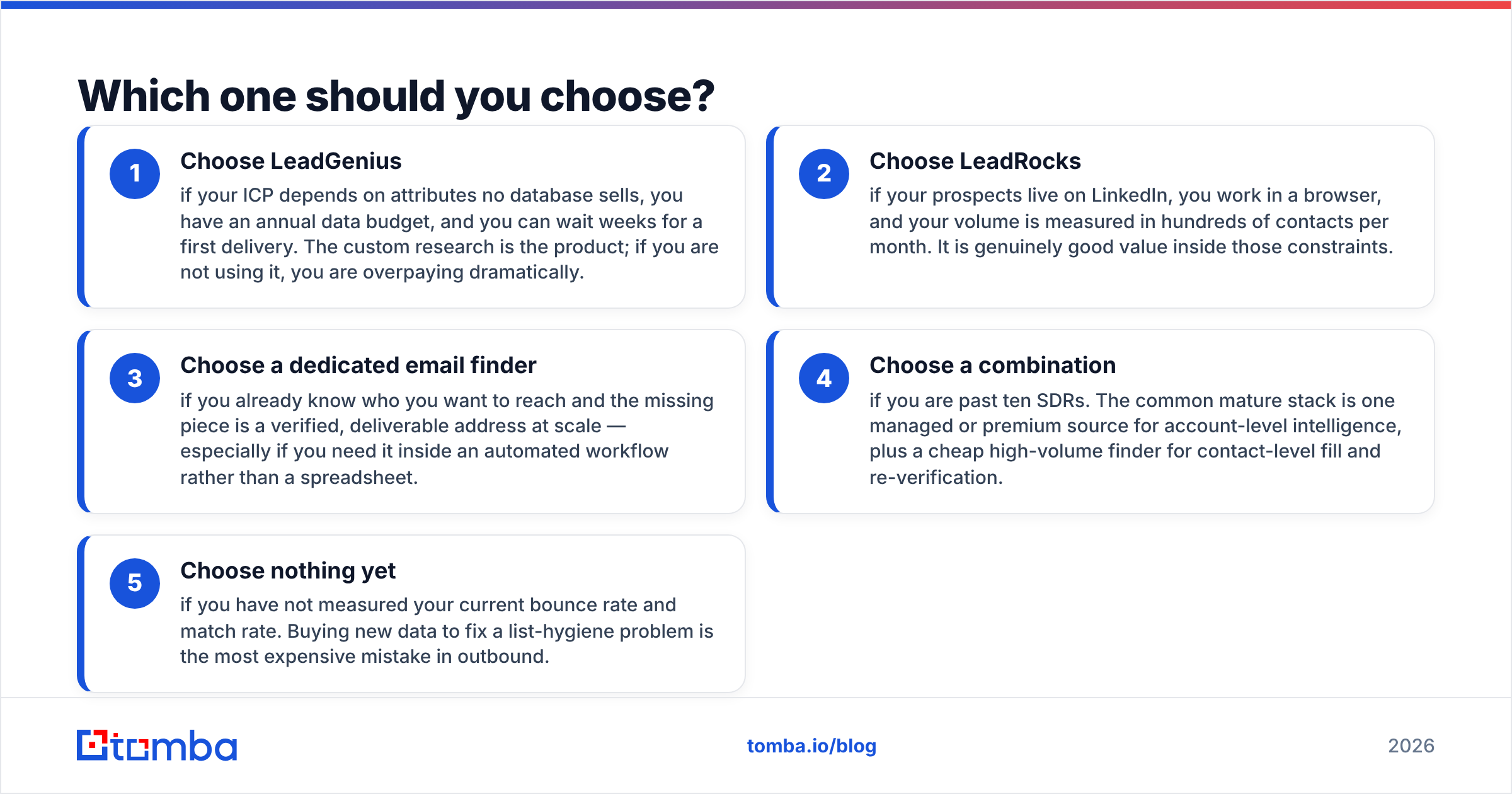
Pick by the shape of your problem, not the size of your budget. The LeadGenius vs LeadRocks call usually lands in one of five places.
- Choose LeadGenius if your ICP depends on attributes no database sells, you have an annual data budget, and you can wait weeks for a first delivery. The custom research is the product. If you are not using it, you are overpaying.
- Choose LeadRocks if your prospects live on LinkedIn, you work in a browser, and your volume runs to hundreds of contacts a month. It is good value inside those limits.
- Choose a dedicated email finder if you already know who you want to reach and the missing piece is a verified, deliverable address at scale. This is the right call when the work sits in an automated workflow rather than a spreadsheet.
Two more cases come up often:
- Choose a combination if you are past ten SDRs. The common mature stack pairs one managed or premium source for account intelligence with a cheap high-volume finder for contact fill and re-verification.
- Choose nothing yet if you have not measured your current bounce rate and match rate. Buying new data to fix a list-hygiene problem is the most expensive mistake in outbound.
For most teams reading a page like this, option three is the honest answer. Tomba's domain search resolves a company's email pattern and returns the people behind it. The bulk email finder handles list-scale jobs. And the Tomba API lets you do both from inside whatever your RevOps team has already built, so enrichment happens on record creation rather than in a quarterly CSV ritual.
What questions should you ask on the sales call?#
Bring these five. They separate vendors quickly, whichever two you are comparing.
- "Run my list, not yours." Send 500 real contacts from your actual ICP and compare match rate and bounce rate against a control. Vendor-supplied samples are picked to flatter.
- "What is your catch-all policy?" Ask whether catch-all addresses count as matches and whether you are billed for them. This one answer can swing effective cost per usable contact by 30%.
- "How often is a record re-confirmed?" Ask for the median age of a record in your target segment, not the size of the total database.
- "What happens on contract end?" Managed providers sometimes license rather than sell data. Know whether you keep what you paid for.
- "What is the refund or credit policy on bad records?" Vendors confident in accuracy will credit invalids. Vendors that are not will talk about industry averages.
Ready to fill the gaps in your list?#
If your real problem is verified email addresses on people you can already name, start with the Tomba Email Finder. Not a custom research project, not a browse-and-export habit. The free tier gives you 25 searches a month to test against your own list, and Starter is $49/mo. Every paid plan includes API access and the email verifier, so you can measure match rate and deliverability on your own data before signing anything annual.
Related guides#
// get started
Find, verify and enrich your first contacts today
Start on the free plan with 25 searches a month, then scale when your team is ready.
Free plan · No credit card required · GDPR & CCPA
// about the author