LeadGenius vs LeadsForge: Which B2B Lead Data Wins in 2026?
LeadGenius sells managed, human-verified B2B data. LeadsForge sells AI-built lists on a self-serve plan. Here is how the two actually differ on accuracy, cost, and speed, and which one fits your team.
TL;DR
- LeadGenius is a managed B2B data service: human researchers plus automation build custom datasets to your spec. Pricing is quote-only and sold on annual contracts, which puts it in enterprise territory.
- LeadsForge sits at the opposite end: an AI-assisted, self-serve list builder where you describe your ICP in plain language and get a contact list back in minutes.
- The real decision is not "which tool is better" but which failure mode you can tolerate: slow and expensive but tailored (LeadGenius), or fast and cheap but generic (LeadsForge).
- Neither publishes an independently audited accuracy number. Whichever you pick, budget for a separate verification step before you send.
- If your bottleneck is finding and verifying work emails at a predictable cost, a dedicated email finder on a $49/mo plan solves 80% of the job for a fraction of a managed-data contract.
What are LeadGenius and LeadsForge?#
These two products get compared because they both end with a CSV of B2B contacts in your hand. How they get there could not be more different.
- LeadGenius is a data-as-a-service company, not a database you log into and search. You define the accounts, attributes, and signals you care about, and a blend of trained human researchers and in-house tooling assembles the dataset. Its pitch on leadgenius.com leans on custom attributes that no off-the-shelf provider tracks: hiring patterns, tech installs, store counts, headcount by department.
- LeadsForge is an AI-first list builder. You type a prompt describing your ideal customer, the system translates that into filters across its contact data, and you export the result. The value proposition is time-to-list, not bespoke research.
- The workflow split is the core difference. LeadGenius is a project you scope with a vendor team. LeadsForge is a tool you open on a Tuesday afternoon.
- The buyer is different too. LeadGenius typically lands with RevOps or data teams at mid-market and enterprise companies. LeadsForge targets founders, solo SDRs, and agencies running volume outbound.
- The pricing philosophy follows from both. Managed research bills like a service. Self-serve tooling bills like software.
If you keep that framing in mind, most of the "which is better" debate answers itself. You are choosing between buying a research team and buying a search box.

How does each one actually build its data?#
LeadGenius runs a human-in-the-loop model. Automated collection does the first pass, then researchers validate, correct, and fill gaps, especially for the custom attributes that automated crawlers get wrong. That is why LeadGenius shows up in conversations about hard-to-source data: number of physical locations, whether a company runs a specific ERP, how many engineers a business unit employs. You are paying for a work order, and the output is a deliverable, usually refreshed on an agreed cadence into your CRM or warehouse.
The tradeoff is latency. Custom research takes days or weeks, not minutes. If your ICP changes mid-quarter, your dataset does not automatically follow.
LeadsForge inverts that. Its AI layer interprets a natural-language ICP description and maps it to structured filters, then returns contacts from its underlying pool. Turnaround is immediate. The tradeoff is that you get what the pool contains. If your target segment is thin in that database, prompting more creatively will not conjure contacts that were never collected. AI-assisted list builders are also prone to a specific problem: a confident-looking list where the job titles are stale by 6 to 18 months because the source profile was never re-crawled.
This matters more than most buyers assume. According to vendor and analyst commentary tracked across review sites like G2 and Capterra, B2B contact data decays somewhere in the 25% to 30% range per year as people change roles. A list generated instantly from an unrefreshed pool inherits all of that decay.
LeadGenius vs LeadsForge: how do they compare head to head?#
Here is the practical comparison. Where a vendor does not publish a figure, this table says so rather than inventing one. Always confirm current terms directly before you sign.
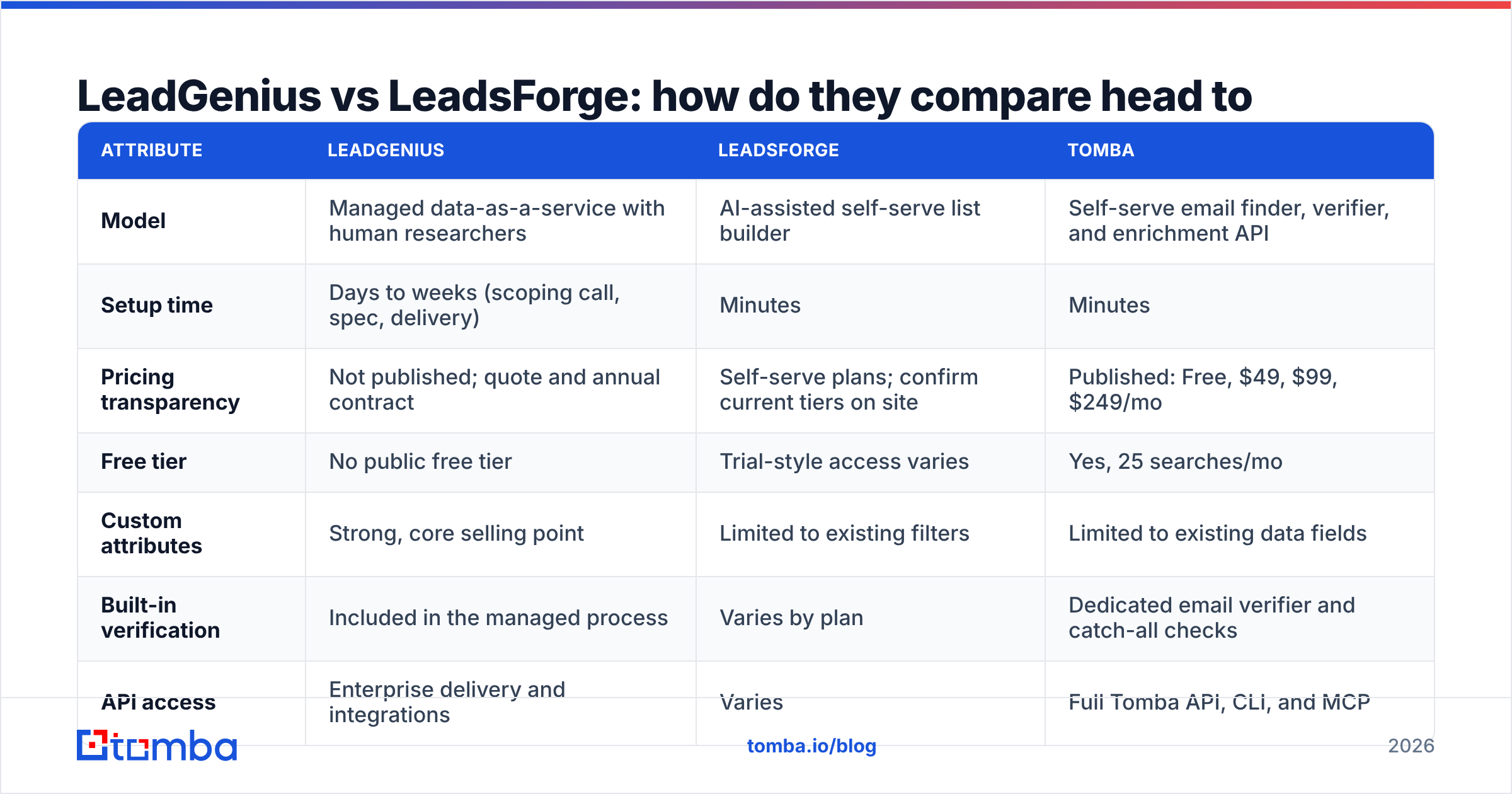
| Attribute | LeadGenius | LeadsForge | Tomba |
|---|---|---|---|
| Model | Managed data-as-a-service with human researchers | AI-assisted self-serve list builder | Self-serve email finder, verifier, and enrichment API |
| Setup time | Days to weeks (scoping call, spec, delivery) | Minutes | Minutes |
| Pricing transparency | Not published; quote and annual contract | Self-serve plans; confirm current tiers on site | Published: Free, $49, $99, $249/mo |
| Free tier | No public free tier | Trial-style access varies | Yes, 25 searches/mo |
| Custom attributes | Strong, core selling point | Limited to existing filters | Limited to existing data fields |
| Built-in verification | Included in the managed process | Varies by plan | Dedicated email verifier and catch-all checks |
| API access | Enterprise delivery and integrations | Varies | Full Tomba API, CLI, and MCP |
| Best fit | Enterprise ABM and data enrichment programs | Founders and small teams needing lists fast | Teams that need accurate emails at predictable cost |
| Worst fit | Anyone under a $2k/mo data budget | Niche ICPs requiring bespoke attributes | Teams needing custom human research |

Read the table row by row and the pattern is obvious: LeadGenius wins on depth, LeadsForge wins on speed, and neither is optimized for the most common day-to-day job, which is turning a known name and company into a deliverable work email without burning a credit on a bounce.
Which one has better data accuracy?#
Neither publishes a third-party audited accuracy rate, so treat any headline number from either side as marketing until you test it yourself.
That said, the structural argument favors LeadGenius on the attributes it was commissioned to research, because a human confirmed them. It does not automatically favor LeadGenius on email deliverability, which is a different problem: an email can be correctly attributed to a real person and still bounce because the mailbox was deprovisioned last month.
LeadsForge, like most AI list builders, inherits the accuracy of its underlying pool. If the pool is refreshed frequently, results are decent. If it is not, you will see the classic symptoms: a 12% to 20% bounce rate, catch-all domains returned as "valid", and contacts who left the company two roles ago.

Here is the discipline that actually protects your domain, regardless of vendor:
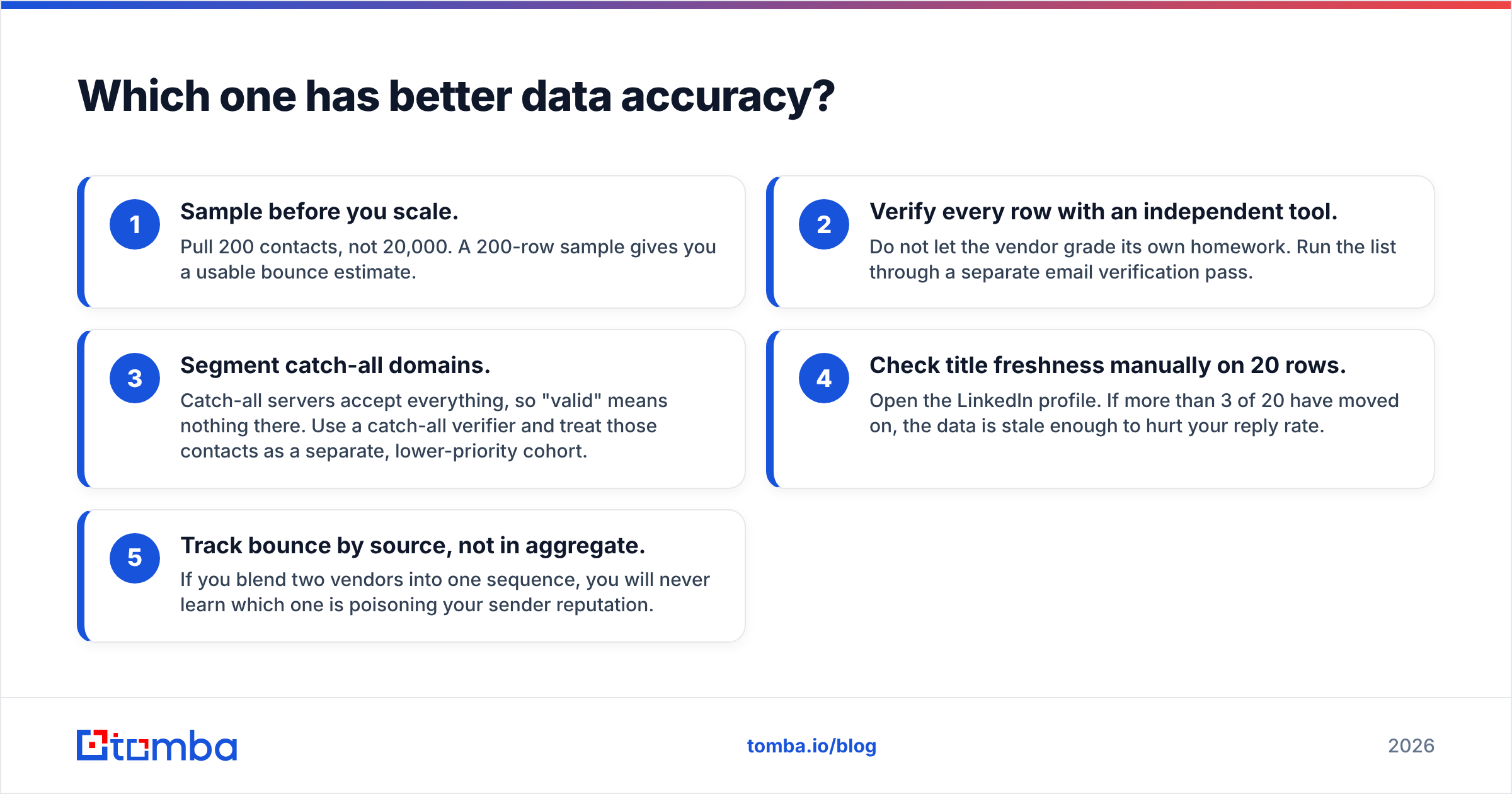
- Sample before you scale. Pull 200 contacts, not 20,000. A 200-row sample gives you a usable bounce estimate.
- Verify every row with an independent tool. Do not let the vendor grade its own homework. Run the list through a separate email verification pass.
- Segment catch-all domains. Catch-all servers accept everything, so "valid" means nothing there. Use a catch-all verifier and treat those contacts as a separate, lower-priority cohort.
- Check title freshness manually on 20 rows. Open the LinkedIn profile. If more than 3 of 20 have moved on, the data is stale enough to hurt your reply rate.
- Track bounce by source, not in aggregate. If you blend two vendors into one sequence, you will never learn which one is poisoning your sender reputation.
Teams that skip this step and send 10,000 unverified addresses usually discover the cost three weeks later, when their primary domain starts landing in spam and the fix takes a month of warmup.
What does each one really cost?#
This is where most LeadGenius vs LeadsForge evaluations end before they start.
LeadGenius does not publish pricing. Buyers consistently describe annual agreements scoped to the size and complexity of the dataset, which is normal for managed data services and typically lands well into five figures per year for meaningful volume. Ask specifically about: minimum contract length, refresh cadence, what counts as an out-of-scope attribute request, and whether you own the data after the contract ends.
LeadsForge follows the self-serve SaaS pattern with monthly tiers tied to credits or export volume. Confirm the current tiers on their site, since AI tooling pricing has been unusually volatile over the past two years. Ask about: rollover of unused credits, whether exported contacts count once or per enrichment, and how bounced contacts are handled.
For calibration, here is what transparent per-seat tooling looks like:
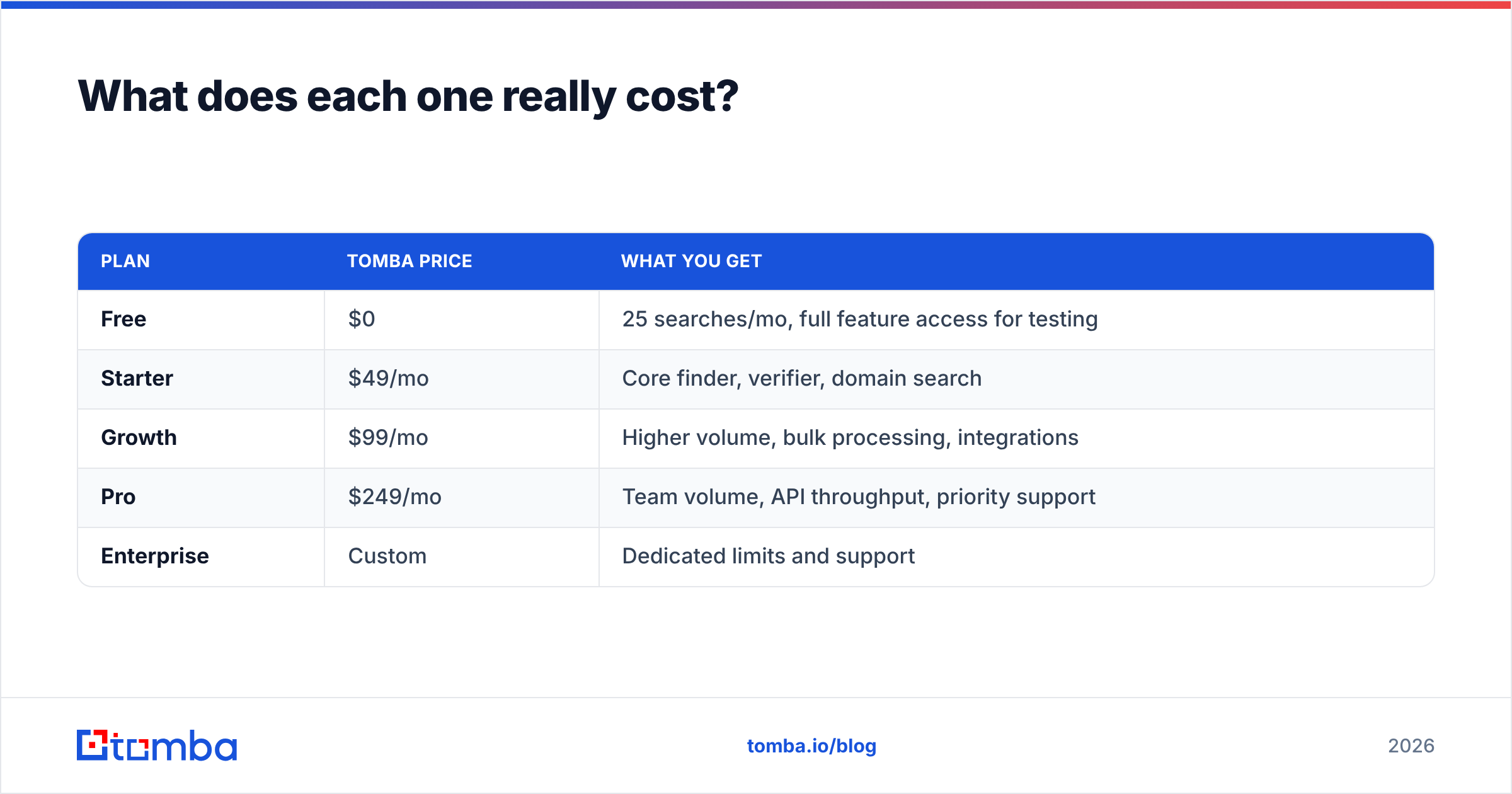
| Plan | Tomba price | What you get |
|---|---|---|
| Free | $0 | 25 searches/mo, full feature access for testing |
| Starter | $49/mo | Core finder, verifier, domain search |
| Growth | $99/mo | Higher volume, bulk processing, integrations |
| Pro | $249/mo | Team volume, API throughput, priority support |
| Enterprise | Custom | Dedicated limits and support |
Full details sit on the Tomba pricing page. The reason this comparison is useful is not that Tomba does what LeadGenius does. It does not. It is that a large share of what teams buy managed data for turns out to be "find and verify work emails for a list of people we already identified", and that job does not require a five-figure contract.

Who should choose LeadGenius?#
Pick LeadGenius when all three of these are true:
- Your ICP depends on attributes nobody sells off the shelf. Franchise counts, fleet size, specific machinery, regulatory licenses, localized store data. If your qualification logic needs a field that Apollo and ZoomInfo do not have, managed research is the only honest answer.
- You have a budget line for data, not just tools. If data spend has to come out of a $500/mo software budget, this conversation ends here.
- You need the dataset maintained, not just delivered. LeadGenius is built around ongoing refresh into your systems. One-off list purchases are a poor use of the model.
Enterprise ABM programs, market-expansion research, and TAM sizing projects are the classic fits. A 3-person startup testing its first outbound motion is not.
Who should choose LeadsForge?#
Pick LeadsForge when:
- Speed beats precision this month. You need to test three ICP hypotheses in two weeks and you would rather have 70% accurate lists now than 95% accurate lists in six weeks.
- Your ICP is mainstream. Software companies, agencies, ecommerce brands, common titles. AI list builders perform well in dense segments and poorly in sparse ones.
- You are comfortable adding your own verification layer. Treat the output as raw material, not finished product.
- You want month-to-month flexibility. No annual lock-in is a real advantage for teams whose strategy is still moving.
The failure case to watch for: teams that mistake the fluency of the AI interface for the quality of the underlying data. A well-written prompt does not fix a thin database.
Is there a better option for lean outbound teams?#
Often, yes, and it usually means unbundling the problem instead of buying one platform that promises everything.
Most outbound teams need three things: a list of target accounts, the right people at those accounts, and a deliverable email for each person. The first two you can frequently assemble yourself from public sources, LinkedIn, or a purpose-built provider. The third is a solved technical problem that costs far less than managed research.
That unbundled stack usually looks like:
- Account sourcing: your own ICP research, a market database, or a specialist vendor. BookYourData and similar providers do well here for teams that want a clean, prepaid list without a contract.
- Contact discovery: domain search to pull the people at a company, or a LinkedIn finder when you already have profiles.
- Email resolution and verification: a finder plus verifier pass, ideally in one system so the credit accounting is simple.
- Enrichment into your CRM: data enrichment via API, Zapier, or a native HubSpot or Salesforce integration.
The result is a stack you can cancel, swap, or scale one piece at a time. The managed-data alternative is a single contract you cannot unwind for 12 months.
How should you run a fair head-to-head test?#
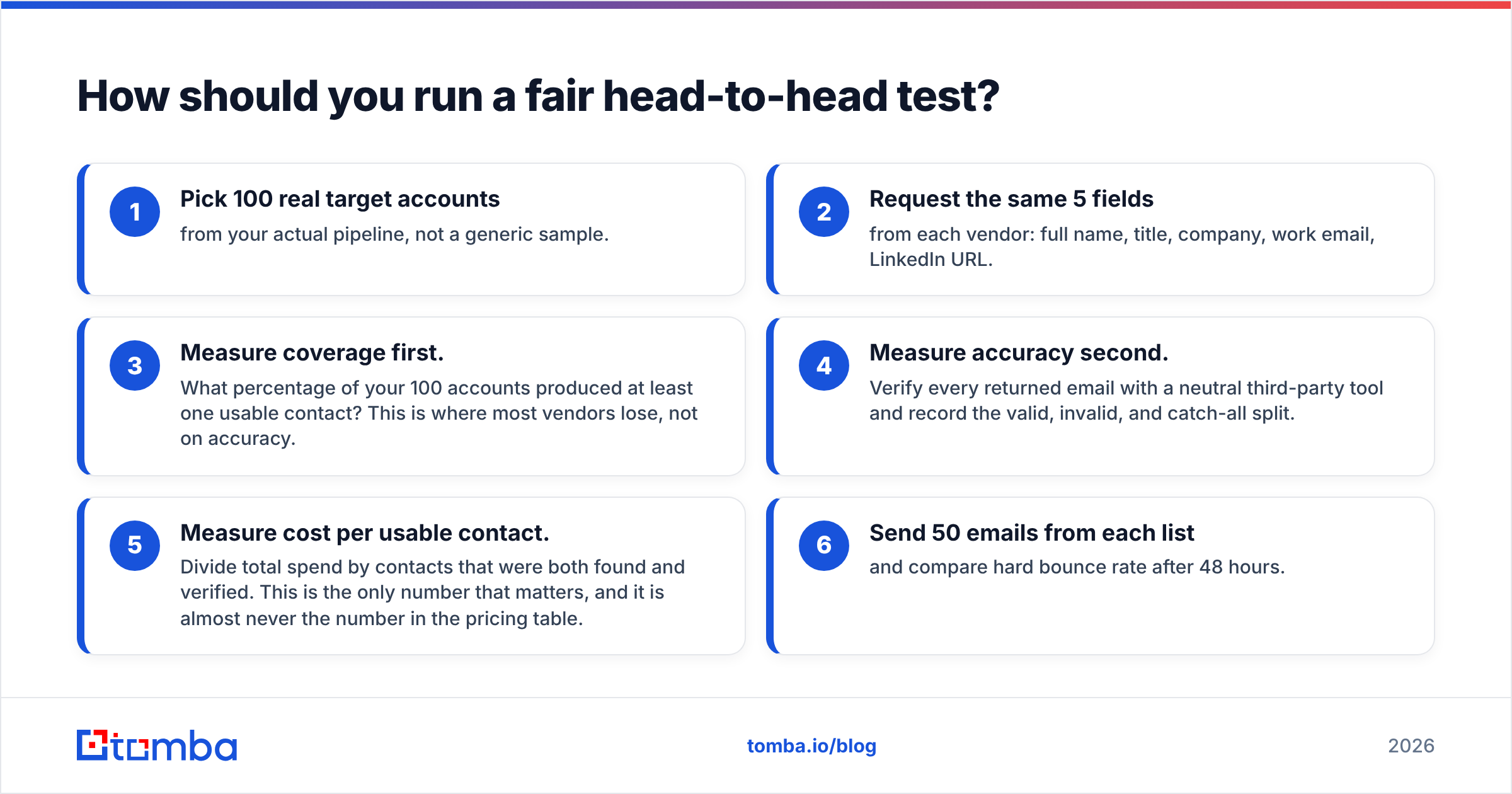
Do not evaluate on demo data. Run the same test on both vendors:
- Pick 100 real target accounts from your actual pipeline, not a generic sample.
- Request the same 5 fields from each vendor: full name, title, company, work email, LinkedIn URL.
- Measure coverage first. What percentage of your 100 accounts produced at least one usable contact? This is where most vendors lose, not on accuracy.
- Measure accuracy second. Verify every returned email with a neutral third-party tool and record the valid, invalid, and catch-all split.
- Measure cost per usable contact. Divide total spend by contacts that were both found and verified. This is the only number that matters, and it is almost never the number in the pricing table.
- Send 50 emails from each list and compare hard bounce rate after 48 hours.
Run that and the LeadGenius vs LeadsForge question usually answers itself for your specific segment, which is the only place the answer exists.
What is the verdict?#
LeadGenius wins if you need data that does not exist anywhere else and you can fund a service contract to get it. Its human-in-the-loop model is genuinely differentiated, and no AI list builder replaces a trained researcher confirming a custom attribute.
LeadsForge wins if your constraint is time and budget, your ICP is mainstream, and you are willing to verify the output yourself. For founders and small teams shipping campaigns weekly, that tradeoff is usually correct.
Neither wins if your actual problem is email accuracy at predictable cost. In that case you are overbuying, and the cheaper path is a focused tool plus your own account research.
If the job in front of you is turning names and domains into verified, deliverable work emails without a procurement cycle, start with the Tomba Email Finder. The free tier gives you 25 searches a month to test real accounts against your own list, Starter is $49/mo, and every plan includes verification so you are not stacking two vendors to solve one problem. Run the 100-account test above against your existing vendor and let the cost-per-usable-contact number make the decision for you.
Related guides#
// get started
Find, verify and enrich your first contacts today
Start on the free plan with 25 searches a month, then scale when your team is ready.
Free plan · No credit card required · GDPR & CCPA
// about the author