LeadGenius vs Ninjapear: Which B2B Data Tool Wins in 2026?
One is a managed, human-verified data service built for enterprise research. The other is a lean self-serve lookup tool. Here is how LeadGenius and Ninjapear actually differ on data quality, pricing transparency, and speed to first list.
LeadGenius vs Ninjapear is a strange matchup. One is a managed research team. The other is a cheap self-serve lookup tool. This guide shows where each one fits, what each costs, and when neither is the right buy.
TL;DR
- LeadGenius is a managed B2B data service. You brief a team, they build custom datasets with human checks, and you pay enterprise contract prices. It is strong for hard-to-find attributes. It is slow when you need 500 emails today.
- Ninjapear is the lean, self-serve side of this matchup. It is cheap, fast, and thin on public documentation. Treat every figure you read about it, here included, as something to confirm in a live trial.
- The two tools do not really compete. The honest question in LeadGenius vs Ninjapear is simple: do you need custom research, or high-volume contact lookup?
- If your bottleneck is finding and verifying work emails at volume, a dedicated email finder costs a fraction of either. It also returns results in seconds, not sprints.
- Budget check: managed data programs are usually annual contracts, quoted per project. Self-serve lookup tools sit in the $30–$100/month band. Tomba's Starter plan is $49/mo, with a free tier at 25 searches.
What are LeadGenius and Ninjapear?#
They solve different problems that happen to share a category page.
LeadGenius (leadgenius.com) is a data-as-a-service company. You do not log in and start scraping. You define the audience and the fields you need. That might be headcount by department, store locations, tech stack, or hiring signals. Those are things no standard database sells. A mix of software and human researchers builds the dataset for you, then keeps it fresh. The output lands in your CRM or warehouse.
Ninjapear is the smaller, newer name here. It sells itself as a self-serve contact-lookup tool: search, export, move on. Its public footprint is thin next to established vendors. Documentation is sparse, third-party reviews on G2 and Capterra are few, and published SLAs are limited. So you are buying on trial results, not track record.
Here is the structural difference behind every point in this LeadGenius vs Ninjapear comparison:
- Delivery model — LeadGenius sells a service, with human QA in the loop. Ninjapear sells a tool you run yourself.
- Time to first record — Managed research runs on project timelines, so weeks. Self-serve lookup runs on API timelines, so seconds.
- Coverage — LeadGenius goes deep on custom fields no database sells off the shelf. Ninjapear goes wide on standard fields: name, title, company, email.
- Pricing posture — LeadGenius quotes. Ninjapear publishes. That one difference decides who can buy each tool.
- Who owns the outcome — With a managed service, a vendor account team owns accuracy. With a self-serve tool, your RevOps lead owns it.

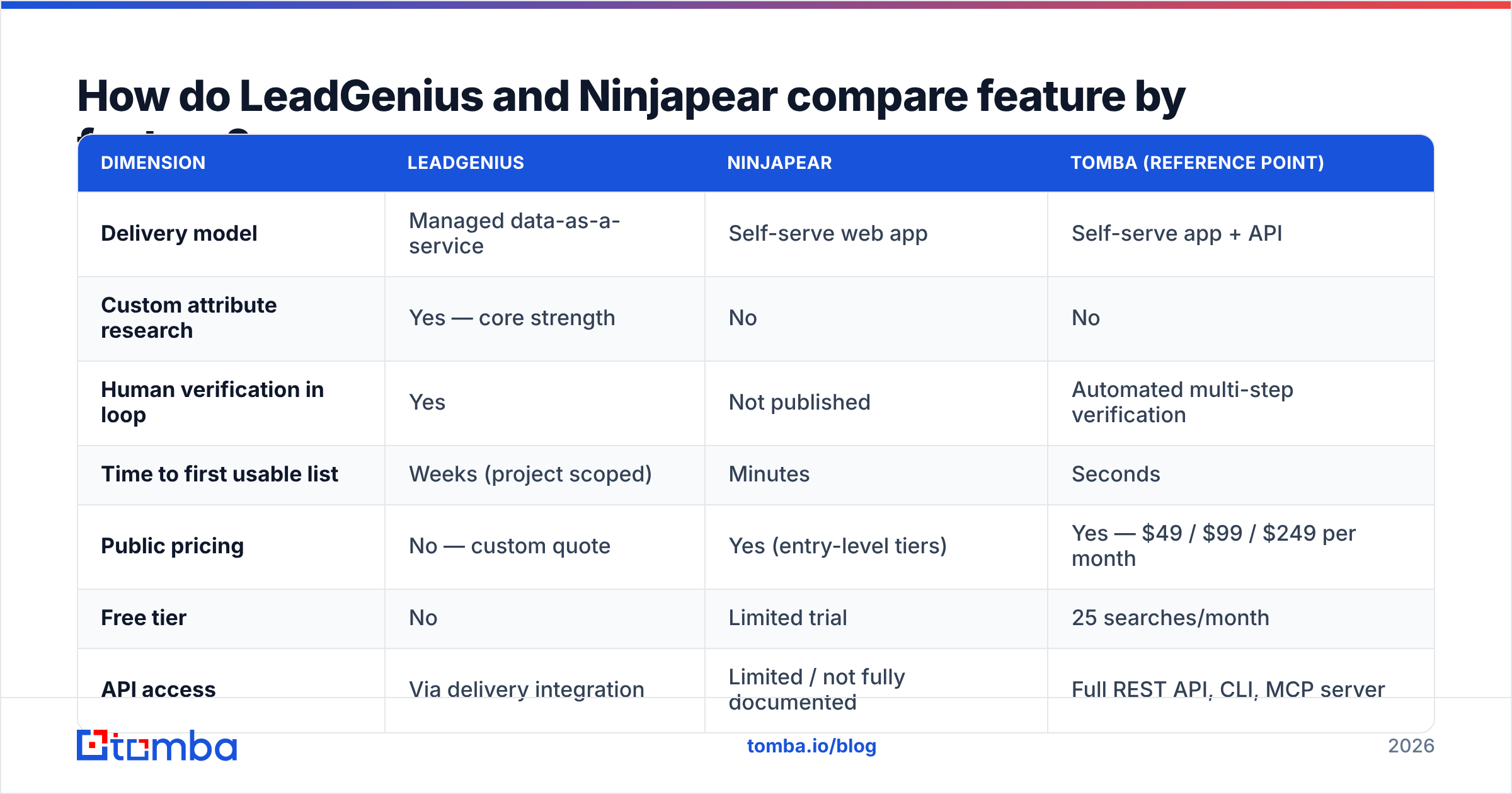
How do LeadGenius and Ninjapear compare feature by feature?#
| Dimension | LeadGenius | Ninjapear | Tomba (reference point) |
|---|---|---|---|
| Delivery model | Managed data-as-a-service | Self-serve web app | Self-serve app + API |
| Custom attribute research | Yes — core strength | No | No |
| Human verification in loop | Yes | Not published | Automated multi-step verification |
| Time to first usable list | Weeks (project scoped) | Minutes | Seconds |
| Public pricing | No — custom quote | Yes (entry-level tiers) | Yes — $49 / $99 / $249 per month |
| Free tier | No | Limited trial | 25 searches/month |
| API access | Via delivery integration | Limited / not fully documented | Full REST API, CLI, MCP server |
| Bulk enrichment | Yes, as a project | Small-batch CSV | Bulk CSV + API at every paid tier |
| Best fit | Enterprise ABM, TAM mapping | Solo founders, light prospecting | Outbound teams needing verified emails at volume |
Read that table as a fit test, not a scoreboard. LeadGenius trails on time-to-list, but that delay is what custom research costs. Ninjapear trails on custom attributes, and that is fine too. It never claimed to do research.
The trap is buying the wrong shape. Teams sign six-figure managed data contracts because they need 20,000 verified emails. That is a $99/month problem. Others try to build a custom firmographic dataset with a $30 lookup tool. They spend three months of an analyst's time doing it badly.
Which one has better data accuracy?#
Accuracy splits along the same line as everything else. LeadGenius wins on fields nobody else sells. Standard contact data is a commodity fight.
Take custom fields. Does this location have a drive-through? Which franchises run a given POS system? LeadGenius is credible here, because a person checked. Automated databases do not carry those columns at all, so their accuracy on them is zero.
Now take the fields most outbound teams run on: work email, job title, company domain. The picture flips. Those fields go stale fast. Roughly 25–30% of B2B contact data decays each year as people change jobs. What matters is not who researched a record once. It is who re-checks it the moment you export. That is a systems problem, and verification engines beat a quarterly refresh cycle at it.

Three things to test in any trial, whichever vendor you pick:
- Bounce rate on a live send, not the claimed accuracy number. Export 200 records, run them through an independent email verifier, and compare.
- Catch-all handling. A tool that marks every catch-all domain as valid is inflating its own score. Ask how catch-alls are graded.
- Coverage on your ICP, not global coverage. A database with 300M contacts is useless if it holds 40 of your 900 target accounts.
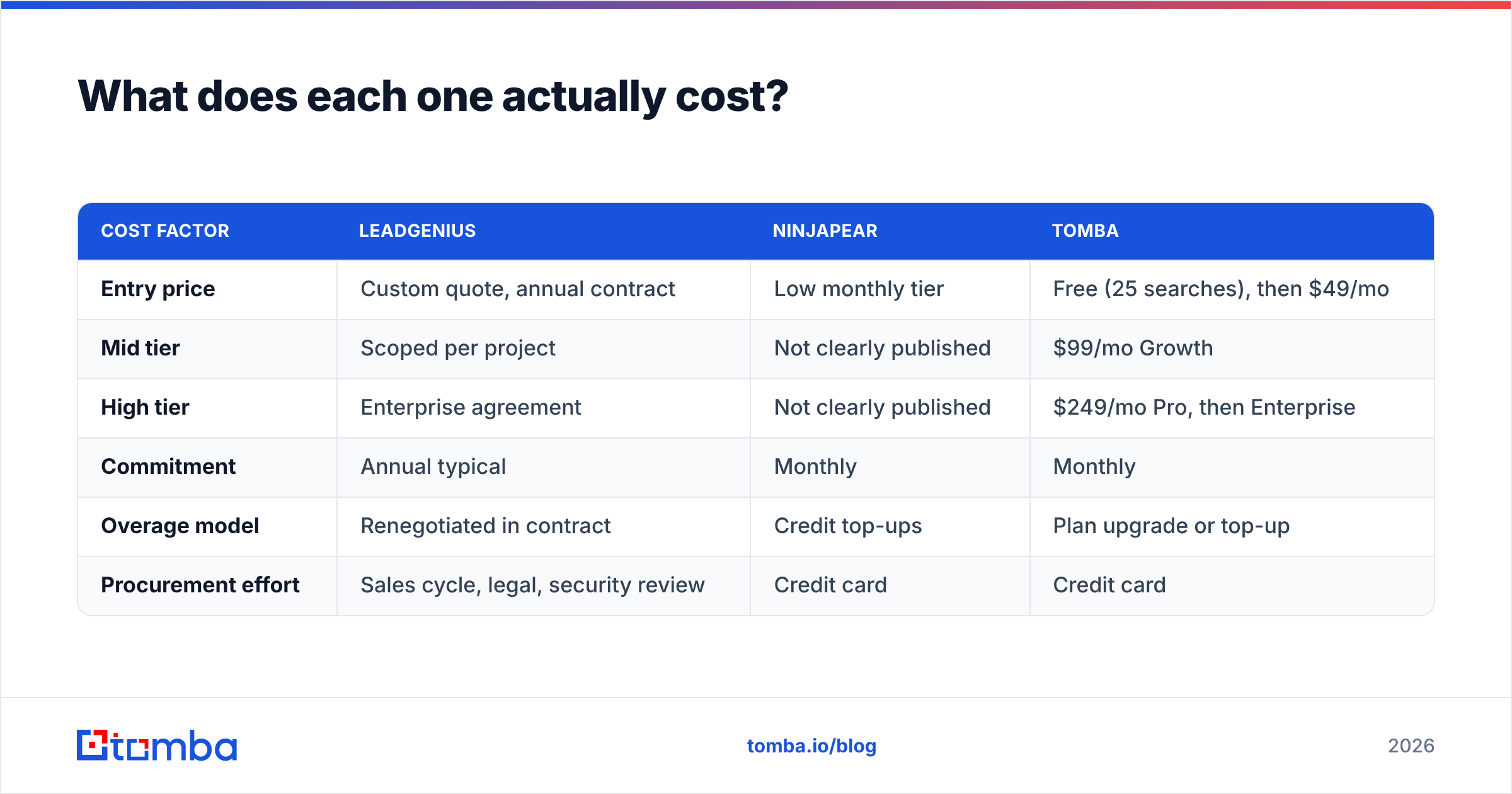
What does each one actually cost?#
| Cost factor | LeadGenius | Ninjapear | Tomba |
|---|---|---|---|
| Entry price | Custom quote, annual contract | Low monthly tier | Free (25 searches), then $49/mo |
| Mid tier | Scoped per project | Not clearly published | $99/mo Growth |
| High tier | Enterprise agreement | Not clearly published | $249/mo Pro, then Enterprise |
| Commitment | Annual typical | Monthly | Monthly |
| Overage model | Renegotiated in contract | Credit top-ups | Plan upgrade or top-up |
| Procurement effort | Sales cycle, legal, security review | Credit card | Credit card |
Two practical notes. First, vendors change prices. Check each vendor's own page before you budget.
Second, the hidden cost of a managed service is rarely the invoice. It is the lead time. If your campaign calendar moves faster than your data vendor, you will buy a second, self-serve tool anyway. Plan for that on day one, instead of finding out in month four. The Tomba pricing page shows what transparent tiering looks like.

Is a managed data service worth it over a self-serve tool?#
Yes, in three situations.
- Your target fields do not exist in any database. Store counts, installed equipment, shelf placement, license status. If you cannot buy the column, you have to commission it.
- You are mapping a total addressable market once, carefully. A one-time TAM build with 40 custom fields earns human research. Weekly prospecting never will.
- You need documented provenance for compliance. Some regulated buyers must know where each record came from and who checked it. Managed services can answer that. Most scrapers cannot.
Outside those three, self-serve wins on math. A rep who needs 100 verified contacts a week needs speed and a credit balance, not a scoping call. That is why many teams run a hybrid stack: a managed provider for the annual market map, and a fast email finder for daily list building.
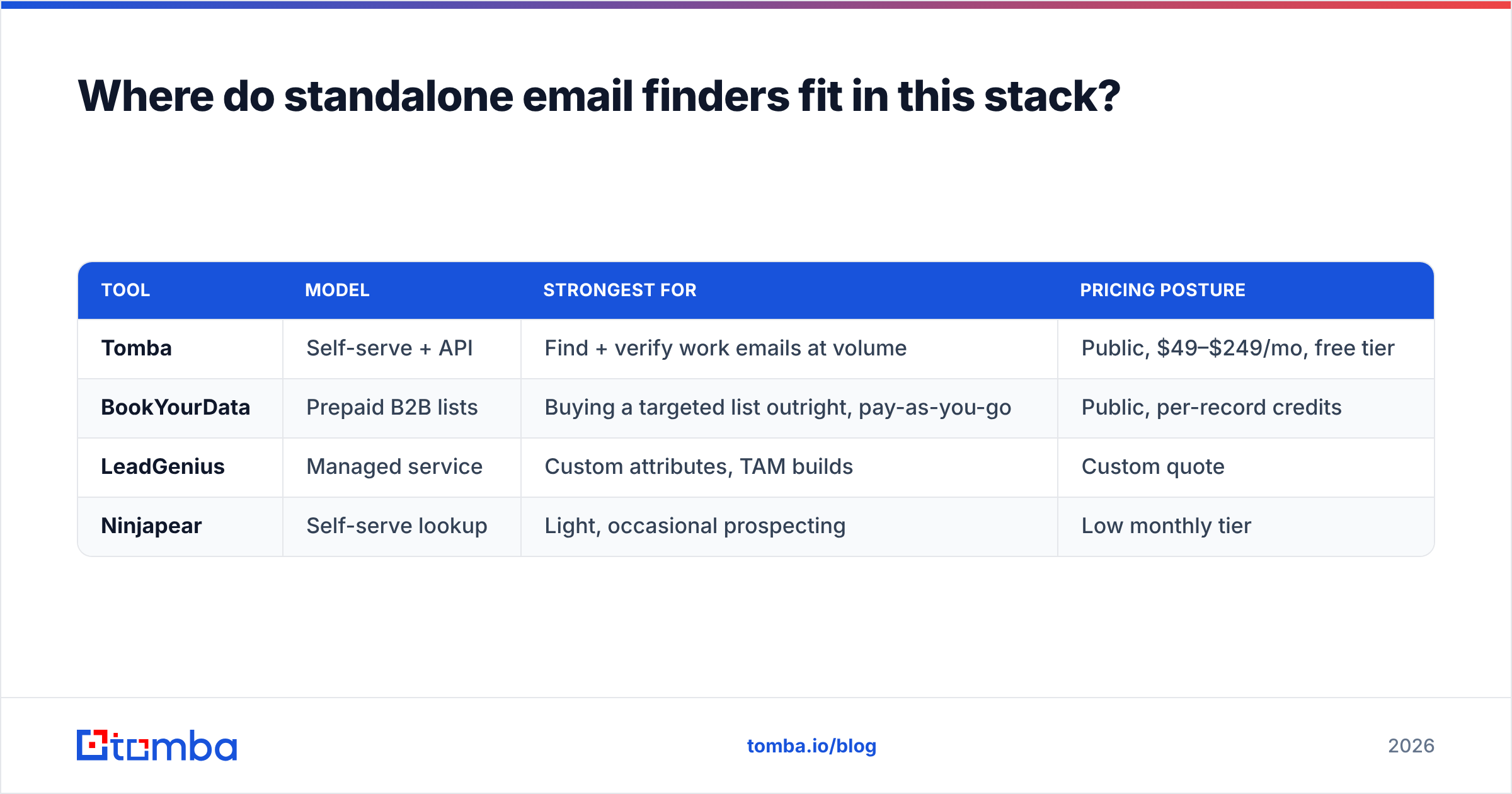
Where do standalone email finders fit in this stack?#
They fill the gap that neither side of LeadGenius vs Ninjapear covers well: high-volume, on-demand contact discovery, with verification in the same call.
The workflow is simple. You already know the accounts. They come from your TAM map, your CRM, a conference list, or a funding announcement. You do not need research. You need the right person and a deliverable address. A domain search returns every public email pattern at a company. An email finder resolves a specific name. Verification runs before the record reaches your sequencing tool.
Tools worth shortlisting alongside the two in this post:
| Tool | Model | Strongest for | Pricing posture |
|---|---|---|---|
| Tomba | Self-serve + API | Find + verify work emails at volume | Public, $49–$249/mo, free tier |
| BookYourData | Prepaid B2B lists | Buying a targeted list outright, pay-as-you-go | Public, per-record credits |
| LeadGenius | Managed service | Custom attributes, TAM builds | Custom quote |
| Ninjapear | Self-serve lookup | Light, occasional prospecting | Low monthly tier |
BookYourData earns a mention for a case neither LeadGenius nor a lookup tool nails. You want a clean, targeted list now, with no subscription and no research project. Its pay-as-you-go model and accuracy guarantee make it a fair one-off buy.
For engineering-led teams, the deciding factor is usually integration surface. A documented email finder API that drops into an enrichment job beats any UI export. The refresh becomes a cron task, not a quarterly human ritual. Managed services integrate too, but on their cadence, not yours.
How should you run the evaluation?#
Run the same three-week test on every vendor, including the two in this LeadGenius vs Ninjapear comparison. Skip the demo-only decision.
- Week 1 — sample. Ask each vendor for 250 records against one narrow ICP segment you know well. Narrow beats broad. You can only spot errors in a segment you can fact-check.
- Week 2 — independent checks. Run every sample through a neutral verifier you control. Record bounce risk, catch-all share, and missing fields per vendor. Do not trust each vendor's own validity flag.
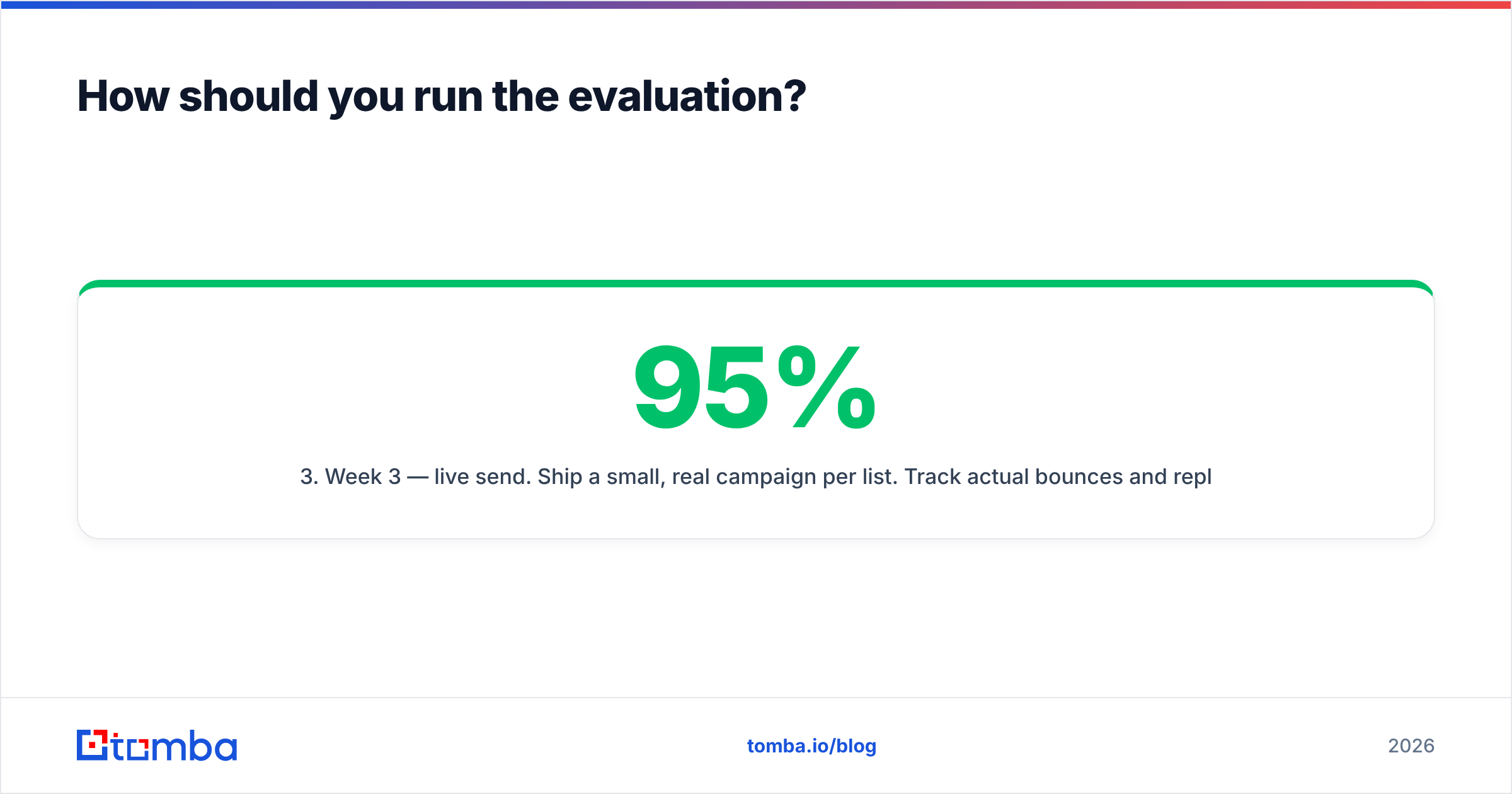
- Week 3 — live send. Ship a small, real campaign per list. Track actual bounces and reply rate. A list with 95% valid records and a 3% reply rate loses to one with 88% valid and a 9% reply rate. Deliverability and relevance are different metrics.
- Score on cost per replied contact, not cost per record. That one change kills most bad data buys before anyone signs.
If you want a primer on the category first, the lead generation overview is a neutral place to align stakeholders on terms.
What is the verdict on LeadGenius vs Ninjapear?#
Pick LeadGenius if you need data that does not exist yet. You also need the budget and the calendar to commission it. It is the more serious operation of the two, with a real enterprise track record. It solves a problem no self-serve tool can touch. The quote-based pricing and the project timeline are the price of custom research.
Pick Ninjapear if you are a solo founder or a small team. That means occasional prospecting and the cheapest path to a few hundred contacts. Go in with open eyes. Run a trial, test the exports yourself, and do not build a core revenue process on a vendor with thin documentation.
Pick neither if your real job is volume email discovery. That is a third category. Paying managed-service rates for it, or living with a light tool's coverage gaps, is the most common data-stack mistake we see.
Ready to fix the email-finding half of the problem?#
If what you need is verified work emails, fast and at volume, start with the Tomba Email Finder. Find addresses by domain, name, or company. Verification runs inline, so the records that reach your sequencer are the ones that land.
The free tier gives you 25 searches a month, so you can test coverage on your own ICP before you spend anything. Starter is $49/mo when you are ready to scale. Run it against your LeadGenius vs Ninjapear samples and compare bounce rates on real sends. That is the only benchmark that settles this.
Related guides#
// get started
Find, verify and enrich your first contacts today
Start on the free plan with 25 searches a month, then scale when your team is ready.
Free plan · No credit card required · GDPR & CCPA
// about the author