LeadGibbon Pricing in 2026: Plans, Real Costs & Alternatives
LeadGibbon sells B2B lead lists and email lookups by credit. Here is how the pricing model actually behaves once you run real campaigns — plus the cost math most buyers miss.
TL;DR
- LeadGibbon sells B2B contact data on a credit model: you buy a monthly allowance of lookups/exports, and every record you reveal burns credits whether or not the email is usable.
- The sticker price is not the real price. Your true number is cost per verified, deliverable email, and that is usually 20–60% higher than the plan math suggests once bounces and catch-alls are removed.
- LeadGibbon's strength is fast list-building from LinkedIn-style searches and clean CSV exports. Its weakness for technical teams is depth of API tooling and verification granularity.
- If you mostly need domain-based email discovery plus verification at a predictable price, Tomba's Starter at $49/mo and Growth at $99/mo cover the same job with a documented API and a free tier to test first.
- Before you commit to any annual contract, run the same 200-contact sample through two or three tools and compare deliverable hit rate, not raw match rate.
What is LeadGibbon and who actually buys it?#
LeadGibbon is a B2B lead data tool. You search for companies or people, it returns business email addresses and company firmographics, and you export the result to CSV or push it into your CRM. The typical buyer is a small sales team or an agency that needs a list of 500–5,000 targeted contacts this week, without building a data pipeline.
Think of it like a wholesale grocer for contact data. You are not paying for a single email — you are paying for shelf access. The question is whether the shelf is stocked with what your ICP actually needs, and how much of it spoils before you use it.
That framing matters because LeadGibbon pricing, like nearly every tool in this category, is quoted in credits rather than in outcomes. A plan that advertises "5,000 leads" is really advertising 5,000 attempts. The gap between those two numbers is where budgets die.
You can see the vendor's current published tiers on leadgibbon.com — always check there before trusting any third-party figure, including this one. Data vendors reprice quietly and often.

How does LeadGibbon pricing actually work?#
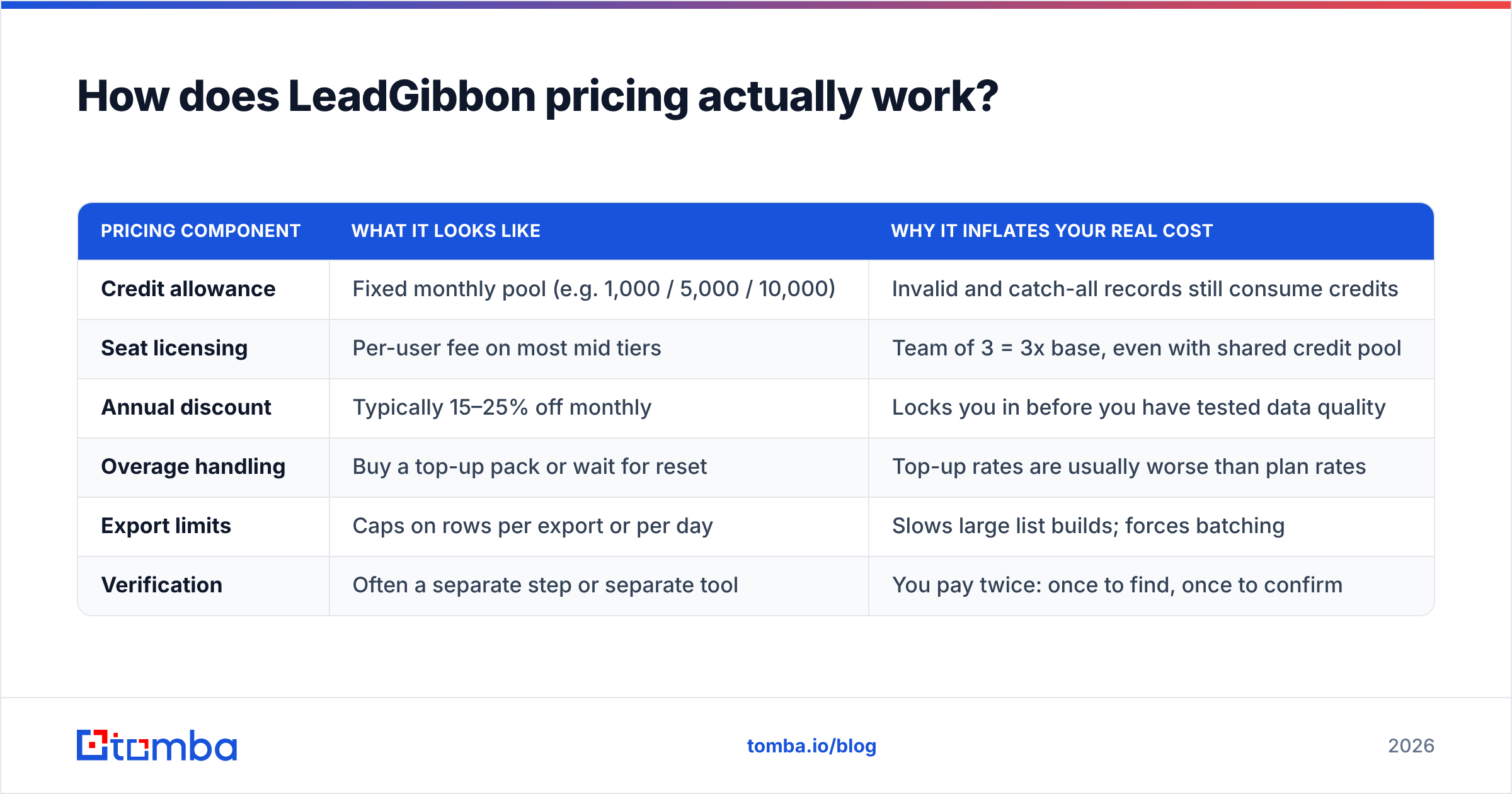
The model has three moving parts, and nearly every data vendor uses some version of them:
- A monthly credit allowance. One credit typically equals one revealed contact record. Some vendors charge extra credits for phone numbers or enriched fields.
- Seat count. Plans are often priced per user, so a three-person SDR pod can cost triple the headline number even if total credit usage stays flat.
- Rollover and expiry rules. Unused credits usually expire at the end of the billing cycle. If your outbound is seasonal, you are pre-paying for months you will not use.
Here is the shape of what you are buying, independent of the exact dollar figures the vendor publishes this quarter:
| Pricing component | What it looks like | Why it inflates your real cost |
|---|---|---|
| Credit allowance | Fixed monthly pool (e.g. 1,000 / 5,000 / 10,000) | Invalid and catch-all records still consume credits |
| Seat licensing | Per-user fee on most mid tiers | Team of 3 = 3x base, even with shared credit pool |
| Annual discount | Typically 15–25% off monthly | Locks you in before you have tested data quality |
| Overage handling | Buy a top-up pack or wait for reset | Top-up rates are usually worse than plan rates |
| Export limits | Caps on rows per export or per day | Slows large list builds; forces batching |
| Verification | Often a separate step or separate tool | You pay twice: once to find, once to confirm |
Entry-level plans in this category generally start in the $49–$99/month range for a single seat with a modest credit pool, scaling to several hundred dollars a month for team plans with larger allowances. LeadGibbon has historically sat in that same band. Treat those as ballpark ranges and confirm on the vendor's own page — the point of this post is the structure of the cost, which changes far less often than the numbers do.
What is the real cost per usable email?#
This is the only metric that matters, and almost nobody calculates it before buying.
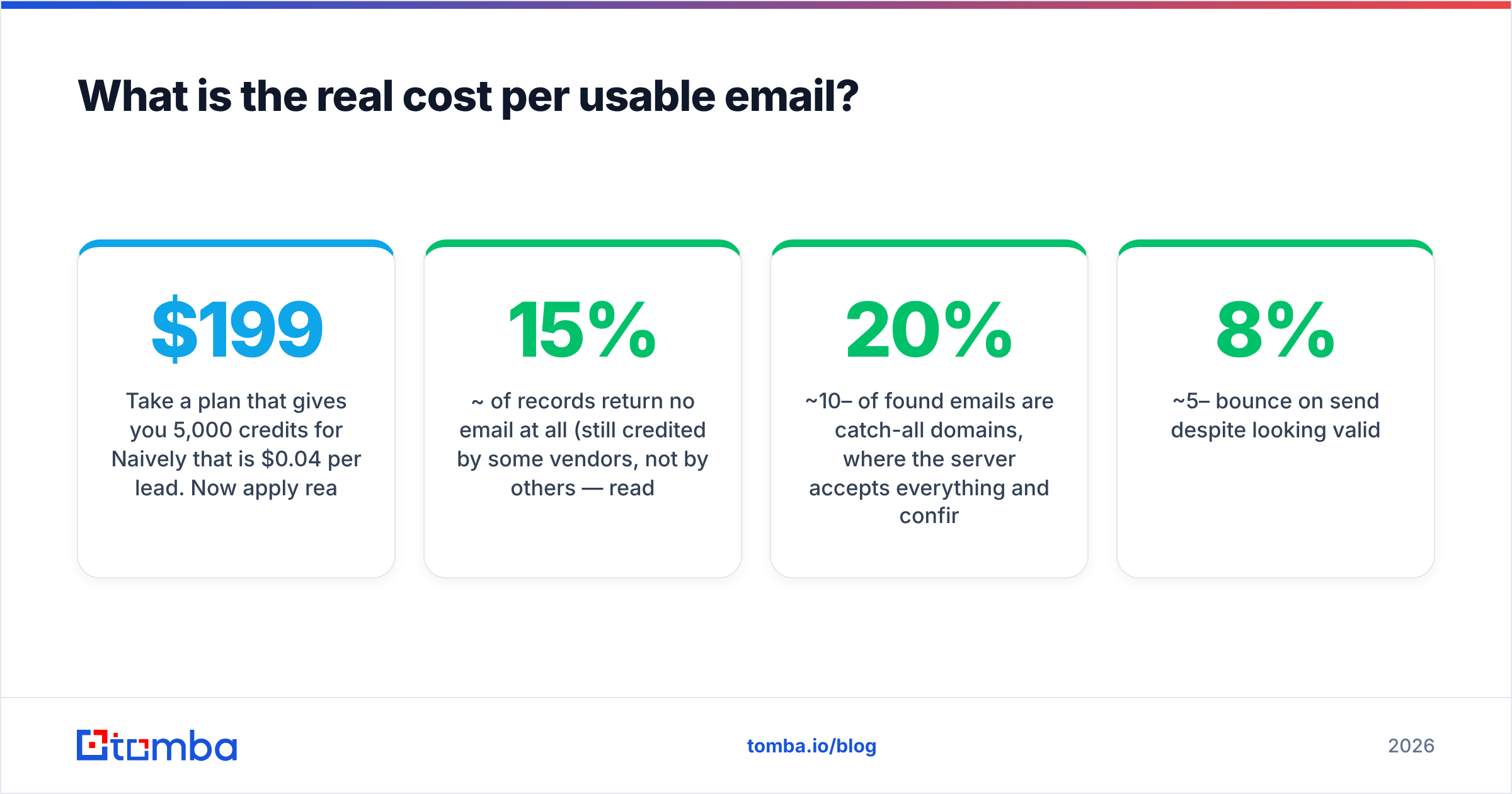
Take a plan that gives you 5,000 credits for $199/month. Naively that is $0.04 per lead. Now apply reality:
- ~15% of records return no email at all (still credited by some vendors, not by others — read the fine print).
- ~10–20% of found emails are catch-all domains, where the server accepts everything and confirms nothing.
- ~5–8% bounce on send despite looking valid.
- Some portion are role accounts (info@, sales@) that your ICP definition should exclude anyway.
Run that through and 5,000 credits becomes roughly 3,000–3,400 genuinely mailable, ICP-matched contacts. Your real cost per usable email is now closer to $0.06–$0.07 — a 50%+ premium over the advertised rate.

Two levers change that math more than price negotiation ever will:
- Don't spend credits on records you would reject anyway. Filter hard on the search side — seniority, headcount, tech stack, geography — before revealing.
- Verify before you send, not after you bounce. A dedicated email verifier run costs a fraction of a finder credit and protects your sending domain. Bounces are not just wasted money; they are reputation damage that suppresses the next six campaigns.
If a vendor's catch-all handling is vague, assume the worst. Catch-all domains are the single biggest source of "the data looked fine and my bounce rate was 9%" postmortems. Tools that expose a dedicated catch-all verifier let you make an explicit risk decision per domain instead of gambling on the whole list.
Is LeadGibbon worth it compared to the alternatives?#
Depends on the job. LeadGibbon is built around list acquisition — you want a spreadsheet of people fitting a profile, fast. That is a legitimate and common need, and for a non-technical SDR it is a reasonable fit.
Where it gets weaker is when your workflow becomes programmatic: enriching inbound signups in real time, running domain-wide sweeps, or wiring email discovery into an internal tool. That is an API problem, not a CSV problem, and list-first vendors tend to treat the API as a secondary surface.
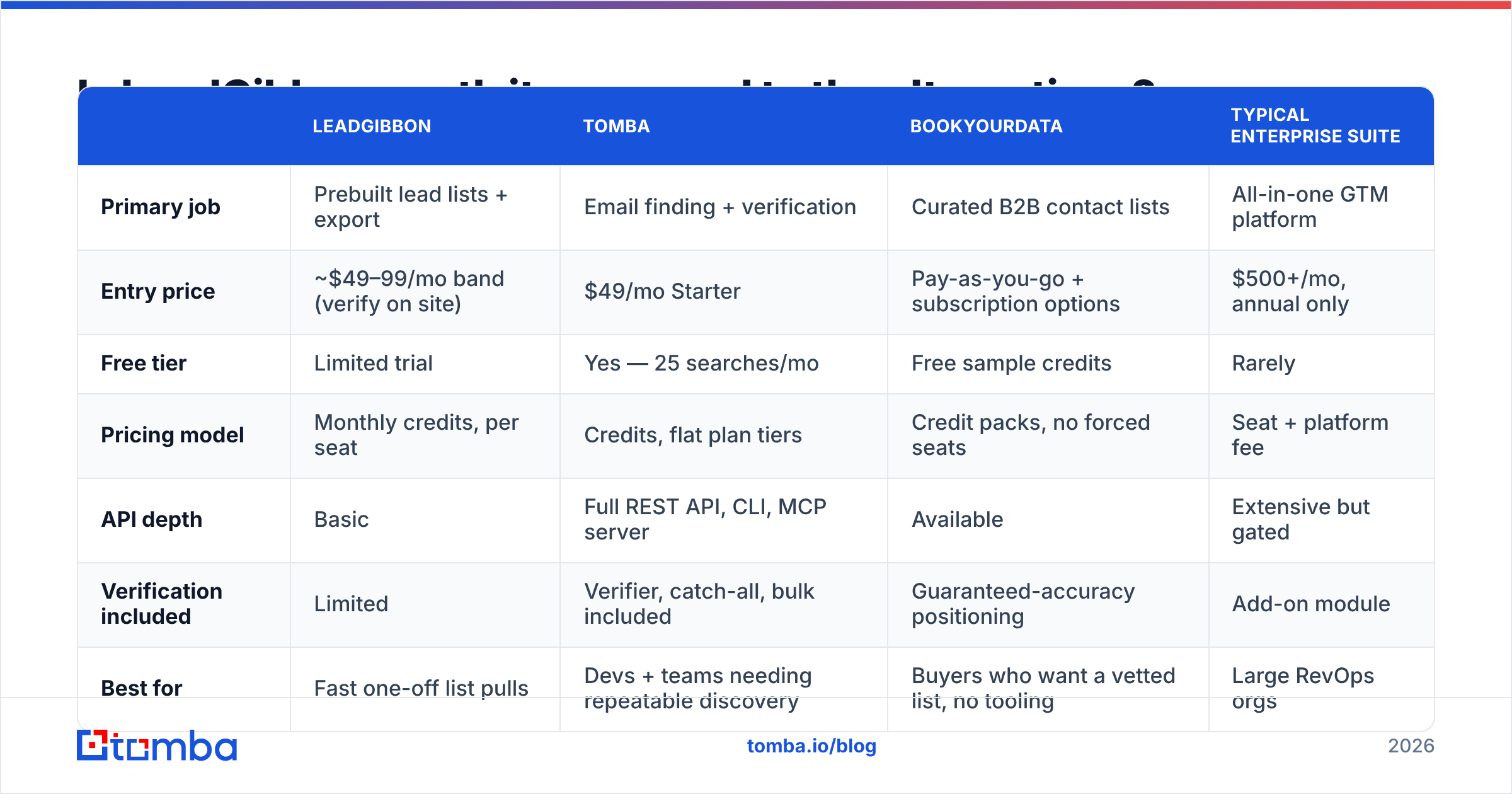
| LeadGibbon | Tomba | BookYourData | Typical enterprise suite | |
|---|---|---|---|---|
| Primary job | Prebuilt lead lists + export | Email finding + verification | Curated B2B contact lists | All-in-one GTM platform |
| Entry price | ~$49–99/mo band (verify on site) | $49/mo Starter | Pay-as-you-go + subscription options | $500+/mo, annual only |
| Free tier | Limited trial | Yes — 25 searches/mo | Free sample credits | Rarely |
| Pricing model | Monthly credits, per seat | Credits, flat plan tiers | Credit packs, no forced seats | Seat + platform fee |
| API depth | Basic | Full REST API, CLI, MCP server | Available | Extensive but gated |
| Verification included | Limited | Verifier, catch-all, bulk included | Guaranteed-accuracy positioning | Add-on module |
| Best for | Fast one-off list pulls | Devs + teams needing repeatable discovery | Buyers who want a vetted list, no tooling | Large RevOps orgs |
BookYourData deserves a specific mention here: it takes a different and honest approach by leaning on accuracy guarantees and pay-as-you-go packs rather than forcing a subscription. If your buying pattern is bursty — a big push in Q1, nothing in Q2 — a credit-pack vendor is structurally a better fit than any monthly plan, LeadGibbon's or anyone else's.
For a broader field view, G2's data provider category and Capterra both carry enough verified reviews to spot the recurring complaints per vendor. Read the 3-star reviews, not the 5-star or 1-star ones — that is where the real trade-offs live.

What hidden costs should you budget for?#
Five line items that never appear on a pricing page:
- Re-verification decay. B2B contact data goes stale at roughly 2–3% per month as people change jobs. A list you bought in January is meaningfully worse by June. Budget a re-verification pass every quarter, or accept rising bounce rates.
- The dedupe tax. Buying from two vendors means overlap. Without deduplication you will email the same prospect twice from two sequences — the fastest way to look amateur. A remove duplicates step costs nothing and saves the relationship.
- Seat creep. You start with one seat. Six months later three people need access. Per-seat vendors capture that growth automatically; flat-plan vendors do not.
- Deliverability remediation. If a bad list burns your domain, you are looking at warmup time, possibly a new sending domain, and weeks of suppressed volume. That cost dwarfs any subscription difference.
- Engineering time. If the API is thin, someone on your team is writing CSV glue scripts. At a loaded engineering rate, forty hours of glue work outweighs a year of price difference between plans.

How should you evaluate any lead data vendor in 2026?#
Run a bake-off. It takes an afternoon and it is the only evaluation method that survives contact with reality.
- Build a 200-row control set. Real companies in your actual ICP, names you can independently confirm. Include a mix of easy targets (large companies, common name formats) and hard ones (small firms, non-Latin names, agencies with custom domains).
- Run it through every candidate tool. Same input, same day. Record match rate, and separately record how many results come back marked catch-all or risky.
- Send a genuine warmup-safe campaign to a 50-address subsample from each vendor. Measure hard bounce rate. This is the number that separates marketing claims from data quality.
- Score the tooling, not just the data. Can you hit it from a script? Is there a bulk email finder for large batches? Does it plug into your CRM without middleware?
- Compute cost per delivered email. Total spend divided by the count of addresses that actually landed in an inbox. Rank vendors on that number alone.
- Check the exit. Can you export your data if you leave? Some platforms make historical enrichment hard to extract. Ask before signing, not after.
A tool that wins on raw match rate and loses on bounce rate is a worse tool, full stop. High match rates are trivially gamed by returning guessed permutations without verifying them — which is exactly what a free email permutator does, and you should not be paying subscription money for guesswork.
Does the credit model ever make sense?#
Yes — when your volume is genuinely predictable and reasonably high. Credits are essentially a volume commitment in exchange for a lower unit rate. If you send 3,000 cold emails a month like clockwork, a committed plan will beat pay-as-you-go pricing.
Credits work badly in three situations:
- Spiky usage. Campaign-driven teams that go quiet between pushes forfeit credits every slow month.
- Exploratory research. When you are still defining your ICP, you will burn credits on segments you end up abandoning.
- Enrichment-on-signup. Inbound enrichment volume tracks your traffic, which you do not control. A hard monthly cap means either overpaying for headroom or hitting a wall on your best week.
In the second and third cases, look for a vendor with a meaningful free tier so discovery work does not consume paid budget, and a flat plan structure so a good month does not trigger overage pricing. That is a large part of why Tomba pricing keeps a free tier at 25 searches per month, then steps cleanly to $49 Starter, $99 Growth, and $249 Pro without per-seat multipliers layered on top.
What's the verdict on LeadGibbon pricing?#
LeadGibbon is a fair-value tool for its specific job: pulling targeted B2B lists quickly without technical setup. If that is your whole workflow and your volume is steady, the pricing is in line with the market and there is no scandal to report.
The case against it is not the price — it is the shape. Credit-metered, seat-multiplied, list-first pricing rewards vendors when your data goes stale and punishes you for testing. If your outbound is bursty, if you need programmatic access, or if verification quality is your bottleneck rather than list volume, you are paying for the wrong shape of product.
Do the bake-off. Use the control-set method above. Whatever number comes out of the cost-per-delivered-email calculation is your answer, and it will be a different answer than the pricing page implies.
Want to run that test without spending anything first? Start with the Tomba Email Finder free tier — 25 searches a month, no card — and push your 200-row control set through it alongside whatever you are evaluating. Compare deliverable hit rate head to head, then decide. If it wins your bake-off, Starter is $49/mo with verification, domain search, and full Tomba API access in the same plan. If it does not, you have lost nothing but an afternoon — and you will finally know your real cost per usable lead.
Related guides#
// get started
Find, verify and enrich your first contacts today
Start on the free plan with 25 searches a month, then scale when your team is ready.
Free plan · No credit card required · GDPR & CCPA
// about the author