LeadGibbon Reviews 2026: Honest Pros, Cons and Verdict
LeadGibbon promises verified B2B emails and a LinkedIn-friendly workflow, but the pricing model and database depth draw mixed reactions. Here is what the reviews actually say in 2026.
TL;DR
- LeadGibbon is a B2B lead database and email-finding tool best known for its LinkedIn Chrome extension and "download a list, get emails appended" workflow. It is genuinely quick for small, one-off list builds.
- The most common complaints across G2, Capterra and Reddit threads are the same three: credits that expire, uneven coverage outside US mid-market, and a support loop that gets slow on billing questions.
- It is priced as a list product, not an infrastructure product. If you need an API, bulk pipelines or CRM-native enrichment, LeadGibbon is not the right shape.
- Accuracy is acceptable for common corporate domains and drops noticeably on catch-all domains, small agencies and non-English-speaking markets.
- Verdict: fine for a solo SDR building a few hundred contacts a month. Teams that need verification depth, API access and predictable per-credit cost should compare it against Tomba, BookYourData and Findymail before committing to an annual plan.
What is LeadGibbon and who actually uses it?#
LeadGibbon is a lead-generation tool that sits between a contact database and a browser extension. You search by job title, company, industry or location, or you run its extension over a LinkedIn Sales Navigator search, and it returns a downloadable list with business emails attached. The output is a CSV or a direct push to Google Sheets. That is the core loop, and it has not changed much in years.
The typical user is a solo founder, a one-person SDR function, or a small agency building targeted lists for cold outreach. If you have ever exported a Sales Navigator search and then thought "now I need emails for these 300 people," you are in LeadGibbon's target market. You can see the product's own positioning on leadgibbon.com.
What LeadGibbon is not: it is not a sequencer, it is not a CRM, and it is not an enrichment layer you wire into a data warehouse. Reviews that call it "limited" are often reviews from buyers who expected a platform and got a list tool. That is a fit problem more than a quality problem, and it is worth separating the two before you read another star rating.

What do LeadGibbon reviews say about accuracy?#
Accuracy is where LeadGibbon reviews split hardest, and the split is predictable once you know how the data is assembled.
On common corporate domains — a 500-person SaaS company in Austin, a mid-market logistics firm in Ohio — users consistently report usable hit rates. The emails follow a discoverable pattern, the domain has enough public footprint for pattern inference, and the SMTP handshake resolves cleanly. Those reviews are positive and fair.
The drop-off shows up in four places, and it shows up in nearly every negative review:
- Catch-all domains. When a domain accepts every address, a simple SMTP ping cannot confirm anything. LeadGibbon tends to return the pattern-guess anyway. Without a dedicated catch-all verifier, you are shipping unconfirmed addresses into a campaign and letting your sending domain absorb the risk.
- Small companies and agencies. Under roughly 20 employees, public email footprint thins out fast. Reviewers report blank rows or generic info@ addresses standing in for the named contact they asked for.
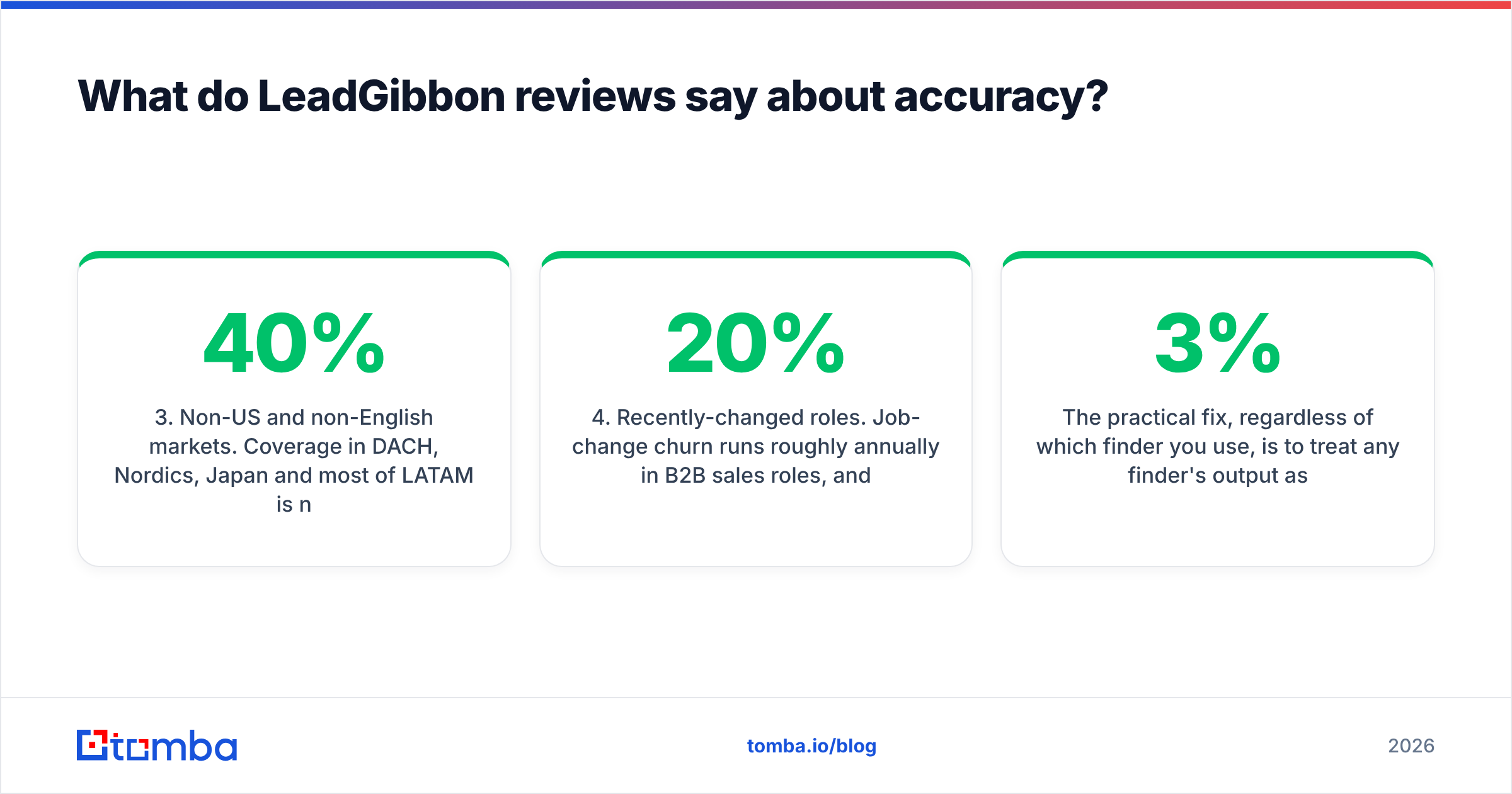
- Non-US and non-English markets. Coverage in DACH, Nordics, Japan and most of LATAM is noticeably weaker. Several reviewers in EU markets describe fill rates under 40%.
- Recently-changed roles. Job-change churn runs roughly 20% annually in B2B sales roles, and a database that refreshes on a slow cycle will hand you people who left eight months ago.
The practical fix, regardless of which finder you use, is to treat any finder's output as a candidate list and run it through a separate email verifier before it touches your sending domain. Bounce rates above 3% start visibly damaging inbox placement, and no amount of clever copy recovers a burned domain. Google's own postmaster guidance and the bulk-sender requirements that took effect in 2024 make this non-negotiable rather than best-practice.
How much does LeadGibbon cost compared to alternatives?#
LeadGibbon prices in lead packs rather than flat monthly credit pools, and that structure is the single most-mentioned frustration in its reviews. Buyers report credits tied to a billing period, and unused credits not rolling over. If your prospecting volume is lumpy — heavy in Q1, light in August — you pay for capacity you never use.
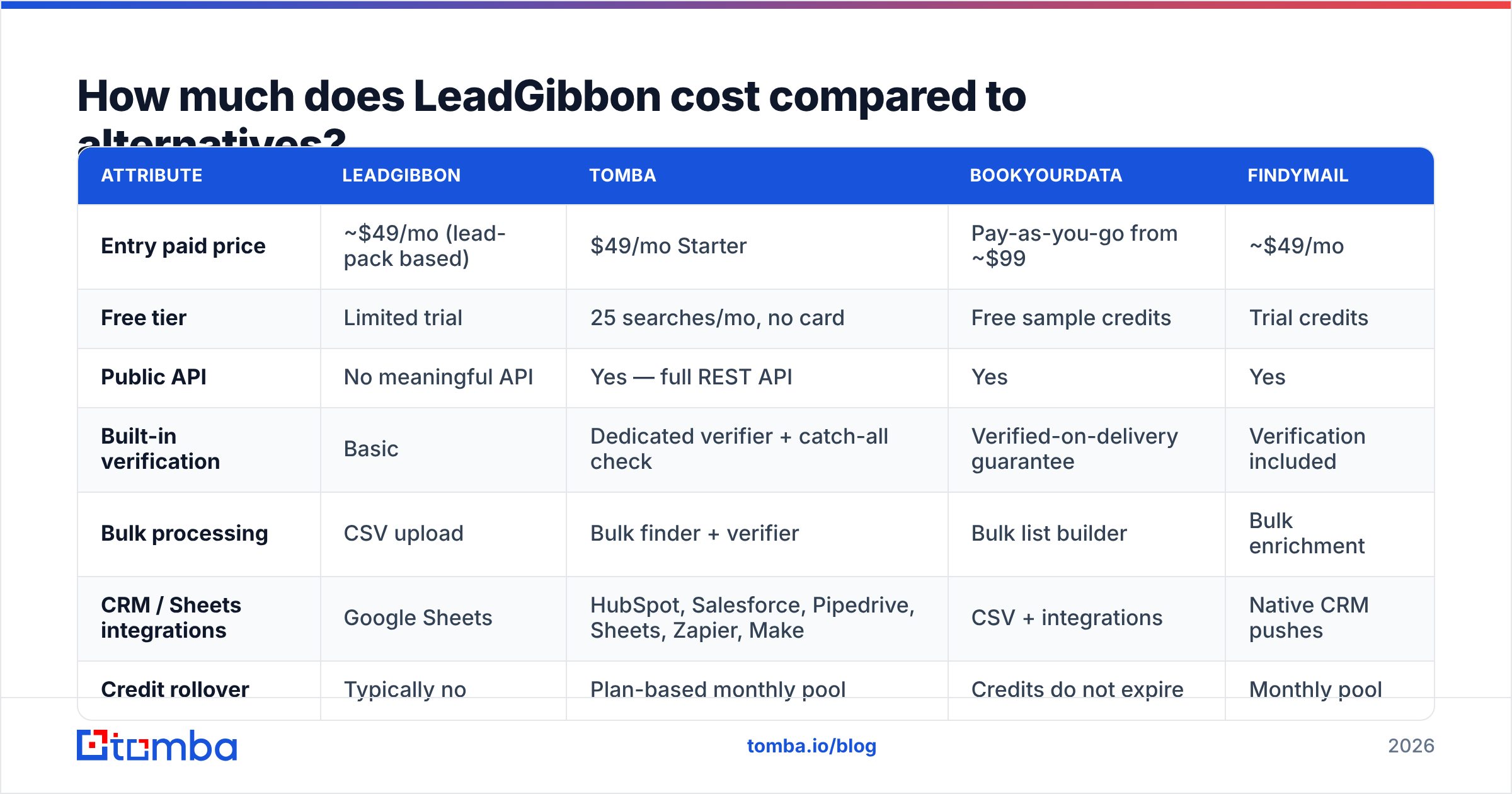
Here is how the shape of the offer compares against tools buyers most often evaluate alongside it. Prices are entry-tier list prices as published by each vendor and should be re-checked before you buy.
| Attribute | LeadGibbon | Tomba | BookYourData | Findymail |
|---|---|---|---|---|
| Entry paid price | ~$49/mo (lead-pack based) | $49/mo Starter | Pay-as-you-go from ~$99 | ~$49/mo |
| Free tier | Limited trial | 25 searches/mo, no card | Free sample credits | Trial credits |
| Public API | No meaningful API | Yes — full REST API | Yes | Yes |
| Built-in verification | Basic | Dedicated verifier + catch-all check | Verified-on-delivery guarantee | Verification included |
| Bulk processing | CSV upload | Bulk finder + verifier | Bulk list builder | Bulk enrichment |
| CRM / Sheets integrations | Google Sheets | HubSpot, Salesforce, Pipedrive, Sheets, Zapier, Make | CSV + integrations | Native CRM pushes |
| Credit rollover | Typically no | Plan-based monthly pool | Credits do not expire | Monthly pool |
| Best fit | Solo SDR, small lists | Teams needing API + verification | Buyers wanting guaranteed-valid purchased lists | Agencies doing bulk enrichment |
Two honest observations from that table. First, BookYourData's non-expiring-credit model genuinely solves the complaint LeadGibbon reviews raise most often — if lumpy volume is your problem, that is a legitimate answer worth pricing out. Second, the gap between LeadGibbon and the API-first tools is not really about price. At roughly the same entry cost, you are choosing between a list you download and an endpoint you can call from your own stack. Compare the Tomba pricing tiers against a LeadGibbon lead pack on a cost-per-verified-contact basis rather than cost-per-month, and the ranking usually flips.
What are the biggest LeadGibbon complaints in 2026?#
Reading across public review platforms — G2 and Capterra both carry LeadGibbon listings — the negative reviews cluster into a short, consistent list.
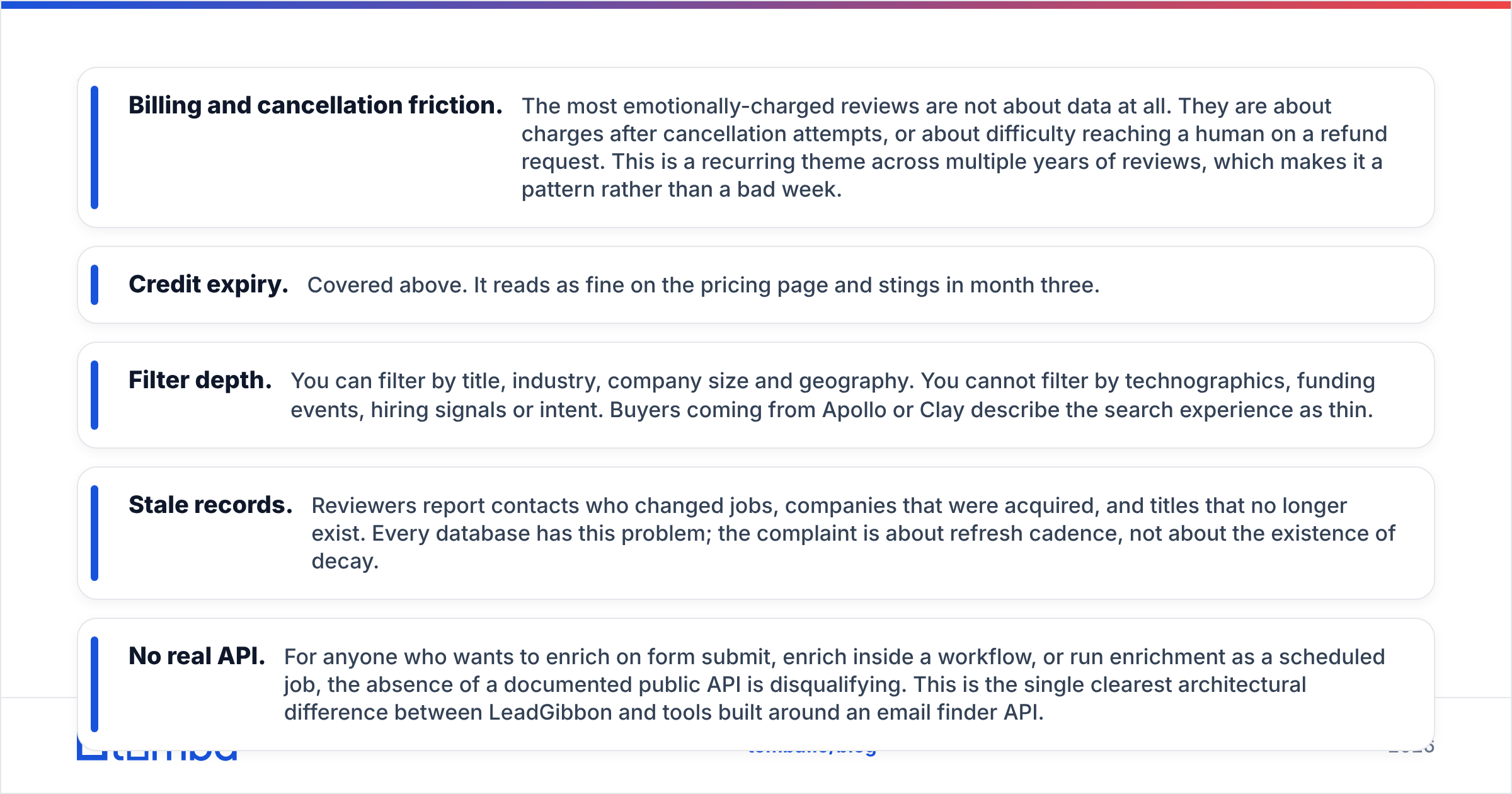
- Billing and cancellation friction. The most emotionally-charged reviews are not about data at all. They are about charges after cancellation attempts, or about difficulty reaching a human on a refund request. This is a recurring theme across multiple years of reviews, which makes it a pattern rather than a bad week.
- Credit expiry. Covered above. It reads as fine on the pricing page and stings in month three.
- Filter depth. You can filter by title, industry, company size and geography. You cannot filter by technographics, funding events, hiring signals or intent. Buyers coming from Apollo or Clay describe the search experience as thin.
- Stale records. Reviewers report contacts who changed jobs, companies that were acquired, and titles that no longer exist. Every database has this problem; the complaint is about refresh cadence, not about the existence of decay.
- No real API. For anyone who wants to enrich on form submit, enrich inside a workflow, or run enrichment as a scheduled job, the absence of a documented public API is disqualifying. This is the single clearest architectural difference between LeadGibbon and tools built around an email finder API.
The positive reviews are equally consistent and worth weighting fairly: the extension is simple, the Google Sheets export works, onboarding takes minutes, and for a non-technical user who just needs a list this week, it does the job without a demo call.

Is LeadGibbon worth it for your team?#
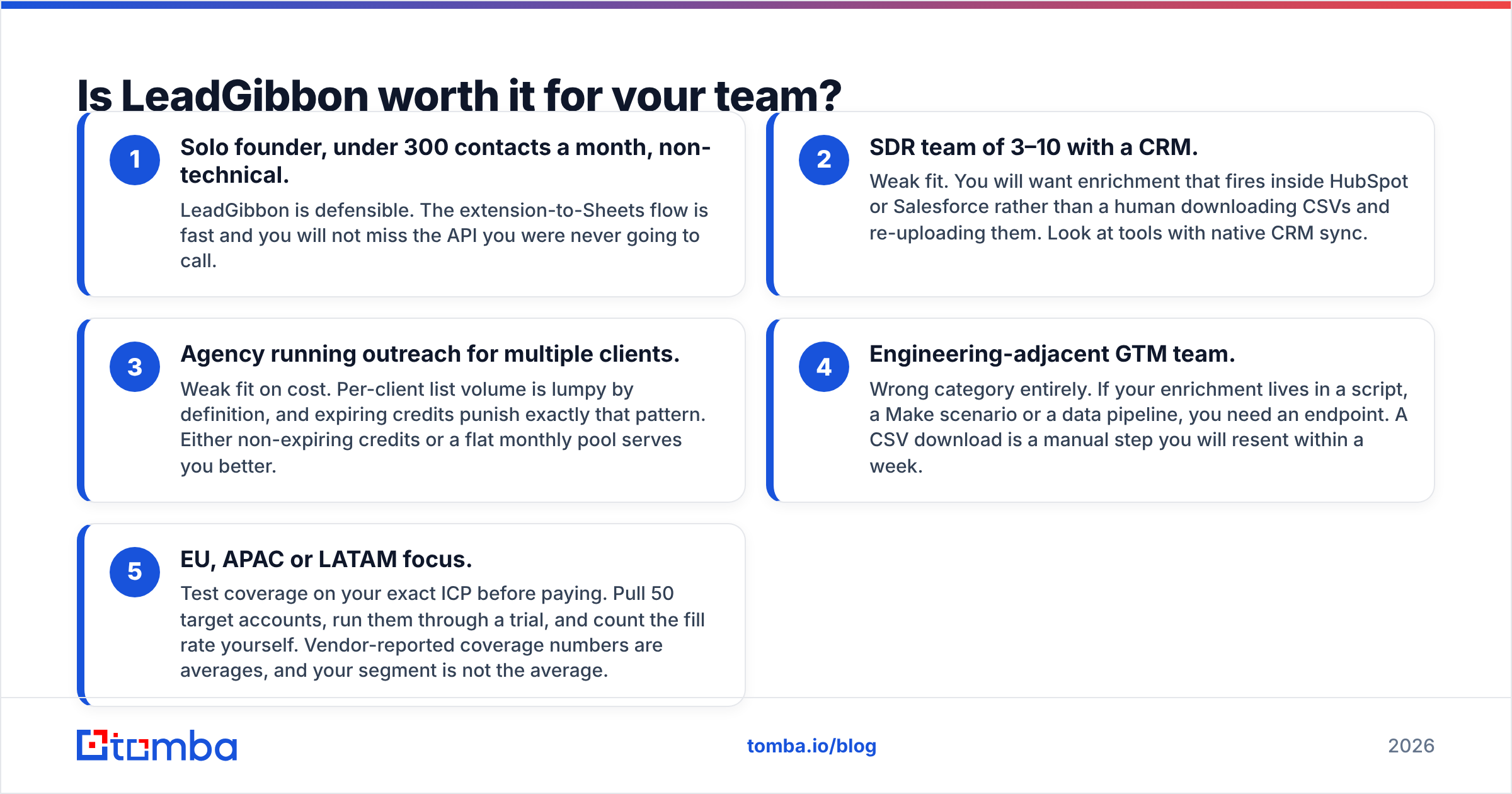
Match the tool to the shape of your workflow, not to a star rating. Here is the decision in five lines:
- Solo founder, under 300 contacts a month, non-technical. LeadGibbon is defensible. The extension-to-Sheets flow is fast and you will not miss the API you were never going to call.
- SDR team of 3–10 with a CRM. Weak fit. You will want enrichment that fires inside HubSpot or Salesforce rather than a human downloading CSVs and re-uploading them. Look at tools with native CRM sync.
- Agency running outreach for multiple clients. Weak fit on cost. Per-client list volume is lumpy by definition, and expiring credits punish exactly that pattern. Either non-expiring credits or a flat monthly pool serves you better.
- Engineering-adjacent GTM team. Wrong category entirely. If your enrichment lives in a script, a Make scenario or a data pipeline, you need an endpoint. A CSV download is a manual step you will resent within a week.
- EU, APAC or LATAM focus. Test coverage on your exact ICP before paying. Pull 50 target accounts, run them through a trial, and count the fill rate yourself. Vendor-reported coverage numbers are averages, and your segment is not the average.
That fifth point generalises. The only accuracy benchmark that matters is the one you run on your own list. Any vendor claiming 95%+ accuracy is quoting a number measured on a sample that probably does not look like your market. Take 100 rows from your actual target segment, run them through two or three tools in trial, and compare fill rate and bounce rate side by side. That test costs an afternoon and saves an annual contract.
What should you look for in a LeadGibbon alternative?#
If the reviews above describe your dealbreakers, here is the checklist to run against replacements:
- Verification is a separate, explicit step. A finder that returns a guess and a verifier that confirms deliverability are different jobs. Tools that collapse them into one number are hiding the catch-all problem.
- Credits you can actually spend. Either a monthly pool sized to your real volume, or credits that do not expire. Anything else is a tax on seasonality.
- An API with documentation you can read before you buy. If you cannot find the endpoint reference without talking to sales, that tells you where the product's attention goes.
- Coverage proof in your market. Ask for a sample against your own domain list. Vendors confident in their data sources will run it.
- Bulk and single-record paths. You need both: one-off lookups when a rep is on a call, and bulk email finder runs when you are building a quarter's worth of pipeline.
- A real cancellation path. Check the billing terms before you check the feature list. Half of LeadGibbon's one-star reviews would not exist if this were self-serve.
Two of LeadGibbon's closest peers each answer part of this well. BookYourData is the stronger pick when you want a purchased, guaranteed-valid list and credits that sit on the shelf until you need them. Findymail leans toward agencies doing volume enrichment. Tomba sits on the infrastructure side: a domain search that maps a company's full contact surface, a verifier with catch-all handling, and a REST API that makes the whole thing scriptable rather than clickable.
Final verdict on LeadGibbon#
LeadGibbon is a competent list tool with a pricing model and a support experience that its own reviewers keep flagging. Nothing in the negative reviews suggests the data is fraudulent — it suggests the product stopped evolving while the category moved toward APIs, real-time verification and CRM-native enrichment. If your workflow is "search, download, upload to a sequencer," it still works. If your workflow has any automation in it, you have outgrown the shape of the product.
Run the 100-row test before you commit to anything, including the alternatives. The result will be more useful than any review, this one included.
Ready to test the alternative side by side? Start with the Tomba Email Finder — the free tier gives you 25 searches a month with no card required, which is enough to run a real coverage test against your own ICP. Paid plans start at $49/mo, include catch-all verification, and every lookup is available through the API, the Chrome extension, Google Sheets, or a bulk CSV — same data, whichever way your team actually works.
Related guides#
// get started
Find, verify and enrich your first contacts today
Start on the free plan with 25 searches a month, then scale when your team is ready.
Free plan · No credit card required · GDPR & CCPA
// about the author