LeadGibbon vs OneMoreLead (2026): Which Data Tool Wins?
Both sell B2B contact lists, but they solve different problems. Here is an honest breakdown of coverage, verification, pricing models and export limits, plus when a per-search email finder beats a list subscription entirely.
LeadGibbon vs OneMoreLead is a choice between a curated list builder and a bulk US database. In 2026, a per-search email finder often beats both.
TL;DR
- LeadGibbon is a list-building layer on top of LinkedIn search and a B2B contact database. You build a segment, add emails, and export a CSV. It fits founders and small teams who prospect account by account.
- OneMoreLead is a bulk B2B database. It leans hard on US contacts and sells large exports rather than one-record lookups.
- The real call is a list subscription vs per-lookup finding. Databases go stale between refresh cycles. On-demand finders resolve the address at the moment you ask.
Two things are true no matter which side you pick.
- Neither tool removes your need to verify. Budget for a separate verification pass, or expect bounce rates that damage your sending domain.
- Does your prospecting start from a company domain or a named person? Then a per-search tool like the Tomba Email Finder usually costs less per usable contact.
What are LeadGibbon and OneMoreLead?#
Both tools answer the same question: give me contact details for people who match this profile. They arrived at it from opposite directions.
LeadGibbon started as a LinkedIn-adjacent email appender. The workflow is familiar to anyone who has built a list by hand. Run a search. Capture the profiles. Ask the tool to attach a business email and company data to each row. Then export. It later grew a searchable database of its own. Even so, the habit it trains is list building from a search result.
OneMoreLead sells a B2B database instead. The pool is large and mostly North American. You filter by industry, title, company size and location. The pitch leans on volume, plus big exports that are not metered as tightly as credit-based tools.
That difference in origin matters more than any feature checklist. LeadGibbon rewards precision. OneMoreLead rewards volume. Choose wrong and you either pay for records you never touch, or grind through a manual workflow when you needed 5,000 rows yesterday.

LeadGibbon vs OneMoreLead: head-to-head comparison#
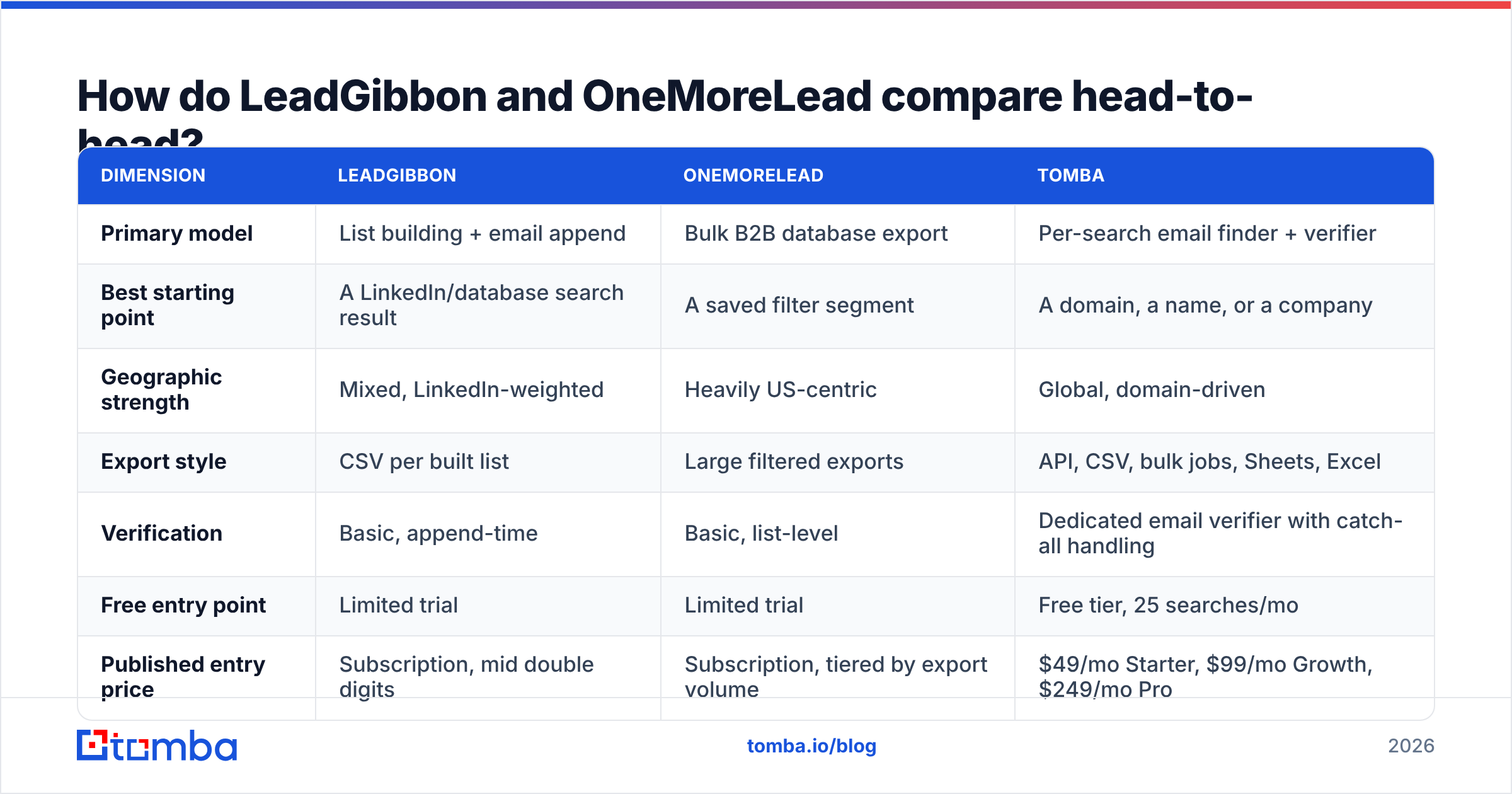
Vendor prices and database counts change often. Treat the numbers below as directional and check each vendor's own pricing page before you buy. The structural gaps have been stable for years.
| Dimension | LeadGibbon | OneMoreLead | Tomba |
|---|---|---|---|
| Primary model | List building + email append | Bulk B2B database export | Per-search email finder + verifier |
| Best starting point | A LinkedIn/database search result | A saved filter segment | A domain, a name, or a company |
| Geographic strength | Mixed, LinkedIn-weighted | Heavily US-centric | Global, domain-driven |
| Export style | CSV per built list | Large filtered exports | API, CSV, bulk jobs, Sheets, Excel |
| Verification | Basic, append-time | Basic, list-level | Dedicated email verifier with catch-all handling |
| Free entry point | Limited trial | Limited trial | Free tier, 25 searches/mo |
| Published entry price | Subscription, mid double digits | Subscription, tiered by export volume | $49/mo Starter, $99/mo Growth, $249/mo Pro |
| Developer access | Limited | Limited | Full Tomba API, CLI, MCP |
The row that decides most purchases is geography. If your ICP is US-only mid-market, the OneMoreLead bias is a feature. If you sell into EMEA, APAC or LATAM, a US-weighted database will fail you quietly. The filters still return rows. Those rows just are not the people you wanted.
What does each tool actually do well?#
Strip away the marketing and each product has a narrow zone where it wins.
- LeadGibbon wins on list curation. Say you are building a 200-account target list by hand and want company context on each row. The append workflow is fast, and the output drops straight into a CRM.
- OneMoreLead wins on raw volume per dollar. If your motion is "pull 20,000 US contacts, test three offers, keep what replies," a volume price beats paying per credit.
- LeadGibbon handles seniority targeting better. It leans on profile data, so title filters match how people describe themselves.
The last two points are the ones buyers tend to miss.
- OneMoreLead cuts tool sprawl for one-channel teams. Filter, export, upload to your sender. Fewer moving parts if email is your only channel.
- Neither handles catch-all domains well. Both will hand you addresses on domains that accept every message at the SMTP layer. Your "valid" list then holds addresses no human will ever read. A dedicated catch-all verifier is not optional here.
How accurate is the data, and why does that matter?#
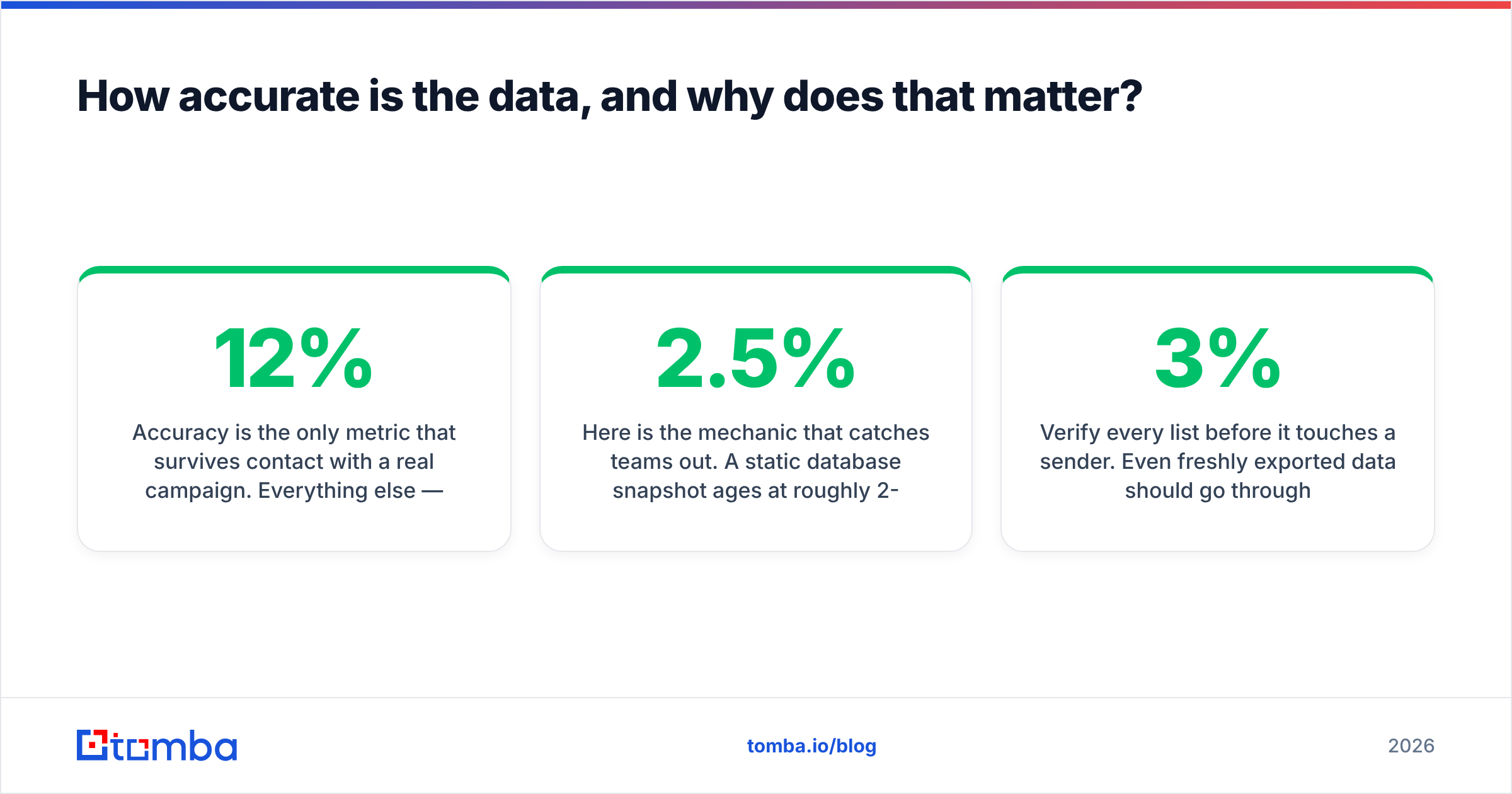
Accuracy is the only metric that survives a real campaign. Filter depth, UI polish and export speed are preferences. A 12% bounce rate is a domain-reputation event. That is where LeadGibbon vs OneMoreLead is usually settled.

Here is the mechanic that catches teams out. A static database ages at roughly 2-2.5% per month in B2B. People change jobs. Companies rebrand domains. Mail servers get moved. A year after a refresh, a quarter to a third of a list is dead. Vendors re-crawl all the time, but your exported CSV does not re-crawl. The moment you download it, decay starts and never stops.
Per-lookup finders flip this around. The address is resolved when you ask, against live signals: public sources, MX records, SMTP replies, and known patterns for that domain. So a domain search run today returns a fresher picture than a segment you exported in the spring.
Three things you should do, whichever vendor wins your test:
- Verify every list before it touches a sender. Even fresh exports need a check. Over 3% hard bounces is a problem. Over 5% is an emergency, and sender reputation is slow to rebuild.
- Re-verify anything older than 60 days. The list you sat on is not the list you bought.
- Track cost per replied contact, not per record. A cheap record that bounces has negative value. It costs you deliverability on the records that would have converted.

LeadGibbon vs OneMoreLead: which is cheaper in practice?#
Sticker price and real price split apart here. The gap comes from three places: unusable records, export caps, and the verification tool you end up buying anyway.
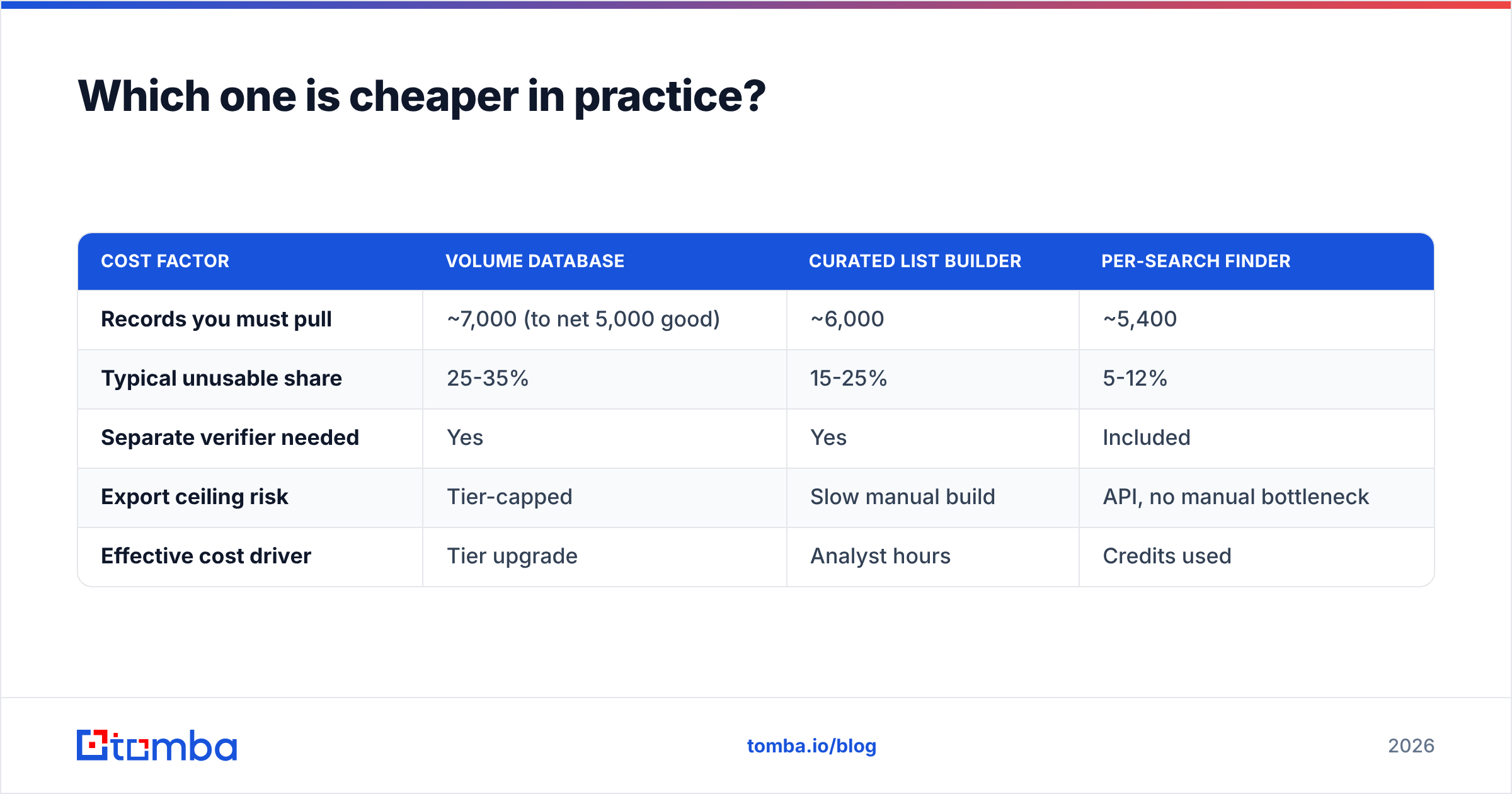
Run the math on a realistic goal. You need 5,000 contacts that a human will actually read.
| Cost factor | Volume database | Curated list builder | Per-search finder |
|---|---|---|---|
| Records you must pull | ~7,000 (to net 5,000 good) | ~6,000 | ~5,400 |
| Typical unusable share | 25-35% | 15-25% | 5-12% |
| Separate verifier needed | Yes | Yes | Included |
| Export ceiling risk | Tier-capped | Slow manual build | API, no manual bottleneck |
| Effective cost driver | Tier upgrade | Analyst hours | Credits used |
The list-builder path hides its cost in labor. Building 6,000 curated rows by hand is not a $60 problem. It is a two-week problem for whoever owns the list. The volume-database path hides its cost in waste, plus the verification subscription you bolt on later. The per-search path is the clearest of the three, because each credit maps to a record you asked for.
For reference, Tomba pricing runs a free tier at 25 searches per month, then $49/mo Starter, $99/mo Growth and $249/mo Pro. Verification and enrichment are included rather than sold as a second SKU. That detail usually closes the gap, because you are not paying two vendors for one clean row.

What do reviewers say about LeadGibbon vs OneMoreLead?#
Review sites are worth ten minutes before you buy. One caveat, though. Read the 3-star reviews. Extremes are written by people with an agenda. Middling reviews are written by people with a workflow.
On G2, the themes for tools in this category repeat across vendors:
- Praise clusters around ease of export and filter depth.
- Complaints cluster around data decay, slow billing support, and credits spent on records that turned out to be invalid.
- Almost nobody complains about the UI. Almost everybody ends up complaining about accuracy.
That pattern is the whole case for treating verification as a requirement rather than a nice-to-have. It also explains why buyers here weigh three or four options at once. That short list often includes vendors like BookYourData, which sells pay-as-you-go pricing and verified-at-purchase guarantees. That is a different deal shape from a monthly database seat.
When should you skip both and use an email finder?#
Pick a database subscription when your prospecting starts from a filter. Think "VP Marketing, SaaS, 50-200 employees, US." You want a pool, you want it big, and you qualify down from there.
Pick a per-search finder when it starts from a specific thing. A domain you just found. A person who commented on a LinkedIn post. An account your AE flagged. Or 800 companies from a conference page. In that motion, a subscription is the wrong shape. You pay a monthly fee to look up things you can already name.
Use a finder when:
- You already have company domains. Run a domain search and get the pattern plus the people, with no filter UI to tune.
- You prospect from LinkedIn activity. A LinkedIn finder turns a profile into a working address at the moment of intent.
- Your list comes from an export you already own. Trade-show lists, CRM rows with missing emails and webinar signups are data enrichment jobs, not database searches.
- You need this in software, not in a UI. If the lookup happens inside your own product, an API beats any dashboard.
- You sell outside the US. Domain-driven finding does not care where a database is strong.
LeadGibbon vs OneMoreLead: which should you choose in 2026?#
Short answer: OneMoreLead if you need US volume and can absorb the verification overhead. LeadGibbon if you build small, precise lists and value curation over scale. Neither, if your workflow starts from a domain or a name.
Score it against four questions.
| Question | If yes, lean toward |
|---|---|
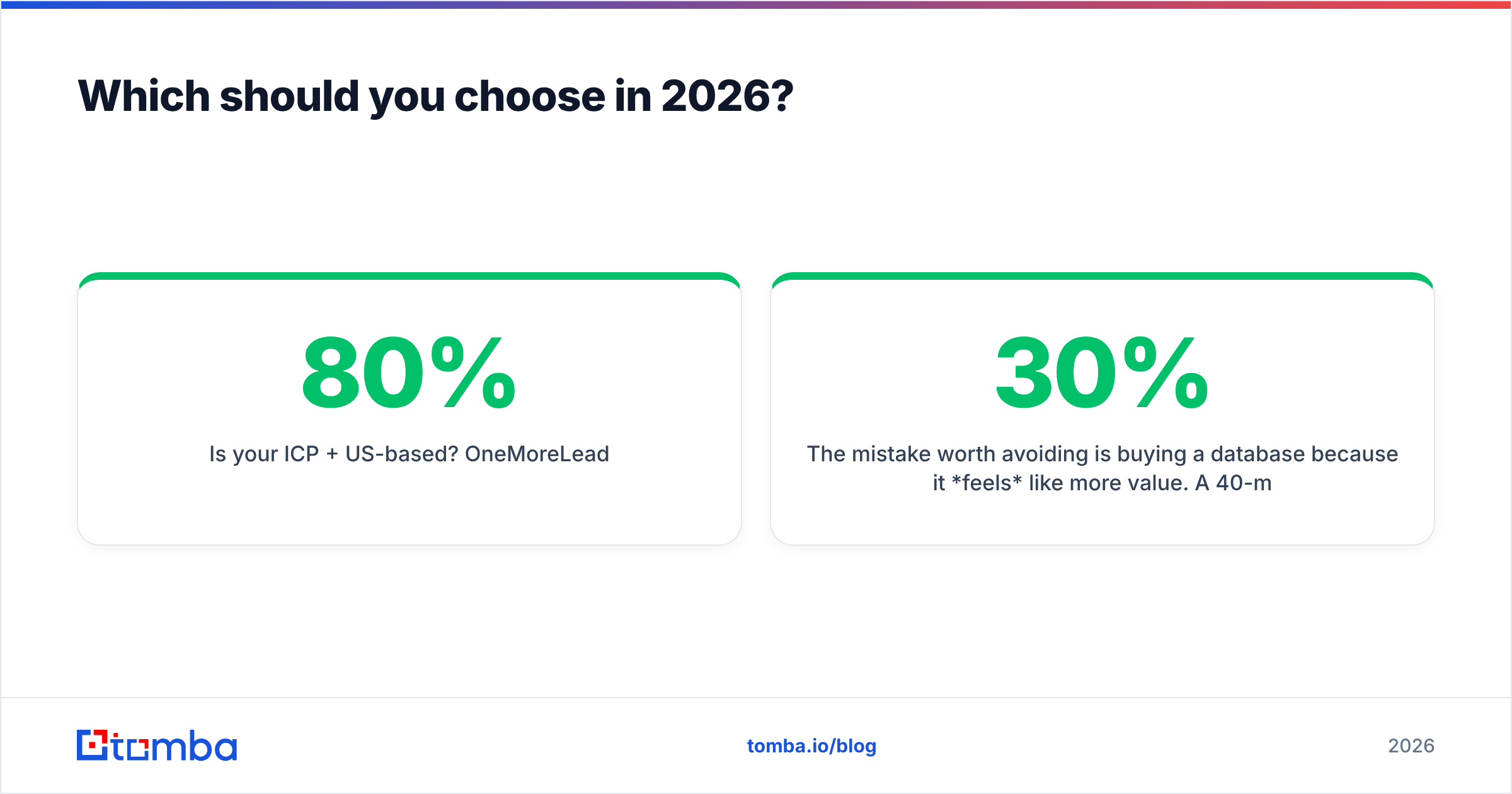
| Is your ICP 80%+ US-based? | OneMoreLead |
| Do you build lists under 500 rows at a time? | LeadGibbon |
| Do you start from domains, names or LinkedIn profiles? | A per-search finder |
| Do you need lookups inside your own app or automation? | A finder with a real API |
The mistake worth avoiding is buying a database because it feels like more value. Say a 40-million-record database caps exports at 10,000 rows, and 30% of those rows have decayed. You net 7,000 usable contacts. A finder that resolves 7,000 specific addresses at 95%+ deliverability gives you the same outcome, with a cleaner sending reputation and no second verification invoice. The inventory number on the pricing page is marketing. The usable-contact number is the product.
Either way, verify before you send. It is the cheapest insurance in outbound: a few cents per record against a domain reputation that takes months to repair. To sanity-check a handful of addresses right now, the free email checker will show you what you are dealing with before you commit budget.
Ready to test a domain-first workflow?#
Take the 30 accounts you care most about this quarter and run them through the Tomba Email Finder. There is no list to build and no filter to tune. Give it a domain and a name, and get back a verified address with a confidence score and the sources behind it. The free tier covers 25 searches a month. That is enough to see whether per-search finding beats the subscription you were about to renew. If it does, Starter is $49/mo with verification, domain search and enrichment in the same plan.
Related guides#
// get started
Find, verify and enrich your first contacts today
Start on the free plan with 25 searches a month, then scale when your team is ready.
Free plan · No credit card required · GDPR & CCPA
// about the author