LeadGibbon vs Power Almanac: Which B2B Data Tool Wins?
One scrapes LinkedIn for private-sector leads, the other sells verified contacts for 40,000 US local governments. Here is where each tool actually earns its price, and where neither one fits.
TL;DR
- These two tools are not really competitors. LeadGibbon is a LinkedIn-first lead scraper for private-sector B2B prospecting. Power Almanac is a specialist database of elected and appointed officials at roughly 40,000 US local governments.
- Pick by ICP, not by feature list. If you sell to city managers, county clerks, public works directors or police chiefs, Power Almanac has coverage no general B2B database matches. If you sell to SaaS, agencies, manufacturers or anyone with a company website, LeadGibbon's LinkedIn workflow is the closer fit.
- The pricing models are structurally different. LeadGibbon is credit-based SaaS you renew monthly. Power Almanac is list access: you filter, you download, you own the CSV.
- Both have the same weak spot: freshness. Government turnover after elections and B2B job-hopping both decay contact data fast. Whatever you buy, verify before you send.
- Neither covers the full funnel. Most teams end up pairing a niche source with a domain-level email finder and an email verifier to fill gaps and re-check aging records.
What is LeadGibbon, exactly?#
LeadGibbon is a B2B lead generation tool built around LinkedIn. You run a search in LinkedIn or Sales Navigator, trigger the Chrome extension, and it pulls the profiles on screen into a list with business email addresses attached. From there you export to CSV or push straight into Google Sheets.
The workflow it's optimised for looks like this:
- Define the segment in LinkedIn. Title, seniority, headcount, geography, industry — LinkedIn's filters do the targeting work.
- Capture the result set. The extension reads the search results page rather than making you open each profile.
- Append emails. LeadGibbon matches each profile to a work email and marks confidence or verification status.
- Export and enrich. CSV or Sheets, then into your sequencer or CRM.
That's a familiar pattern — it is the same shape as ContactOut, Wiza, Lusha and a dozen others. What differentiates tools in this category is hit rate (what percentage of a list comes back with an email), bounce rate on the emails it does return, and whether the pricing punishes you for misses.
LeadGibbon's positioning has always been "verified emails, simple exports, no bloated sales-engagement suite bolted on." If you already have Instantly, Smartlead or HubSpot for sending, that narrow scope is a feature, not a gap.
Correction on the image syntax — here it is properly:
What is Power Almanac, and who is it for?#
Power Almanac solves a problem almost no general B2B database solves well: reaching the people who run American municipalities.
There are roughly 90,000 units of local government in the United States — cities, towns, townships, counties, villages. Power Almanac focuses on the general-purpose ones, covering tens of thousands of jurisdictions and a quarter-million-ish named officials. The titles it carries are the ones that matter if you sell to the public sector:
- Elected leadership — mayors, council members, commissioners, supervisors
- Administrative leadership — city managers, administrators, clerks, finance directors
- Department heads — public works, planning, parks and recreation, IT
- Public safety — police chiefs, fire chiefs, emergency management directors
Records typically include name, exact title, jurisdiction, direct email, phone, and mailing address, plus firmographic-style attributes unique to the segment: population served, budget band, form of government, state.
That last part is the real product. Filtering by "cities with population between 25,000 and 100,000 in the Midwest, public works directors only" is trivial in Power Almanac and effectively impossible in a LinkedIn-derived tool — because half those officials don't maintain a LinkedIn profile, and the ones who do don't tag their employer as a scrapeable company page.
The delivery model is also different. Power Almanac is a database you query and download from, not a browser extension that follows you around. You buy access, build a filtered list, export it, and it's yours.
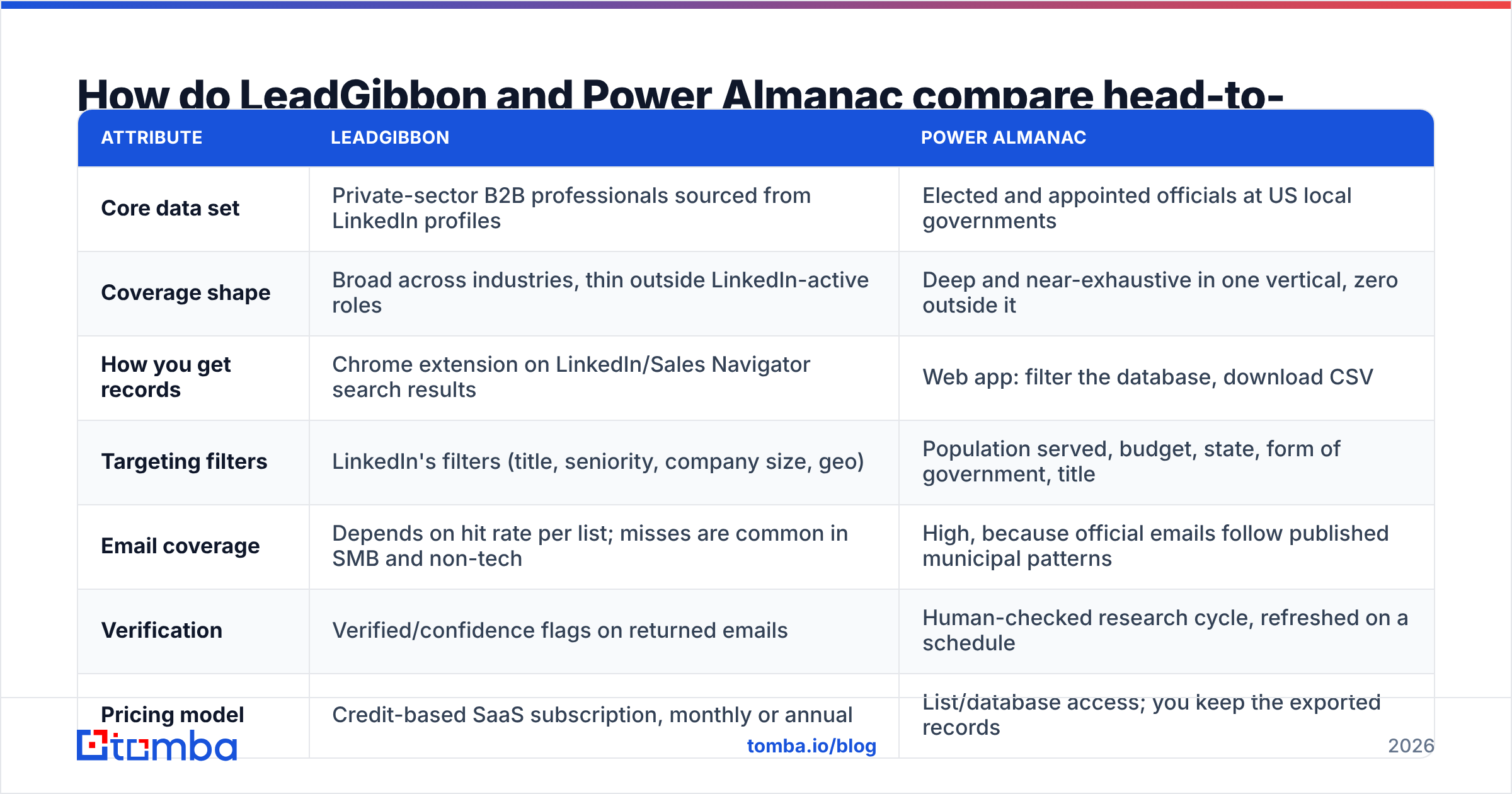
How do LeadGibbon and Power Almanac compare head-to-head?#
| Attribute | LeadGibbon | Power Almanac |
|---|---|---|
| Core data set | Private-sector B2B professionals sourced from LinkedIn profiles | Elected and appointed officials at US local governments |
| Coverage shape | Broad across industries, thin outside LinkedIn-active roles | Deep and near-exhaustive in one vertical, zero outside it |
| How you get records | Chrome extension on LinkedIn/Sales Navigator search results | Web app: filter the database, download CSV |
| Targeting filters | LinkedIn's filters (title, seniority, company size, geo) | Population served, budget, state, form of government, title |
| Email coverage | Depends on hit rate per list; misses are common in SMB and non-tech | High, because official emails follow published municipal patterns |
| Verification | Verified/confidence flags on returned emails | Human-checked research cycle, refreshed on a schedule |
| Pricing model | Credit-based SaaS subscription, monthly or annual | List/database access; you keep the exported records |
| Free option | Limited trial credits | Sample records and count previews before purchase |
| API access | Limited — built for extension + export workflow | Limited — built for filtered downloads |
| Best fit | SDR teams prospecting companies | GovTech, public-sector sales, civic research, advocacy |
Read that table once and the decision usually makes itself. These tools don't overlap on ICP, pricing logic, or workflow. The only honest reason to compare them side by side is that both show up when you search for "B2B contact database" and both sell you a CSV at the end.
Which one has better data accuracy?#
Neither wins outright, because they decay for different reasons.
Power Almanac's decay is calendar-driven. US local elections run on a predictable cycle, and every November a meaningful slice of the mayors and council members in your list stop being mayors and council members. Appointed staff turn over too, but slower. The upside: municipal email addresses are usually structural (firstname.lastname@cityofX.gov), published on the jurisdiction's website, and stable across the role. A stale record is often wrong about the person, not the mailbox. Send to a departed clerk and you may still reach a real inbox — just the wrong human, which is its own problem.
LeadGibbon's decay is job-market-driven. B2B professionals change employers constantly, and when they do, the old mailbox is deactivated or silently catches everything. That produces hard bounces and catch-all ambiguity, both of which hit sender reputation. Scrape-derived emails also carry pattern-guessing risk: if a tool infers j.smith@company.com without confirming it, you find out at send time.
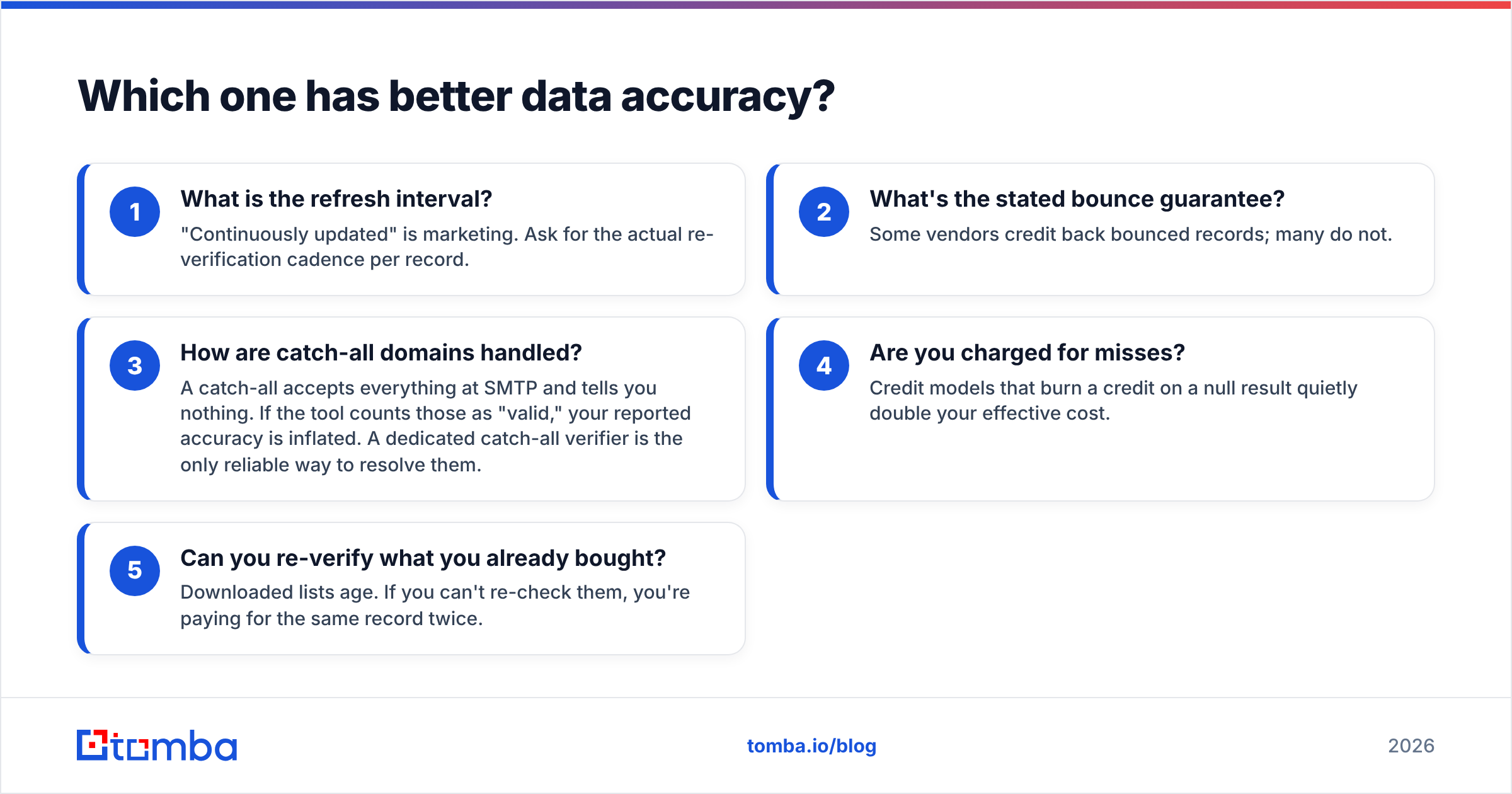
Five accuracy questions worth asking either vendor before you pay:
- What is the refresh interval? "Continuously updated" is marketing. Ask for the actual re-verification cadence per record.
- What's the stated bounce guarantee? Some vendors credit back bounced records; many do not.
- How are catch-all domains handled? A catch-all accepts everything at SMTP and tells you nothing. If the tool counts those as "valid," your reported accuracy is inflated. A dedicated catch-all verifier is the only reliable way to resolve them.
- Are you charged for misses? Credit models that burn a credit on a null result quietly double your effective cost.
- Can you re-verify what you already bought? Downloaded lists age. If you can't re-check them, you're paying for the same record twice.
Whichever side you land on, re-verification before a campaign is not optional. A 20% bounce rate on a first send does more damage to your domain than the entire list was worth.

What does each one actually cost?#
Both vendors have adjusted pricing over the years, so treat any number you read in a blog post — including this one — as a starting point to confirm, not a quote.
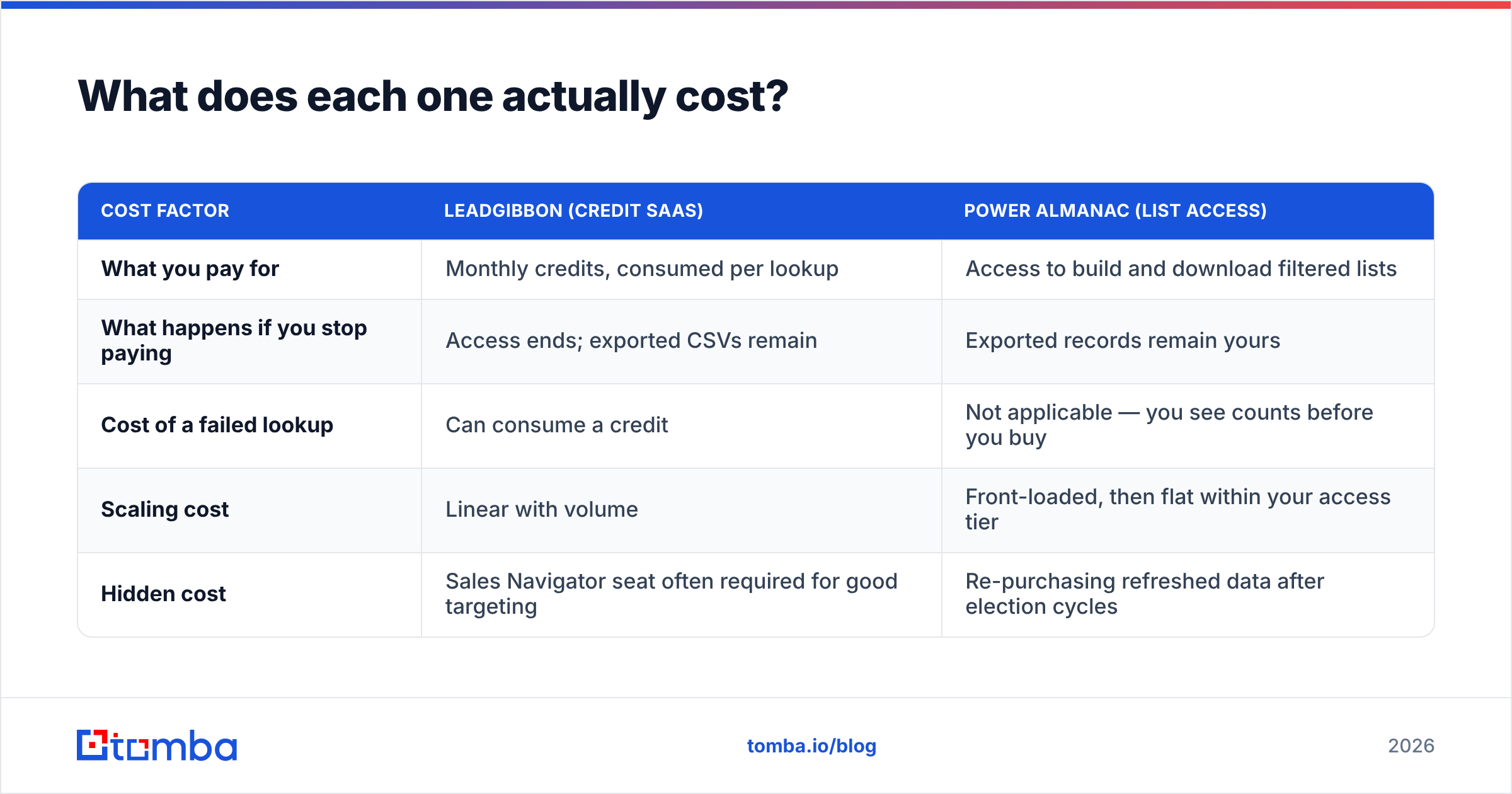
The structural difference matters more than the sticker price:
| Cost factor | LeadGibbon (credit SaaS) | Power Almanac (list access) |
|---|---|---|
| What you pay for | Monthly credits, consumed per lookup | Access to build and download filtered lists |
| What happens if you stop paying | Access ends; exported CSVs remain | Exported records remain yours |
| Cost of a failed lookup | Can consume a credit | Not applicable — you see counts before you buy |
| Scaling cost | Linear with volume | Front-loaded, then flat within your access tier |
| Hidden cost | Sales Navigator seat often required for good targeting | Re-purchasing refreshed data after election cycles |
The practical implication: LeadGibbon is cheaper to start and more expensive to scale. Power Almanac is the reverse — a larger upfront commitment that stops charging you per record once you're in.
For reference, general-purpose email finders sit in a third pricing bracket entirely. Tomba pricing runs a free tier at 25 searches per month, Starter at $49/mo, Growth at $99/mo and Pro at $249/mo, all credit-based with API access included rather than gated behind an enterprise call. That matters when you're comparing total cost across a stack rather than a single line item.
Which should you choose for your use case?#
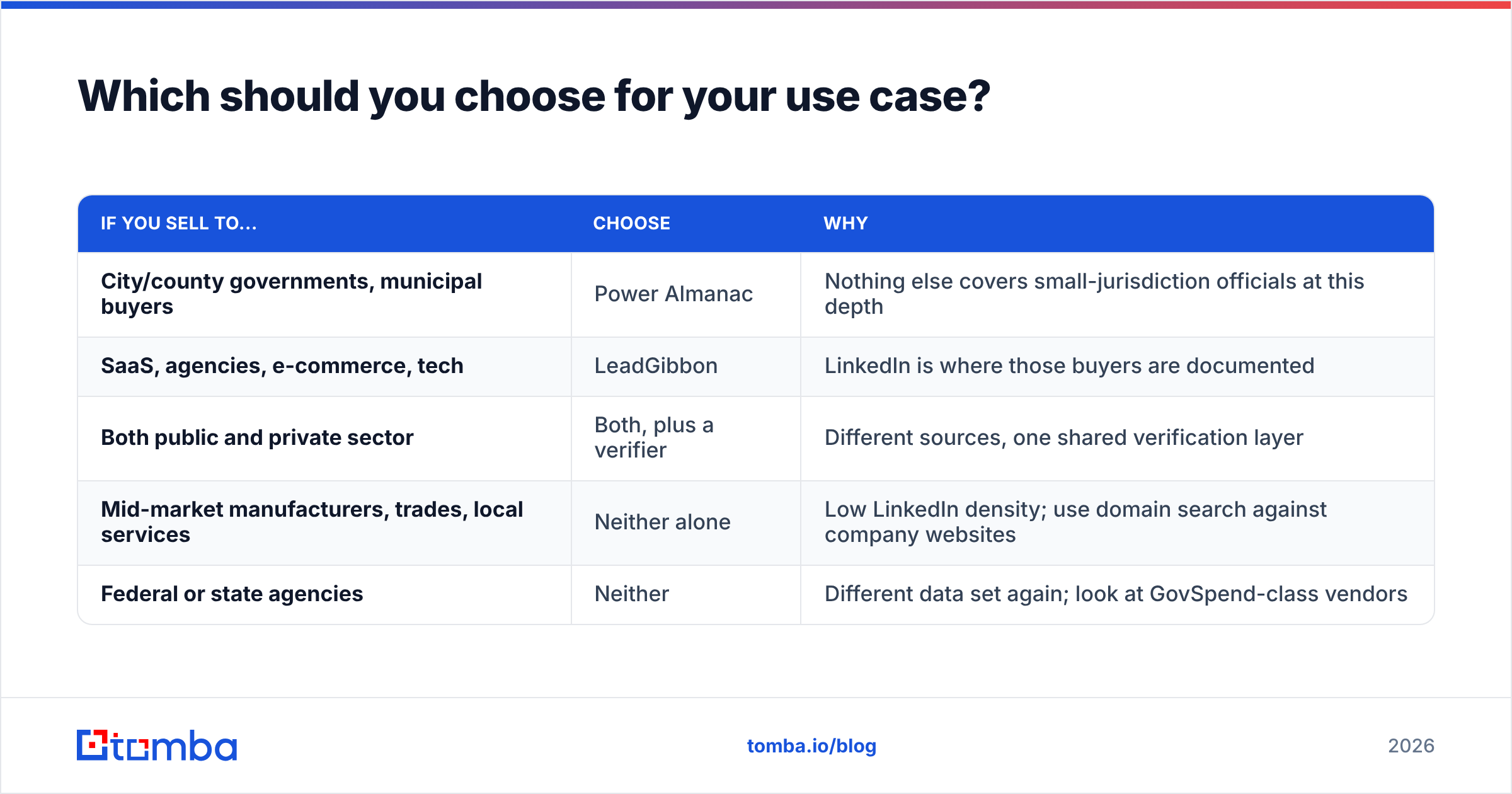
| If you sell to... | Choose | Why |
|---|---|---|
| City/county governments, municipal buyers | Power Almanac | Nothing else covers small-jurisdiction officials at this depth |
| SaaS, agencies, e-commerce, tech | LeadGibbon | LinkedIn is where those buyers are documented |
| Both public and private sector | Both, plus a verifier | Different sources, one shared verification layer |
| Mid-market manufacturers, trades, local services | Neither alone | Low LinkedIn density; use domain search against company websites |
| Federal or state agencies | Neither | Different data set again; look at GovSpend-class vendors |
A few specifics worth calling out.
GovTech vendors should start with Power Almanac. If you're selling permitting software, fleet management, body cameras or ERP to towns of 10,000 people, the ROI math is simple: LinkedIn coverage of a public works director in rural Ohio is close to zero, and Power Almanac has them.
Outbound SDR teams should not start with either. Most SDR motions need email discovery keyed to a company domain, not a scrape of a LinkedIn results page or a vertical list purchase. That's a different tool category, and it's where a bulk email finder earns its keep — you feed a list of domains and names, you get back verified addresses, and you never touch a browser extension.
Anyone buying a static list needs a re-verification plan. Budget for it explicitly. The list is a snapshot; the campaign happens weeks later.
Are there better alternatives to both?#
Depends on what's actually broken in your workflow.
If the problem is LinkedIn dependency — rate limits, account risk, Sales Navigator seat costs — the fix is a domain-first approach. You already know which companies you want. Resolve contacts from the company domain rather than from a social profile, and the whole fragile browser-automation layer disappears. Tools in this space include Hunter, Findymail, Apollo and Tomba; see our breakdowns of Apollo alternatives and Findymail alternatives for how they differ on hit rate and pricing.
If the problem is public-sector coverage, there is genuinely limited competition. Power Almanac's niche is narrow enough that generalist databases haven't bothered to build it. BookYourData is a solid option for pre-built, verified B2B lists across many verticals and is worth a look if you want purchased lists with broader industry coverage alongside your gov data. For state and federal, you're in a different market again.
If the problem is data hygiene across everything you already own, neither tool is the answer — a verification and enrichment layer is. That means running your CRM export through validation, resolving catch-alls, and appending missing fields rather than buying yet another list. Tomba's data enrichment and verification tools exist for exactly that job, and the data sources page documents where the records come from, which is a question worth asking every vendor on this page.
One neutral benchmark habit: before committing, pull 100 records from each vendor's trial, run them through an independent verifier, and measure real bounce rate yourself. Vendor-published accuracy numbers are marketing artifacts. Your own 100-record test is evidence. Cross-check user reports on G2 too, but weight your own test higher.
FAQ: LeadGibbon vs Power Almanac#
Can Power Almanac replace a general B2B email finder?#
No. It covers one vertical — US local government — with unusual depth and nothing outside it. If more than a quarter of your pipeline is private-sector, you need a second source.
Does LeadGibbon work without LinkedIn Sales Navigator?#
It works with regular LinkedIn search, but the targeting quality drops sharply. Most teams running LeadGibbon seriously are paying for Sales Navigator too, which belongs in your cost comparison.
Is scraping LinkedIn profiles compliant?#
It depends on jurisdiction and how you use the data. Under GDPR, legitimate-interest B2B outreach has a path, but it requires documentation and an opt-out. US CAN-SPAM is looser but still requires accurate headers and unsubscribe handling. Talk to counsel before you scale a scrape-driven motion into EU territories.
Which has lower bounce rates?#
Municipal .gov addresses generally bounce less, because they're published and structurally predictable. But "didn't bounce" isn't the same as "reached the right person" when an official left office in November. Verify freshness, not just deliverability.
Do I still need an email verifier if the vendor says emails are verified?#
Yes, for any list older than about 30 days. Verification is a point-in-time measurement, and it degrades from the moment it's taken.
Ready to stop guessing at email addresses?#
If your prospecting problem is simpler than either of these tools implies — you know the companies, you need the people — skip the extension and the list purchase. Run the domains through the Tomba Email Finder, get verified addresses back with confidence scores and source attribution, and keep the whole thing inside an API you can automate. Start free with 25 searches a month, and only scale spend when the hit rate proves itself on your own list.
Related guides#
// get started
Find, verify and enrich your first contacts today
Start on the free plan with 25 searches a month, then scale when your team is ready.
Free plan · No credit card required · GDPR & CCPA
// about the author