LeadGibbon vs SignalHire: Which B2B Contact Tool Wins in 2026?
LeadGibbon sells list-building simplicity. SignalHire sells phone numbers and recruiter reach. We break down pricing, data coverage, verification quality, and which one actually fits your outbound motion.
TL;DR
- LeadGibbon is a lightweight list-builder: LinkedIn-sourced B2B contacts, CSV exports, and a simple credit model. Good for one-person prospecting, thin on API and phone data.
- SignalHire is a contact-revealer with a strong recruiting DNA: email plus mobile numbers from a browser extension, priced per-seat with volume tiers.
- If you need phone numbers and candidate sourcing, SignalHire wins. If you need fast, cheap B2B email lists you can hand to a sequencer, LeadGibbon is the simpler buy.
- Neither tool leads on verification depth or developer access — that's where a dedicated email-finding stack (Tomba, Findymail, or a verifier layered on top) tends to outperform both.
- Budget reality: SignalHire's per-seat pricing punishes teams; LeadGibbon's credits expire. Price out a full year before you commit.
What are LeadGibbon and SignalHire, actually?#
They're solving two different jobs that look identical on a pricing page.
LeadGibbon is a list-building tool. You search a company or a set of LinkedIn profiles, and it returns names, job titles, emails, and company metadata you can export to CSV or push into a sheet. Its center of gravity is volume and speed for a single user — a founder or SDR who wants 500 rows before Monday.
SignalHire (signalhire.com) started closer to recruiting. Its browser extension sits on LinkedIn, GitHub, and other profile sites, and "reveals" contact details — critically, mobile phone numbers, not just work emails. That phone coverage is the single biggest functional difference between the two products, and it's why SignalHire shows up in recruiter tool stacks far more than in pure cold-email stacks.
Here's the framing that matters: LeadGibbon optimizes for rows exported. SignalHire optimizes for contacts revealed. If your outbound is email-only, rows are what you want. If you're multithreading with calls and texts, reveals are what you want.

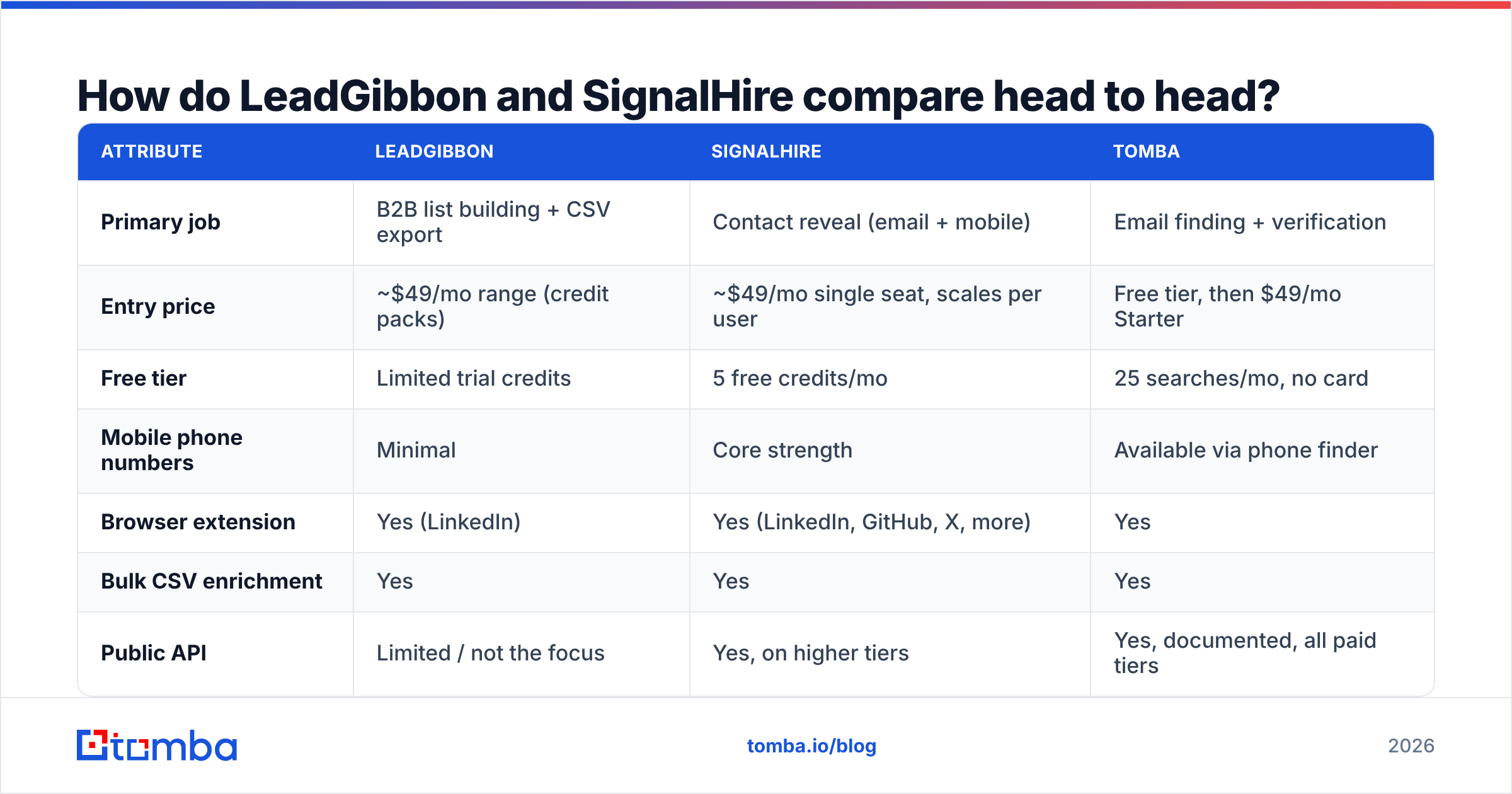
How do LeadGibbon and SignalHire compare head to head?#
| Attribute | LeadGibbon | SignalHire | Tomba |
|---|---|---|---|
| Primary job | B2B list building + CSV export | Contact reveal (email + mobile) | Email finding + verification |
| Entry price | ~$49/mo range (credit packs) | ~$49/mo single seat, scales per user | Free tier, then $49/mo Starter |
| Free tier | Limited trial credits | 5 free credits/mo | 25 searches/mo, no card |
| Mobile phone numbers | Minimal | Core strength | Available via phone finder |
| Browser extension | Yes (LinkedIn) | Yes (LinkedIn, GitHub, X, more) | Yes |
| Bulk CSV enrichment | Yes | Yes | Yes |
| Public API | Limited / not the focus | Yes, on higher tiers | Yes, documented, all paid tiers |
| Built-in email verification | Basic | Basic | Dedicated verifier + catch-all handling |
| Best for | Solo SDR building lists fast | Recruiters, phone-heavy outbound | Dev teams, agencies, accuracy-first outbound |
| Weakest at | Phone data, API depth | Per-seat cost at team scale | No native sequencer |
Two things jump out of that table.
First, both tools charge roughly the same entry price for very different value. SignalHire's seat model means a five-person team pays five times for the same database. LeadGibbon's credit model means an idle month is money burned.
Second, neither is a verification specialist. Both return "an email." Neither is built to tell you with confidence whether that mailbox will bounce, whether the domain is catch-all, or whether the address is a role account that will torch your sender reputation.
Which one has better data accuracy?#
Short answer: SignalHire is better on phones, LeadGibbon is competitive on emails, and both leave a verification gap you have to fill yourself.
Contact data accuracy breaks into four layers, and vendors rarely separate them:
- Match rate — of the contacts you searched, how many returned anything? This is the number vendors advertise. It says nothing about quality.
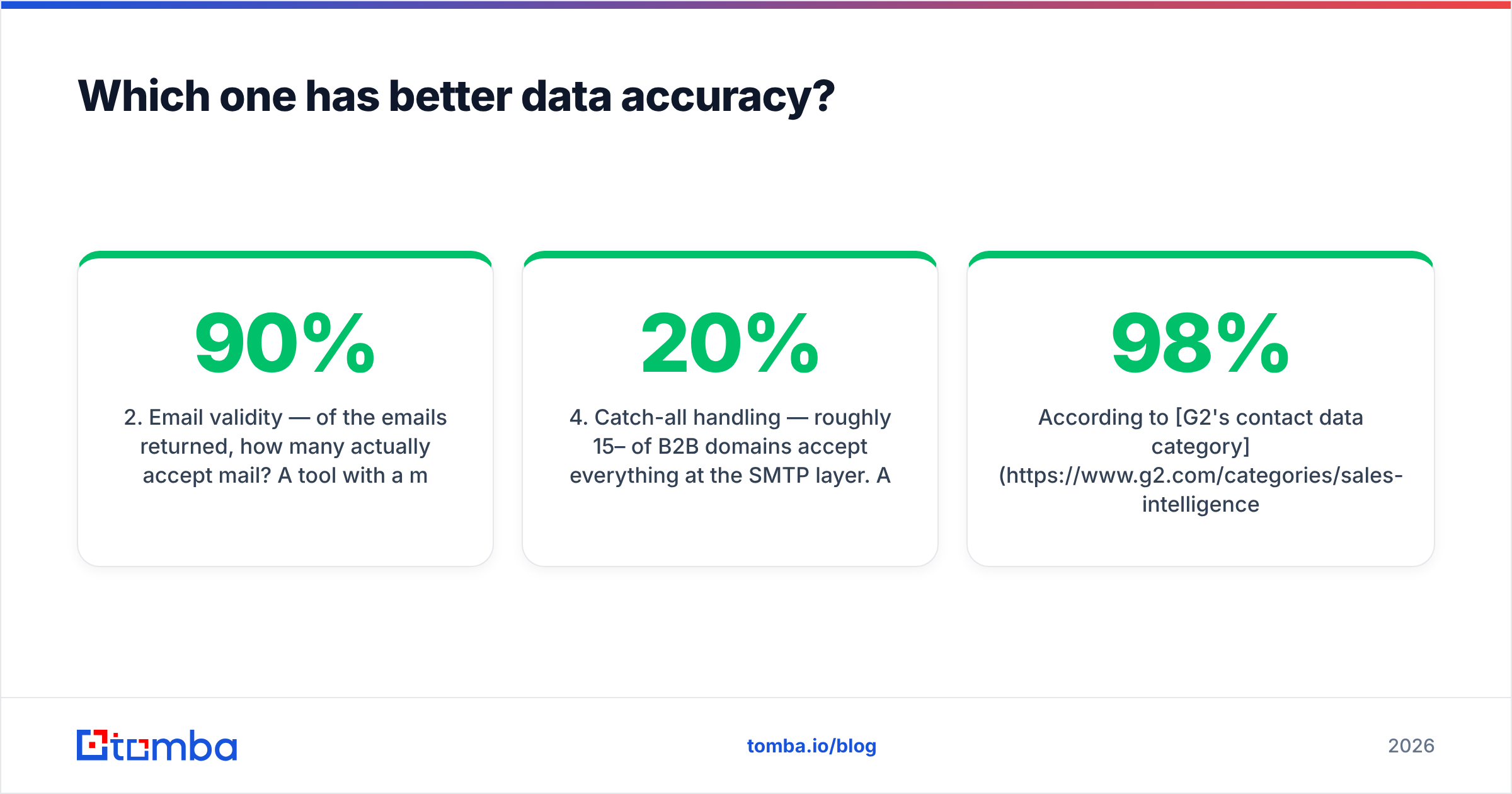
- Email validity — of the emails returned, how many actually accept mail? A tool with a 90% match rate and 70% validity is worse than one at 65% match and 96% validity.
- Role accuracy — is the job title current? LinkedIn-sourced data drifts fast; a contact who changed jobs six months ago is a bounce and a wasted touch.
- Catch-all handling — roughly 15–20% of B2B domains accept everything at the SMTP layer. A tool that marks those "valid" is lying to you by omission.
LeadGibbon and SignalHire both do well on layer 1 and acceptably on layer 2. Layers 3 and 4 are where teams get burned — and where they end up bolting a second tool onto the stack.
That's the practical case for running a dedicated email verifier on top of whatever list tool you choose. If your provider's data is genuinely clean, the verifier costs you a few dollars and confirms it. If it isn't, you find out before your domain does. For the catch-all layer specifically, a catch-all verifier is the only honest way to score those addresses rather than guessing.
According to G2's contact data category, the most consistent complaint across every vendor in this space — not just these two — is exactly this: advertised accuracy that doesn't survive contact with a real send. Treat every "98% accurate" claim as a hypothesis to test on 200 rows before you buy annual.
Is SignalHire worth it for phone-first outbound?#
Yes, if calling is genuinely part of your motion — and no, if you're buying phones "just in case."
SignalHire's mobile coverage is the reason recruiters pay for it. When you're sourcing engineers who ignore LinkedIn InMail and don't publish a work email, a mobile number is the only channel that works. The extension works across GitHub and other technical profile sites, which matters enormously for technical recruiting and much less for standard B2B SaaS sales.
But phone data has a cost profile most buyers underestimate:
- Mobile numbers decay slower than emails but verify harder. You can SMTP-check an email for fractions of a cent. Validating a mobile means a carrier lookup — which is why a phone validator is a separate line item in most stacks.
- Compliance overhead is real. Cold-calling mobiles pulls you into DNC and consent regimes that email outreach mostly sidesteps. Your legal team will have opinions.
- Utilization is usually low. Teams buy phone credits, use 20% of them, and renew anyway. Measure your actual dial volume for a month before sizing the plan.
If you dial fewer than 30 numbers a week, you're paying a phone premium for an email product. In that case LeadGibbon — or a focused email finder with an optional phone finder you only pay for when you use it — is the cheaper architecture.
Is LeadGibbon better for simple list building?#
For a solo operator, probably yes. For a team, it starts to strain.
LeadGibbon's strength is that there's almost nothing to learn. Point it at a company, get a list, export it, load it into your sequencer. No sequence builder to configure, no intent-data dashboard to ignore, no seat provisioning. For a founder doing their first 500 cold emails, that simplicity is a feature and not a compromise.
Where it strains:
- No serious API story. The moment you want contact lookup inside your own app, CRM workflow, or enrichment pipeline, you're writing CSV round-trips. Compare that to a documented email finder API you can call from a Lambda.
- Credit expiry. Monthly credits that don't roll over convert lumpy prospecting into wasted spend. Prospecting is naturally lumpy — you build 3,000 rows in a launch week and 200 the next month.
- Thin enrichment. You get contact fields. You don't get much firmographic depth, tech stack, or funding signals, so you'll pair it with a second data enrichment source anyway.

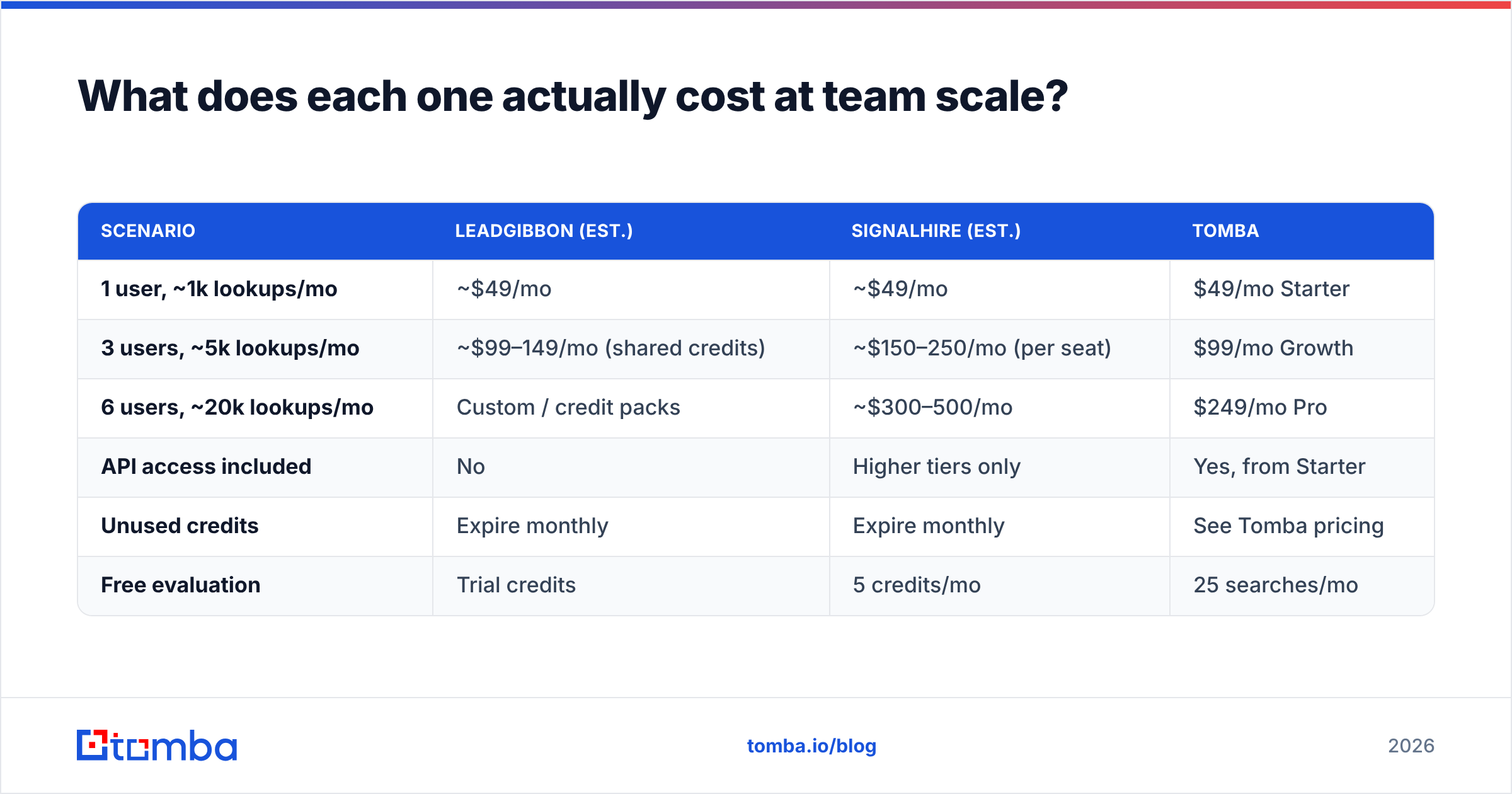
What does each one actually cost at team scale?#
Model the year, not the month. The two pricing models diverge sharply as you add people.
| Scenario | LeadGibbon (est.) | SignalHire (est.) | Tomba |
|---|---|---|---|
| 1 user, ~1k lookups/mo | ~$49/mo | ~$49/mo | $49/mo Starter |
| 3 users, ~5k lookups/mo | ~$99–149/mo (shared credits) | ~$150–250/mo (per seat) | $99/mo Growth |
| 6 users, ~20k lookups/mo | Custom / credit packs | ~$300–500/mo | $249/mo Pro |
| API access included | No | Higher tiers only | Yes, from Starter |
| Unused credits | Expire monthly | Expire monthly | See Tomba pricing |
| Free evaluation | Trial credits | 5 credits/mo | 25 searches/mo |
Prices for third-party tools move; verify current numbers on each vendor's own pricing page before you sign. The structural point holds regardless of the exact figures: per-seat pricing scales with headcount, credit pricing scales with usage, and only one of those matches how outbound teams actually consume data.
If your team has six reps who each pull 200 contacts a month, per-seat pricing charges you six times for 1,200 lookups — a volume a single credit pool would cover cheaply. Conversely, if you have two reps pulling 15,000 rows each, seat pricing is the bargain. Know which shape you are.
What about the alternatives neither vendor mentions?#
The LeadGibbon vs SignalHire framing assumes those are your only two options. They aren't, and the third category often fits better.
Volume-first databases. Tools like BookYourData sell pre-verified B2B contact lists with pay-as-you-go pricing and a bounce guarantee. If you want 10,000 verified marketing directors in the US and don't need a LinkedIn workflow, buying a filtered list outright is often faster and cheaper than revealing contacts one profile at a time. It's a genuinely different purchase model — list acquisition rather than contact discovery — and worth pricing alongside the other two.
API-first email finders. If your bottleneck is engineering integration rather than UI workflow, a tool built around the API changes the economics. You enrich on signup, on form-fill, on CRM record creation — automatically, with no human in the loop. Tomba's domain search and bulk endpoints exist for exactly this, and the Tomba MCP server lets AI agents call the same lookups directly.
Verifier-first stacks. Some teams keep a cheap data source and spend their budget on validation instead. Given that HubSpot's research on email marketing benchmarks consistently shows deliverability as the dominant driver of campaign outcomes, this is a defensible allocation — clean 60% of a list properly rather than send to 100% of a dirty one.
How should you choose between them?#
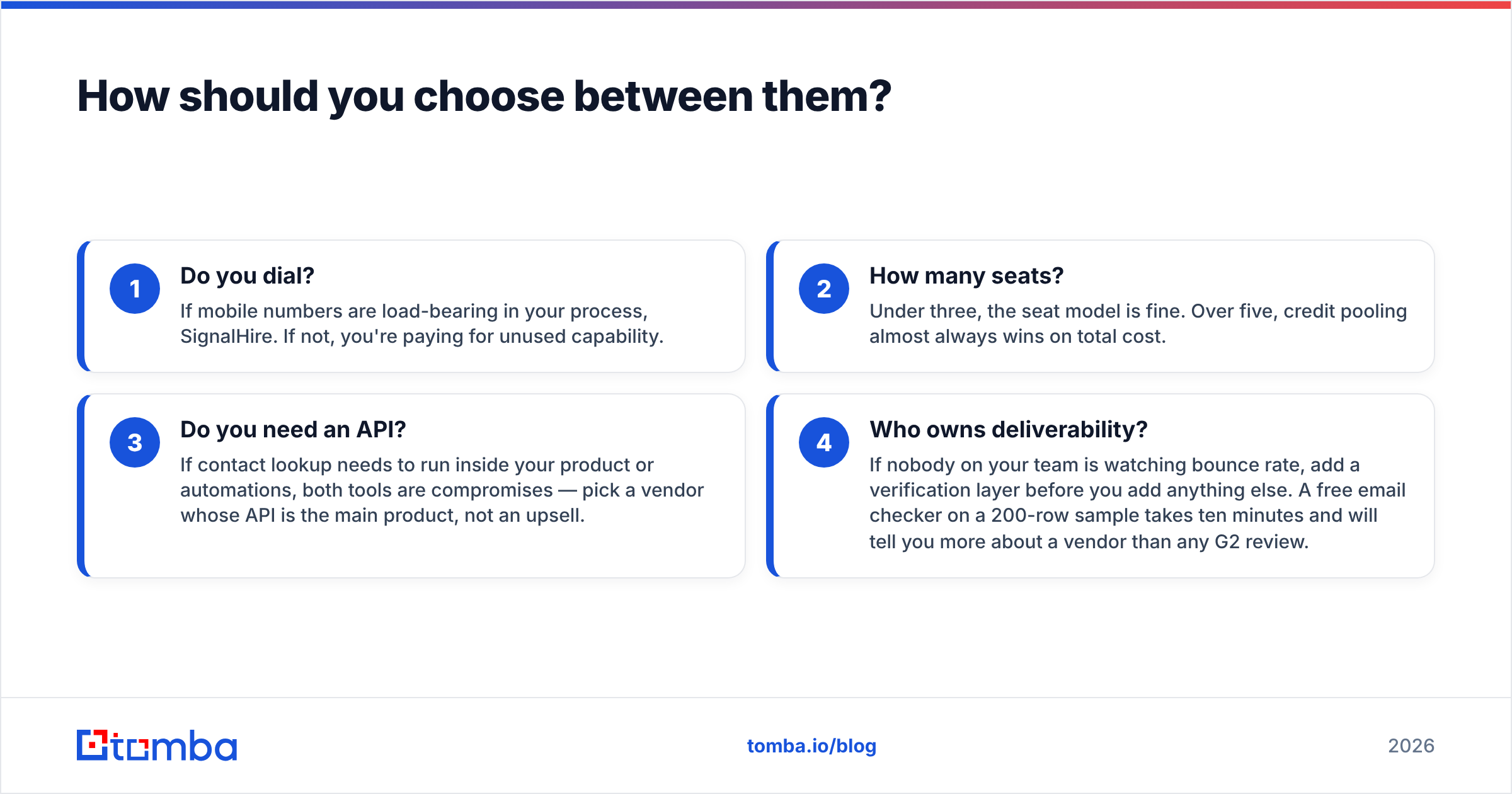
Answer four questions honestly.
- Do you dial? If mobile numbers are load-bearing in your process, SignalHire. If not, you're paying for unused capability.
- How many seats? Under three, the seat model is fine. Over five, credit pooling almost always wins on total cost.
- Do you need an API? If contact lookup needs to run inside your product or automations, both tools are compromises — pick a vendor whose API is the main product, not an upsell.
- Who owns deliverability? If nobody on your team is watching bounce rate, add a verification layer before you add anything else. A free email checker on a 200-row sample takes ten minutes and will tell you more about a vendor than any G2 review.
A reasonable decision rule: SignalHire for recruiting and phone-heavy sales. LeadGibbon for solo email list building. A dedicated finder-plus-verifier stack for anything that needs to scale, integrate, or survive a deliverability audit.
What's the verdict?#
There's no universal winner here, because the two tools barely overlap once you look past the category label.
SignalHire is the better product if contact reveals — especially mobile numbers across technical profile sites — are what you're buying. It's priced accordingly, and the per-seat model means you should keep the seat count tight.
LeadGibbon is the better product if you want lists fast with zero setup, you're one or two people, and you already have a sequencer that does the heavy lifting. Its limits show up when you try to automate it or scale it past a handful of users.
What both share is a verification gap and a pricing model that fights how outbound actually consumes data. That's the honest case for evaluating a third option rather than defaulting to one of the two names you started with.
Ready to test the data yourself?#
Don't take anyone's accuracy claim on faith — including this post's. Pull the same 200 target contacts through each tool and compare bounce rates on a real send.
Tomba's Email Finder gives you 25 free searches a month with no card required, a documented API from the $49/mo Starter plan, and a dedicated verifier with catch-all handling so you know which addresses are actually safe to send to. Run it against your current provider on the same list, compare the results, and let the bounce rate pick the winner.
Related guides#
// get started
Find, verify and enrich your first contacts today
Start on the free plan with 25 searches a month, then scale when your team is ready.
Free plan · No credit card required · GDPR & CCPA
// about the author