LeadGibbon vs SMARTe (2026): Which B2B Data Tool Wins?
LeadGibbon is a fast LinkedIn-to-list scraper. SMARTe is a global contact database with mobile numbers and compliance tooling. Here is where each one actually wins — and where a dedicated email finder beats both.
LeadGibbon vs SMARTe is a comparison of two very different tools. One builds lead lists from LinkedIn in minutes. The other sells global contact data with mobile numbers. Here is how they differ, and where both fall short.
TL;DR
- LeadGibbon is a lightweight LinkedIn-to-spreadsheet tool: browse a Sales Navigator search, push contacts into a list, export emails. Fast, cheap, shallow.
- SMARTe is an enterprise-leaning global contact database with mobile numbers, intent signals, CRM sync, and a sales-led pricing motion. Deeper, slower to buy, more expensive.
- They are not really competitors. LeadGibbon sells speed on a laptop; SMARTe sells coverage and compliance at team scale.
- Both leave the same gap. Neither is built as an accuracy-first email finder with verification included. So most teams bolt one on.
- Say you already have the company and the person, and you just need an email that lands. Then a dedicated email finder beats either one on cost per valid contact.
What is LeadGibbon and who is it for?#
LeadGibbon is a browser-based lead list builder. You run a search on LinkedIn or Sales Navigator. The extension captures the profiles. LeadGibbon then adds business email addresses and company firmographics. Output goes to CSV or a shared list you can hand to a VA.
The product is narrow on purpose. There is no sequencer, no dialer, no intent scoring, no ABM layer. It is a scraper plus an enrichment step. That is usually all a solo founder or a two-person SDR pod needs at the start. You can see the current feature set on the LeadGibbon site.
Who it fits:
- Solo founders doing their own prospecting — you need 200 names this week, not a data platform.
- Agencies building lists for clients — per-list export beats a per-seat contract when the client roster churns.
- LinkedIn-first motions — if every list starts as a Sales Navigator search, a Chrome extension is the shortest path.
- Teams with a separate sending stack — LeadGibbon assumes you already own Instantly, Smartlead, or your CRM's sequencer.
- Budget-constrained buyers — no procurement cycle, no annual commit, no implementation call.
Where it stops: sourcing outside LinkedIn, phone data depth, EU compliance paperwork, and real API access. RevOps teams need that API when enrichment has to run nightly against a whole CRM.
What is SMARTe and who is it for?#
SMARTe (smarte.io) is a B2B contact and company data provider. It aims at go-to-market teams that need coverage outside the US. Most North American databases thin out fast in EMEA and APAC, and SMARTe is built for those regions. The pitch is deep mobile-number data, GDPR- and CCPA-aware sourcing with opt-out handling, a Chrome extension that works on LinkedIn and company websites, and native push into Salesforce, HubSpot, and Outreach. You can review its positioning on the SMARTe homepage.
SMARTe says its database holds hundreds of millions of contacts, with a heavy focus on verified mobile numbers. Treat any vendor's own count as a marketing number, not a guarantee. What matters is coverage in your ICP. Only a sample test tells you that.
Who it fits:
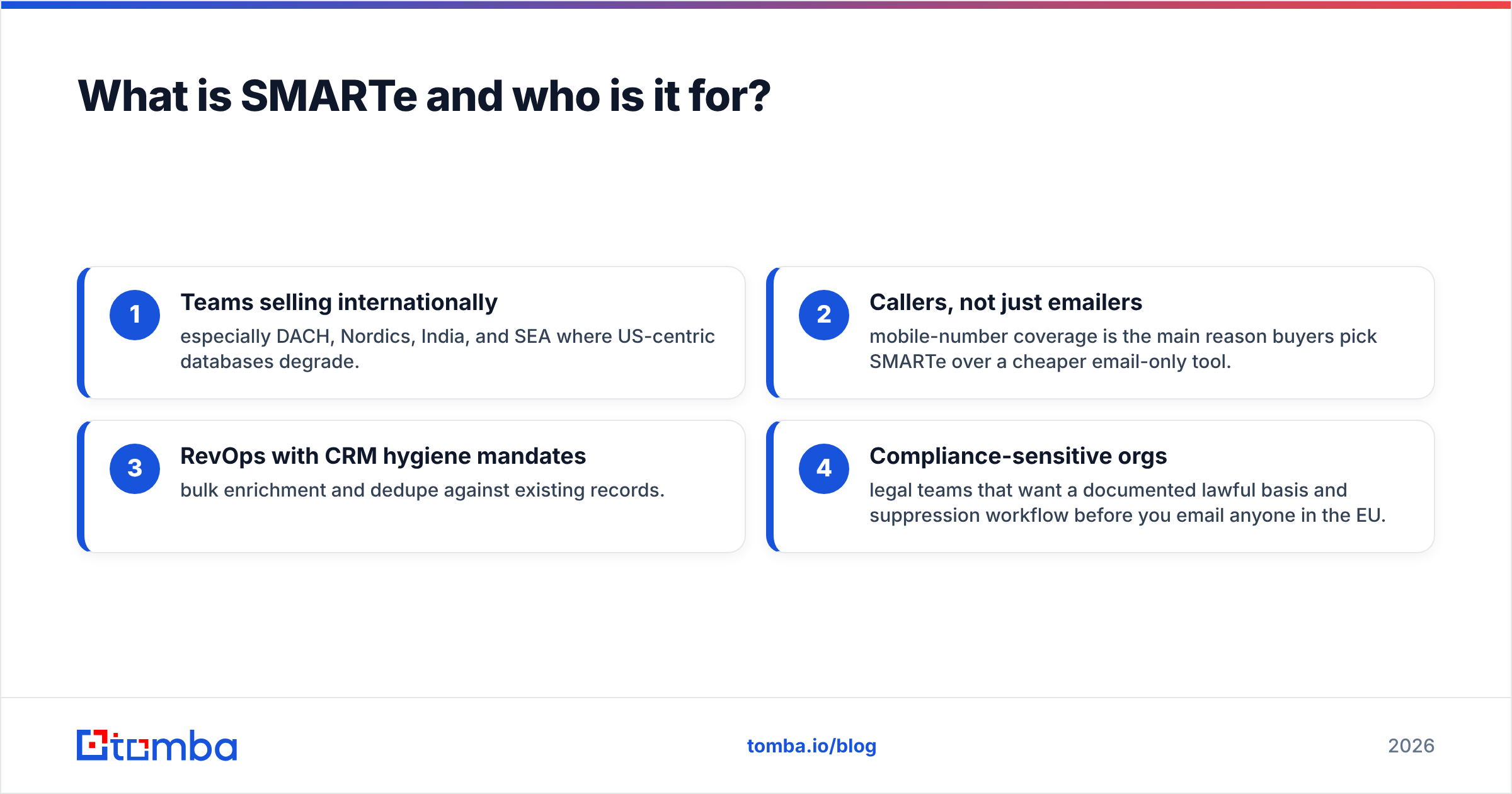
- Teams selling internationally — especially DACH, Nordics, India, and SEA where US-centric databases degrade.
- Callers, not just emailers — mobile-number coverage is the main reason buyers pick SMARTe over a cheaper email-only tool.
- RevOps with CRM hygiene mandates — bulk enrichment and dedupe against existing records.
- Compliance-sensitive orgs — legal teams that want a documented lawful basis and suppression workflow before you email anyone in the EU.

LeadGibbon vs SMARTe: how do they compare head to head?#
Here is the honest side-by-side. Pricing and feature details change, so confirm on each vendor's site before you sign anything.
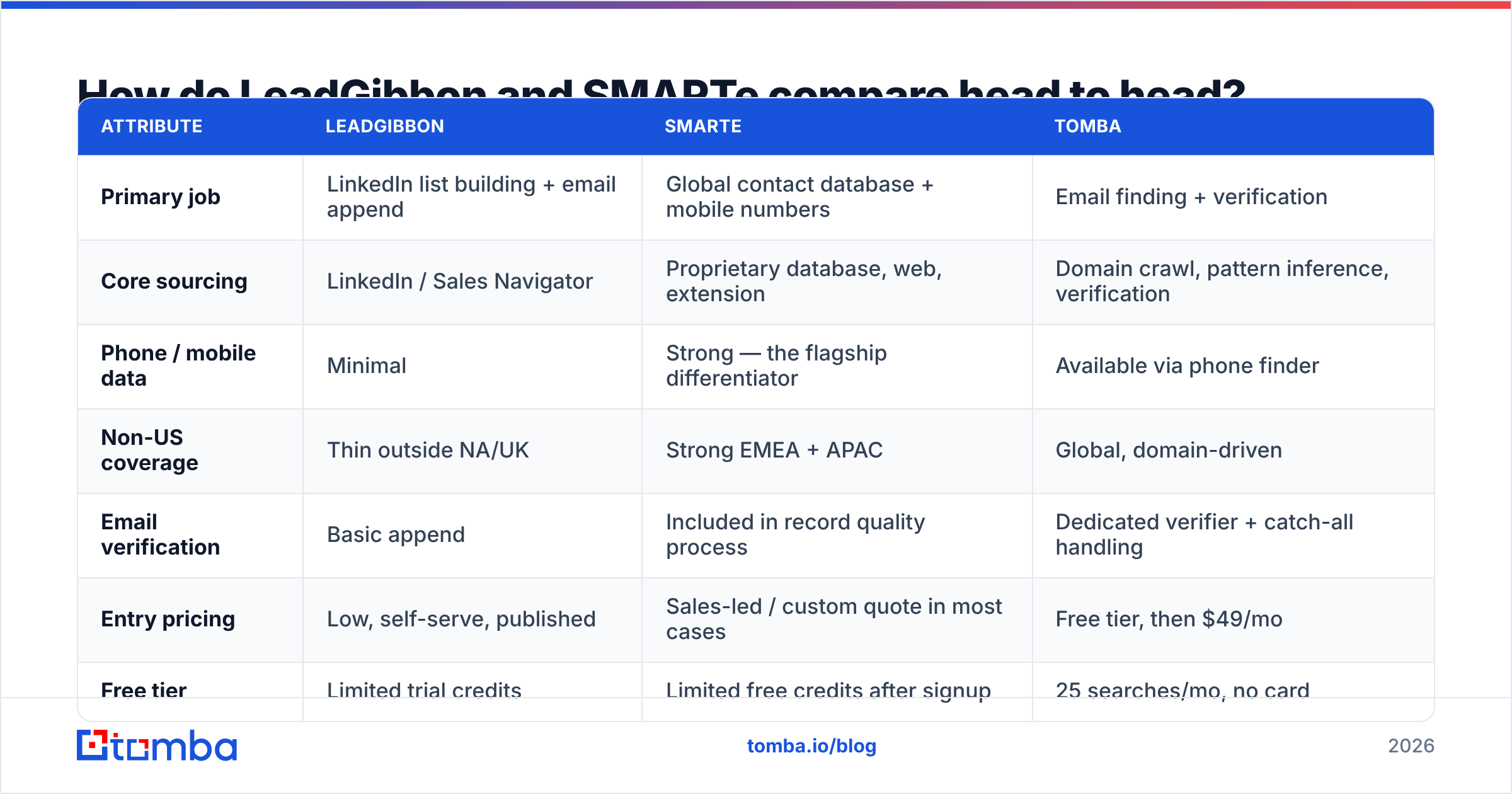
| Attribute | LeadGibbon | SMARTe | Tomba |
|---|---|---|---|
| Primary job | LinkedIn list building + email append | Global contact database + mobile numbers | Email finding + verification |
| Core sourcing | LinkedIn / Sales Navigator | Proprietary database, web, extension | Domain crawl, pattern inference, verification |
| Phone / mobile data | Minimal | Strong — the flagship differentiator | Available via phone finder |
| Non-US coverage | Thin outside NA/UK | Strong EMEA + APAC | Global, domain-driven |
| Email verification | Basic append | Included in record quality process | Dedicated verifier + catch-all handling |
| Entry pricing | Low, self-serve, published | Sales-led / custom quote in most cases | Free tier, then $49/mo |
| Free tier | Limited trial credits | Limited free credits after signup | 25 searches/mo, no card |
| API access | Limited | Available on higher tiers | Full REST API on all paid plans |
| Buying process | Sign up and go | Demo, scoping call, annual commit | Sign up and go |
| Best for | Solo / agency list pulls | Global enterprise outbound | Accuracy-first email at any scale |
The pattern is clear once you lay it out. LeadGibbon is built for speed to a first list. SMARTe is built for breadth and legal cover. Neither sells email accuracy as the headline product.

Which one has better data accuracy?#
Neither wins outright, because they fail in different places. And the failure mode matters more than the average.
LeadGibbon's accuracy rests on two things: how fresh the LinkedIn profile is, and how easy the email pattern is to guess. Results are solid when the prospect updated their profile last quarter and the company uses a simple first.last@ format. Results break when the profile is stale, the company was acquired, or the domain uses an odd pattern. Then you get an address that looks right and bounces. Scraped lists also inherit LinkedIn's own lag. Someone who left in March may still show as employed in September.
SMARTe's accuracy rests on database refresh cycles. Records are re-checked on a schedule, not at the moment you search. So coverage feels broad, but a single record can be a quarter behind reality. Mobile numbers hold up better than emails here. People change jobs far more often than they change phone numbers.

The practical rule: never trust an appended email without verifying it at send time. Whatever vendor you pick, run the export through an email verifier before it touches your sending domain. A 12% bounce rate on a 3,000-address campaign is not a data problem you can apologize your way out of. It is a hit to your sender reputation, and it suppresses your next six campaigns too.
Catch-all domains deserve their own note. Both tools will hand you addresses at domains that accept everything. Both will mark them "valid" because the SMTP handshake succeeds. That is where a catch-all verifier earns its keep. It tells "the server said yes to everything" apart from "this mailbox actually exists."
How does pricing compare?#
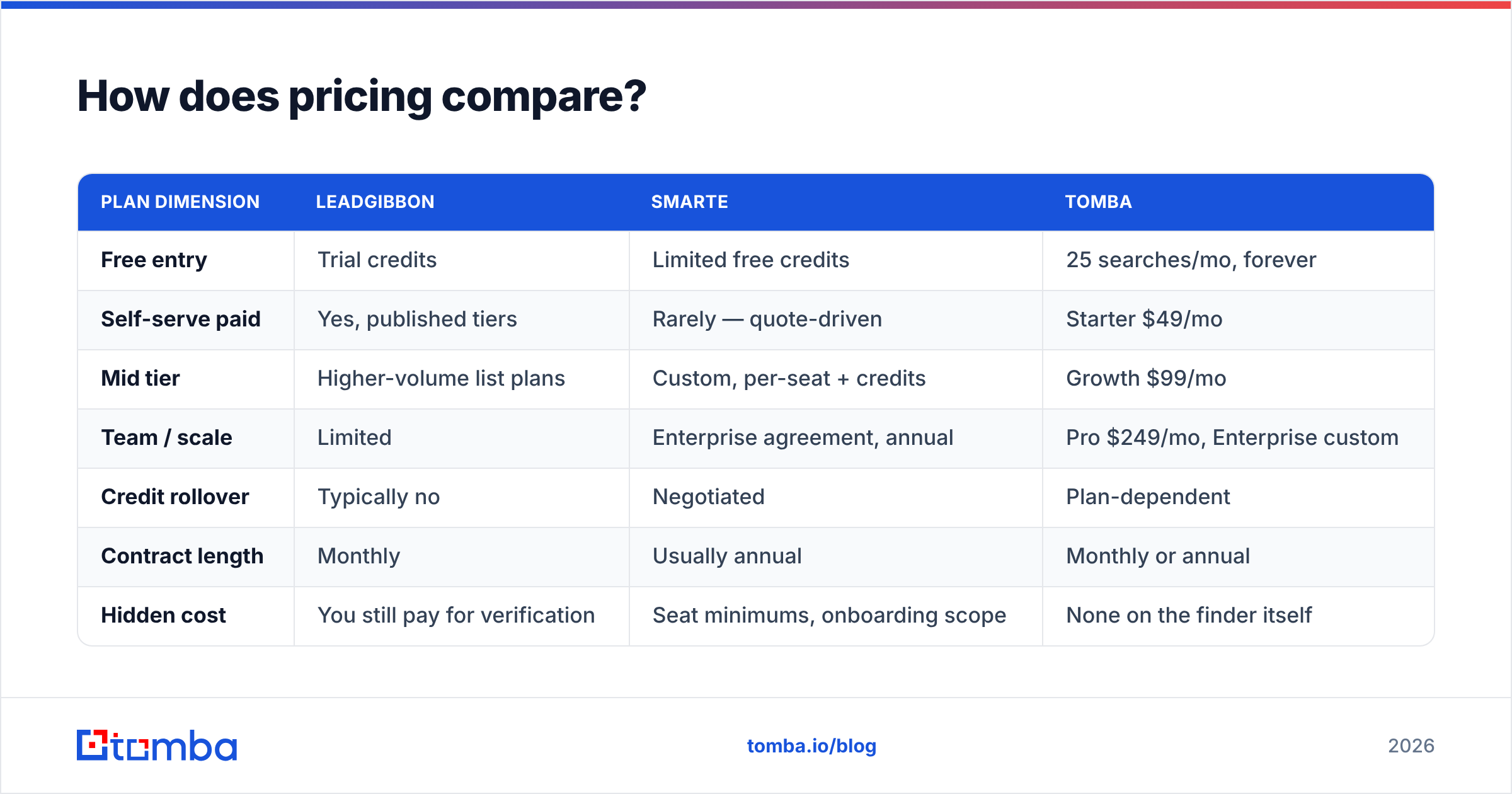
| Plan dimension | LeadGibbon | SMARTe | Tomba |
|---|---|---|---|
| Free entry | Trial credits | Limited free credits | 25 searches/mo, forever |
| Self-serve paid | Yes, published tiers | Rarely — quote-driven | Starter $49/mo |
| Mid tier | Higher-volume list plans | Custom, per-seat + credits | Growth $99/mo |
| Team / scale | Limited | Enterprise agreement, annual | Pro $249/mo, Enterprise custom |
| Credit rollover | Typically no | Negotiated | Plan-dependent |
| Contract length | Monthly | Usually annual | Monthly or annual |
| Hidden cost | You still pay for verification | Seat minimums, onboarding scope | None on the finder itself |
Two cost traps worth naming.
First, credit burn on bad records. Say a tool charges a credit for every reveal and 20% of reveals are unusable. Your real cost per valid contact is then 25% higher than the sticker. Always compute cost-per-verified-contact, not cost-per-credit. Check that math against transparent Tomba pricing before you assume the cheaper sticker wins.
Second, seat minimums on sales-led plans. SMARTe-style contracts often price around a team of five even when you have three reps. If you have fewer than ten SDRs, a self-serve tool plus an API is almost always cheaper. You can also cancel without a renewal conversation.
Which is better for LinkedIn prospecting specifically?#
LeadGibbon, if LinkedIn is the only source. It was built around that workflow and the friction is lowest: search, select, export, send.
SMARTe competes here too, and its extension enriches LinkedIn profiles in place. But you pay for a database you may barely touch if all your sourcing starts in Sales Navigator.
The third path most teams miss: split sourcing from enrichment. Scrape or export the profile list with whatever you already pay for. Then enrich in bulk through an API. A LinkedIn finder plus bulk email finder handles the same job with no per-seat database contract. You can also audit the result and see which addresses were confirmed and which were guessed.

What about GDPR and data compliance?#
This is where the two tools genuinely diverge. It is also the single most common reason buyers choose SMARTe.
SMARTe publishes a compliance posture: documented sourcing, opt-out and suppression handling, and data-subject request workflows. That paperwork is not a nice-to-have if you sell into Germany, France, or the Nordics. It is also what you need when your own customers audit your vendors. Your legal team will ask for it in week two.
LeadGibbon, like most scraper-adjacent tools, puts more of the compliance burden on you. You scrape public LinkedIn data and email EU residents on a legitimate-interest basis. You have to make that case yourself, with your own suppression list and your own records. That works for a founder-led motion. It gets uncomfortable for a Series C company with a security questionnaire to answer.
Either way, three practices are non-negotiable if you touch EU contacts:
- Maintain a global suppression list that survives tool changes.
- Honor opt-outs across channels, not just within one sequencer.
- Keep provenance — know where every record came from and when.
Sloppy list hygiene has a downstream cost. See email deliverability for a refresher. Bounce rate and complaint rate are the two metrics that turn a compliance problem into a revenue problem.
Where do both tools fall short?#
Verification is an afterthought in both. Appending an address is not the same as confirming a mailbox exists. You will still need a verification layer, which means a second vendor or a second line item.
Neither is API-first. LeadGibbon starts with the extension. SMARTe starts with the platform and gates API access behind higher tiers. You will feel this fast if enrichment has to run as a nightly job against your CRM or inside a product workflow. A plain REST endpoint like the Tomba API removes a whole class of manual CSV shuffling.
Coverage claims are impossible to check until you test. "220M+ contacts" tells you nothing about whether the 340 VP Ops contacts in your specific ICP exist. Run the same 50-name sample through every finalist and count verified hits. That one-hour test is worth more than every review page you will read.
Pricing transparency. You can price LeadGibbon in thirty seconds. Pricing SMARTe takes a call, a scoping conversation, and usually a quarter-end negotiation. That is a real cost even if the final number is fair.
LeadGibbon vs SMARTe: which should you choose in 2026?#
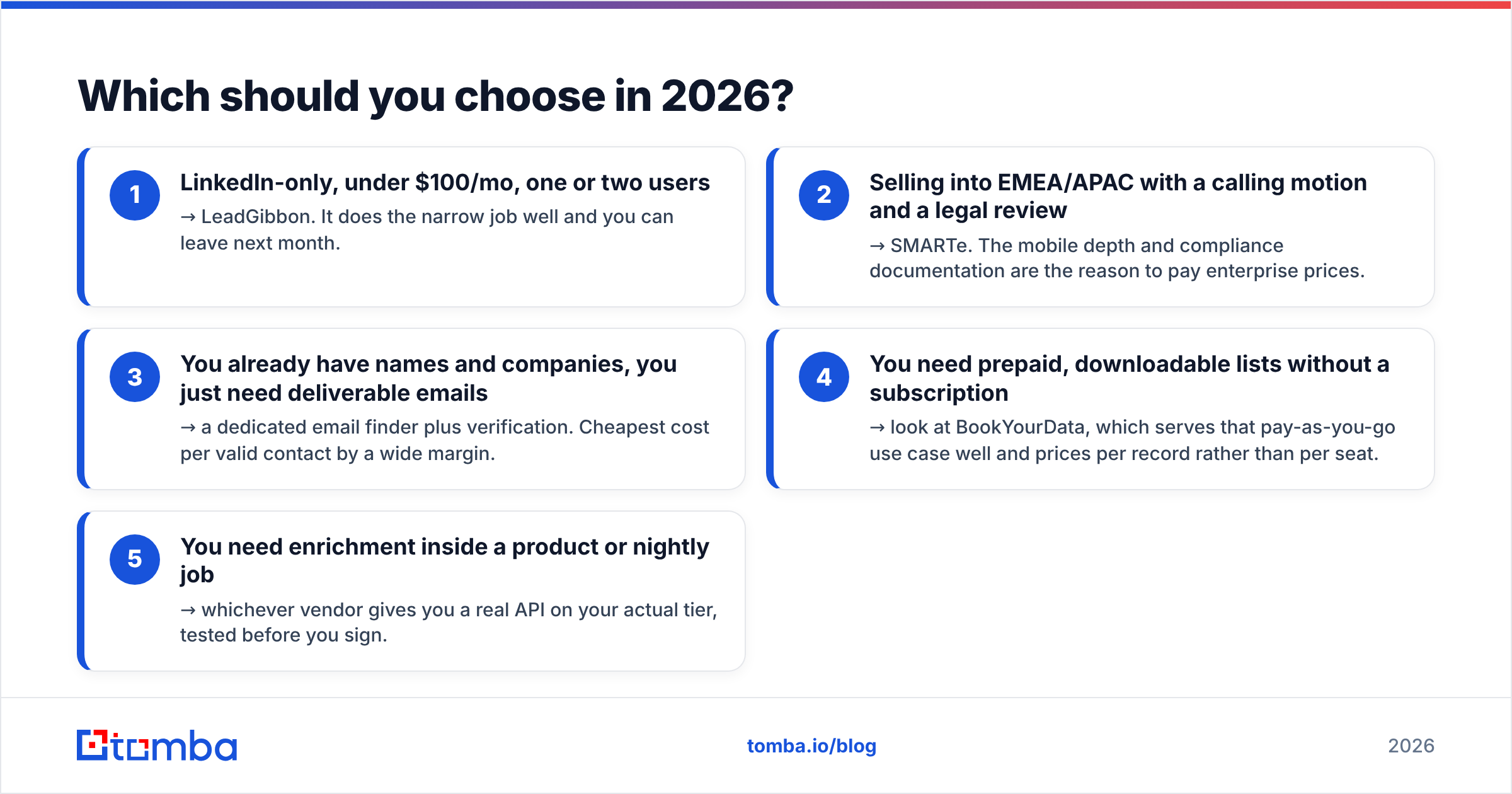
Pick by constraint, not by feature count:
- LinkedIn-only, under $100/mo, one or two users → LeadGibbon. It does the narrow job well and you can leave next month.
- Selling into EMEA/APAC with a calling motion and a legal review → SMARTe. The mobile depth and compliance documentation are the reason to pay enterprise prices.
- You already have names and companies, you just need deliverable emails → a dedicated email finder plus verification. Cheapest cost per valid contact by a wide margin.
- You need prepaid, downloadable lists without a subscription → look at BookYourData, which serves that pay-as-you-go use case well and prices per record rather than per seat.
- You need enrichment inside a product or nightly job → whichever vendor gives you a real API on your actual tier, tested before you sign.
One more pattern is worth a look. Use a cheap sourcing tool for the list, a specialist finder for the emails, and a verifier before every send. Three focused tools often cost less than one platform license. And you can swap any piece without a migration.
If you are shopping the wider market, test domain search as a sourcing method too. You start from a list of target-account domains instead of a LinkedIn query. That often surfaces contacts profile scrapers miss, especially at companies whose staff keep thin LinkedIn profiles.
Ready to stop paying for addresses that bounce?#
The LeadGibbon vs SMARTe comparison keeps landing in the same place. Both tools are fine at their own jobs. Neither is built for the one metric that decides whether your campaign works: the share of exported addresses that actually deliver.
Run the sample test. Take 50 real prospects from your ICP, push them through your shortlist, and count verified hits, not credits spent. Then run the same 50 through the Tomba Email Finder. The free tier gives you 25 searches a month with no card. Paid plans start at $49/mo, with the verifier, catch-all handling, and full API included rather than upsold. Whichever tool wins your test, you will at least be choosing on evidence instead of a database size printed on a homepage.
Related guides#
// get started
Find, verify and enrich your first contacts today
Start on the free plan with 25 searches a month, then scale when your team is ready.
Free plan · No credit card required · GDPR & CCPA
// about the author