LeadIQ vs FindEmails.com (Toofr): Which Email Finder Wins?
LeadIQ sells CRM-ready prospecting workflows. FindEmails.com (formerly Toofr) sells cheap bulk lookups. They solve different problems — here's which one actually fits your pipeline, and what each really costs.
LeadIQ vs FindEmails.com comes down to one question: are you buying a workflow, or buying data? LeadIQ sells the workflow. FindEmails.com sells the data. Here is how they differ on accuracy, price, and fit.
TL;DR
- LeadIQ is a sales prospecting platform built around a LinkedIn Chrome extension, CRM/sequencer sync, and job-change tracking. It's priced per seat, and the value is in the workflow, not the raw email lookup.
- FindEmails.com (the rebrand of Toofr) is a stripped-down, credit-based email finder and verifier with CSV bulk upload and a simple API. It's cheap, it's old, and it does one thing.
- If your reps live inside LinkedIn and your revenue stack is Salesforce + Outreach, LeadIQ is the more defensible spend. If you just need a few thousand emails a month appended to a list, LeadIQ is overkill.
- FindEmails.com's weak point is verification depth and product momentum; LeadIQ's weak point is cost per seat and coverage outside North American tech.
- If you want per-credit pricing without per-seat lock-in — plus catch-all handling and a real API — a dedicated finder like Tomba usually beats both on cost-per-valid-email.
What are LeadIQ and FindEmails.com (Toofr)?#
They're not really the same category of product, and that's the first thing to get straight before you compare price tags.
LeadIQ is a B2B prospecting platform. The core motion is simple. A rep opens a LinkedIn Sales Navigator search, clicks the LeadIQ extension, and captures a lead or a whole list. That record lands in Salesforce, HubSpot, Outreach, or Salesloft with the email and mobile number already attached. Layered on top are Scribe (an AI email writer that pulls from the prospect's profile and recent activity) and contact tracking that pings you when someone in your CRM changes jobs. LeadIQ sells "fewer keystrokes between finding a person and sequencing them."
FindEmails.com is what happened to Toofr. Toofr launched in the mid-2010s as an indie email-finding tool built by Ryan Buckley, got acquired, and was rebranded to FindEmails.com. The product stayed roughly what it always was. You give it a name and a domain, or upload a CSV, and it guesses and validates the most likely address for credits. There's a search-by-company function, a verification endpoint, and a REST API. There is no extension-driven prospecting motion, no sequencer, no CRM writeback worth the name.
So the honest framing is: LeadIQ is a workflow tool that includes data. FindEmails.com is data with a thin UI on top. Comparing them on "which finds more emails" misses most of the decision.
LeadIQ vs FindEmails.com: how do the features compare?#
Here's the side-by-side on the things that actually change how a week of prospecting feels.
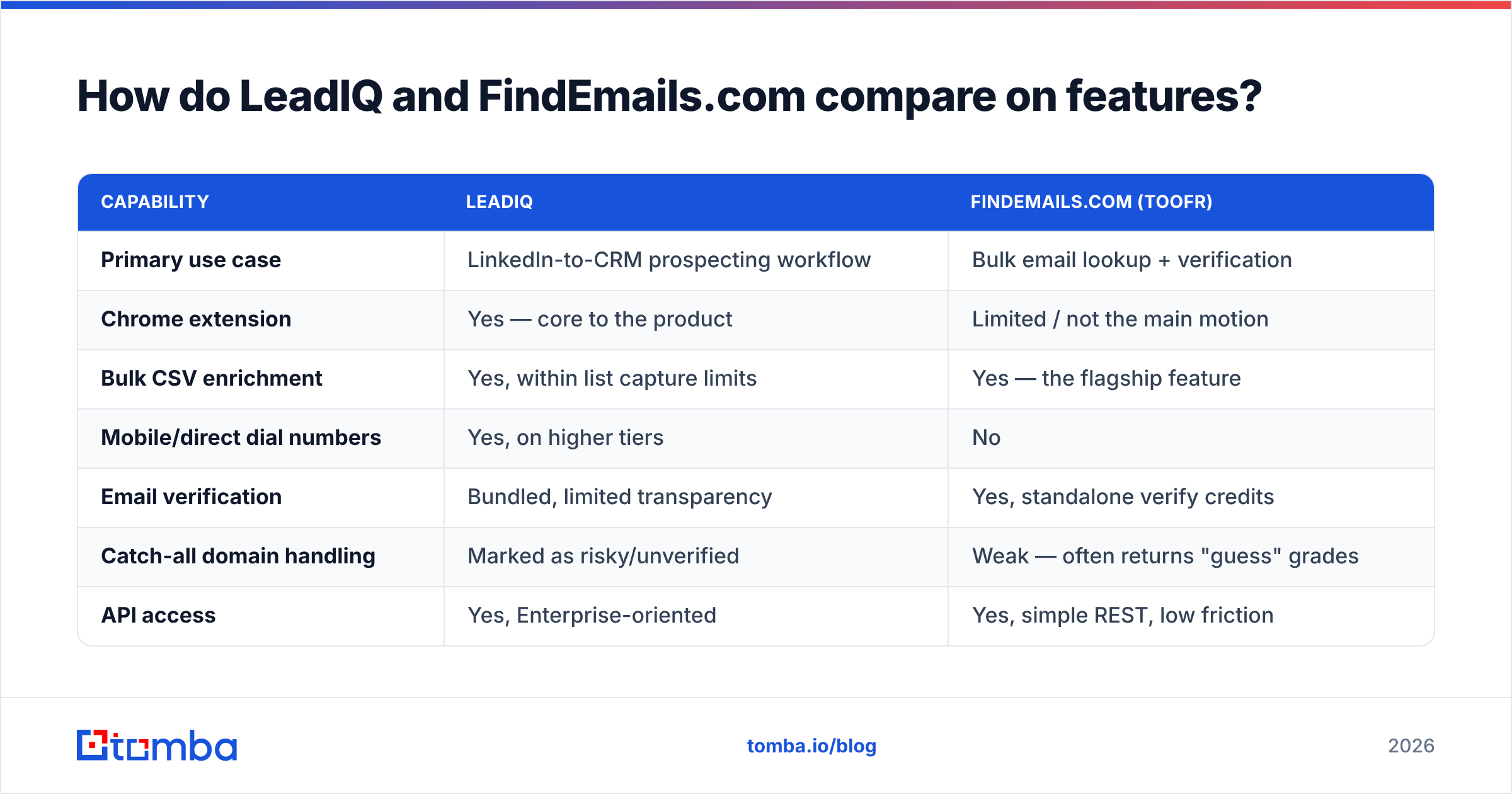
| Capability | LeadIQ | FindEmails.com (Toofr) |
|---|---|---|
| Primary use case | LinkedIn-to-CRM prospecting workflow | Bulk email lookup + verification |
| Chrome extension | Yes — core to the product | Limited / not the main motion |
| Bulk CSV enrichment | Yes, within list capture limits | Yes — the flagship feature |
| Mobile/direct dial numbers | Yes, on higher tiers | No |
| Email verification | Bundled, limited transparency | Yes, standalone verify credits |
| Catch-all domain handling | Marked as risky/unverified | Weak — often returns "guess" grades |
| API access | Yes, Enterprise-oriented | Yes, simple REST, low friction |
| CRM / sequencer sync | Salesforce, HubSpot, Outreach, Salesloft | Export CSV, DIY via API |
| AI message generation | Yes (Scribe) | No |
| Job-change tracking | Yes | No |
| Pricing model | Per seat, per month | Credit packs, per month |
| Best for | SDR teams running outbound at volume | Solo operators, list builders, agencies |
The pattern is clear. LeadIQ wins anything involving a rep's hands on a keyboard. FindEmails.com wins anything involving a spreadsheet with 4,000 rows and a deadline.

Where this gets expensive is when you buy LeadIQ for a use case that's really a FindEmails.com job. Picture a marketing ops person who needs to append emails to a webinar list once a quarter. You'd be paying a per-seat prospecting license to do batch enrichment. That's a common and avoidable mistake.
Which tool finds more valid email addresses?#
Neither vendor publishes an independently audited accuracy number, and you should be skeptical of any comparison post that claims a precise one. What you can do is understand how each tool arrives at an address, because that predicts where it fails.
The four ways email finders actually work:
- Pattern inference — The tool knows
acme.comusesfirst.last@, so it constructsjane.doe@acme.com. Cheap, fast, and the backbone of almost every finder including FindEmails.com. Fails on companies with mixed or legacy formats. - Crawled and sourced records — Addresses scraped from public web pages, press releases, GitHub commits, conference listings, and author bylines. High confidence when present, sparse outside marketing and engineering roles.
- Contributed / network data — Contact data pooled from users who connect their inboxes or extensions. This is a big part of how LeadIQ and similar platforms get mobile numbers. Strong on North American tech, thinner in EMEA and APAC, and it ages fast.
- SMTP and MX validation — The final gate: does the mailbox actually accept mail? This is what separates a "guess" from a deliverable address, and it's where catch-all domains break most tools.
FindEmails.com leans heavily on (1) and (2) with a verification pass. That makes it good value on well-indexed companies and unreliable on smaller or non-English domains. LeadIQ leans on (3) plus its own enrichment layer. That's why it's strong on funded US software companies. It gets noticeably weaker when you prospect into European manufacturing or Japanese logistics.

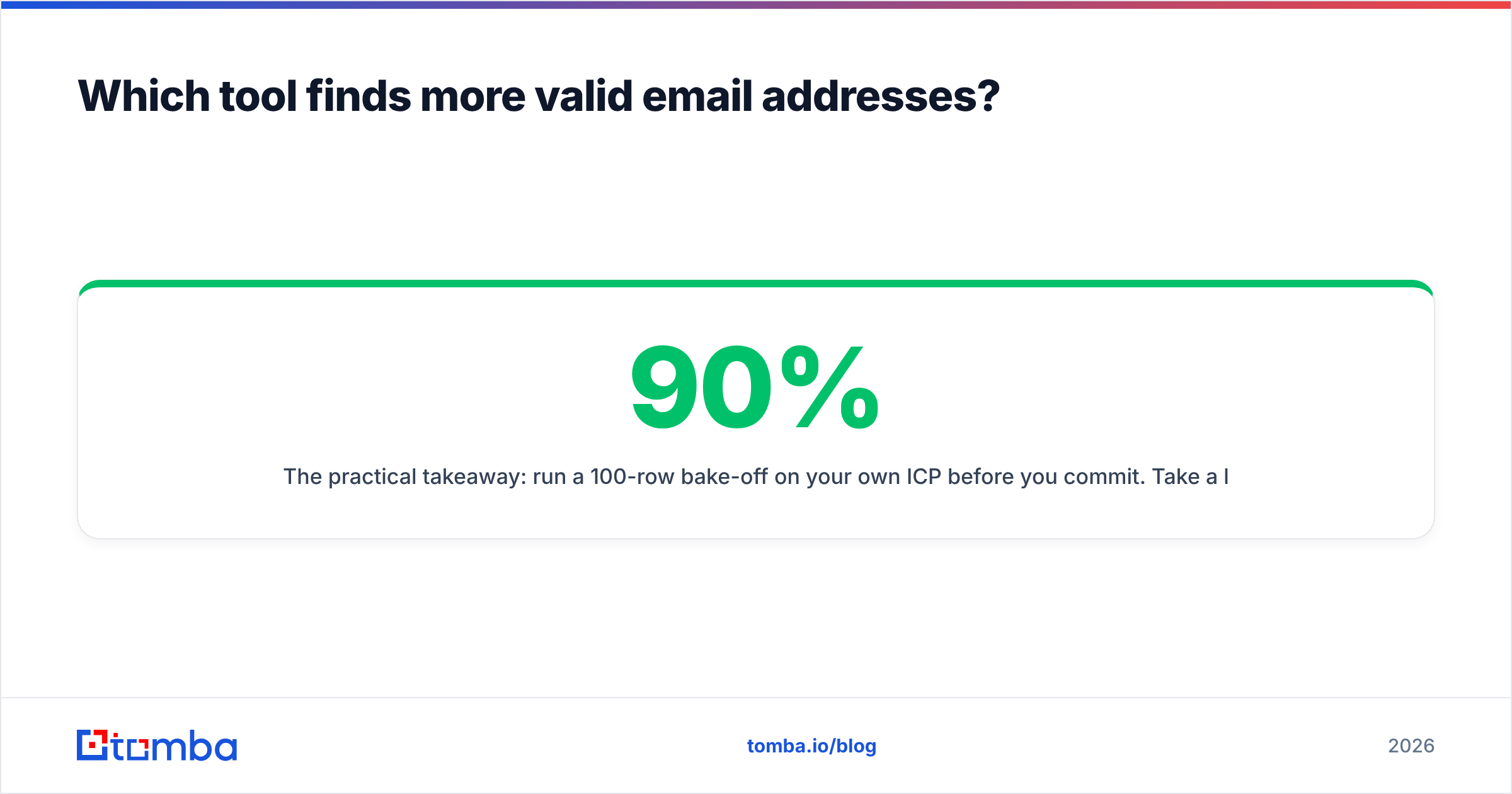
The practical takeaway: run a 100-row bake-off on your own ICP before you commit. Take a list you already have verified emails for and strip the emails out. Run it through each trial. Then measure three things — match rate (how many rows came back with anything), accuracy (how many matched the known-good address), and bounce rate on the ones you didn't already know. A tool with a 90% match rate and a 12% bounce rate is worse than one with a 65% match rate and a 1% bounce rate. Bounces damage sender reputation, and that damage costs more than credits.
If you don't have a verified control list, at minimum push everything through a second-opinion email verifier before it touches a sequencer. Treating any finder's output as send-ready is how domains end up in Google's spam folder by month two.
How much do LeadIQ and FindEmails.com cost?#
Pricing on both tools has moved more than once, so treat these as directional and confirm on the vendors' own pages before you sign anything.
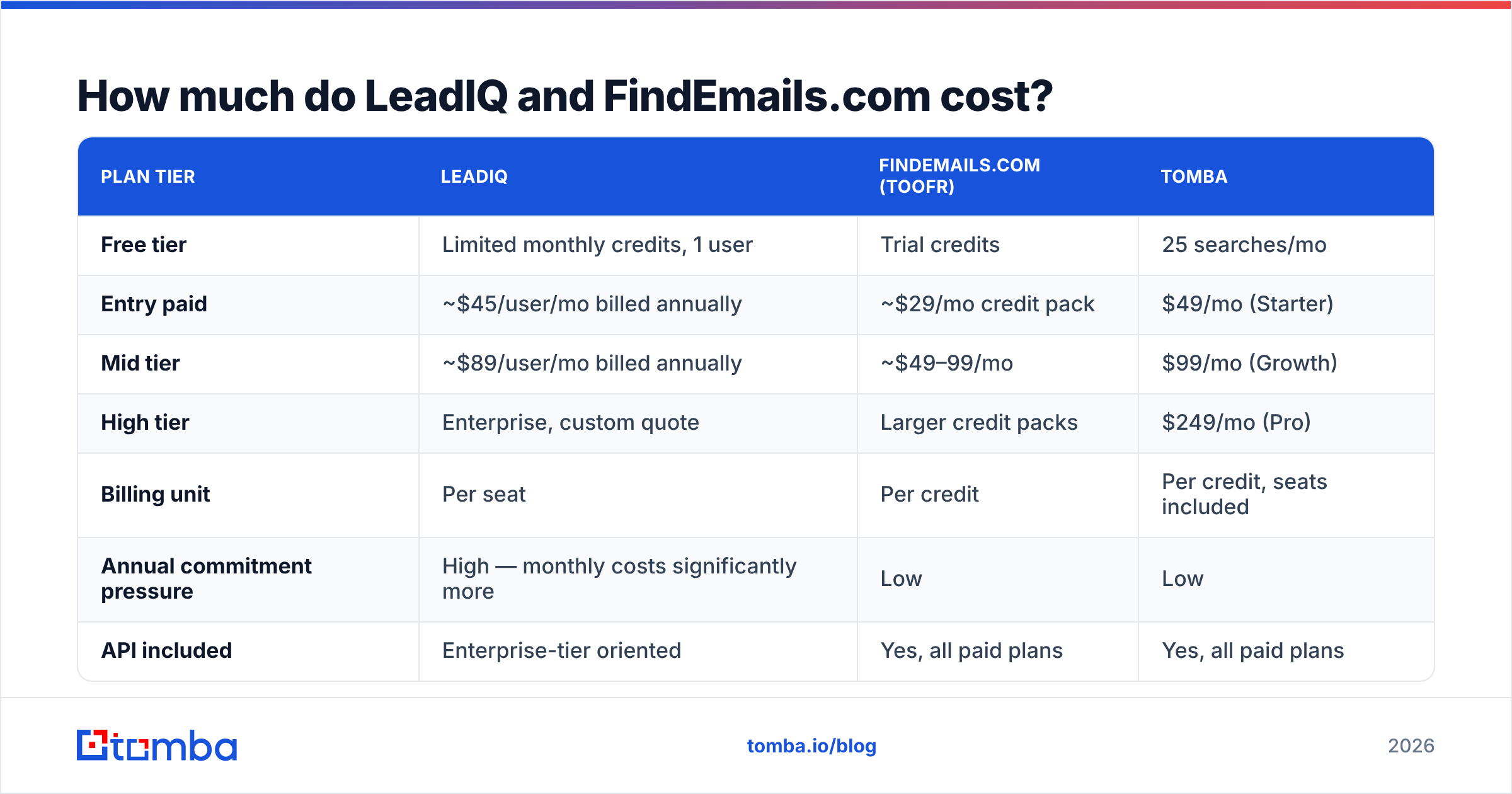
| Plan tier | LeadIQ | FindEmails.com (Toofr) | Tomba |
|---|---|---|---|
| Free tier | Limited monthly credits, 1 user | Trial credits | 25 searches/mo |
| Entry paid | ~$45/user/mo billed annually | ~$29/mo credit pack | $49/mo (Starter) |
| Mid tier | ~$89/user/mo billed annually | ~$49–99/mo | $99/mo (Growth) |
| High tier | Enterprise, custom quote | Larger credit packs | $249/mo (Pro) |
| Billing unit | Per seat | Per credit | Per credit, seats included |
| Annual commitment pressure | High — monthly costs significantly more | Low | Low |
| API included | Enterprise-tier oriented | Yes, all paid plans | Yes, all paid plans |
Two cost traps worth naming.
LeadIQ's per-seat math compounds. A five-rep SDR pod on the mid tier is roughly $445/month before anyone has sent an email, and credits are still capped per seat. If two of those reps prospect heavily and three barely touch it, you're paying for idle capacity you can't reallocate.
FindEmails.com's cheap credits hide a verification gap. A credit spent on an address that turns out to be a catch-all guess isn't a bargain — it's a future bounce. When you price compare, divide by verified deliverable results, not by raw lookups. A $29 plan that returns 60% usable data is more expensive per valid contact than a $49 plan returning 92%.
If you want to sanity-check that math against a third option, Tomba pricing is credit-based with seats included, which removes the per-rep multiplier entirely.
Who should choose LeadIQ?#
Pick LeadIQ if three or more of these are true:
- Your reps prospect inside LinkedIn Sales Navigator daily. The extension is genuinely good, and the time saved on manual data entry is real.
- You run Salesforce or HubSpot plus Outreach or Salesloft. LeadIQ's writeback is deep enough to eliminate a CSV step entirely, and it respects your field mappings.
- You need mobile numbers as well as emails. Multi-channel outbound needs dials, and FindEmails.com simply doesn't offer them.
- Your ICP is North American B2B software or services. That's where contributed-network data is densest.
- Job-change alerts matter to your motion. Tracking champions into new roles is one of the highest-converting outbound plays that exists, and LeadIQ productizes it.
Pass on LeadIQ if you're a one-person outbound operation, if your target accounts are mostly outside the US, or if your actual need is "enrich this spreadsheet." You'd be renting a workflow you don't use.
Who should choose FindEmails.com?#
Pick FindEmails.com if:
- You're buying data, not software. No onboarding, no seats, no implementation call.
- Bulk CSV is your primary interface. Upload, wait, download. It's unglamorous and it works.
- Budget is the binding constraint. The entry tier is genuinely inexpensive.
- You need a dead-simple API to wire into a script or a no-code automation without an enterprise conversation.
Pass on it if you need catch-all resolution, phone numbers, CRM sync, or a product roadmap that's visibly moving. The tool's greatest strength — that it hasn't changed much since the Toofr days — is also its ceiling. Check recent G2 reviews for both vendors before committing. Review recency tells you more about product momentum than any feature list.

Is there a better option than either one?#
For the narrow job of "find and verify business email addresses at the lowest cost per valid contact," yes — and that's not a knock on either tool, it's a category distinction.
LeadIQ prices like a sales-engagement platform because it is one. FindEmails.com prices like a commodity because it behaves like one. A dedicated, modern email-finding API sits between them: deeper data operations than the commodity tools, none of the per-seat drag of the platforms.
That's the gap Tomba is built for. Concretely:
- Domain search pulls every discoverable address at a company with roles and confidence scores, rather than one-at-a-time lookups.
- Catch-all verification actually tries to resolve accept-all domains instead of shrugging and marking them "risky." That's where most finders quietly lose half their usable output.
- Bulk processing handles list enrichment and verification in the same pass, so you're not exporting to a second vendor to clean the results.
- A documented email finder API plus a CLI, Sheets add-on, and Chrome extension, so the same credits serve the ops team and the reps.
- Credits, not seats. Add the whole team without multiplying the invoice.
Tomba runs $49/mo on Starter, $99/mo on Growth, and $249/mo on Pro, with a free tier at 25 searches a month for testing before you commit. If you're actively shopping, the LeadIQ alternative breakdown goes deeper on the feature-by-feature swap.

What should you actually test before buying?#
Run the same protocol on every tool on your shortlist. It takes an afternoon and saves a year of regret.
- Build a 100-row control list from your real ICP — same industries, same company sizes, same regions you actually sell into. Generic Fortune 500 lists make every vendor look great.
- Measure match rate and accuracy separately. Vendors quote match rate because it's the flattering number.
- Send a warm-up batch of 50 through a throwaway domain and record the hard-bounce rate. Under 2% is acceptable; over 5% means the verification layer isn't doing its job.
- Price it per valid contact, not per credit or per seat. Total monthly cost divided by deliverable addresses is the only number that compares across pricing models.
- Test one non-US segment, even if it's small. Coverage collapses outside North America for several tools and you want to know that before a Q3 expansion push.
- Check the API and export path, because the day you outgrow the UI arrives faster than you expect.
The verdict#
LeadIQ vs FindEmails.com has a clean answer once you know what you're buying. LeadIQ wins if you're staffing an SDR team and buying a workflow. FindEmails.com wins if you're an individual or agency buying cheap bulk lookups. Neither is the cost-efficient default for a team that mostly needs accurate, verified email addresses at volume without paying per rep.
If that last description fits you, start with the Tomba Email Finder. The free tier gives you 25 searches to run your own bake-off against whatever you're using today. No seat count, no annual commitment, and a verification layer that tells you the truth about catch-all domains before your sequencer finds out the hard way.
Related guides#
// get started
Find, verify and enrich your first contacts today
Start on the free plan with 25 searches a month, then scale when your team is ready.
Free plan · No credit card required · GDPR & CCPA
// about the author