LeadIQ vs LeadLeaper: Features, Pricing and Accuracy Compared
LeadIQ is built for sales teams that live in Salesforce and Sales Navigator. LeadLeaper is a lighter, cheaper option for solo prospectors. Here's how they compare on data, workflow, pricing and fit.
TL;DR
- LeadIQ is a team prospecting platform. You get LinkedIn and Sales Navigator capture, CRM sync with Salesforce and HubSpot, job-change tracking and AI-written outreach. It suits SDR teams that already have a defined outbound process.
- LeadLeaper is a lightweight Chrome extension that pulls leads from LinkedIn and company websites, and it adds Gmail tracking. It suits solo founders, recruiters and small teams on a tight budget.
- LeadIQ costs more per seat, and in return it handles the CRM hygiene work that stops a team from making a mess of its data. LeadLeaper is cheaper, but more of the process is manual.
- Neither tool is mainly a domain-wide email finder with verification. If what you need most is verified addresses at scale, pair either one with a dedicated finder and verifier, or replace it with one.
- Our pick: LeadIQ for teams of 3 or more SDRs using a CRM, and LeadLeaper for individuals who prospect a few hundred leads a month.
What are LeadIQ and LeadLeaper?#
On the surface the two tools look alike. Both are Chrome extensions that sit on top of LinkedIn and turn profiles into contact records with emails. They were built for different buyers, though, and that shows in almost every design choice.
LeadIQ positions itself as a sales prospecting platform for revenue teams. Its core workflow runs like this: you open a LinkedIn or Sales Navigator profile, capture the contact, enrich it with work email and phone, and push it to Salesforce, HubSpot or your sequencing tool in one click. The platform also includes job-change alerts (so you can follow champions to new companies) and an AI writing assistant for personalised first lines. Admins get team-level controls such as shared credit pools, duplicate checks against the CRM, and usage reporting.
LeadLeaper has been around longer and is deliberately simpler. The extension captures leads from LinkedIn and Sales Navigator and from ordinary company web pages, then tries to find a business email for each one. Leads go into a list inside LeadLeaper that you can export to CSV. The company also sells a Gmail add-on for email tracking and basic mail merge, which is useful if you prospect and send from the same inbox.
In short, LeadIQ is infrastructure for a sales team, while LeadLeaper is a productivity tool for one person.
How do LeadIQ and LeadLeaper compare feature by feature?#
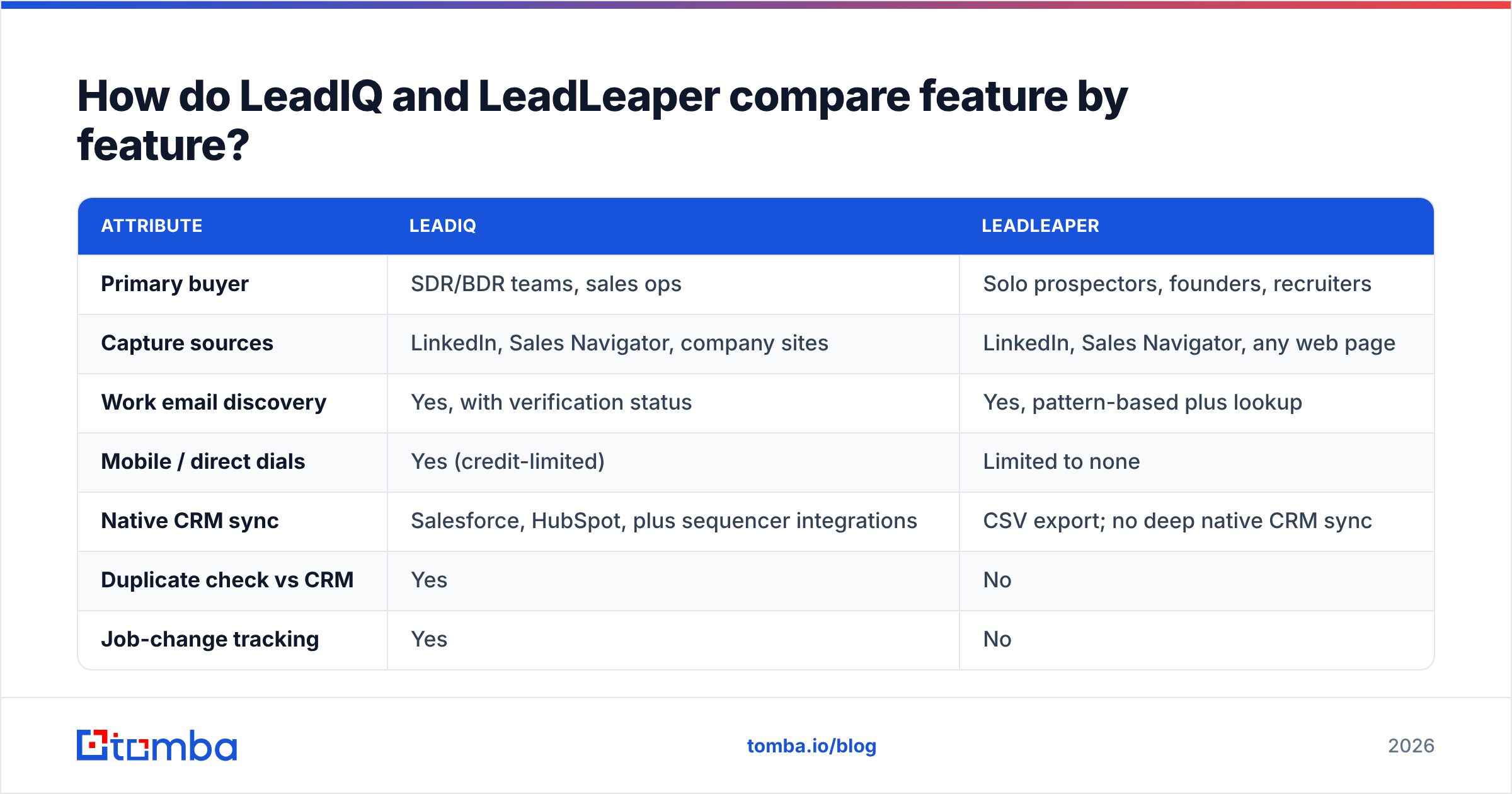
This table sets out the practical differences. Feature sets and quotas change often, so check each vendor's current plan page before you buy.
| Attribute | LeadIQ | LeadLeaper |
|---|---|---|
| Primary buyer | SDR/BDR teams, sales ops | Solo prospectors, founders, recruiters |
| Capture sources | LinkedIn, Sales Navigator, company sites | LinkedIn, Sales Navigator, any web page |
| Work email discovery | Yes, with verification status | Yes, pattern-based plus lookup |
| Mobile / direct dials | Yes (credit-limited) | Limited to none |
| Native CRM sync | Salesforce, HubSpot, plus sequencer integrations | CSV export; no deep native CRM sync |
| Duplicate check vs CRM | Yes | No |
| Job-change tracking | Yes | No |
| AI email writing | Yes | No |
| Email tracking in Gmail | Via sequencer integrations | Yes, native Gmail add-on |
| Free plan | Yes, small weekly/monthly credit allowance | Yes, monthly lead cap |
| Paid entry point | Per-seat, mid-market pricing | Low monthly fee, individual-friendly |
| Learning curve | Moderate (admin setup) | Very low |
Two rows in this table usually settle the decision: native CRM sync and duplicate checking. If your reps capture leads straight into Salesforce, LeadIQ's duplicate protection alone can justify the price, because cleaning up duplicate accounts is expensive RevOps work. If you don't run a CRM, or you're happy with CSV imports, most of what LeadIQ charges for won't matter to you.
Which tool finds more accurate emails?#
Accuracy matters more than any other feature, because a lead with a bounced email is worth nothing and it also damages your sender reputation.

In general, the pattern looks like this.
LeadIQ invests heavily in data. It combines several sources and returns a verification status with each email, so reps can tell a confirmed address from a best guess. Its reviews on G2 consistently praise how easily data gets into the CRM. Complaints tend to focus on credit limits and on mobile-number coverage outside North America, not on email quality.
LeadLeaper leans more on pattern detection. It works out a company's email format (for example first.last@company.com) and applies it to the lead. This works well at mid-sized companies with consistent formats. It is less reliable at:
- Catch-all domains, where the mail server accepts every address, so a pattern-generated email can't be confirmed as real.
- Enterprises with mixed formats, where acquisitions or regional subsidiaries use different conventions.
- Small startups, which may not have enough public data to establish a pattern at all.
Whichever tool you choose, don't send to a new list before you run it through an email verifier. This is especially important for catch-all results, which tend to produce the most unexpected bounces.
How much do LeadIQ and LeadLeaper cost?#
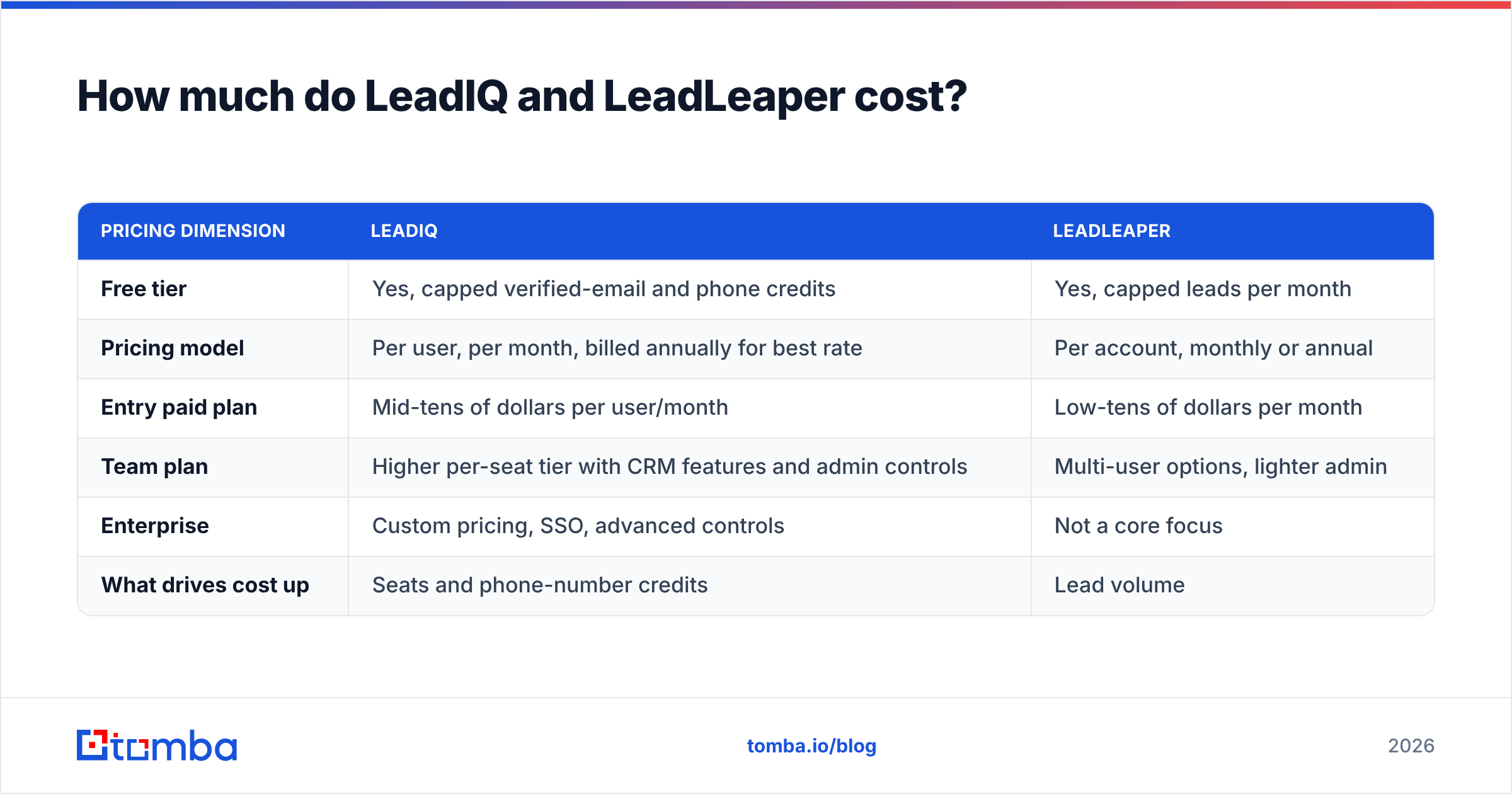
Pricing is where the two tools differ most. We've kept exact figures out of this section on purpose, because both vendors adjust tiers and credit allowances regularly. Treat these as structural differences and confirm current numbers on their sites.
| Pricing dimension | LeadIQ | LeadLeaper |
|---|---|---|
| Free tier | Yes, capped verified-email and phone credits | Yes, capped leads per month |
| Pricing model | Per user, per month, billed annually for best rate | Per account, monthly or annual |
| Entry paid plan | Mid-tens of dollars per user/month | Low-tens of dollars per month |
| Team plan | Higher per-seat tier with CRM features and admin controls | Multi-user options, lighter admin |
| Enterprise | Custom pricing, SSO, advanced controls | Not a core focus |
| What drives cost up | Seats and phone-number credits | Lead volume |
The practical takeaway: a five-rep team on LeadIQ will pay several times what one person pays for LeadLeaper. That comparison is fair only if you count the CRM and duplicate-management work LeadIQ takes off your hands. For one founder sending 200 cold emails a month, LeadLeaper's cost-per-lead is very hard to beat.
For context, a dedicated email finder such as Tomba starts with a free tier of 25 searches a month, with paid plans from $49 (Starter), $99 (Growth) and $249 (Pro) a month. The full breakdown is on Tomba pricing. That places it between the two in cost, with a narrower focus: finding and verifying emails, not managing a team workflow.
Which workflow fits your team?#
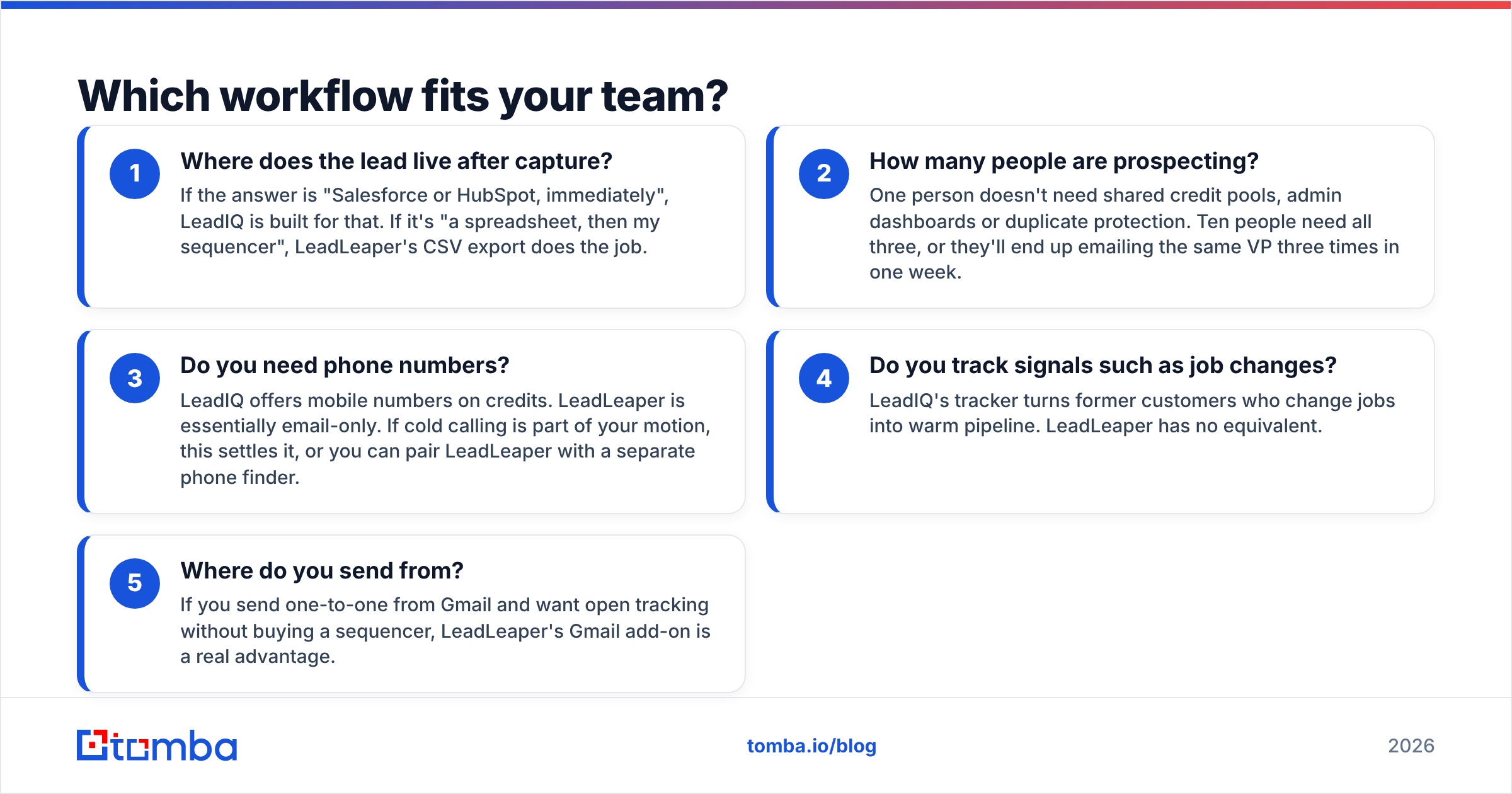
A feature list doesn't tell you how a tool feels to use every day. Here are the four workflow questions that decide most LeadIQ vs LeadLeaper evaluations.
- Where does the lead live after capture? If the answer is "Salesforce or HubSpot, immediately", LeadIQ is built for that. If it's "a spreadsheet, then my sequencer", LeadLeaper's CSV export does the job.
- How many people are prospecting? One person doesn't need shared credit pools, admin dashboards or duplicate protection. Ten people need all three, or they'll end up emailing the same VP three times in one week.
- Do you need phone numbers? LeadIQ offers mobile numbers on credits. LeadLeaper is essentially email-only. If cold calling is part of your motion, this settles it, or you can pair LeadLeaper with a separate phone finder.
- Do you track signals such as job changes? LeadIQ's tracker turns former customers who change jobs into warm pipeline. LeadLeaper has no equivalent.
- Where do you send from? If you send one-to-one from Gmail and want open tracking without buying a sequencer, LeadLeaper's Gmail add-on is a real advantage.
If you answered "CRM, team, phones, signals" to most of these, choose LeadIQ. If you answered "spreadsheet, just me, email-only, Gmail", choose LeadLeaper.
What are the pros and cons of each?#
LeadIQ pros
- One-click capture from Sales Navigator into Salesforce or HubSpot, with duplicate checks
- Verification status shown next to each email
- Job-change tracking that produces warm outbound opportunities
- AI personalisation that saves reps time on first lines
- Team admin, shared credits and usage reporting
LeadIQ cons
- Per-seat pricing adds up quickly for growing teams
- Credit limits, especially for mobile numbers, can frustrate heavy users
- More setup than a solo user needs
LeadLeaper pros
- Very low learning curve: install, click, capture
- Works on ordinary company web pages as well as LinkedIn
- Generous free tier for light prospecting
- Built-in Gmail tracking for people who send one-to-one
LeadLeaper cons
- Pattern-based emails need verification before you send
- No deep native CRM sync or duplicate protection
- Few or no phone numbers
- Older interface and a narrower roadmap than team-focused platforms
Is LeadIQ better than LeadLeaper?#
For a sales team, yes. For an individual, usually not.
LeadIQ's value comes from what happens after you capture a lead: syncing, deduplication, routing and tracking. Those features compound as headcount grows. A 10-person SDR team that avoids duplicate records and wasted touches each quarter easily recovers the extra per-seat cost.
LeadLeaper's value comes from what it leaves out. There's no admin console to configure, no CRM field mapping and no seat management. For a founder doing their own outbound, a recruiter sourcing candidates, or a consultant building a list of 150 targets, that simplicity is what they're paying for.
There's also a third group that neither tool serves especially well: teams whose bottleneck is email coverage, not workflow. If you already have a list of target companies and need every relevant decision-maker's verified email, you want a tool built for domain search and bulk verification. A profile-by-profile LinkedIn extension is the wrong fit for that job.

Where does a dedicated email finder fit in?#
Many teams end up with a hybrid stack. One layer is the capture or workflow tool (LeadIQ, LeadLeaper, or the sequencer's own extension). The other is a dedicated finder and verifier that handles volume and accuracy.
A dedicated email finder is worth adding in these situations:
- Account-based lists. You start from company domains, not LinkedIn profiles, and need everyone in marketing or engineering at 300 accounts.
- Bulk enrichment. You have a CSV of 5,000 names and companies from an event, a webinar or a purchased list, and you need emails filled in and verified in one pass.
- Catch-all handling. A large share of B2B domains are catch-all. A tool with dedicated catch-all verification tells you which of those guesses are safe to send.
- API and automation. You want enrichment to run inside your own product, a Zapier flow or a spreadsheet, not through a browser extension.
If you're weighing LeadIQ mainly for email data and not for its CRM workflow, look at our LeadIQ alternative breakdown first. You may be paying for team features you won't use.
How should you decide in the next 30 minutes?#
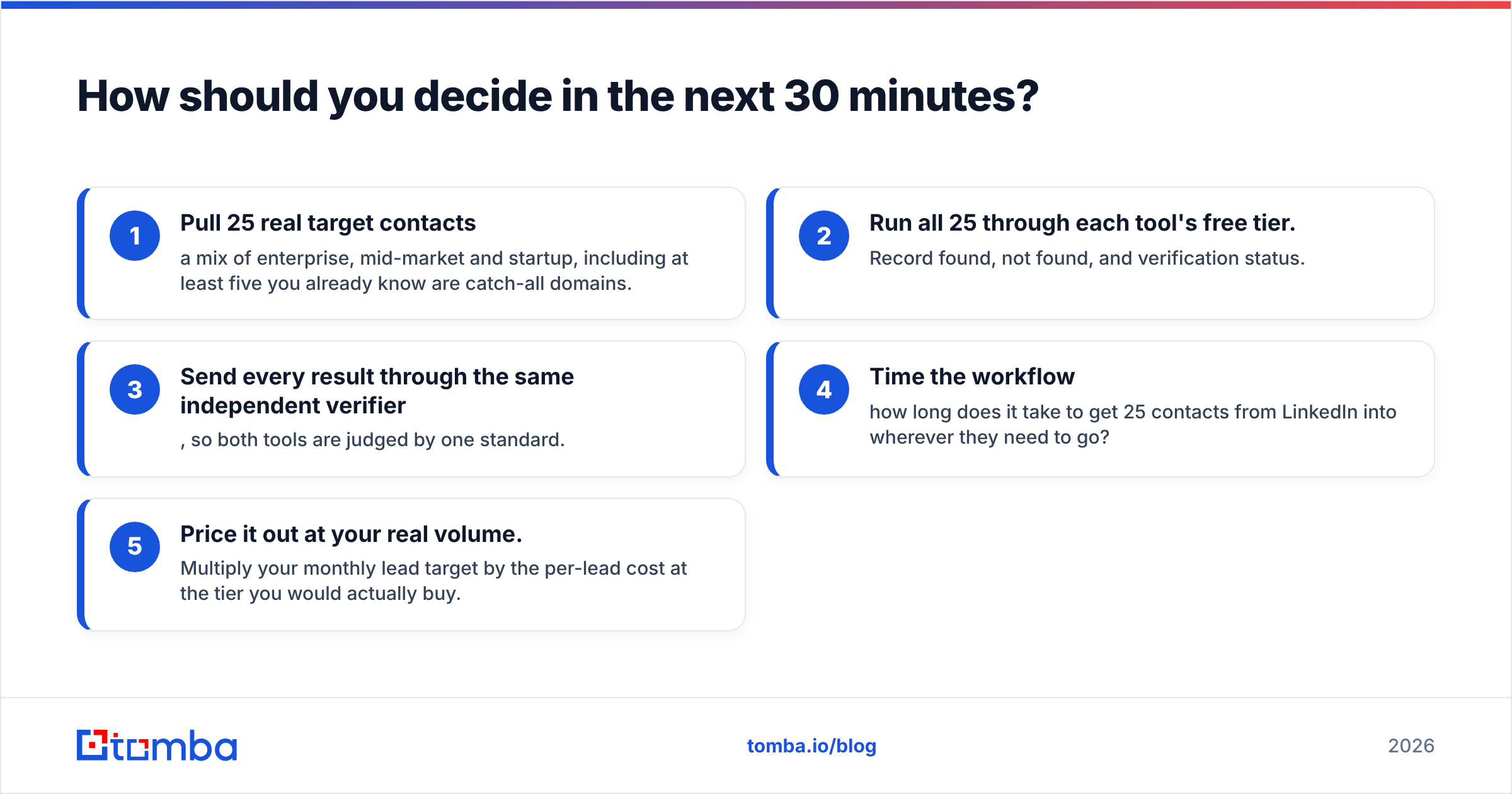
Run this quick test instead of reading more reviews:
- Pull 25 real target contacts: a mix of enterprise, mid-market and startup, including at least five you already know are catch-all domains.
- Run all 25 through each tool's free tier. Record found, not found, and verification status.
- Send every result through the same independent verifier, so both tools are judged by one standard.
- Time the workflow: how long does it take to get 25 contacts from LinkedIn into wherever they need to go?
- Price it out at your real volume. Multiply your monthly lead target by the per-lead cost at the tier you would actually buy.
This takes about half an hour and gives you data specific to your market, which is more reliable than any generic accuracy claim, ours included.
Final verdict: LeadIQ vs LeadLeaper#
| If you are... | Choose |
|---|---|
| An SDR team on Salesforce or HubSpot | LeadIQ |
| Running an outbound motion with cold calling | LeadIQ |
| A solo founder or consultant on a budget | LeadLeaper |
| A recruiter sourcing from LinkedIn and websites | LeadLeaper |
| Building lists from company domains at volume | A dedicated email finder |
LeadIQ and LeadLeaper are both legitimate tools that solve different problems. LeadIQ keeps team prospecting organised and synced to your CRM. LeadLeaper keeps solo prospecting cheap and fast. Choose based on your team size and CRM setup, not on the length of the feature list.
If what you really need is verified email coverage and not another workflow layer, try the Tomba Email Finder. You can look up professional emails by name, company or domain, check each result with built-in verification and catch-all handling, and run bulk lists or connect through the API. The free plan includes 25 searches a month, which is enough to run the 25-contact test above against either tool before you spend anything.
Related guides#
// get started
Find, verify and enrich your first contacts today
Start on the free plan with 25 searches a month, then scale when your team is ready.
Free plan · No credit card required · GDPR & CCPA
// about the author