LeadIQ vs QuickEnrich: Which Contact Finder Fits Your Team in 2026?
LeadIQ is a per-seat prospecting tool built around your CRM and sequencer. QuickEnrich is a lighter tool you pay for by the credit. This comparison shows which one fits your team, your budget and your data quality bar.
TL;DR
- LeadIQ is a prospecting tool built around your workflow. You capture contacts from LinkedIn and Sales Navigator, push them to Salesforce, HubSpot, Outreach or Salesloft in one click, and get alerts when a contact changes jobs. You pay per seat.
- QuickEnrich is a lighter enrichment tool. You feed it a LinkedIn profile or a CSV and get emails and phone numbers back. You pay for credits, not seats.
- Pick LeadIQ if you run an SDR team whose work lives in a CRM and a sequencer, and the extra cost per seat pays for itself in saved clicks.
- Pick QuickEnrich if you're a founder, a small team or an agency that needs contact data now and then and doesn't need a full prospecting suite.
- Whichever you choose, verify every address before you send. Neither tool removes the need for a verification step.
What are LeadIQ and QuickEnrich, and why compare them?#
LeadIQ and QuickEnrich both answer "how do I get this person's work email and phone number?", but they're built on different ideas.
LeadIQ sells itself as a prospecting workspace. Its Chrome extension sits on top of LinkedIn and Sales Navigator. You capture a prospect, LeadIQ looks up their contact data, and the record goes straight to your CRM or sequencer. Around that core it adds job-change tracking and an AI tool for writing personalized emails. LeadIQ is built for SDR teams whose managers care about CRM hygiene and activity data.
QuickEnrich is simpler. You get contact data (email and phone) from a LinkedIn profile or a spreadsheet, and you pay only for what you enrich. You get fewer workflow features, a smaller commitment and a shorter setup.
So you're not comparing two versions of the same product. You're choosing between a workflow tool that finds data and a data tool with a small amount of workflow. That's why so many people search "leadiq vs quickenrich": the tools look alike in a Chrome Web Store listing and behave very differently once you use them every day.
How do LeadIQ and QuickEnrich compare side by side?#
Here's the short version. Pricing on both sides changes often, so treat the pricing rows as a description of how each tool charges and check the vendor pages before you buy.
| Attribute | LeadIQ | QuickEnrich | Tomba (reference) |
|---|---|---|---|
| Core model | Prospecting workflow + contact data | Contact enrichment (email + phone) | Email finder + verifier + enrichment |
| Pricing model | Per seat, monthly or annual | Credit-based, smaller entry point | Free (25 searches/mo), $49, $99, $249/mo, Enterprise |
| Free option | Limited free plan | Trial credits | Yes, 25 searches/month |
| LinkedIn / Sales Nav capture | Yes, a core feature | Yes, via extension | Yes, via browser extension |
| Bulk CSV enrichment | Yes | Yes, a core feature | Yes |
| Native CRM push | Salesforce, HubSpot, deep | Lighter, export-first | HubSpot, Salesforce, Pipedrive, Zapier, Make |
| Sequencer sync | Outreach, Salesloft, others | Mostly via export | Via integrations and API |
| Job-change tracking | Yes | Not a focus | Not a focus |
| AI email writing | Yes | No | Separate free tools |
| Domain-wide search | Limited | Limited | Yes, a core feature |
| Built-in verification | Emails are verified at capture | Emails are validated at enrichment | Standalone verifier + catch-all verifier |
| Best for | SDR teams on Salesforce/HubSpot + a sequencer | Founders, agencies, spot enrichment | Teams that want finding + verification in one stack |

The table shows the main split. LeadIQ's strengths show up after the email is found: where the record goes, who owns it and what happens when the person changes jobs. QuickEnrich's strengths show up before that point: how fast and how cheaply you can turn a list of names into contact data.
How do the day-to-day workflows differ?#
The feature list matters less than what your reps do forty times a day. Here's how the two tools compare on the jobs you'll repeat.
- Capturing a single prospect. In LeadIQ, you open a LinkedIn or Sales Navigator profile, click capture, and the contact is enriched, checked for duplicates against your CRM and pushed to a sequence without leaving the page. QuickEnrich also works from the profile, but the usual next step is export or copy-paste. That's fine for a founder and slow for a rep hitting activity targets.
- Enriching a list you already have. QuickEnrich is built for this: upload a CSV of names and companies or LinkedIn URLs and get emails and phones back. LeadIQ supports list work too, but its design assumes contacts arrive one profile at a time from LinkedIn.
- Keeping the CRM clean. LeadIQ checks for existing leads and contacts in Salesforce and HubSpot before it creates records. That's a real benefit if you've ever inherited a CRM with three copies of the same VP. With QuickEnrich, deduplication is your job, usually in a spreadsheet before import.
- Following champions who change jobs. LeadIQ's tracking alerts you when a past customer or champion moves to a new company, and some of the best outbound replies come from exactly those leads. QuickEnrich doesn't try to cover this.
- Writing the first email. LeadIQ includes an AI writing assistant that drafts personalized openers from profile data. QuickEnrich leaves copy to you or to your sequencer.

If you picture a rep's day, LeadIQ saves clicks at every step between finding a person and sending the first touch. If you picture a founder's week, which might be three hours of prospecting and one CSV, those saved clicks are worth much less, and QuickEnrich's lower commitment starts to look better.
Which one has better data accuracy?#
This is the question everyone asks, and no vendor can answer it honestly for you. Accuracy depends on your market: region, company size, seniority and industry. A tool that's excellent for US mid-market SaaS VPs can be weak on DACH manufacturing or LATAM agencies.
What you can say about each tool's approach:
- LeadIQ verifies emails when you capture them and marks how confident it is in each one. Because it's aimed at larger sales teams, its coverage is strongest where those teams sell: North American and Western European B2B, especially tech and professional services.
- QuickEnrich runs enrichment requests through its own data and lookup process and returns a status for each record. Spot enrichment tools like this can do well on long-tail contacts because they look up each record when you ask for it rather than relying on a static database.

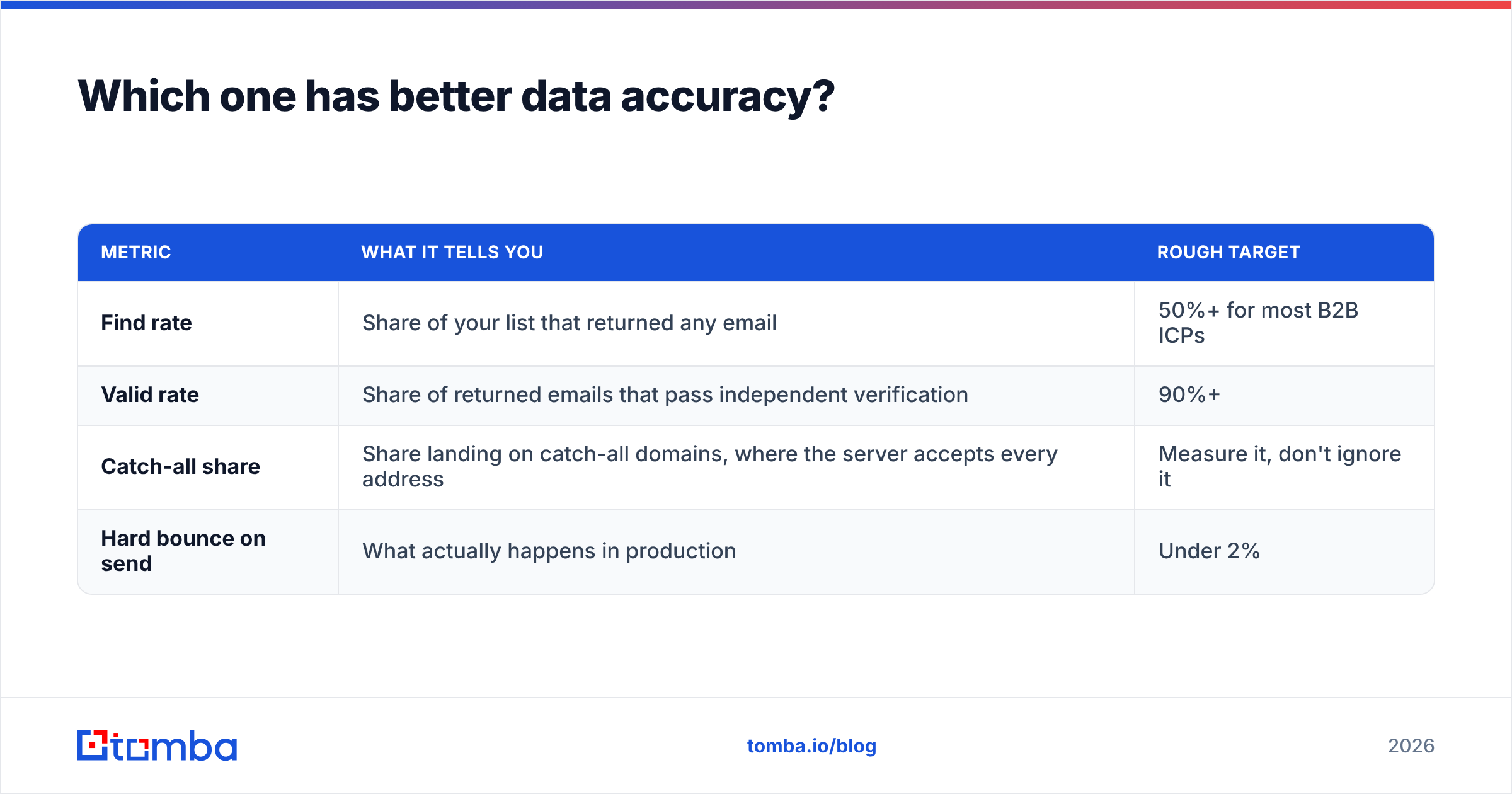
Our advice is the same for both: run a bake-off on your own list. Take 200 contacts from your real ICP, including a mix of seniorities, regions and a few companies you know are hard. Run them through both tools. Then put every returned email through an independent email verifier and send a small warm test. Track three numbers:
| Metric | What it tells you | Rough target |
|---|---|---|
| Find rate | Share of your list that returned any email | 50%+ for most B2B ICPs |
| Valid rate | Share of returned emails that pass independent verification | 90%+ |
| Catch-all share | Share landing on catch-all domains, where the server accepts every address | Measure it, don't ignore it |
| Hard bounce on send | What actually happens in production | Under 2% |
The catch-all row is the one most teams skip. Many mid-market and enterprise domains accept every address at the SMTP level, so a "valid" result there proves nothing. If a lot of your ICP sits on catch-all domains, a dedicated catch-all verifier will do more for your bounce rate than switching between LeadIQ and QuickEnrich.
Third-party reviews on G2 can show you patterns in what users complain about, such as coverage gaps in certain regions or credit burn on unfound records. Treat them as leads to test, not verdicts.
How does pricing compare in practice?#
The structure matters more than the sticker price, because the two tools charge for different things.
LeadIQ charges per seat. Each rep who needs the tool is a line item, and every plan comes with a credit allowance. The Pro and Enterprise tiers unlock the features that justify the tool for larger teams: deeper CRM sync, sequencer integrations, tracking and admin controls. If you have eight SDRs, your cost grows with headcount even if some reps barely prospect in a given month.
QuickEnrich charges by credit. You buy a pool of lookups and use it at whatever pace you like. For a founder who enriches 300 contacts one month and 30 the next, that's much easier on the budget. The trade-off is that you pay nothing extra for workflow because you get less workflow.
A quick way to think about it:
- One or two people, uneven volume: credit-based pricing almost always wins. That favors QuickEnrich.
- Five or more SDRs, steady daily volume, strict CRM rules: per-seat pricing buys automation that saves real hours. That favors LeadIQ.
- Agencies enriching lists for clients: credit pools that don't depend on seats usually fit better. That favors QuickEnrich or a finder with an API.
Also count the cost you don't see on either pricing page: bad data. One hard-bounced campaign that hurts your sending domain costs more than a year of any of these plans. Budget for verification either way.
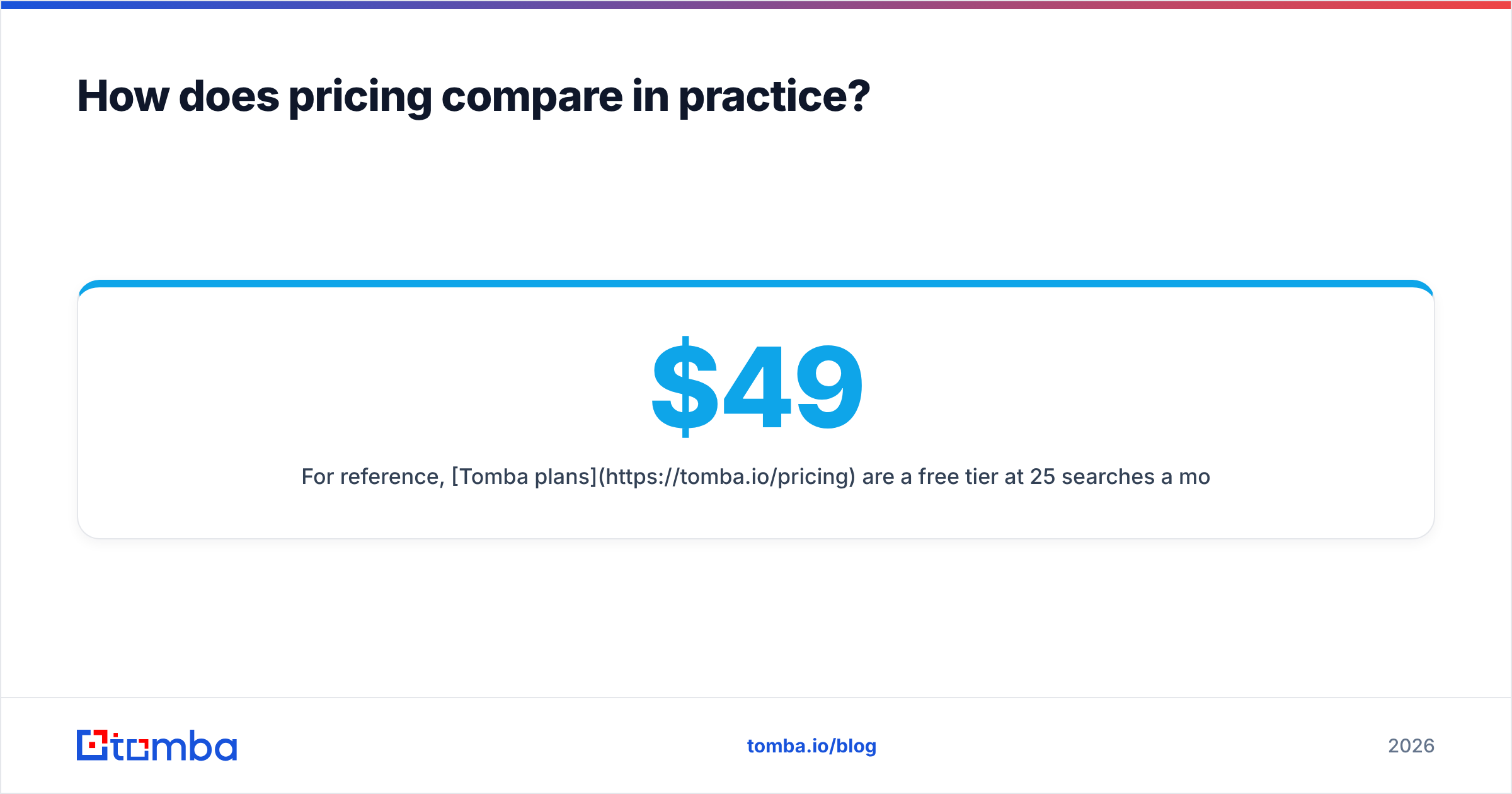
For reference, Tomba plans are a free tier at 25 searches a month, Starter at $49/mo, Growth at $99/mo, Pro at $249/mo and custom Enterprise. They're priced per account rather than per seat, which puts Tomba structurally closer to QuickEnrich than to LeadIQ.
Is LeadIQ better than QuickEnrich for SDR teams?#
Usually, yes, if the team fits the profile LeadIQ was built for. The value isn't that its emails are dramatically better. The value is how the tool connects to the rest of your stack. When a rep can go from a Sales Navigator profile to a Salesforce contact in an Outreach sequence in one click, with duplicate checks and ownership rules applied, you save minutes per prospect and you avoid CRM clean-up projects later.
It also fits how a sales manager thinks. Activity rolls up to the CRM, job-change alerts create warm pipeline, and admins control who can spend credits. Those things matter at 10 reps and matter a lot at 50. If you're working through HubSpot's CRM or Salesforce as your system of record, LeadIQ's integrations are the main reason to buy it.
If you're comparing LeadIQ against a wider field, including tools with stronger domain search or cheaper pricing that doesn't depend on seats, our LeadIQ alternative breakdown covers the rest of the market.
When does QuickEnrich make more sense?#
QuickEnrich is the better choice when prospecting is something you do occasionally, not a full-time job:
- Founder-led sales. You prospect in short bursts between product work. You want to paste in a list, get emails back and move on, without training anyone on a new tool.
- Agencies and freelancers. You enrich lists for different clients with different ICPs. Credit pools that aren't tied to seats and CSV-first workflows fit how you work.
- RevOps list repair. You have 2,000 old CRM contacts with missing emails or phones, and you want to fill the gaps once, not buy a year of seats.
- Testing a new segment. Before you commit a team to a new vertical, you want to enrich a few hundred contacts cheaply and see if outbound works there.
In all four cases, LeadIQ's workflow features are ones you'd pay for and rarely use.
What should you check before signing with either?#
Whichever way you lean, run this checklist first:
- Run the bake-off on your ICP, not the vendor's demo list. Two hundred contacts is enough to see a real difference.
- Ask how failed lookups are billed. Some tools charge a credit per attempt and some only when they find something. On a hard list, that can double your effective cost.
- Check what "verified" means. Ask whether catch-all domains are labeled separately. If they aren't, your bounce rate will surprise you.
- Test the CRM sync in a sandbox. Check duplicate handling, field mapping and ownership rules before you connect production.
- Read the data processing terms. If you prospect in the EU or UK, make sure the vendor explains its legal basis and handles opt-out requests clearly.
- Plan your verification layer. Decide now which tool checks emails before they reach your sequencer. Don't leave it to the finder alone.

So which should you choose, LeadIQ or QuickEnrich?#
Choose LeadIQ if you manage a team of SDRs that runs on Salesforce or HubSpot plus a sequencer, and the time saved per prospect, the duplicate checks and the job-change alerts justify paying per seat.
Choose QuickEnrich if you prospect in bursts, work from spreadsheets or need a cheap way to fill contact gaps without a full-year commitment for every seat.
Choose neither on its own if your ICP has a lot of catch-all domains or your sending domain can't take a bad week. Pair your finder with independent verification.
Where does Tomba fit?#
If you want a finder that also handles domain search and verification, without paying per seat, Tomba Email Finder is worth adding to your bake-off. You can look up emails by name and company, pull every public address on a domain, and check each result, including catch-all domains, before it reaches your sequencer. It works through the Chrome extension, bulk CSV upload, Google Sheets or the API. Start on the free tier with 25 searches a month, run it against the same 200-contact list you use for LeadIQ and QuickEnrich, and compare the verified results before you commit.
Related guides#
// get started
Find, verify and enrich your first contacts today
Start on the free plan with 25 searches a month, then scale when your team is ready.
Free plan · No credit card required · GDPR & CCPA
// about the author