LeadIQ vs SalesQL: Pricing, Accuracy, and Which to Pick in 2026
LeadIQ and SalesQL both pull contact data from LinkedIn, but they suit different teams. LeadIQ is built for sales teams that live in their CRM. SalesQL is built for people who want cheap credits fast. Here's how to choose.
TL;DR
- LeadIQ is a prospecting tool for SDR and AE teams. Its strengths are tight Salesforce and HubSpot sync, job-change tracking, and AI-assisted email writing. You pay per seat, and the price reflects that.
- SalesQL is a lighter, cheaper LinkedIn contact finder. It's built for recruiters, founders, and small sales teams who want emails and phone numbers without much setup.
- Pick LeadIQ if your team has several reps, a CRM that has to stay clean, and a process that depends on signals like job changes.
- Pick SalesQL if you work alone or in a small team, prospect mostly from LinkedIn, and care most about cost per contact.
- Whichever you choose, verify emails before you send. No LinkedIn-based finder delivers 100% valid data, and bounces hurt your sender reputation quickly.
What are LeadIQ and SalesQL, and why compare them?#
Both tools solve the same basic problem. You find a good prospect on LinkedIn, and you need their work email or direct phone number to contact them outside LinkedIn. Both use a Chrome extension that sits on top of LinkedIn and Sales Navigator, and both run on a credit model.
The overlap ends there. They were built for different buyers:
- LeadIQ sells itself as a sales prospecting platform. You capture contacts from LinkedIn and push them straight into Salesforce, HubSpot, Outreach, or Salesloft. It also flags when past champions change jobs and drafts personalized emails with its AI writer (Scribe).
- SalesQL sells itself as a LinkedIn email and phone finder. You open a profile, click, and get contact details. It also offers bulk enrichment and a searchable contact database, and it has native CRM integrations. The focus is fast, cheap contact data rather than workflow automation.
So "LeadIQ vs SalesQL" isn't really a question of which data is better. It's a question of whether you need a workflow tool or a data tool. The rest of this post shows you how to answer that for your team.
How do LeadIQ and SalesQL compare feature by feature?#
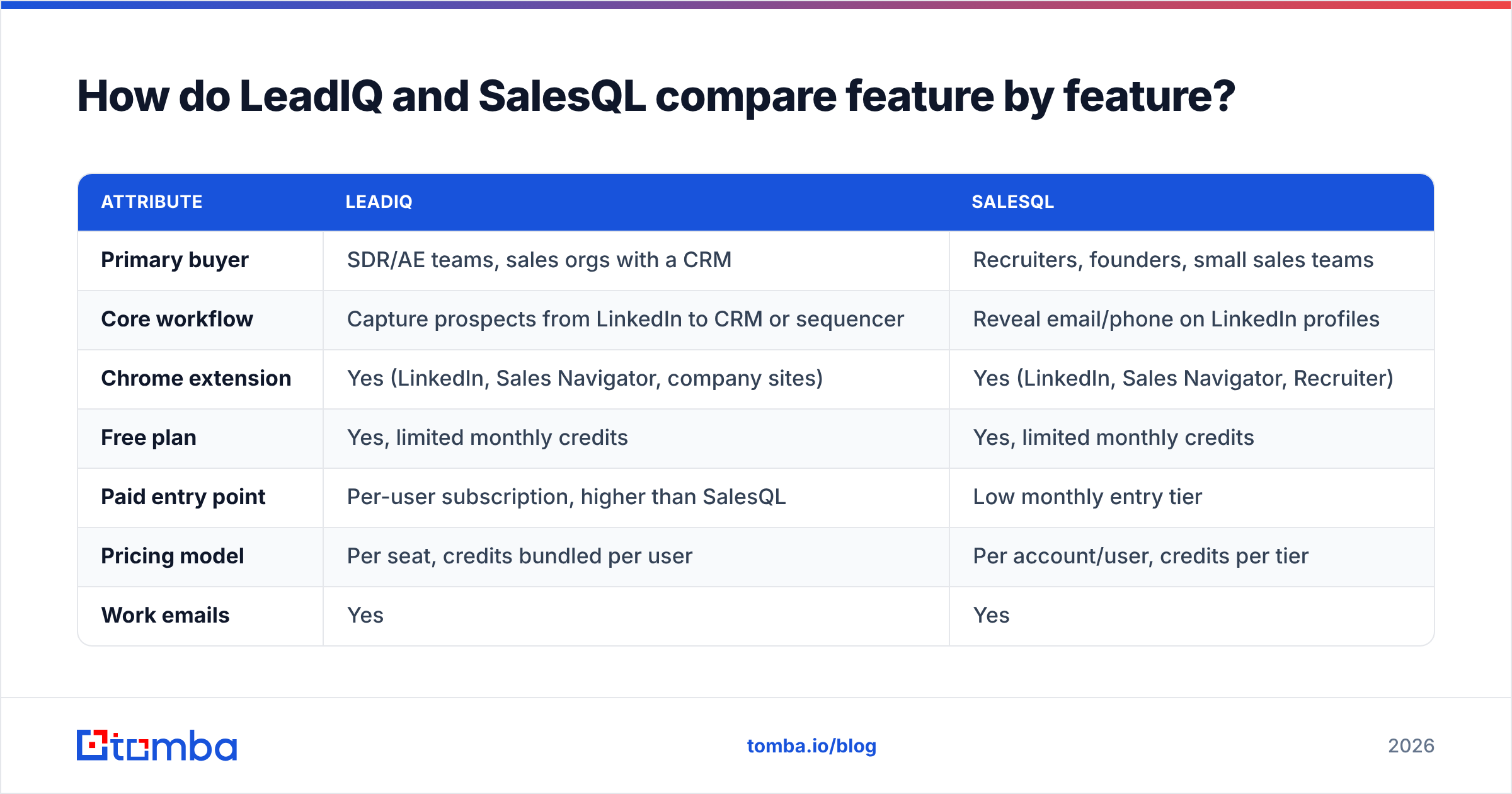
The table below reflects what each vendor publicly advertises at the time of writing (2026). Pricing and credit limits change often, so check the vendor pricing pages before you buy.
| Attribute | LeadIQ | SalesQL |
|---|---|---|
| Primary buyer | SDR/AE teams, sales orgs with a CRM | Recruiters, founders, small sales teams |
| Core workflow | Capture prospects from LinkedIn to CRM or sequencer | Reveal email/phone on LinkedIn profiles |
| Chrome extension | Yes (LinkedIn, Sales Navigator, company sites) | Yes (LinkedIn, Sales Navigator, Recruiter) |
| Free plan | Yes, limited monthly credits | Yes, limited monthly credits |
| Paid entry point | Per-user subscription, higher than SalesQL | Low monthly entry tier |
| Pricing model | Per seat, credits bundled per user | Per account/user, credits per tier |
| Work emails | Yes | Yes |
| Mobile/direct dials | Yes (separate or pricier credits) | Yes (included on higher tiers) |
| CRM integrations | Salesforce, HubSpot (deep sync, duplicate checks) | HubSpot, Salesforce, Pipedrive, Zoho, and others |
| Sequencer integrations | Outreach, Salesloft, Apollo and others | Limited; mostly via CSV/Zapier |
| Job-change tracking | Yes (core feature) | No dedicated equivalent |
| AI email writing | Yes (Scribe) | No |
| Bulk enrichment | Yes | Yes (CSV and LinkedIn search lists) |
| Best for | Repeatable team prospecting with CRM hygiene | Low-cost contact reveals at volume |
The table shows the tradeoff. LeadIQ wins on workflow depth. SalesQL wins on simplicity and cost per contact. If you don't use job-change alerts or the sequencer push, you're paying for LeadIQ features you'll never touch.

Which has better data accuracy: LeadIQ or SalesQL?#
Neither vendor publishes an independently audited accuracy rate. Treat every "95%+ accurate" claim on a landing page as marketing. In practice, accuracy depends on three things more than on the brand name:
- Your target market. US tech companies with standard
first.last@patterns get far better results than mid-market manufacturers in DACH or LATAM. - Catch-all domains. Many companies accept mail for any address at their domain. A finder can return a well-formed email that "verifies" but still never reaches a person. Neither tool can fully fix this, so you need a separate catch-all verifier step for those domains.
- Data freshness. People change jobs constantly. Data that was right six months ago may now point to an inbox that no longer exists.

Here's what users tend to report on review sites like G2:
- LeadIQ is generally praised for email quality at enterprise and mid-market accounts. Complaints mostly concern phone number coverage and the cost of mobile credits.
- SalesQL is generally praised for hit rate on LinkedIn profiles and value for money. Complaints mostly concern inconsistent phone data and occasional stale emails outside North America.
The honest answer: run a bake-off. Take 100 prospects from your actual ICP, run them through both free tiers, and verify every result with an independent email verifier. Count valid, risky/catch-all, and invalid results. That number tells you more than any vendor claim or blog post, this one included.
How much do LeadIQ and SalesQL cost?#
Pricing is where the two tools differ most, and it's usually what decides the purchase.
LeadIQ uses per-seat pricing. You get a free tier to test, then paid plans billed per user with a monthly credit allowance. Annual contracts get better rates, and enterprise plans are custom. Mobile numbers usually cost more credits than emails. For a team of five SDRs, LeadIQ becomes a real budget line, which makes sense because you're also paying for CRM sync, job tracking, and Scribe.
SalesQL starts cheaper. There's a free plan with a small monthly credit allowance, then tiered plans that add more credits, phone numbers, bulk enrichment, and team features. On a cost-per-revealed-contact basis, SalesQL is usually the cheaper of the two, especially for a single user.
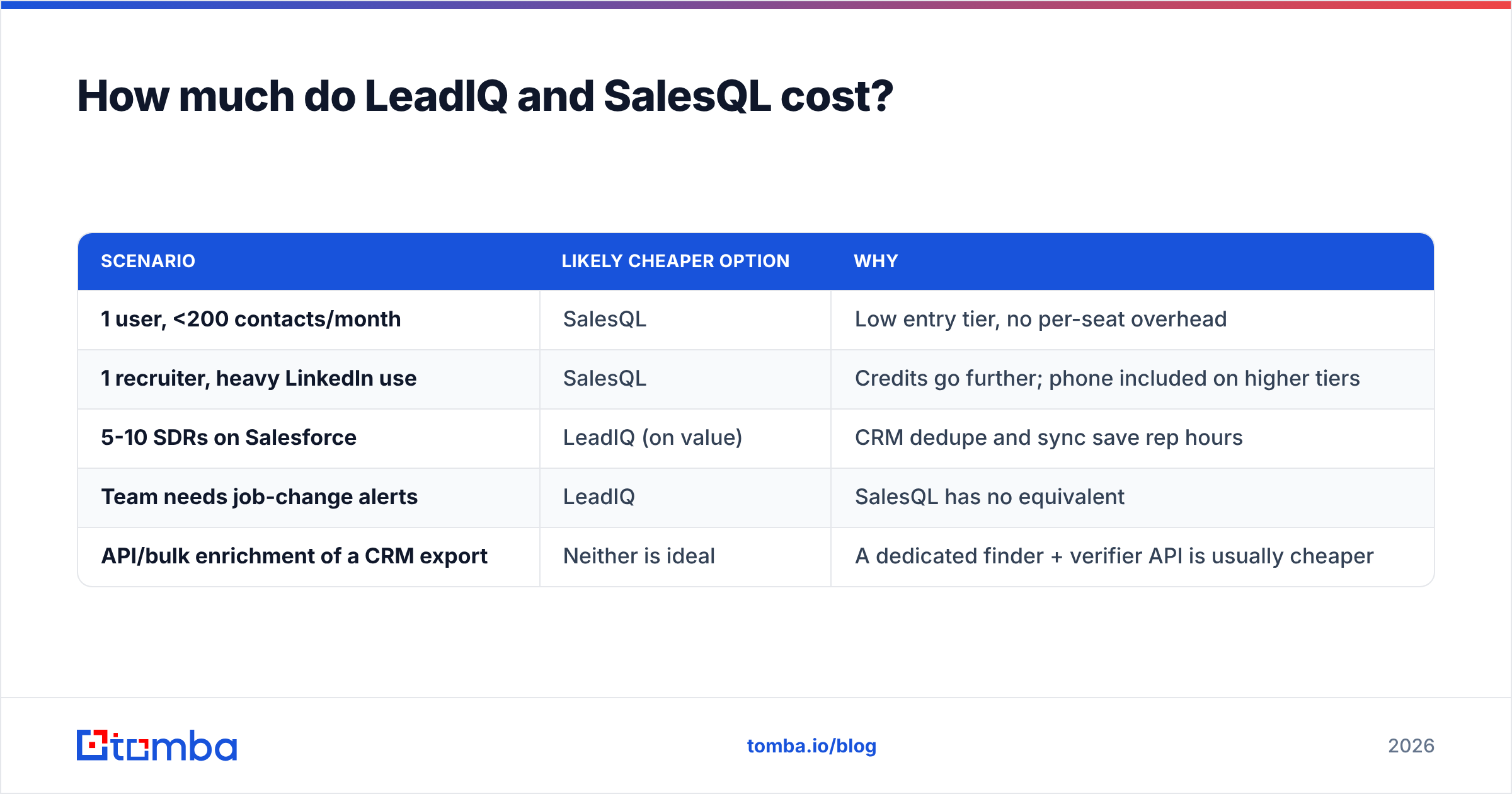
A quick way to compare:
| Scenario | Likely cheaper option | Why |
|---|---|---|
| 1 user, <200 contacts/month | SalesQL | Low entry tier, no per-seat overhead |
| 1 recruiter, heavy LinkedIn use | SalesQL | Credits go further; phone included on higher tiers |
| 5-10 SDRs on Salesforce | LeadIQ (on value) | CRM dedupe and sync save rep hours |
| Team needs job-change alerts | LeadIQ | SalesQL has no equivalent |
| API/bulk enrichment of a CRM export | Neither is ideal | A dedicated finder + verifier API is usually cheaper |
As a reference point for the last row, a domain- and API-first tool like Tomba starts at $49/mo on Starter. There's a free tier with 25 searches per month, Growth at $99/mo, and Pro at $249/mo (full Tomba pricing). It works as a different kind of benchmark: pay per lookup rather than per seat.

Is LeadIQ better than SalesQL for sales teams?#
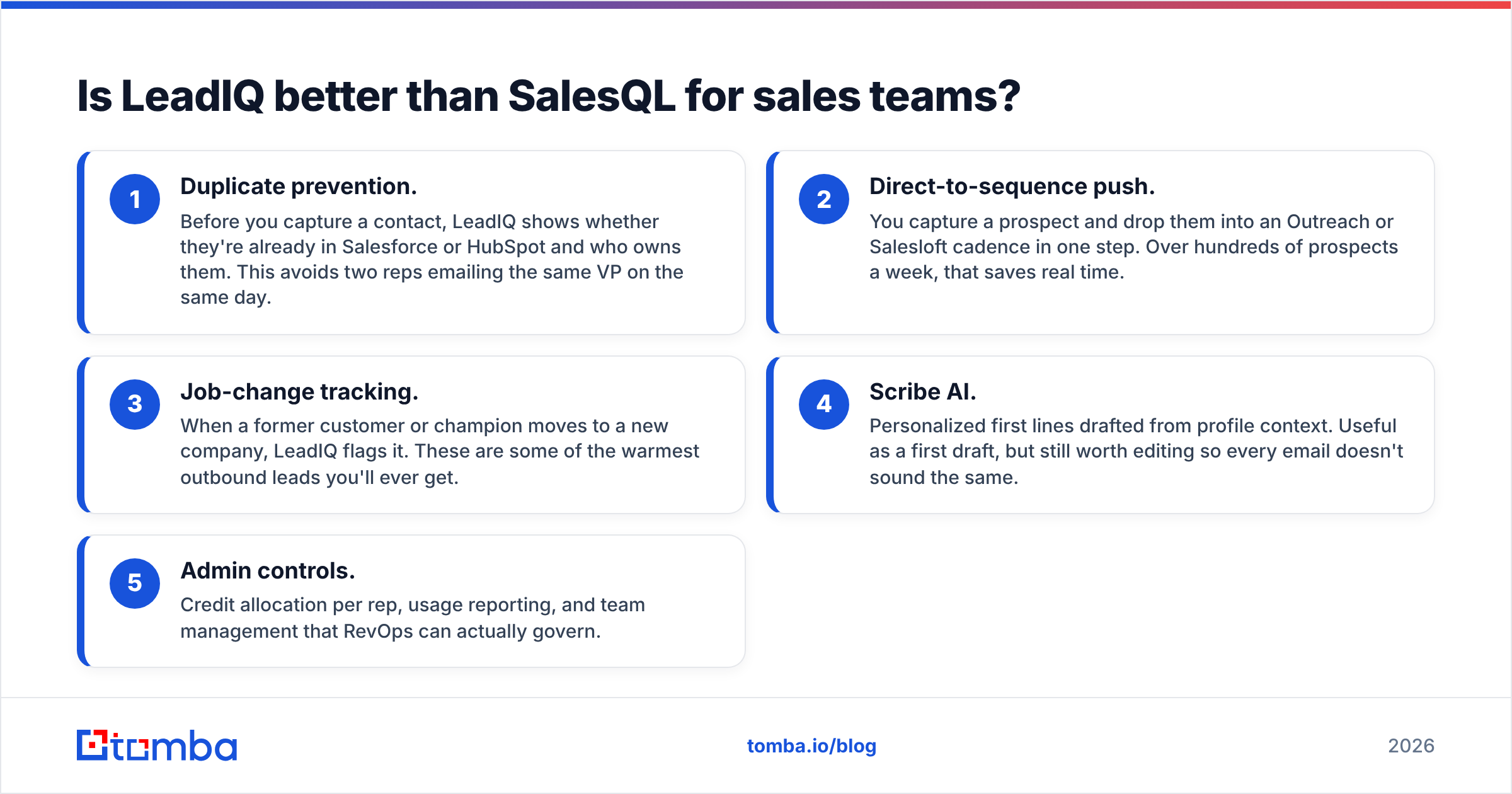
For a structured sales team, usually yes. That's not because LeadIQ's emails are dramatically better. It's because LeadIQ was built around how SDR teams actually work:
- Duplicate prevention. Before you capture a contact, LeadIQ shows whether they're already in Salesforce or HubSpot and who owns them. This avoids two reps emailing the same VP on the same day.
- Direct-to-sequence push. You capture a prospect and drop them into an Outreach or Salesloft cadence in one step. Over hundreds of prospects a week, that saves real time.
- Job-change tracking. When a former customer or champion moves to a new company, LeadIQ flags it. These are some of the warmest outbound leads you'll ever get.
- Scribe AI. Personalized first lines drafted from profile context. Useful as a first draft, but still worth editing so every email doesn't sound the same.
- Admin controls. Credit allocation per rep, usage reporting, and team management that RevOps can actually govern.
If none of those five matter to you, most of LeadIQ's premium is paying for unused features.
Is SalesQL better than LeadIQ for recruiters and solo prospectors?#
For recruiters, founders doing their own outbound, and small agencies, SalesQL is often the better choice:
- Fast start. Install the extension, open a profile, get an email. Nothing to configure and no admin to set up.
- Recruiter-friendly. It works on LinkedIn Recruiter as well as standard LinkedIn and Sales Navigator, which matters if hiring is your main use case.
- Personal and work emails. Depending on the plan and the profile, SalesQL can return personal addresses as well as business ones. That's useful for recruiting, but think carefully before using personal emails for B2B sales. Under GDPR, personal data needs a lawful basis, and B2B cold email to personal inboxes is harder to justify.
- Bulk enrichment of LinkedIn searches. Export a search result list and enrich it in one go.
Where it's weaker: no job-change signals, no AI writing, and a shallower sequencer ecosystem. If your team grows past three or four reps and starts arguing over who owns which account, you'll feel the lack of LeadIQ-style CRM guardrails.
What do both tools have in common, and what do they both miss?#
Both tools depend on LinkedIn. That's the strength of the model, since prospect discovery happens where the prospects are. It's also the main limitation:
- LinkedIn-centric discovery. If your prospect isn't active on LinkedIn, or you're starting from a list of company domains, a profile-by-profile extension is the wrong tool. Domain search or a pattern-based finder handles that case better.
- No built-in, independent verification layer you control. Both vendors verify internally. But you can't tune the thresholds, and catch-all results are still ambiguous. Running a second verification pass before sending costs little and protects your domain.
- Credit anxiety. Both tools charge credits per reveal, so you'll end up rationing lookups. Plan credit allocation before you roll the tool out to a team.
- Compliance is on you. Neither tool can make your outreach compliant. You still need a lawful basis, an opt-out, and honest sender identification. HubSpot's guide to cold email best practices is a solid primer if you're new to this.

How should you choose between LeadIQ and SalesQL?#
Use this decision path:
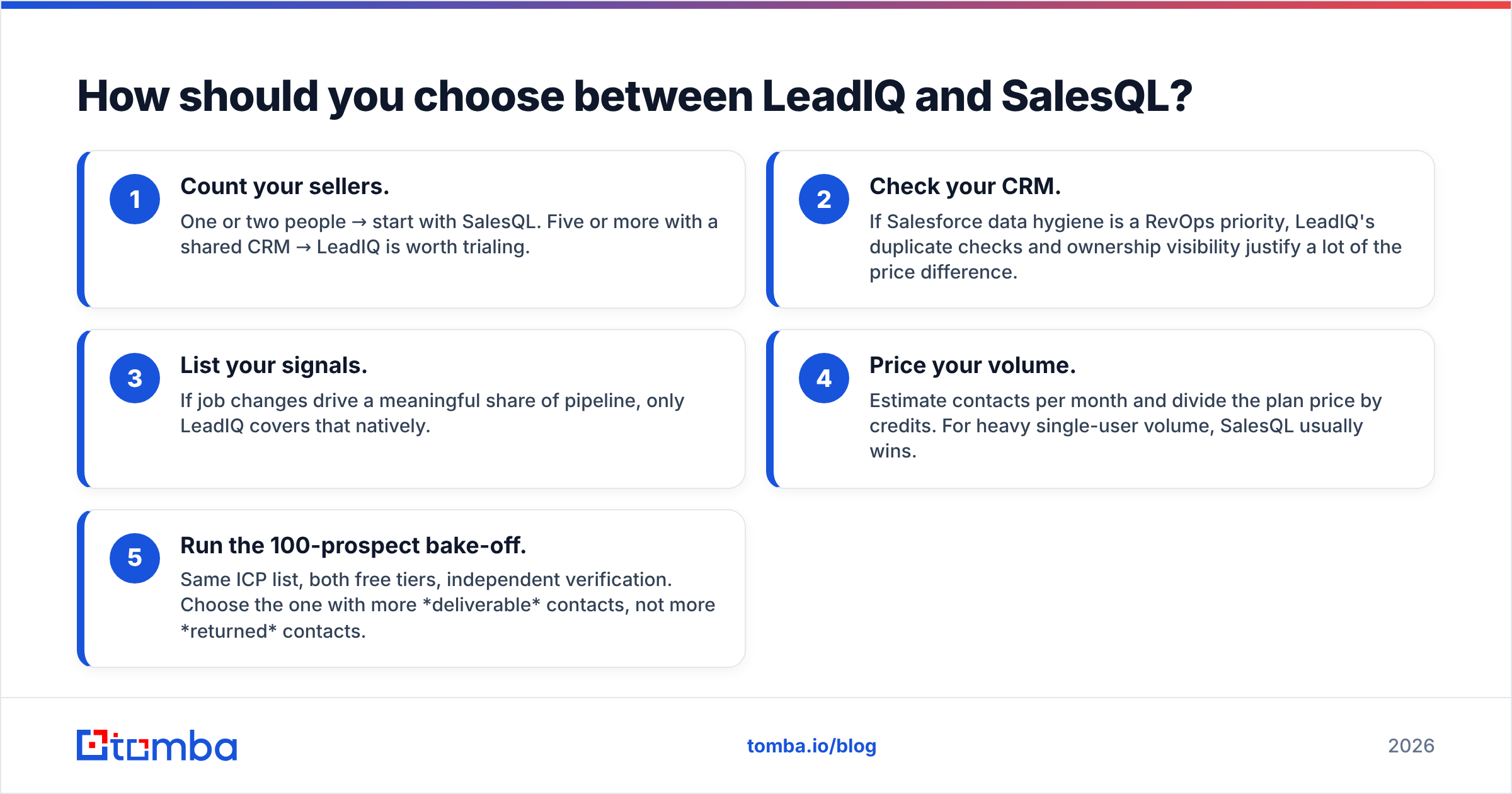
- Count your sellers. One or two people → start with SalesQL. Five or more with a shared CRM → LeadIQ is worth trialing.
- Check your CRM. If Salesforce data hygiene is a RevOps priority, LeadIQ's duplicate checks and ownership visibility justify a lot of the price difference.
- List your signals. If job changes drive a meaningful share of pipeline, only LeadIQ covers that natively.
- Price your volume. Estimate contacts per month and divide the plan price by credits. For heavy single-user volume, SalesQL usually wins.
- Run the 100-prospect bake-off. Same ICP list, both free tiers, independent verification. Choose the one with more deliverable contacts, not more returned contacts.
If you're also considering tools beyond these two, see our breakdown of the best LeadIQ alternative options. Some are cheaper per contact, and some aren't limited to LinkedIn.
Frequently asked questions#
Is LeadIQ or SalesQL cheaper? SalesQL is usually cheaper, especially for a single user. LeadIQ's per-seat pricing costs more but includes CRM sync, job-change tracking, and AI email writing.
Do LeadIQ and SalesQL both have free plans? Yes. Both offer a free tier with a limited monthly credit allowance. It's enough to run a small accuracy test before you commit.
Which tool is better for phone numbers? Both return mobile and direct dials, and coverage varies by region. LeadIQ typically charges more credits for mobile numbers. SalesQL includes phone reveals on its higher tiers. Test both on your own ICP.
Can I use LeadIQ or SalesQL without LinkedIn? To a limited extent. Both are built around LinkedIn workflows. If you start from company domains or a CSV of names and companies, a domain-search or API-based email finder is usually a better fit.
Should I verify emails from LeadIQ or SalesQL before sending? Yes. Internal verification reduces bounces but doesn't eliminate them, especially on catch-all domains. An independent verification pass before each campaign protects your sender reputation.
So, LeadIQ vs SalesQL: which one wins?#
Our pick:
- Choose LeadIQ if you run a multi-rep sales team on Salesforce or HubSpot and want prospecting, CRM hygiene, and job-change signals in one tool. You pay more and get a real workflow in return.
- Choose SalesQL if you're a recruiter, founder, or small team prospecting mostly from LinkedIn and your main goal is the lowest cost per revealed contact.
Neither is the wrong choice. The mistake is paying for workflow features you won't use, or trusting any finder's output without checking deliverability first.
If your prospecting doesn't always start on a LinkedIn profile, or you want per-lookup pricing instead of per-seat pricing, try the Tomba Email Finder. You can find professional email addresses by domain, by name and company, or in bulk, and check them with the built-in verifier before they go into a sequence. Start on the free tier with 25 searches a month, run your own 100-prospect bake-off against LeadIQ and SalesQL, and let the deliverability numbers decide.
Related guides#
// get started
Find, verify and enrich your first contacts today
Start on the free plan with 25 searches a month, then scale when your team is ready.
Free plan · No credit card required · GDPR & CCPA
// about the author