LeadIQ vs The Data City: Contact Data or Industry Intelligence?
LeadIQ and The Data City both sell B2B data, but they answer different questions. One tells you who to email. The other tells you which UK industries and companies exist. Here's how to pick the right one.
TL;DR
- LeadIQ is a sales prospecting tool. It captures contact details (work emails, phone numbers) for people you find on LinkedIn and pushes them into your CRM and sequencer.
- The Data City is a UK industry-intelligence platform. It classifies companies by what they actually do, using its Real-Time Industrial Classifications (RTICs), which it builds from company websites instead of outdated SIC codes.
- They rarely compete head to head. LeadIQ answers "how do I reach this person?" and The Data City answers "which companies make up this market?"
- If you're an SDR team that needs emails in Salesforce by Friday, pick LeadIQ or a dedicated email finder. If you're mapping a UK sector for economic development, investment, or market sizing, pick The Data City.
- Plenty of teams use both layers: an account-intelligence source to build the list, then a contact finder to reach the people in it.
What is the real difference between LeadIQ and The Data City?#
The two tools work at different levels of your data stack, and that's the most useful thing to understand before you compare them.
LeadIQ works at the contact level. You look at a prospect's LinkedIn profile, click the LeadIQ Chrome extension, and it returns that person's work email and phone number, then syncs the record to Salesforce, HubSpot, Outreach, or Salesloft. The whole product is built to keep an SDR's time from "found a person" to "person is in a sequence" as short as possible.
The Data City works at the company and industry level. It crawls UK company websites, reads what those businesses say they do, and groups them into Real-Time Industrial Classifications. These are sector definitions such as "net zero," "immersive technology," or "space," and you won't find them in the UK's Standard Industrial Classification (SIC) system. Its customers are often local and combined authorities, government departments, universities, investors, and corporate strategy teams trying to answer questions like "how many battery-tech firms are in the West Midlands, and are they growing?"
Put simply: LeadIQ tells you who to email, and The Data City tells you which companies belong on the list in the first place.
How does each tool work under the hood?#
The methods matter because they explain where each tool is strong and where it falls short.
LeadIQ's approach:
- Capture in context. You prospect in LinkedIn or Sales Navigator, and the extension overlays contact data on the profile you're viewing.
- Waterfall lookup. LeadIQ checks its own data and verification sources to return a work email and, where it has one, a mobile or direct dial.
- CRM de-duplication. Before you save a contact, it flags whether that person or account already exists in Salesforce or HubSpot.
- Push to sequence. The contact goes straight into your engagement tool, and LeadIQ's AI writing assistant can draft a first-touch email.
- Job-change tracking. It can alert you when a champion moves to a new company, which is one of the most reliable warm-outbound triggers there is.
The Data City's approach:
- Web-scale crawl. It reads the public websites of UK-registered companies.
- Machine-learning classification. It tags each company to one or more RTICs based on what the site describes, not the SIC code the company chose at incorporation.
- Enrichment with official data. It links companies to Companies House records, financials, location, and growth signals.
- Explore and export. Analysts build sector maps, filter by region or growth, and export company lists or pull them through an API.
The first method starts with a person and works outward. The second starts with the whole UK economy and narrows it down.

LeadIQ vs The Data City: how do they compare feature by feature?#
Here's the side-by-side comparison. Check pricing and coverage with each vendor before you buy, because both change from time to time.
| Attribute | LeadIQ | The Data City |
|---|---|---|
| Primary job | Capture contact data for individual prospects | Classify and map UK companies by real activity |
| Data unit | Person (email, phone, title) | Company and industry cluster |
| Geographic focus | Global, strongest in North America | UK-focused |
| Core workflow | Chrome extension on LinkedIn / Sales Navigator | Web platform for sector exploration, plus exports and API |
| Classification system | Standard firmographics (industry, size, location) | Proprietary RTICs plus SIC, Companies House data |
| Verified work emails | Yes, core feature | Not the product focus |
| Direct dials / mobiles | Yes, on paid tiers | No |
| CRM sync | Native Salesforce, HubSpot, plus Outreach and Salesloft | Exports and API rather than rep-level CRM sync |
| AI features | AI email drafting, job-change alerts | ML-driven industry classification |
| Typical buyer | SDR/BDR teams, sales ops | Economic development, policy, investors, strategy, research |
| Pricing model | Free plan, then per-seat paid tiers, with custom Enterprise pricing | Custom licence or subscription, usually annual |
| Best at | Speed from profile to sequence | Seeing emerging sectors that SIC codes miss |
The table makes it plain that these tools barely overlap. The one place they meet is list building. LeadIQ builds lists one person at a time. The Data City can hand you thousands of relevant UK companies at once, but it won't give you the person-level emails or phone numbers a rep needs to start outreach.
Is LeadIQ better than The Data City for outbound sales?#
For hands-on outbound, yes. LeadIQ was built for SDRs, and it shows:
- Speed. Capturing a contact takes one click in the browser where reps already spend their day.
- Hygiene. CRM duplicate checks stop two reps from prospecting the same account without knowing it.
- Signals. Job-change tracking gives you timely reasons to reach out that don't depend on cold intent data.
LeadIQ has limits you should know about, though. Its coverage is strongest where LinkedIn activity is heavy, which means North American tech and SaaS. Coverage in mid-market UK manufacturing, regional services, or companies with thin LinkedIn footprints tends to be patchier. That's normal for any person-first database. Credits are counted per seat, so if you have a big team doing high-volume prospecting, model the cost at your real usage before signing. User reviews on G2 mostly praise the workflow and the Salesforce sync, while comments on data accuracy vary a lot by region and segment.
If LeadIQ's per-seat pricing or regional coverage doesn't fit, it's worth looking at a LeadIQ alternative that charges per search instead of per seat.
Is The Data City better than LeadIQ for market intelligence?#
For market intelligence, clearly yes, and for UK sectors it's close to unique.
SIC codes were designed decades ago and are chosen by the company at registration. A drone-software startup might register under "other information technology service activities," and a hydrogen-electrolyser maker might sit under "manufacture of other electrical equipment." If you're trying to size the UK hydrogen economy with SIC codes, you'll miss most of it.
The Data City gets around this by reading what companies actually say they do online. That's why its RTICs are used in government and regional economic reports on emerging industries. For a strategy team, a VC scouting a thesis, or an agency deciding where to invest skills funding, that view is worth much more than a list of emails.
Where it's the wrong tool:
- You need to email or call a named person this week. The Data City describes companies, not decision-makers' inboxes.
- Your market is mostly outside the UK. The classification engine is built around UK company data.
- You're a single SDR with a small budget. The licence model suits organisations that need analysis, not reps who need individual contacts.

Which one should you choose for your use case?#
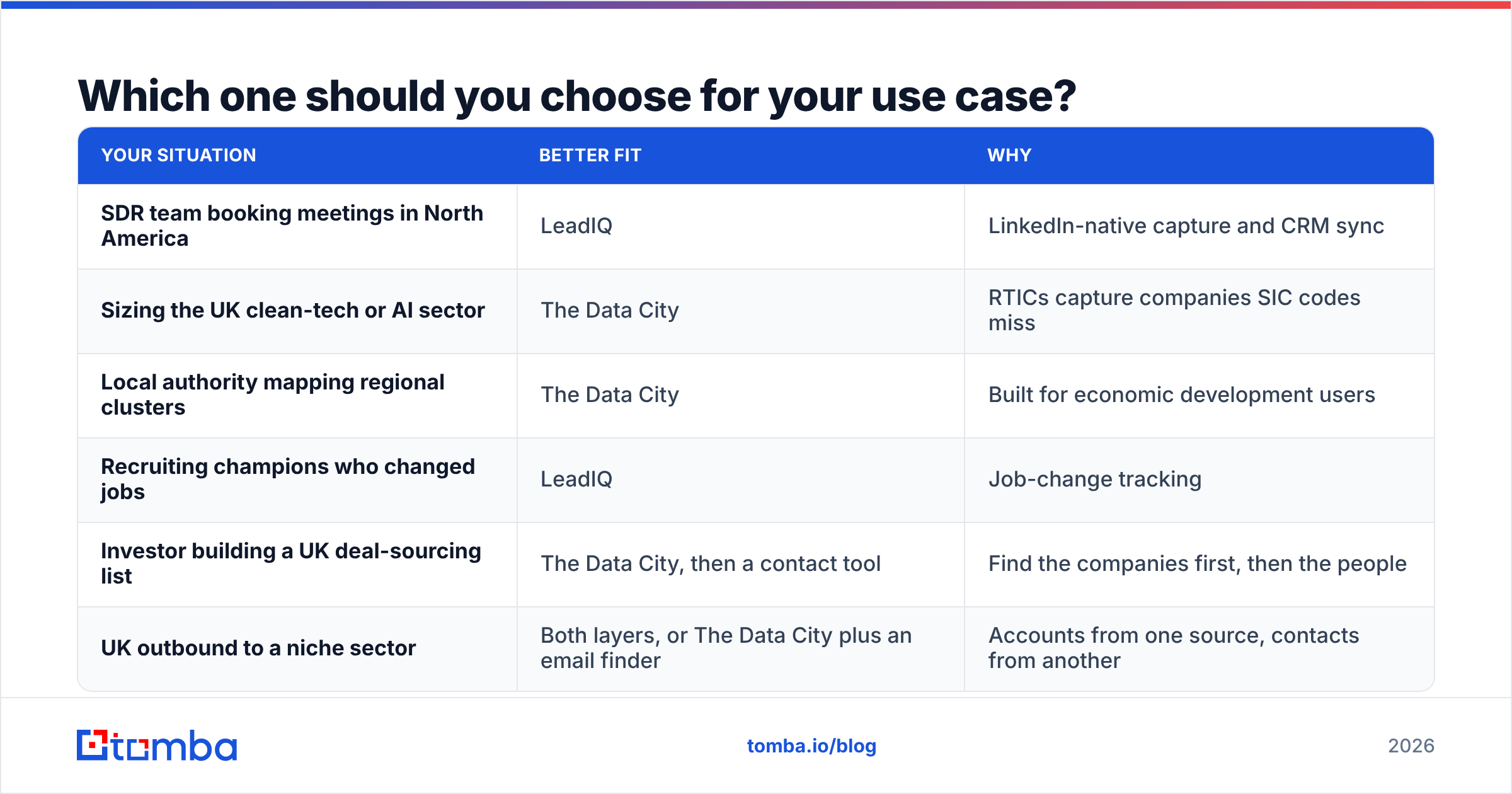
Pick based on the question you're trying to answer, not on whose demo was more impressive.
| Your situation | Better fit | Why |
|---|---|---|
| SDR team booking meetings in North America | LeadIQ | LinkedIn-native capture and CRM sync |
| Sizing the UK clean-tech or AI sector | The Data City | RTICs capture companies SIC codes miss |
| Local authority mapping regional clusters | The Data City | Built for economic development users |
| Recruiting champions who changed jobs | LeadIQ | Job-change tracking |
| Investor building a UK deal-sourcing list | The Data City, then a contact tool | Find the companies first, then the people |
| UK outbound to a niche sector | Both layers, or The Data City plus an email finder | Accounts from one source, contacts from another |
That last row is the pattern most sophisticated teams use. You build the account list with a source that understands the market, then use a separate tool to find and verify emails for the right roles at those accounts.
How do you combine company intelligence with contact data?#
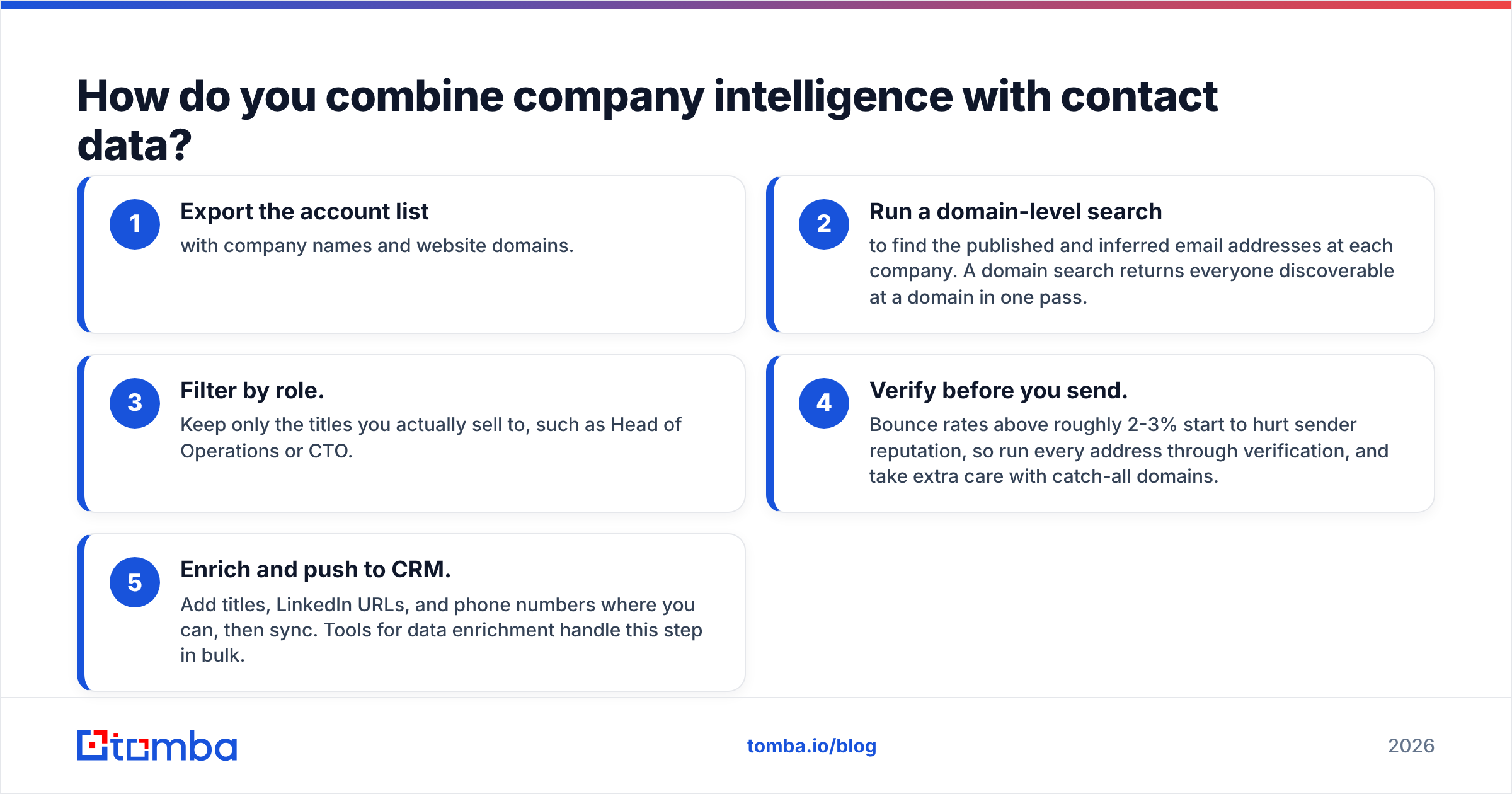
If you've already got a list of target companies, from The Data City or anywhere else, turning it into a sequence-ready contact list works like this:
- Export the account list with company names and website domains.
- Run a domain-level search to find the published and inferred email addresses at each company. A domain search returns everyone discoverable at a domain in one pass.
- Filter by role. Keep only the titles you actually sell to, such as Head of Operations or CTO.
- Verify before you send. Bounce rates above roughly 2-3% start to hurt sender reputation, so run every address through verification, and take extra care with catch-all domains.
- Enrich and push to CRM. Add titles, LinkedIn URLs, and phone numbers where you can, then sync. Tools for data enrichment handle this step in bulk.
This separation also keeps each vendor to what it does best. You won't be paying an industry-intelligence licence for something it isn't designed to do, or asking a LinkedIn-based contact tool to understand UK sector taxonomy.
What about pricing and total cost of ownership?#
Compare the two on the job each one does, not on sticker price.
LeadIQ has a free tier for testing, then per-seat paid plans that increase your email and phone credit allowances, with Enterprise pricing for larger teams that need advanced CRM controls. Your cost goes up with headcount. Ten reps on a mid-tier plan can easily reach five figures a year once you add phone credits. Check the current tiers on LeadIQ's website before budgeting.
The Data City is priced as a licence or subscription, usually annual and scoped to the users, sectors, or API access you need. That's typical for research-grade data platforms. For a policy team or a fund, the cost is small compared with commissioning a bespoke sector study. For a sales rep who just wants emails, it would be a poor use of budget.
Hidden costs to watch:
- LeadIQ: phone credits running out mid-quarter, and seats paid for by reps who rarely prospect.
- The Data City: the analyst time needed to turn sector maps into decisions, plus the contact-data layer you'll still need for outreach.
- Both: data decay. Contact data goes stale as people change jobs, and company data goes stale as businesses pivot, dissolve, or merge. Budget for regular refreshes.
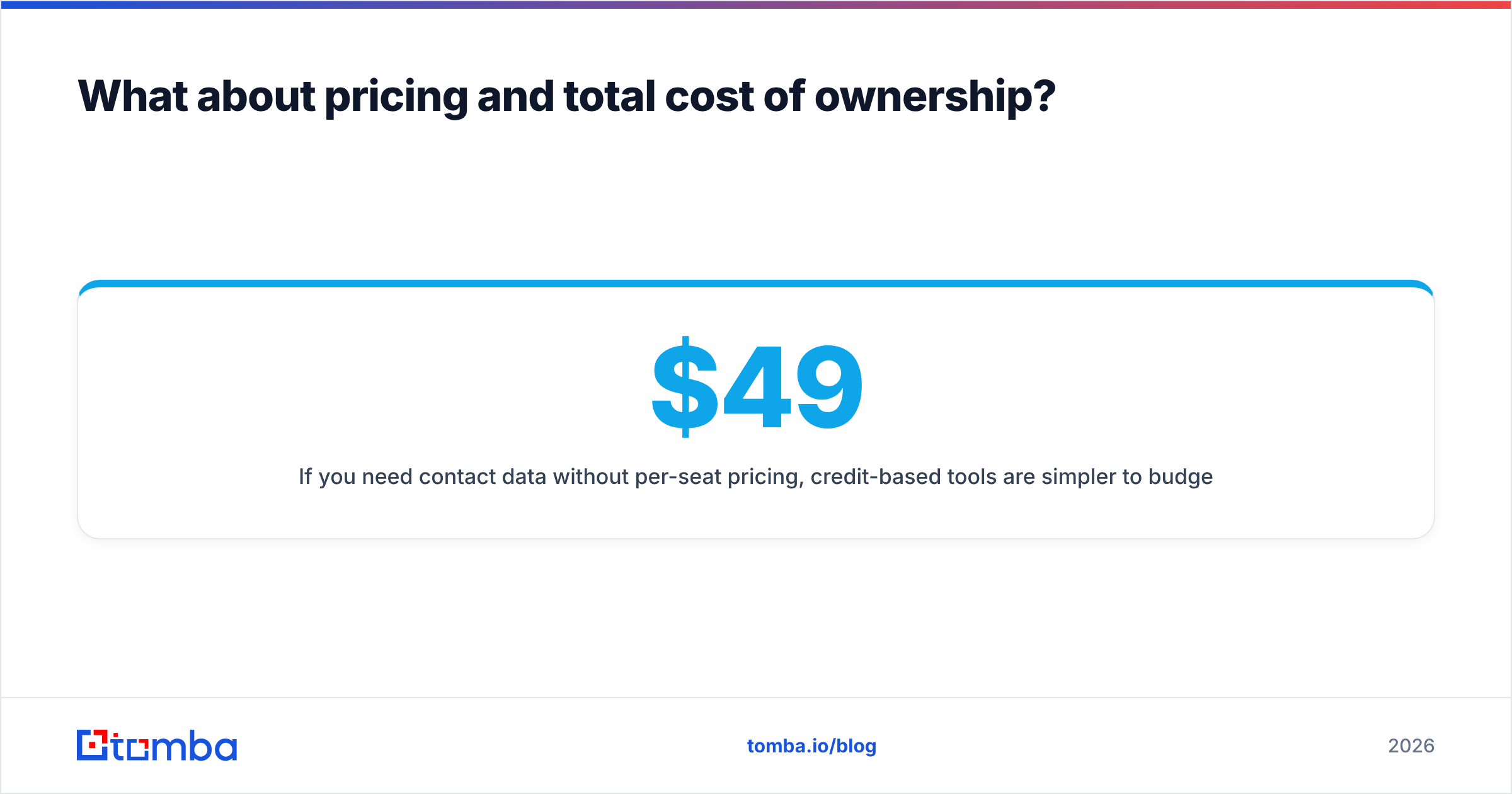
If you need contact data without per-seat pricing, credit-based tools are simpler to budget. Tomba pricing starts with a free tier of 25 searches a month, then Starter at $49/mo, Growth at $99/mo, and Pro at $249/mo, with shared credits instead of per-rep licences.
What are the pros and cons at a glance?#
LeadIQ pros
- Quickest path from a LinkedIn profile to a sequenced contact
- Strong Salesforce and HubSpot sync with duplicate detection
- Job-change alerts drive warm outbound
- Free tier lets reps try it before you buy
LeadIQ cons
- Per-seat pricing grows fast with team size
- Coverage is weaker outside LinkedIn-heavy, North America-centric segments
- Tied to LinkedIn-centred workflows
The Data City pros
- RTICs reveal emerging UK sectors that SIC codes hide
- Classifications come from what companies actually do, not a code chosen at incorporation
- Trusted by government, research, and investment users
- API and exports for analyst workflows
The Data City cons
- UK-focused, so less useful for global markets
- Not a source of verified, person-level contact data
- Licence pricing suits organisations more than individual reps
So, LeadIQ vs The Data City: which wins?#
Neither wins outright, because they solve different problems.
- If your goal is meetings booked, LeadIQ is the relevant tool, and The Data City isn't really an alternative to it.
- If your goal is understanding a UK market, meaning its size, growth, where companies cluster, and which firms are emerging, The Data City is the specialist and LeadIQ can't do that job.
- If you want both, use The Data City to define the market and a contact-data tool to reach the people in it.
The biggest mistake is buying either one to do the other's job. A sales team that licenses an industry-intelligence platform expecting inboxes will be disappointed, and so will a policy team that expects a Chrome extension to explain the UK's net-zero supply chain.
If you've already got your target accounts, whether from The Data City, your CRM, or a spreadsheet, the next step is reaching the right people at them. Tomba Email Finder finds professional email addresses by domain, name, or company and verifies them before they reach your sequence, on credit-based plans instead of per-seat licences. Try it on the free tier with your next account list and see how many verified decision-makers you get back.
Related guides#
// get started
Find, verify and enrich your first contacts today
Start on the free plan with 25 searches a month, then scale when your team is ready.
Free plan · No credit card required · GDPR & CCPA
// about the author