LeadIQ vs Verifyemailio (2026): Finder or Verifier, Which Wins?
LeadIQ finds and syncs prospects. Verifyemailio checks whether an address will bounce. They solve different problems. Here's how to tell which one your outbound stack is missing, and when you need both.
TL;DR
- LeadIQ is a prospecting platform. It captures contacts from LinkedIn and Sales Navigator, finds their emails and phone numbers, and pushes them into your CRM and sequencer.
- Verifyemailio is an email verification service. It doesn't find anyone. It tells you whether an address you already have is likely to deliver, bounce, or land in a risky catch-all bucket.
- Most searches for "LeadIQ vs Verifyemailio" assume the two compete. They mostly don't. The real question is whether you need to source contacts, clean contacts, or both.
- Pick LeadIQ if your SDR team lives in LinkedIn and needs one-click capture plus CRM sync. Pick Verifyemailio if you already have lists and just need them checked before sending.
- If you'd rather not pay two vendors, a combined finder and verifier (Tomba is one) handles both steps under one plan.
What is the difference between LeadIQ and Verifyemailio?#
LeadIQ is a sourcing tool and Verifyemailio is a hygiene tool. That's the whole comparison in one line, and it explains why picking the "wrong" one feels expensive later.
Think of a restaurant supply chain. LeadIQ is the buyer who goes to the market and brings produce back to the kitchen. Verifyemailio is the person at the back door checking each crate for spoiled items before it goes in the walk-in. You can't cook with a checker alone, and a buyer who never checks will eventually serve something bad.
Here's what that means in practice:
- LeadIQ starts with a person, usually a LinkedIn profile, a Sales Navigator lead list, or a company account. It returns contact data (work email, sometimes a direct dial or mobile) and syncs the record to Salesforce, HubSpot, Outreach, or Salesloft. It also has AI-assisted email writing and job-change tracking.
- Verifyemailio starts with an email address, or a CSV of thousands. It runs syntax, domain, MX, and mailbox-level checks and returns a status for each address, such as valid, invalid, risky, or unknown. It works through a single-check interface, bulk upload, and an API.
These aren't two answers to the same question. LeadIQ answers "who should I contact, and how?" Verifyemailio answers "will this message actually arrive?"
How do LeadIQ and Verifyemailio compare feature by feature?#
The table below compares both tools on the attributes that usually decide the purchase. Vendor pricing changes often, so check each vendor's pricing page before you commit. The structure of the pricing matters more here than the exact dollar figure.
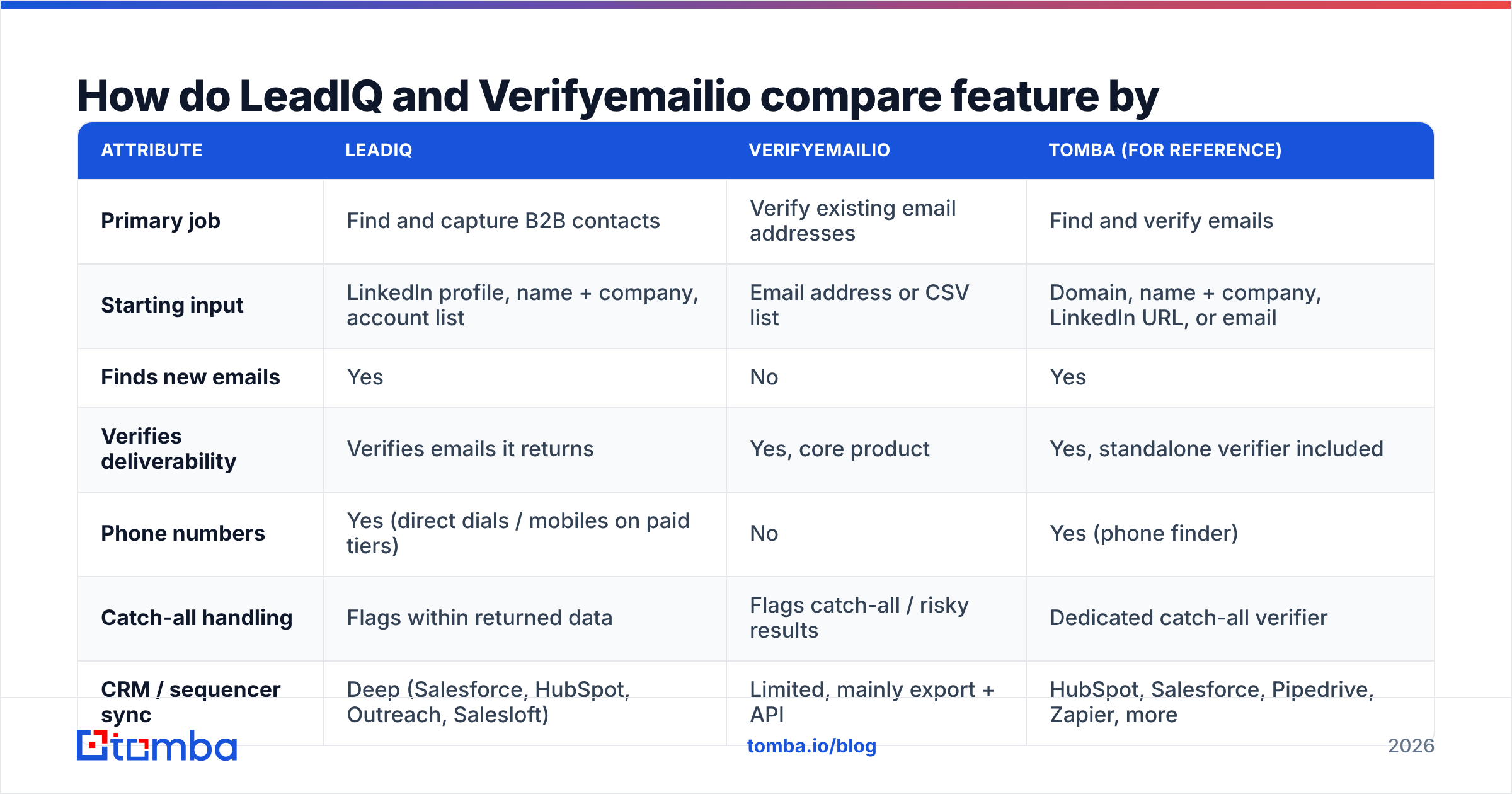
| Attribute | LeadIQ | Verifyemailio | Tomba (for reference) |
|---|---|---|---|
| Primary job | Find and capture B2B contacts | Verify existing email addresses | Find and verify emails |
| Starting input | LinkedIn profile, name + company, account list | Email address or CSV list | Domain, name + company, LinkedIn URL, or email |
| Finds new emails | Yes | No | Yes |
| Verifies deliverability | Verifies emails it returns | Yes, core product | Yes, standalone verifier included |
| Phone numbers | Yes (direct dials / mobiles on paid tiers) | No | Yes (phone finder) |
| Catch-all handling | Flags within returned data | Flags catch-all / risky results | Dedicated catch-all verifier |
| CRM / sequencer sync | Deep (Salesforce, HubSpot, Outreach, Salesloft) | Limited, mainly export + API | HubSpot, Salesforce, Pipedrive, Zapier, more |
| Pricing model | Per-seat subscription, free tier, enterprise quotes | Credit-based per verification | Free (25 searches/mo), $49, $99, $249/mo, Enterprise |
| Best for | SDR teams prospecting in LinkedIn | Marketers and ops cleaning lists | Teams wanting sourcing + hygiene in one plan |
Two things stand out.
First, the overlap is small. LeadIQ does validate the emails it hands you, but it isn't built for you to upload a 40,000-row legacy CRM export and scrub it. Verifyemailio can't produce a single new lead.
Second, the pricing models reflect the jobs. LeadIQ charges per seat because its value is tied to rep workflow. Verifyemailio charges per check because its value is tied to list volume. A 3-person SDR team and a 1-person marketing ops function will get very different bills from the same tool.
When should you choose LeadIQ?#
Choose LeadIQ when finding contacts is the bottleneck and your reps already work inside LinkedIn.
These are the four situations where LeadIQ clearly earns its seat price:
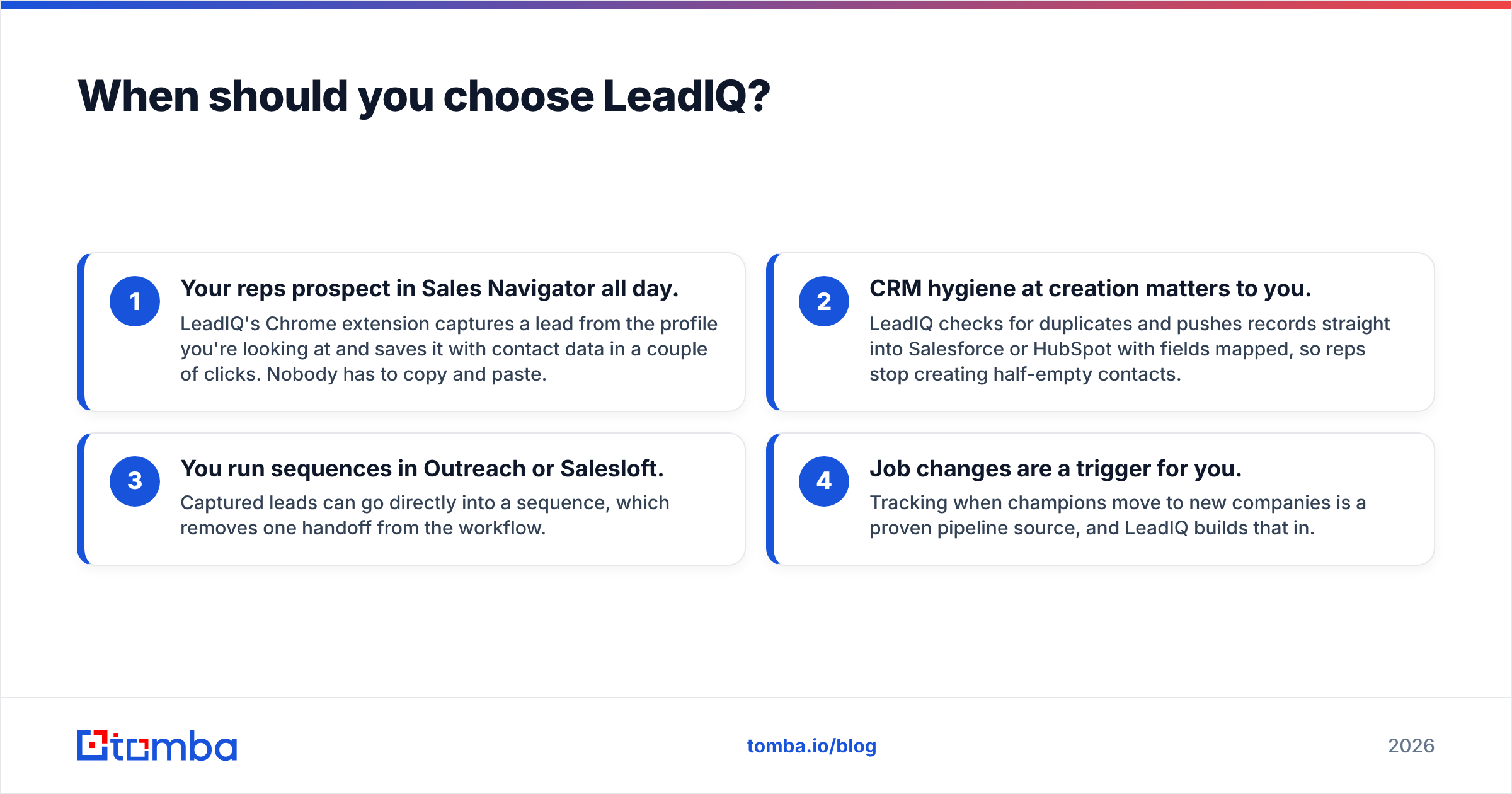
- Your reps prospect in Sales Navigator all day. LeadIQ's Chrome extension captures a lead from the profile you're looking at and saves it with contact data in a couple of clicks. Nobody has to copy and paste.
- CRM hygiene at creation matters to you. LeadIQ checks for duplicates and pushes records straight into Salesforce or HubSpot with fields mapped, so reps stop creating half-empty contacts.
- You run sequences in Outreach or Salesloft. Captured leads can go directly into a sequence, which removes one handoff from the workflow.
- Job changes are a trigger for you. Tracking when champions move to new companies is a proven pipeline source, and LeadIQ builds that in.
The trade-offs are real, though:
- Per-seat pricing adds up. A 10-rep team pays for 10 seats whether each rep captures 50 contacts a month or 500.
- Coverage depends on geography and segment. Like every contact database, LeadIQ tends to be stronger on North American tech and SaaS than on SMBs in smaller European or APAC markets. Reviewers on G2's LeadIQ page mention this both ways, so run a trial against your own ICP.
- It's not a list-cleaning tool. If you inherit a spreadsheet from an event, a partner, or an old campaign, LeadIQ isn't where you'd scrub it.
If LeadIQ's seat cost or coverage doesn't fit, our LeadIQ alternative breakdown compares other finder options on the same criteria.

When should you choose Verifyemailio?#
Choose Verifyemailio when you already have the addresses and your problem is bounce rate, not lead volume.
A pure verifier pays off here:
- You're about to send to an old or bought list. Addresses decay constantly as people change jobs, companies rebrand, and domains lapse. Anything older than a few months should be checked before a campaign goes out.
- You're importing event, webinar, or form leads. Typos like "gmial.com" or "jon@compnay.com" and disposable addresses show up in any open-form data. A verifier catches them before they reach your ESP.
- Your ESP or deliverability team is warning you about bounces. Hard bounces are one of the fastest ways to damage sender reputation. Mailbox providers treat a high bounce rate as a sign you don't manage your lists. The Wikipedia entry on bounce messages explains the mechanics if you want the protocol-level detail.
- You need an API in a signup flow. Checking addresses in real time at registration keeps bad data out of your system to begin with.
The limits of Verifyemailio are the limits of the whole verifier category:
- It can't create pipeline. If your list runs out, a verifier has nothing to check.
- Catch-all domains stay uncertain. Some company mail servers accept every address at SMTP level, so no verifier can confirm the mailbox exists with full certainty. Expect a "risky" or "accept-all" bucket and decide how you'll treat it.
- You still need a sourcing tool. For outbound, a verifier is always the second step.
How accurate is each tool, and what does "accuracy" even mean here?#
Accuracy means different things for these two tools, and mixing the definitions leads to bad decisions.
For LeadIQ, accuracy is a finder metric: of the contacts you capture, how many come back with an email at all (coverage), and how many of those deliver (validity). A finder can have high validity with modest coverage, or broad coverage with more risky results. You want both measured against your target accounts, not a vendor's headline number.
For Verifyemailio, accuracy is a classification metric: when it says "valid," how often does the email actually deliver, and when it says "invalid," how often was it really dead? The hardest cases are catch-all domains and servers that throttle or greylist verification requests. Those produce "unknown" results, and how a verifier reports them matters as much as its headline rate.
Here's a practical test you can run on either tool in an afternoon:
- Pull 200 contacts from your real ICP, not a sample list the vendor gives you.
- Run them through the tool and record every status: found, not found, valid, invalid, risky, unknown.
- Send a low-volume, plain-text touch from a warmed secondary domain to the "valid" group only.
- Measure hard bounces within 48 hours. Under 2% is healthy. Above 5% means the "valid" label isn't reliable enough for your segment.
- Check the risky bucket separately. Some teams send to catch-alls at reduced volume, others skip them entirely. Decide based on data, not habit.
This same method works for comparing any finder or verifier, and it beats reading marketing claims.
Is it better to use LeadIQ and Verifyemailio together?#
For many teams, yes, at least on paper. LeadIQ sources contacts, Verifyemailio re-checks everything right before a campaign, and your bounce rate stays low. That's a legitimate stack.
The costs show up in operations, not in the feature list:
- Two vendors, two contracts, two renewal cycles. Procurement and security reviews double.
- Data moves between tools. Either someone exports a CSV from the CRM, uploads it to the verifier, and re-imports the results, or someone builds and maintains an integration.
- Double-verification spend. LeadIQ already validates what it returns, so re-verifying fresh LeadIQ contacts right away is often money spent twice. The verifier earns its keep on aging data and data from other sources.
- Status fields drift. When two systems each hold an "email status," they disagree eventually, and reps don't know which one to trust.
A clean rule: use a verifier on any list that's older than about 90 days or came from a source you don't control. Don't re-verify freshly sourced contacts from a finder that already validated them unless your own bounce data says you should.
How do the pricing models play out for a real team?#
Rather than quote list prices that change quarterly, here's how the structure of each model affects three common team shapes.
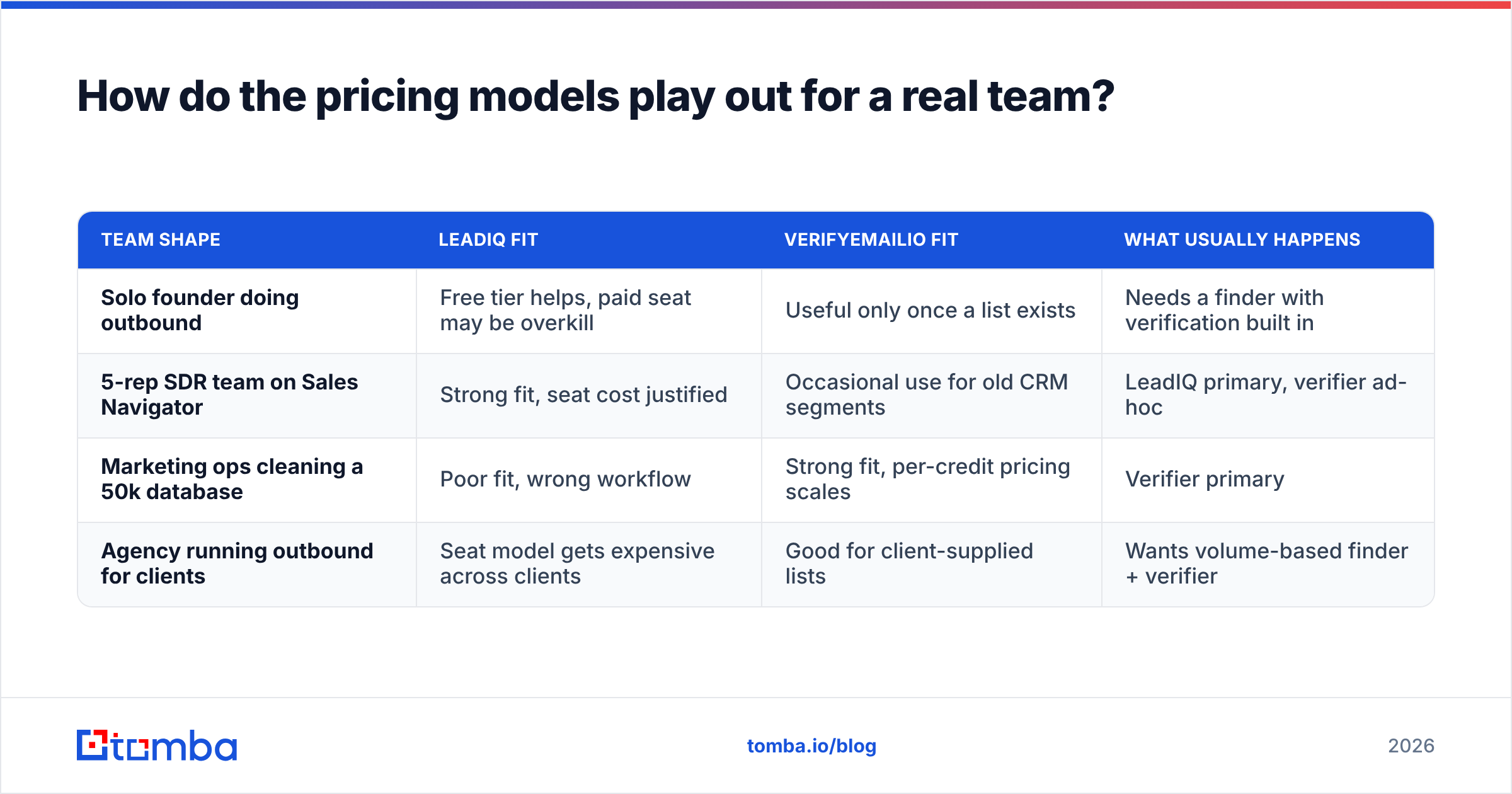
| Team shape | LeadIQ fit | Verifyemailio fit | What usually happens |
|---|---|---|---|
| Solo founder doing outbound | Free tier helps, paid seat may be overkill | Useful only once a list exists | Needs a finder with verification built in |
| 5-rep SDR team on Sales Navigator | Strong fit, seat cost justified | Occasional use for old CRM segments | LeadIQ primary, verifier ad-hoc |
| Marketing ops cleaning a 50k database | Poor fit, wrong workflow | Strong fit, per-credit pricing scales | Verifier primary |
| Agency running outbound for clients | Seat model gets expensive across clients | Good for client-supplied lists | Wants volume-based finder + verifier |
The pattern: seat-based tools reward heavy per-rep usage, and credit-based tools reward bursty volume. If usage varies a lot from month to month, credit or tiered plans usually cost less than seats that sit idle.
For comparison, Tomba pricing is tiered by search volume rather than seats: a free plan with 25 searches a month, then Starter at $49/mo, Growth at $99/mo, Pro at $249/mo, and custom Enterprise. Verification and finding come out of the same plan, which is the main reason some teams consolidate.

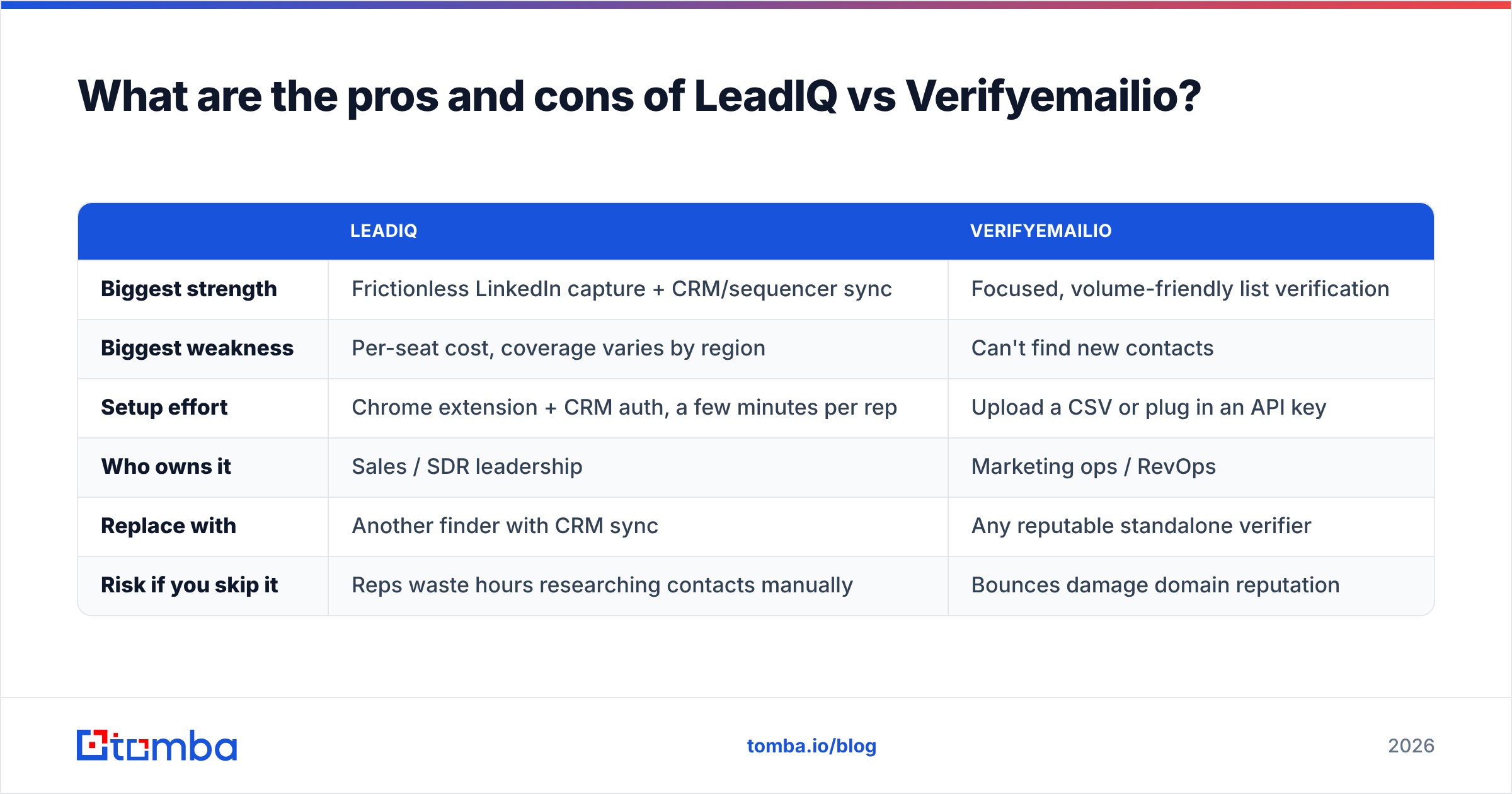
What are the pros and cons of LeadIQ vs Verifyemailio?#
A side-by-side summary for skimmers:
| LeadIQ | Verifyemailio | |
|---|---|---|
| Biggest strength | Frictionless LinkedIn capture + CRM/sequencer sync | Focused, volume-friendly list verification |
| Biggest weakness | Per-seat cost, coverage varies by region | Can't find new contacts |
| Setup effort | Chrome extension + CRM auth, a few minutes per rep | Upload a CSV or plug in an API key |
| Who owns it | Sales / SDR leadership | Marketing ops / RevOps |
| Replace with | Another finder with CRM sync | Any reputable standalone verifier |
| Risk if you skip it | Reps waste hours researching contacts manually | Bounces damage domain reputation |
Neither tool is "better." They sit on opposite sides of the same pipeline. The bad outcome is buying one and expecting it to do the other's job.
How do you decide in five minutes?#
Answer these in order:
- Do you have enough contacts to email next month? If no, you need a finder. LeadIQ is one option; LeadIQ's own site lists its current plans and integrations.
- Is most of your list older than 90 days or from outside sources? If yes, you need a verifier. Verifyemailio fits.
- Did you answer yes to both? Then compare the cost of two tools against one platform that does both.
- Do your reps work mainly in LinkedIn and Salesforce/HubSpot? That pushes toward LeadIQ's workflow strengths.
- Is your spend spiky, like campaigns, events, or client projects? That pushes toward credit or tiered pricing over seats.
What's the bottom line on LeadIQ vs Verifyemailio?#
LeadIQ and Verifyemailio aren't really rivals. LeadIQ is a strong choice for SDR teams that prospect in LinkedIn and want contacts flowing into their CRM and sequencer with little friction. Verifyemailio is a sensible pick for anyone who already has lists and needs to protect deliverability before hitting send. The expensive mistake is buying one and expecting it to cover the other's job, or paying for both when your volume doesn't justify two contracts.
If you want sourcing and hygiene under one roof, the Tomba Email Finder finds professional addresses by domain, name, company, or LinkedIn URL, and returns a verification status with every result. When you inherit an old list, the built-in email verifier cleans it on the same plan. Start on the free tier with 25 searches, test it against 200 contacts from your own ICP using the method above, and let your bounce rate decide.
Related guides#
// get started
Find, verify and enrich your first contacts today
Start on the free plan with 25 searches a month, then scale when your team is ready.
Free plan · No credit card required · GDPR & CCPA
// about the author