LeadLeaper vs RocketReach: Honest 2026 Comparison for Sales Teams
LeadLeaper is a lightweight LinkedIn extension. RocketReach is a full contact database with phones and an API. We compare them on data, workflow, pricing, and integrations so you can pick the right one for how your team prospects.
TL;DR
- LeadLeaper is a browser extension that pulls emails from LinkedIn, Sales Navigator, and company websites as you browse. It's cheap and simple, and it works best for solo reps and small teams doing manual, profile-by-profile prospecting.
- RocketReach is a large contact database with emails, direct dials, company data, bulk lookups, CRM integrations, and an API. It costs more, but it scales past one person clicking through profiles.
- Pick LeadLeaper if your whole workflow runs through LinkedIn and your budget is tight. Pick RocketReach if you need phone numbers, search filters, bulk enrichment, or data feeding into your CRM.
- Neither tool removes the need to verify addresses before you send. Bounces hurt your sender reputation no matter where the data came from.
- If you want database-style search at a price closer to entry level, with verification built in, Tomba is a middle option worth testing.
What are LeadLeaper and RocketReach?#
These two tools are built for different jobs, and that difference matters more than any single feature.
LeadLeaper (leadleaper.com) is a prospecting extension for Chrome. You open a LinkedIn profile, a Sales Navigator search, or a company site. LeadLeaper finds the person's likely business email and saves the lead to a list you can export. It works like a clipboard that fills in email addresses for you. It doesn't try to be a searchable database of hundreds of millions of people. It helps you capture the prospects you've already found.
RocketReach (rocketreach.co) is a B2B contact database. You can search it directly by title, company, industry, location, headcount, and other attributes. It returns professional and personal emails, phone numbers, and social profiles. It also has a Chrome extension, but the extension sits on top of the database. You can run bulk lookups, push records into Salesforce or HubSpot, and call everything through an API.
In short, LeadLeaper helps you capture leads while you browse, and RocketReach is where you go to search for them. You can prospect with either one, but the daily workflow is very different.
How do LeadLeaper and RocketReach compare at a glance?#
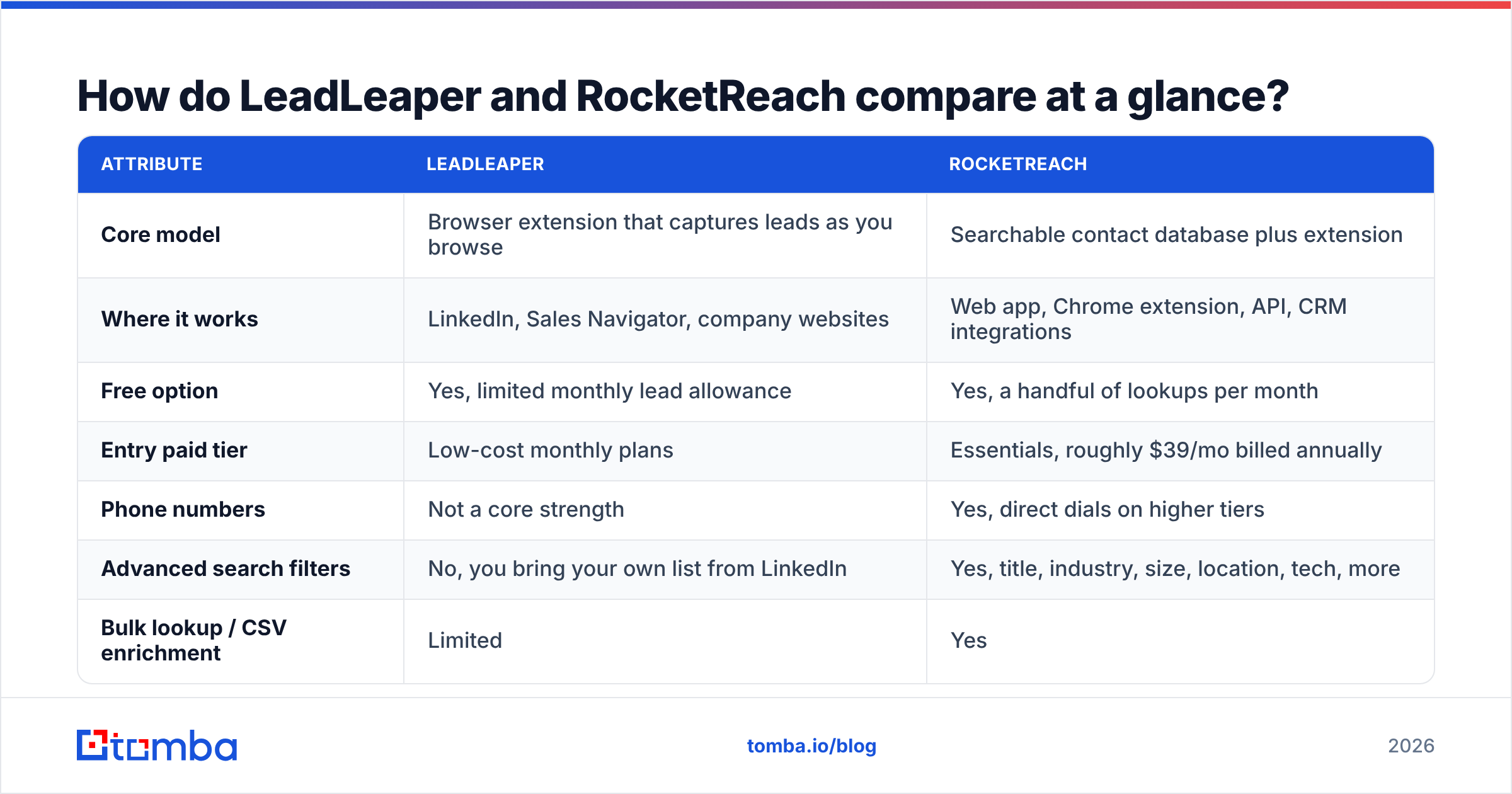
Here's the side-by-side. Pricing changes often, so check each vendor's page before you buy. The table shows how each tool positions itself, not a quote.
| Attribute | LeadLeaper | RocketReach |
|---|---|---|
| Core model | Browser extension that captures leads as you browse | Searchable contact database plus extension |
| Where it works | LinkedIn, Sales Navigator, company websites | Web app, Chrome extension, API, CRM integrations |
| Free option | Yes, limited monthly lead allowance | Yes, a handful of lookups per month |
| Entry paid tier | Low-cost monthly plans | Essentials, roughly $39/mo billed annually |
| Phone numbers | Not a core strength | Yes, direct dials on higher tiers |
| Advanced search filters | No, you bring your own list from LinkedIn | Yes, title, industry, size, location, tech, more |
| Bulk lookup / CSV enrichment | Limited | Yes |
| API access | No public data API for enrichment at scale | Yes, on higher plans |
| CRM integrations | Export-focused (CSV, lists) | Native Salesforce, HubSpot, others |
| Best for | Solo reps, founders, recruiters on a budget | SDR teams, RevOps, recruiters at volume |

A quick way to read this table: LeadLeaper is cheaper per month but depends on you doing the manual work of finding people. RocketReach costs more but handles search, enrichment, and integrations for you. The real question is whether your team's time or the software budget is the bigger constraint.
Which one has better data coverage and accuracy?#
On coverage, RocketReach is ahead, mostly because of what it is. It maintains its own database of hundreds of millions of professional profiles and tens of millions of companies. When you search for "VP of Finance at SaaS companies with 200-1,000 employees in Germany," you get records back without first building the list in LinkedIn.
LeadLeaper's coverage is effectively whatever you can see on LinkedIn and company websites. That can be an advantage. The profile you're looking at is current, so you aren't working from a stale database record for someone who changed jobs eight months ago. The catch is that the email address still has to be inferred or matched, and that's where accuracy varies.
Accuracy is where every email finder, these two included, deserves some skepticism:
- Pattern-guessed emails (first.last@company.com) are often right, but they fail on companies with unusual formats or duplicate names.
- Catch-all domains accept every address at the SMTP level, so a finder can't confirm the mailbox exists. Both tools will return "likely" addresses here that may bounce. A dedicated catch-all verifier is the only reliable way to score them.
- Job changes make database records decay. Estimates of how fast B2B contact data goes stale vary, but a large share of records changes every year.

In practice, RocketReach tends to return more results per search, with confidence grades attached. LeadLeaper returns fewer, but they're tied to the person you're actually looking at. Whichever you choose, run the output through an email verifier before it enters a sequence. Independent review sites like G2 consistently mention accuracy complaints for every tool in this category. None of them has fully solved it.
How does the day-to-day workflow differ?#
Prospecting speed depends more on workflow than on raw data size. This is how a typical week looks with each tool:
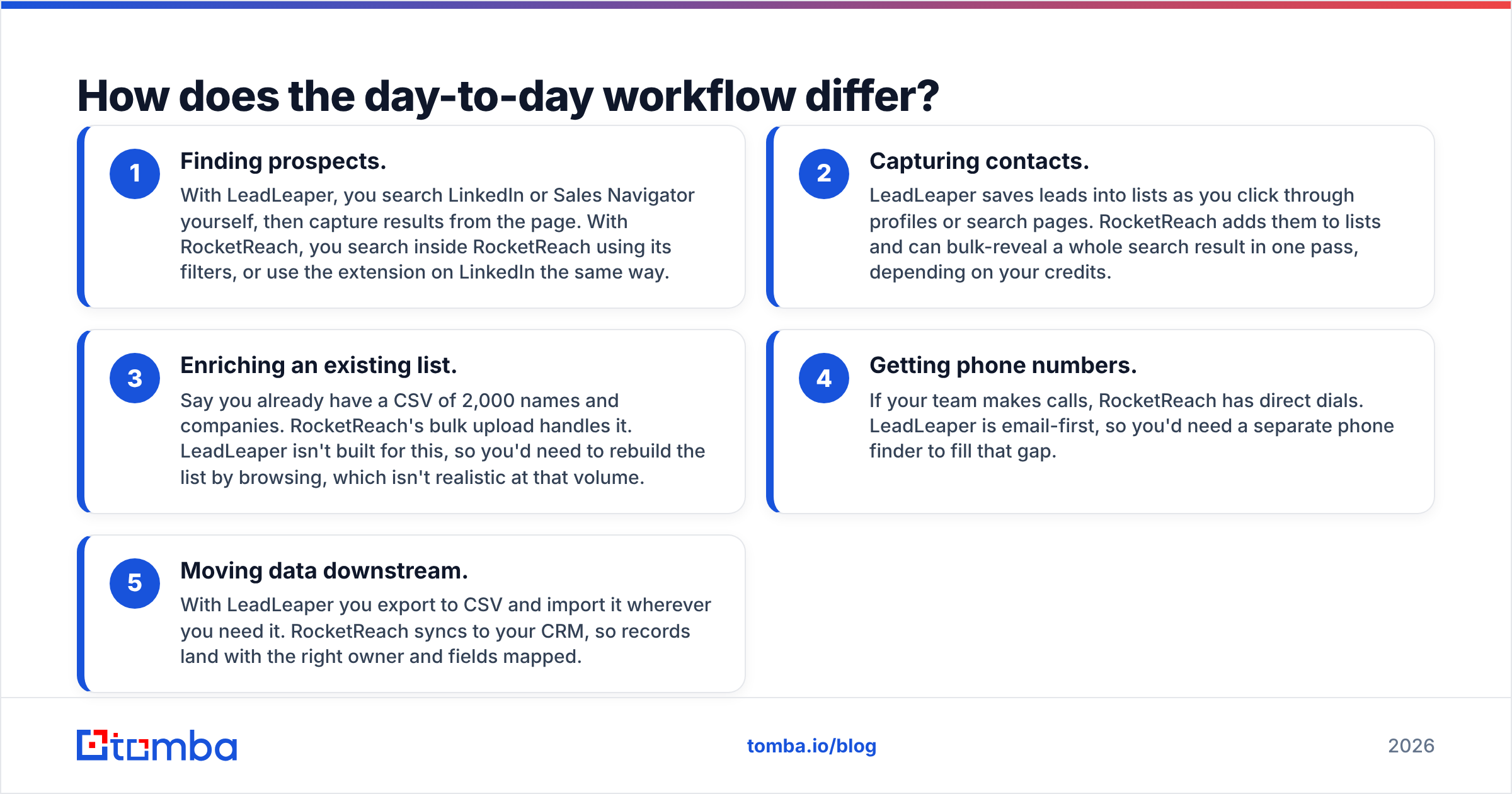
- Finding prospects. With LeadLeaper, you search LinkedIn or Sales Navigator yourself, then capture results from the page. With RocketReach, you search inside RocketReach using its filters, or use the extension on LinkedIn the same way.
- Capturing contacts. LeadLeaper saves leads into lists as you click through profiles or search pages. RocketReach adds them to lists and can bulk-reveal a whole search result in one pass, depending on your credits.
- Enriching an existing list. Say you already have a CSV of 2,000 names and companies. RocketReach's bulk upload handles it. LeadLeaper isn't built for this, so you'd need to rebuild the list by browsing, which isn't realistic at that volume.
- Getting phone numbers. If your team makes calls, RocketReach has direct dials. LeadLeaper is email-first, so you'd need a separate phone finder to fill that gap.
- Moving data downstream. With LeadLeaper you export to CSV and import it wherever you need it. RocketReach syncs to your CRM, so records land with the right owner and fields mapped.

If you're a founder spending 30 minutes a day on LinkedIn, LeadLeaper's approach feels natural and costs almost nothing. Once you have three SDRs, a CRM, and a target of 1,500 new contacts a month, copy-paste workflows break down and RocketReach's structure starts paying for itself.
What do LeadLeaper and RocketReach actually cost?#
Cost goes beyond the sticker price. Compare three things: price per verified contact, what one credit actually buys, and whether you're forced into annual billing.
LeadLeaper keeps pricing simple. There's a free plan with a monthly lead cap, and paid plans raise the cap for a modest monthly fee. You aren't paying for a database you don't search, which is why it's so cheap. You are paying for it with your own time spent building lists.
RocketReach uses tiered plans: Essentials, Pro, and Ultimate. Annual billing brings the price down to roughly $39, $99, and $249 per month respectively, as published on its pricing page at the time of writing. Monthly billing costs noticeably more. Lookup allowances scale with each tier, and phone numbers, API access, and integrations are reserved for the higher plans. Check what counts as a "lookup," and whether a revealed record with no valid email still uses a credit.
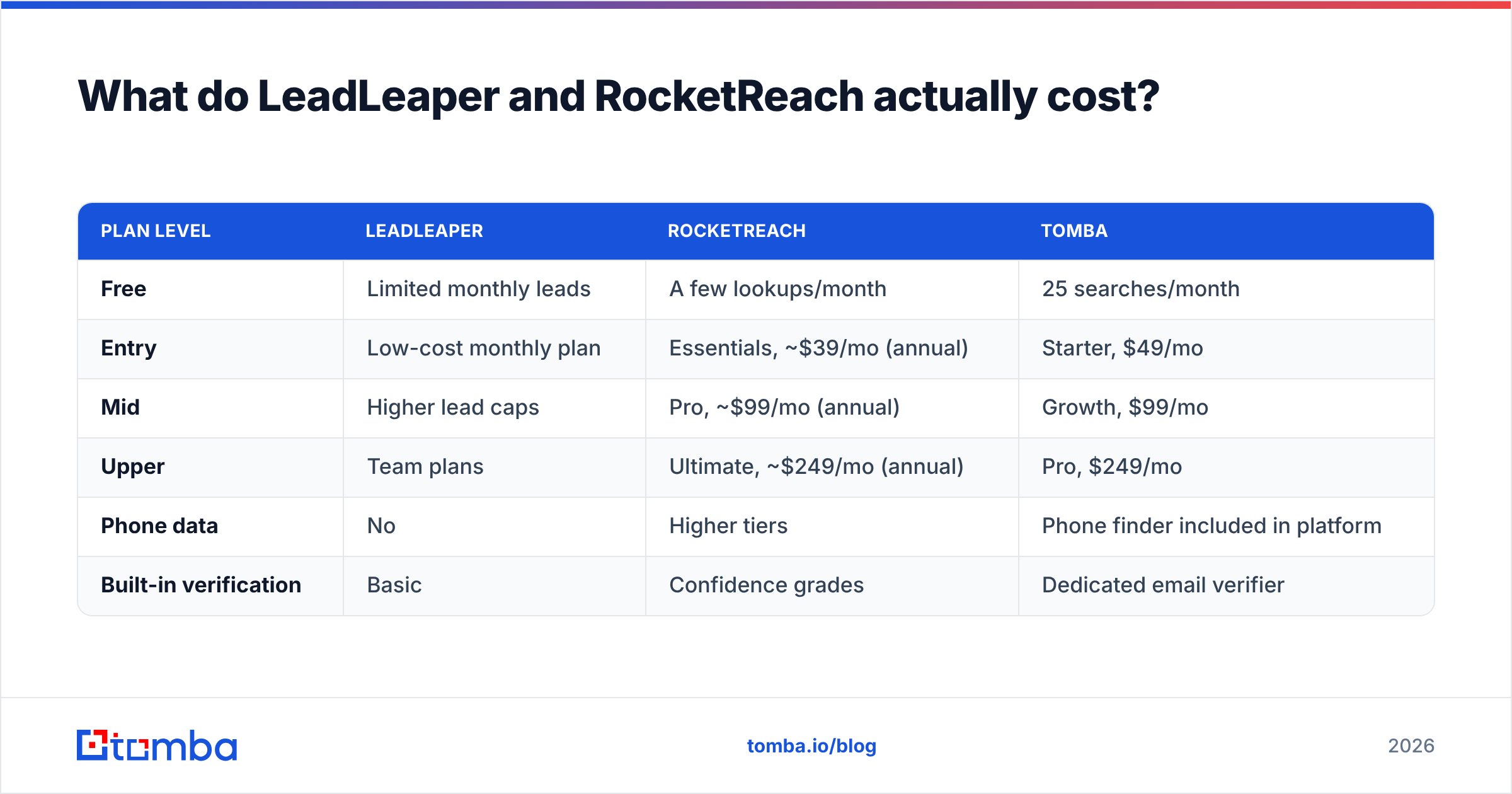
Here's how the entry points compare, with Tomba added as a reference point:
| Plan level | LeadLeaper | RocketReach | Tomba |
|---|---|---|---|
| Free | Limited monthly leads | A few lookups/month | 25 searches/month |
| Entry | Low-cost monthly plan | Essentials, ~$39/mo (annual) | Starter, $49/mo |
| Mid | Higher lead caps | Pro, ~$99/mo (annual) | Growth, $99/mo |
| Upper | Team plans | Ultimate, ~$249/mo (annual) | Pro, $249/mo |
| Phone data | No | Higher tiers | Phone finder included in platform |
| Built-in verification | Basic | Confidence grades | Dedicated email verifier |
Two hidden costs are worth budgeting for. The first is verification: if your finder doesn't verify properly, you'll pay for a separate verifier anyway. The second is rep time. A tool that costs $20 less but takes an extra hour a week per rep isn't actually cheaper. If you're comparing against other databases too, our RocketReach alternative breakdown covers how the per-credit math works across vendors.
Which integrates better with your CRM and outreach stack?#
RocketReach wins this one clearly.
RocketReach offers native integrations with major CRMs including Salesforce and HubSpot. It also connects with outreach platforms and exposes a REST API for custom pipelines. In a RevOps setup, that means enrichment can run automatically: a new lead arrives, RocketReach adds email and phone, and the record gets routed. Salesforce's own guidance on data quality makes the same point that matters here: bad data entering the CRM costs you in every stage after it.
LeadLeaper is mostly export-based. You build lists in the extension, export them, and import them into your email tool or CRM. For one person that's fine. For a team, it creates version-control problems (whose CSV is current?) and makes it easy to email the same prospect from two accounts.
If your team lives in spreadsheets rather than a CRM, the gap is smaller. Either tool can feed a sheet, and you can enrich or verify inside the sheet afterward.
Is LeadLeaper better than RocketReach for LinkedIn prospecting?#
For pure LinkedIn-first prospecting on a budget, yes, LeadLeaper is often the better fit. That's the scenario it was built for.
LeadLeaper's strengths on LinkedIn:
- Low friction. You install it, browse, and capture leads. There's no database UI to learn.
- Current context. You're looking at the live profile, so you can see role, tenure, and recent activity before saving the lead.
- Sales Navigator support. It works on Navigator search result pages, which is where most serious LinkedIn prospecting happens.
- Price. For someone sending 100-300 personalized emails a month, it's very hard to beat on cost.
RocketReach's extension also works on LinkedIn and returns more data per profile, including phones and alternate emails. It costs more per lookup, though, and on LinkedIn its advantage over LeadLeaper is smaller than it is inside its own search tool.
If LinkedIn is your main channel and you're comparing LinkedIn-specific tools, it's worth also looking at a dedicated LinkedIn finder. Several tools in this category now return verified addresses directly from profile URLs, which helps when you have a list of LinkedIn URLs rather than a browser session.
When should you pick RocketReach over LeadLeaper?#
Choose RocketReach when any of these are true:
- You need phone numbers. Cold calling, or multichannel sequences that include calls, need direct dials, and RocketReach has them.
- You build lists from filters, not from browsing. Account-based teams that start from an ICP definition ("Series B fintech, 50-500 employees, US") need a searchable database.
- You enrich lists you already have. Trade-show lists, inbound form fills, and webinar registrants all need bulk enrichment. LeadLeaper isn't designed for that.
- Your CRM is the source of truth. Native sync and an API keep records clean without CSV juggling.
- You're hiring. Recruiters at volume find RocketReach's personal-email coverage useful for passive candidates, though you should stay on the right side of GDPR and local privacy rules.
Choose LeadLeaper when:
- You're a solo seller, founder, freelancer, or small agency.
- Your prospecting already happens on LinkedIn and you just need the email address.
- Budget matters more than scale, and you send low-volume, highly personalized outreach.

Whichever you choose, verify before you send. A 5% bounce rate on a new domain can push you into spam folders for weeks, and no finder's confidence score replaces a real SMTP check. Tomba's free email checker is fine for spot checks. For whole lists, use bulk verification.
Where does Tomba fit in this comparison?#
Tomba sits between the two. It's more capable than an extension that only captures leads, and cheaper to start than a full enterprise database.
Here's what it adds compared to LeadLeaper:
- Domain search. You can pull every public address at a company without browsing profiles one at a time.
- Bulk finding and verification. You can upload a CSV of names and domains and get back verified addresses.
- API, Sheets, and CRM integrations for teams that want enrichment to run automatically.
Here's how it compares to RocketReach:
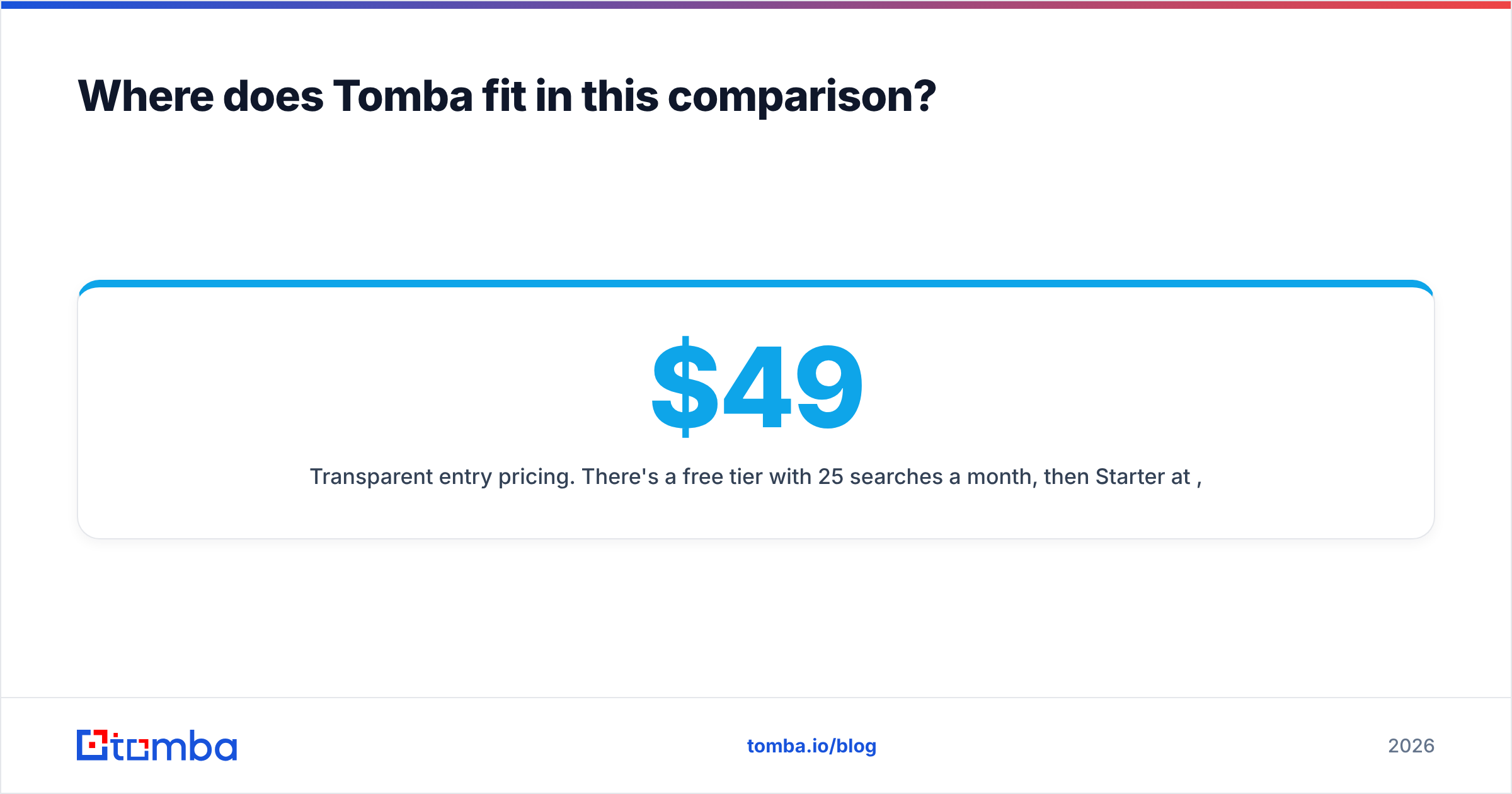
- Transparent entry pricing. There's a free tier with 25 searches a month, then Starter at $49/mo, Growth at $99/mo, and Pro at $249/mo, as listed on Tomba pricing.
- Verification built into the platform, including catch-all handling, so you don't need a second vendor.
- Email-first focus. Phone and enrichment are available, but the email finder is the core product.
Where RocketReach still has the edge: its database of searchable professional profiles is broad, and for filter-heavy list building in some verticals and regions it will return more records. If phone-heavy outbound is your main motion, test RocketReach's direct-dial coverage against your ICP before deciding.
The honest recommendation: run a 50-contact test. Take 50 prospects from your actual ICP, run them through each tool, then verify every result with the same independent verifier. Count the deliverable emails and divide by what you spent. That number tells you more than any vendor's accuracy claim.
Frequently asked questions#
Is LeadLeaper free?#
LeadLeaper has a free plan with a monthly cap on leads, which is enough to test it on real LinkedIn prospecting. Paid plans raise the cap for a small monthly fee.
Does RocketReach have a free plan?#
Yes. RocketReach's free plan gives you a small number of lookups each month. It's enough to test data quality, but not enough to prospect with.
Which is more accurate, LeadLeaper or RocketReach?#
Neither is consistently more accurate across every industry and region. RocketReach returns more results with confidence grades, and LeadLeaper returns fewer results tied to live profiles. Verify the output of both before sending.
Can I use LeadLeaper and RocketReach together?#
You can, and some teams do: LeadLeaper for LinkedIn capture and RocketReach for phones and bulk enrichment. For most small teams, though, paying for two tools with overlapping email coverage is harder to justify than picking one platform that handles finding and verification together.
Ready to find emails without the trade-off?#
The LeadLeaper vs RocketReach choice comes down to a cheap extension for capturing leads on LinkedIn versus a larger database with search, phones, and integrations. If you want something in between, with verified emails by name, domain, or company, a real free tier, and paid plans starting at $49/mo, try the Tomba Email Finder. Run your own 50-contact test against either tool and compare the deliverable results before you commit.
Related guides#
// get started
Find, verify and enrich your first contacts today
Start on the free plan with 25 searches a month, then scale when your team is ready.
Free plan · No credit card required · GDPR & CCPA
// about the author