Leadleaper vs Salesbot: Email Finder or AI Prospecting Platform?
Leadleaper finds emails one LinkedIn profile at a time. Salesbot builds AI-researched prospect lists with phones included. Here's which one fits your pipeline, what each costs, and when neither is the right call.
TL;DR
- Leadleaper is a lightweight Chrome extension that finds business emails while you browse LinkedIn and company websites. It has a free tier (100 credits/month) and cheap paid plans, and it suits solo reps and founders.
- Salesbot is an AI prospecting platform. It builds lists from your ICP, pulls emails and mobile numbers from multiple data providers, and helps with personalized outreach. Paid plans are reported to start around $49/month, and Professional runs about $99/user/month.
- Pick Leadleaper if you prospect by hand on LinkedIn and only need emails. Pick Salesbot if you want the tool to find the accounts and buyers for you, phone numbers included.
- Neither one is really built for high-volume domain search, bulk CSV enrichment, or API-first workflows. For those, a dedicated email finder with verification built in is usually a better fit.
- Always check current pricing on each vendor's site. Both have changed their tiers in the past year, and third-party listings don't agree.
What is the real difference between Leadleaper and Salesbot?#
These two tools show up in the same searches, but they solve different problems.
Leadleaper works like a magnifying glass. You're already looking at a person on LinkedIn, Sales Navigator, or a company's team page, and Leadleaper tells you their work email. It stays out of your way and works one profile or one results page at a time. Captured leads go into a simple built-in lead list (a lightweight CRM), and you can export them to CSV.
Salesbot works more like a research assistant. You describe your ideal customer profile (industry, company size, the roles you sell to, sometimes a list of target websites), and it goes looking for the buyers. It checks contacts against several premium data sources and ranks the most reliable emails and mobile numbers. It also adds AI help for list building and personalized outreach.
So "Leadleaper vs Salesbot" really comes down to this question: do you already know who you want to contact, or do you need a tool to figure that out for you?
How do Leadleaper and Salesbot compare feature by feature?#
Here's the side-by-side, based on public vendor information and listings on Capterra as of 2026. Treat the prices as a guide and confirm them before you buy.
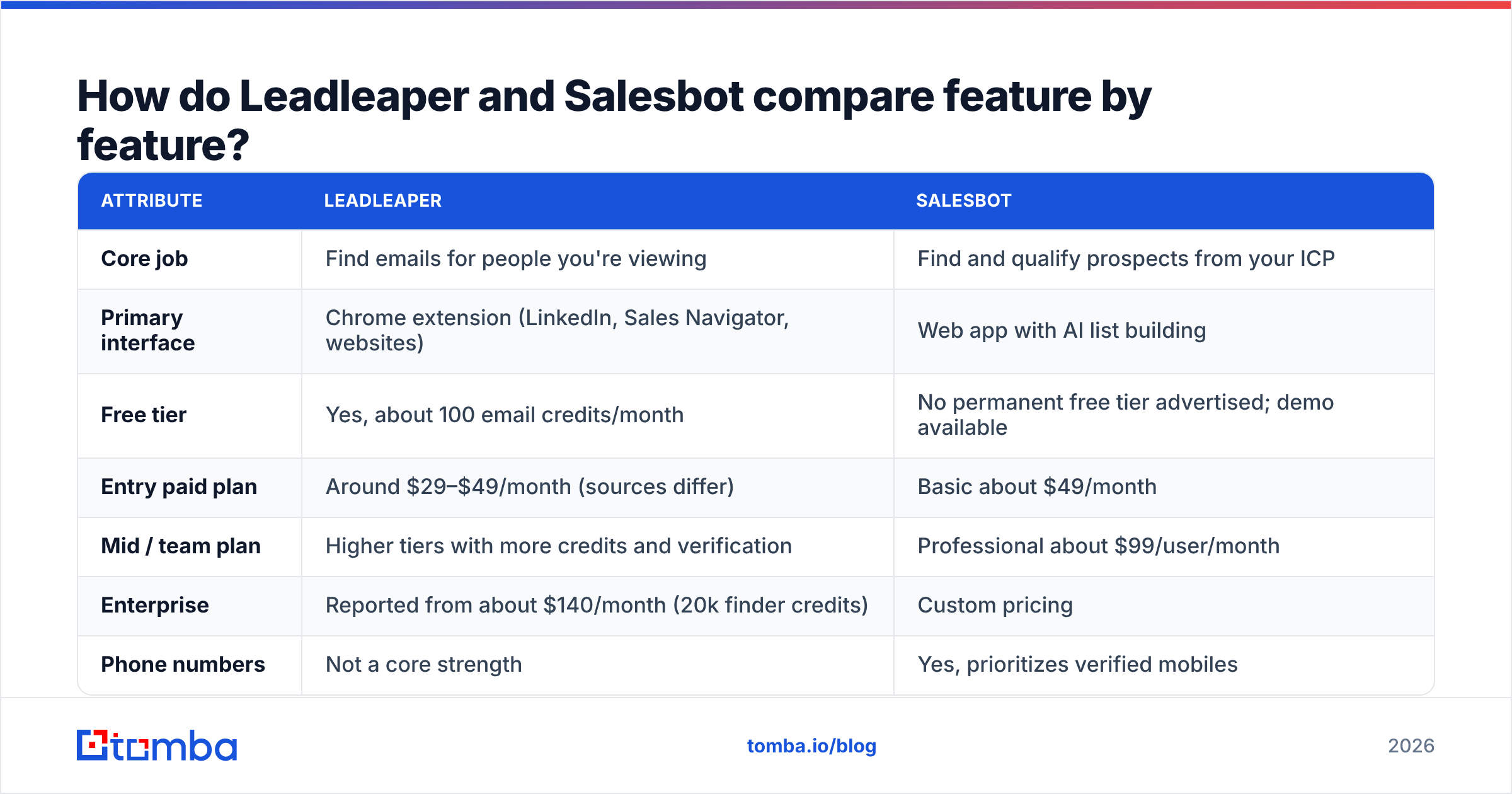
| Attribute | Leadleaper | Salesbot |
|---|---|---|
| Core job | Find emails for people you're viewing | Find and qualify prospects from your ICP |
| Primary interface | Chrome extension (LinkedIn, Sales Navigator, websites) | Web app with AI list building |
| Free tier | Yes, about 100 email credits/month | No permanent free tier advertised; demo available |
| Entry paid plan | Around $29–$49/month (sources differ) | Basic about $49/month |
| Mid / team plan | Higher tiers with more credits and verification | Professional about $99/user/month |
| Enterprise | Reported from about $140/month (20k finder credits) | Custom pricing |
| Phone numbers | Not a core strength | Yes, prioritizes verified mobiles |
| Email verification | Included on higher tiers | Built into its multi-source data checks |
| Built-in CRM | Lightweight lead list | Not the focus; built around outreach and lists |
| Outreach / sequencing | No | AI-assisted personalized outreach |
| Credit model | Charged only when an email is found; no export credits | Plan-based; check limits per seat |
| Best for | Solo reps, founders, recruiters | SDR teams and agencies running outbound at scale |
The pricing row is where people get caught out. Leadleaper's entry price appears as $29, $39, and $49 depending on which review you read and when it was written. That usually means the tiers changed recently. Get the number from leadleaper.com itself. Salesbot's figures come from its Capterra listing. Its Professional plan is priced per user, which adds up quickly once you have more than three SDRs.

How does each tool fit into a real prospecting workflow?#
Features on a pricing page don't tell you much. What matters is what your Tuesday afternoon looks like with each tool.
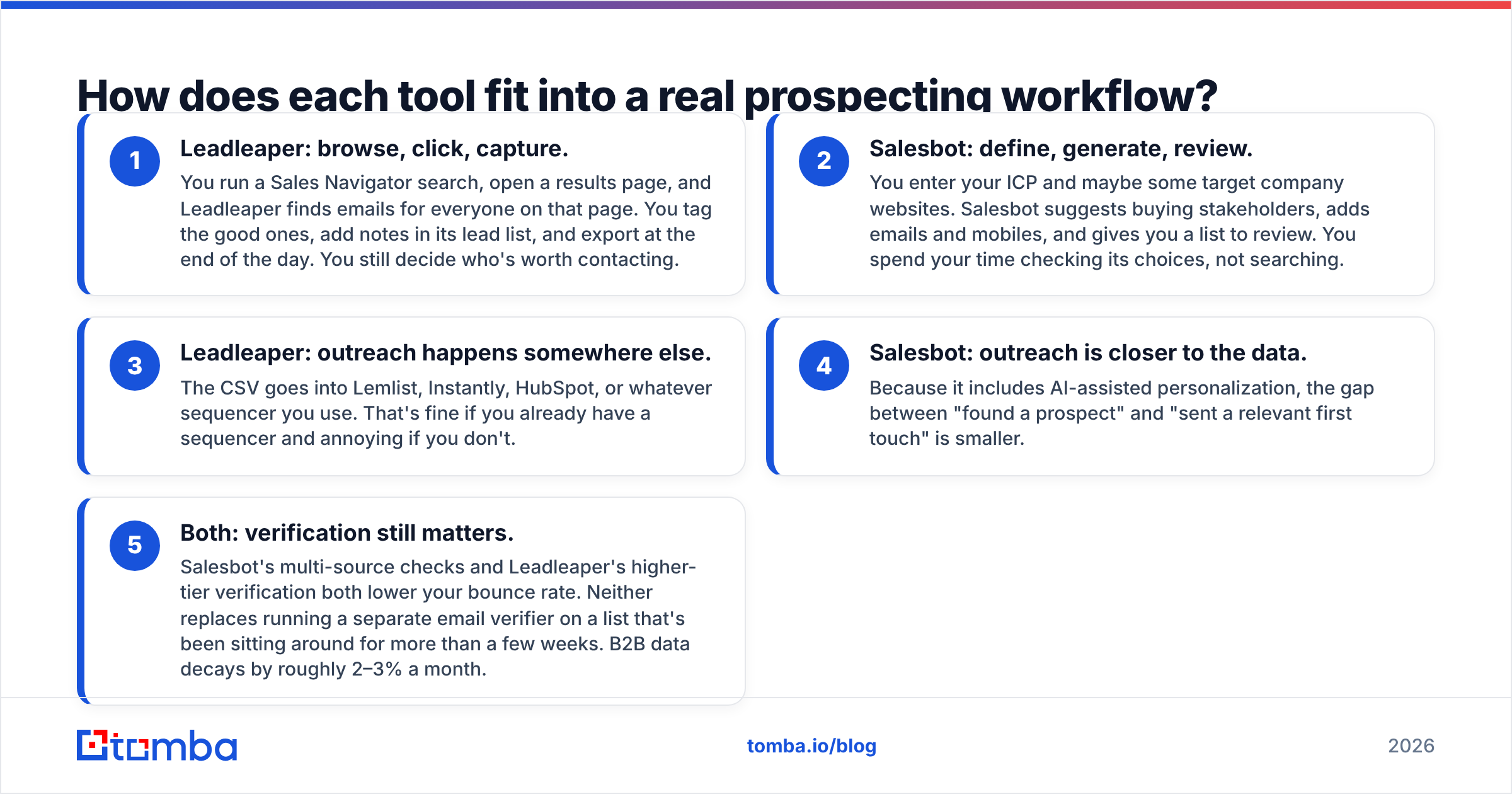
- Leadleaper: browse, click, capture. You run a Sales Navigator search, open a results page, and Leadleaper finds emails for everyone on that page. You tag the good ones, add notes in its lead list, and export at the end of the day. You still decide who's worth contacting.
- Salesbot: define, generate, review. You enter your ICP and maybe some target company websites. Salesbot suggests buying stakeholders, adds emails and mobiles, and gives you a list to review. You spend your time checking its choices, not searching.
- Leadleaper: outreach happens somewhere else. The CSV goes into Lemlist, Instantly, HubSpot, or whatever sequencer you use. That's fine if you already have a sequencer and annoying if you don't.
- Salesbot: outreach is closer to the data. Because it includes AI-assisted personalization, the gap between "found a prospect" and "sent a relevant first touch" is smaller.
- Both: verification still matters. Salesbot's multi-source checks and Leadleaper's higher-tier verification both lower your bounce rate. Neither replaces running a separate email verifier on a list that's been sitting around for more than a few weeks. B2B data decays by roughly 2–3% a month.

Which tool gives you more accurate contact data?#
The honest answer is that nobody has published a controlled head-to-head accuracy test of Leadleaper against Salesbot. Anyone who hands you a precise percentage for either one is guessing or selling something.
What you can reason about is how each tool is built:
- Leadleaper generates and checks an email pattern for the person you're looking at. That works well at companies with a consistent format (first.last@company.com) and a mail server that responds to verification. It has a harder time with catch-all domains, which accept every address, so a "valid" result doesn't prove the mailbox exists.
- Salesbot pulls from several premium providers and ranks the most reliable record. Waterfall enrichment like this usually improves coverage, especially for mobile numbers, because each provider fills gaps the others leave. The trade-off is less visibility into where a specific record came from.

If accuracy is your main concern, run your own test before you commit. Take 50 contacts you already know are correct (customers, closed-lost deals, your own network), strip out the emails, and run them through each tool's trial. Count exact matches, wrong addresses, and "not found" results. Thirty minutes of testing tells you more than any review, this one included.
For catch-all domains in particular, a dedicated catch-all verifier is worth adding to the stack no matter which finder you choose. Catch-all addresses are where most "verified" bounces come from.
Is Leadleaper better than Salesbot for solo reps and founders?#
In most cases, yes.
If you're a founder doing your own sales or an AE who builds their own pipeline, you already know your market. You don't need AI to tell you that VP Ops at 200-person logistics companies is your buyer. You need that VP's email, fast, while you're looking at their profile.
Leadleaper fits that job well:
- The free tier is enough to try it properly. 100 credits a month lets you test it on real prospects before you pay.
- You're only charged for results. Credits are spent when an email is found, not when you search, and exports are free. That's more generous than many competitors.
- You don't have to learn much. It's an extension, so there's no new platform to set up.
Where it falls short: phone numbers, team collaboration on lower tiers, and anything past one-page-at-a-time capture. If you need 5,000 contacts from a list of 800 domains, clicking through LinkedIn profiles isn't the right approach.
Is Salesbot better than Leadleaper for SDR teams and agencies?#
Usually, yes, as long as you'll actually use the AI features.
Salesbot makes sense when:
- Your team's time costs more than the seats. If an SDR spends 40% of the week researching prospects, cutting that in half pays for a $99/user seat easily.
- You need phone numbers. Salesbot is built around verified mobiles as well as email. If cold calling is part of your motion, that settles it.
- You run outbound for several clients. Agencies switching between ICPs benefit most from describing the target and getting a list back.
- Your ICP is wide or poorly defined. Salesbot's stakeholder discovery can find buyer roles you might not have thought of.
Where it falls short: per-seat pricing adds up quickly, there's no ongoing free plan to try things out on, and a platform that combines data and outreach can overlap with a sequencer you already pay for. If your team already has Outreach, Salesloft, or Instantly, check whether you're paying twice for sequencing.
What does each tool actually cost at team scale?#
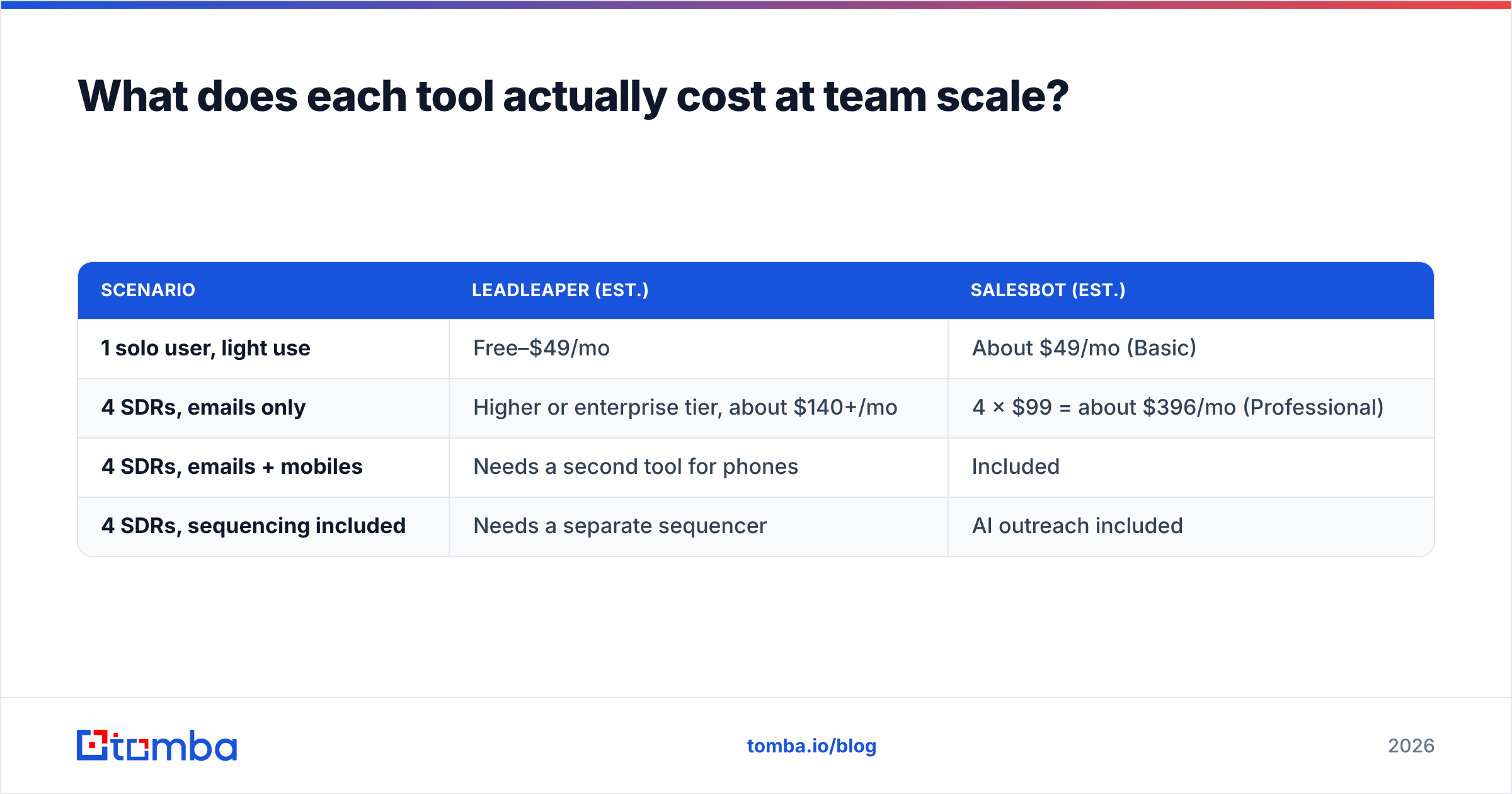
Here's a rough cost comparison for a four-person SDR team, using the publicly reported prices above. These are estimates, not quotes.
| Scenario | Leadleaper (est.) | Salesbot (est.) |
|---|---|---|
| 1 solo user, light use | Free–$49/mo | About $49/mo (Basic) |
| 4 SDRs, emails only | Higher or enterprise tier, about $140+/mo | 4 × $99 = about $396/mo (Professional) |
| 4 SDRs, emails + mobiles | Needs a second tool for phones | Included |
| 4 SDRs, sequencing included | Needs a separate sequencer | AI outreach included |
When you add up the whole stack, the difference shrinks. Leadleaper looks much cheaper until you add a phone data tool and a sequencer. Salesbot looks expensive until you remove those two line items. Do the math on everything you'd be paying for, not just this one tool.
When should you choose neither?#
Both tools are built around people. Leadleaper starts from a LinkedIn profile, and Salesbot starts from an ICP description. Some prospecting starts from a company or a spreadsheet instead:
- You have a list of target domains (from a trade show, a tech-install list, or an ABM tier) and need every relevant contact at each one.
- You have a CSV of 10,000 names and companies and need emails added in one batch, not by clicking.
- You're building email lookup into your own product or CRM workflow and need an API, not an extension.
- You work from Google Sheets or Excel and don't want to switch to another interface.
In these cases a dedicated email finder with domain search, bulk processing, and verification in the same workflow is the better tool. It's also worth checking how the vendor's data is priced at volume. Tomba pricing, for example, starts with a free tier of 25 searches a month, then Starter at $49/month, Growth at $99/month, and Pro at $249/month, with Enterprise priced on request. These are flat plans, not per-seat, so a four-person team doesn't pay four times.
This doesn't make Leadleaper or Salesbot the wrong choice. It means the right tool depends on where your prospecting starts. Plenty of teams run a LinkedIn extension for day-to-day browsing and a domain-based finder for list work, and that combination works well.
Leadleaper vs Salesbot: which should you pick?#
Here's how to decide:
- Pick Leadleaper if you prospect by hand on LinkedIn, only need emails, want a real free tier, and your budget is tight. It's the better value for individuals.
- Pick Salesbot if you run a team or an agency, need mobiles as well as emails, and want AI to handle research and first-touch personalization. It's the better choice when rep time is your biggest cost.
- Pick a domain-first email finder if your prospecting starts from company lists or spreadsheets, or needs to run through an API. Neither of these tools is designed for that.
Before you pay for anything, run the 50-known-contacts test on each trial. Your market's email formats, your share of catch-all domains, and your target regions will affect accuracy more than any feature list.
Ready to find emails without clicking through profiles?#
If your pipeline starts with a list of companies rather than a single LinkedIn profile, try Tomba Email Finder. Enter a name and domain, or just a domain, and you get verified professional emails with source data. It works in bulk, in Google Sheets, and through the API. The free plan covers 25 searches a month, which is enough to run the same known-contacts accuracy test described above before you decide which tool to use.
Related guides#
// get started
Find, verify and enrich your first contacts today
Start on the free plan with 25 searches a month, then scale when your team is ready.
Free plan · No credit card required · GDPR & CCPA
// about the author