LeadLeaper vs SignalHire: Which Contact Finder Wins in 2026?
LeadLeaper is a lean LinkedIn email grabber. SignalHire adds phone numbers and a bigger credit system. Here's how they compare on data, workflow, and cost, and which one fits your pipeline.
TL;DR
- LeadLeaper is a light, affordable Chrome extension. It pulls work emails from LinkedIn and Sales Navigator profiles and saves them to a lead list. It suits solo reps and small teams that only need emails.
- SignalHire is a bigger contact-data platform. It covers emails and phone numbers and offers a web app, bulk search, and an API. It suits recruiters and sales teams who call as well as email.
- On price, LeadLeaper is usually cheaper for email-only work. SignalHire's phone credits cost more, and teams often don't expect that.
- Neither tool gives you domain-level search or built-in verification the way a dedicated email-finder stack does. Verify every list before you send.
- Our pick: choose SignalHire if you need phone numbers, and LeadLeaper if you want cheap LinkedIn email capture. If you want domain search, verification, and enrichment in one place, a broader tool like Tomba covers both jobs.
What are LeadLeaper and SignalHire?#
Both tools answer the same question: "I've found the right person. How do I contact them?" They answer it in different ways.
LeadLeaper began as a browser extension for LinkedIn prospecting. You open a profile or a Sales Navigator search, click the extension, and it tries to return a verified business email. Every lead goes into a list inside LeadLeaper, and you can export that list or push it into your outreach tool. The product is deliberately small. It doesn't try to be a sales engagement platform, a database, or a CRM.
SignalHire positions itself as a contact-information platform for recruiters, sales teams, and marketers. It also works as a Chrome extension on LinkedIn and other professional sites. It adds a searchable candidate and prospect database, bulk lookups from CSV files, an API, and, most importantly, direct-dial and mobile phone numbers alongside emails.
So you're not comparing two versions of the same thing. You're comparing a specialist email grabber with a multi-channel contact platform.
How do the two tools actually work?#
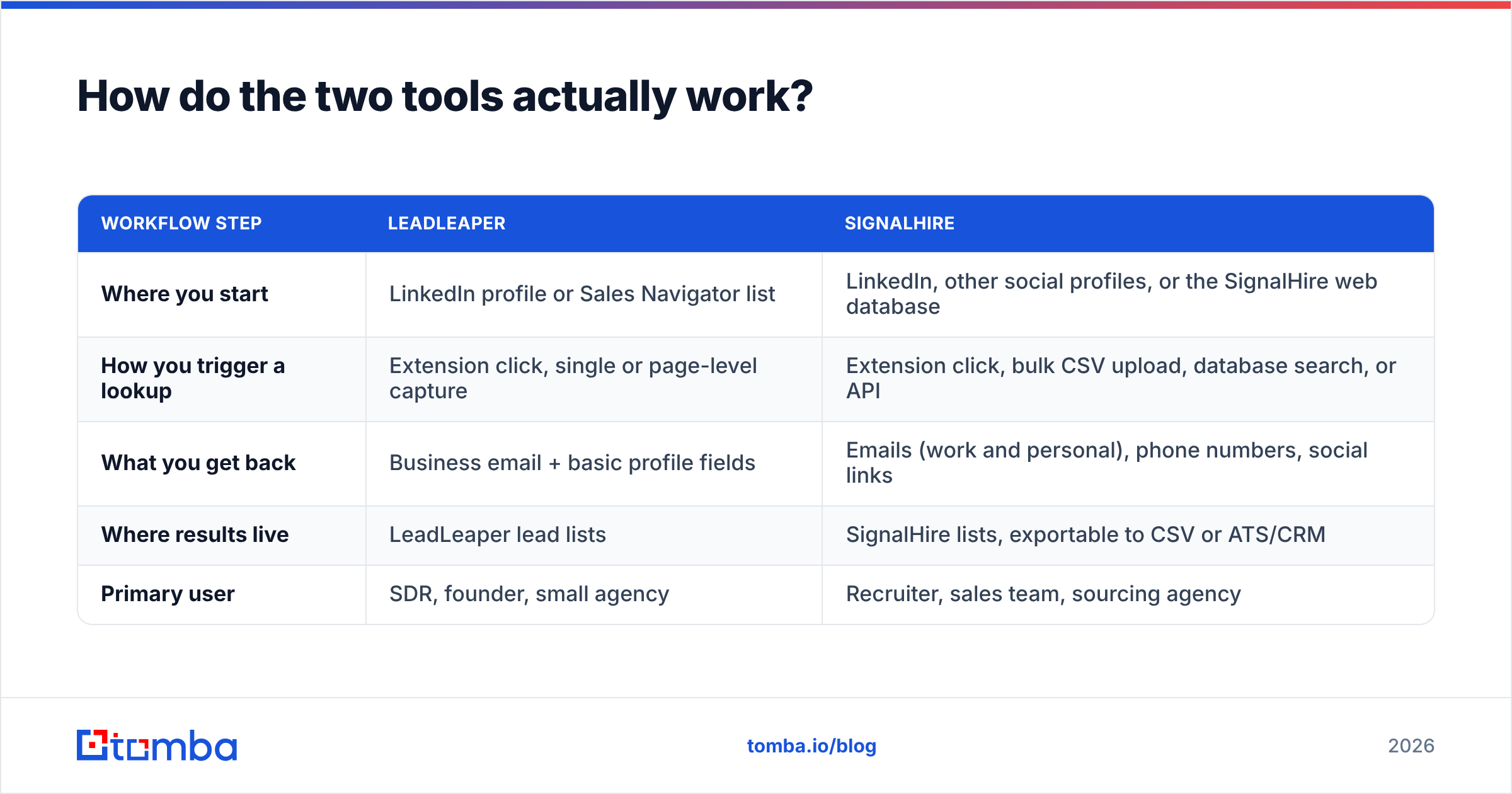
To pick the right tool, it helps to see the workflow each one assumes. The table below shows the core mechanics side by side.
| Workflow step | LeadLeaper | SignalHire |
|---|---|---|
| Where you start | LinkedIn profile or Sales Navigator list | LinkedIn, other social profiles, or the SignalHire web database |
| How you trigger a lookup | Extension click, single or page-level capture | Extension click, bulk CSV upload, database search, or API |
| What you get back | Business email + basic profile fields | Emails (work and personal), phone numbers, social links |
| Where results live | LeadLeaper lead lists | SignalHire lists, exportable to CSV or ATS/CRM |
| Primary user | SDR, founder, small agency | Recruiter, sales team, sourcing agency |
Here's what that means in practice:
- Capture scope. LeadLeaper is built around the LinkedIn page you already have open. SignalHire lets you start from a database search or an uploaded file, so you don't need a browser tab open for each lookup.
- Contact types. LeadLeaper is essentially email-only. SignalHire returns phones as well, and for recruiters and cold callers that matters more than anything else in this comparison.
- Scale. LeadLeaper handles page-by-page capture well. SignalHire's bulk upload and API are better suited to thousands of records per week.
- Data freshness. Both tools infer and check emails at lookup time rather than serving a stale static list. Neither one can check an address hosted on a catch-all domain with full certainty.
- Output. LeadLeaper assumes you'll export and send from elsewhere. SignalHire assumes you might pipe records into an ATS or CRM.
Which tool is more accurate?#
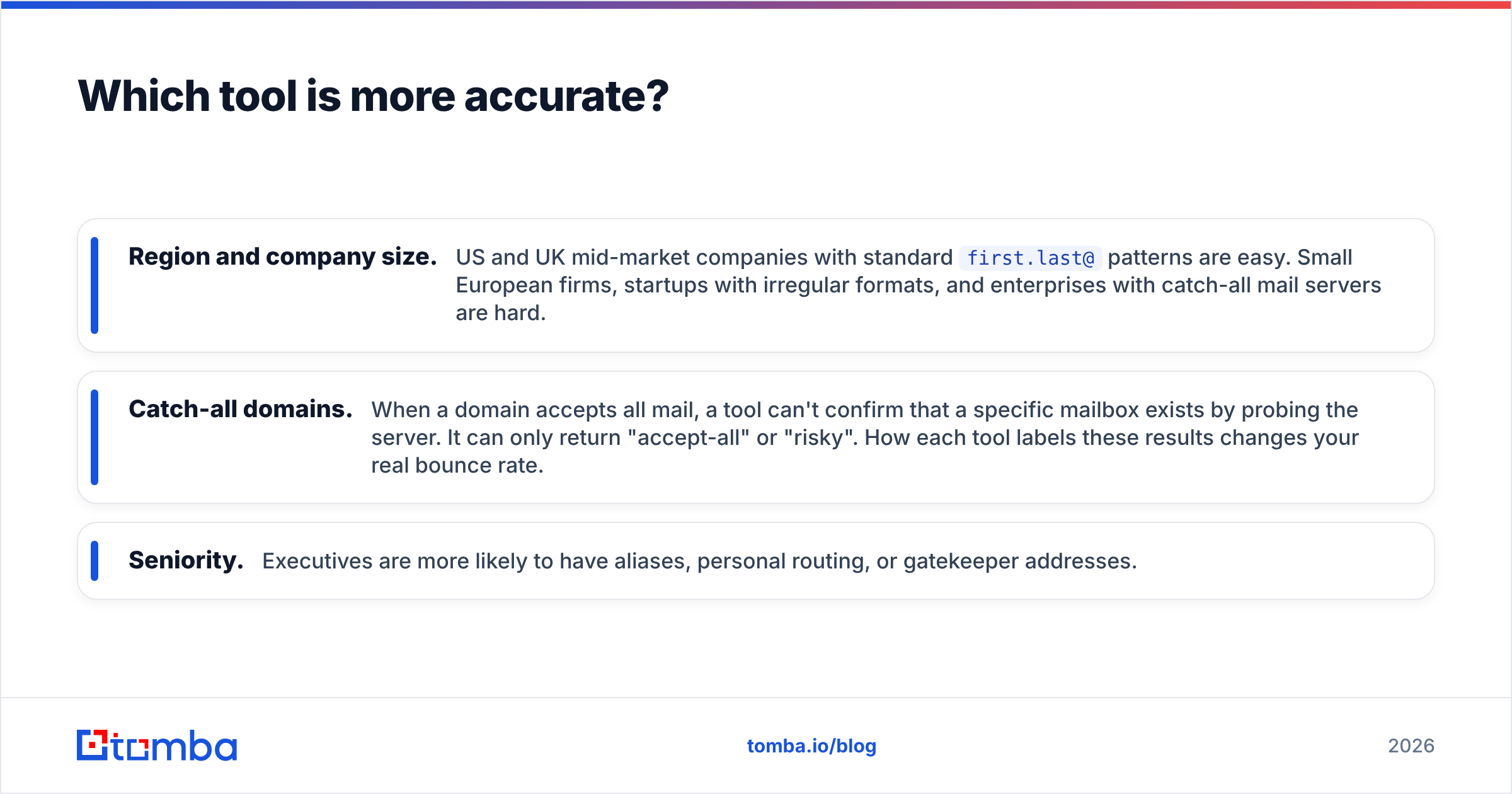
No vendor's own accuracy claim should settle this for you, and that includes both of these vendors. Accuracy in email finding depends heavily on three things:
- Region and company size. US and UK mid-market companies with standard
first.last@patterns are easy. Small European firms, startups with irregular formats, and enterprises with catch-all mail servers are hard. - Catch-all domains. When a domain accepts all mail, a tool can't confirm that a specific mailbox exists by probing the server. It can only return "accept-all" or "risky". How each tool labels these results changes your real bounce rate.
- Seniority. Executives are more likely to have aliases, personal routing, or gatekeeper addresses.
In hands-on use, both tools return a usable work email for a solid share of standard B2B LinkedIn profiles. The difference is in the edges. SignalHire often returns multiple emails per person, including personal addresses. That helps recruiters, but it can hurt B2B cold email if a rep sends to a Gmail address by mistake. LeadLeaper returns fewer addresses, but they tend to be focused on the business domain.

Whichever tool you pick, run the output through a separate email verifier before it reaches your sequencer. Finder-side verification is useful. An independent second check is what keeps your bounce rate under the 2% line that mailbox providers watch.
The fairest way to compare accuracy is to take 100 prospects from your own ICP, run both tools on the same list, verify both outputs independently, and count deliverable addresses. That takes about an hour and will tell you more than any review site.
How does pricing compare?#
Both tools are priced on credits. What a credit buys is where they differ.
LeadLeaper has historically offered a free tier with a monthly lead allowance and low-cost paid plans that raise that allowance. It's one of the cheaper options for pure LinkedIn email capture. Because the only thing you're buying is emails, costs stay predictable.
SignalHire gives you a handful of free credits each month to test with. Paid plans are split into email-only, phone-only, and combined bundles. Email-only plans start at a similar monthly price to other mid-market finders. Phone credits and combined plans cost noticeably more per contact, because verified mobile numbers are expensive for every vendor to source.
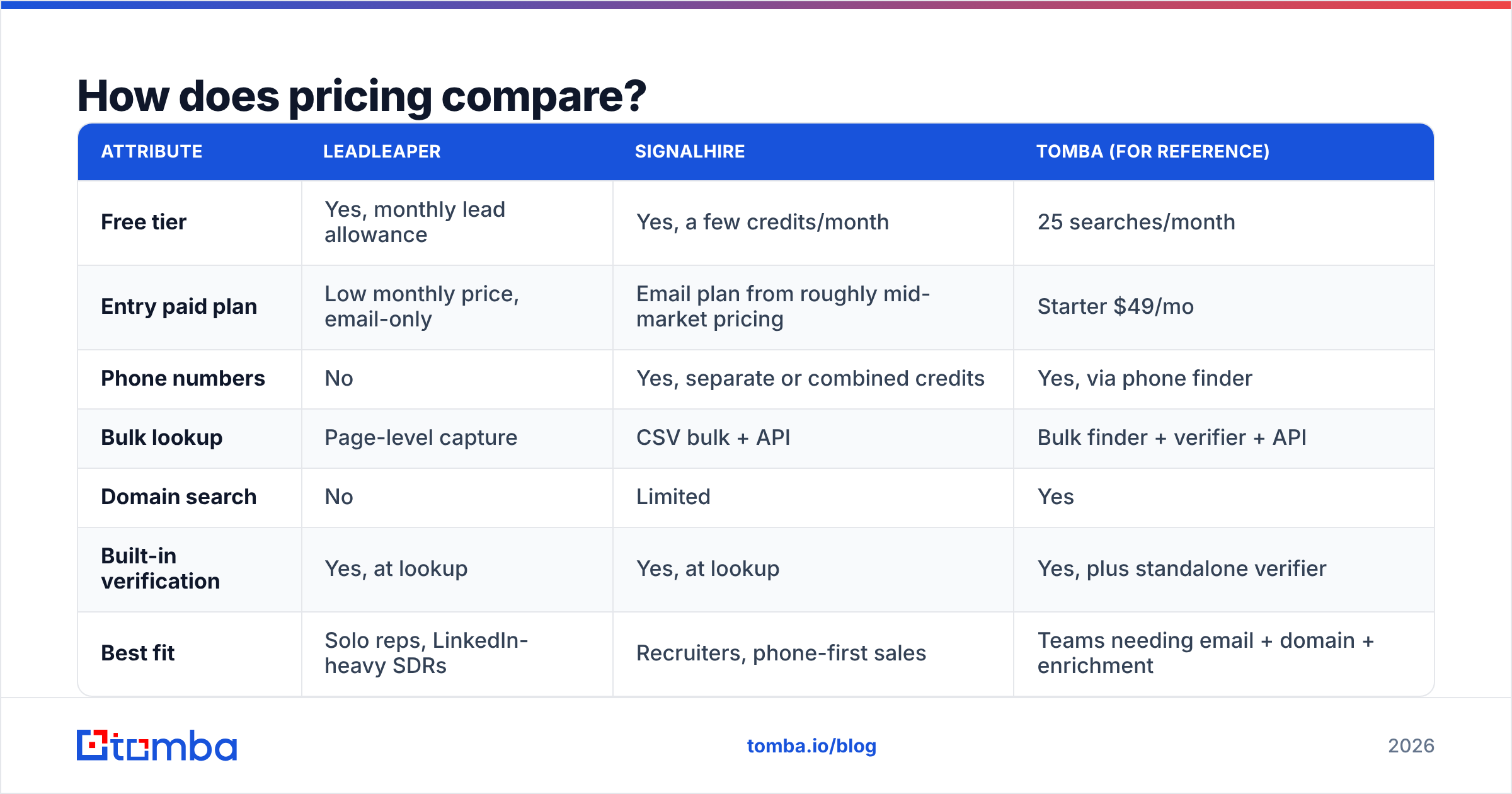
Prices in this category change often, so check both vendors' current pricing pages before you commit. The table below reflects the general structure at the time of writing.
| Attribute | LeadLeaper | SignalHire | Tomba (for reference) |
|---|---|---|---|
| Free tier | Yes, monthly lead allowance | Yes, a few credits/month | 25 searches/month |
| Entry paid plan | Low monthly price, email-only | Email plan from roughly mid-market pricing | Starter $49/mo |
| Phone numbers | No | Yes, separate or combined credits | Yes, via phone finder |
| Bulk lookup | Page-level capture | CSV bulk + API | Bulk finder + verifier + API |
| Domain search | No | Limited | Yes |
| Built-in verification | Yes, at lookup | Yes, at lookup | Yes, plus standalone verifier |
| Best fit | Solo reps, LinkedIn-heavy SDRs | Recruiters, phone-first sales | Teams needing email + domain + enrichment |

The main pricing trap is on the SignalHire side. Teams budget for emails, then find out halfway through the quarter that their reps want phone numbers for every prospect. Phone credits run out fast. If calling is part of your motion, budget for the combined plan from day one.

Is LeadLeaper better than SignalHire for LinkedIn prospecting?#
For a rep who works mostly inside Sales Navigator and only sends email, LeadLeaper is often the better daily tool. Here's why:
- Lower friction. The extension does one job, so there's less UI to learn.
- Lower cost per useful email. You don't pay for phone data you won't use.
- Clean list building. Capturing a Sales Navigator page into a list is quick, and exports are simple.
SignalHire wins on LinkedIn when you need depth per contact. Examples include a recruiter who wants a personal email and a mobile number for a passive candidate, or an AE who wants to call a decision-maker after a no-reply sequence.
If LinkedIn is your main source, it's also worth comparing both against a dedicated LinkedIn finder. These tools increasingly return the same work email in a similar workflow, so price per verified result becomes the deciding factor.
For third-party context, user reviews on G2 are useful for spotting patterns in complaints, such as credit expiry, support response times, and extension breakage after LinkedIn UI changes. Read them for trends, not star averages.
Is SignalHire better for recruiters and phone-first sales?#
Yes, and by a clear margin. LeadLeaper doesn't compete in phone data. For recruiting teams, SignalHire has three structural advantages:
- Personal contact data. Recruiters often need to reach candidates outside their current employer's inbox. SignalHire's personal emails and mobiles serve that use case directly.
- Database search. You can search for candidates by title, location, and skills inside SignalHire instead of only enriching profiles you've already found.
- ATS-friendly exports and API. Sourcing teams at scale need records to flow into their applicant tracking system without CSV juggling.
Sales teams that run call-heavy motions, such as SMB sales, local services, or high-velocity outbound, get similar value. A direct dial often converts better than a fourth email.
One compliance note: personal emails and mobile numbers carry more regulatory risk than business emails, particularly under GDPR in the EU and telemarketing rules in several US states. Make sure your use has a lawful basis and that your team respects opt-outs.
What do neither of them do well?#
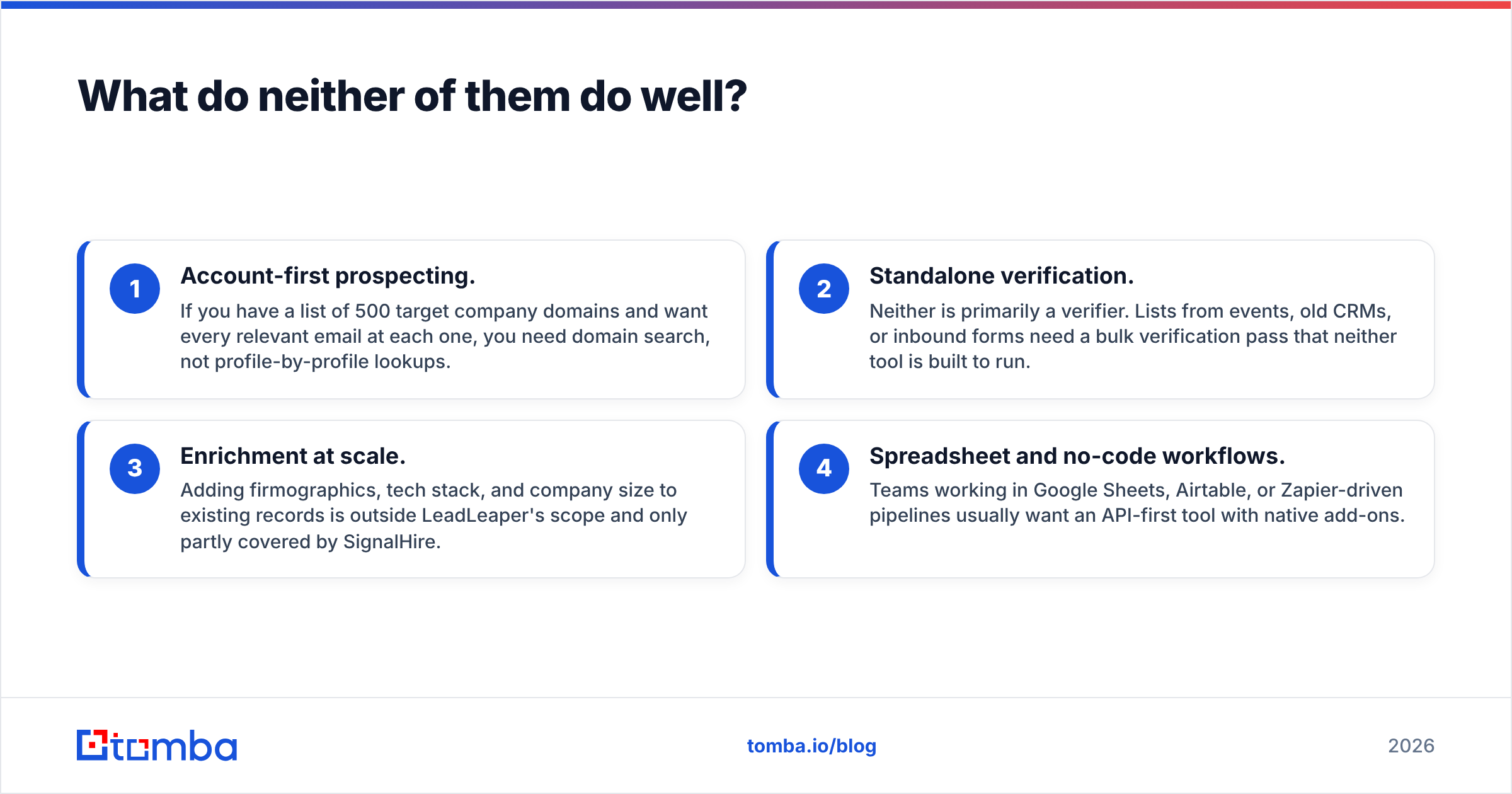
Both tools are built around the person-first lookup: you know the human, and you want their contact details. Several common B2B workflows don't fit that model.
- Account-first prospecting. If you have a list of 500 target company domains and want every relevant email at each one, you need domain search, not profile-by-profile lookups.
- Standalone verification. Neither is primarily a verifier. Lists from events, old CRMs, or inbound forms need a bulk verification pass that neither tool is built to run.
- Enrichment at scale. Adding firmographics, tech stack, and company size to existing records is outside LeadLeaper's scope and only partly covered by SignalHire.
- Spreadsheet and no-code workflows. Teams working in Google Sheets, Airtable, or Zapier-driven pipelines usually want an API-first tool with native add-ons.
This is where a general-purpose email finder platform earns its place. It won't replace SignalHire's phone depth for recruiting. But for B2B sales teams that send mostly email, one tool that finds, verifies, and enriches from name, domain, or LinkedIn URL often costs less than stacking two specialists.
How should you choose between LeadLeaper and SignalHire?#
Use these rules to decide:
- Choose LeadLeaper if you're a solo founder, SDR, or small agency, you prospect almost entirely on LinkedIn, you only send email, and you want the lowest monthly cost.
- Choose SignalHire if you recruit, you call prospects, you need personal contact data, or you need bulk and API access to push records into an ATS or CRM.
- Choose neither on its own if your motion is account-based, you need domain-wide email discovery, or you want verification and enrichment in the same workflow.
Whatever you pick, run the 100-prospect bake-off described above. Measure deliverable emails per dollar, not "found" emails per dollar. A found email that bounces costs you more than the credit: it also damages your sender reputation, which takes weeks to recover.
What's the final verdict?#
This comparison isn't really about which tool is better overall. It's about which contact channel your pipeline depends on.
LeadLeaper is a focused, affordable way to turn LinkedIn browsing into an email list. It does that one job cleanly and doesn't charge you for data you won't use.
SignalHire is the stronger platform when phone numbers, personal contacts, and bulk sourcing matter. That's why it's popular with recruiters. Expect to pay more per contact, especially once phone credits come into play.
For email-first B2B teams who want to find contacts by name, domain, or LinkedIn profile and verify them in the same place, there's a third option. Tomba Email Finder returns professional email addresses from a name and company, a full domain, or a LinkedIn URL, with verification and enrichment built in. The free tier lets you run your own accuracy test, and paid plans start at $49/month (see Tomba pricing). Run the same 100 prospects through it alongside LeadLeaper and SignalHire, and let deliverable results per dollar decide.
Related guides#
// get started
Find, verify and enrich your first contacts today
Start on the free plan with 25 searches a month, then scale when your team is ready.
Free plan · No credit card required · GDPR & CCPA
// about the author