Leadmine vs Limeleads: Email Finder or Lead Database in 2026?
Leadmine finds emails for people you already have in mind. Limeleads sells you a filtered list of US contacts. Here's how their pricing, credits and data quality compare, and which one fits your outbound.
TL;DR
- Leadmine is an email finder. You give it a name and a domain, or browse with its Chrome extension, and it returns and verifies a professional email. It suits teams that already know who they want to reach.
- Limeleads is a US-focused B2B contact database with about 20 million records. You filter by title, industry, revenue and headcount, then export verified contacts. It suits teams that still need to build a list.
- Pricing: Leadmine starts cheaper and has a small free tier. Limeleads starts at $99/mo for 500 credits, and the per-contact price falls a lot on the $150 and $400 tiers.
- Our pick: choose Limeleads to find US prospects from scratch. Choose Leadmine for cheap, targeted email lookups. If you need both jobs done plus global coverage, a hybrid tool like Tomba belongs on your shortlist.
What is the real difference between Leadmine and Limeleads?#
People search "Leadmine vs Limeleads" expecting two versions of the same product. They aren't. The two tools solve different problems, and that's the most useful thing to understand before comparing prices.
Leadmine works from a person to an email. You already know you want to reach the Head of Growth at a particular SaaS company. Leadmine takes the first name, last name and company domain, predicts the address pattern, checks it against the mail server, and returns an email with a confidence signal. Its Chrome extension does the same while you browse Google results or Crunchbase profiles, and a built-in verifier checks syntax, MX records and deliverability.
Limeleads works from a filter to a list. You don't know the people yet. You know your ideal customer profile: say, US logistics companies with 50-200 employees and $10M-$50M revenue, where you want VP Operations or above. Limeleads searches its database, shows the matching contacts, and verifies each one in real time when you export. You pay one credit per verified contact.
An analogy helps. Leadmine is a phone directory where you already know the name you're looking up. Limeleads is a trade show floor where you walk around and pick who to talk to. Both get you to a conversation, but the input is different.

How do Leadmine and Limeleads compare feature by feature?#
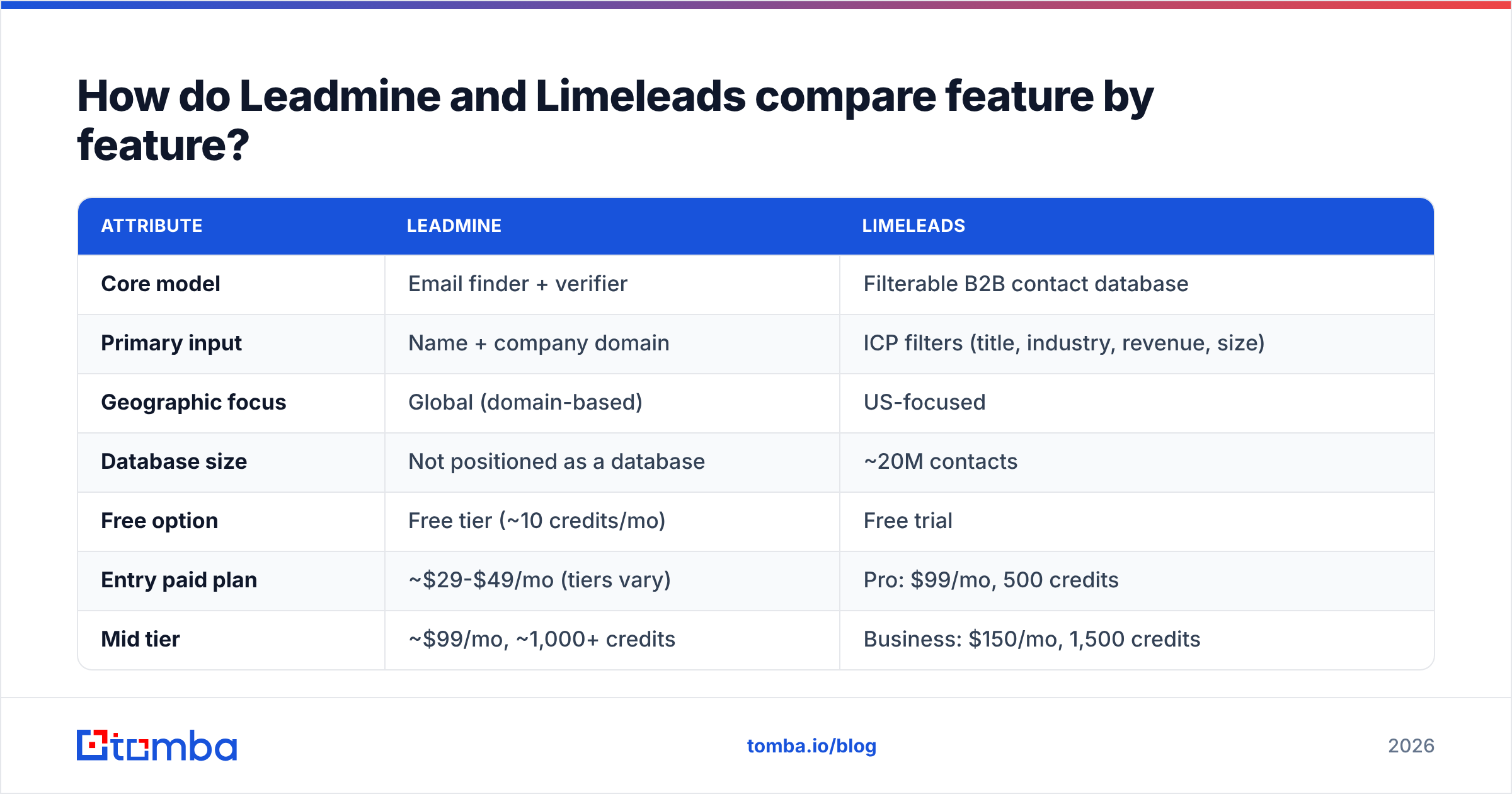
This table sets out the concrete attributes. Pricing comes from each vendor's public pages and major review directories at the time of writing. Both vendors have changed plans before, so check the live pricing page before you buy.
| Attribute | Leadmine | Limeleads |
|---|---|---|
| Core model | Email finder + verifier | Filterable B2B contact database |
| Primary input | Name + company domain | ICP filters (title, industry, revenue, size) |
| Geographic focus | Global (domain-based) | US-focused |
| Database size | Not positioned as a database | ~20M contacts |
| Free option | Free tier (~10 credits/mo) | Free trial |
| Entry paid plan | ~$29-$49/mo (tiers vary) | Pro: $99/mo, 500 credits |
| Mid tier | ~$99/mo, ~1,000+ credits | Business: $150/mo, 1,500 credits |
| Top tier | ~$149/mo, high-volume | Enterprise: $400/mo, 5,000 credits |
| Cost per contact (top tier) | Low single-digit cents | ~$0.08 |
| Phone numbers | Limited | Mobile direct dials on export |
| Verification | Built-in verifier (syntax, MX, SMTP) | Real-time verification at export |
| Browser extension | Yes (Google, Crunchbase) | No core extension workflow |
| Annual discount | Available on some plans | 35% off monthly price |
| Best for | Targeted lookups, account-based lists | Building US lists from scratch |
Two points in this table matter more than the others.
First, Limeleads' credit economics change a lot by tier. On Pro, a contact costs about $0.20. On Enterprise it drops to about $0.08, and overage credits get as low as $0.03. Buying at scale changes the maths completely. You can confirm the current tiers on the Limeleads pricing page.
Second, Leadmine charges for lookups, not for filtered discovery. It's cheap per result, but it can't give you a list of 800 US logistics VPs you've never heard of. You need that list from somewhere first.
Which tool has better data accuracy?#
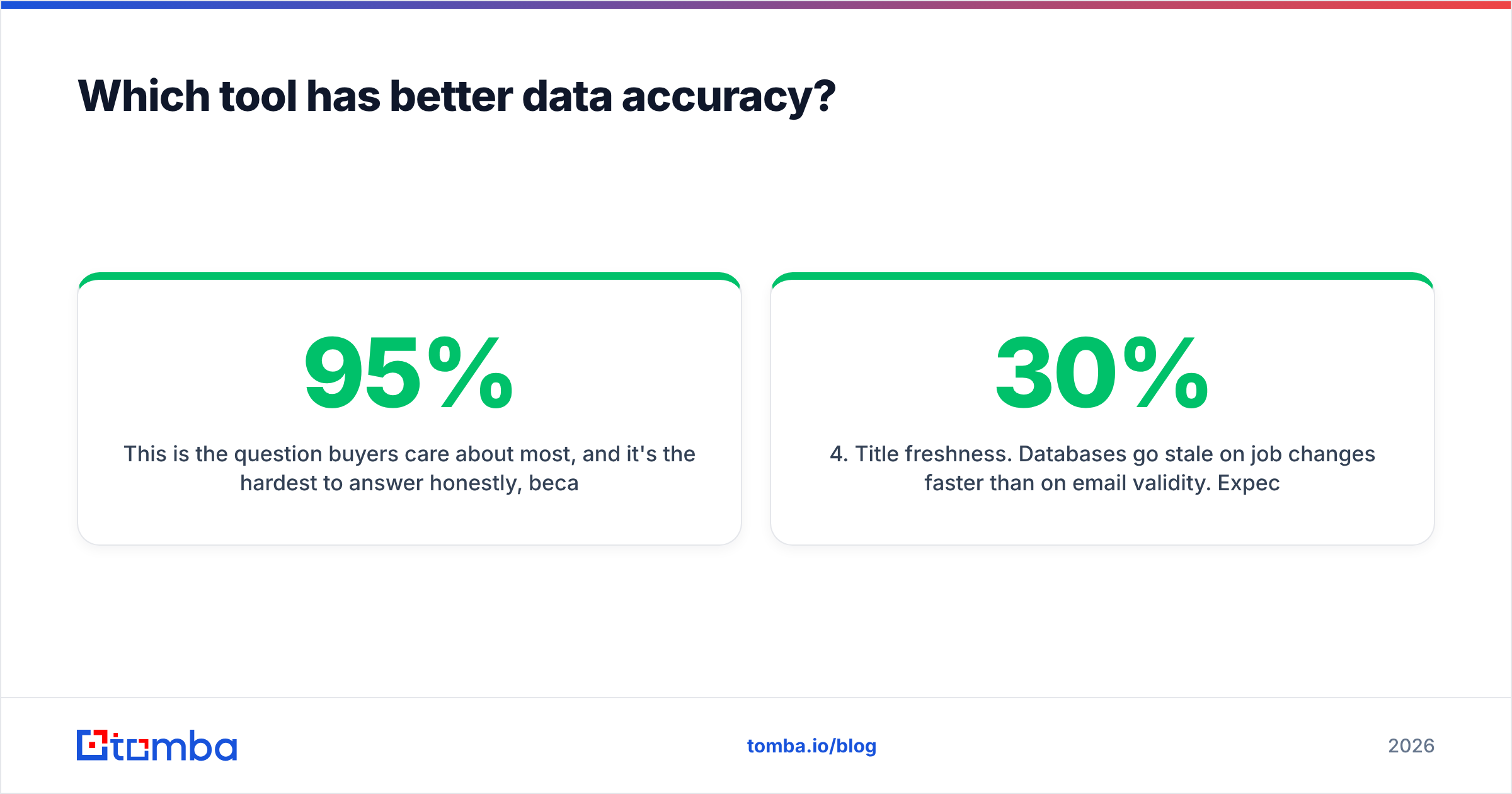
This is the question buyers care about most, and it's the hardest to answer honestly, because both vendors publish their own accuracy claims. Leadmine is marketed at around 95% email accuracy. Limeleads promotes "98% plus accuracy" on its homepage. Neither figure comes from an independent audit. Read them as vendor targets, not guarantees.
What you can reason about is how each tool works, and that tells you where it will be strong or weak:
- Pattern-plus-verification (Leadmine). Accuracy depends on how well it predicts the company's email format and how cleanly the target mail server answers an SMTP check. It does well on standard corporate domains and gets weaker on catch-all domains, where the server accepts every address and verification can't confirm anything.
- Verify-at-export (Limeleads). Records are re-verified when you pull them, so you avoid paying for contacts that bounced since the last database refresh. This is a real advantage over databases that sell stale records. The trade-off is that verification only confirms the mailbox exists, not that the person still holds the job title on file.
- Catch-all handling. Neither tool fully solves catch-all domains, and no tool on the market does. If your ICP includes many mid-market companies on Google Workspace or Microsoft 365 with catch-all set up, run those results through a dedicated catch-all verifier before you load them into a sequence.
- Title freshness. Databases go stale on job changes faster than on email validity. Expect roughly 20-30% of B2B contact records to decay each year across the industry, whichever vendor you use.
In practice: test both on the same 100 contacts before you commit. Take 50 people you already have confirmed emails for, and 50 new targets you'll email in the same week. Measure the hard bounce rate. That number is the only accuracy benchmark that counts for your outbound.
Is Limeleads better than Leadmine for building lead lists?#
Yes, clearly, if you're selling into the US and start with an ICP rather than a named account list.
Limeleads' filters are the product. Job title, seniority, industry, revenue band, employee count and location all combine, so you can shape a list tightly before spending a credit. That's the workflow most SDR teams actually run: define a segment, pull 500-1,500 contacts, load them into a sequencer, repeat next month. The Business plan at $150/mo for 1,500 credits fits that cadence well.
Leadmine isn't built for this. You can use its extension on Google or Crunchbase results to collect leads one page at a time, and it supports list segmentation and CRM export. But building 1,500 contacts that way takes an SDR hours of work that Limeleads does in a few filter clicks.
Where Limeleads is weaker:
- Outside the US. Its coverage is deliberately US-centric. If a meaningful share of your pipeline is in EMEA or APAC, you'll hit gaps quickly.
- Named accounts. In account-based motions you often need the specific buying committee at 40 target companies. A filter-first database can miss the exact person you want. Then you're back to needing a finder.
- Entry price. $99/mo is a real commitment for a solo founder testing outbound for the first time.
Is Leadmine better than Limeleads for finding specific emails?#
Yes, when you know exactly who you want.
Leadmine's value is precision and a low price per lookup. For account-based selling, partnership outreach, investor lists, journalist pitches or recruiting, you usually have a name and a company already. Paying for database access to find one person is wasteful. A finder that returns and verifies an address for a few cents is the better tool.
The Chrome extension also fits research-heavy workflows. If your reps already spend time on Crunchbase or Google checking accounts, pulling emails from the page they're on saves a lot of copy-paste.
Where Leadmine is weaker:
- No discovery. It doesn't tell you who to contact, only how to reach someone you've already picked.
- Phone data. If your motion depends on cold calling, Leadmine is not built for direct dials. Limeleads includes mobile numbers with verified exports.
- Smaller ecosystem. Integrations and team features are lighter than those of larger lead platforms, which matters once you have more than a few reps. For third-party user feedback, Leadmine's G2 listing is worth reading before you buy.

How much does each tool really cost per usable contact?#
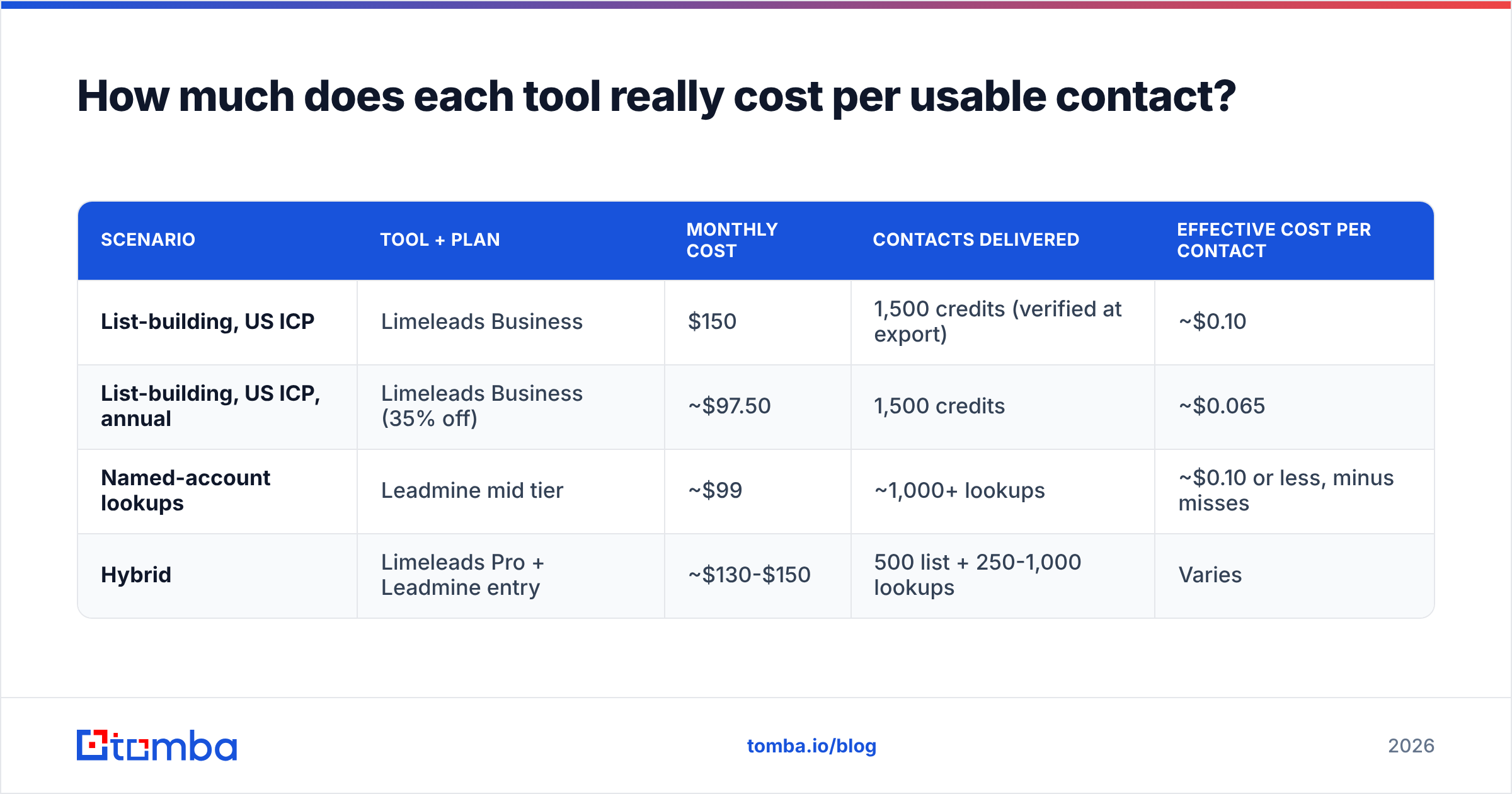
The sticker price is misleading. The number that matters is cost per contact who actually receives your email. Here's a simple way to model it for a team sending 1,000 new contacts a month:
| Scenario | Tool + plan | Monthly cost | Contacts delivered | Effective cost per contact |
|---|---|---|---|---|
| List-building, US ICP | Limeleads Business | $150 | 1,500 credits (verified at export) | ~$0.10 |
| List-building, US ICP, annual | Limeleads Business (35% off) | ~$97.50 | 1,500 credits | ~$0.065 |
| Named-account lookups | Leadmine mid tier | ~$99 | ~1,000+ lookups | ~$0.10 or less, minus misses |
| Hybrid | Limeleads Pro + Leadmine entry | ~$130-$150 | 500 list + 250-1,000 lookups | Varies |
Two hidden costs to plan for:
- Misses on finder lookups. An email finder doesn't return a valid address for every search. Check whether a failed search uses up a credit on the plan you're considering, because that changes your effective price.
- Bounce cost. Every hard bounce hurts your sender reputation. A tool that is 3% cheaper but gives you 4% more bounces costs you more in lost inbox placement than you save.
Which should you choose: Leadmine or Limeleads?#
Use this decision frame:
- You sell only into the US and need net-new prospects every month. Choose Limeleads. The filters and verify-at-export model fit list-based outbound, and the Business tier offers the best value.
- You run account-based outbound against a fixed target list. Choose Leadmine. You're paying for precision, not discovery.
- You need phone numbers for a call-heavy motion. Choose Limeleads, because its mobile direct dials are part of the credit.
- You're a solo founder testing outbound on a tight budget. Start with Leadmine's free and entry tiers, and move to a database once you have proven a segment.
- You sell globally, or need both discovery and lookups in one place. Neither tool fully covers you. Look at a hybrid platform instead.
Many teams end up running two tools: a database for discovery and a finder for gaps. That works, but it means two bills, two data formats and two places where duplicates creep in.
Where does Tomba fit in the Leadmine vs Limeleads decision?#
Tomba sits between the two models. Its core product is an email finder that works from name and domain, like Leadmine. Domain search then returns every public email tied to a company, which covers much of the "who works here?" discovery that you would otherwise need a database for. Verification, catch-all checks, phone finding and enrichment are in the same account, and coverage isn't limited to the US.
To be fair: if your whole motion is filter-heavy US list-building, with revenue bands, headcount and seniority in one query, a purpose-built database like Limeleads is still a strong choice. Tomba makes the most sense for teams that do both kinds of work, sell outside the US, or want one API across finding, verifying and enriching.
On price, Tomba has a free tier of 25 searches a month, then Starter at $49/mo, Growth at $99/mo and Pro at $249/mo. Full breakdowns are on Tomba pricing.
Frequently asked questions#
Is Leadmine free? Leadmine offers a small free tier with a limited number of monthly credits. That's enough to test accuracy on your own targets before upgrading.
Does Limeleads have a free plan? Limeleads offers a free trial rather than a permanent free plan. Paid plans start at $99/mo for 500 credits.
Does Limeleads cover contacts outside the US? Limeleads is built around US B2B data. If international coverage matters to you, confirm your target regions with them before buying.
Can I use Leadmine and Limeleads together? Yes. A common setup is Limeleads for US list-building and a finder like Leadmine or Tomba to fill gaps on specific named accounts. Deduplicate before loading contacts into your sequencer.
Which has the higher accuracy? Both publish vendor claims (about 95% for Leadmine, 98%+ for Limeleads) that no independent audit has confirmed. Run a 100-contact bounce test on your own ICP. It's the only reliable comparison.
Ready to find emails without choosing between a finder and a database?#
If the Leadmine vs Limeleads comparison showed you need targeted lookups and company-wide discovery, with coverage beyond the US, try the Tomba Email Finder. Enter a name and domain to get a verified professional email, or run a domain search to see every public contact at a target account. The free tier gives you 25 searches a month to test it on your own list before paying anything.
Related guides#
// get started
Find, verify and enrich your first contacts today
Start on the free plan with 25 searches a month, then scale when your team is ready.
Free plan · No credit card required · GDPR & CCPA
// about the author