Leadmine vs Logvalid: Email Finding vs Verification in 2026
Leadmine is built to find emails and Logvalid is built to verify them. Here's how their features, credits, and pricing compare, and which one belongs in your outbound stack in 2026.
TL;DR
- Leadmine is a finder-first prospecting tool. You search by name, company, domain, title, location, or industry, and every email comes back verified. Paid plans start at $29/mo for 250 credits.
- Logvalid is a verifier-first platform. Its core job is cleaning lists: it removes invalid, disposable, and spam-trap addresses, and it has an API plus a Chrome "Email Finder & Extractor." Its free tier (500 verification credits) is much larger than Leadmine's.
- If you need new contacts, pick Leadmine. If you already have a list and need to protect your bounce rate cheaply, pick Logvalid.
- Many teams end up paying for both. A single platform that finds and verifies, such as Tomba, removes that second subscription.
- Pricing below reflects each vendor's public pages at the time of writing. Check them again before you buy, because credit bundles change often.
What is the real difference between Leadmine and Logvalid?#
Most "Leadmine vs Logvalid" searches assume the two tools compete head-to-head. They mostly don't. They start at opposite ends of the same workflow.
Leadmine answers "who should I email, and what's their address?" According to its product site, it's a lead generation and sales prospecting platform. You can look up emails by name or domain, filter leads by title, company, location, or industry, and pull contact data from Crunchbase profiles or Google results with its Chrome extension. Verification is included, but it supports the finder rather than being the product.
Logvalid answers "which of these addresses are safe to send to?" It's mainly an email verification platform. It checks lists in bulk or one at a time through an API and flags invalid, disposable, and risky addresses. It also has a Chrome extension that finds and extracts emails from the pages you browse. Discovery is a side feature, and verification is where the product is strongest.
Put simply, Leadmine fills the top of your list and Logvalid cleans it up. Keep that framing in mind for everything below.
How do Leadmine and Logvalid compare feature by feature?#
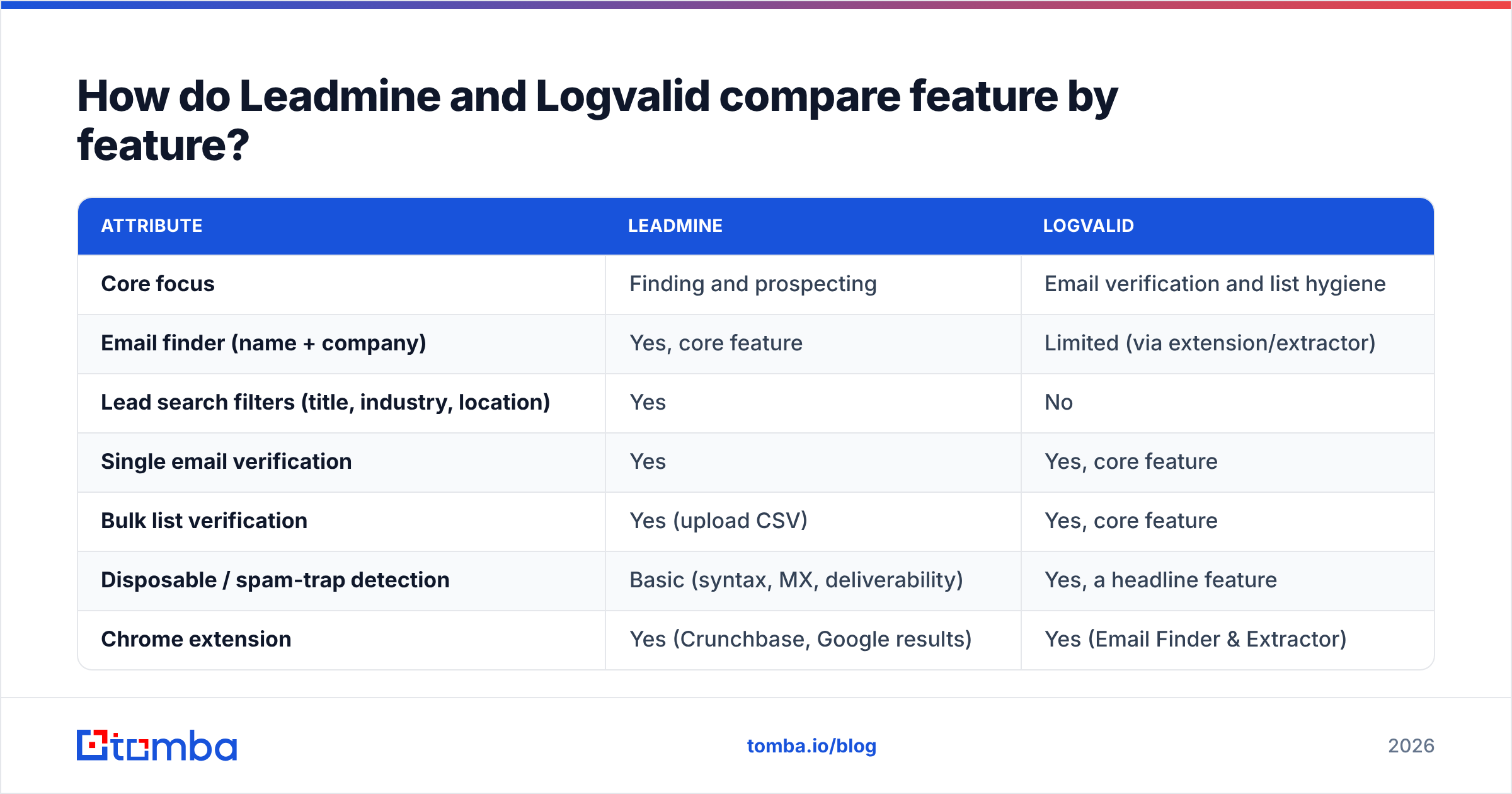
The table below covers what most outbound teams actually weigh. "Limited" means the capability exists but isn't the tool's main focus.
| Attribute | Leadmine | Logvalid |
|---|---|---|
| Core focus | Finding and prospecting | Email verification and list hygiene |
| Email finder (name + company) | Yes, core feature | Limited (via extension/extractor) |
| Lead search filters (title, industry, location) | Yes | No |
| Single email verification | Yes | Yes, core feature |
| Bulk list verification | Yes (upload CSV) | Yes, core feature |
| Disposable / spam-trap detection | Basic (syntax, MX, deliverability) | Yes, a headline feature |
| Chrome extension | Yes (Crunchbase, Google results) | Yes (Email Finder & Extractor) |
| API | Yes | Yes |
| Free tier | 10 credits/mo | 500 verification credits |
| Entry paid plan | $29/mo for 250 credits | Low-cost credit packs (advertised from about $1 for 2,000 credits) |
| Credit refunds | Refunded on bounces and duplicates | Varies by pack |
| Best for | SDRs building fresh lists | Marketers and ops teams cleaning existing lists |
Two things stand out. First, the price per credit isn't comparable, because a Leadmine credit usually buys a found and verified contact while a Logvalid credit buys one verification check. Second, only Leadmine has prospecting filters. If you need new leads by persona, Logvalid can't do that for you.

How accurate is each tool?#
Neither vendor publishes an independent third-party benchmark, so treat all accuracy claims as marketing until you've tested them on your own data.
Leadmine says it cross-checks results against a database of roughly 200 million unique email addresses and advertises a deliverability rate above 95%. Its verification runs syntax, MX record, and deliverability checks. That's enough to catch obvious bad addresses. It's lighter than a dedicated verifier on edge cases such as catch-all domains and role-based inboxes.
Logvalid leads with list hygiene: removing spam traps, disposable addresses, and invalid mailboxes. That depth matters more when your list came from a scraper, an old CRM export, or a trade-show badge scan than when every address came fresh out of a finder.

You can run your own accuracy test in an afternoon:
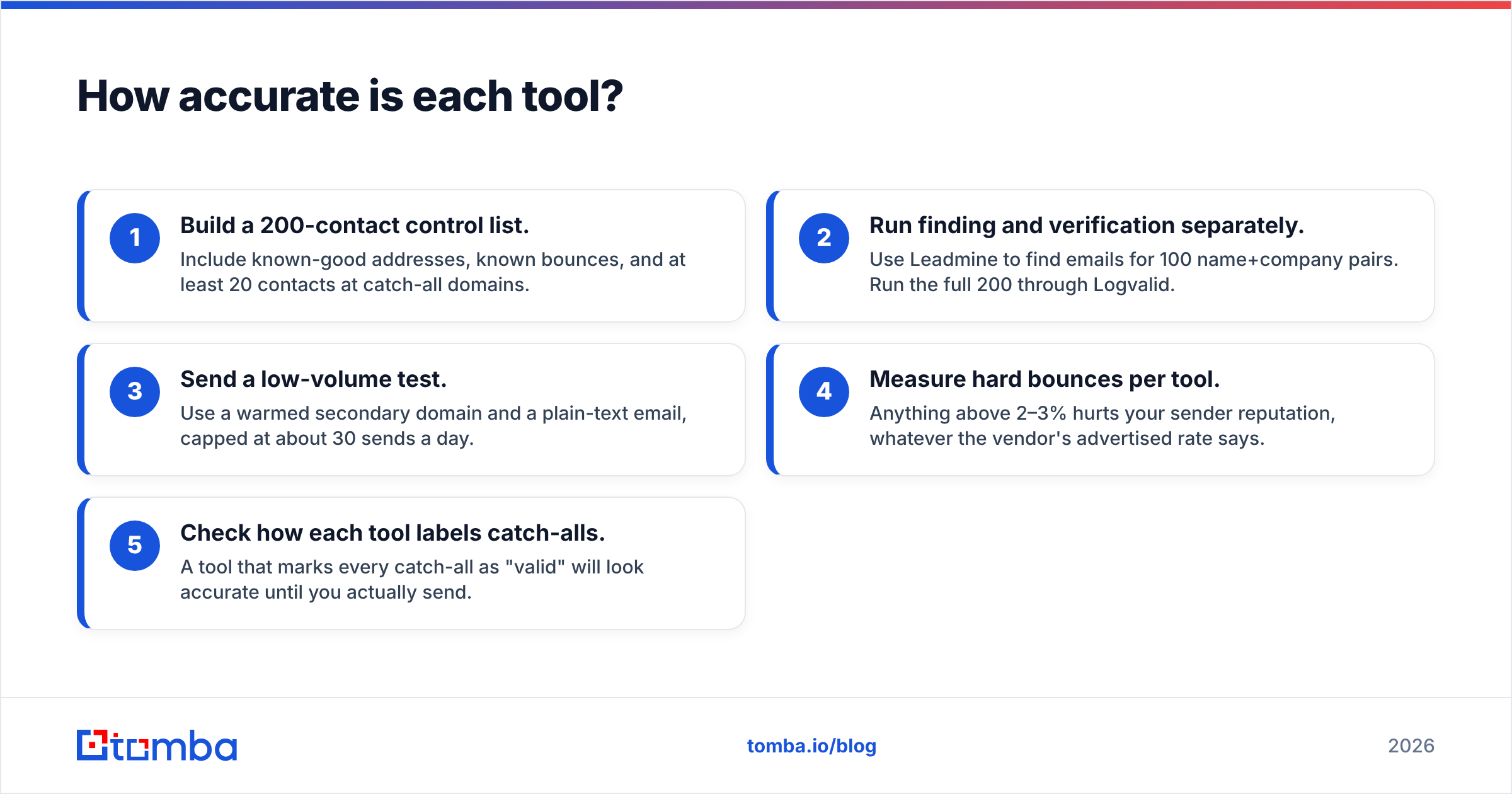
- Build a 200-contact control list. Include known-good addresses, known bounces, and at least 20 contacts at catch-all domains.
- Run finding and verification separately. Use Leadmine to find emails for 100 name+company pairs. Run the full 200 through Logvalid.
- Send a low-volume test. Use a warmed secondary domain and a plain-text email, capped at about 30 sends a day.
- Measure hard bounces per tool. Anything above 2–3% hurts your sender reputation, whatever the vendor's advertised rate says.
- Check how each tool labels catch-alls. A tool that marks every catch-all as "valid" will look accurate until you actually send.
What does each tool cost in 2026?#
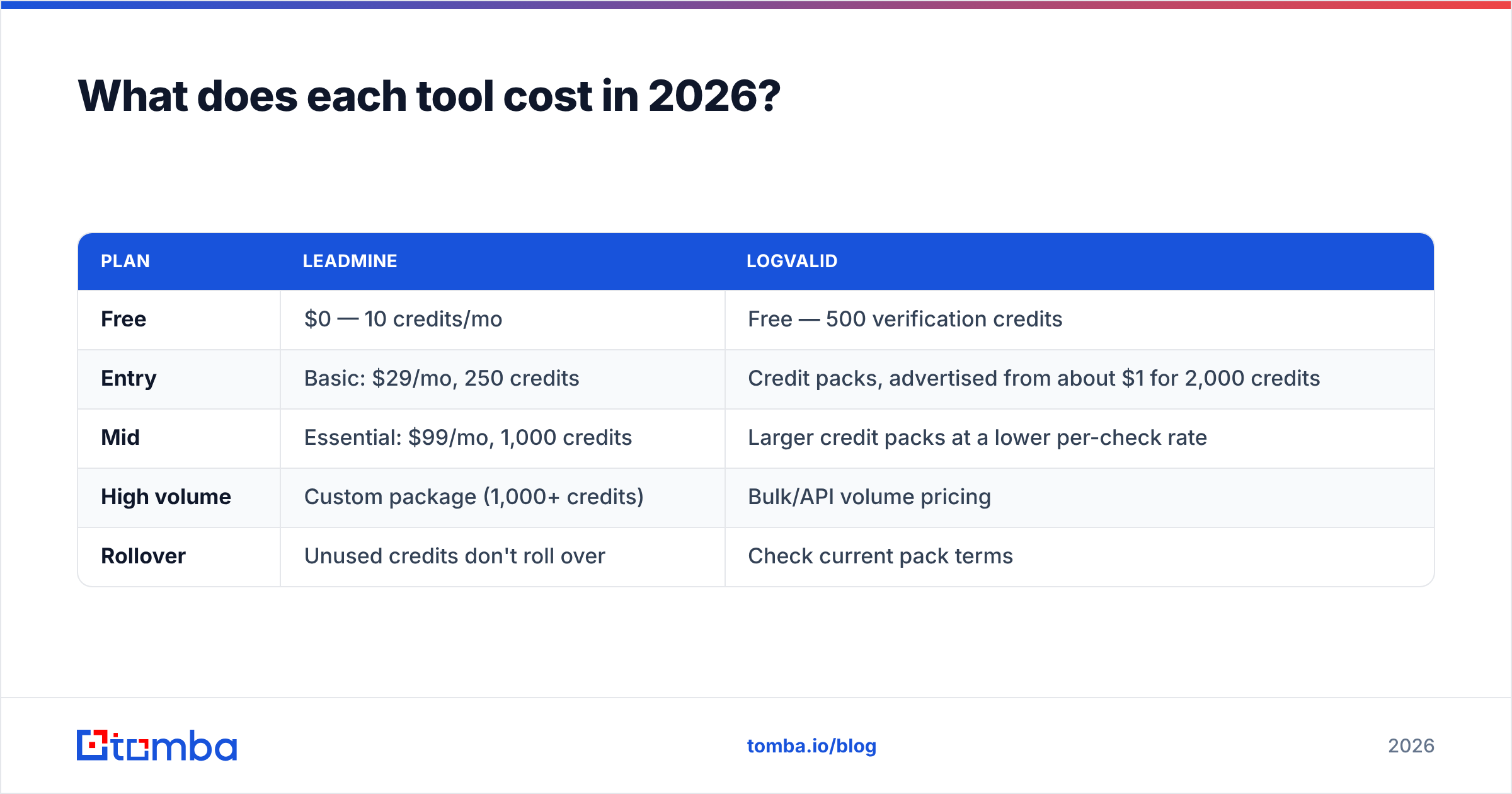
Here's how pricing looked on each vendor's public pages at the time of writing. Leadmine lists its tiers on its pricing page. Logvalid's credit packs are listed on its site and summarized on G2.
| Plan | Leadmine | Logvalid |
|---|---|---|
| Free | $0 — 10 credits/mo | Free — 500 verification credits |
| Entry | Basic: $29/mo, 250 credits | Credit packs, advertised from about $1 for 2,000 credits |
| Mid | Essential: $99/mo, 1,000 credits | Larger credit packs at a lower per-check rate |
| High volume | Custom package (1,000+ credits) | Bulk/API volume pricing |
| Rollover | Unused credits don't roll over | Check current pack terms |
What this means in practice:
- Leadmine costs about $0.10–$0.12 per credit. One credit covers a finder search, a lookup, or a verification. At that price, using it only to verify an existing list is expensive.
- Logvalid verification costs a fraction of a cent per check at advertised pack rates. For a 50,000-row list, that's a very small cost.
- The hidden cost is running both. If you use Leadmine to find and Logvalid to verify, you pay two vendors, manage two credit balances, and move CSVs between them. That's how most bounce-rate problems start.

Which tool is better for finding new leads?#
Leadmine, clearly. Logvalid's extension can pull addresses off pages you visit, but it has no people search. You can't say "give me VPs of Marketing at 50–200-person SaaS companies in Germany" and get a list back.
Leadmine can do that. Its filters cover name, title, company, domain, location, and industry. The bulk upload also accepts incomplete files: a CSV with only first name, last name, and company name comes back with valid emails appended. For an SDR team building lists every week, that's the feature that matters.
Where Leadmine falls short:
- Its credit ceiling is low. The top self-serve plan has 1,000 credits a month. Past that, you're negotiating a custom package.
- Its extension is narrow. It's built around Crunchbase and Google results, not a full LinkedIn workflow.
- Credits don't roll over. A slow month means wasted spend.
If your prospecting runs mostly off LinkedIn, or you need more than a few thousand contacts a month, compare Leadmine with a broader email finder before you commit.
Which tool is better for cleaning an existing list?#
Logvalid. This is the job it was built for, and its free tier alone covers a meaningful first pass.
Verification depth matters because of how mailbox providers score senders. Google's and Yahoo's bulk-sender rules, in force since 2024, reward low bounce and complaint rates and penalize high ones. Spam traps and disposable addresses are what quietly damage your domain. A verifier that specifically removes them is doing work a finder's built-in check often skips.
Logvalid fits best when:
- You inherited a CRM full of addresses nobody has emailed in 18 months.
- You buy or scrape lists and need to filter them before anything goes out.
- You run newsletters or nurture programs where list decay, not discovery, is the main problem.
- You need an API to verify at the point of capture, such as on signup forms.
Where Logvalid falls short is anything upstream. It doesn't know who you should be emailing. It only tells you whether an address you already have is safe to send to.
Can you use Leadmine and Logvalid together?#
Yes, and plenty of lean teams do. The common setup looks like this:
- Prospect in Leadmine by persona and export found emails.
- Re-verify the export in Logvalid right before sending, especially if the list has aged more than a few weeks.
- Load the clean list into your sequencer (Instantly, Lemlist, Apollo, and so on).
- Re-verify every quarter before re-engaging old segments.
It works, but it has real friction. Every list crosses two tools, two exports, and two credit balances. Leadmine has already verified each address once, so step 2 partly pays twice for the same check. And every CSV hand-off is another chance for columns to break, rows to be deduplicated inconsistently, or someone to upload the stale file.

That's the main downside of a finder-plus-verifier setup: you're maintaining a pipeline, not just using a tool.
Is there an alternative that does both finding and verification?#
Yes. If the comparison above leaves you thinking you need both tools, look at platforms that combine finding and verification under one credit system.
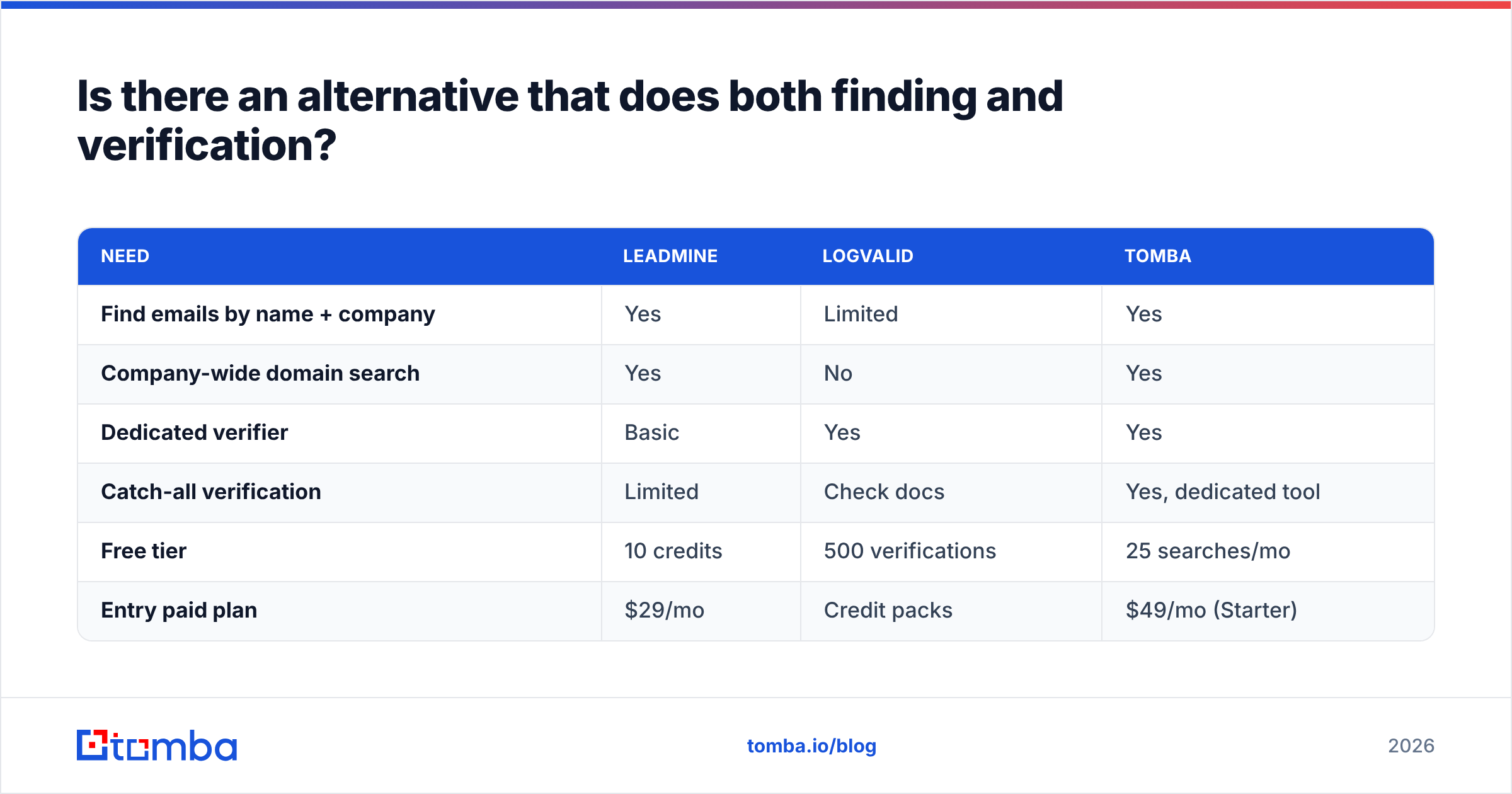
Tomba is one example. Its core product is an email finder that works by name, domain, or company. A dedicated email verifier and a catch-all verifier sit alongside it, so the same account handles both halves of the workflow. It also covers the gaps above: domain search for full company contact lists, a LinkedIn finder, a phone finder, and bulk email finder and verification for CSVs.
| Need | Leadmine | Logvalid | Tomba |
|---|---|---|---|
| Find emails by name + company | Yes | Limited | Yes |
| Company-wide domain search | Yes | No | Yes |
| Dedicated verifier | Basic | Yes | Yes |
| Catch-all verification | Limited | Check docs | Yes, dedicated tool |
| Free tier | 10 credits | 500 verifications | 25 searches/mo |
| Entry paid plan | $29/mo | Credit packs | $49/mo (Starter) |
To be clear about the trade-offs: if all you need is cheap bulk verification of an existing list, Logvalid's per-check pricing is very hard to beat. And if you only need a few hundred found contacts a month, Leadmine's $29 Basic plan costs less than Tomba's $49 Starter. The case for a combined tool is strongest once you're doing regular prospecting and also caring about deliverability, which describes most outbound teams past the first few months. Tomba pricing scales from Starter through Growth ($99/mo) and Pro ($249/mo) to custom Enterprise.
Leadmine vs Logvalid: which should you choose?#
Decide based on the job, not the price:
- Choose Leadmine if your bottleneck is finding new contacts, your volume is under about 1,000 lookups a month, and Crunchbase or Google is where you research accounts.
- Choose Logvalid if your bottleneck is bounce rate on lists you already have, you verify tens of thousands of addresses, or you need low-cost verification through an API at signup.
- Choose a combined platform if you're about to pay for both, move CSVs between them every week, and re-verify addresses you already paid to find.
Before you commit, read recent user reviews on Capterra and G2, and run the 200-contact test described above. Your own bounce rate will tell you more than any vendor's accuracy claim.
Ready to find and verify in one place?#
If this comparison showed you need both halves of the workflow, you can skip the second subscription. Tomba Email Finder finds professional emails by name, domain, or company and verifies them in the same pass. Catch-all checks and bulk CSV processing are available when you scale. Start with the free tier's 25 monthly searches, test it on your own target accounts, and compare the bounce rate against whatever you use now.
Related guides#
// get started
Find, verify and enrich your first contacts today
Start on the free plan with 25 searches a month, then scale when your team is ready.
Free plan · No credit card required · GDPR & CCPA
// about the author