Leadmine vs Ninjapear: Email Finder or Company Intelligence API?
Leadmine helps sales reps find contact emails. Ninjapear is an API that tells you who a company sells to, competes with and hires. Here's which one fits your workflow in 2026.
- Leadmine is a prospecting app. You search a database of about 200 million contacts, find and verify emails, and export leads. It suits SDRs and small sales teams.
- Ninjapear is Nubela's API for company intelligence. It returns a company's customers, competitors, employee count and enriched people data. It suits developers, RevOps teams and data products.
- Pricing works in different ways. Leadmine sells monthly credit plans with a small free tier. Ninjapear has subscriptions, plus pay-as-you-go credits that stay valid for 18 months.
- They mostly don't compete. Leadmine tells you who to email. Ninjapear tells you which accounts to go after. Plenty of teams would use both.
- Our pick: Leadmine if you want a no-code email tool. Ninjapear if you're building account lists or products on top of an API.
What is the real difference between Leadmine and Ninjapear?#
Most "Leadmine vs Ninjapear" searches assume the two tools do the same job. They don't. The overlap is small, and choosing the wrong one usually means paying for data you can't use.
Think of a fishing trip. Leadmine is the rod and reel: you pick a spot, cast, and pull in contacts one at a time or in batches. Ninjapear is the sonar. It shows where the fish are, which boats are already working that water, and how big the school is. You still need something to actually catch them.
In concrete terms:
- Leadmine is a web app and Chrome extension that finds emails. You search people by name, domain, job title, industry and location. Then you verify emails and export or sync the leads. According to Leadmine's site, the database holds over 200 million contacts.
- Ninjapear is a B2B data API from Nubela, the Singapore team that used to run Proxycurl. Its main endpoints are Customer Listing (a company's customers, investors and partners), Competitor Listing, Employee Count, person enrichment, work email lookup and disposable-email checks. The data comes from public web sources, and LinkedIn is deliberately excluded. That matters if your legal team is wary after the lawsuits of 2025. See Nubela's product page for the current endpoint list.
So the actual question is whether your bottleneck is contacts or accounts.
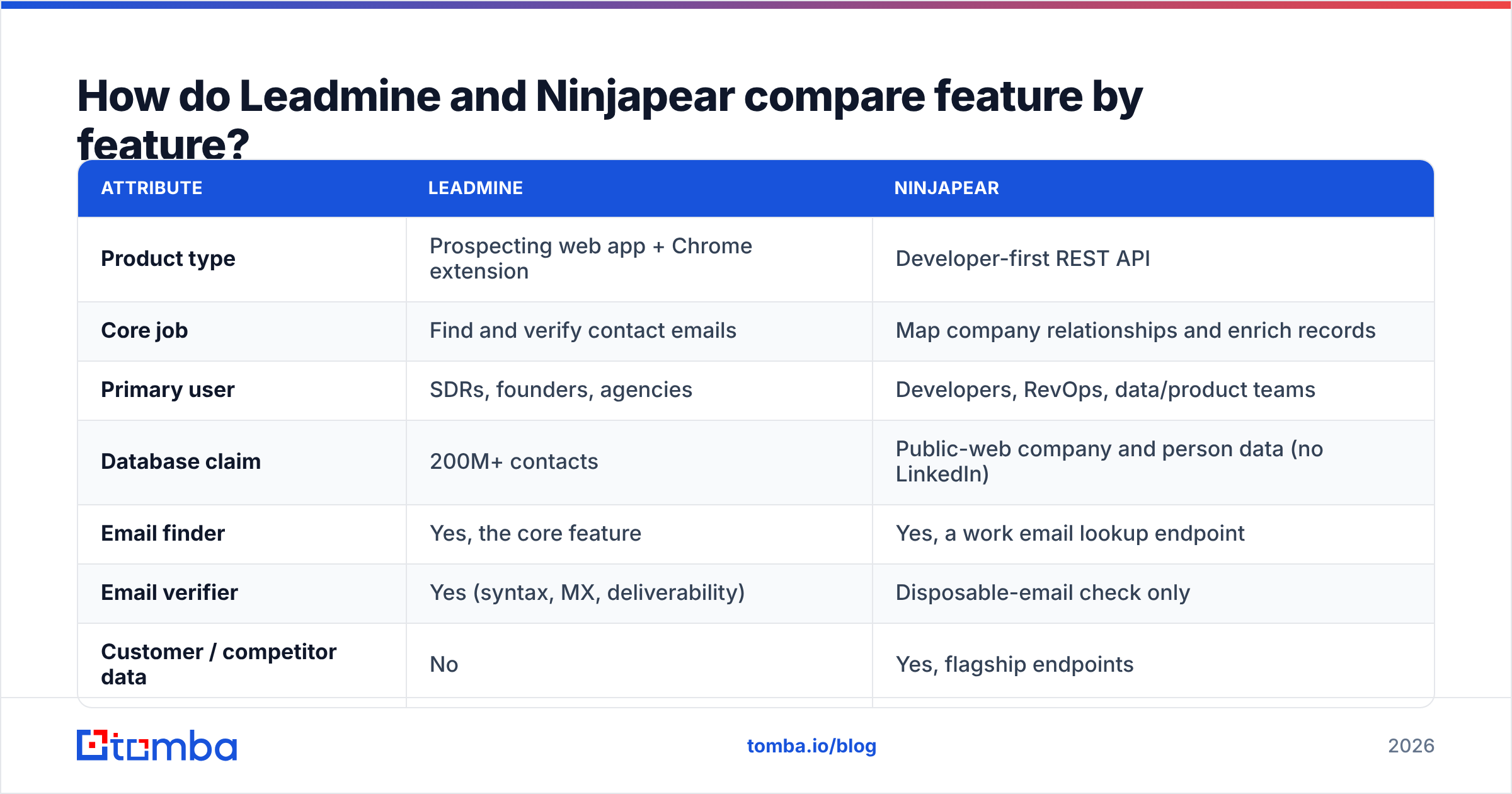
How do Leadmine and Ninjapear compare feature by feature?#
Here's the side-by-side. Both vendors change their pricing pages often, so check the linked sources before you buy.
| Attribute | Leadmine | Ninjapear |
|---|---|---|
| Product type | Prospecting web app + Chrome extension | Developer-first REST API |
| Core job | Find and verify contact emails | Map company relationships and enrich records |
| Primary user | SDRs, founders, agencies | Developers, RevOps, data/product teams |
| Database claim | 200M+ contacts | Public-web company and person data (no LinkedIn) |
| Email finder | Yes, the core feature | Yes, a work email lookup endpoint |
| Email verifier | Yes (syntax, MX, deliverability) | Disposable-email check only |
| Customer / competitor data | No | Yes, flagship endpoints |
| Employee count | Via company filters | Dedicated endpoint |
| Free tier | 10 credits/month, no card required | 3-day trial with 10 credits |
| Paid entry | Monthly credit plans from roughly $29–$49/mo | Subscription tiers; top published tier around $1,899/mo |
| Credit expiry | Monthly, no rollover | Subscription: per cycle. PAYG: 18 months |
| No-code usability | High | Low (you need code or an integration layer) |
The main takeaway: Leadmine is a finished product for people, and Ninjapear is raw material for systems.
Who should use Leadmine?#
Leadmine suits a small sales team that wants a list of verified emails by Friday and has no engineer to help.
Where Leadmine is strong:
- Fast to get going. You sign up, filter by title and industry, and export. Reviewers on Capterra's Leadmine page keep mentioning how easy it is to navigate and how helpful support is.
- Chrome extension for research on the fly. It pulls names, emails, positions and social links from Crunchbase profiles and Google search results. That works well if you prospect from funding announcements.
- Verification built in. Leadmine checks syntax, MX records and deliverability before you send. That protects your sender reputation from bounce spikes.
- Cheap to test. Ten free credits a month is small, but it lets you check whether the data covers your niche before you pay.
Where Leadmine is weaker:
- Credits don't roll over. In a slow month you lose whatever you didn't spend.
- Little account-level intelligence. You can filter by company attributes, but you can't ask "who are Stripe's customers?" and get a list back.
- Coverage is uneven by region and niche. That's true of every contact database, so run a sample of your real ICP before you commit.

Who should use Ninjapear?#
Ninjapear suits teams whose problem sits one layer above contacts. They know how to email people. What they're missing is a sharp list of which companies to target, and why.
Where Ninjapear is strong:
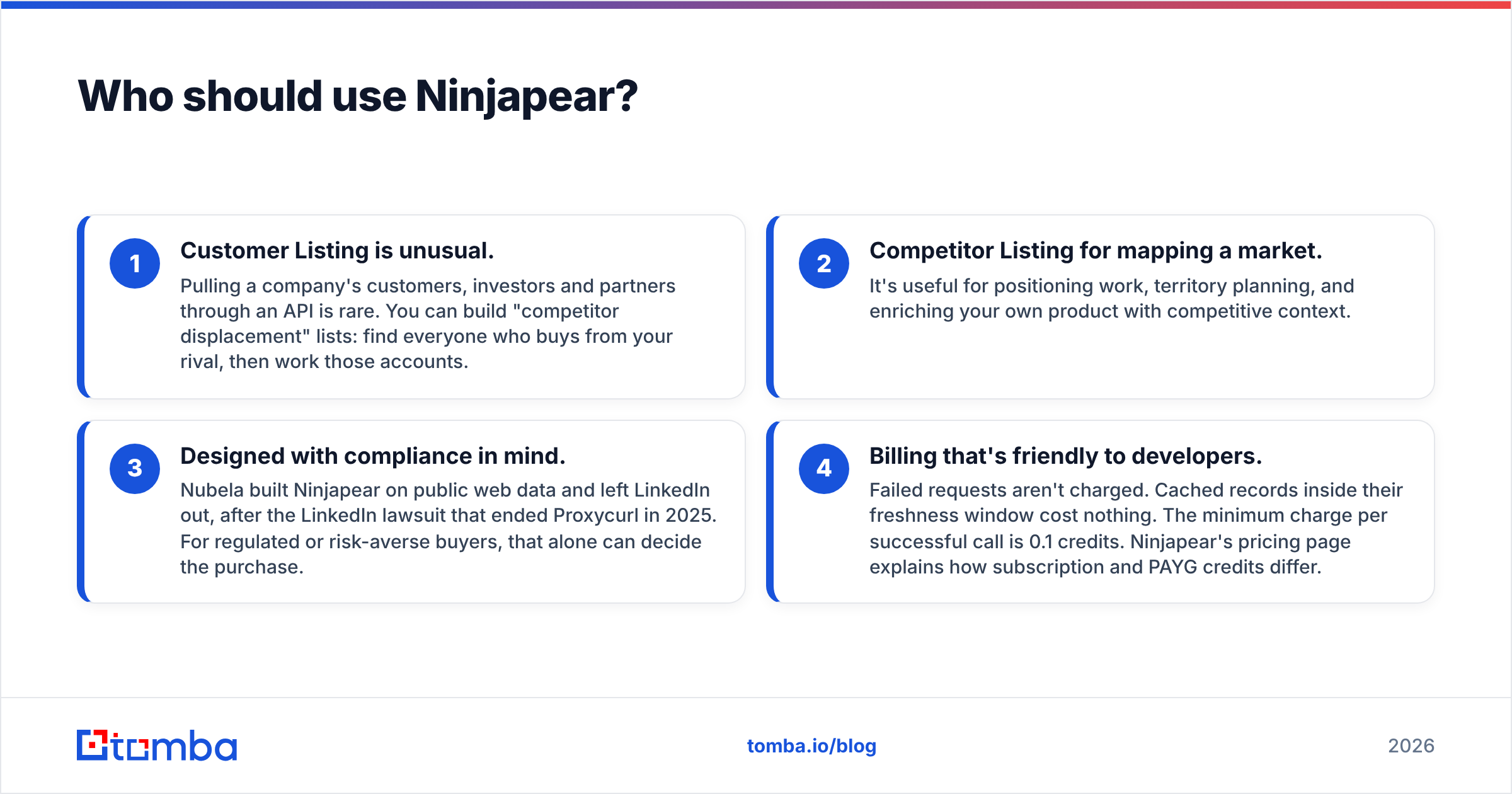
- Customer Listing is unusual. Pulling a company's customers, investors and partners through an API is rare. You can build "competitor displacement" lists: find everyone who buys from your rival, then work those accounts.
- Competitor Listing for mapping a market. It's useful for positioning work, territory planning, and enriching your own product with competitive context.
- Designed with compliance in mind. Nubela built Ninjapear on public web data and left LinkedIn out, after the LinkedIn lawsuit that ended Proxycurl in 2025. For regulated or risk-averse buyers, that alone can decide the purchase.
- Billing that's friendly to developers. Failed requests aren't charged. Cached records inside their freshness window cost nothing. The minimum charge per successful call is 0.1 credits. Ninjapear's pricing page explains how subscription and PAYG credits differ.
Where Ninjapear is weaker:
- No UI for reps. If nobody on your team writes code or wires up Make or Zapier, you won't get value from it.
- Email is a side feature. The work email lookup exists, but there's no full verification layer. You'll probably want a separate email verifier before anything goes into a sequence.
- High ceiling on spend. Heavy use on the upper subscription tiers costs far more than a seat-based prospecting tool. Forecast how many calls you'll make before you sign up.
Is Leadmine or Ninjapear cheaper?#
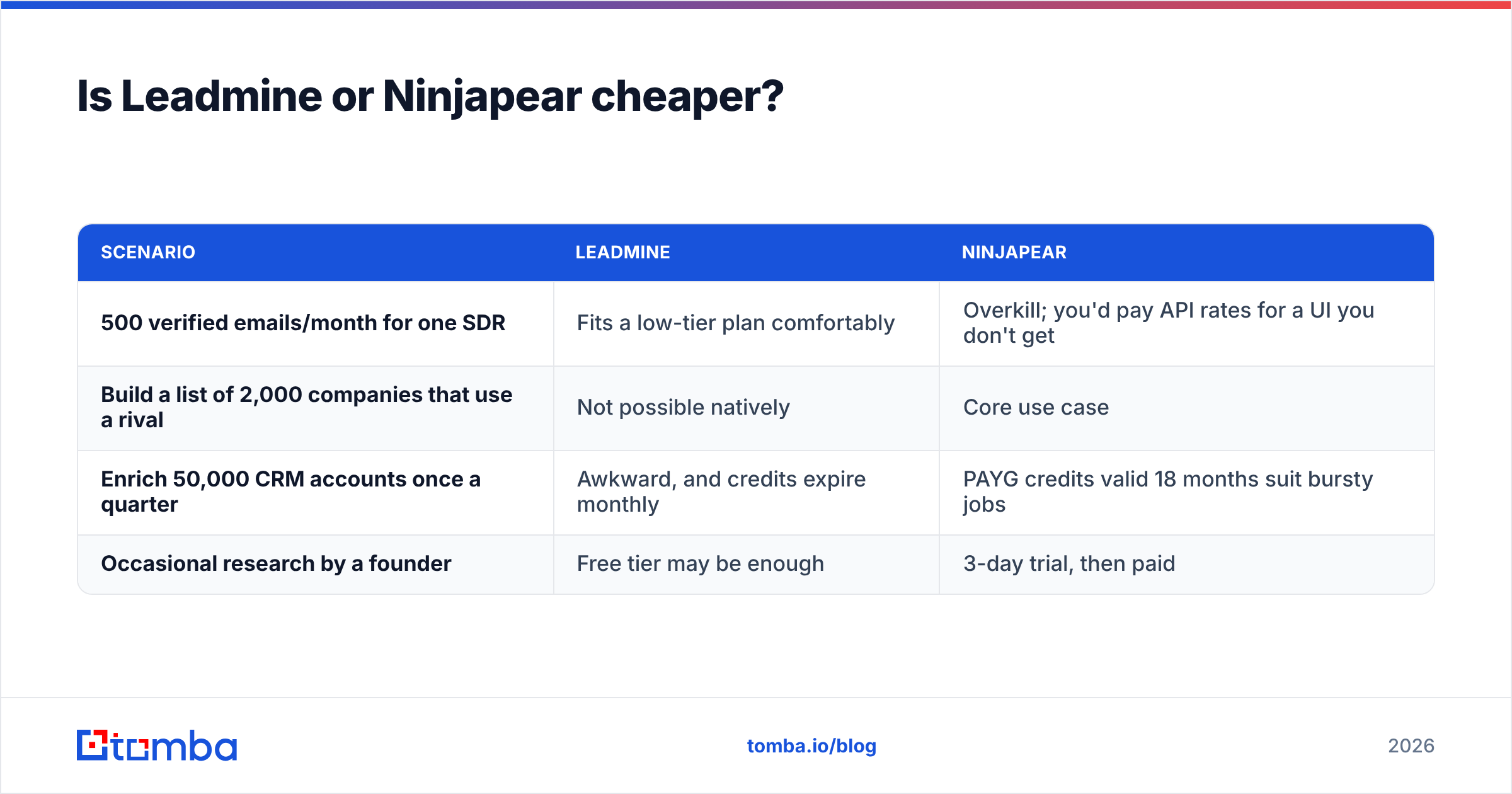
That depends on what you're counting. Put in terms of unit economics:
| Scenario | Leadmine | Ninjapear |
|---|---|---|
| 500 verified emails/month for one SDR | Fits a low-tier plan comfortably | Overkill; you'd pay API rates for a UI you don't get |
| Build a list of 2,000 companies that use a rival | Not possible natively | Core use case |
| Enrich 50,000 CRM accounts once a quarter | Awkward, and credits expire monthly | PAYG credits valid 18 months suit bursty jobs |
| Occasional research by a founder | Free tier may be enough | 3-day trial, then paid |
Rule of thumb: if your cost driver is emails found per month, Leadmine will almost always cost less. If it's accounts researched per quarter, Ninjapear's model fits better, and Leadmine can't do most of that work at all.
The hidden cost to watch is expiry. Leadmine's monthly credits and Ninjapear's subscription credits both reset at the end of the cycle. If your usage comes in bursts, like quarterly enrichment or campaign launches, Ninjapear's 18-month PAYG credits are the most forgiving option in this comparison.
How accurate is the data in each tool?#
Neither vendor publishes an independent accuracy benchmark we could verify, so we won't make one up. What we can say about the architecture:
- Leadmine's accuracy depends on its verification step. An email that passes MX and deliverability checks is far safer to send to. But catch-all domains still return "risky" results on almost every verifier. Budget a 5–10% soft-risk bucket for those.
- Ninjapear's accuracy depends on public-web coverage. Relationship data (customers, partners) comes from what companies publish: case studies, logo walls, press releases. It's strong for mid-market and enterprise vendors who show off their customers. It's thinner for stealth startups and companies that don't publish their customers.
Whichever you pick, run a 100-record test drawn from your real ICP. Count bounces for emails, and do spot checks by hand for relationship data. Don't rely on vendor coverage claims in either direction.
Can you use Leadmine and Ninjapear together?#
Yes, and for account-based teams this is probably the best setup. A typical flow:
- Ninjapear builds the account list. You call Competitor Listing for your top rival, then Customer Listing on that rival to get the companies buying from them.
- Filter the list. Use the Employee Count endpoint to keep companies inside your size band.
- Leadmine (or another email finder) finds the people. For each account you search by domain plus title: VP Sales, Head of RevOps, and so on.
- Verify, then push to your CRM and sequencer. Keep bounce rates low to protect email deliverability.
Handoffs are where this breaks. Step 1 happens in code and step 3 happens in a browser tab, so you'll be exporting CSVs between them. If that friction adds up, use an email finder with an API, so steps 3–4 can run in the same script as steps 1–2.

Where does Tomba fit in a Leadmine vs Ninjapear decision?#
Since this is the Tomba blog, here's where Tomba does and doesn't fit.
Tomba isn't a competitor to Ninjapear's Customer Listing or Competitor Listing endpoints. If relationship mapping is what you need, Ninjapear does something we don't.
Tomba competes directly with Leadmine's core job of finding and verifying professional emails. It adds a few things that matter in the combined workflow above:
- An API and a UI together. Reps can use the web app or the browser extension, and developers can call the Tomba API from the same script that queries Ninjapear. No CSV handoffs.
- Search by domain. Give it a domain from your Ninjapear account list and get the known addresses and the company's email pattern back.
- Catch-all handling. Tomba has a dedicated catch-all verifier, which addresses the "risky" bucket mentioned above.
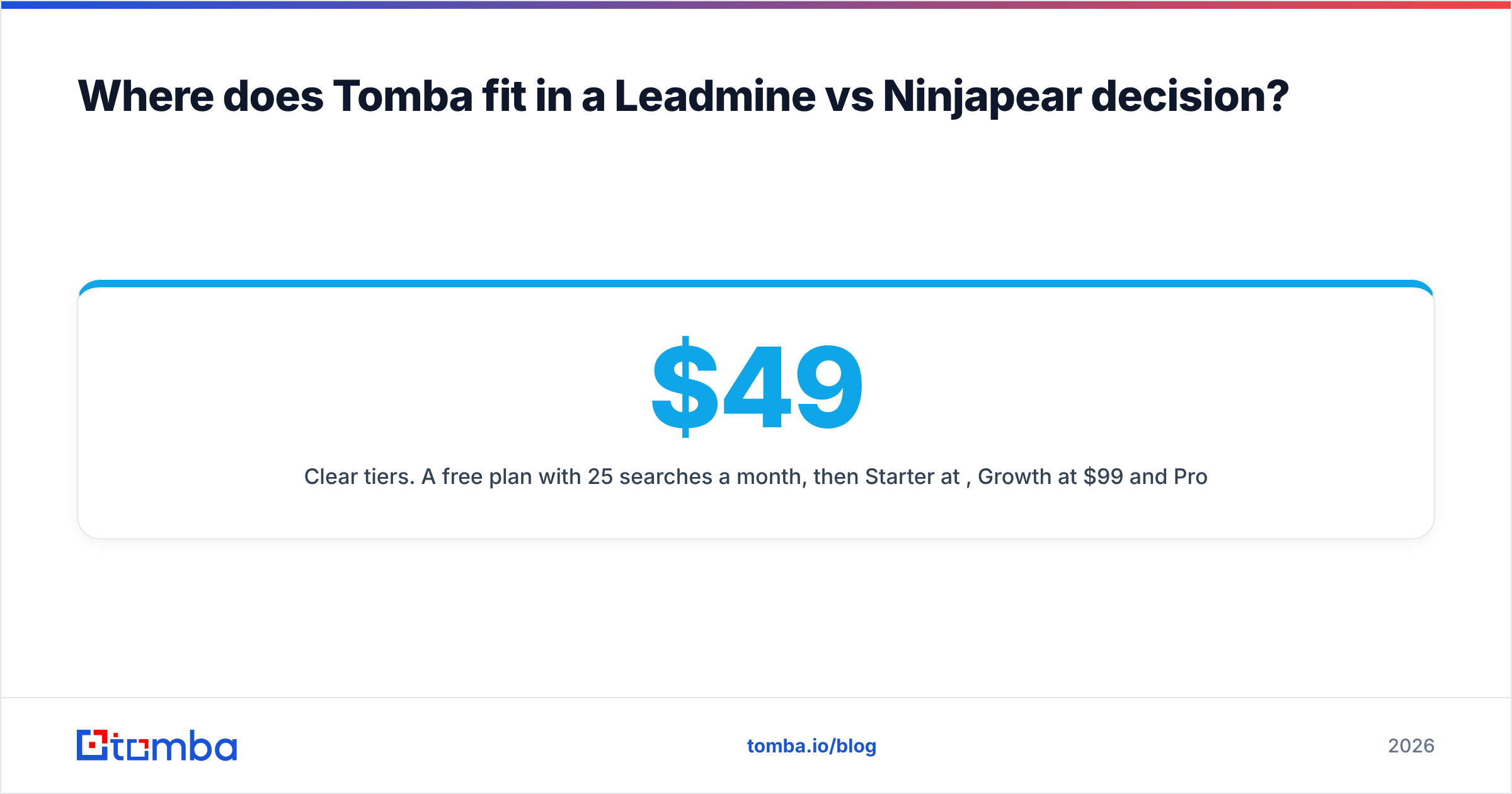
- Clear tiers. A free plan with 25 searches a month, then Starter at $49/mo, Growth at $99/mo and Pro at $249/mo. See Tomba pricing for credit amounts.
If you're happy with Leadmine's UI and only need a handful of emails a week, switching isn't urgent. If you're wiring Ninjapear into a pipeline, you'll get more from an email finder you can call from code.
Which should you choose: Leadmine or Ninjapear?#
Decide by job, not by brand:
| If your main need is... | Choose |
|---|---|
| Verified emails for outbound, no engineering | Leadmine |
| Chrome-based prospecting from Crunchbase/Google | Leadmine |
| Lists of companies using a competitor | Ninjapear |
| Market or competitor mapping via API | Ninjapear |
| LinkedIn-free data for compliance reasons | Ninjapear |
| Quarterly bulk enrichment with bursty usage | Ninjapear (PAYG) |
| Account discovery and contact finding in one pipeline | Ninjapear + an email finder with an API |
Bottom line: Leadmine and Ninjapear sit at different layers of the B2B data stack. Leadmine is a solid, affordable email prospecting tool for small teams. Ninjapear is a specialist API for company intelligence, with endpoints few other vendors offer. Asking which is "better" is like comparing a CRM to a data warehouse. Pick the one that matches your bottleneck, and pair them if you have both.
Ready to turn account lists into verified contacts?#
If Ninjapear, or any other source, gives you target accounts and you now need the right people's emails, Tomba Email Finder closes that gap. Search by name plus domain, pull every known address at a company, and verify before you send, from the web app, the Chrome extension or the API. Start with 25 free searches a month and move up to Starter at $49/mo when your pipeline needs more.
Related guides#
// get started
Find, verify and enrich your first contacts today
Start on the free plan with 25 searches a month, then scale when your team is ready.
Free plan · No credit card required · GDPR & CCPA
// about the author