Leadmine vs Noparam (2026): Email Finder or Verification API?
Leadmine finds B2B emails. Noparam verifies them in real time. They overlap less than you'd think, so picking the wrong one leaves a gap in your outbound stack. Here's what each tool does and when to use it.
TL;DR
- Leadmine is mainly a prospecting tool. It searches a database of 200M+ business contacts, has a Chrome extension and bulk email finding, and checks every email before it hands it to you. Paid plans start at $29/mo.
- Noparam is mainly an email validation API. It checks syntax, MX records, SMTP, disposable addresses, role accounts and catch-all domains, in real time or in bulk. It says it doesn't store or resell your data.
- These tools do different jobs. Leadmine answers "who should I email?" Noparam answers "is this email safe to send to?"
- Pick Leadmine if you need new leads. Pick Noparam if you already have a list or a signup form to clean. If you need both jobs in one place, look at an all-in-one tool like Tomba.
What is the real difference between Leadmine and Noparam?#
People search "Leadmine vs Noparam" because both tools show up under "email finder" and "email verifier" on review sites. They don't actually compete head-to-head, though. Each one started from a different job.
Think of a restaurant. Leadmine is the supplier who finds and delivers the ingredients. Noparam is the health inspector who checks those ingredients before they reach a customer. You need both roles, but one company rarely does both well.
In practice:
- Leadmine starts with discovery. You filter by industry, location, revenue, job title, company name or headcount, and you get contacts with emails that have already been checked. Verification is built in, but it comes second to finding people.
- Noparam starts with validation. You send it an email address, one at a time through the API or thousands at once in bulk, and it tells you whether the address is deliverable, risky, disposable, role-based or on a catch-all domain. It can sometimes help you find an email, but it doesn't have a prospect database for you to search.
So the real question isn't which tool is better. It's which problem you have right now.
How do Leadmine and Noparam compare feature by feature?#
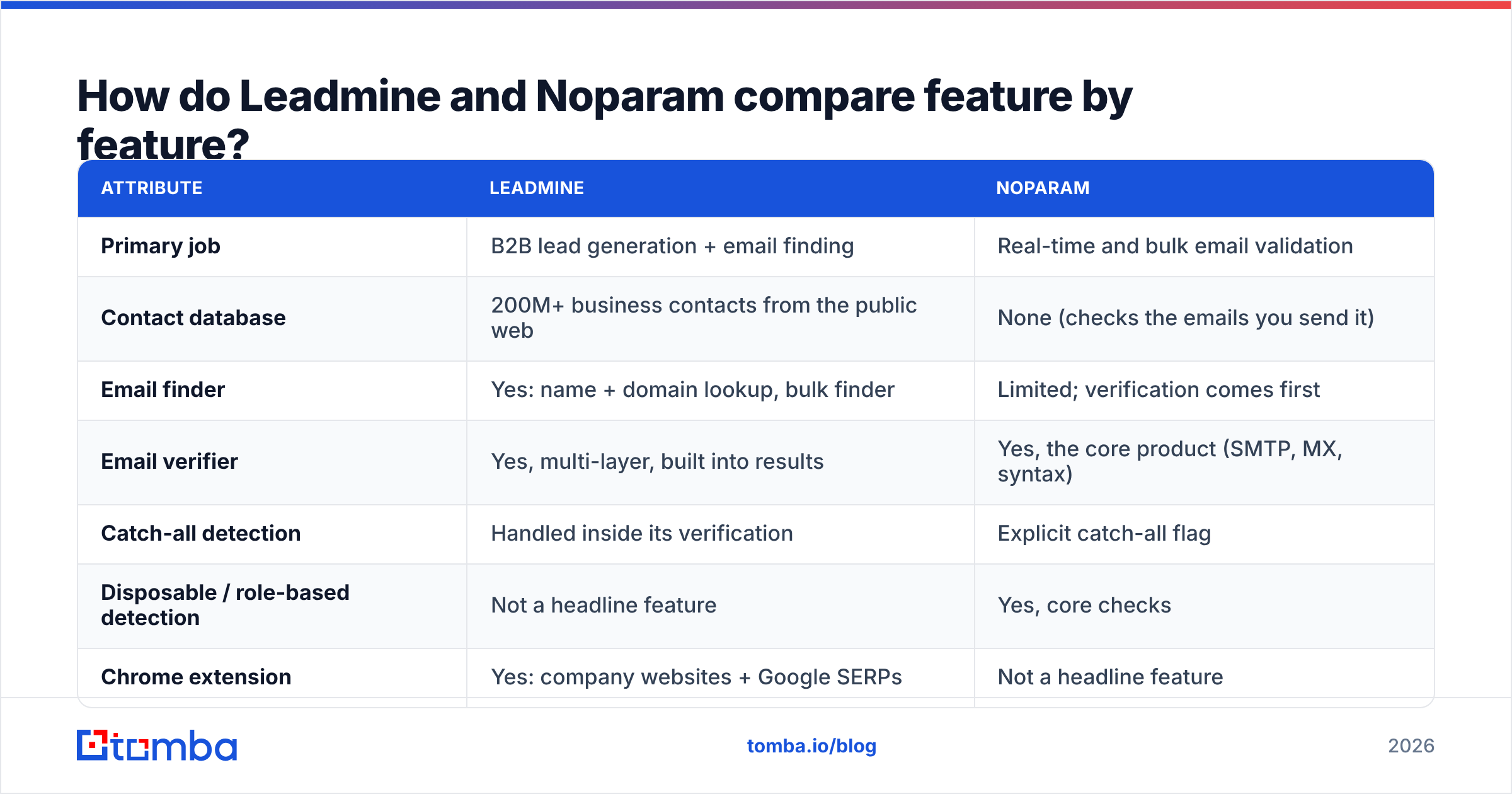
Here's a side-by-side view based on what each vendor publishes as of 2026. Pricing changes often, so check each vendor's own page before you buy.
| Attribute | Leadmine | Noparam |
|---|---|---|
| Primary job | B2B lead generation + email finding | Real-time and bulk email validation |
| Contact database | 200M+ business contacts from the public web | None (checks the emails you send it) |
| Email finder | Yes: name + domain lookup, bulk finder | Limited; verification comes first |
| Email verifier | Yes, multi-layer, built into results | Yes, the core product (SMTP, MX, syntax) |
| Catch-all detection | Handled inside its verification | Explicit catch-all flag |
| Disposable / role-based detection | Not a headline feature | Yes, core checks |
| Chrome extension | Yes: company websites + Google SERPs | Not a headline feature |
| API | Available | Yes, API-first product |
| Google Sheets | Not a headline feature | Available via Google Workspace Marketplace |
| Free tier | 10 free credits + 14-day trial, no card | Free plan to start |
| Paid entry price | From $29/mo | Tiered by monthly verification volume |
| Enterprise | Contact sales | Custom quotas, priority processing |
| Data policy | Aggregates public web data | Privacy-first: doesn't store or resell data |
| Deliverability claim | 95%+ on returned emails | Checks each address in real time |
The table shows the split clearly. The rows where Leadmine is strong (database, Chrome extension, lead filters) are mostly empty for Noparam. The rows where Noparam is strong (disposable detection, real-time API, privacy stance) are secondary for Leadmine.
What does Leadmine do well?#
Leadmine is built for SDRs, founders and agencies who want a list of people to contact without paying for an enterprise data platform.
Where it's strong:
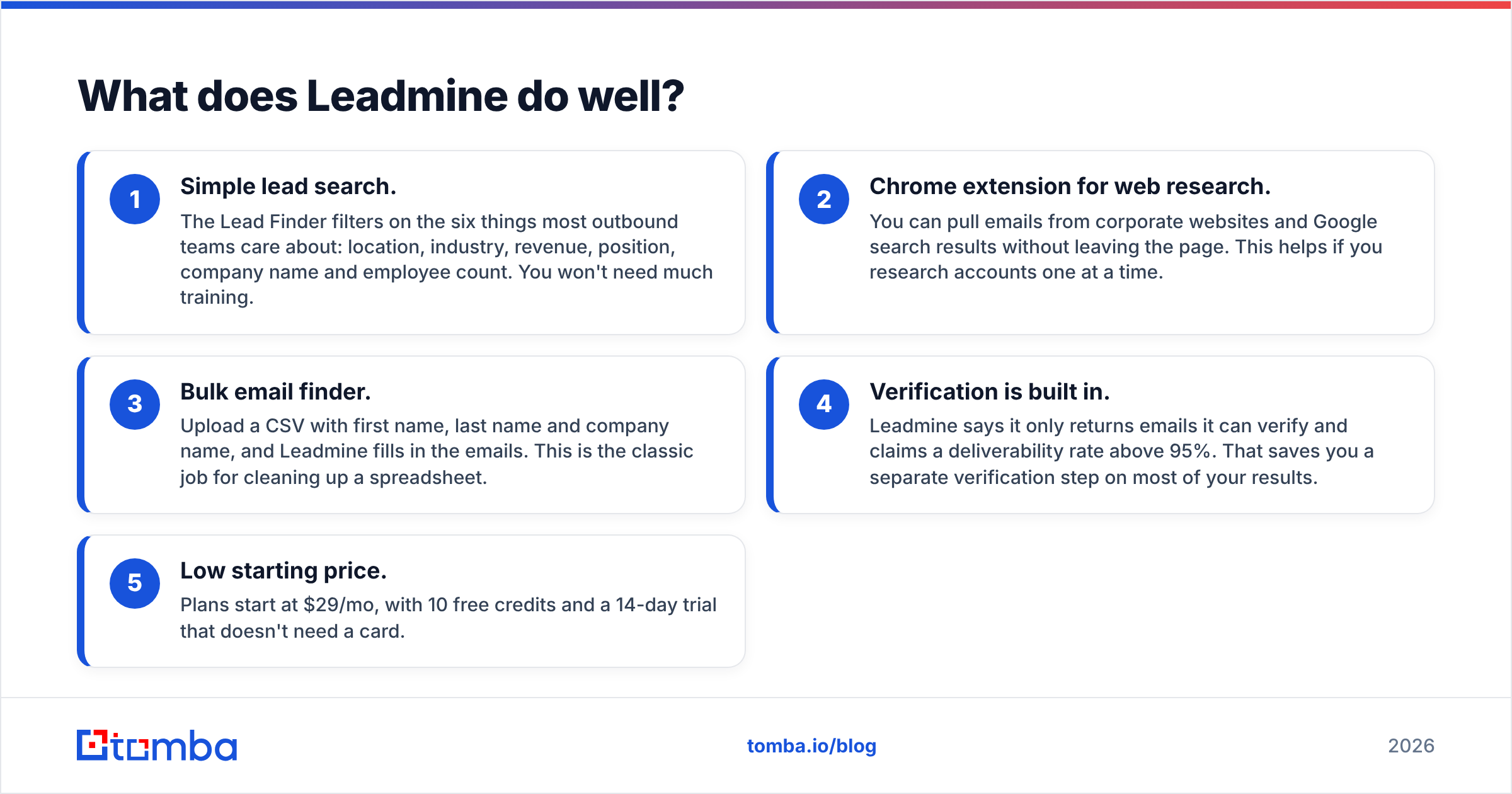
- Simple lead search. The Lead Finder filters on the six things most outbound teams care about: location, industry, revenue, position, company name and employee count. You won't need much training.
- Chrome extension for web research. You can pull emails from corporate websites and Google search results without leaving the page. This helps if you research accounts one at a time.
- Bulk email finder. Upload a CSV with first name, last name and company name, and Leadmine fills in the emails. This is the classic job for cleaning up a spreadsheet.
- Verification is built in. Leadmine says it only returns emails it can verify and claims a deliverability rate above 95%. That saves you a separate verification step on most of your results.
- Low starting price. Plans start at $29/mo, with 10 free credits and a 14-day trial that doesn't need a card.
Where it's weaker:
- The database is built from public web data. That's normal in this category, but coverage varies by region and industry, and small companies can be thin.
- Checking data you collected elsewhere isn't what Leadmine is built for. If you have a 50,000-row list from events, webinars and old CRM exports, you'll want a dedicated verifier.
- It doesn't focus on real-time form validation. You wouldn't use Leadmine to block fake emails on a signup page.

What does Noparam do well?#
Noparam presents itself as a real-time email validation API. It checks syntax, confirms the domain exists, looks up MX records and tests whether the mailbox exists. It also flags fake, mistyped, temporary, disposable and role-based addresses.
Where it's strong:
- Built for developers. If you want to validate emails on a signup form, a lead-capture form or inside a data pipeline, you want an API first. That's Noparam's design.
- Explicit catch-all detection. Catch-all domains accept mail sent to any address, so a basic SMTP check can't tell you if the person actually exists. Noparam labels these addresses so you can treat them differently instead of mixing them in with confirmed-valid ones.
- Disposable and role-based filtering. Addresses like
info@,sales@and throwaway inboxes hurt reply rates and signup quality. Noparam flags them directly. - Privacy stance. Noparam says it doesn't store or resell the data you send. If your legal or security team reviews every vendor that touches personal data, that matters.
- Free plan and Sheets add-on. You can test it at no cost, and non-technical users can run checks in Google Sheets.
Where it's weaker:
- There's no prospect database. Noparam can't tell you who the VP of Marketing is at a 200-person SaaS company.
- Publicly available detail on specific price tiers is thinner than Leadmine's. Plan your budget from the official pricing page, not from third-party listings.
- Non-technical teams get the most value through the Sheets add-on. The rest of the product is aimed at people who can call an API.
Is Leadmine or Noparam more accurate?#
They measure different kinds of accuracy, so a straight comparison doesn't work.
- Leadmine's accuracy is about find rate plus deliverability. How often does it return an email for a given person, and how often does that email actually land? Leadmine's published claim is 95%+ deliverability on the emails it returns. That's a claim about its own results, not about any list you bring.
- Noparam's accuracy is about classification. When it says "valid," "invalid," "catch-all" or "disposable," how often is it right? Here, catch-all handling matters most, because every verifier on the market struggles to confirm individual mailboxes on accept-all domains.
The fair way to test them is to run each tool on the job it was built for:
- Take 200 target contacts you know are correct (for example, people who have replied to you before). Run them through Leadmine's bulk finder and count how many correct emails it finds.
- Take 1,000 addresses from a messy older list. Run them through Noparam, send only to the "valid" group, and track the bounce rate. Aim for under 2%. That's a common threshold in HubSpot's deliverability guidance and in other sources.
If you only test one tool on the other tool's job, the results won't tell you anything useful.
How does pricing compare for a typical outbound team?#
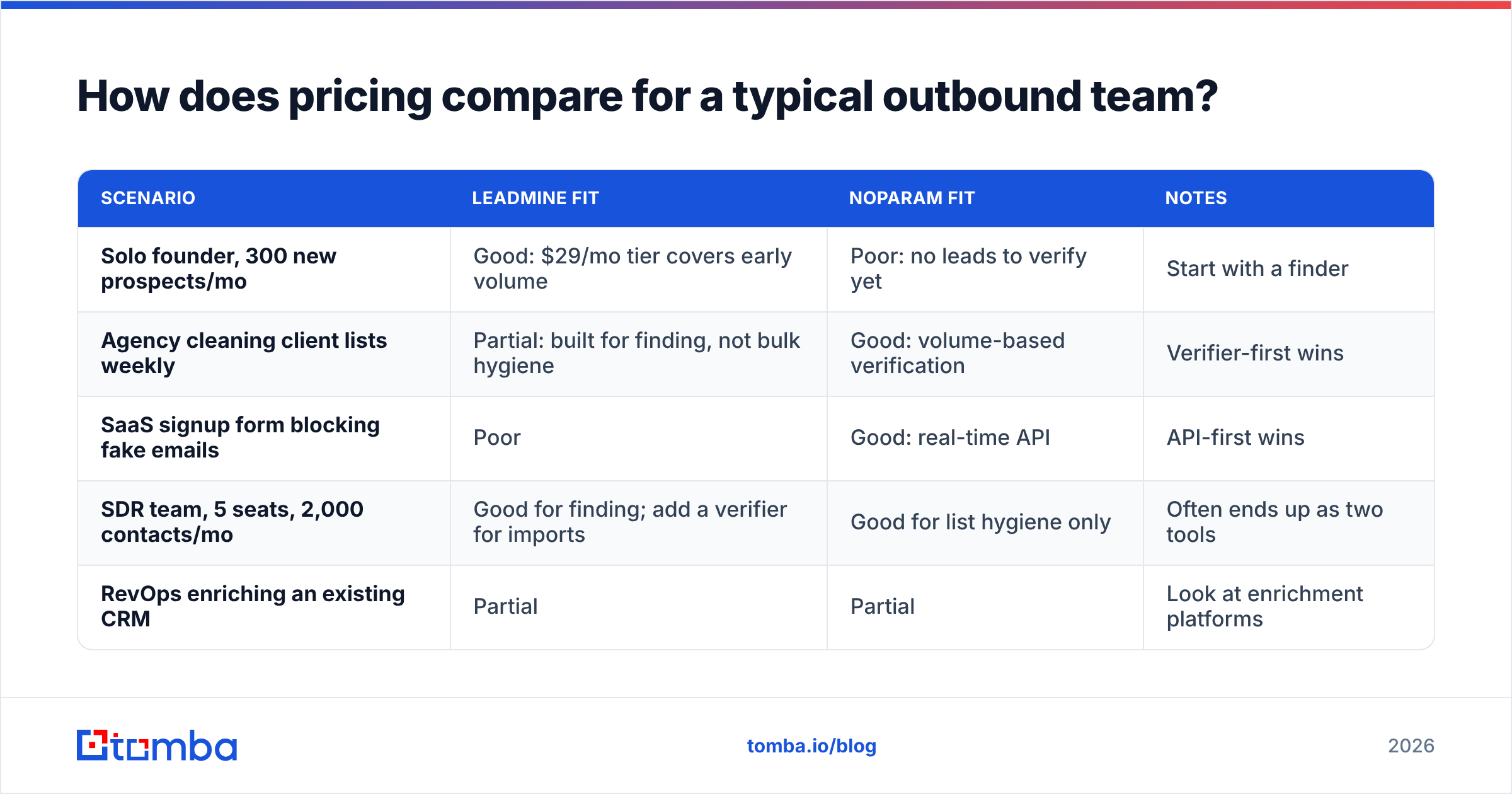
Look at pricing through your actual workflow, not the headline number.
| Scenario | Leadmine fit | Noparam fit | Notes |
|---|---|---|---|
| Solo founder, 300 new prospects/mo | Good: $29/mo tier covers early volume | Poor: no leads to verify yet | Start with a finder |
| Agency cleaning client lists weekly | Partial: built for finding, not bulk hygiene | Good: volume-based verification | Verifier-first wins |
| SaaS signup form blocking fake emails | Poor | Good: real-time API | API-first wins |
| SDR team, 5 seats, 2,000 contacts/mo | Good for finding; add a verifier for imports | Good for list hygiene only | Often ends up as two tools |
| RevOps enriching an existing CRM | Partial | Partial | Look at enrichment platforms |
The last two rows show the hidden cost. Many teams end up paying for a finder and a verifier separately, plus the time to move CSVs between them. Before you choose, add up the total cost of the stack, not just one tool.
Which one should you choose?#
Pick Leadmine if:
- You need new contacts, not cleaner old ones.
- You research accounts on company websites and want a Chrome extension.
- You want a simple UI and a starting price under $30/mo.
Pick Noparam if:
- You already have lists and your main problem is bounces.
- You need to validate emails as they arrive, on forms, in apps or in data pipelines.
- Your security team cares whether vendors store or resell the data you submit.
Consider something else if:
- You want finding, verifying and catch-all handling in one workflow without exporting CSVs between tools.
- You need phone numbers, company enrichment or CRM integrations as well as email.
Independent review sites like G2 are useful here. Filter reviews by company size, because a 3-person agency and a 300-seat sales floor judge these tools very differently.

Where does Tomba fit in this comparison?#
Tomba covers both halves of the Leadmine vs Noparam split in one account.
On the finding side, the Tomba Email Finder works from a name plus domain, a company or a whole domain, and returns the source URLs behind each result so you can see where an email came from. On the checking side, the email verifier runs SMTP, MX and syntax checks. A separate catch-all verifier goes further on accept-all domains, which is exactly where most verifiers, including dedicated ones, stop giving you a useful answer.
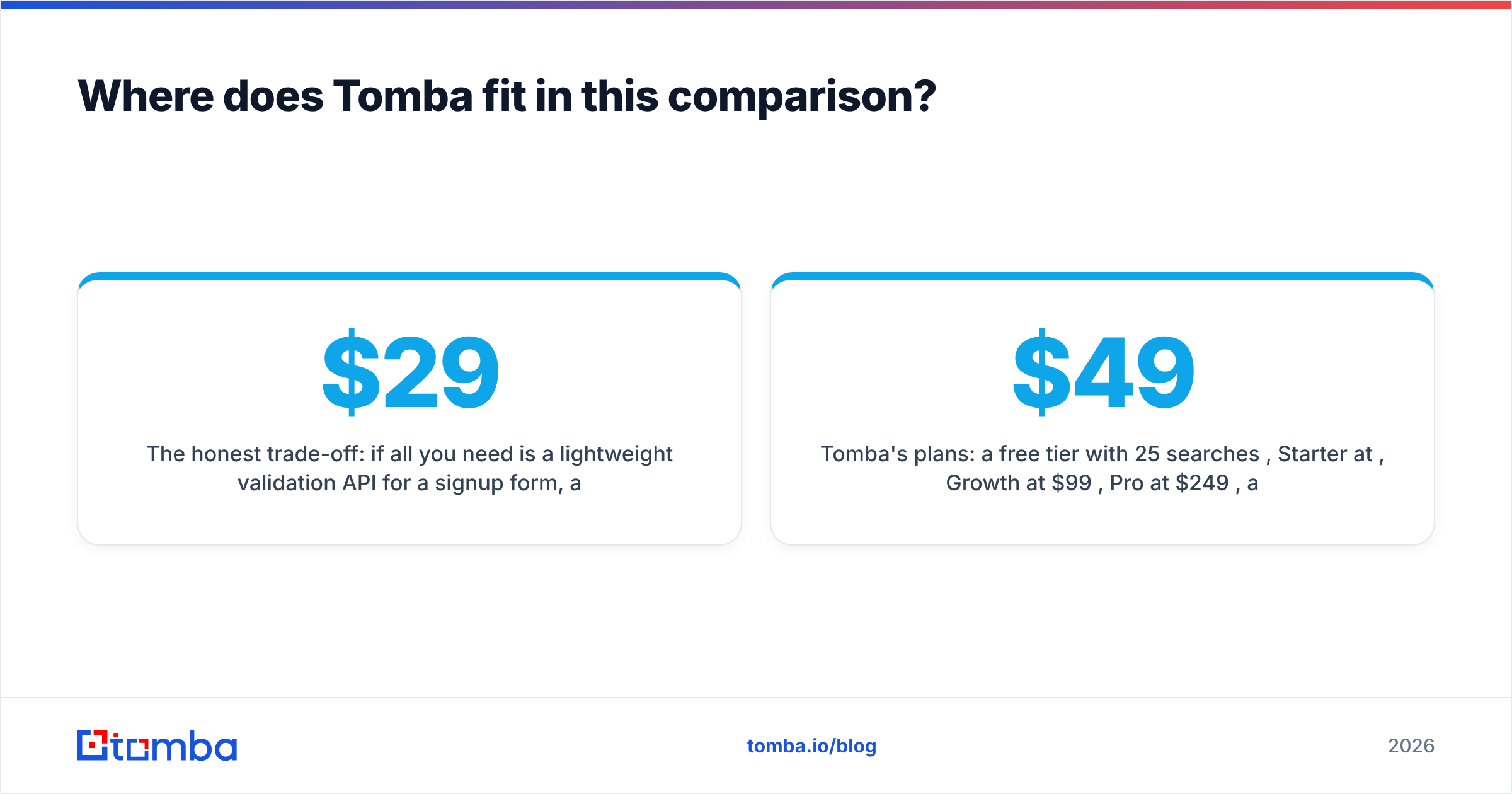
The honest trade-off: if all you need is a lightweight validation API for a signup form, a focused tool like Noparam may be simpler to set up. If all you need is a cheap first list of leads, Leadmine's $29/mo entry point is hard to beat. Tomba makes the most sense when you would otherwise pay for both tools and move CSVs between them every week.
Tomba's plans: a free tier with 25 searches per month, Starter at $49/mo, Growth at $99/mo, Pro at $249/mo, and custom Enterprise pricing. The full breakdown is on the Tomba pricing page.
What are the most common mistakes when choosing between them?#
- Treating a verifier as a finder. Noparam can't create prospects. If your pipeline is empty, cleaning emails won't fill it.
- Skipping verification on imported lists. Leadmine checks the emails it finds. It doesn't check a spreadsheet you bought, scraped or inherited. Run those through a dedicated verifier before you send.
- Sending to catch-all addresses at full volume. Put catch-all results in a separate, lower-volume sequence and watch bounces closely. Sending to unconfirmed addresses is a fast way to damage your sender reputation.
- Comparing headline prices only. $29/mo for a finder plus a separate verifier plan can cost more than one combined tool. Price the whole workflow.
- Ignoring data policy. If you sell into the EU, ask every vendor how it sources, stores and processes contact data. Noparam's no-storage stance and Leadmine's public-web sourcing are different answers to that question, and your legal team should see both.
Frequently asked questions#
Is Noparam an email finder? Mostly no. Noparam is positioned as an email validation API. Some of its add-ons mention finding, but it has no searchable contact database like Leadmine's.
Does Leadmine verify emails? Yes. Leadmine has a standalone email verifier, and it verifies results before returning them. It claims 95%+ deliverability on emails it provides.
Which is cheaper, Leadmine or Noparam? Leadmine lists plans from $29/mo. Noparam uses volume-based tiers and has a free plan. Which one costs less depends on whether you're buying leads or buying verification checks. Check each vendor's current pricing page.
Can I use Leadmine and Noparam together? Yes, and many teams do: find with Leadmine, then run imported or older lists through Noparam. The cost is managing two vendors and moving data between them.
What is a catch-all email? It's an address on a domain that accepts mail sent to any mailbox name, so a standard SMTP check can't confirm the specific person exists. You need a dedicated catch-all check or careful low-volume sending.
The bottom line#
Leadmine and Noparam are both good at what they're built for, and they're built for different things. Leadmine gets you prospects. Noparam keeps your lists and forms clean. Choose based on where your outbound process is breaking: an empty top of funnel, or a bounce rate that's hurting your domain.
If you're tired of paying for two tools and moving CSVs between them, try the Tomba Email Finder. You find the email, verify it, check catch-all domains and see the source URL in one place. Start on the free plan with 25 searches a month, test it on your own target accounts, and upgrade only if the results are better than what you use now.
Related guides#
// get started
Find, verify and enrich your first contacts today
Start on the free plan with 25 searches a month, then scale when your team is ready.
Free plan · No credit card required · GDPR & CCPA
// about the author