Leadmine vs Salutary Data: Self-Serve Finder or Licensed Dataset?
Leadmine gives you a Chrome extension and monthly credits. Salutary Data sells licensed US B2B records starting around $5,000. They solve different problems. Here's how to tell which one your team needs.
TL;DR
- Leadmine is a self-serve prospecting tool. You get a lead finder, email lookup, an email verifier and a Chrome extension, all billed monthly by credit.
- Salutary Data is a data licensing company. It sells a curated US B2B dataset (148M+ contacts, 4M+ companies) as files, API access or platform access, on annual contracts that reportedly start around $5,000.
- Pick Leadmine if you're an SDR or a small team that needs to find individual emails this week. Pick Salutary Data if you're a data, RevOps or product team that needs bulk records to load into a warehouse, CRM or model.
- Neither one is the full answer for a mid-market team that wants on-demand lookups, verification and API access without an annual data contract. Tools like Tomba sit between the two.
What is the real difference between Leadmine and Salutary Data?#
Most "Leadmine vs Salutary Data" searches start from the same assumption: these are two email finders, so one of them must be better. They aren't the same kind of product, and treating them that way leads to a bad purchase.
Leadmine is built for the person doing the outreach. You search for leads by title, company, location and industry. You type a name and domain to get an email. You verify an address before sending, or open a LinkedIn profile and pull contact details through the Chrome plugin. Pricing is monthly and credit-based, and you can sign up without talking to anyone.
Salutary Data is built for the person who owns the data pipeline. The company calls itself a boutique B2B contact and company data provider, and it sells to teams doing sales intelligence, marketing, recruiting, identity resolution and ML/AI work. You don't click a button to reveal one email. You license records, often thousands or millions at a time, and they arrive as flat files, through an API or via a data marketplace such as Databricks.
A simple way to frame it: Leadmine is a search engine you query one lead at a time. Salutary Data is a wholesaler that ships you the inventory.
How do Leadmine and Salutary Data compare feature by feature?#
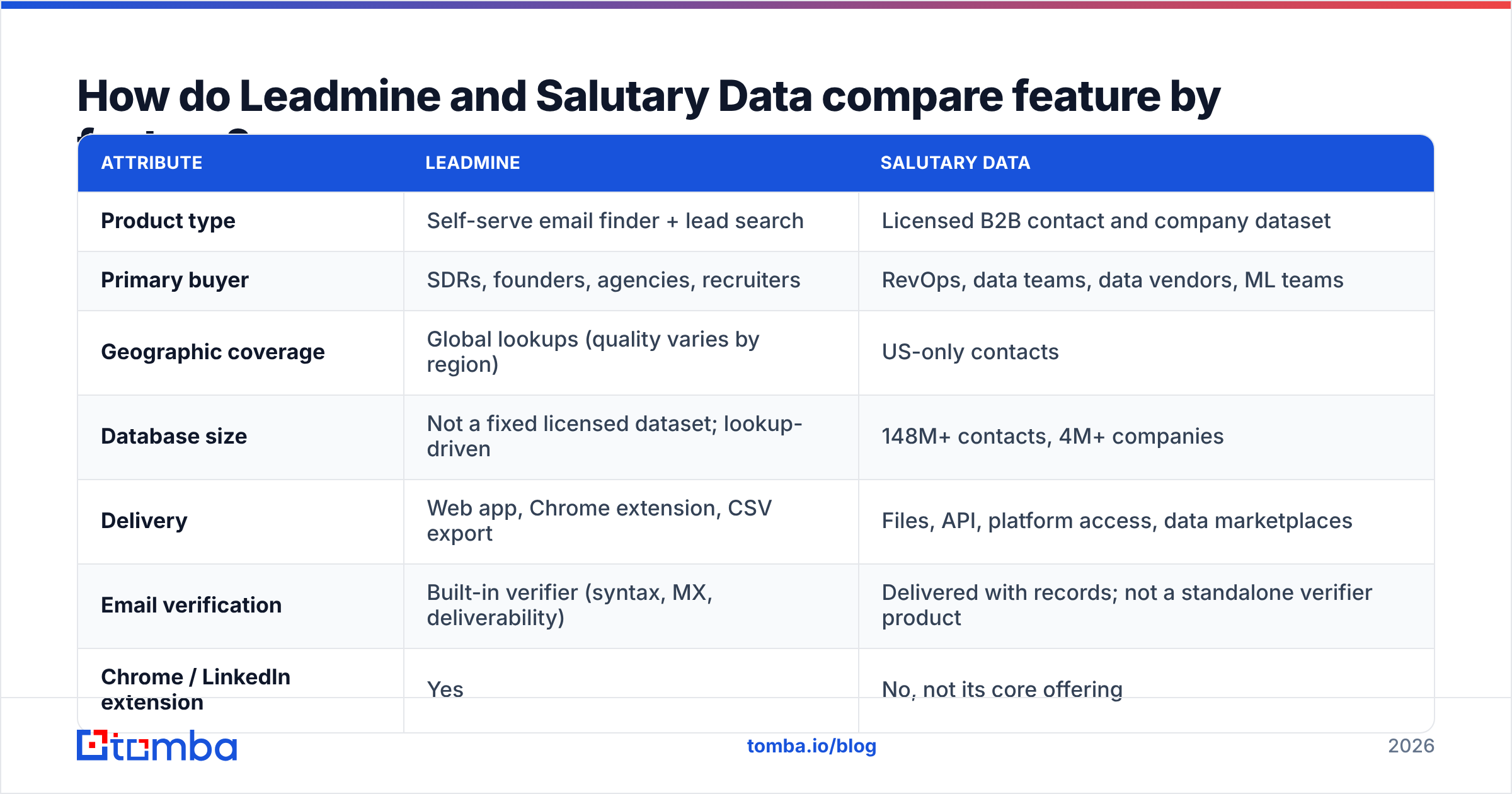
The table below reflects public product pages and third-party listings as of 2026. Pricing on both sides changes often, so treat the numbers as ranges and confirm them before you buy.
| Attribute | Leadmine | Salutary Data |
|---|---|---|
| Product type | Self-serve email finder + lead search | Licensed B2B contact and company dataset |
| Primary buyer | SDRs, founders, agencies, recruiters | RevOps, data teams, data vendors, ML teams |
| Geographic coverage | Global lookups (quality varies by region) | US-only contacts |
| Database size | Not a fixed licensed dataset; lookup-driven | 148M+ contacts, 4M+ companies |
| Delivery | Web app, Chrome extension, CSV export | Files, API, platform access, data marketplaces |
| Email verification | Built-in verifier (syntax, MX, deliverability) | Delivered with records; not a standalone verifier product |
| Chrome / LinkedIn extension | Yes | No, not its core offering |
| Free option | Small free plan (roughly 10 credits/mo) and a trial | No self-serve free tier |
| Entry pricing | Roughly $49/mo on listed plans | Custom; datasets and APIs reportedly start around $5,000 |
| Contract | Monthly subscription | Annual deals with a minimum spend |
| Best for | Finding and verifying specific contacts fast | Bulk enrichment, TAM builds, data products |
Leadmine's listed tiers on sites like Capterra have been reported at about $49/mo for 1,000 credits, $99/mo for 3,000 and $149/mo for 10,000. Older listings mention a cheaper entry plan, which is why you should check the live pricing page. Salutary Data doesn't publish a rate card. You talk to its team and get a quote based on the records, fields and refresh cadence you need.
Which buying model fits your team?#
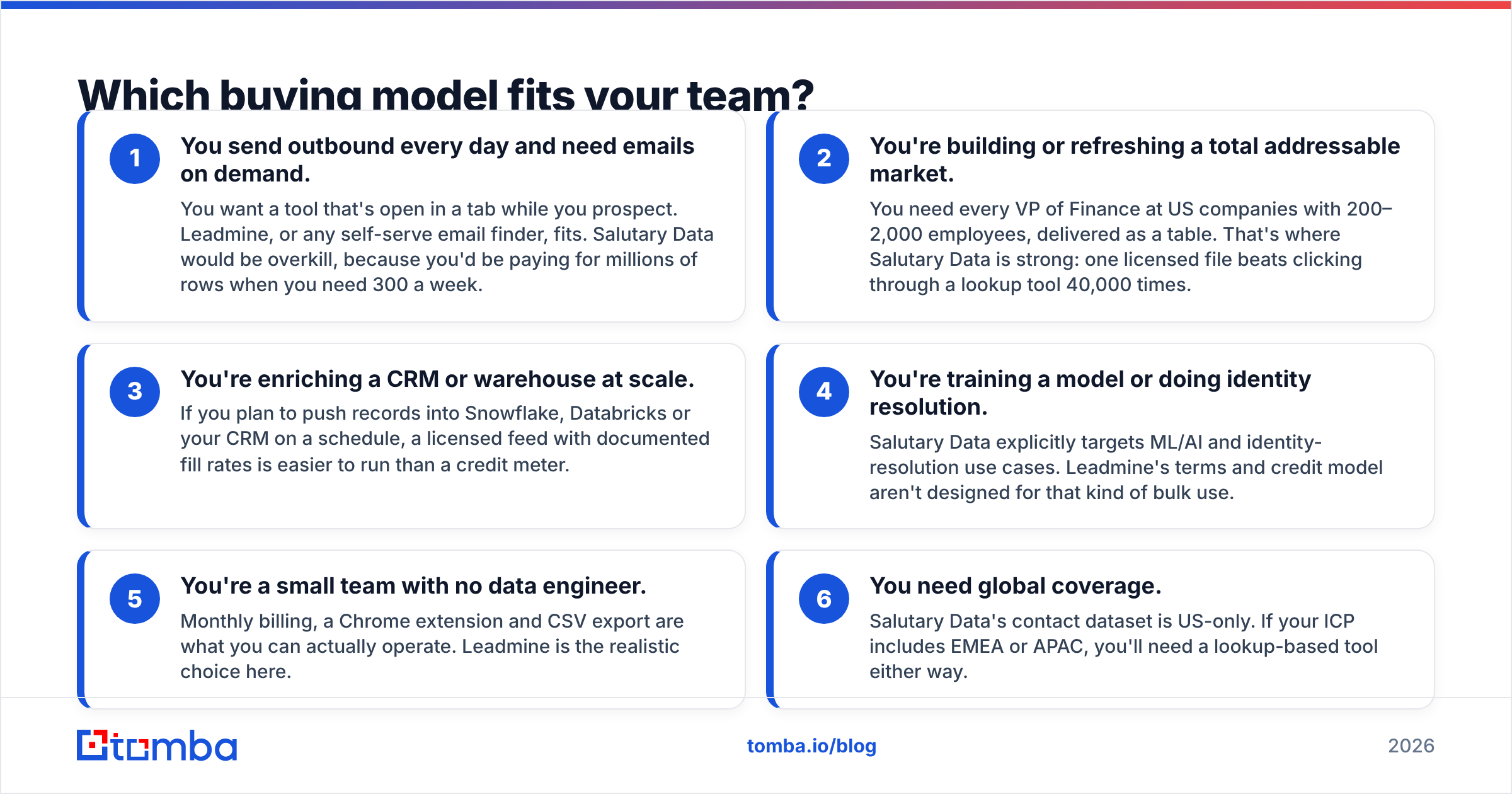
Before you look at data quality, figure out which of these situations you're in. The buying model usually settles the decision faster than feature lists do.
- You send outbound every day and need emails on demand. You want a tool that's open in a tab while you prospect. Leadmine, or any self-serve email finder, fits. Salutary Data would be overkill, because you'd be paying for millions of rows when you need 300 a week.
- You're building or refreshing a total addressable market. You need every VP of Finance at US companies with 200–2,000 employees, delivered as a table. That's where Salutary Data is strong: one licensed file beats clicking through a lookup tool 40,000 times.
- You're enriching a CRM or warehouse at scale. If you plan to push records into Snowflake, Databricks or your CRM on a schedule, a licensed feed with documented fill rates is easier to run than a credit meter.
- You're training a model or doing identity resolution. Salutary Data explicitly targets ML/AI and identity-resolution use cases. Leadmine's terms and credit model aren't designed for that kind of bulk use.
- You're a small team with no data engineer. Monthly billing, a Chrome extension and CSV export are what you can actually operate. Leadmine is the realistic choice here.
- You need global coverage. Salutary Data's contact dataset is US-only. If your ICP includes EMEA or APAC, you'll need a lookup-based tool either way.

How accurate is each platform's data?#
Neither vendor publishes an independent, third-party accuracy benchmark that you can compare side by side. So instead of trusting either marketing page, look at how each one handles quality.
Leadmine verifies at the moment of lookup. Its verifier checks syntax, the domain's MX record and mailbox deliverability. That's the standard SMTP-level approach, and it's useful because you get a fresh check right before you send. The weak spot is the same one every lookup tool has: catch-all domains. When a company's mail server accepts everything, an SMTP check can't confirm the mailbox exists, and many results come back as "risky" or "unknown."
Salutary Data puts its quality work into curation and refresh. It publishes fill-rate statistics by field on its website, which is more transparent than most bulk data vendors. That matters when you're paying for a dataset: a contact record with a 40% email fill rate is worth much less than one at 80%. The tradeoff is timing. Licensed data is accurate as of its last refresh, and B2B contact data decays quickly as people change jobs. You'll want to know the refresh cadence and whether updates are included in your contract.
In practice, a lot of teams license bulk data and then run it through an email verifier before any campaign goes out. Verifying first protects your sender reputation no matter where the records came from.
What to test during a trial or sample:
- Pull 200 contacts you already know are valid (current customers, recent closed-won deals) and check the match and accuracy rate.
- Include a batch of catch-all domains and count how many come back as usable.
- For Salutary Data, ask for a sample file and check fill rates on the fields you actually need: email, direct dial, title, seniority, company size.
- For Leadmine, spend the free credits on hard targets: small companies, recent job changers and non-US contacts.
What does each tool cost in practice?#
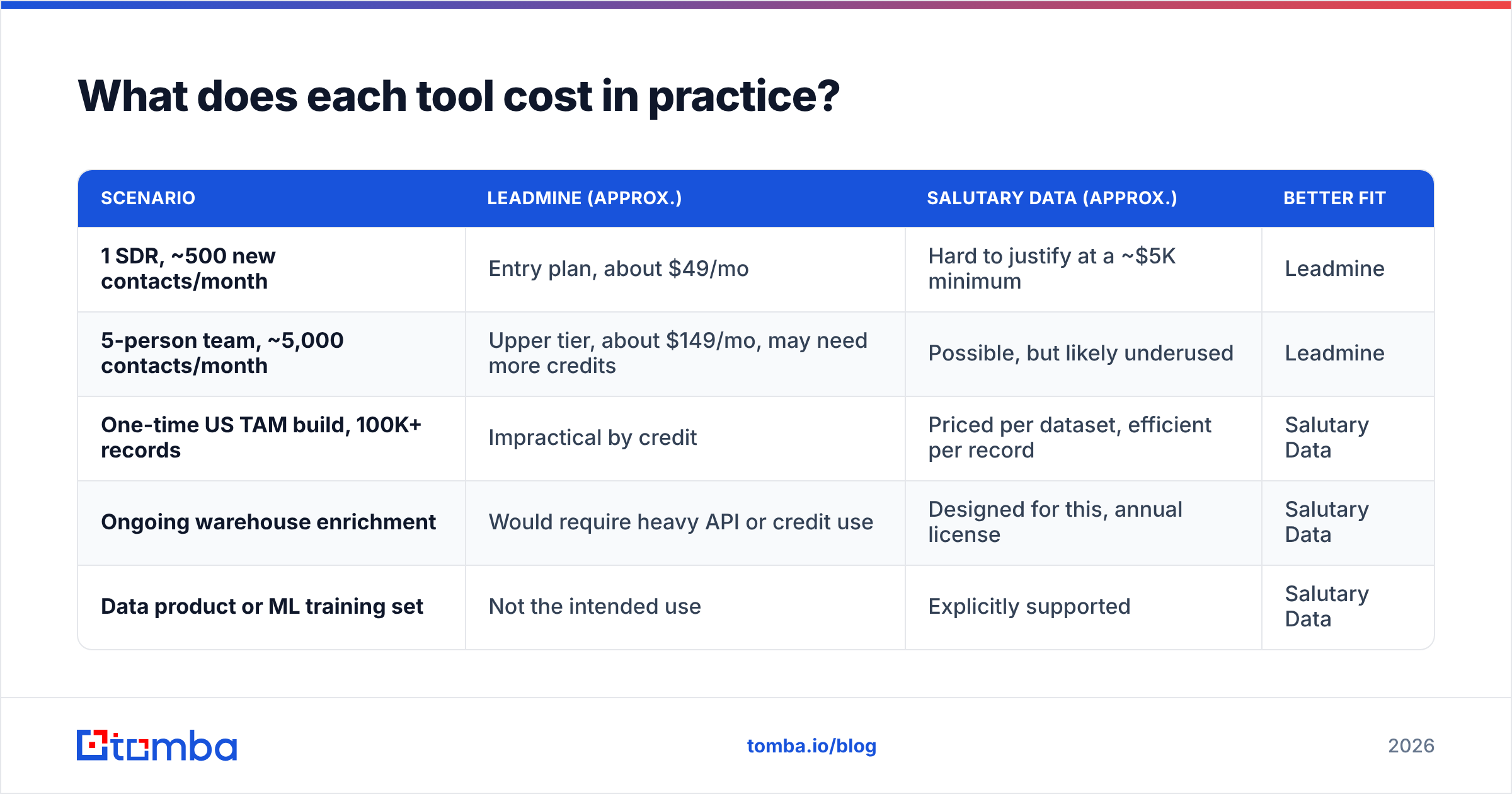
Sticker prices mislead here because the units don't match. Leadmine charges per credit. Salutary Data charges per dataset or license.
| Scenario | Leadmine (approx.) | Salutary Data (approx.) | Better fit |
|---|---|---|---|
| 1 SDR, ~500 new contacts/month | Entry plan, about $49/mo | Hard to justify at a ~$5K minimum | Leadmine |
| 5-person team, ~5,000 contacts/month | Upper tier, about $149/mo, may need more credits | Possible, but likely underused | Leadmine |
| One-time US TAM build, 100K+ records | Impractical by credit | Priced per dataset, efficient per record | Salutary Data |
| Ongoing warehouse enrichment | Would require heavy API or credit use | Designed for this, annual license | Salutary Data |
| Data product or ML training set | Not the intended use | Explicitly supported | Salutary Data |
Two hidden costs are worth flagging.
With Leadmine, credits can go on failed or unverifiable lookups depending on the plan rules, and high-volume teams often outgrow the top tier. Read the credit terms carefully and check whether unused credits roll over.
With Salutary Data, the $5,000 floor is only the start. The final price depends on record count, the fields you need, refresh frequency and licensing rights, such as whether you can resell or embed the data. You'll also need someone to ingest, dedupe and maintain the data. If you don't have that person, the dataset loses value quickly.
What do reviewers say about each tool?#
Leadmine has listings on G2, Capterra and GetApp. Reviewers usually praise the ease of use, the Chrome extension and the price for small teams. Common complaints are about coverage gaps outside major markets and inconsistent results on smaller companies, which is typical for lookup tools in this price range.
Salutary Data has a smaller public review footprint. That's normal for a data licensing vendor that sells through sales conversations and data marketplaces rather than self-serve signups. Most of what's public describes its dataset (size, US focus, field coverage) and its delivery options, not a day-to-day user interface. That fits the business: Salutary Data's customers mostly never "use" it the way an SDR uses Leadmine. They receive its data.
If you judge Salutary Data by its G2 review count, you're scoring a wholesaler as if it were a storefront.
Is Leadmine better than Salutary Data?#
For individual prospecting, yes. For bulk data acquisition, no. Here's a straight answer for each type of buyer.
Choose Leadmine if:
- You need to find and verify specific people's emails today.
- You work from LinkedIn and want a browser extension.
- You want monthly billing with no sales call and no minimum.
- Your volume is in the hundreds or low thousands of contacts a month.
Choose Salutary Data if:
- You need large volumes of US B2B contacts delivered as structured data.
- You have a data or RevOps function that can ingest files or an API feed.
- Your use case includes enrichment at scale, identity resolution or ML.
- You can commit to an annual contract and want predictable per-record economics.
Consider neither on its own if:
- You sell globally and need coverage outside the US.
- You need on-demand lookups and a real API for workflows, without a five-figure contract.
- Catch-all domains make up a large share of your target accounts.

Where does Tomba fit between the two?#
Many teams comparing Leadmine and Salutary Data really want the middle ground: self-serve pricing like Leadmine, plus the programmatic access and bulk handling that data licensing promises.
That's the gap Tomba is built for. Tomba's core product is an email finder that works by name, domain or company, with a domain search that lists the public emails tied to a company. Verification, a catch-all verifier, a phone finder and data enrichment run alongside it, so you don't need a separate tool to check addresses before sending. For pipelines and automation, the Tomba API exposes the same finder and verifier endpoints, which covers much of the "enrich my CRM on a schedule" work without an annual data license.
Pricing is public and monthly: a free tier with 25 searches a month, Starter at $49/mo, Growth at $99/mo, Pro at $249/mo and custom Enterprise plans. The full breakdown is on the Tomba pricing page.
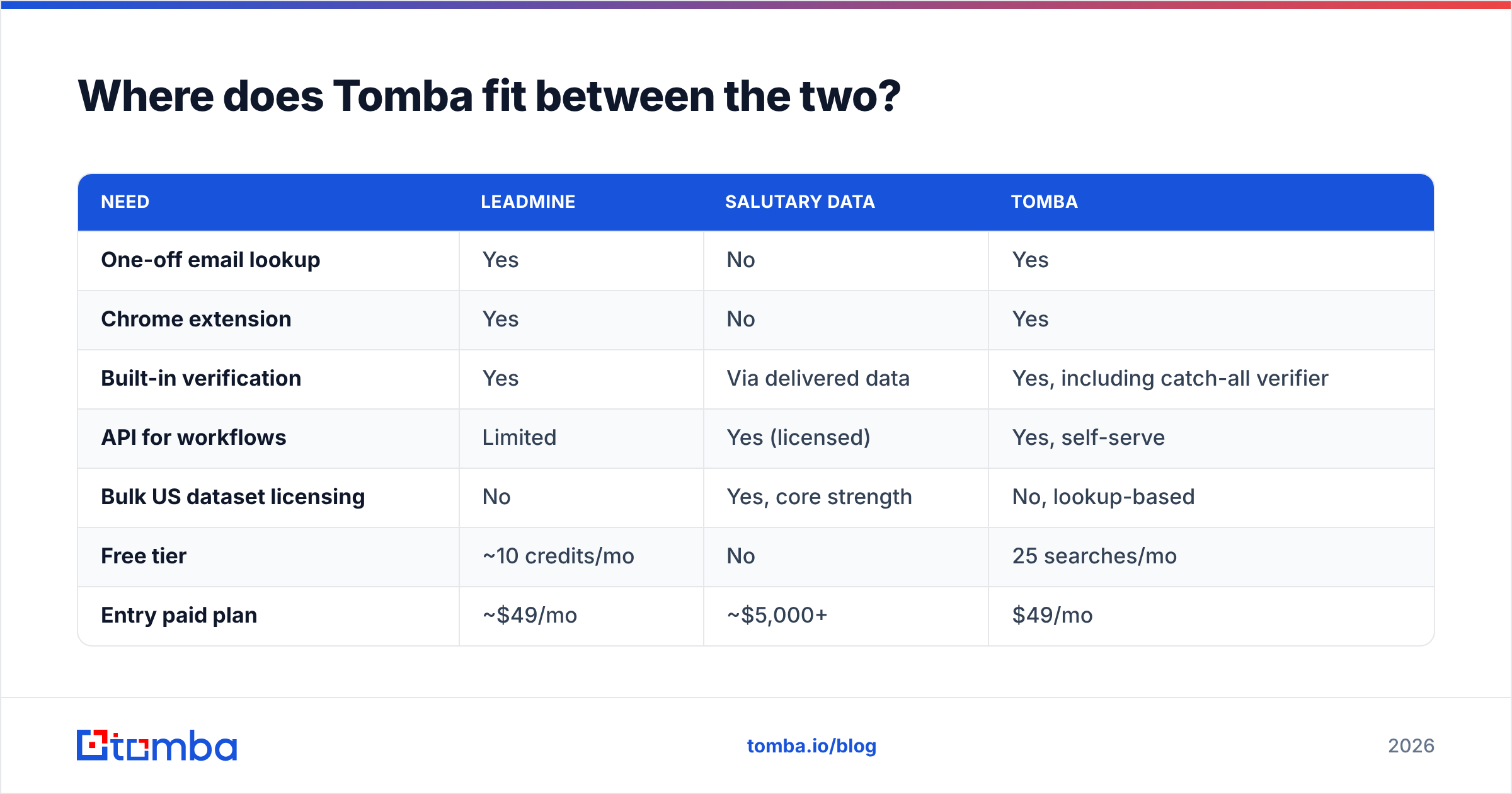
| Need | Leadmine | Salutary Data | Tomba |
|---|---|---|---|
| One-off email lookup | Yes | No | Yes |
| Chrome extension | Yes | No | Yes |
| Built-in verification | Yes | Via delivered data | Yes, including catch-all verifier |
| API for workflows | Limited | Yes (licensed) | Yes, self-serve |
| Bulk US dataset licensing | No | Yes, core strength | No, lookup-based |
| Free tier | ~10 credits/mo | No | 25 searches/mo |
| Entry paid plan | ~$49/mo | ~$5,000+ | $49/mo |
To be fair about it: if you need a licensed, warehouse-ready US dataset with documented fill rates, Salutary Data does something Tomba doesn't try to do. Tomba is the better fit when your team prospects actively, verifies before sending and wants API access without committing to a dataset.
How should you run the final evaluation?#
Don't pick based on a feature grid alone, including the ones in this post. Run this five-step check before you sign anything:
- Write down your monthly contact volume and where the data needs to go (browser, CRM, warehouse). This usually rules out one of the two options right away.
- Build a truth set of 100–200 contacts you know are correct, and score every vendor against it.
- Include your hardest segment, whether that's catch-all domains, SMBs, recent job changers or non-US contacts.
- Calculate cost per usable contact, not cost per credit or per record. A cheap record that bounces isn't cheap.
- Read the contract terms: credit rollover, refresh cadence, usage rights and minimum commitments.
So which should you choose?#
Leadmine and Salutary Data compete less than their shared search results suggest. Leadmine is a practical, affordable tool for people who prospect by hand. Salutary Data is a serious data supplier for organizations that treat contact data as infrastructure. Choose based on how you consume data, not which logo shows up more often in comparison lists.
If you're between those two extremes, try the Tomba Email Finder. You can find professional emails by name, domain or company, verify them in the same workflow, and move into the API when you're ready to automate. Start on the free tier with 25 searches a month, test it against your own truth set, and upgrade only once the numbers hold up.
Related guides#
// get started
Find, verify and enrich your first contacts today
Start on the free plan with 25 searches a month, then scale when your team is ready.
Free plan · No credit card required · GDPR & CCPA
// about the author