Leadmine vs Unwrapemail: Email Finder or Verification API in 2026?
Leadmine and Unwrapemail get compared a lot, but they don't do the same job. Leadmine finds B2B emails and Unwrapemail checks them through an API. Here's which one your stack needs, and when you need both.
TL;DR
- Leadmine and Unwrapemail do different jobs. Leadmine is a B2B email finder that works on LinkedIn, domains and bulk lists. Unwrapemail is a developer API that checks addresses for disposable domains, MX records and domain risk.
- Pick Leadmine if your problem is "I have names and companies, but no emails." It's aimed at SDRs, founders and recruiters doing outbound.
- Pick Unwrapemail if your problem is "bad emails are getting into my signup form, CRM or data pipeline." It's aimed at engineers and ops teams.
- Many outbound teams need both steps, finding and verifying. Running two separate vendors for that means two bills, two logins and two sets of credits.
- If you want one tool for both steps, an all-in-one platform like Tomba handles finding and verification together. Starter is $49/mo, and there's a free tier with 25 searches.
What is the real difference between Leadmine and Unwrapemail?#
Search results tend to treat "Leadmine vs Unwrapemail" as a like-for-like comparison. It isn't one. The two products sit at opposite ends of the email data workflow.
- Leadmine helps you get email addresses. You give it a person and a company, a LinkedIn profile or a domain, and it returns a likely professional address, usually with a verification status attached.
- Unwrapemail helps you judge email addresses you already have. You send an address to its API, and it tells you whether the domain is disposable, whether MX records exist, and what risk signals the domain shows.
Think of Leadmine as a phone book and Unwrapemail as a bouncer at the door. The phone book tells you who to call. The bouncer decides who gets in. You wouldn't pick one over the other in the abstract. You'd first ask which problem you actually have.
That matters for your buying decision. Most "vs" posts on this matchup score both tools on the same checklist, which pushes you toward the wrong product for your use case. This one starts with the job each tool does, then compares where they overlap.
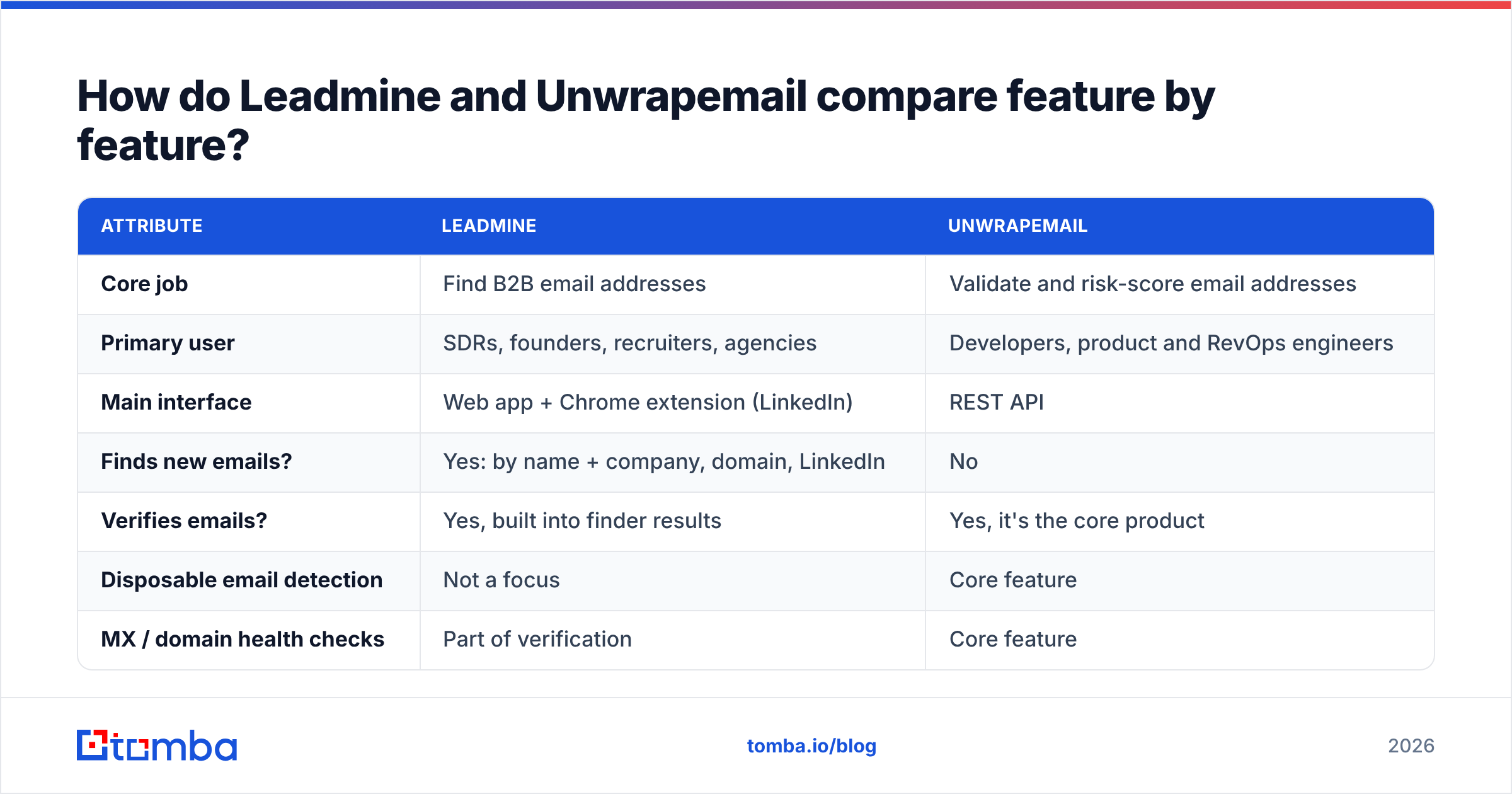
How do Leadmine and Unwrapemail compare feature by feature?#
The table below is built from each vendor's public positioning and third-party listings such as Capterra's LeadMine profile. Pricing in this category changes often, so check it against the live pricing pages before you commit.
| Attribute | Leadmine | Unwrapemail |
|---|---|---|
| Core job | Find B2B email addresses | Validate and risk-score email addresses |
| Primary user | SDRs, founders, recruiters, agencies | Developers, product and RevOps engineers |
| Main interface | Web app + Chrome extension (LinkedIn) | REST API |
| Finds new emails? | Yes: by name + company, domain, LinkedIn | No |
| Verifies emails? | Yes, built into finder results | Yes, it's the core product |
| Disposable email detection | Not a focus | Core feature |
| MX / domain health checks | Part of verification | Core feature |
| Bulk processing | CSV upload for finding/verifying | High-volume API calls |
| Free tier | Small monthly credit allowance + trial | 1,000 validations/month |
| Paid pricing model | Monthly plans with credit buckets (entry plans listed roughly $29–$49/mo) | Flat monthly tiers, then per-validation pricing as volume grows |
| Best fit | Building prospect lists for outbound | Cleaning signups, CRM imports, data pipelines |
Look down that table and one row settles most of the decision: "Finds new emails?" If you need new contacts, Unwrapemail can't help you, whatever its accuracy. If you need to block fake signups in real time, Leadmine isn't built for that.

What is Leadmine best at?#
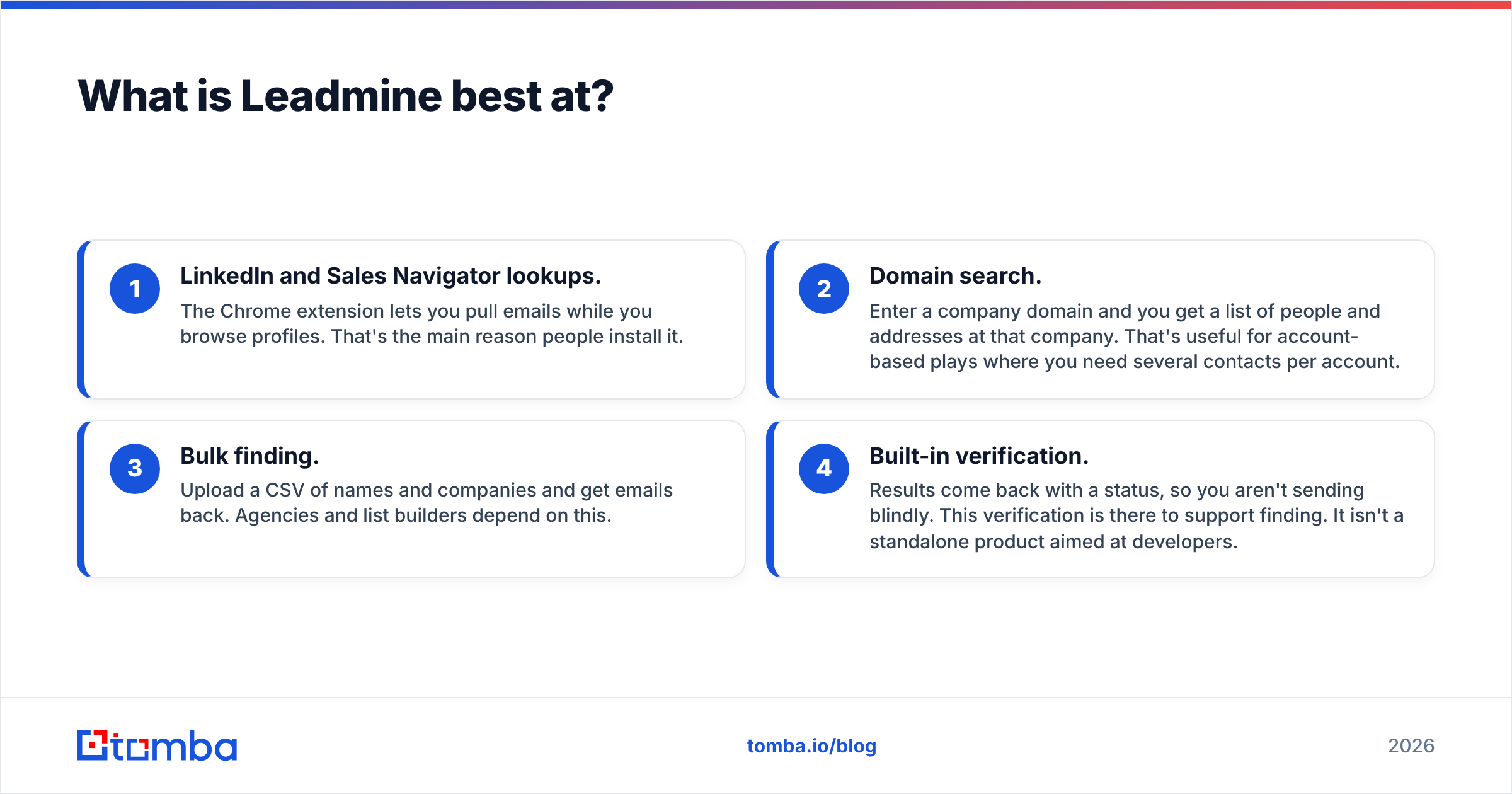
Leadmine is a prospecting tool first. Its strengths are in the parts of the workflow where a rep spends most of their day:
- LinkedIn and Sales Navigator lookups. The Chrome extension lets you pull emails while you browse profiles. That's the main reason people install it.
- Domain search. Enter a company domain and you get a list of people and addresses at that company. That's useful for account-based plays where you need several contacts per account.
- Bulk finding. Upload a CSV of names and companies and get emails back. Agencies and list builders depend on this.
- Built-in verification. Results come back with a status, so you aren't sending blindly. This verification is there to support finding. It isn't a standalone product aimed at developers.
On price, Leadmine positions itself as an affordable entry point. The official Leadmine pricing page lists plans at the lower end of the market, plus a free allowance for testing. For a solo founder or a two-person sales team trying out outbound, that low entry cost is a real advantage.
Where Leadmine is thinner: It isn't designed as an embeddable verification layer for your product's signup form. It also doesn't specialize in disposable-domain detection, which is what matters most when you're fighting fake trial accounts.
What is Unwrapemail best at?#
Unwrapemail is infrastructure. You call it from code, and its value shows up in the systems it protects:
- Signup flows. Catch
@tempmail-style throwaway addresses before they create a free-trial account and skew your activation metrics. - CRM imports. Check a vendor list or event export before it lands in HubSpot or Salesforce and damages your sender reputation.
- Data pipelines. Add risk signals such as disposable status, MX presence and domain health to records moving between systems.
- Speed. Unwrapemail markets itself as a fast API, which matters when a check sits inline on a signup form and every added millisecond is friction.
The free tier is generous for the category: 1,000 validations per month. That's enough to run it against real traffic before you pay anything.
Where Unwrapemail is thinner: It won't give you a single new contact. It also isn't a no-code tool. If nobody on your team can make an API call or set up a webhook, you'll struggle to use it.
Is Leadmine or Unwrapemail more accurate?#
The honest answer is that you can't compare them on one accuracy number, because they measure different things.
- Leadmine's accuracy means: when it gives you
jane.doe@acme.com, is that really Jane's inbox, and will it accept mail? That depends on the quality of its data sources, pattern detection, and how it handles catch-all domains. - Unwrapemail's accuracy means: when it flags an address as disposable, or a domain as lacking valid MX records, is that right? That depends on how current its disposable-domain lists are and how well it checks DNS.
A useful way to judge any finder is to see what it does with catch-all domains. These are servers that accept every address, so a standard SMTP check can't tell a real inbox from a fake one. Finders that just mark everything on those domains "valid" inflate their accuracy figures and push up your bounce rate. Before you buy, pick 50 contacts you already know are good, run them through the tool, and count how many come back correct, how many come back "unknown", and how many come back wrong.
For disposable detection, run the same kind of test: collect 30–40 known throwaway domains and 30–40 real corporate domains, and see how cleanly the API separates them.
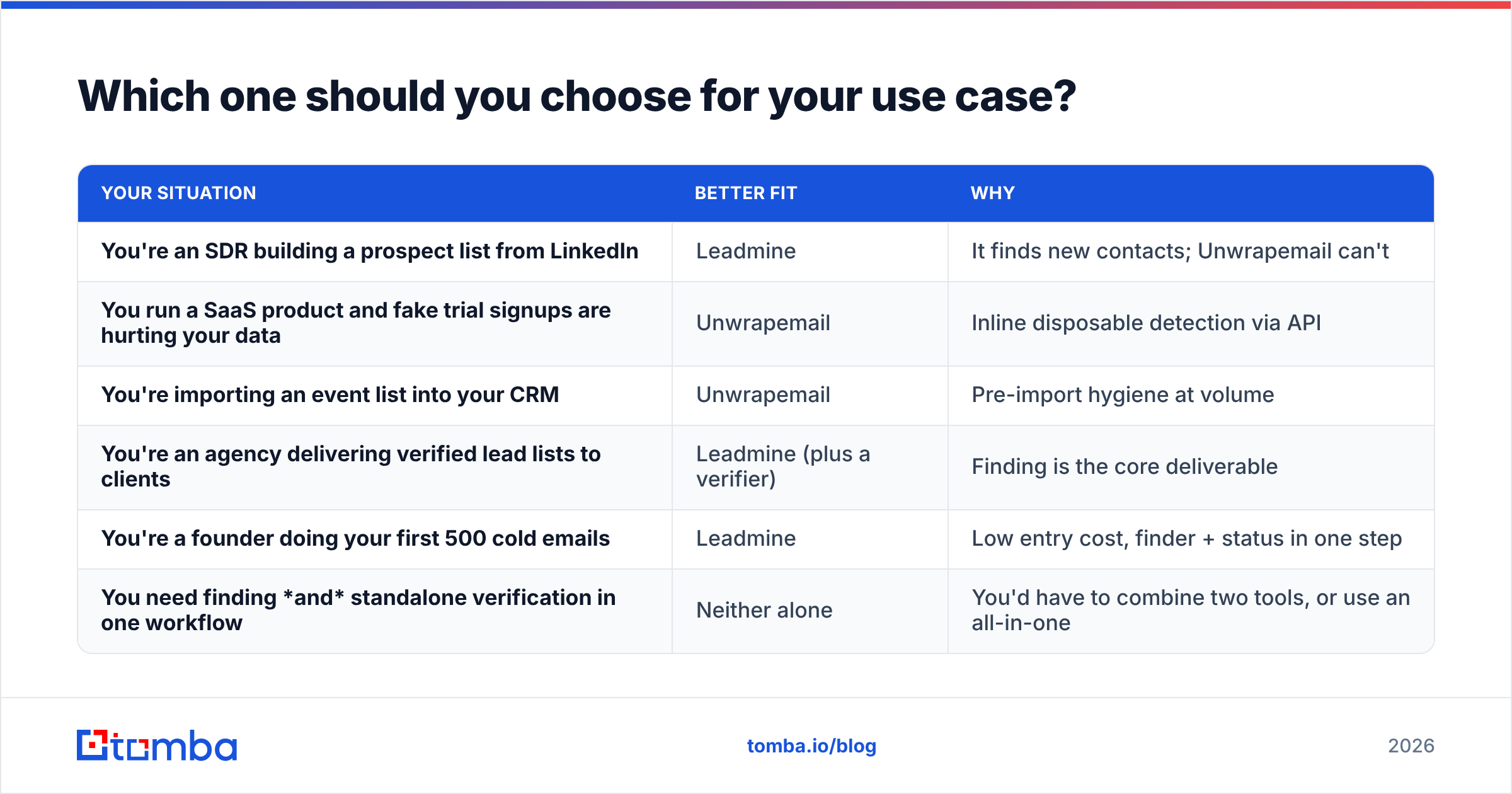
Which one should you choose for your use case?#
Here's the decision in practical terms:
| Your situation | Better fit | Why |
|---|---|---|
| You're an SDR building a prospect list from LinkedIn | Leadmine | It finds new contacts; Unwrapemail can't |
| You run a SaaS product and fake trial signups are hurting your data | Unwrapemail | Inline disposable detection via API |
| You're importing an event list into your CRM | Unwrapemail | Pre-import hygiene at volume |
| You're an agency delivering verified lead lists to clients | Leadmine (plus a verifier) | Finding is the core deliverable |
| You're a founder doing your first 500 cold emails | Leadmine | Low entry cost, finder + status in one step |
| You need finding and standalone verification in one workflow | Neither alone | You'd have to combine two tools, or use an all-in-one |
The last row describes more teams than you might expect. The standard outbound workflow is:
- Find the contact.
- Verify the address, including catch-all handling.
- Enrich it with title, company size and phone.
- Push it to your CRM or sequencer.
Leadmine covers most of steps 1 and 2. Unwrapemail covers part of step 2, and only in an API setting. Neither covers step 3 in depth.
Do you need both Leadmine and Unwrapemail?#
Some teams really do use both, and that setup can work:
- Growth or sales uses Leadmine to build outbound lists.
- Product or engineering uses Unwrapemail to protect the signup form and the CRM import path.
Those are two separate budgets and two separate problems, so two tools can make sense. The costs of this setup are practical ones:
- Two sources of truth. An address can be "valid" in Leadmine and "risky" in Unwrapemail because the two tools check different things. Someone has to decide which verdict wins.
- Two credit meters. You pay to find an email, then pay again to check it.
- Two integrations to maintain. One is a browser extension and CSV exports, the other is API keys and code. When something breaks, you're troubleshooting two vendors.
If the same people are doing both the finding and the verifying, running two tools usually costs more than it saves.

How does an all-in-one tool like Tomba fit into this comparison?#
To be clear, this post isn't claiming Tomba wins a matchup it isn't part of. Leadmine is a capable, affordable finder. Unwrapemail is a focused, developer-friendly validation API. If your need maps exactly to one of them, that tool may be all you need.
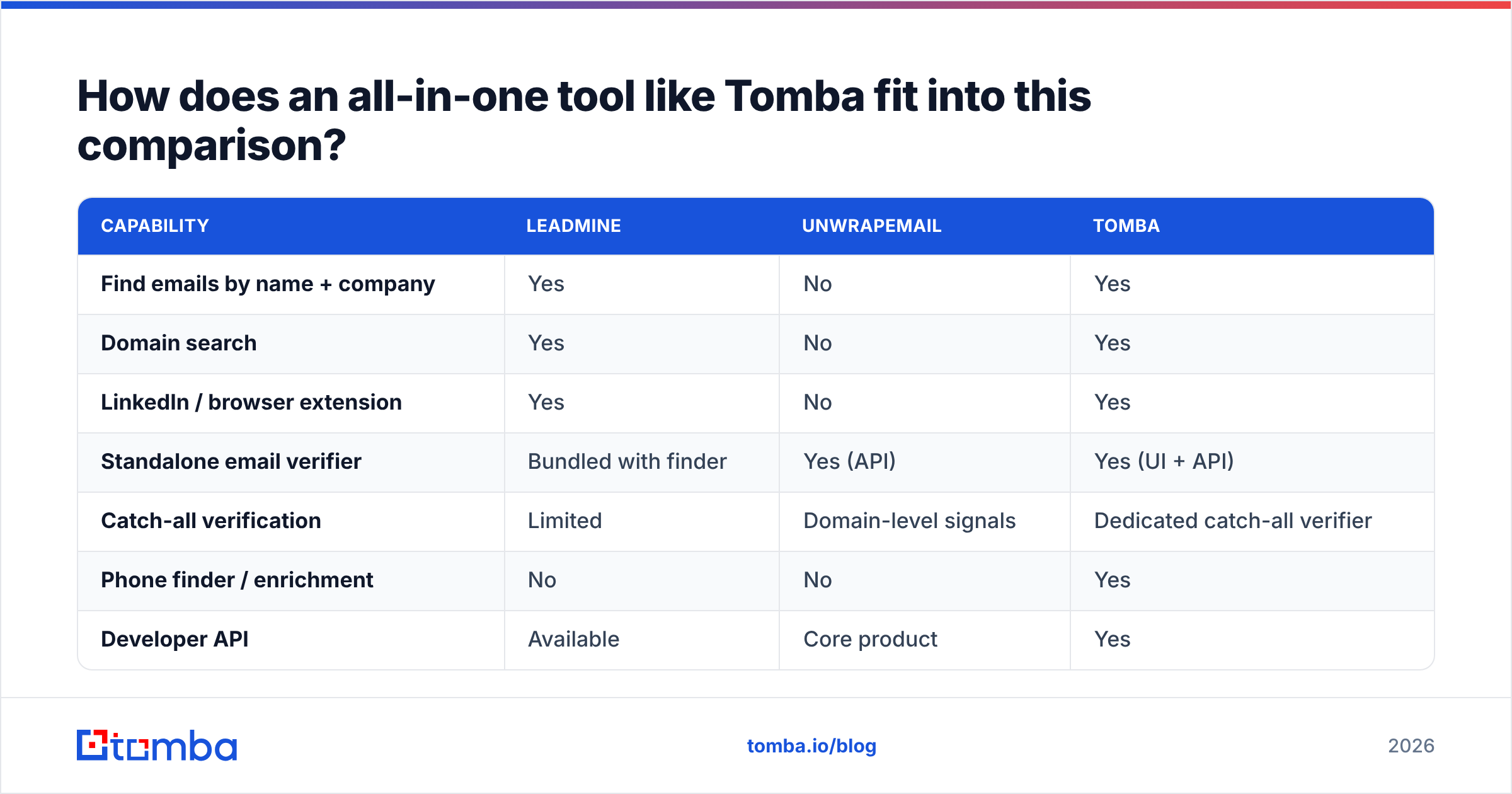
Tomba is relevant because it covers the ground between them. The core product is an email finder that works by name + company, by domain, and on LinkedIn through a browser extension. That's roughly what Leadmine covers. Alongside it are a standalone email verifier and a dedicated catch-all verifier, both available in the UI and through an API. That's the space where Unwrapemail sits.
Compared side by side:
| Capability | Leadmine | Unwrapemail | Tomba |
|---|---|---|---|
| Find emails by name + company | Yes | No | Yes |
| Domain search | Yes | No | Yes |
| LinkedIn / browser extension | Yes | No | Yes |
| Standalone email verifier | Bundled with finder | Yes (API) | Yes (UI + API) |
| Catch-all verification | Limited | Domain-level signals | Dedicated catch-all verifier |
| Phone finder / enrichment | No | No | Yes |
| Developer API | Available | Core product | Yes |
| Free tier | Small credit allowance | 1,000 validations/mo | 25 searches/mo |
| Entry paid plan | ~$29–$49/mo | Usage-based tiers | $49/mo Starter |
Tomba's plans are Starter at $49/mo, Growth at $99/mo, Pro at $249/mo, and custom Enterprise. Full limits are on the Tomba pricing page. On raw price, the trade-offs are straightforward. Unwrapemail's free tier is more generous for pure validation volume. Leadmine's lowest plan may cost less for light finding. Tomba costs more if you only need one of those two jobs, and less once you need both plus enrichment.
What should you test before you buy either tool?#
Whichever direction you go, don't pick based on a landing page. Run a short test like this:
- Build a truth set. Take 50 contacts whose emails you know are correct. Include some at catch-all domains and some at small companies with unusual email formats.
- Run the finder test (Leadmine, Tomba, or both). Count correct results, wrong results and "unknown" results. A tool that returns fewer answers with fewer wrong ones is usually better for deliverability than one that answers everything.
- Run the validation test (Unwrapemail, Tomba's verifier, or both). Mix in 20 disposable addresses and 20 dead domains. Check false positives, meaning real addresses marked bad, as well as false negatives.
- Measure the workflow, not just the data. How many clicks from LinkedIn profile to CRM record? How many lines of code from form submission to verdict? Your team uses that path every day, and it matters as much as the accuracy result.
- Price your actual volume. Multiply your monthly lookups by the effective per-credit cost at your tier, not the headline plan price. Include the cost of re-verifying anything older than 60–90 days.
Vendor review sites such as G2 and Capterra help with a first pass, but your own truth set is the only benchmark that reflects your market, your regions and your ICP.
So, Leadmine or Unwrapemail: what's the verdict?#
- Choose Leadmine if you're a salesperson, founder or agency and the gap in your process is getting emails. It's affordable and built around LinkedIn, and verification is included in the result.
- Choose Unwrapemail if you're an engineer or ops lead and the gap is filtering emails: blocking disposable signups and cleaning imports before they damage your data or your sending domain.
- Choose neither on its own if you need both steps from one team in one workflow. Stacking two single-purpose tools means paying twice and reconciling two verdicts.
Most readers searching for this comparison are building outbound lists, then finding out that verification is its own separate step. If that's you, try the Tomba Email Finder. It finds professional addresses by name, domain or company, verifies them in the same pass (catch-all domains included), and has an API for when engineering wants the same checks in your signup flow. Start with the free tier's 25 searches, test it against the truth set above, and upgrade to Starter at $49/mo only if the results hold up.
Related guides#
// get started
Find, verify and enrich your first contacts today
Start on the free plan with 25 searches a month, then scale when your team is ready.
Free plan · No credit card required · GDPR & CCPA
// about the author