Leadmine vs Zintlr (2026): Email Finder or Sales Intelligence?
Leadmine is a lean, credit-based email finder. Zintlr bundles contact data with DISC and OCEAN personality profiles. Here is which one fits your outbound motion, your budget, and your data needs in 2026.
TL;DR
- Leadmine is a lean email finder. You get lead search, email lookup, verification, and a Chrome plugin for LinkedIn and Google results, with paid plans reported to start around $29/month.
- Zintlr is a sales intelligence platform. Emails and phone numbers come bundled with DISC and OCEAN personality profiles, buyer-committee mapping, and meeting prep. There's a free plan (15 unlock credits a month), and paid tiers start at about $49/month.
- Pick Leadmine if you want verified emails at the lowest price per contact and you'll write your own personalization.
- Pick Zintlr if your reps sell to a handful of high-value accounts and would actually use personality data to shape the pitch.
- Neither is a clear fit if you need API-first enrichment, bulk domain search, or credits that don't vanish every month. In that case, compare both against a dedicated email-finder platform before you commit.
What are Leadmine and Zintlr, and why compare them?#
Both tools find B2B contact details, so they show up in the same shortlists. They're built for different jobs, though.
Leadmine (leadmine.net) is a browser-based prospecting tool. It advertises a proprietary database of 200M+ corporate contacts, and its product has three parts: a Lead Finder (filter by title, company, location, industry), an Email Lookup (name + domain returns an address), and an Email Verifier. A Chrome plugin pulls leads from LinkedIn profiles and Google search results. Leadmine claims over 95% deliverability and daily data updates. Treat those as vendor claims until you test them yourself.
Zintlr (zintlr.com) positions itself as sales intelligence first and contact data second. Emails and direct dials are included, but the pitch is its Personality Suite. For each prospect it builds DISC and OCEAN profiles that predict communication style, decision-making tendencies, and likely objections. It also offers company insights, buyer-committee views, meeting intel, and a LinkedIn email finder extension.
So you're really choosing between two philosophies. Leadmine answers "what is this person's email?" Zintlr answers "what's this person's email, and how should I talk to them?"
How do Leadmine and Zintlr compare feature by feature?#
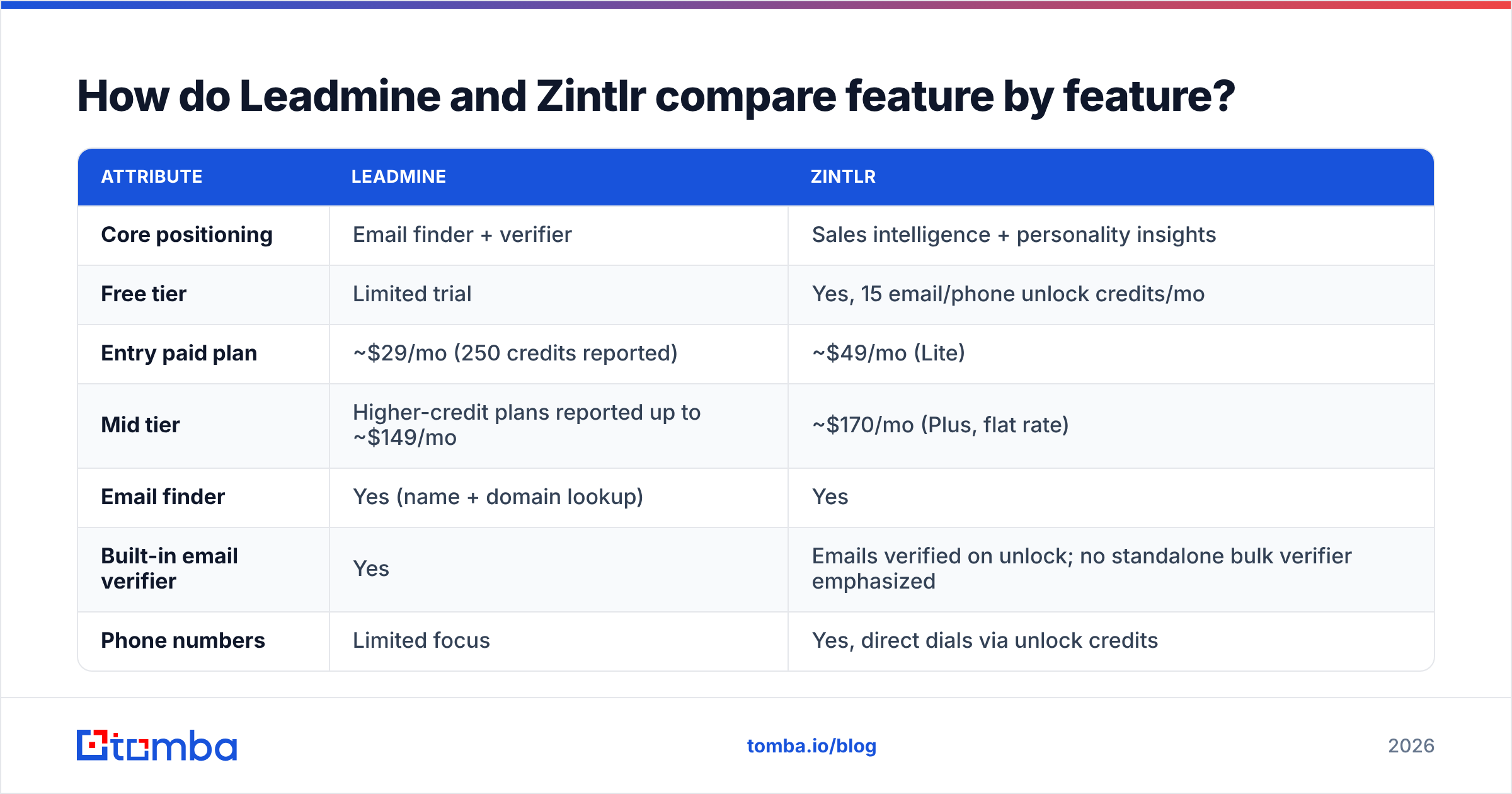
Here's the head-to-head on the attributes that matter most for outbound teams. Pricing reflects publicly listed or widely reported figures at the time of writing. Both vendors adjust tiers often, so confirm on their pricing pages before you buy.
| Attribute | Leadmine | Zintlr |
|---|---|---|
| Core positioning | Email finder + verifier | Sales intelligence + personality insights |
| Free tier | Limited trial | Yes, 15 email/phone unlock credits/mo |
| Entry paid plan | ~$29/mo (250 credits reported) | ~$49/mo (Lite) |
| Mid tier | Higher-credit plans reported up to ~$149/mo | ~$170/mo (Plus, flat rate) |
| Email finder | Yes (name + domain lookup) | Yes |
| Built-in email verifier | Yes | Emails verified on unlock; no standalone bulk verifier emphasized |
| Phone numbers | Limited focus | Yes, direct dials via unlock credits |
| Personality profiling | No | Yes, DISC + OCEAN |
| Buyer committee mapping | No | Yes |
| Chrome extension | Yes (LinkedIn + Google SERPs) | Yes (LinkedIn) |
| Credit rollover | Reported to expire monthly | Plan-dependent, check terms |
| Best for | Budget-conscious SDRs, solo founders | Account executives, ABM teams, consultative sales |
The pattern is clear. Leadmine costs less and does less. Zintlr costs more because the data layer comes with coaching.

Which tool has more accurate email data?#
Neither vendor publishes an independent, third-party accuracy audit, so any claim of "95%+ accuracy" should be treated as marketing until you've tested it on your own ICP.
Accuracy in email finding depends on three things:
- Source freshness. People change jobs, and B2B data decays by roughly 2 to 3% a month by common industry estimates. A tool that refreshes daily (as Leadmine claims) has an edge over one that refreshes quarterly, but only if the refresh actually re-verifies mailboxes.
- Verification method. An SMTP handshake check can confirm a mailbox exists on most domains. On catch-all domains, which accept every address, it can't. Ask each vendor how they label catch-all results. A tool that marks them "valid" will inflate its accuracy numbers and hurt your bounce rate.
- Regional coverage. Zintlr users often cite strong coverage in India and APAC markets. Leadmine's database is pitched as global. If your territory is North America or Western Europe, run a 100-contact test in both before you decide.

How to run a fair test: pull 100 contacts from your real target list, including 20 at companies you know are catch-all. Run them through both tools, then through a neutral email verifier. Count three numbers for each tool: found rate, verified-valid rate, and "risky/unknown" rate. That test will tell you more than any vendor landing page.

What does Zintlr's personality data actually add?#
This is the one feature that sets Zintlr apart, so it's worth being honest about what it does and doesn't do.
Zintlr's Personality Suite builds profiles from public signals like writing style, social activity, and role history. It maps each prospect to two well-known frameworks:
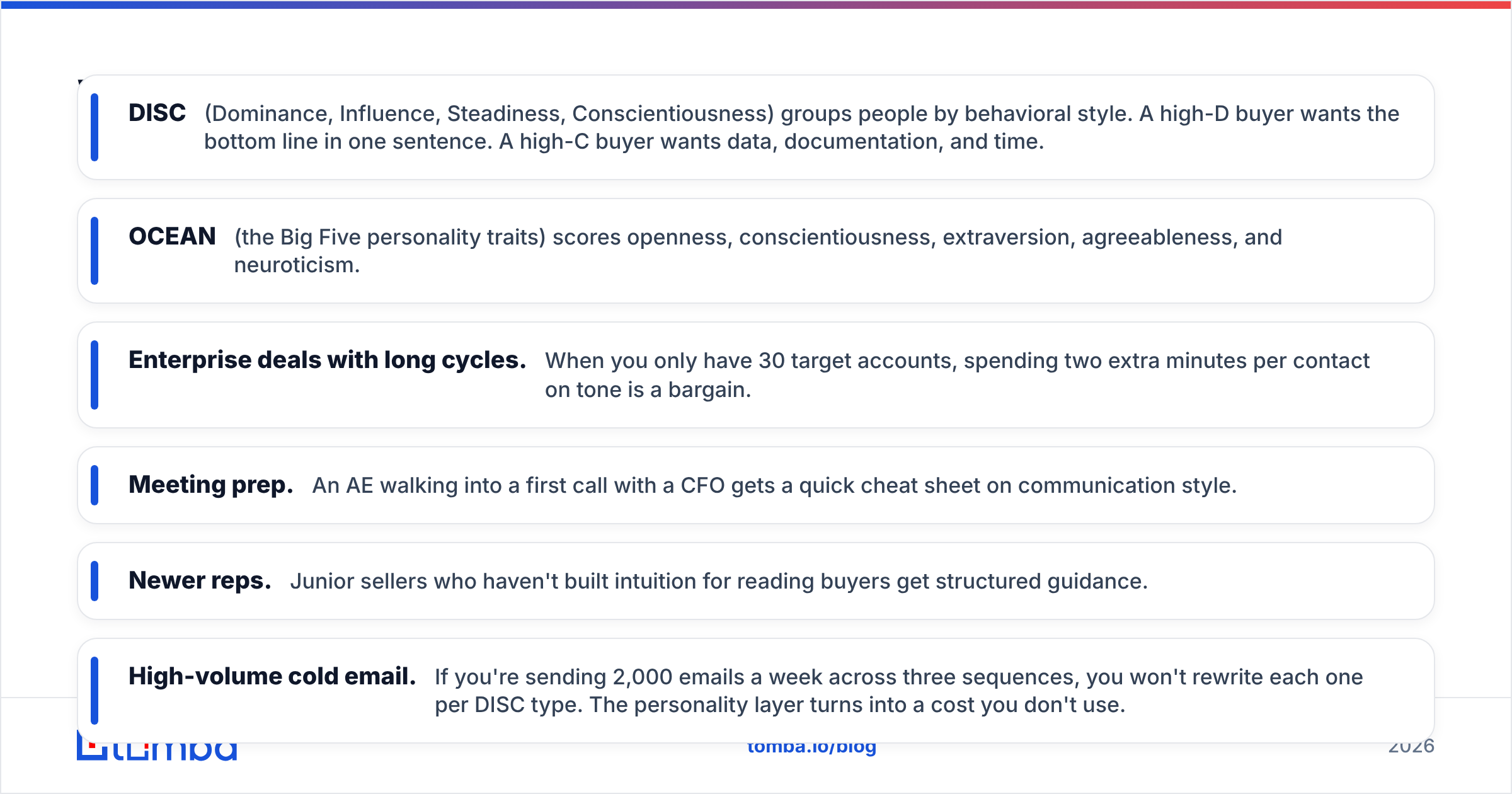
- DISC (Dominance, Influence, Steadiness, Conscientiousness) groups people by behavioral style. A high-D buyer wants the bottom line in one sentence. A high-C buyer wants data, documentation, and time.
- OCEAN (the Big Five personality traits) scores openness, conscientiousness, extraversion, agreeableness, and neuroticism.
Zintlr then turns those scores into practical suggestions: how to open the email, what tone to use on the call, and which objections to prepare for.
Where it helps:
- Enterprise deals with long cycles. When you only have 30 target accounts, spending two extra minutes per contact on tone is a bargain.
- Meeting prep. An AE walking into a first call with a CFO gets a quick cheat sheet on communication style.
- Newer reps. Junior sellers who haven't built intuition for reading buyers get structured guidance.
Where it doesn't:
- High-volume cold email. If you're sending 2,000 emails a week across three sequences, you won't rewrite each one per DISC type. The personality layer turns into a cost you don't use.
- Accuracy of inference. Personality prediction from public data is probabilistic. Treat it as a hypothesis to check in the first call, not a fact.
- Privacy-sensitive markets. If you sell into the EU, ask your legal team how profiled personality data sits with your GDPR obligations before you store it in your CRM.
Is Leadmine cheaper than Zintlr?#
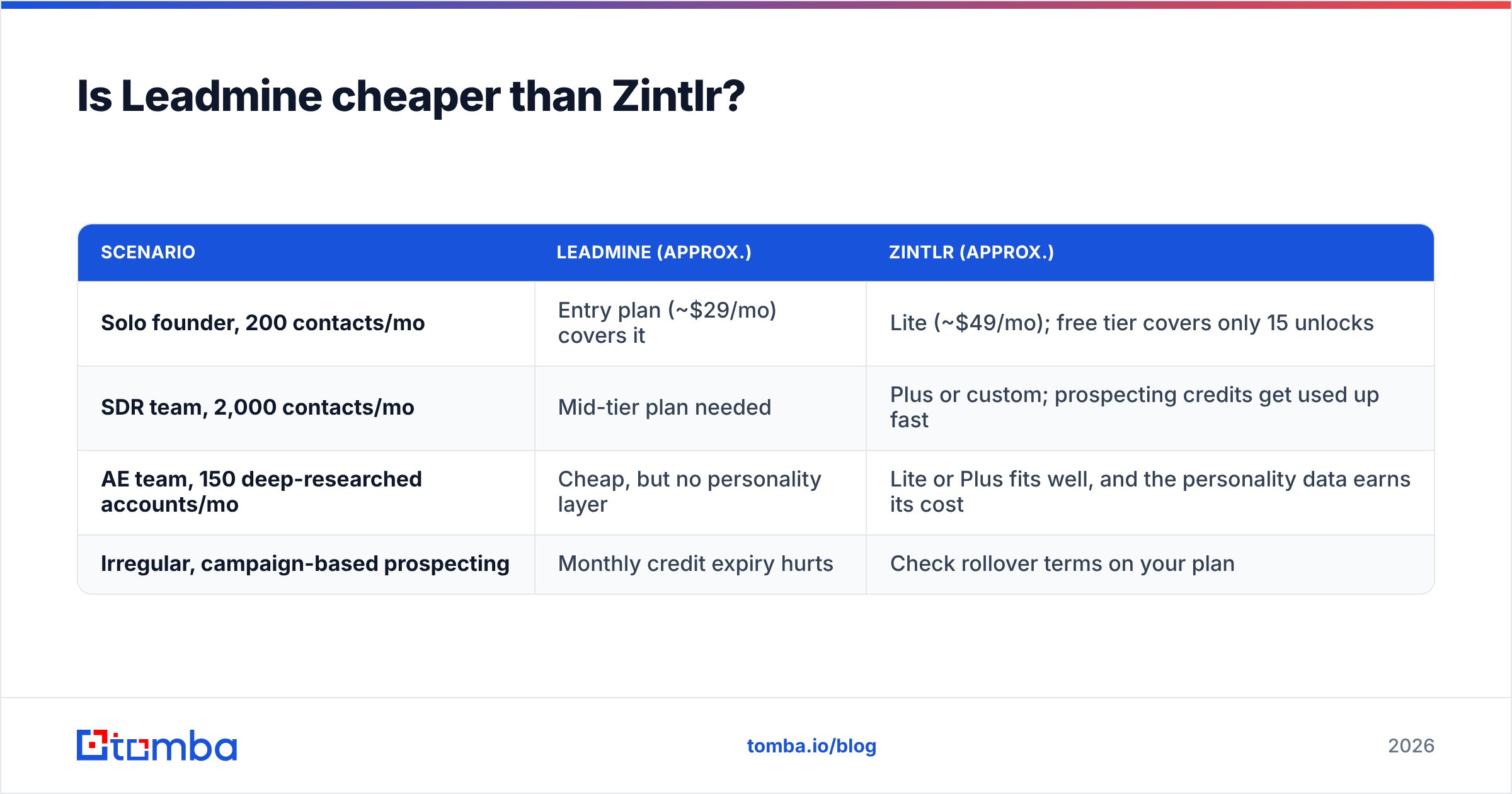
At the entry level, yes. But price per contact matters more than the sticker price.
| Scenario | Leadmine (approx.) | Zintlr (approx.) |
|---|---|---|
| Solo founder, 200 contacts/mo | Entry plan (~$29/mo) covers it | Lite (~$49/mo); free tier covers only 15 unlocks |
| SDR team, 2,000 contacts/mo | Mid-tier plan needed | Plus or custom; prospecting credits get used up fast |
| AE team, 150 deep-researched accounts/mo | Cheap, but no personality layer | Lite or Plus fits well, and the personality data earns its cost |
| Irregular, campaign-based prospecting | Monthly credit expiry hurts | Check rollover terms on your plan |
Watch for two hidden costs:
- Credit expiry. Third-party reviews report that Leadmine's unused credits expire at the end of each month. If your prospecting is bursty (heavy in Q1, light in summer), you'll pay for credits you never use.
- Separate credit pools. Zintlr's Plus plan splits credits into types: personality profiles, prospecting credits, zBizLocator/zScout credits, and exports. Make sure the pool you'll drain fastest is big enough. Otherwise you'll hit a ceiling mid-month while the other pools sit full.
For comparison, Tomba pricing starts with a free tier of 25 searches a month, then Starter at $49/mo, Growth at $99/mo, and Pro at $249/mo. That's useful as a benchmark even if you end up choosing one of the two tools here.
How do the Chrome extensions compare?#
Most reps spend their day on LinkedIn, so the extension is where you'll feel the difference.
Leadmine's plugin works on LinkedIn profiles and on Google search results. That second part is underrated. If you search "VP Marketing site:company.com", you can pull contacts straight from the results page without opening each profile. It's fast, minimal, and single-purpose.
Zintlr's extension overlays LinkedIn profiles with contact unlocks and the personality summary. It's a richer view with more to read per profile, which suits account research better than list building.
Rule of thumb: if your motion is "build a list of 300, send a sequence," Leadmine's extension gets you there with fewer clicks. If it's "research 15 accounts deeply before a campaign," Zintlr's extra context pays off.
Which integrations and workflows does each support?#
Neither tool is known for a deep native integration catalog, and that matters more than most buyers expect.
- Leadmine focuses on CSV export and its own list management. You'll typically export to your sequencer (Instantly, Lemlist, Apollo) by file.
- Zintlr lists CRM push and export options, and higher tiers include more export capacity plus a dedicated account manager.
If your RevOps team wants contact data to land in HubSpot or Salesforce automatically, with enrichment triggered by a new lead, ask both vendors for a live demo of that exact flow. File-based exports work fine at small volume and turn into a data-hygiene problem at scale.

What do real users say about Leadmine and Zintlr?#
Review volume is modest for both products, so read the patterns rather than the star ratings. On Capterra and similar directories:
Leadmine reviewers tend to praise:
- Simple interface with almost no learning curve
- Low entry price
- Useful Google SERP extraction in the extension
Leadmine reviewers tend to flag:
- Monthly credit expiry
- Thinner coverage outside core markets
- Few native integrations
Zintlr reviewers tend to praise:
- Personality insights as a real differentiator for meeting prep
- Phone number coverage, especially in India
- Responsive customer success on paid plans
Zintlr reviewers tend to flag:
- Credit pools that are confusing at first
- Personality data that's hard to use at high volume
- Price jump between Lite and Plus
Leadmine vs Zintlr: which should you choose?#
Choose by motion, not by feature count.
- Choose Leadmine if you're a founder or small SDR team running volume-based cold email, you write your own personalization, and you want the lowest cost per verified email. Just plan your usage around monthly credit expiry.
- Choose Zintlr if you're an AE or ABM team working a limited set of high-value accounts, you'll use DISC/OCEAN insights in real conversations, and you need phone numbers as well as emails.
- Choose neither (yet) if you need API access, bulk domain-level search, catch-all verification, or native CRM enrichment. Those needs point to a dedicated email-finding platform. Test one of those alongside both tools before you sign an annual contract.
A sensible stack for many mid-market teams: a dedicated email finder for volume list building, plus a personality or intelligence layer only for the top tier of accounts. You don't need to pay for personality profiles on 2,000 contacts when only 50 will reach a discovery call.
What should you check before buying either tool?#
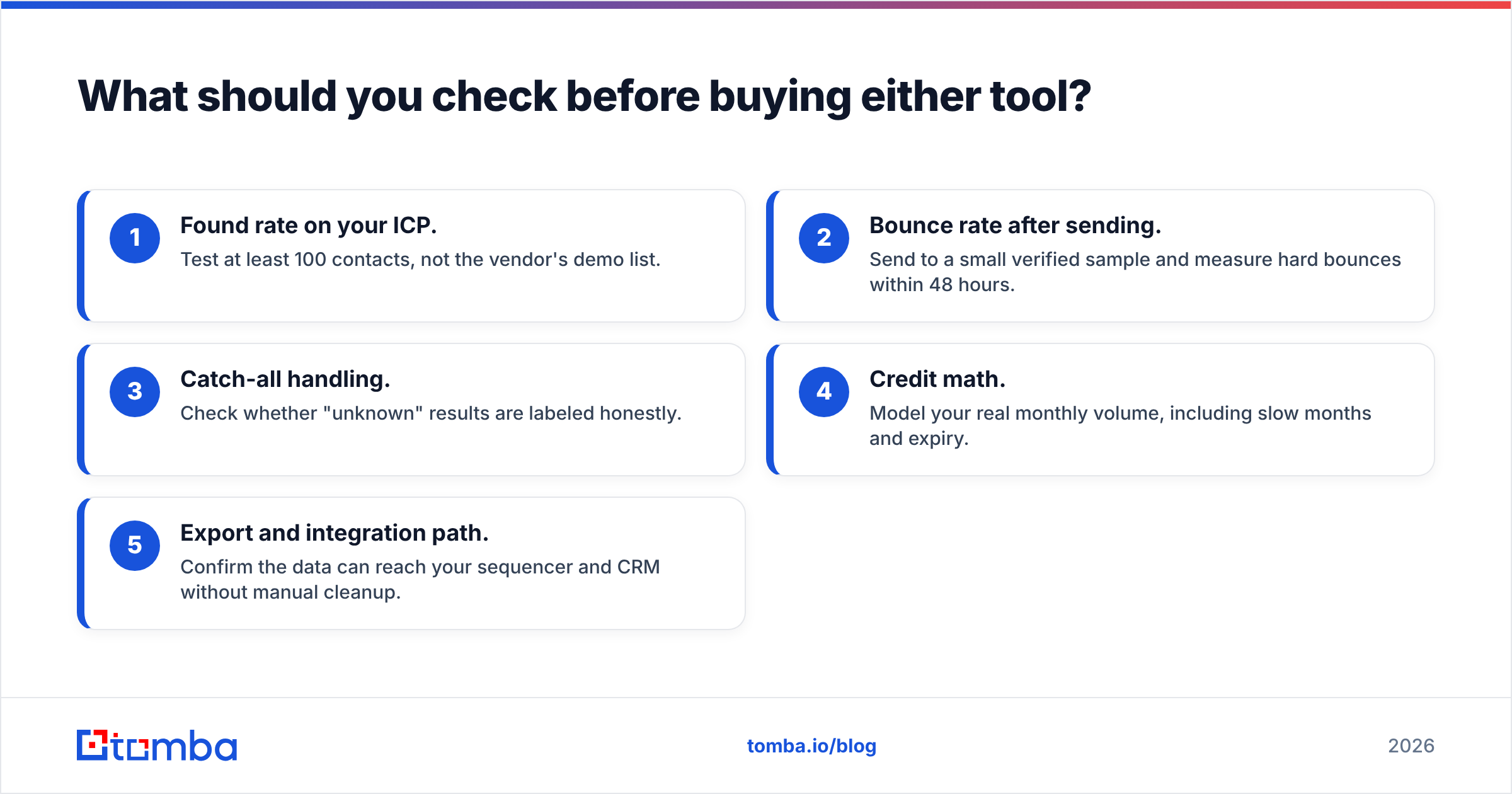
Use this five-point checklist on any free trial:
- Found rate on your ICP. Test at least 100 contacts, not the vendor's demo list.
- Bounce rate after sending. Send to a small verified sample and measure hard bounces within 48 hours.
- Catch-all handling. Check whether "unknown" results are labeled honestly.
- Credit math. Model your real monthly volume, including slow months and expiry.
- Export and integration path. Confirm the data can reach your sequencer and CRM without manual cleanup.
Want a third option built for email finding at scale?#
If your main need is finding and verifying professional emails reliably, without monthly credit pressure or paying for personality data you won't use, try the Tomba Email Finder. Look up anyone by name and domain, pull every public address at a company, verify results before they hit your sequencer, and connect it all through the API, Chrome extension, or Google Sheets. Start on the free tier with 25 searches a month and run the same 100-contact test described above. Then decide based on your own bounce rate, not on anyone's landing page.
Related guides#
// get started
Find, verify and enrich your first contacts today
Start on the free plan with 25 searches a month, then scale when your team is ready.
Free plan · No credit card required · GDPR & CCPA
// about the author